IP block list checker for IP addresses and domains against blacklists – search for an address in spam databases. Data monitoring evaluates their reputation and verifies the correctness of the reverse DNS (PTR) record. IP blacklist lookup helps you detect potential blocking risks, email delivery issues, and possible threats in advance. To perform a blacklist check and see whether your address is listed, enter any IP address or domain. Then, an instant email blacklist checker will be performed. The system will quickly identify whether the address is present in blacklist databases and conduct further moderation.
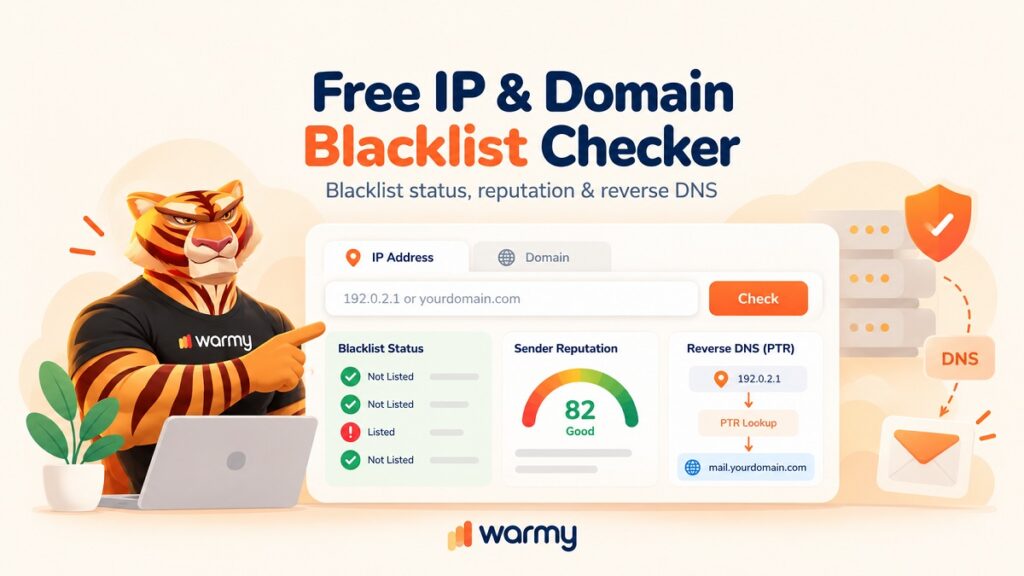
What Is an IP/Domain Blacklist Checker?
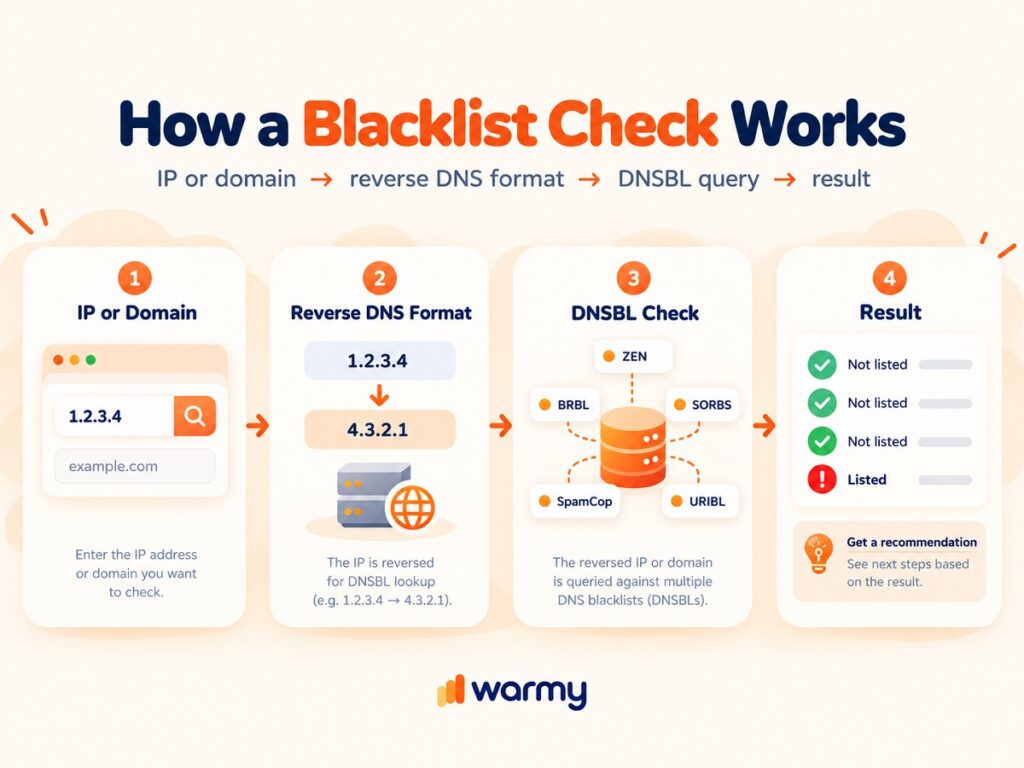
An IP blacklist checker is a DNS query sent to DNSBL and RBL databases. The system queries over 60 public lists, including Spamhaus ZEN, Barracuda, and SORBS. If a positive response is received (an A record such as 127.0.0.2), the address is considered blocked. This analysis, which takes 2-5 seconds, identifies risks of SMTP blocks, reputation loss, and email delivery threats.
What Is an IP Blacklist?
An IP blacklist is a constantly updated database of IP addresses associated with spam, botnet activity, port scanning, or malware distribution. The main types are DNSBLs and RBLs. They operate via DNS: during a reverse IP lookup, the address is converted to its reverse form (4.3.2.1.zen.spamhaus.org), and an A record is queried. A response of 127.0.0.2-127.0.0.11 indicates that the address is on the list. Well-known operators maintain lists containing anywhere from hundreds of thousands to millions of entries and update their data every 5-30 minutes. Being added to such lists results in the rejection of SMTP connections, blocking at the ISP level, and a sharp decline in IP reputation. This is precisely why an email blacklist check and IP reputation checker have become standard tools for monitoring deliverability.
What Is a Domain/Email Blacklist?
A domain and email blacklist is a database to which domains and email addresses are added. They may be associated with:
- spam;
- phishing;
- malware campaigns;
- fraud.
The main types are Domain Block Lists (DBL) and URI blacklists (SURBL, URIBL). A reverse DNS lookup is performed using a query in the format example.com.dbl.spamhaus.org. A positive result (an A record of 127.0.0.2 or higher) means that the domain or email address is listed. Being flagged by a reverse DNS checker leads to the blocking of links in emails, the rejection of messages at the SMTP level, and a sharp drop in the deliverability of content or files.
What Is IP/Domain Reputation (and How Is It Different From a Blacklist)?
IP address reputation is a numerical rating (typically from 0 to 100) of its “trustworthiness” based on its sending history. It is determined by:
- user complaints;
- bounce rate;
- traffic volume;
- the presence of SPF/DKIM/DMARC;
- data from systems such as Sender Score, Microsoft SNDS, or Google Postmaster Tools.
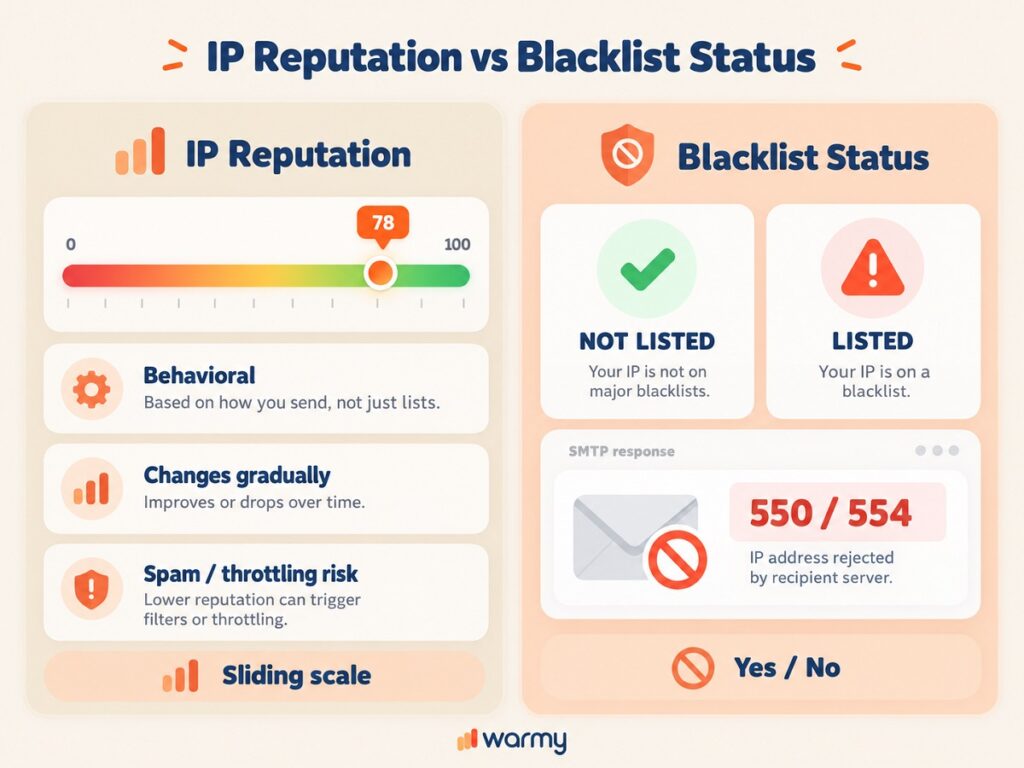
Unlike an IP blacklist lookup, where the status is binary (either “yes” or “no” in the database), reputation is a sliding scale. A low score (below 70) does not block emails immediately, but it increases the likelihood of being marked as spam, throttled, or filtered. A blacklist entry, on the other hand, results in a hard bounce at the SMTP level. This check should be performed once a month.
| Parameter | IP Address Reputation | Blacklist Status (DNSBL/RBL) |
|---|---|---|
| Rating Type | Continuous scale via IP reputation checker (0-100 points) | Binary (listed/not listed) |
| Main Systems | Sender Score, Microsoft SNDS, Google Postmaster, Cisco Talos, Barracuda Reputation, Warmy | Spamhaus ZEN, Warmy, Barracuda, SORBS, SpamCop, URIBL |
| Update Frequency | 1-24 hours | 5-30 minutes |
| Criticality Threshold | <70 – high spam risk <50 – almost guaranteed filtering | Any A record 127.0.0.2-127.0.0.11 = block |
| Impact on SMTP | Throttling, priority reduction, delivery to the spam folder | Instant and strict rejection (550/554) at the connection stage |
| Rating Factors | Complaint rate (< 0.1%), bounce rate, volume, SPF/DKIM/DMARC, history | Confirmed presence of spam, malware, scanning, or complaints following a domain blacklist check |
| Recovery Speed | 7-30 days for “clean” sending | 24-72 hours after a delist request (sometimes up to 14 days) |
| Depth of Analysis | Historical + behavioral IP reputation check | An instant “yes/no” result after a check domain reputation |
| Accuracy | ~85-95% (depends on data volume) | High accuracy, but false positives are possible with the domain reputation checker |
Free Blacklist & Reputation Checker Tool
This free tool for blacklist check and reputation assessment allows you to scan an IP or domain against 60+ DNSBL/RBL databases in a single query and evaluate its current rating. The result from the IP block list checker is delivered instantly. The full response includes detailed information for each list and recommendations for recovery. Want a broader picture? Run our free Email Deliverability Test, which also reports blacklist status.
How to Check if Your IP Is Blacklisted
Blacklist check IP address requires the following steps:
- Find your public IP address (using ifconfig.me or ipinfo.io).
- Enter it into a tool that queries 60+ DNSBLs/RBLs (Spamhaus ZEN, Barracuda, SORBS).
- Wait for a response within 3-7 seconds: if the blacklist check IP address shows an A record of 127.0.0.2-127.0.0.11, it means the IP is blacklisted.
- Check the details for each list and, if necessary, submit a delist request.
After the check IP blacklist, the user will immediately see the status and risks to SMTP deliverability without any glitches.
How to Check if Your Domain Is Blacklisted
For the blacklist check, the Warmy team’s experts recommend following these four steps:
- Prepare the full domain name (for example, example.com).
- Enter it into a tool that queries over 40 domain block lists and URI blacklists (Spamhaus DBL, SURBL, URIBL).
- Wait for a response within 3-7 seconds: an A-record of 127.0.0.2 or higher indicates a hit.
- Review the details for each list and, if necessary, submit a delisting request through Deliverability Insights.
This allows you to quickly assess the risks of links being blocked and email deliverability dropping.
How to Check Your IP/Domain Reputation
To run an IP reputation checker or check domain reputation, use specialized services:
- Sender Score (0-100) – a sender reputation rating based on the number of complaints and IP block list checker results.
- Email Warm-Up and Microsoft SNDS – provide data on deliverability and spam rates and perform a comprehensive IP reputation check.
- Cisco Talos or Barracuda Reputation – assess historical behavior as part of a domain reputation checker.
Enter an IP address or domain into the tool. The domain blacklist check result will appear in 5-15 seconds. A score below 70 indicates an increased risk of filtering; a score below 50 means your emails are almost guaranteed to end up in spam. For a step-by-step walkthrough, see our guide on how to check IP reputation and IP blacklists.
What Is Reverse DNS (PTR Record) and Why It Matters for Deliverability
A reverse DNS lookup (PTR) links an IP address to a domain name. For the address 1.2.3.4, it looks like 4.3.2.1.in-addr.arpa and points to the hostname.
Mail servers almost always check the PTR. If the record is missing, the reverse IP lookup is inactive, or it does not match the forward A record (FCrDNS), emails are often rejected. The absence of a correctly configured PTR record increases the risk of emails being sent to the spam folder. This can result in SMTP error codes 550/554.
A valid PTR record is essential for reliable email delivery and a healthy IP reputation. A reverse DNS checker is performed, and this system is configured by the hosting provider or the owner of the IP block.
How to Do a Reverse DNS / Reverse IP Lookup
Converting a standard IP address into the corresponding domain name is called a reverse DNS lookup (rDNS). The difference from standard forward DNS resolution, which converts a URL into an IP address, is that reverse DNS works in the opposite direction.
From a technical standpoint, a reverse DNS checker uses the reverse domain in-addr.arpa. When a mail server receives an incoming email, it performs a reverse DNS lookup. This is necessary to verify the server’s authenticity and its association with a specific network node.
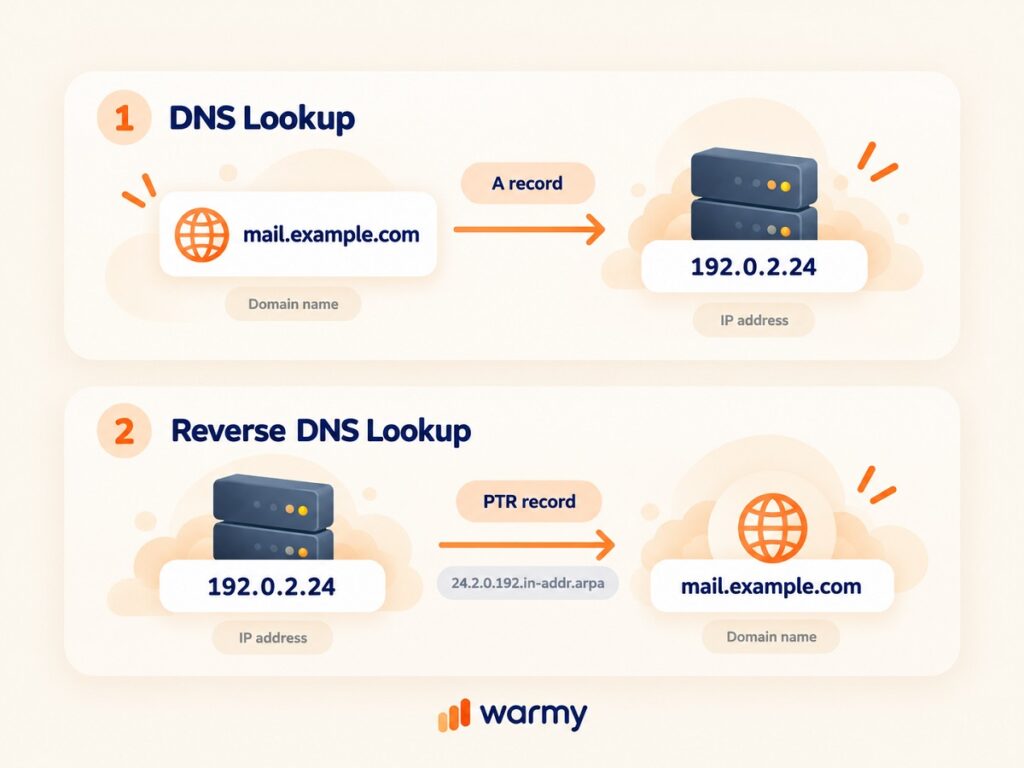
There are several methods for performing a reverse IP lookup. You can do this via the command line. For Linux/macOS, use the dig -x <IP address> or host <IP address> command. On Windows, use nslookup <IP address> for a reverse IP lookup. Another way to perform a lookup is to use specialized tools. For example, Warmy allows you to instantly determine whether a reverse DNS lookup exists and whether the PTR record is up to date. To see how a failed lookup affects delivery, read about reverse DNS lookup failures and sender trust.
How to Fix a Missing or Mismatched PTR Record
A PTR record links an IP address to a fully qualified domain name (FQDN). If it is missing or the value does not match the name, emails will start getting blocked. Emails may also be sent to the “Spam” folder.
To fix this error, you need to:
- Determine the sender’s current address. Check which dedicated IP address your server is using to send emails.
- Contact your hosting provider. The PTR record is configured by the owner of the IP address block. This could be a data center, AWS, DigitalOcean, Hetzner, or other providers.
- Request the creation (or modification) of the PTR record. The domain name must partially match the mail server’s FQDN.
- Verify that the FCrDNS connection is correct. The domain’s A record must point to the same IP address. The PTR record must resolve to the domain in use.
It takes time for DNS changes to propagate. The update process takes between 12 and 48 hours. For server-side configuration details, see our best practices for fixing reverse DNS failures.
Why Do IPs and Domains Get Blacklisted?
A decline in the sender’s reputation results in being blacklisted. Anti-spam filters detect suspicious activity and add addresses and domains to a blocklist. This is used to protect users from unwanted emails.
A high percentage of spam complaints lowers the IP/domain’s reputation. Clicking the “This is spam” button allows services to assess how well your service meets user expectations. The acceptable limit is no more than one complaint per 1,000 emails.
Using purchased contacts or contacts that are invalid for other reasons is also risky. Sending emails to nonexistent recipients triggers an increase in complaints. Reasons for this include:
- Pure spam traps. The addresses on the mailing list never belonged to real people. Hits on these addresses indicate illegitimate data collection.
- Converted profiles. Sometimes providers turn abandoned accounts into spam traps. If you use them, it indicates a lack of database hygiene.
- Server hacking. Unauthorized access to the mail server is possible. This is often caused by a credential leak. Attackers use your account to distribute malware or carry out phishing attacks.
- Errors in SPF, DKIM, and DMARC. The absence of a digital signature allows your domain to be spoofed. This results in your IP addresses being blocked.
Sending thousands of emails from an unestablished address (domain) is detected by security systems. Algorithms identify the mailing as an automated attack.
Major Blacklists You Should Know (Spamhaus, Barracuda, SORBS, SpamCop, UCEPROTECT…)
| Operators | Description |
|---|---|
| Spamhaus (overview) | The most authoritative organization. Being added to these lists results in immediate blocking of the IP address by email providers |
| Barracuda Reputation Network | A popular list. Used by many corporate filters. Detects spikes in activity and the absence of PTR records |
| SORBS (Spam and Open Relay Blocking System) | Monitors servers with open relays. It also contains a collection of addresses used to send spam |
| SpamCop | An automated system. Generates lists based on user reports. Also uses its own spam traps |
| UCEPROTECT (Level 1, Level 2, Level 3) | A multi-level blacklist. At the top level, it blocks entire subnets of addresses |
Other lists we cover in detail: DroneBL, RATS-NoPtr (hosts without a PTR record), Truncate, Hostkarma, ivmURI, SPFBL, and Abusix Mail Intelligence. To understand how listings change inbox decisions, read how blacklists influence Gmail, Outlook, and Yahoo filtering.
How to Get Delisted From a Blacklist
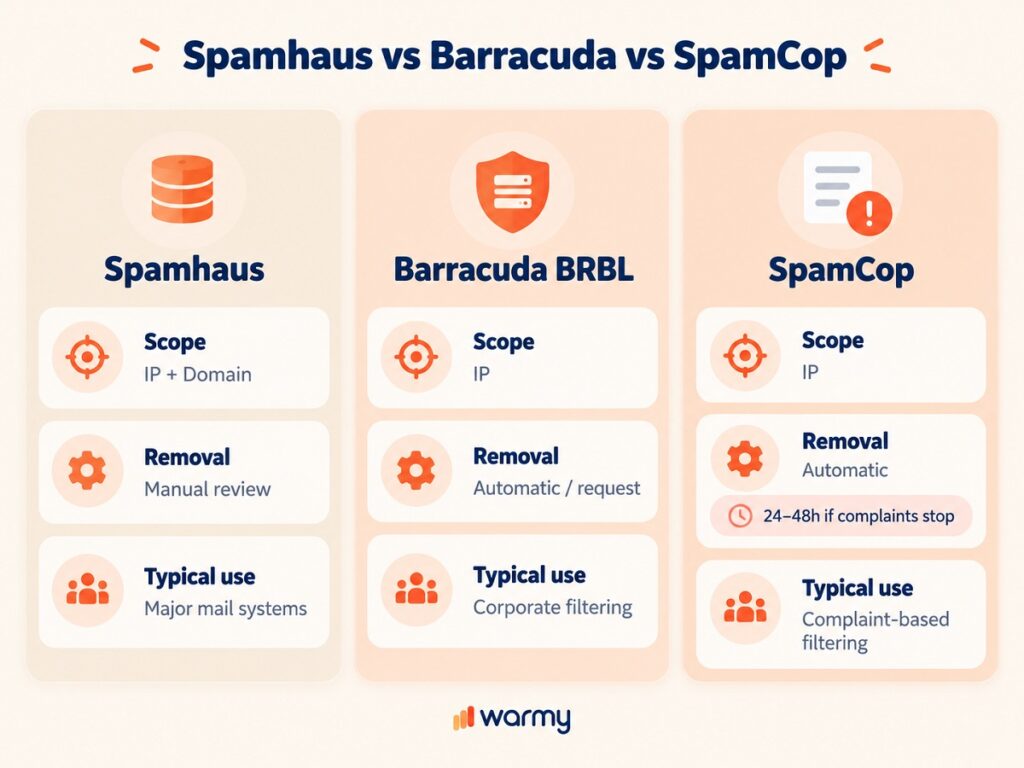
| Blacklist | Block Type | Removal Method |
|---|---|---|
| Spamhaus (SBL/DBL/XBL) | At the IP address and domain level | Manual Process: Resolve the cause (clean up the database, fix the vulnerability); submit a request via the Delist Portal with an explanation of the reasons |
| Barracuda (BRBL) | At the IP address level | Automatic and Manual: The rating is lowered once spam distribution ceases; expedited process via a request on the website |
| SpamCop | At the IP address level | Automatic: The IP is automatically removed from the list within 24-48 hours; complaints must cease entirely |
| SORBS | At the IP address level | Manual process: Register in the system; create a request; resolve server issues |
| UCEPROTECT (Level 1) | At the IP address level | Manual/automatic: Automatic removal after 7 days; repeat violations must be prevented; paid instant removal is available |
For the full procedure, follow our 5 steps to delist your IP or domain or compare the top IP blacklist removal tools. If the block comes from a mailbox provider rather than a public list, see how to remove your IP from the Yahoo blacklist or from Gmail’s blacklist.
Blacklist & Reputation Checker FAQ
What is an IP blacklist checker?
An IP blacklist checker checks whether your IP address is listed in public databases. The purpose of such a check is to determine whether it has been flagged as a source of spam or harmful content. This affects email deliverability.
How do I check if my domain is blacklisted?
You can use specialized reputation monitoring services and an email blacklist check. Warmy IP Blacklist Checker scans your domain and performs a reverse IP lookup across all major blocking registries in real time.
What is IP reputation and why does it matter?
An IP’s reputation is a numerical or categorical assessment of a server’s reliability. It is calculated by email providers based on email delivery metrics. It determines whether an email will reach the recipient. The email may be redirected to the “Spam” folder or rejected entirely.
What is a reverse DNS lookup?
A reverse IP lookup is the process of determining the domain name associated with a specific IP address. This is done using a PTR record in the in-addr.arpa domain zone.
How long does blacklist removal take?
The time required for removal depends on the organization’s policies. For example, it may take a few hours with SpamCop and Barracuda databases, or several days (Spamhaus, SORBS). To be removed, you must perform a reverse DNS lookup or use an email blacklist checker, submit an official request, and resolve the root causes.
Is IP reputation the same as being blacklisted?
Being blacklisted is a binary state. Your IP is either listed in the database (detected with an IP blacklist checker), or it isn’t. An IP’s reputation is a dynamic metric. It takes into account audience engagement, volume, delivery errors, and SPF/DKIM validation.
How often should I check my blacklist status?
For active senders, it is recommended to set up continuous, automated domain reputation monitoring using reverse DNS lookup. It is recommended to perform a manual IP blacklist lookup at least once a week.
Next Steps: Protect Your Sender Reputation Long-Term
Removal from a blacklist is merely a one-time fix for a symptom. To ensure consistent deliverability and protect your reputation, it is important to follow systematic practices: set up authentication, check your email list hygiene, and automate monitoring. With Warmy, these internal processes become easier. You can see for yourself right now.
Track blacklist status continuously with Deliverability Insights, and rebuild sender reputation after a delisting with Email Warm-Up.