



 Klaviyo
Klaviyo Email Deliverability: Warm Up, Test And Monitor Your Sending Domain
Klaviyo can report a message as delivered without showing whether it reached the inbox, Promotions or spam. Warmy warms your sending domain, tests real mailbox placement, and monitors the signals behind the result.
No credit card required
- Senders
- 7,000+Senders use Warmy to monitor deliverability
- Warm-up
- AutomatedWarmy warms your sending domain with real mailbox interaction
- Placement testing
- Per providerInbox, categories and spam folder measured separately
Trusted By 7,000+ Ecommerce And B2B Senders











Why Klaviyo Emails Miss The Inbox - And Where Warmy Helps
Four situations Klaviyo senders run into, and the Warmy capability that addresses each one.
Klaviyo says delivered, but campaign performance drops
Delivered only means the receiving server accepted the message - not that it reached the inbox instead of Promotions or spam.
Warmy tests the same sending path your subscribers get and reports placement per mailbox provider.
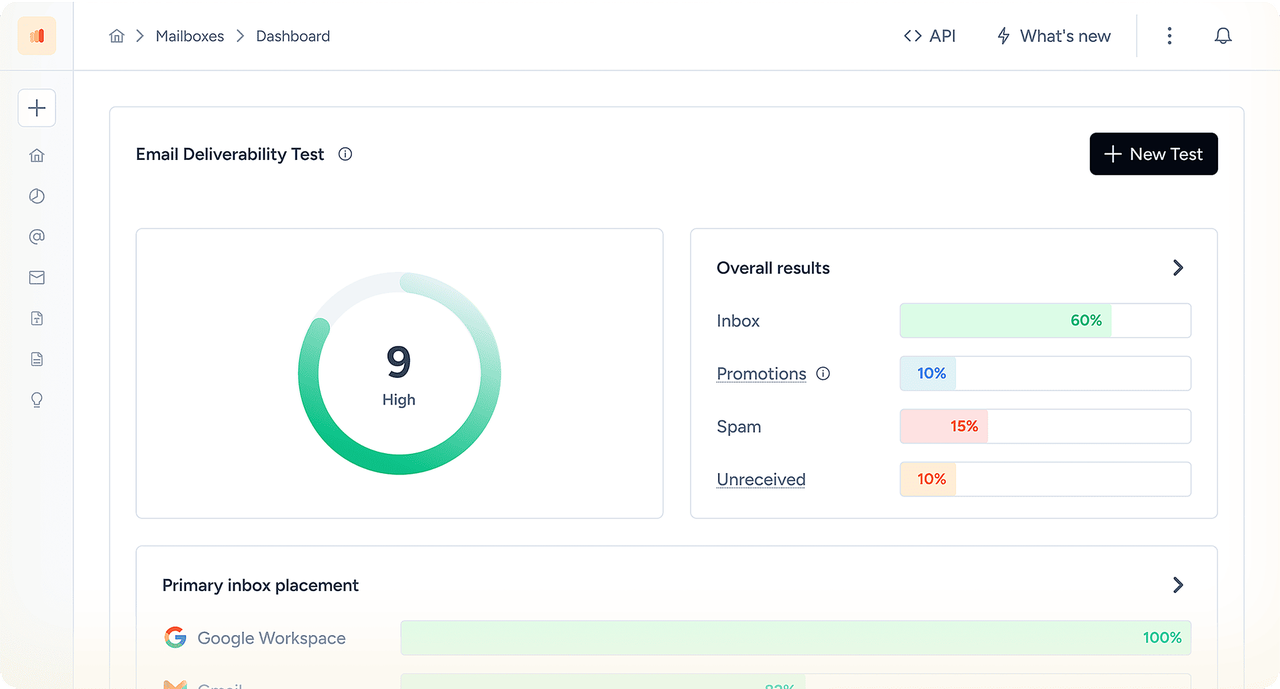
Warmy inbox placement report: inbox, categories and spam, provider by provider.
New Klaviyo sending domain? Warm it up first
A new or changed branded sending subdomain starts with almost no sending history, so early volume becomes your first impression.
Warmy actively warms that domain through its own mailbox network - gradual, scheduled activity that builds history while you monitor deliverability.
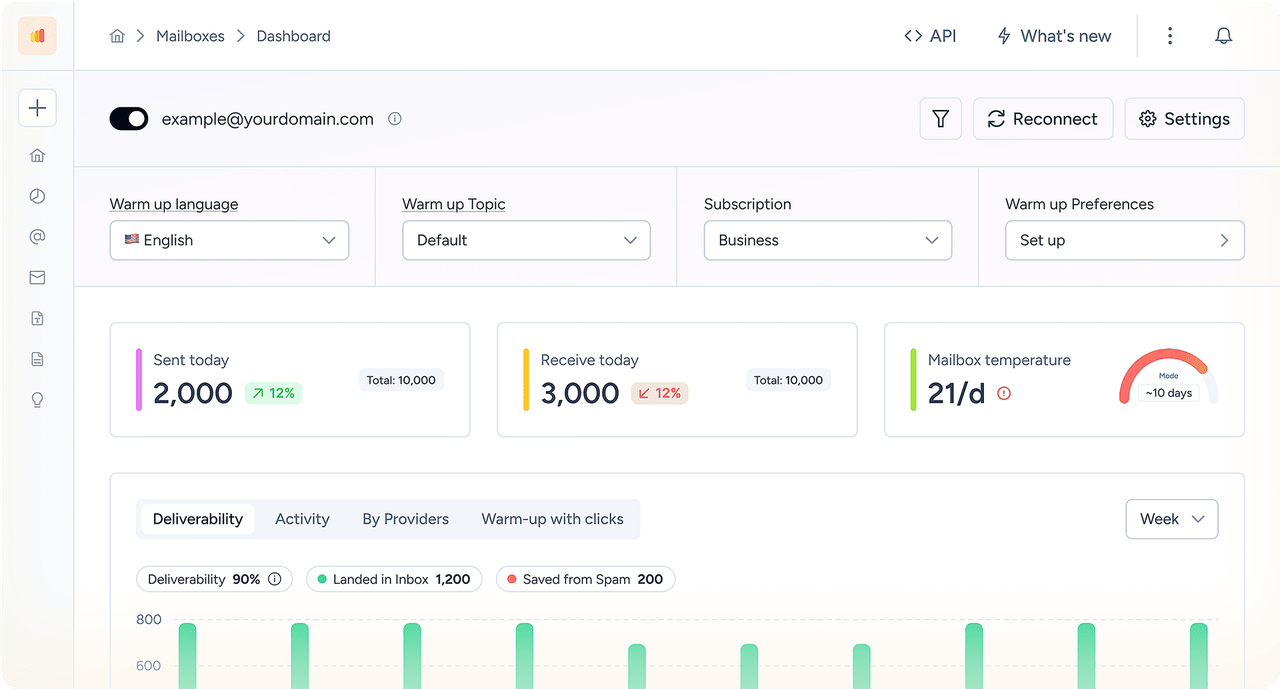
Warmy's warm-up dashboard: scheduled sends, deliverability and mailbox progress per day.
SPF and DKIM pass, but emails still reach spam
Authentication proves who sent the message; it doesn't vouch for you.
Warmy puts authentication, alignment, reputation and blocklist signals next to the placement result, so you fix the weakest one.
You're about to increase volume or widen the audience
A volume jump, winback flow or stale segment changes the signals providers read - and Klaviyo's reporting won't show which one.
Run the same test before and after the change, compare, then scale once it holds.
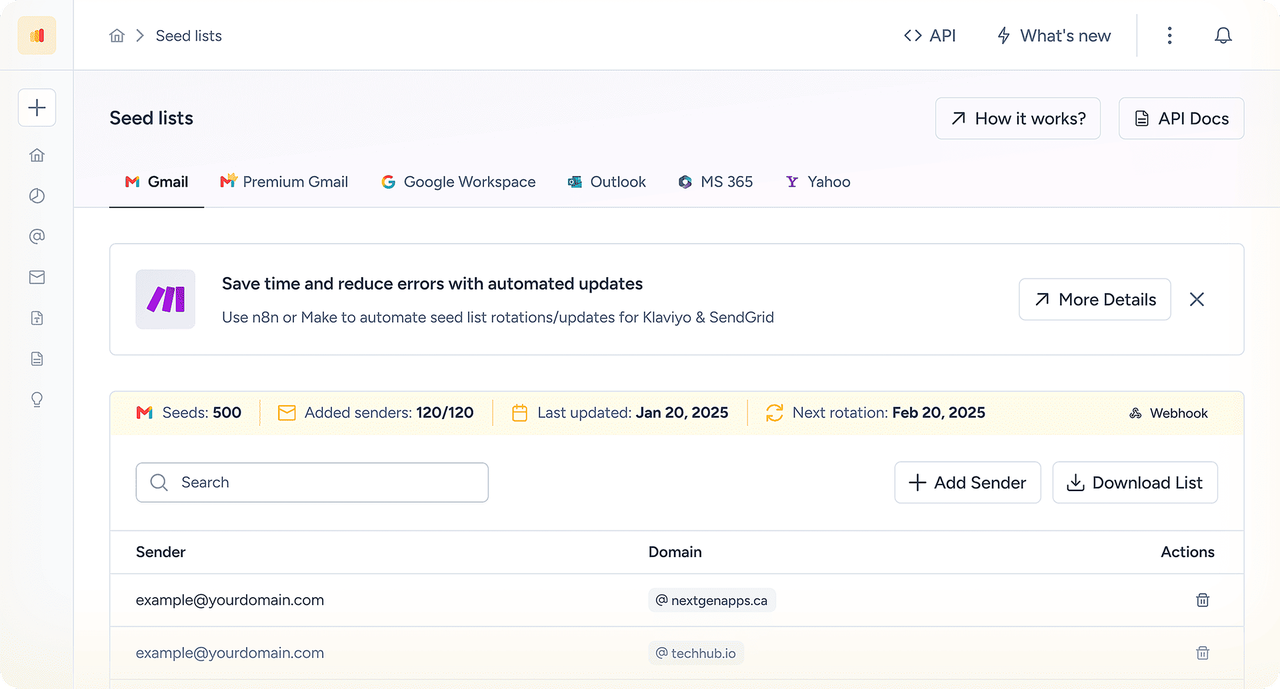
Repeatable seed-list tests, so before and after are measured the same way.
Connect Klaviyo To Warmy
Three steps. Your campaigns keep going out from Klaviyo, your DNS stays with your provider, and your audience strategy stays yours.
Pick the workflow you need
Warm-up, deliverability testing or monitoring - choose the one that matches the situation you're in.
Add your Klaviyo sending domain and mailbox
Point Warmy at the branded sending domain behind your campaigns, and set up the mailbox Warmy sends from.
Start the run
Warm-up begins on schedule, placement tests run on demand, and sender-health signals update as you go.
Loved By Thousands Of Marketers Around The World




The platform’s warmup processes make sure that our cold emails don’t bounce into spam filters. It also makes use of AI behavior tracking as we’re sending which is great for campaigns scaling. It’s also really valuable to be able to track open rates and responses.


Ready To Improve Your Klaviyo Deliverability?
Set your sending domain up in Warmy today and go into your next campaign with data instead of hope.
Book a demoHow Klaviyo Sending Domains Actually Work
Before troubleshooting spam placement, it helps to know which identity your Klaviyo account is sending under - and which send type that identity covers.
Shared sending domain
A new Klaviyo account can send before any DNS work is done, using Klaviyo's shared sending infrastructure and its authentication. Mail goes out, but the authenticated domain is Klaviyo's, so the reputation built by those sends is not fully yours.
Branded sending domain
A branded (dedicated) sending domain moves the authenticated identity to a subdomain of your own root domain, using the DNS records Klaviyo generates. Links, DKIM signing and alignment then point at your brand instead of a shared Klaviyo domain.
Marketing, transactional, service
Klaviyo's domain setup asks for a send type, so branded sending domains can be configured separately for marketing, transactional and service mail. Marketing campaigns and flows send under the marketing sending domain, which is why a transactional domain being healthy tells you little about campaign placement.
| Shared Klaviyo sending domain | Branded sending domain (your subdomain) | |
|---|---|---|
| Brand alignment | Visible sending and link domains belong to Klaviyo's shared infrastructure | Sending subdomain and click-tracking links carry your own domain |
| Authentication ownership | Klaviyo's records authenticate the mail | SPF and DKIM are enabled through the records Klaviyo generates in your DNS |
| Reputation control | Shared with other senders on the same infrastructure | Your domain accumulates its own sending history and reputation |
| Best use case | Getting started, very low volume, short-term testing | Any brand sending recurring campaigns and flows at meaningful volume |
| Warmup implications | No domain of yours to warm; you also cannot influence shared history | New or changed sending domains need a controlled, engagement-first ramp |
| DMARC | Alignment depends on the shared configuration | Your DMARC policy in DNS governs alignment for your domain |
Brand alignment
- Shared Klaviyo sending domain
- Visible sending and link domains belong to Klaviyo's shared infrastructure
- Branded sending domain (your subdomain)
- Sending subdomain and click-tracking links carry your own domain
Authentication ownership
- Shared Klaviyo sending domain
- Klaviyo's records authenticate the mail
- Branded sending domain (your subdomain)
- SPF and DKIM are enabled through the records Klaviyo generates in your DNS
Reputation control
- Shared Klaviyo sending domain
- Shared with other senders on the same infrastructure
- Branded sending domain (your subdomain)
- Your domain accumulates its own sending history and reputation
Best use case
- Shared Klaviyo sending domain
- Getting started, very low volume, short-term testing
- Branded sending domain (your subdomain)
- Any brand sending recurring campaigns and flows at meaningful volume
Warmup implications
- Shared Klaviyo sending domain
- No domain of yours to warm; you also cannot influence shared history
- Branded sending domain (your subdomain)
- New or changed sending domains need a controlled, engagement-first ramp
DMARC
- Shared Klaviyo sending domain
- Alignment depends on the shared configuration
- Branded sending domain (your subdomain)
- Your DMARC policy in DNS governs alignment for your domain
One distinction worth being clear about: a branded - or dedicated - sending domain is not a dedicated IP. It changes the authenticated identity your mail sends under. The sending infrastructure behind it can still be shared.
How Klaviyo SPF, DKIM And DMARC Authentication Works
Authentication proves that Klaviyo is allowed to send as your domain and that the message was not altered. It is a prerequisite for good placement - never a guarantee of it.
| Protocol | How Klaviyo handles it | What you should verify | What it does NOT guarantee |
|---|---|---|---|
| SPF | For a branded sending domain, SPF authorisation is enabled through the records Klaviyo generates for your sending subdomain - you do not hand-build a separate Klaviyo include on your root domain. | That the generated records are published exactly as shown and verify inside Klaviyo, and that the sending subdomain resolves. | Inbox placement, and it does not cover forwarded mail. |
| DKIM | Klaviyo signs mail for the branded sending domain using the keys published through its generated DNS records. | dkim=pass in a received message, and that the signing domain aligns with the visible From domain. | That recipients engage, or that your domain reputation is healthy. |
| DMARC | DMARC is a policy you publish in DNS. During branded-domain setup Klaviyo can offer to generate a p=none record when the domain has none. | That the published policy exists, that SPF or DKIM passes in alignment, and that reports are being collected. | Protection from spam placement - a domain can pass DMARC and still land in spam. |
SPF
- How Klaviyo handles it
- For a branded sending domain, SPF authorisation is enabled through the records Klaviyo generates for your sending subdomain - you do not hand-build a separate Klaviyo include on your root domain.
- What you should verify
- That the generated records are published exactly as shown and verify inside Klaviyo, and that the sending subdomain resolves.
- What it does NOT guarantee
- Inbox placement, and it does not cover forwarded mail.
DKIM
- How Klaviyo handles it
- Klaviyo signs mail for the branded sending domain using the keys published through its generated DNS records.
- What you should verify
- dkim=pass in a received message, and that the signing domain aligns with the visible From domain.
- What it does NOT guarantee
- That recipients engage, or that your domain reputation is healthy.
DMARC
- How Klaviyo handles it
- DMARC is a policy you publish in DNS. During branded-domain setup Klaviyo can offer to generate a p=none record when the domain has none.
- What you should verify
- That the published policy exists, that SPF or DKIM passes in alignment, and that reports are being collected.
- What it does NOT guarantee
- Protection from spam placement - a domain can pass DMARC and still land in spam.
How to authenticate a Klaviyo branded sending domain
- 1Click your company name in the bottom-left of your Klaviyo account.
- 2Select Settings.
- 3Open Domains.
- 4Select Add Domain.
- 5Choose the send type: Marketing, Transactional or Service.
- 6Confirm the root domain you send from.
- 7Choose an unused sending subdomain.
- 8Follow the DNS setup Klaviyo generates for that domain.
- 9Publish the records at your DNS provider, or use the automated connection option where available.
- 10Verify the records in Klaviyo.
- 11Activate the sending domain.
Use the DNS values generated for your domain inside your own Klaviyo account. Record names and values differ per account and domain, so never copy them from another site or tutorial.
Where setup usually fails
- The host field was pasted with the root domain duplicated.
- Records were added with the wrong type, or a CNAME was proxied by the DNS provider.
- DNS has not finished propagating, so verification is simply early.
- The value picked up a trailing character or line break when copied.
- A second, conflicting record for the same host already exists.
Once the records verify, confirm authentication in a real send rather than in the DNS dashboard alone: run a deliverability test and check that SPF, DKIM and DMARC pass in alignment on mail that actually left Klaviyo.
Authentication Passes. But Where Did The Email Land?
Check actual Klaviyo inbox placement before your next campaign.
Common Klaviyo Deliverability Mistakes
Klaviyo spam problems tend to trace back to a handful of decisions rather than anything exotic.
Treating passing authentication as proof of good placement
- Why it matters
- SPF, DKIM and DMARC get you through the door. Reputation, engagement and list quality decide which folder you land in.
- What to check
- A recent inbox-placement test per provider - not Klaviyo's delivered rate.
- Recommended action
- Test placement first, then work whichever signal looks weakest.
Staying on the shared sending identity too long
- Why it matters
- The reputation those sends build isn't yours, and your links and DKIM signature don't carry your brand.
- What to check
- Settings → Domains: is a branded sending domain added, verified and active for Marketing?
- Recommended action
- Set up a branded sending domain for campaigns and flows, then check placement before you scale volume.
Switching sending infrastructure without a transition plan
- Why it matters
- A new subdomain starts with no history. A full-list campaign on day one behaves nothing like the same send on your old domain.
- What to check
- Which situation you're actually in: new sender, ESP migration, or subdomain change.
- Recommended action
- Match the ramp to the situation and watch placement at each step up in volume.
Warming a domain with inactive profiles
- Why it matters
- If a campaign suddenly goes to thousands of profiles that haven't opened in months, Gmail sees a weak engagement pattern on a domain with no track record.
- What to check
- Whether unengaged profiles are included in your campaign segments by default.
- Recommended action
- Send to your engaged cohort first. Save winback and re-engagement flows for later.
Raising campaign volume too fast
- Why it matters
- Sharp jumps look like a different sender. Providers respond by filtering more, and the drop usually shows up a send or two later.
- What to check
- Volume sent per day since the domain went live, and the placement trend alongside it.
- Recommended action
- Step volume up in smaller increments and retest between steps.
Using one sending strategy for marketing, transactional and service mail
- Why it matters
- Klaviyo separates these send types, and each branded domain builds its own reputation. A healthy transactional domain says nothing about campaign placement.
- What to check
- Which send type the problem campaign or flow actually used.
- Recommended action
- Diagnose each send type on its own domain instead of averaging them together.
Changing domains to escape a reputation problem
- Why it matters
- A fresh subdomain hides the history. The list quality and content that caused the problem move with you.
- What to check
- Complaint rate, bounce rate and engagement trend before the change.
- Recommended action
- Fix hygiene and content first, then decide whether you still need a new domain.
Do You Need To Warm Up Your Klaviyo Sending Domain?
Sometimes. There's no single Klaviyo warmup schedule that fits every account - what you need depends on how much sending history the domain already has.
Scenario A
New Klaviyo sender or newly registered marketing domain
There is no sending history, so mailbox providers have nothing to judge you on. Klaviyo's engagement-based warming process applies: start with your most engaged profiles, raise volume gradually over the first weeks, and keep performance steady before widening the audience.
Warmy's role: Warm the new domain in Warmy while the ramp runs, verify authentication before the first send, and track placement per provider as volume grows.
Scenario B
Existing sender migrating from another ESP or sending domain
You already have engagement history and usually an established root domain, so the ramp is often shorter than a cold start. The new sending path still has to earn its own record, though. Don't assume old performance carries over on day one.
Warmy's role: Compare placement on the old and new sending paths so a migration dip is measured, not guessed at.
Scenario C
Changing the branded sending subdomain
A new subdomain starts fresh even when the root domain is well established. Treat the change as a controlled transition, keep early sends engagement-first, and do not schedule it immediately before a peak campaign.
Warmy's role: Start warm-up on the new subdomain in Warmy ahead of the switch, and run a pre-flight authentication and placement check before you move traffic.
Scenario D
Transactional and service sending
Receipts, shipping updates and service mail are usually lower volume, highly expected and strongly engaged. Their warming considerations differ from bulk marketing traffic, and they should not be bundled into a marketing ramp plan.
Warmy's role: Monitor these domains separately so a marketing reputation problem is not mistaken for a transactional one.
Layer A - sending strategy in Klaviyo
Who you send to, and how much
Engaged profiles first, volume raised in steps, inactive and winback audiences kept out of the early ramp. This part stays in your hands: it's audience selection and campaign planning inside Klaviyo.
Layer B - domain warm-up and monitoring in Warmy
Building history on the domain itself
Warmy actively warms the sending domain through its own mailbox network, gradually and on a schedule, then tracks authentication, reputation and placement as that history builds. So the domain isn't relying on campaign traffic alone to earn a record.
Neither layer replaces the other. Warm-up in Warmy doesn't license a full-list campaign on day one, and a careful Klaviyo ramp still benefits from independent placement data while it runs.
Klaviyo Deliverability Scenarios
Three situations Klaviyo senders hit most often, and the order to work them in.
Authentication passes, but campaigns still land in spam
- 1.Confirm SPF, DKIM and DMARC pass in alignment on a real Klaviyo send.
- 2.Look at domain reputation and blocklist signals, not just DNS.
- 3.Check engagement by cohort: which segments drag the campaign down?
- 4.Run an inbox-placement test per provider to see how far the problem spreads.
How Warmy fits: monitor authentication, alignment, blocklist and reputation signals in one place, fix the weakest one, then retest the same path.
Launching a new Klaviyo marketing sending domain before a large campaign
- 1.Add and verify the branded sending domain for the Marketing send type.
- 2.Send the first campaigns to a tightly engaged cohort.
- 3.Raise volume in controlled increments rather than in one jump.
- 4.Monitor placement and complaints at each step before expanding.
How Warmy fits: warm the new subdomain in Warmy weeks before the campaign date, then confirm placement holds as campaign volume steps up.
Re-engaging inactive Klaviyo profiles
- 1.Understand the risk: inactive profiles generate low engagement and more complaints.
- 2.Isolate the winback audience from your regular campaign schedule.
- 3.Test a small slice first and read placement, not just opens.
- 4.Expand only while placement and complaint signals stay stable.
How Warmy fits: test placement on a small winback slice first, and compare it against your regular campaign path before opening the audience up.
Preparing A New Klaviyo Sending Domain?
Warm it up in Warmy and watch the signals as volume grows.
Klaviyo Deliverability Troubleshooting
Symptom, likely cause, what to check inside Klaviyo, what to verify independently, and the next action.
| What you see | Likely cause | Check in Klaviyo | Test externally | Next action |
|---|---|---|---|---|
| Delivered rate looks fine but spam placement is high | Domain or sender reputation and engagement, not DNS | Send type and sending domain used, segment engagement, complaint and unsubscribe rates | Inbox-placement test per mailbox provider | Tighten the audience to engaged profiles, then retest |
| Domain verification fails in Klaviyo | DNS records missing, mistyped, duplicated or proxied | Domains screen: the exact generated records and their status | DNS lookup on the sending subdomain | Republish the generated records unchanged and re-verify after propagation |
| SPF and DKIM pass but DMARC fails | Alignment: the authenticated domain does not match the visible From domain | Which sending domain the campaign used and the From address on it | Authentication check on a real send, plus DMARC reports | Send under the branded sending domain that aligns with your From domain |
| Deliverability drops after changing sending domain | New sending path with no history, ramped too fast | When the domain was activated and volume sent since | Placement comparison old path vs new path | Slow the ramp, send engagement-first, monitor placement per step |
| Performance drops after expanding the audience | Newly added cohorts are unengaged or stale | Segment definitions and the engagement window used | Placement test on the expanded cohort | Roll back to the last healthy segment and expand in smaller steps |
| Gmail performs worse than other providers | Gmail weights engagement and complaints heavily; category placement may also be in play | Gmail-specific open, click and complaint trends | Gmail placement, distinguishing Promotions from Spam | Improve engagement signals; treat Promotions as an inbox category, not a failure |
| High bounce rate | List acquisition quality, old imports, invalid addresses | Bounce reports and recently imported sources | Domain and MX validation on the failing recipients | Stop sending to failing sources and clean the import |
| High complaint or unsubscribe signals | Expectation mismatch: frequency, relevance or consent | Frequency by profile, sign-up source, flow overlap | Placement and reputation trend after the complaint spike | Reduce frequency for low-engagement cohorts and revisit consent sources |
| Links flagged or click tracking looks suspect | Shared click-tracking or link-domain reputation | Which sending and tracking domain the send used | Link and domain reputation checks | Move to a branded sending domain so tracking links carry your own domain |
Delivered rate looks fine but spam placement is high
- Likely cause
- Domain or sender reputation and engagement, not DNS
- Check in Klaviyo
- Send type and sending domain used, segment engagement, complaint and unsubscribe rates
- Test externally
- Inbox-placement test per mailbox provider
- Next action
- Tighten the audience to engaged profiles, then retest
Domain verification fails in Klaviyo
- Likely cause
- DNS records missing, mistyped, duplicated or proxied
- Check in Klaviyo
- Domains screen: the exact generated records and their status
- Test externally
- DNS lookup on the sending subdomain
- Next action
- Republish the generated records unchanged and re-verify after propagation
SPF and DKIM pass but DMARC fails
- Likely cause
- Alignment: the authenticated domain does not match the visible From domain
- Check in Klaviyo
- Which sending domain the campaign used and the From address on it
- Test externally
- Authentication check on a real send, plus DMARC reports
- Next action
- Send under the branded sending domain that aligns with your From domain
Deliverability drops after changing sending domain
- Likely cause
- New sending path with no history, ramped too fast
- Check in Klaviyo
- When the domain was activated and volume sent since
- Test externally
- Placement comparison old path vs new path
- Next action
- Slow the ramp, send engagement-first, monitor placement per step
Performance drops after expanding the audience
- Likely cause
- Newly added cohorts are unengaged or stale
- Check in Klaviyo
- Segment definitions and the engagement window used
- Test externally
- Placement test on the expanded cohort
- Next action
- Roll back to the last healthy segment and expand in smaller steps
Gmail performs worse than other providers
- Likely cause
- Gmail weights engagement and complaints heavily; category placement may also be in play
- Check in Klaviyo
- Gmail-specific open, click and complaint trends
- Test externally
- Gmail placement, distinguishing Promotions from Spam
- Next action
- Improve engagement signals; treat Promotions as an inbox category, not a failure
High bounce rate
- Likely cause
- List acquisition quality, old imports, invalid addresses
- Check in Klaviyo
- Bounce reports and recently imported sources
- Test externally
- Domain and MX validation on the failing recipients
- Next action
- Stop sending to failing sources and clean the import
High complaint or unsubscribe signals
- Likely cause
- Expectation mismatch: frequency, relevance or consent
- Check in Klaviyo
- Frequency by profile, sign-up source, flow overlap
- Test externally
- Placement and reputation trend after the complaint spike
- Next action
- Reduce frequency for low-engagement cohorts and revisit consent sources
Links flagged or click tracking looks suspect
- Likely cause
- Shared click-tracking or link-domain reputation
- Check in Klaviyo
- Which sending and tracking domain the send used
- Test externally
- Link and domain reputation checks
- Next action
- Move to a branded sending domain so tracking links carry your own domain
Work one row at a time. Change a single thing, rerun the same test, and compare it against the previous result - that's the only way to tell which fix moved placement.
Klaviyo Deliverability
Frequently Asked Questions
Improve Your Klaviyo Deliverability
With Warmy
Bring your sending setup into Warmy, build reputation on your sending domain, monitor deliverability, and check placement before your next major Klaviyo send.