An MX lookup shows where a domain receives email and whether the routing information published in DNS is usable.
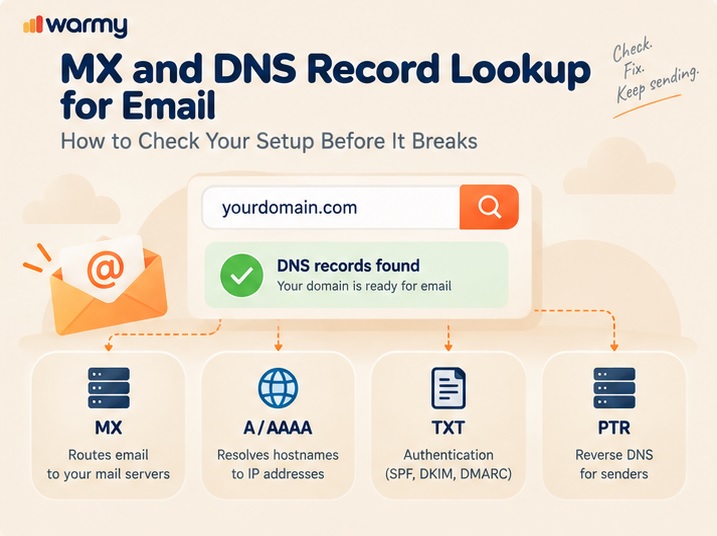
You can check MX records with a browser-based lookup tool. If the result needs verification, repeat the query with nslookup or dig. A complete email routing check then resolves each mail host to its A or AAAA address. PTR and TXT records cover the sender-side checks that sit outside the MX route itself.
The lookup should show whether the current setup is usable and where to investigate a problem.
Key Takeaways
- DNS records for email interact: MX depends on address records, and sender checks use PTR and TXT data.
- A lower MX priority number means a mail server is preferred; equal numbers mean equal preference.
- A domain without an explicit MX can still receive mail. SMTP can fall back to its A or AAAA record.
- Valid PTR and forward DNS matter for outbound mail because major mailbox providers use them when evaluating sending infrastructure.
- Recheck records after a provider migration or other DNS change; cached answers can create a propagation delay even after the authoritative zone is correct.
The DNS Records That Actually Matter for Email
Mail exchange records tell other SMTP servers where to deliver incoming mail. MX points to receiving hosts, and A/AAAA records resolve those hostnames to addresses. PTR and TXT are more relevant to sender-side checks that receiving systems use when evaluating outbound mail.
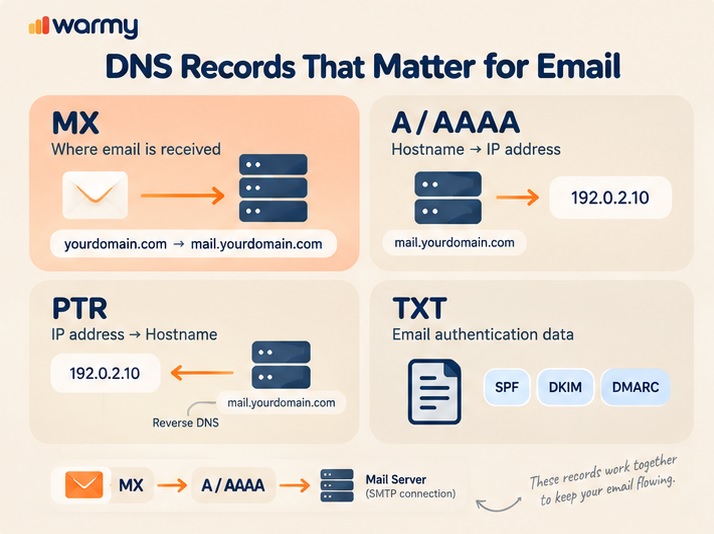
| Record | What it does | Why it matters for email |
|---|---|---|
| MX | Points senders to the mail hosts that receive messages for the domain | Wrong targets or priorities can route incoming mail to the wrong infrastructure |
| A / AAAA | Maps a hostname to an IPv4 or IPv6 address | MX hosts need usable addresses, and forward DNS also matters for sender checks |
| PTR | Maps an IP address back to a hostname | Valid reverse DNS is expected by major mailbox providers for sending infrastructure |
| TXT | Publishes text-based policies and verification data | SPF, DKIM, and DMARC use DNS data that receiving systems evaluate |
For a deeper record-by-record explanation, see the full breakdown of MX, A, and rDNS records.
How to Look Up Your MX Records
The fastest way to check MX records is to start with a web lookup tool, then verify the result from the terminal if needed. Follow these steps:
- Open an MX record lookup service. MXToolbox, DNSChecker.org, Google Admin Toolbox, and DNS Robot are popular choices for this task.
- Enter the domain. An MX server lookup should return one or more hostnames with their preference values.
- Read the hostnames and priorities. MX names often reveal the receiving gateway or provider, although a filtering service can sit in front of the mailbox platform. If the result points to Microsoft 365 or Outlook infrastructure, use the provider-specific instructions (setting up Outlook specifically? See our step-by-step guide).
- Resolve each MX hostname to A or AAAA. The destination needs a usable IP address before SMTP can connect.
- Verify when needed with
nslookup -type=MX example.comor the dig commanddig +short MX example.com. - If a public result looks stale, find the authoritative name server with
dig example.com NS +short, then query it directly:dig @ns1.provider.com example.com MX. A new authoritative answer plus an old public answer points to caching; if both show the old record, the authoritative DNS still needs correction. - Once the MX path is confirmed, run a full deliverability test on your domain to check sender-side issues beyond routing.
Reading MX Priority (and Why It Matters)
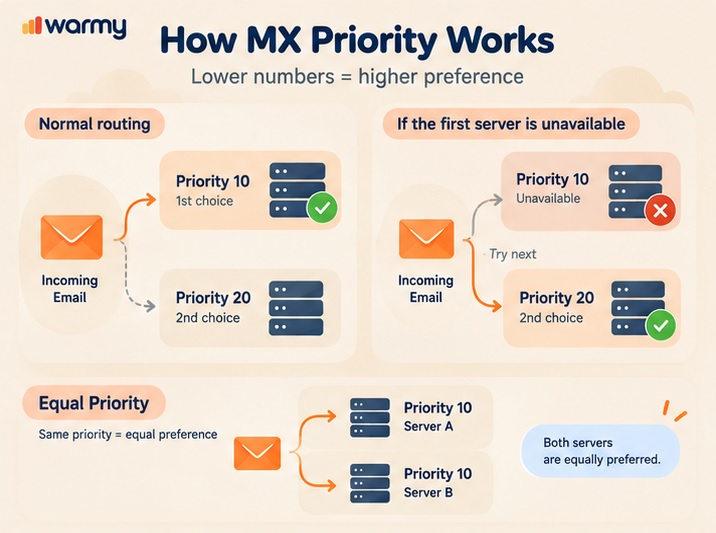
With multiple MX records, the lowest value gets the first attempt. Priority 10 therefore comes before priority 20. If that destination is unavailable, SMTP moves on to a lower-preference host.
The numbers only establish order. A wider gap between the values changes nothing, and two records set to priority 10 are treated as equally preferred rather than as primary and backup.
During a provider migration, this ordering becomes operationally important. Leaving an old provider at the same or better preference can keep it in the active routing path after the new service is ready.
A Records, PTR Records, and Reverse DNS
Start with a DNS A record lookup for each MX hostname, and check AAAA when IPv6 is part of the setup. An MX record identifies the mail host; the actual connection happens only after that hostname resolves to a usable IPv4 or IPv6 address.
For outbound sender validation, reverse DNS starts with the sending IP. The PTR record returns a hostname. A forward lookup should then resolve that hostname back to the address the server actually uses for sending, whether it is IPv4 or IPv6.
Google requires valid forward and reverse DNS for sending IPs. Gmail checks that the sending IP matches an IP returned by the hostname in its PTR record. Yahoo also requires valid forward and reverse DNS from senders. For providers with this requirement, a missing PTR or failed forward/reverse match violates the rule and can contribute to rejection or spam placement.
PTR records are usually controlled by the organization that owns the IP block. In practice, reverse DNS is configured through the hosting, cloud, or mail provider, unless that provider has delegated control to you. If the check fails, read our full guide to fixing reverse DNS failures.
Checking DNS Records Beyond MX (TXT, SPF Context)
A DNS lookup tool can also show the TXT records that receiving systems use for email authentication. For SPF, look for the TXT value beginning with v=spf1. Publishing more than one SPF record for the same name is invalid and can produce an SPF permanent error.
DKIM and DMARC also rely on DNS data. An email-focused DNS checker should show whether the expected TXT records are present and whether their values conflict.
When MX routing is correct, check authentication records separately because SPF, DKIM, or DMARC failures can affect message acceptance.
What a Broken or Missing Record Actually Does to Delivery
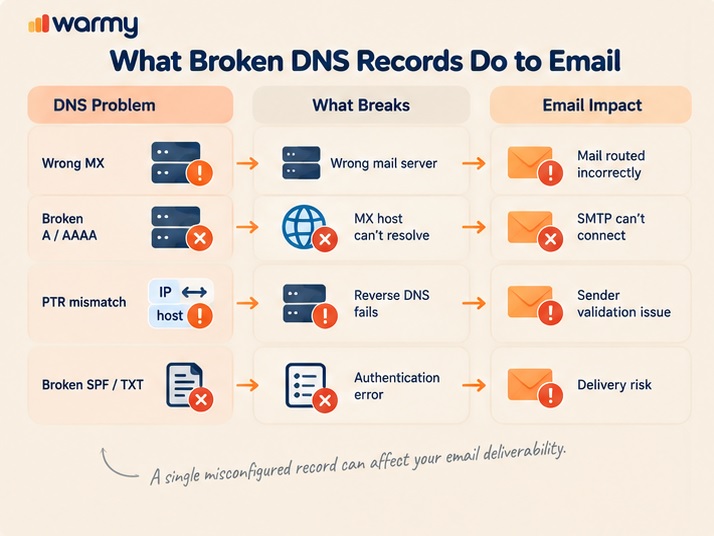
Without an explicit MX, SMTP may still deliver mail by falling back to the domain’s A or AAAA address. Null MX changes the meaning completely: MX 0 . explicitly tells other servers that the domain does not accept email.
For a published MX to work, its target has to resolve to a usable IPv4 or IPv6 address. That resolved address is where SMTP connects to the receiving server. A hostname that is itself a CNAME alias falls outside the standard MX model.
During a provider migration, an obsolete MX can remain either in the authoritative zone or only in resolver caches. If the record is still authoritative, it remains part of the live routing configuration and can continue receiving traffic according to its preference. If the authoritative name server shows the new MX but a recursive resolver still shows the old one, the old answer is cached. The previous TTL controls how long that positive answer can remain valid.
A resolver can also cache the absence of a record. If an MX was recently added, a public resolver may briefly continue returning NODATA until the negative cache expires.
A missing or mismatched PTR can put the sending infrastructure out of compliance with provider requirements. SPF creates a different failure mode: duplicate records or malformed syntax may cause the authentication check to return an error. Once the MX route is confirmed, review these sender-side DNS records as a separate part of the setup.
Common MX/DNS Mistakes
- Leaving an old provider’s MX record in the authoritative zone after a migration.
- Pointing an MX record to a hostname that is itself a CNAME alias. The target should resolve directly to A or AAAA records.
- Reading a larger MX priority number as a higher preference. Lower values are preferred.
- Checking only one cached recursive resolver after a DNS change. Compare it with the authoritative name server.
- Trying to fix PTR in the ordinary forward DNS zone even though the provider controlling the sending IP usually manages reverse DNS.
- Publishing multiple SPF records for the same hostname.
Checking Your Setup Automatically
A raw MX lookup is useful when you are tracing a specific routing problem or checking a recent DNS change. Routine domain health is better handled with automated monitoring, which can surface changes in DNS and authentication before someone has to run another manual check.
Warmy’s domain checks cover email-related signals including SPF, DKIM, DMARC, MX, A, and rDNS. You can check all of this automatically with Deliverability Insights and review DNS health alongside reputation and placement signals.
FAQ
What is an MX record, and why does email need one?
An MX record tells SMTP servers which hosts receive mail for a domain. Explicit MX records are standard. SMTP has a fallback when no MX is published.
How do I check the MX records for my domain?
Use an MX lookup tool, nslookup -type=MX example.com, or dig +short MX example.com. Check the returned hostnames, priorities, and IP resolution.
What does MX priority mean?
Lower numbers have higher preference. Equal values mean equal preference; neither destination is automatically primary or backup.
What’s the difference between an MX record and an A record?
MX selects the mail host. A maps a hostname to IPv4. AAAA maps it to IPv6.
What is reverse DNS (PTR), and why does it matter for email?
A PTR record maps an IP back to a hostname. Major mailbox providers expect valid reverse and forward DNS for sending IPs.
How long does it take for a DNS record change to propagate?
Start with the record’s previous TTL. Cached answers can remain valid until that interval expires. MX changes can take up to 72 hours to be recognized.
Can I send email without an MX record?
Yes. MX primarily controls inbound routing, so outbound mail can work without an explicit MX. A sending domain should not publish a Null MX.
What happens if my MX records point to the wrong server?
Incoming mail can reach the wrong infrastructure, including an old provider after migration. It can fail if the target is unusable.
Do I need to check DNS records after switching email providers?
Yes. Check immediately after the switch and again after the previous TTL expires. For a planned migration, lower MX TTL to about 3,600 seconds far enough in advance for the previous TTL to expire. This helps old routing leave caches sooner.
How often should I check my domain’s MX and DNS records?
We recommend at least monthly and after every DNS or mail-provider change. Business-critical domains benefit from continuous monitoring.
Wrapping Up
An MX lookup should tell you where mail is routed and whether those destinations actually resolve. If a result looks outdated, compare the recursive response with the authoritative zone before changing the configuration.
For ongoing monitoring, check all of this automatically with Deliverability Insights.