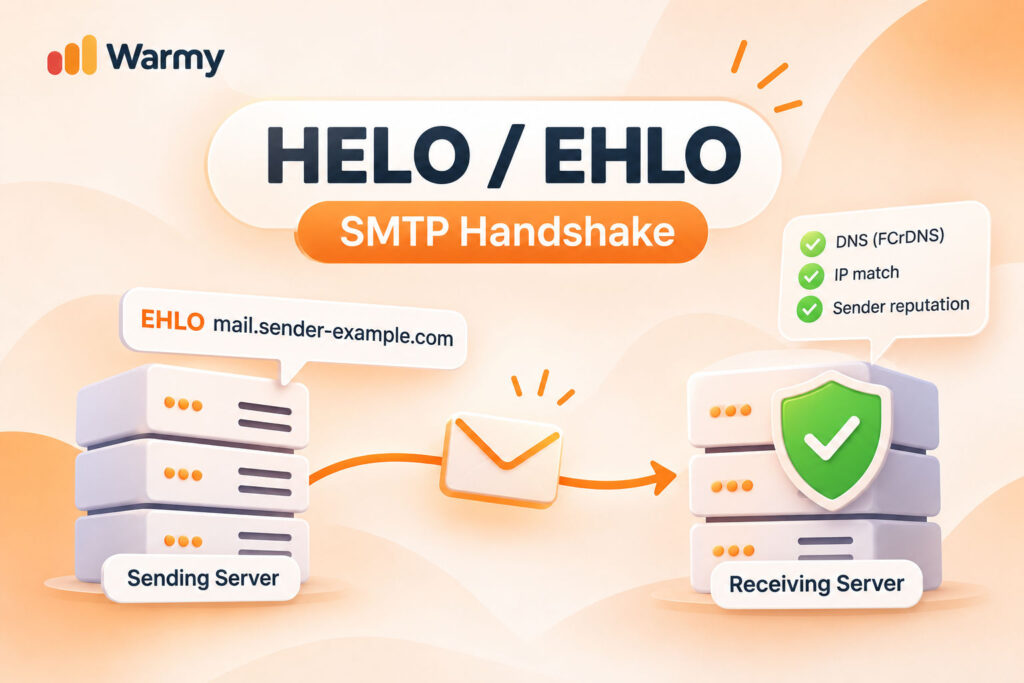
Before a single word of your email is read, your server has already introduced itself. The SMTP HELO greeting, or its modern form SMTP EHLO, is a one-line claim: “this is who I am.” The receiving server doesn’t take that at face value. It checks the claim against DNS, compares it with your IP, and quietly files the result under your sender reputation. Ever had mail rejected with no obvious reason? Below, you’ll see how the handshake works and why one misconfigured hostname can cost you the inbox.
Key Takeaways
- Every session opens with HELO or EHLO, the first of the SMTP commands, and the hostname inside it is what receivers verify.
- RFC 821 (1982) gave us HELO; RFC 1869 (RFC 2821 / RFC 5321) (1995) added EHLO, whose reply doubles as a menu of extensions like STARTTLS.
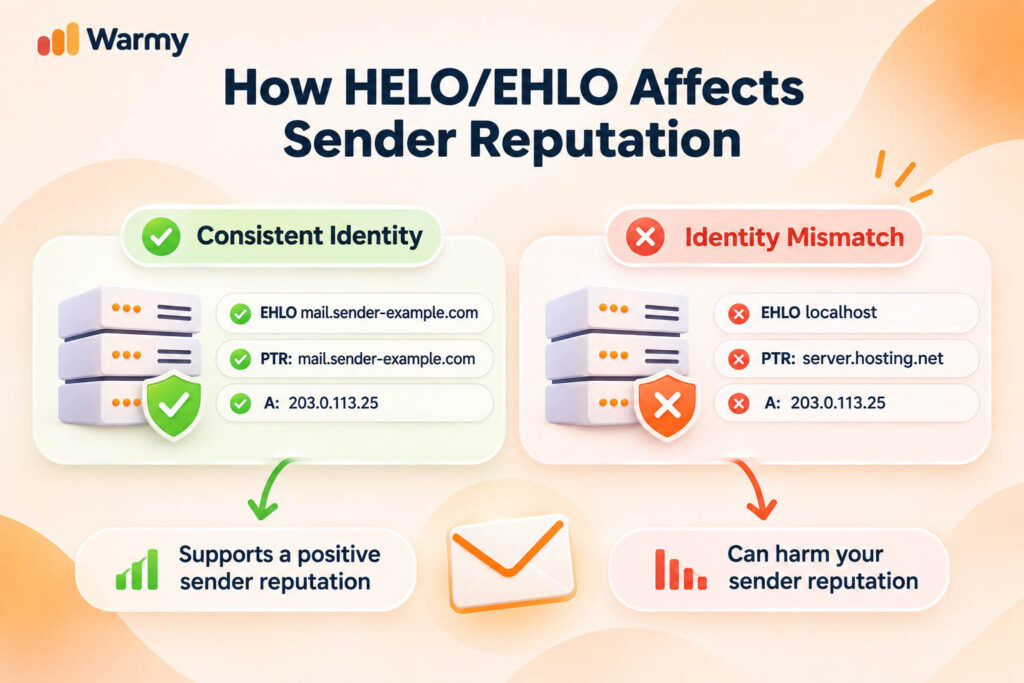
- FCrDNS ties the HELO hostname, the PTR record, and the A record into one test; all three must agree.
- A mismatch can end the session with a 5xx code or quietly lower your Sender Reputation Level.
- SPF also checks the HELO identity (RFC 7208); DKIM and DMARC add layers of their own.
What HELO and EHLO Actually Do
What happens if a server accepts a message from a machine that never said who it was? Nothing good, which is why SMTP sessions are built to begin with the client naming itself in the EHLO SMTP command, a line that lands before any sender, recipient, or message body, even though the server has already spoken its own 220 banner by then.
A receiver that has never met this machine needs a claim to test before it agrees to anything further. If SMTP itself is still new to you, read our full breakdown of how SMTP works first, then come back to the greeting. Here is how SMTP protocol commands opening looks on the wire, trimmed to the lines:
S: 220 mx.example.net ESMTP ready
C: EHLO mail.sender-example.com
S: 250-mx.example.net Hello mail.sender-example.com [203.0.113.25]
S: 250-STARTTLS
S: 250-SIZE 52428800
S: 250 8BITMIME
C: MAIL FROM:<news@sender-example.com>
S: 250 OK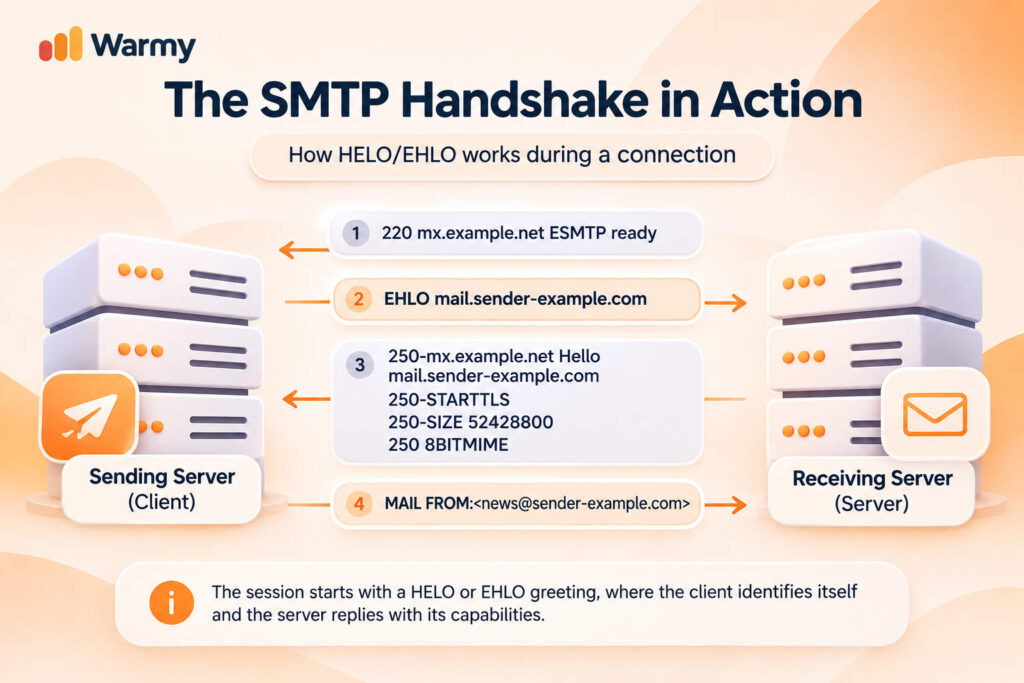
HELO vs. EHLO: What’s the Difference?
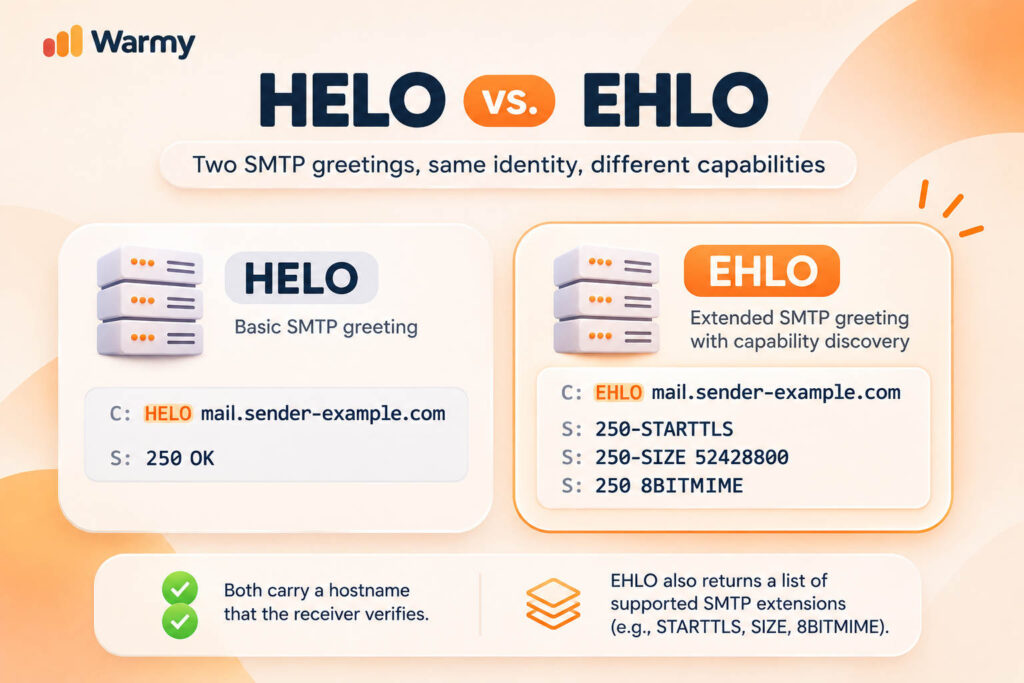
When we talk about HELO vs EHLO, we are comparing two things: what the server learns about the client’s features, and what it learns about the client’s identity. Why does the first change between the commands? This is because the EHLO command makes the server reply with a list of extensions, such as STARTTLS, and HELO gets a single 250 line.
And why does the second stay the same? This is because both commands carry a hostname, and the receiver tests it the same way. In short, EHLO sets what the session can do, and the hostname sets how far it is trusted.
FCrDNS: The Trust Triangle Behind HELO
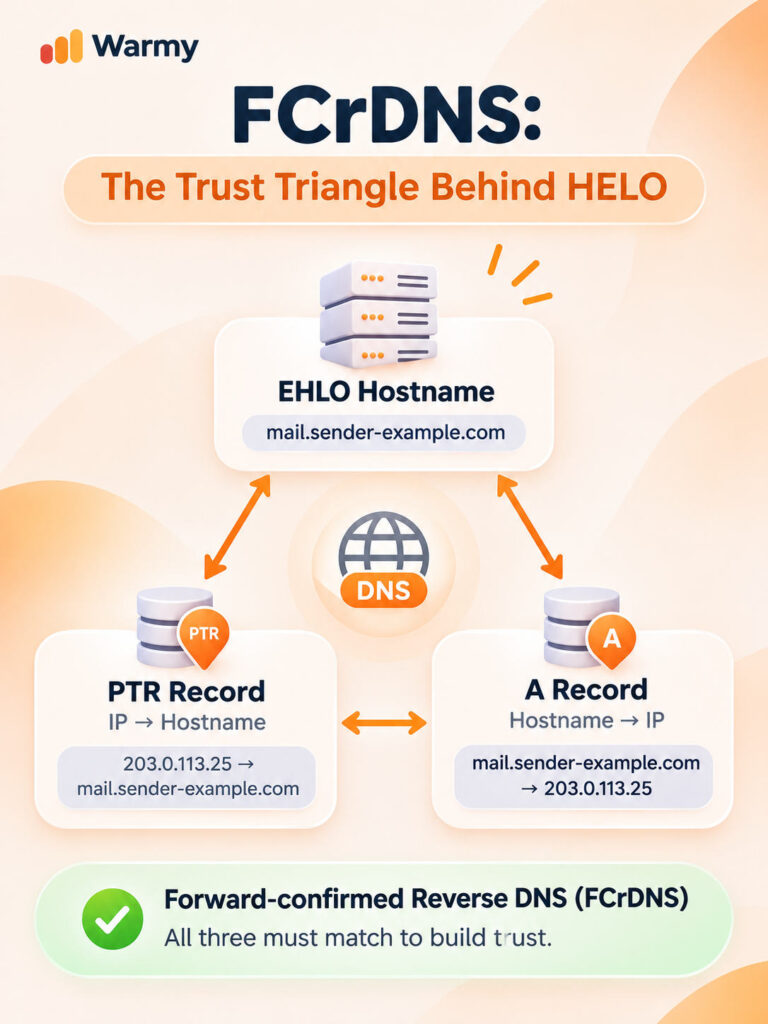
It’s easy to type any hostname into an EHLO line, and that is where you can face trouble: a name anyone can claim still proves nothing. So how does a receiver tell a real mail server from a stranger wearing a good-looking name? It asks DNS, and the test it runs is called FCrDNS, forward-confirmed reverse DNS.
Let’s picture a triangle: one corner is the hostname in your HELO, ideally a fully qualified domain name (FQDN), meaning the complete name with its domain part, such as mail.sender-example.com; another is the PTR record, and the third is the A record, the forward lookup that turns that name into an IP.
Let’s go deeper into our example server. It connects from 203.0.113.25 and says EHLO mail.sender-example.com. The receiver looks up the PTR for that IP and gets mail.sender-example.com. Then it looks up that name, finds 203.0.113.25 behind it, and the loop closes.
Why does a closed loop count for so much? Because the PTR belongs to whoever owns the IP, usually your hosting provider, while the A record belongs to whoever owns the domain, and a spammer on a throwaway address seldom controls both. Some receivers go one step further and compare the HELO name with the PTR name directly, so it pays to keep all three corners identical.
How HELO/EHLO Affects Sender Reputation
Sender Reputation Level (SRL) is built from three inputs: an analysis of the HELO/EHLO statement, a reverse DNS lookup, and the spam confidence ratings of the sender’s earlier messages. Two of them sit within a sysadmin’s reach: the name you announce, and the DNS records behind your IP are settings you control, but the third input is a history of how your past messages scored for spam. It follows your content, your lists, and your recipients’ reactions, and no hostname change will repair it.
Spammers often forge the name in the SMTP protocol HELO line, so a sender who presents many different names within a short window starts to look suspect. A legitimate server says the same thing every time, and that steadiness is what the analysis picks up.
The reverse DNS step then compares the name DNS returns for the connecting IP with the name given in the greeting, which is the FCrDNS triangle from the previous section, seen from the receiver’s chair. Microsoft describes its own filter, and other mailbox providers keep their formulas private, so the exact weights stay hidden to us.
How to Check and Fix Your HELO Configuration
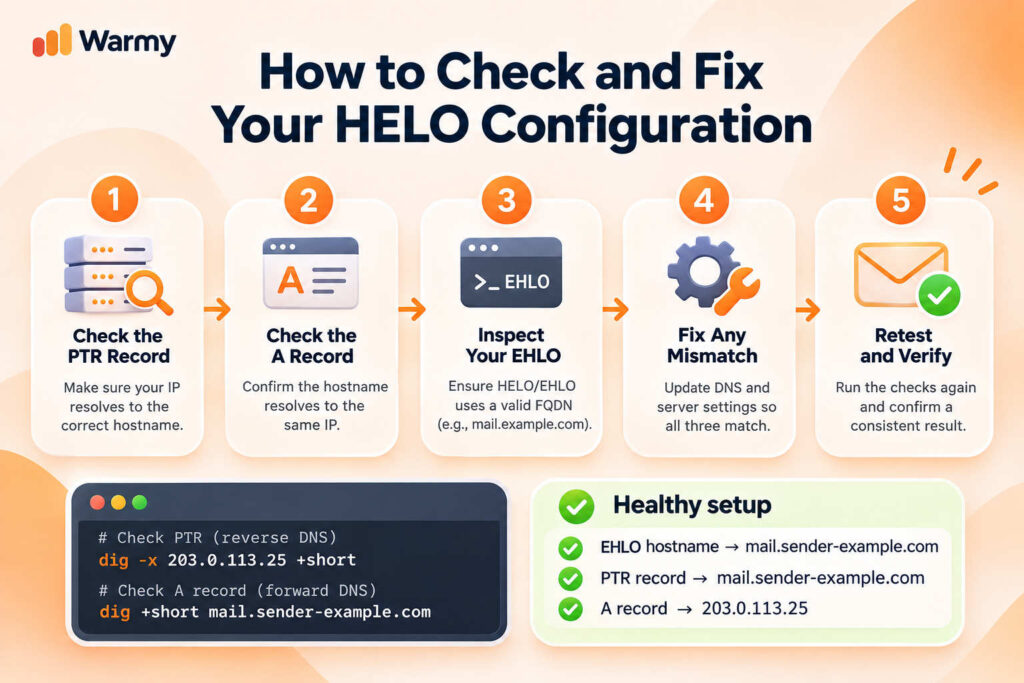
Five steps cover the whole check, and the first two need nothing but a terminal.
- Read your PTR. Run
digwith the-xoption on your sending IP (203.0.113.25 in our example) and see which name DNS returns:dig -x 203.0.113.25 +short. - Confirm the A record. Run
digon that name:dig +short mail.sender-example.com. Check that it returns the same IP. If it does, the loop is closed. - See what your server announces. Send a message to a mailbox you control at another provider and open the Received header. The name after “from” is your HELO domain name as the receiver saw it. You can also connect with telnet to your server on port 25 and read the 220 banner, though many hosting networks block that port.
- Fix the broken corner. The HELO name lives in your mail server’s configuration (in Postfix, the
myhostnamesetting); see how the MTA fits into this handshake. The A record belongs in your own DNS zone. The PTR sits with the owner of the IP, so ask your hosting provider to fix the reverse DNS configuration and set it to the same hostname. - Retest. Wait out DNS caching, then rerun steps 1 to 3.
Common HELO/EHLO Mistakes
Most failures trace back to a handful of habits, and almost all of them are one-line fixes in the configuration or the DNS zone:
- localhost or localhost.localdomain. The default on many fresh installs. It names no particular machine, so receivers have nothing to verify and often turn the session away.
- A bare hostname such as “mail”. With no domain part, it isn’t a fully qualified name, which leaves DNS nothing to confirm.
- A raw IP without brackets. An address literal belongs in square brackets, as in
[203.0.113.25]; the unbracketed form can be read as malformed. - The sending domain used as the HELO name. It works only when that domain’s A record points to the mail server, and usually it points at the website.
- A name nobody created in DNS. Typed into the config, never added to the zone, so the loop breaks at the A record.
- A PTR left at the provider’s default. A generic label like
ip-203-0-113-25.hosting.examplewill never match the name your server announces. - A hostname that changes between sessions. Rotating names look exactly like the pattern Microsoft’s analysis flags.
Each mistake leaves the receiver with a name it cannot tie back to your IP, or with a name that keeps changing, and those are the two things every check in this article looks for.
HELO/EHLO vs. SPF/DKIM/DMARC: Different Layers
HELO/EHLO tells the receiver which machine is connecting, and its job ends there, while SPF, DKIM, and DMARC authentication checks tell us more about the domain or the message. SPF (RFC 7208) compares the connecting IP with the list of servers the domain has authorized, and it can run the same check on the HELO name.
DKIM verifies a cryptographic signature, so the receiver learns whether the message was altered after the domain signed it. DMARC compares the domain in the visible From address with the domains that SPF and DKIM verified, and a mismatch triggers the policy the domain owner published.
When a receiver does refuse the session, the reply code shows how it read the problem. SMTP error 501 means a syntax error in the arguments, so an EHLO with no hostname, or with illegal characters in it, lands here. SMTP error 550 is a refusal of the requested action, and many servers use it for policy rejections, for example when the name fails their checks. SMTP error 554 reports a failed transaction, and some servers attach it to messages like “rDNS does not match HELO”. The wording after the number changes from one server to the next.
FAQ
What does HELO stand for in SMTP, and what is a HELO in email?
It is a four-letter shortening of “hello”. In email, a HELO is the SMTP command a sending server uses to give its name at the start of a session, before any sender or recipient is named.
What’s the difference between HELO and EHLO?
The server answers EHLO with a multi-line list of extensions such as STARTTLS and answers HELO with a single 250 line. Both carry the hostname that receivers verify.
Does a misconfigured HELO block email delivery by itself?
It can. Some receivers reject the session over a bad name such as localhost, and a name that is not fully qualified or does not resolve is the usual trigger. Others accept the message and count the problem as one negative signal among many.
What is FCrDNS, and why does it matter for HELO?
FCrDNS is the three-way match of the HELO hostname, the PTR record, and the A record. It lets a receiver confirm that the name belongs to the IP that connected, which a typed-in hostname cannot prove on its own.
Should my HELO hostname match my sending domain?
It doesn’t have to. The name must resolve to your sending IP and match the PTR, and a dedicated hostname such as mail.sender-example.com is the usual choice, because the main domain’s A record normally points at the website.
Can HELO issues cause SPF to fail?
Yes. SPF can evaluate the HELO name as an identity of its own, so a hostname without a valid SPF record leaves that check with no result or a failure.
How do I check what HELO name my server is sending?
Send a message to a mailbox you control at another provider and read the Received header. The name after “from” is what the receiver saw. If the name looks wrong, work through the check-and-fix steps above.
Is EHLO always better than HELO?
In practice, yes. RFC 5321 tells clients to try EHLO first and fall back to HELO only when the server refuses. For reputation, both weigh the same.
What does “554 rDNS does not match HELO” mean?
554 is a general transaction failure, and this wording comes from the receiving server: the reverse DNS of your IP differs from the name in your HELO.
Do I need to configure HELO manually if I use an ESP?
Usually no, because the ESP’s servers announce their own hostnames. On your own server or a dedicated IP, the setup is yours.
Wrapping Up
SMTP HELO is the first piece of information that the receiver will get. Your server gives a name, DNS confirms the name belongs to your IP, and the receiver decides how much to trust you. Set the name once, test it with dig, and test it again after any change of server, provider, or IP. To keep an eye on it, you can monitor HELO configuration alongside your other deliverability signals in Deliverability Insights.