If you are seeing a warning that says “Reverse DNS doesn`t match SMTP Banner,” your mail server is sending a red flag to every receiving server it connects to. This mismatch tells spam filters that your server cannot be verified as a legitimate sender — and in 2026, that can mean your emails land in spam or get rejected before they even reach the inbox.
In this guide you will find out exactly what this error means, why it happens, how it affects your email deliverability, and the precise steps to fix it — without needing to be a DNS expert.
What is reverse DNS?
Reverse DNS, or Reverse Domain Name System, is a process used to resolve IP addresses back to domain names. While the standard DNS translates domain names to IP addresses, allowing us to access websites using human-readable names, Reverse DNS does the opposite. It’s particularly useful for network troubleshooting, security verification, and ensuring that a given IP address is genuinely associated with a specific domain, especially in email communication.
The Role of SMTP in Email Communication
Simple Mail Transfer Protocol (SMTP) is the backbone of email communication. It’s a set of rules that govern the sending of emails from one server to another. When you send an email, it’s the SMTP server that pushes that email to the recipient’s mail server. Think of SMTP as the postman of the digital world, ensuring that your messages get to the right mailbox in a standardized manner.
If you want to understand how the SMTP handshake works in detail — including how servers authenticate each other step by step — read our guide on what SMTP is and how email servers actually work.
Introduction to SMTP Banners
SMTP banners are the initial greeting messages that an SMTP server sends when another server or client connects to it. This banner typically contains information about the server, such as its software version and sometimes the domain it’s associated with. It’s a crucial aspect of the SMTP communication process, as it sets the stage for the servers to exchange information and ensure that they’re communicating with a legitimate partner. A mismatch between the SMTP banner and the Reverse DNS can raise flags about the authenticity of the email, potentially leading to deliverability issues.
The importance of matching reverse DNS and SMTP banner
1. Ensuring Email Deliverability
One of the primary reasons for ensuring that Reverse DNS matches the SMTP Banner is to guarantee email deliverability. When there’s a mismatch, the receiving email server might deem the incoming email as suspicious. This can lead to the email being flagged, delayed, or even outright rejected, preventing your messages from reaching their intended recipients.
2. Building Trust with Email Recipients
Trust is a cornerstone of effective email communication. When the Reverse DNS aligns with the SMTP Banner, it signals to the receiving server and, by extension, the end recipient, that the email originates from a legitimate source. This alignment can significantly reduce the chances of your emails being marked as spam or phishing attempts, ensuring that your communications are received in the intended spirit.
3. Avoiding Blacklisting by Spam Filters
Spam filters are always on the lookout for discrepancies that might indicate malicious intent. A mismatch between Reverse DNS and the SMTP Banner is a red flag for many of these filters. Consistent mismatches can lead to your domain or IP address being blacklisted, which would severely hamper all future email communication efforts from that domain or IP.
Reasons behind why reverse DNS does not match SMTP banner
✅Misconfigured DNS Records
One of the most common reasons for a mismatch is simply a misconfiguration in the DNS records. This can happen due to human error, oversight, or changes in hosting without updating the necessary records. Regular audits of DNS records can help in identifying and rectifying such misconfigurations.
✅Incorrect SMTP Server Settings
Sometimes, the SMTP server might be set up with incorrect or outdated settings, leading to discrepancies in the banner it presents. This can be due to changes in domain names, server migrations, or simply oversight during initial setup. Regular server checks and updates can prevent such issues.
✅Hosting Multiple Domains on a Single IP
In scenarios where multiple domains are hosted on a single IP address, it’s possible for one domain’s SMTP banner to be used for another domain’s Reverse DNS lookup. This can cause apparent mismatches even if each individual domain’s settings are correct. It’s essential to ensure that each domain’s SMTP banner and Reverse DNS are correctly paired when using shared hosting environments.
Pro Tip: When you migrate your mail server to a new hosting provider, always update your PTR record with the new provider immediately — before changing your MX records. Many administrators do it the other way around and spend days chasing phantom deliverability issues caused by a stale PTR pointing to the old IP.
Technical deep dive into the issue: “Reverse DNS doesn`t match SMTP Banner.”
1. How Reverse DNS Works
Reverse DNS Lookup, often abbreviated as rDNS, is the method of translating an IP address back into a domain name. Unlike the standard DNS process, which converts domain names into IP addresses, rDNS does the reverse. When a server receives a connection request, it can use rDNS to check the domain name associated with the incoming IP address. This is especially useful for verifying the authenticity of connections.
Pointer (PTR) records play a pivotal role in the Reverse DNS process. They reside in the DNS zone of the IP address, pointing it back to its associated domain name. When an rDNS lookup is initiated, it’s the PTR record that’s queried to provide the corresponding domain name. Without a correctly configured PTR record, the rDNS lookup would fail, leading to potential authentication issues.
2. SMTP Banners Explained
An SMTP banner is the initial message presented by an SMTP server when another server or client establishes a connection. It typically contains the server’s hostname, software version, and sometimes additional information about its configuration. This banner is crucial for the SMTP handshake process, setting the stage for subsequent communication between servers.
While the primary purpose of SMTP banners is technical, they can also be customized for branding purposes. Organizations can modify their SMTP banners to include brand-specific messages or identifiers. This not only adds a layer of professionalism but can also assist in quickly identifying and troubleshooting server-related issues.
3. The Role of Email Servers
Email servers are specialized software designed to handle the sending, receiving, and storage of emails. Some of the popular email server software includes Microsoft Exchange, Postfix, Sendmail, and Exim. Each of these has its own set of features, configurations, and quirks, but all serve the primary purpose of managing email communication.
If your email server is rejecting connections or returning authentication errors during the SMTP handshake, these may appear as specific SMTP error codes — knowing how to read them helps you diagnose whether the underlying problem is the PTR record, the banner configuration, or something else entirely.
Ensuring that your email server’s SMTP banner matches its Reverse DNS is crucial for optimal email deliverability. This often involves diving into the server’s configuration settings. Depending on the software in use, this can be a straightforward process or require a bit more technical know-how. Regular audits and tests can help ensure that the SMTP banner and Reverse DNS are in sync, reducing the chances of email delivery issues.
How to fix the issue “Reverse DNS doesn`t match SMTP banner”
1. Diagnosis:
◾ Check Current Configuration. Use online tools like MXToolbox to check the current SMTP banner presented by your mail server. This will give you an idea of what the receiving servers see when they connect to your server.
◾ Review Email Headers. If you’ve received bounce-back emails or notifications about delivery issues, inspect the email headers. They might contain information about the perceived mismatch.
Pro Tip: Run MXToolbox’s SMTP diagnostic from an external IP that is different from your sending IP. Some firewalls present different SMTP banners for internal vs. external connections, which means your internal tests can show a clean match while external servers still see a mismatch. Always verify from the outside.
2. Addressing DNS Configuration:
◾Verify PTR Record. The PTR (Pointer) record in your DNS settings should match the domain name you’re using for your email server. Ensure that the PTR record for your mail server’s IP address points to the correct domain name.
◾ Update A Record. Ensure that the A record for your domain points to the correct IP address of your mail server.
3. Adjusting SMTP Server Settings:
◾ Review SMTP Banner. Access your SMTP server’s configuration and check the current SMTP banner. It should match the domain name specified in your DNS settings.
◾ Modify SMTP Banner. If the SMTP banner is incorrect, modify it to match the expected domain name. The process for this will vary depending on the email server software you’re using (e.g., Postfix, Sendmail, Microsoft Exchange).
4. Verification:
◾ Test Email Delivery. After making changes, send test emails to different email providers (e.g., Gmail, Yahoo, Outlook) to ensure they’re being delivered without issues.
◾ Use Diagnostic Tools. Re-run tools like MXToolbox to verify that the SMTP banner now matches the Reverse DNS.
◾ Inspect Email Headers. Send a test email to yourself and inspect the headers to ensure there are no warnings or flags related to the SMTP banner or Reverse DNS.
Not sure if your DNS records are correctly configured after making changes? Run Warmy’s free Email Deliverability Test — it checks SPF, DKIM, DMARC, blacklist status, and inbox placement across Gmail, Outlook, and Yahoo in minutes.
Advanced considerations
1. Security Implications of Mismatch
A mismatch between Reverse DNS and SMTP Banner can be a red flag for email servers and security systems. Cybercriminals often exploit such discrepancies to carry out phishing attacks. When there’s a mismatch, it can indicate that the email might not be coming from a legitimate source, making it easier for malicious actors to impersonate trusted entities. Recipients might be more susceptible to deceptive emails, leading to potential data breaches or malware infections.
To maintain the integrity of email communication, it is essential to ensure that all configurations, including Reverse DNS and SMTP Banners, are correctly set. Google recommends enforcing TLS encryption for all SMTP connections to prevent eavesdroppers from intercepting email in transit. Additionally, RFC 5321 (the SMTP standard) formally defines how receiving servers should handle EHLO/HELO hostname verification — making PTR alignment not just a best practice but a protocol expectation. Regularly updating and patching your email server software also protects against known vulnerabilities.
2. SMTP Authentication Errors Caused by Mismatches
A Reverse DNS mismatch is frequently the root cause behind SMTP authentication failures that are not immediately obvious. If your server fails the banner check, receiving servers may refuse to proceed with authentication entirely, returning errors that look like credential failures rather than DNS problems. If you encounter an “SMTP Error: Could Not Authenticate” message, always check your PTR record and SMTP banner alignment before assuming the problem is with your login credentials.
Similarly, if you are seeing a “550 Please Turn On SMTP Authentication” error, the receiving server may be rejecting your connection at the banner-check stage before authentication even begins. Fixing the PTR/banner mismatch often resolves these downstream errors automatically.
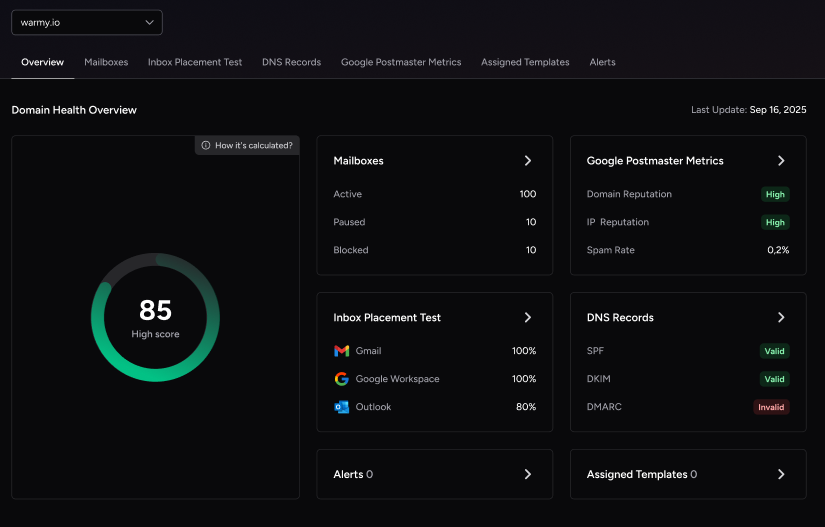
Pro Tip: If you manage email sending across multiple domains or shared IPs, use Warmy’s Domain Health Hub to monitor PTR record status, DMARC alignment, and inbox placement for all your domains from a single dashboard — without running individual DNS lookups every time something breaks.
3. The Future of Email Communication
As cyber threats continue to evolve, so do the standards and protocols governing email communication. Technologies like DMARC (Domain-based Message Authentication, Reporting, and Conformance), DKIM (DomainKeys Identified Mail), and SPF (Sender Policy Framework) are becoming more prevalent. These technologies aim to authenticate email senders and ensure that emails are not tampered with during transit. Staying updated with these evolving standards is crucial for ensuring the security and reliability of email communication.
The landscape of email communication is bound to change with advancements in technology and shifts in cybersecurity threats. Organizations should be proactive in monitoring these changes and adapting their email infrastructure accordingly. This might involve investing in new technologies, training IT personnel on emerging threats and solutions, and regularly auditing email server configurations to ensure compliance with best practices. A top DNS filtering service helps block malicious domains and prevent phishing attempts, strengthening overall email security and reducing exposure to cyber threats.
Understanding the advanced considerations surrounding the “Reverse DNS does not match SMTP Banner” issue provides a holistic view of its implications.
Conclusion
Navigating the complexities of email server configurations can be daunting, especially when faced with challenges like the “Reverse DNS does not match SMTP Banner” issue. As we’ve explored in this post, this mismatch is more than just a technical hiccup; it has profound implications for email deliverability, server reputation, and overall email communication security. By understanding the root causes and implementing the recommended solutions, organizations can address and rectify this common challenge.
As the digital landscape continues to evolve, staying informed and proactive about issues like the “Reverse DNS doesn`t match SMTP Banner” mismatch becomes paramount. By doing so, we ensure that our email communications remain trustworthy, secure, and effective in an ever-changing digital world.
Start your 7-day free trial — no credit card required. Book a demo to see Warmy in action.