



 Mailchimp
Warmy Keeps Mailchimp Emails Out Of Spam And Promotions
Mailchimp tells you the campaign was delivered. It doesn't tell you whether anyone saw it. Warmy warms up your Mailchimp campaigns with a live seed list, shows where each send lands at Gmail, Outlook and Yahoo, and watches your domain so a DNS or reputation problem never reaches your subscribers first.
Free test · No credit card required · Campaigns, Customer Journeys and Mailchimp Transactional
- senders
- 35,000+senders
- on Capterra
- 4.9on Capterra
- Human deliverability support
- 24/7Human deliverability support
Mailchimp Email Deliverability In 30 Seconds
Mailchimp email deliverability is the share of your Mailchimp emails that land in the inbox, not in spam or the Promotions tab. Mailchimp hands the message over. Gmail, Outlook and Yahoo decide where it goes, based on your domain's DKIM and DMARC, your sender reputation, how people engage and how clean your list is. Mailchimp reports delivery, not placement, so you need an outside test to see the real number.
- Campaigns and Customer Journeys
- leave from Mailchimp's shared IPs, signed with your domain. Your domain and your list do most of the work.
- Mailchimp Transactional
- (formerly Mandrill) sends order and account emails over its own infrastructure and won't send until DKIM and DMARC are in place.
- Warmy
- warms up both, tests placement by provider and alerts you when authentication or reputation slips.
Trusted By 35,000+ Ecommerce And B2B Senders
Rated 4.9 out of 5 on Capterra and G2











Mailchimp Reports A 99% Delivery Rate. The Inbox Is A Different Number.
Mailchimp says more than 99% of its email gets delivered, and that's probably true. Delivered just means the receiving server said "got it." Whether the email then sits in the inbox, the Promotions tab or spam is Gmail's call, or Outlook's, or Yahoo's. Mailchimp doesn't see that part and doesn't report it.
Mailchimp knows this, by the way. Senders without an authenticated domain get a banner in their account warning that their emails "may miss 74% of inboxes." And even with authentication done, your reports show opens, clicks, bounces and abuse reports. Not folders. Open rates won't save you either: Apple Mail Privacy Protection opens images automatically, so a campaign can look fine while it sits in spam everywhere else.
| What Mailchimp shows you | What Warmy adds |
|---|---|
Delivery rate: the server accepted it | Mailchimp deliverability rate: inbox, Promotions or spam at each provider |
Opens, clicks, bounces and abuse reports, after the send | A placement test before the send |
Domain status: verified or authenticated | Ongoing DKIM, DMARC, SPF and DNS checks, with alerts |
An Omnivore warning once a risky list is already imported | Email verification before you import |
No view of your sender reputation | Your Mailchimp sender reputation trend, Google Postmaster Tools data and blocklist status |
What Warmy Fixes For Mailchimp Senders
Mailchimp sends the campaign. Warmy helps it reach the inbox.
Warm up your Mailchimp campaigns with a live seed list
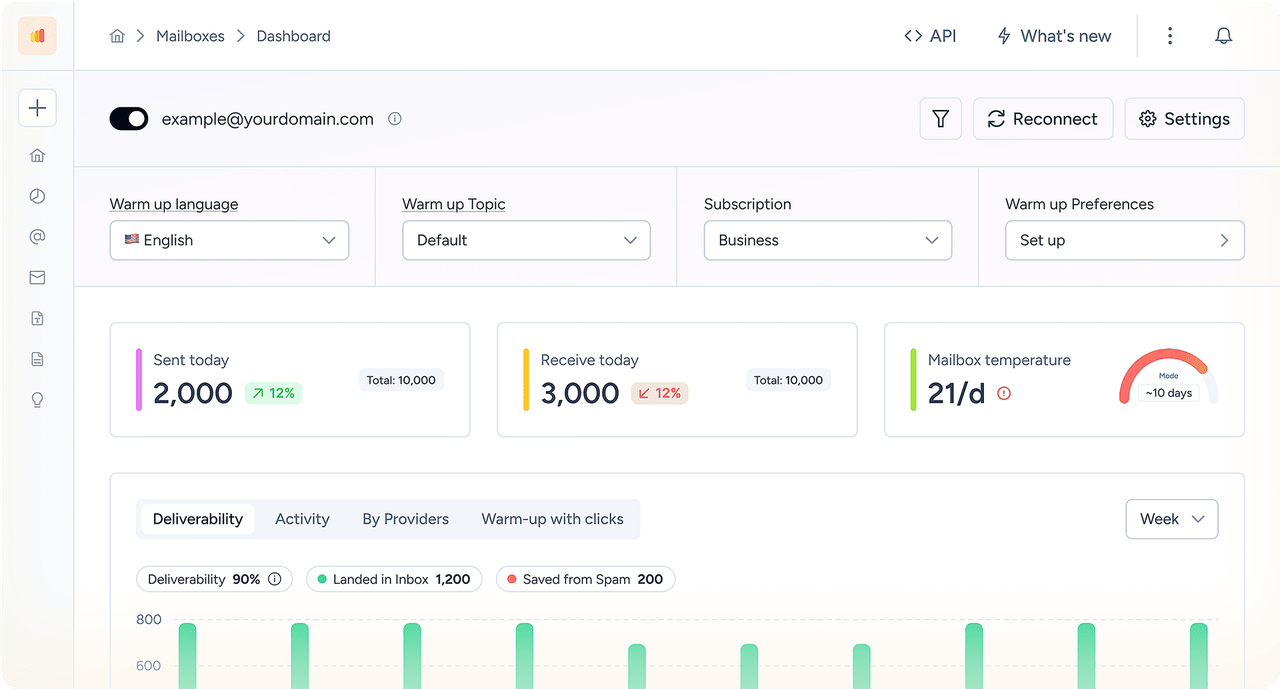
Most warm-up tools need to log in to a mailbox. Mailchimp campaigns don't have one, which is why ordinary warm-up can't touch them. Warmy's Mailchimp email warm-up works from inside your real sends instead. A tagged segment of Warmy seed addresses gets every campaign, opens it, scrolls, marks it important and pulls it out of spam if it lands there. The segment rotates and grows a little each day, so Gmail, Outlook and Yahoo see steady, positive engagement with your domain on Mailchimp's actual sending path.
A Mailchimp spam checker that uses real inboxes
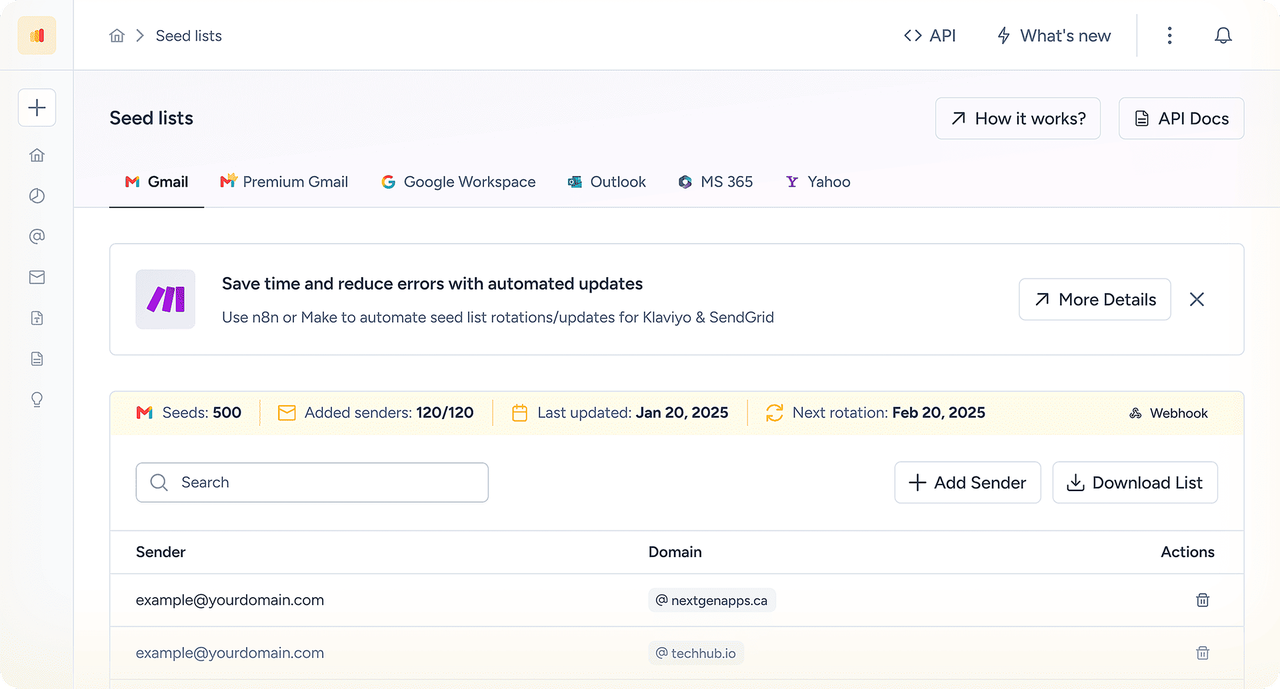
A content score is an educated guess. Warmy's Mailchimp spam test sends your real campaign to live seed mailboxes at Gmail, Outlook, Yahoo, Google Workspace and Microsoft 365 and tells you where it landed at each one. Change one thing, test again, and only send to your full list once the numbers hold.
Watch reputation, authentication and blacklists
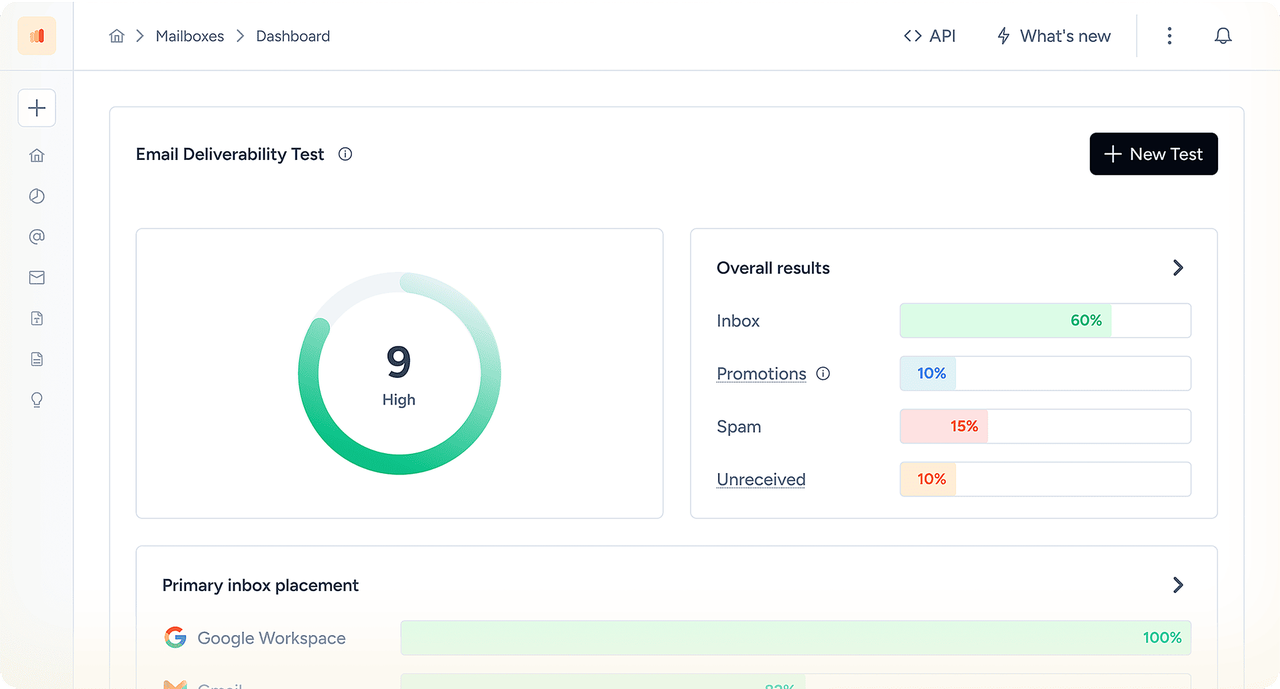
Warmy keeps checking DKIM, DMARC, SPF, MX and rDNS for your sending domain, flags a Mailchimp blacklist listing as soon as it appears, and brings Google Postmaster Tools data into the same dashboard. You hear about a problem before the campaign goes out.
Connect Mailchimp To Warmy: Two Ways
No migration, and nothing changes in your campaigns. Pick the path that matches how you send.
Campaigns and Customer Journeys: seed-list warm-up
Create a warm-up tag and a segment in Mailchimp. Audience → Tags, then a segment that filters by that tag.
Connect Warmy and Mailchimp with API keys. A ready-made Zapier workflow (n8n and Make work too) adds Warmy seed addresses to the tag and rotates them every day.
Send the way you always do. Include the segment in your campaigns. It grows at the rate you set, and Warmy reports placement for every send.
Mailchimp Transactional (Mandrill): SMTP relay warm-up
In Warmy, add a sender and choose Custom SMTP.
In Mailchimp Transactional, verify your sending domain and create an API key under SMTP & API Info.
Paste the SMTP host, port and API key into Warmy, switch IMAP off and connect. Mailchimp Transactional has no IMAP, so Warmy sends through the relay only. Warm-up starts the same day.
What Senders Say About Warmy
The platform’s warmup processes make sure that our cold emails don’t bounce into spam filters. It also makes use of AI behavior tracking as we’re sending which is great for campaigns scaling. It’s also really valuable to be able to track open rates and responses.






How Warmy Improves Mailchimp Deliverability For Every Type Of Send
Mailchimp doesn't send everything the same way. A newsletter, a welcome journey and an order confirmation travel different roads, and each one builds reputation in its own way.
| Mailchimp email | How it's sent | Whose reputation counts | What Warmy does |
|---|---|---|---|
Regular campaigns and newsletters | Mailchimp's shared IPs, signed with your domain's DKIM | Your sending domain, plus Mailchimp's IP pool | Seed-list warm-up inside real sends, placement tests, DNS monitoring |
Customer Journeys | Same shared infrastructure, one email at a time | Your sending domain | Placement tests for each journey email |
Mailchimp Transactional (Mandrill) | Its own infrastructure, API or SMTP relay; dedicated IPs optional | Your domain, plus shared or dedicated transactional IPs | SMTP warm-up, placement tests, DNS monitoring |
Anything sent from a Gmail or Yahoo address | Rewritten by Mailchimp to a send.mailchimpapp.com address | Mailchimp's domain, not yours | Move to your own authenticated domain, then warm it up |
A healthy newsletter tells you nothing about your order confirmations, and the other way round. Test each type of send on its own.
See where your next Mailchimp campaign lands.
No credit card required
Why Mailchimp Emails Go To Spam Or Promotions
Yes, Mailchimp emails can end up in spam. Mailchimp's infrastructure is rarely the cause. Most Mailchimp deliverability issues come down to the From address, the list or the content, and the table below covers the usual suspects. For the long version, read our guide to Mailchimp emails going to spam.
| Symptom | Likely cause | How to check | Fix |
|---|---|---|---|
Every campaign delayed or failing at once | A Mailchimp incident, not your domain | status.mailchimp.com | Wait it out; don't change DNS |
From shows "@ send.mailchimpapp.com" or "via mcsv.net" | Free Gmail or Yahoo From address, or domain not authenticated | Mailchimp Domains page; Warmy DNS check | Send from your own domain; publish both DKIM records and DMARC |
Test email never arrives | Free From address, unverified domain or the test-email limit | The From field and campaign checklist | Verify a custom-domain address; send fewer tests |
Spam right after the first big campaign | New or cold domain, full volume on day one | Placement test by provider | Warm up; start with engaged contacts |
Gmail files campaigns under Promotions | Heavy images, discount copy, lots of links | Template Checker + test of a lighter version | Fewer images and links, more text |
Spam filters flag one campaign but not others | Shortened URLs, too many links, risky link domains | Seed test of that campaign | Full branded links; cut the link count |
Omnivore warning after an import | Old, bought or scraped addresses | Warmy email verification | Verify before importing; drop risky contacts |
Spam only at Outlook or Microsoft 365 | Low engagement, corporate filters, click tracking | Seed test with Microsoft 365 mailboxes | Test with and without click tracking |
Sudden drop at every provider | Blacklist listing or a complaint spike | Warmy blacklist monitor; Mailchimp abuse reports | Pause, find the source, request delisting |
How To Warm Up A Mailchimp Sending Domain
A brand-new domain has no history, and mailbox providers are suspicious of strangers. Mailchimp's own advice is a 4-week warm-up: start with the people most likely to open, then add volume week by week. That works. What a schedule can't do is create engagement or tell you whether this week's step went well. Warmy covers both.
Authenticate first.
Verify the domain in Mailchimp and publish both DKIM records and DMARC.
Add the Warmy seed segment to your campaigns typically several weeks before your first big send.
Send to your most engaged contacts first, for example people who opened or clicked in the last 30–90 days. Then widen the audience.
Run a placement test before every step up.
Only grow volume if inbox placement holds at Gmail, Outlook and Yahoo.
Moving to Mailchimp from another platform?
Your domain's reputation comes with you. The IP history of your old platform doesn't. Run a baseline placement test, verify the old list before you import it (Omnivore checks every new audience), and resist emailing everyone on day one.
Mailchimp campaigns going to Promotions
The Promotions tab isn't spam, but fewer people look at it. Image-heavy campaigns with discount language and lots of links end up there most. Build a lighter version, run both through a seed test, and keep the one that lands in Primary for more providers.
Mailchimp SPF Record, DKIM And DMARC: What Mailchimp Actually Needs
Gmail and Yahoo require custom authentication and a DMARC record from anyone who sends more than 5,000 emails a day to their users. In Mailchimp this happens in two steps. Verification proves you own the From address. Authentication adds the DNS records that let Mailchimp sign mail as your domain.
How to send from a Mailchimp custom domain
Open your profile → Account & billing → Domains.
Add the domain of your From address and verify it with the code Mailchimp emails you.
Click Start authentication. Let Entri sign in to your DNS provider, or set the records up by hand.
Publish the two DKIM CNAME records and the DMARC TXT record exactly as Mailchimp shows them.
Come back to Mailchimp and check the status. DNS changes can take up to 48 hours.
Send a test and look for
dkim=passanddmarc=passwith your domain ind=. Or let Warmy check it.
| Record | DNS type | What it does | Mailchimp specifics |
|---|---|---|---|
Mailchimp DKIM | 2 × CNAME | Signs every message as your domain | k2._domainkey → dkim2.mcsv.net and k3._domainkey → dkim3.mcsv.net. Older setups may still show k1._domainkey → dkim.mcsv.net; replace it with the current records |
Mailchimp DMARC | TXT at _dmarc | Policy and reports for your From domain | Start at p=none; one DMARC record per domain; subdomains inherit the root record |
Mailchimp SPF record | TXT | Lists servers allowed to send | Not needed for campaigns: the return-path is Mailchimp's own domain, so DMARC passes through DKIM |
Transactional DKIM | 2 × CNAME | Signs transactional mail | mte1._domainkey and mte2._domainkey; Transactional won't send without DKIM and a valid DMARC policy |
Do you need a Mailchimp SPF record?
For campaigns, no. Mailchimp's current setup asks for two DKIM records and one DMARC record, nothing else. Older guides tell you to add include:servers.mcsv.net to SPF. It won't break anything, but it spends one of your ten SPF lookups and doesn't help DMARC pass. Keep SPF for the services that send with your own return-path, like Google Workspace or Microsoft 365.
Mailchimp Omnivore, Cleaned Contacts And Email Verification
Mailchimp guards its shared network with its own checks. They feel like a nuisance, but they're usually the first place a deliverability problem shows up.
| Mailchimp signal | What it means | What to do |
|---|---|---|
Omnivore warning | Mailchimp's abuse-prevention system expects a list to cause too many bounces, complaints or spam-trap hits, and holds the send | Verify the list, remove old or bought contacts, ask the rest to reconfirm |
Cleaned contacts | Mailchimp stopped sending to an address, usually after a hard bounce or repeated soft bounces | A sudden jump after an import means the list needs checking |
Abuse reports | People clicked "report spam" on your campaign | Keep the Gmail spam rate under 0.1% (Google's hard limit is 0.3%); mail only people who opted in |
Mailchimp list cleaning and email verification before you import
Mailchimp verifies your From address, but it doesn't verify the contacts you upload. Omnivore only tells you a list looks risky. Run the list through Warmy's email verification first, and the bounces, traps and dead addresses that trigger those warnings never reach Mailchimp. Repeated holds can lead to account restrictions, and no warm-up tool can lift those.
Shared IPs And Dedicated IPs In Mailchimp
Mailchimp campaigns go out from shared IPs, so your domain's reputation and engagement carry most of the weight. Dedicated IPs are a Mailchimp Transactional option.
| Shared IPs (campaigns) | Dedicated IP (Mailchimp Transactional) | |
|---|---|---|
Reputation | Pooled with other Mailchimp senders; your domain matters most | Yours alone on that IP |
IP warm-up | Not needed for the IP; your domain still needs it | Mailchimp shifts mail onto the new IP over about 30 days |
Fits | Most marketing senders | Steady, high-volume transactional email |
A dedicated IP won't rescue a weak list. It just puts every bounce and complaint on your own address. Warm up the domain, clean the list and test placement first.
Mailchimp Deliverability Checklist
Mailchimp email deliverability best practices, in the order we'd fix them:
0/12 ready
Three Mailchimp Scenarios Warmy Is Built For
First campaigns on a new domain.
You've moved from a Gmail From address to news.example.com. Authenticate it, add the Warmy seed segment, start with your most engaged contacts and test before each step.
Black Friday on Mailchimp.
Volume is about to triple in a week. Start the seed-list warm-up a month ahead, test the sale template against Gmail Promotions and Outlook, and check abuse reports every day of the sale.
Order emails in junk.
Confirmations from Mailchimp Transactional are landing in spam. Connect the SMTP relay to Warmy, warm it up, and test confirmations separately from newsletters.
How we test Mailchimp inbox placement
We send the same Mailchimp campaign to Warmy seed mailboxes at Gmail, Outlook, Yahoo, Google Workspace and Microsoft 365, and note the folder at each one: inbox, Promotions, spam or missing. Then we change one thing (domain, template, tracking or volume) and test again. A seed test is a sample of how providers treat your email. It's not a promise that every subscriber sees the same thing.
Mailchimp Deliverability Frequently Asked Questions
Yes, in two ways. For campaigns and Customer Journeys, Warmy adds a rotating seed list to a tagged Mailchimp segment through your API key, so every real send also warms up your domain. For Mailchimp Transactional, you connect its SMTP relay to Warmy as a custom SMTP sender. Both come with inbox placement tests and DNS monitoring.
They can. The usual reasons are a free Gmail or Yahoo From address, a domain without DKIM and DMARC, a new domain sent at full volume, old or bought contacts, and heavy templates. Because campaigns share Mailchimp's IPs, your own domain's reputation decides most of it. A seed test shows which providers filter you.
Send from your own domain and authenticate it with both DKIM records and DMARC. Verify lists before you import them, warm up a new domain with engaged segments, and test inbox placement before each big campaign. After every send, check abuse reports, cleaned contacts and your Gmail spam rate.
Authenticate your domain, send only to people who opted in, and keep the list clean. In the email itself, use fewer images and links, skip URL shorteners, and avoid pushy subject lines in all caps. Then test the campaign against real inboxes before sending, because filters judge your reputation as much as your words.
Gmail, Yahoo and other free providers publish DMARC policies that tell servers to reject mail sent in their name from somewhere else. Mailchimp warns you before a test email because those messages may never arrive. Switch to an address on a domain you own, then verify and authenticate it.
Use Send a test in the campaign builder and add up to a few addresses. If it never arrives, the most common causes are a free From address, an unverified sending domain, or the daily limit on test emails. Also check your spam folder: a test that lands there is an early sign of a deliverability problem, not a glitch. A placement test shows whether it's only your inbox or every provider.
Not for campaigns. Mailchimp asks for two DKIM CNAME records and one DMARC record; the return-path uses Mailchimp's own domain, so DMARC passes through DKIM. Adding include:servers.mcsv.net to SPF doesn't hurt, but it uses one of your ten SPF lookups.
Mailchimp doesn't include automated warm-up; its advice is a manual 4-week ramp. Warmy's 7-day trial unlocks the seed-list warm-up for campaigns. No credit card needed.
Not usefully. Mailchimp rewrites Gmail and Yahoo From addresses to send.mailchimpapp.com, so any reputation you build goes to Mailchimp's domain, not yours. Warm up a custom domain instead. If you mean landing in Gmail inboxes, that's exactly what the seed-list warm-up and Gmail placement tests are for.
Big campaigns go out in batches, and Send Time Optimization spreads delivery over hours on purpose. Mailchimp may also hold some campaigns for a compliance review. If mail crawls to one provider, that provider may be throttling you because of low reputation, which a placement test will show.
You share IPs with other senders, Mailchimp reports delivery rather than inbox placement, SPF can't align with your domain, and it has no built-in list verification. Omnivore is strict with imported lists. None of that is a reason to leave, but it does mean testing and warm-up are up to you.
Yes. Warmy's free email deliverability test works as a Mailchimp spam checker. Send a real campaign to the test addresses and you'll see inbox placement by provider, DKIM, SPF and DMARC status, and blacklist results. No credit card required.
No. Mailchimp's terms require permission from every contact, and cold lists set off Omnivore holds and abuse reports fast. Send cold outreach from dedicated mailboxes with their own warm-up, and keep Mailchimp for people who signed up.