Mailchimp is a renowned all-in-one email marketing automation platform designed to improve email campaigns, subscriber management, and customer engagement. It is widely used by email marketers to send newsletters, run cold and warm email campaigns, and deploy automated follow-ups.
One of the many reasons behind Mailchimp’s popularity is its ease of use. However, that ease of use can be a double-edged sword: business owners with limited knowledge of email marketing fundamentals can initiate full-blown campaigns without implementing the email deliverability measures that protect their sender reputation and inbox placement.
Why do Mailchimp emails go to spam?
Mailchimp emails go to spam primarily because of missing email authentication (SPF, DKIM, DMARC), a low sender reputation, poor list hygiene, spam-trigger content in the subject line or body, or inconsistent sending habits.
According to Mailchimp, many campaigns from their platform are directed to spam due to spam filters which run automated checks on every email before delivery. Failing even just one of these checks can land your campaign in junk.
1. Missing or broken email authentication
If your domain hasn’t been configured with SPF, DKIM, and DMARC records, spam filters have no way to verify that you are who you say you are. Needless to say, Missing or incorrectly configured records send immediate red flags to mailbox providers and ESPs.
Not sure if your SPF or DMARC records are correct? Use Warmy’s free DMARC Record Generator and free SPF Record Generator to ensure validity and proper set up of your records.
2. Poor sender reputation
Internet Service Providers (ISPs) track your sending history much like banks review your credit history. So a history of high bounce rates, low open rates, spam complaints, and irregular sending damage your reputation score over time.
Sender reputation is tied to both your domain and the IP address used to send. Mailchimp uses shared IP pools for most accounts, which means that poor behavior from other senders on the same pool may affect you. Dedicated IPs, available on higher-tier Mailchimp plans, isolate your reputation entirely.
3. Unhealthy email list
Sending to stale, unengaged, or purchased lists signals to ESPs that you may be a spammer. Every invalid address that bounces, every disengaged subscriber who never opens, and every contact who marks your email as spam chips away at your sender reputation.
Key list hygiene issues to address:
- Hard bounces from invalid or non-existent addresses
- Contacts who haven’t opened a single email in 6+ months
- Purchased or scraped lists (which Mailchimp’s terms of service prohibit)
- Contacts who never explicitly opted in to receive your emails
Additionally, there’s a critical risk many senders overlook: spam traps. ISPs and email service providers set up addresses known as spam traps specifically to catch senders with poor list sourcing practices. These addresses look like legitimate emails but are not owned by real people. They exist solely to detect and flag bad senders. Essentially, hitting a spam trap sends a direct signal to ISPs that your list is not clean, and this can then trigger an immediate drop in deliverability.
Example: A business purchases a third-party email list and may experience a sudden, unexplained deliverability decline if that list contains spam trap addresses. The emails themselves may be perfectly well-crafted but the problem lies in the list itself. This is why purchased, rented, or scraped lists are not just against Mailchimp’s terms of service: they are a direct deliverability liability.
4. Spam-trigger content
Certain words, phrases, excessive punctuation, and poor HTML formatting cause spam filters to flag your message and send it to the spam folder right away. Common triggers include words like ‘free,’ ‘guaranteed,’ ‘act now,’ and ‘limited time,’ as well as ALL CAPS subject lines, excessive exclamation points, and a high image-to-text ratio.
Use Warmy’s Free Template Checker and its Chrome Extension to scan your email content for anything that may be detected as spam before you send.
5. Inconsistent sending volume
Sudden spikes in email volume (especially from a new domain) look suspicious to ISPs. This is why the email warmup process is highly recommended before initiating actual campaigns.
Warmy.io offers AI-powered email warmup that simulates human-like sending patterns that helps your domain build a positive reputation and establish trust gradually.
Warmy supports up to millions of warmup emails per day, which is the highest daily volume available among email warmup tools. For senders managing multiple domains simultaneously or scaling aggressively, that ceiling matters because most warmup tools cap out well below it.
Is your domain ready for your next Mailchimp campaign? Run a free deliverability test to find out.
What happens when your Mailchimp campaign passes or fails a spam check?
Most Mailchimp users assume spam filtering is a simple yes-or-no decision: either the campaign gets through or it doesn’t. In reality, there are four distinct outcomes and understanding which one you’re hitting tells you how serious your problem is and where to focus your fix.
Outcome #1: Delivered to inbox
Your campaign passed all checks. Authentication is verified, sender reputation is acceptable, and your content is clean. The email lands in your recipient’s primary inbox.
Outcome #2: Delivered to the spam or junk folder
The receiving server accepted the email but didn’t trust it enough to place it in the inbox. This is the most common problematic outcome and the most deceptive.
This is where the distinction between Mailchimp’s “acceptance rate” and actual inbox placement becomes critical:
- Mailchimp measures deliverability based on whether the receiving server accepted the email and not whether it reached the inbox.
- An email accepted by the server and routed to the spam folder counts as “delivered” in your Mailchimp dashboard. You won’t see a bounce. Your delivery rate will look healthy. But your campaign is not reaching anyone.
The only way to catch this is by monitoring open rate trends over time or using a deliverability testing tool that checks actual inbox placement, not just server acceptance.
Pro Tip: If you notice your open rates are declining despite what your delivery rate suggests, your inbox placement is almost certainly the issue, not your subject lines. Curious if your deliverability is what you think it is? Take Warmy’s free email deliverability test today.
Outcome #3: Rejected or blocked outright
If your sending domain is blacklisted, your authentication fails entirely, or your campaign content triggers a hard filter rule, the receiving server will reject the message right away.
You will see this as a bounce in Mailchimp, though the bounce error code won’t always indicate that a spam filter was the culprit rather than an invalid address.
Blacklisting can happen when sending frequency restrictions are violated or when complaint rates spike. The Spamhaus blacklist, for example, has flagged established senders for exactly this reason and recovery requires a full delisting process before deliverability can be restored.
Outcome #4: Quarantined by the receiving server
Some corporate email environments (particularly those running Microsoft 365 or Google Workspace with custom security policies) will quarantine suspicious Mailchimp campaigns rather than route them to spam right away. When this happens, the recipient doesn’t see the email unless they actively check their quarantine folder, which most people never do.
How spam filters actually score your Mailchimp emails
Most modern spam filters use a cumulative scoring system and not a single pass/fail check. Here’s how the major categories break down:
| Factor Category | Description |
|---|---|
| Content Triggers | Spammy words (“free”, “guaranteed”), ALL CAPS, excessive punctuation, salesy language, or image-heavy ratios. |
| Sender Reputation | IP/domain blacklists, shared IP behavior, bounce/spam complaint rates from past sends. |
| Authentication | Missing/incorrect SPF, DKIM, DMARC signatures. |
| Engagement History | Low opens/clicks, high unsubscribes, spam reports via feedback loops. |
| Volume/Consistency | Sudden spikes in sends or list imports. |
Why the same Mailchimp campaign can go to spam for some subscribers but not others
One of the most confusing deliverability experiences is hearing from one subscriber that a campaign landed in their spam folder while another received it in their inbox.
This is not a glitch. It is just how modern email filtering works.
ISPs also filter at the individual inbox level
- Gmail trains its filters on individual user behavior. So if a subscriber has previously marked emails from your domain as spam, Gmail will continue routing your campaigns to their spam folder even if your overall sender reputation is excellent.
- That filtering decision is personal to that user and it doesn’t affect delivery to other Gmail users who have engaged positively with your campaigns.
Corporate email environments have their own filtering rules
- A subscriber using a company-managed email address is subject to that organization’s IT security policies, which are often far more aggressive than consumer inboxes.
- A campaign that sails into every Gmail inbox on your list may be quarantined by a subscriber’s corporate Microsoft 365 environment because of a link domain, an image, or an authentication configuration that conflicts with the company’s internal policies.
Subscriber engagement history creates different inbox experiences
Two subscribers who signed up on the same day can have completely different deliverability outcomes six months later based purely on how they have interacted with your campaigns:
- The subscriber who opens every email and clicks regularly signals to their mailbox provider that your emails are wanted.
- The one who has never opened a single campaign actively signals that your emails are unwanted, which over time causes their provider to route your emails to their spam folder.
This is why segmenting your Mailchimp list by engagement level is not just a best practice for open rates. It is also a deliverability strategy. Sending exclusively to engaged subscribers protects your sender reputation with each ISP, which in turn improves inbox placement for your broader list over time.
How to read your Mailchimp campaign reports for deliverability red flags
Mailchimp provides campaign performance data after every send, but most users only check open rates and click rates. Learning to read your reports specifically for deliverability warning signs lets you catch problems early and before they compound into a serious sender reputation issue.
| Metric | Red Flag Threshold | What It Signals |
|---|---|---|
| Delivery Rate | Below 98% | Bounces accumulating means you must clean your list immediately |
| Open Rate | Declining across 3+ consecutive campaigns | Campaigns increasingly landing in spam, not just weak subject lines |
| Unsubscribe Rate | Sudden spike after one campaign | Campaign reached wrong audience and you must check list segmentation |
| Spam Complaint Rate | Above 0.10% (danger); above 0.30% (blacklist risk) | ISPs use this to flag domains; investigate any fraction of a percent |
| Click-to-Open Rate (CTOR) | Steadily declining | Content is mismatching subscriber expectations and disengagement is building |
A quick note on the reliability of open rates:
Open rates are traditionally tracked using a small tracking pixel embedded in the email. When the email is opened and the pixel loads, it reports back that the message was viewed. However, open rate data has become significantly less reliable for two reasons:
Apple Mail Privacy Protection (MPP): Apple’s MPP preloads email tracking pixels automatically regardless of whether the recipient actually opens the email. Any subscriber using Apple Mail with this feature enabled will always register as an “open,” inflating your open rate with activity that doesn’t represent real engagement. If a significant portion of your list uses Apple Mail, your open rates may look healthier than they actually are.
Email clients that block tracking pixels: Some email clients and corporate security software block images by default, which prevents the tracking pixel from loading even when the email is opened. This causes genuine opens to go unrecorded, leading to underreporting for those users.
For these reasons, CTOR (Click-to-Open Rate) and spam complaint rate are now more reliable indicators of true deliverability health than open rate alone.
Using Warmy.io’s deliverability test alongside your Mailchimp reports gives you a fuller picture: Mailchimp tells you what happened after delivery, while Warmy tells you whether your emails are actually reaching the inbox in the first place.
How to fix Mailchimp emails going to spam
Step 1: Authenticate your domain (SPF, DKIM, DMARC)
Log into your DNS provider and verify that the following records exist and are correctly configured:
- SPF record: Authorizes Mailchimp’s servers to send on behalf of your domain
- DKIM record: Adds a cryptographic signature to your emails so recipients can verify their integrity
- DMARC record: Sets a policy for how receiving servers should handle emails that fail SPF or DKIM checks
Mailchimp provides instructions for setting up domain authentication in their account settings under ‘Domains.’ Use Warmy’s free SPF Record Generator and free DMARC Record Generator to create properly formatted records instantly.
Step 2: Clean your email list
Before your next campaign, audit your list and remove:
- All hard-bounced addresses
- Contacts who haven’t opened any email in 6+ months
- Any addresses sourced from purchased, rented, or scraped lists
In Mailchimp, use the ‘Inactive Subscribers’ segment to identify and suppress unengaged contacts. Sending to a smaller, more engaged list consistently outperforms sending to a large, disengaged one.
Step 3: Audit your content for spam triggers
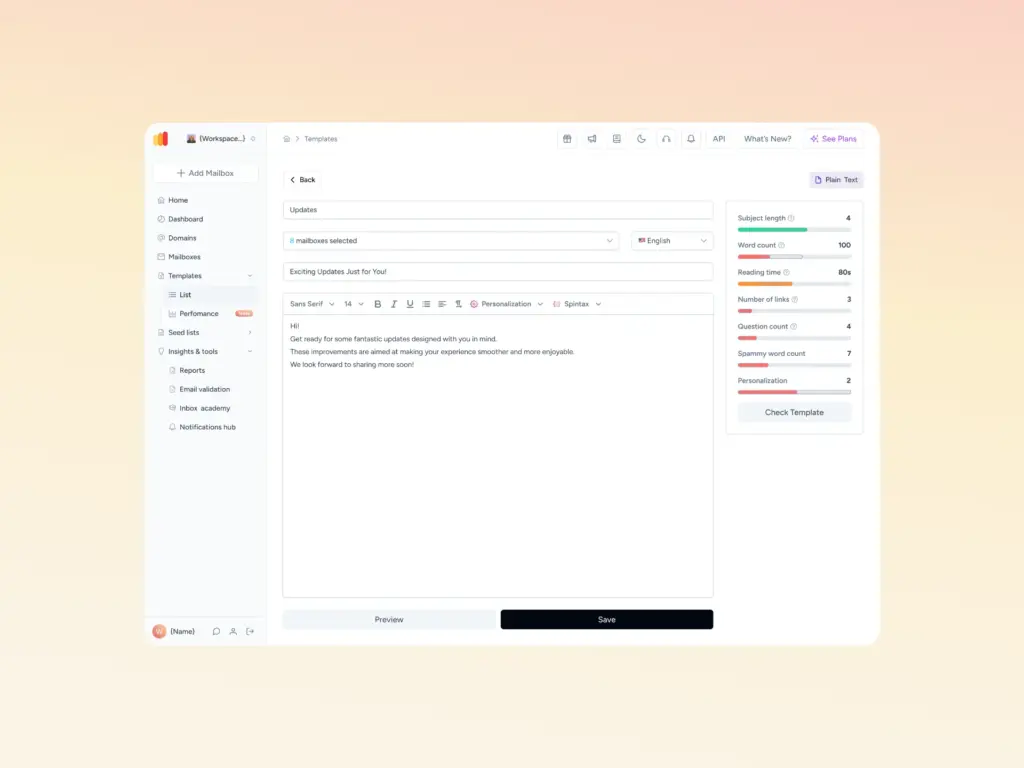
Before sending any campaign, run it through Warmy’s Free Template Checker. It scans email content and looks for potential triggers, such as:
- Subject lines with spam-associated words (‘free,’ ‘act now,’ ‘guaranteed,’ ‘no risk’)
- Excessive ALL CAPS or punctuation (!!!, $$$)
- Poor text-to-image ratio (emails that are mostly images with minimal text)
- Broken HTML or missing alt tags on images
- Shortened or suspicious-looking links
Running your email content through this template checker before launching your campaigns allows you to spot potential issues early on and adjust before the actual launch.
Step 4: Warm up your domain
If your domain is new, if you’ve been inactive for more than 30 days, or if you’re planning to scale your sending volume significantly, run a warmup process before your next campaign.
Warming up your domain ensures that you build a positive sender reputation the right away, which sets up your future Mailchimp campaigns for success.
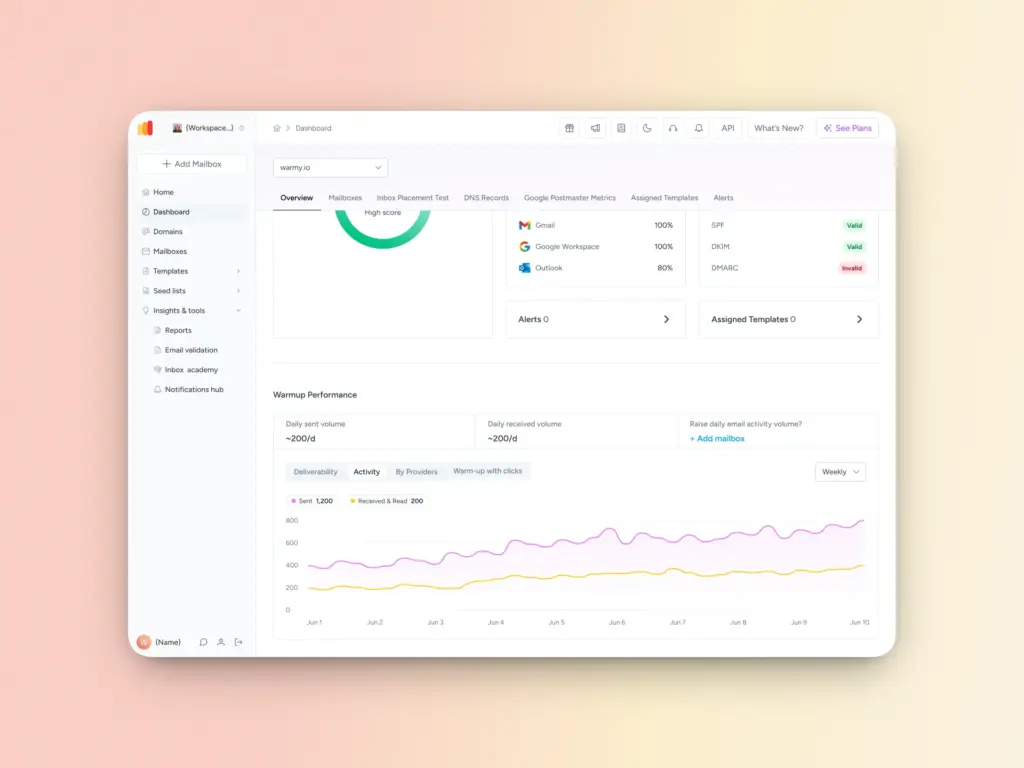
Warmy.io is an AI-powered email warmup platform that gradually increases sending volume while simulating human-like engagement patterns such as opens, replies, spam recovery, and clicks to build your domain’s reputation with ISPs before you launch at scale.
Step 5: Comply with bulk sender requirements
If any of your subscribers use Gmail or Google Workspace accounts, you must comply with Google’s updated sender guidelines:
- DMARC policy must be in place (p=none is acceptable to start, but p=quarantine or p=reject offers stronger protection)
- One-click unsubscribe must be enabled in your Mailchimp campaign settings
- Your spam rate as measured in Google Postmaster Tools must stay below 0.10%
These are not optional recommendations anymore. They are enforced requirements. Non-compliant bulk senders are routed to spam automatically.
Warmy.io tools to improve your Mailchimp deliverability
Mailchimp handles the sending infrastructure while Warmy.io handles the sender reputation and deliverability layer that Mailchimp cannot manage on its own. Together, they give you a complete deliverability stack.
Here is the full suite of Warmy tools relevant to Mailchimp senders:
AI-powered email warmup gradually ramps up sending volume from your domain while simulating authentic engagement opens, replies, clicks, and spam recovery to build a trusted sending history with ISPs before your campaigns launch. Supports up to millions of warmup emails per day, making it the strongest option for high-volume senders and agencies managing multiple domains
Free Email Deliverability Test checks actual inbox placement across Gmail, Outlook, Yahoo, and other major providers, not just server acceptance. Shows you exactly what percentage of your emails land in the inbox, promotions tab, or spam. Use this before every major campaign and after any deliverability incident.
Free Email Template Checker scans your Mailchimp email content for spam trigger words, HTML issues, image-to-text ratio problems, and broken formatting before you send to a single real address. Also available as a Chrome extension for quick checks during drafting.
Free SPF Record Generator creates a correctly formatted SPF record for your domain, one of the three authentication records now required by Gmail, Yahoo, and Microsoft for bulk senders.
Free DMARC Record Generator generates a valid DMARC policy for your domain, giving you control over how receiving servers handle emails that fail authentication checks.
Maximize your Mailchimp campaigns and ensure your emails land
Mailchimp is an amazing tool for email marketers across various industries and business types. Its ease of use and flexibility allows even rookie senders to craft automated workflows that seamlessly integrate with recipients’ respective customer journeys.
However, spam placement is a real threat. Not just to your open rates, but to your campaign results, and business bottomline. Ensuring your emails land in the inbox is not something that Mailchimp can handle on its own. When integrated with Warmy, however, senders are able to complement cold outreach efforts with a proper warmup process—ensuring emails land where you want them to.
Ready to improve your inbox placement? Start your 7-day free trial with Warmy.io.