TL;DR: Hostkarma is a DNSBL that scores IP addresses and hostnames as whitelisted, blacklisted, yellowlisted, brownlisted, or NOBL rather than giving a simple yes-or-no answer, and it’s generally lower-impact than major blocklists since smaller ISPs and hosting providers use it most.
Check your status with a direct DNS lookup, fix the root cause (usually an authentication gap, compromised account, or open relay), then submit a delisting request – or just wait, since Hostkarma’s blacklist data typically ages out on its own after about 5 days of clean sending. Warmy.io’s gradual email warm-up reduces the odds you land there again.
Its role extends beyond mere blacklisting; Hostkarma is a guardian of email security, ensuring that the flow of communication remains clean and trustworthy. By flagging IPs involved in spam or other dubious activities, Hostkarma assists in preventing the misuse of email networks and thus plays a pivotal role in protecting both senders and receivers in the digital communication ecosystem.
Understanding the dynamics of how services like Hostkarma operate and the impact they have on online security and email management is essential for anyone navigating the digital world. Whether for individual users or businesses, awareness of blacklisting practices and their implications is crucial for maintaining a secure and reputable online presence.
Understanding Hostkarma
What is Hostkarma?
Hostkarma stands as a pivotal element in the digital security landscape, functioning as a robust blacklist service. It is specifically designed to identify and flag IP addresses that are associated with unwanted or harmful online activities, particularly in the realm of email communication. The core purpose of Hostkarma is to safeguard the integrity of email exchanges by preventing spam and other malicious content from infiltrating inboxes.
What sets Hostkarma apart from other blacklisting services is its dynamic and comprehensive approach to monitoring online behavior. Unlike some services that focus narrowly on specific types of email abuse, Hostkarma employs a broader, more inclusive strategy. This allows it to effectively capture a wide range of threats, ensuring that email environments are protected against a diverse array of potential security breaches.
How Hostkarma’s Color-Coded System Works
Unlike a simple blacklist that only returns a yes-or-no answer, Hostkarma is a DNSBL – the same broad category as other real-time blackhole lists – that classifies senders into several categories with a single lookup. The zone hostkarma.junkemailfilter.com returns one of five codes: 127.0.0.1 for a trusted, whitelisted sender; 127.0.0.2 for a confirmed spam source; 127.0.0.3 for a “yellowlisted” mixed source, such as a large webmail provider that sends both legitimate mail and spam; 127.0.0.4 for a “brownlisted” source that has sent some spam but hasn’t crossed the threshold for a full blacklist entry; and 127.0.0.5 for a source confirmed not to be spam-only.
Hostkarma also supports hostname lookups using Forward Confirmed reverse DNS (FCrDNS), which is harder to spoof than checking an IP address alone. No response from the zone simply means Hostkarma has no listing for that IP or hostname at all.
Pro Tip: Don’t treat every code the same way. A 127.0.0.2 (blacklist) hit calls for immediate action, but a 127.0.0.3 (yellowlist) or 127.0.0.4 (brownlist) result is more of a scoring signal than a hard block – it’s worth tracking, but it shouldn’t trigger the same urgency as a full blacklist entry.
Importance of Hostkarma in Email Deliverability
Hostkarma plays an indispensable role in the realm of email deliverability. Its functionality is crucial in identifying and blocking sources of spam, which are not only a nuisance but also pose significant risks to email security. By filtering out harmful IP addresses, Hostkarma ensures that inboxes are not overrun by unwanted emails, thereby maintaining the cleanliness and effectiveness of email communication channels.
The impact of Hostkarma extends beyond just spam prevention. It is integral in upholding the reputation of email domains and IPs, which is vital in the current digital age where email deliverability can significantly affect business operations and personal communications. In essence, Hostkarma serves as a gatekeeper, ensuring that only legitimate and safe emails reach their intended destinations, thus preserving the trust and reliability of email as a vital tool for digital communication.
It’s worth calibrating your response to the listing type, though: Hostkarma is used mainly by smaller ISPs, hosting providers, and mail administrators rather than the largest mailbox providers, so a Hostkarma listing typically carries less deliverability impact than a listing on a heavily adopted blocklist like Spamhaus ZEN. That said, a 127.0.0.2 or 127.0.0.4 result is still worth investigating – it usually means a receiving server checking Hostkarma will reject, score, or route your mail differently, so treat it as an early warning rather than something to ignore.
Reasons for being listed on Hostkarma
Common Causes for IP Addresses Being Blacklisted
Landing on the Hostkarma blacklist is often the result of specific online behaviors or activities that are deemed detrimental to the sanctity of email communication. Understanding these triggers is crucial for maintaining a clean digital reputation.
Spamming Activities
One of the primary reasons for an IP address to be blacklisted by Hostkarma is engagement in spamming activities. This includes sending unsolicited bulk emails or participating in spam networks. Such practices not only clutter recipients’ inboxes but also undermine the credibility of email as a communication medium.
Hosting Malicious Content
If an IP address is associated with websites or servers that host malicious content, such as malware or phishing scams, it can quickly find its way onto Hostkarma’s blacklist. This activity is a serious breach of digital trust and security.
Compromised Email Servers
Sometimes, an IP address gets blacklisted not due to the direct actions of its user but because it is part of a compromised email server used for nefarious activities. This situation often arises when adequate security measures are not in place.
Poor Email Practices
Engaging in poor email practices, such as failing to honor unsubscribe requests or using deceptive subject lines, can also lead to blacklisting. These practices are seen as damaging to the user experience and the overall health of email communication.
Delisting your IP from Hostkarma
Initial Steps: Confirming Your IP’s Status
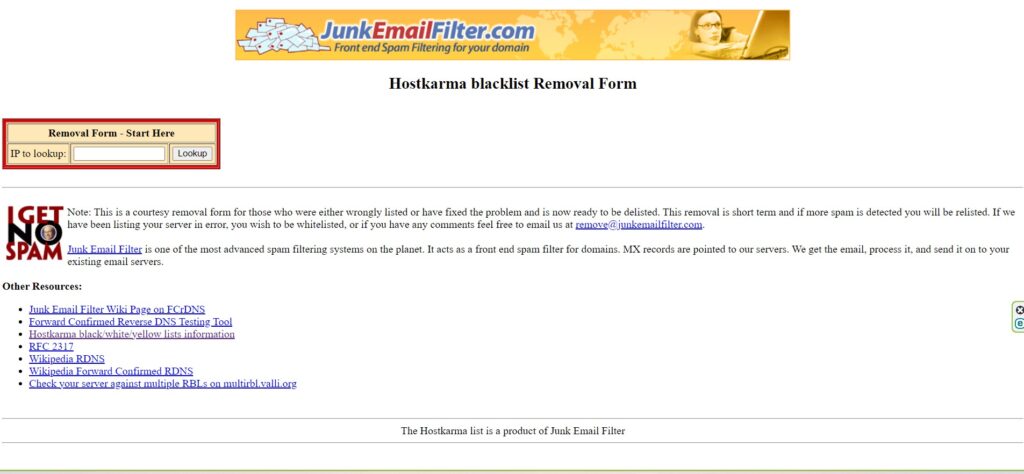
Before embarking on the journey of delisting, the first critical step is to ascertain whether your IP address is indeed listed on Hostkarma. This verification can typically be done through Hostkarma’s own lookup tool. By entering your IP address into their system, you can quickly determine if it has been blacklisted. This initial assessment is crucial in charting the path forward and formulating an effective delisting strategy.
Detailed Guide to the Delisting Process
It’s worth knowing that Hostkarma’s blacklist entries aren’t permanent by default – data typically ages out within about 5 days of the spam activity stopping, so a source that’s genuinely been cleaned up may drop off the list on its own. Submitting a request speeds that up and gives you a clear record that the issue was addressed as part of a proper hostkarma blacklist delisting process:
Pro Tip: If you’ve already fixed the root cause and stopped sending the offending traffic, it can be worth waiting the ~5 days for the entry to expire naturally before filing a manual request – especially if the listing was brief and you’re confident it won’t recur.
Resolve the Issue
Firstly, address the underlying reason for which your IP was blacklisted. Whether it’s enhancing email security measures, cleaning up your email practices, or securing your network, ensure that the issue is thoroughly resolved.
In practice, this usually means checking that SPF, DKIM, and DMARC are all correctly configured and passing, reviewing recent bounce and complaint patterns for signs of compromised accounts, and confirming your mail server isn’t running as an open relay.
Gather Required Information
Compile all relevant information about your IP address and the corrective actions you have taken. This might include logs, security updates, and policy changes.
Submit a Delisting Request
Visit Hostkarma’s delisting section and submit a request for removal. Provide all necessary information along with a concise explanation of the remedial steps you’ve taken.
If you believe your IP was listed in error, or you’d like it whitelisted going forward, you can also reach Hostkarma’s team directly at remove@junkemailfilter.com. This is the core of the hostkarma blacklist removal process – keep in mind it’s a short-term fix, and if the underlying issue reappears and Hostkarma detects spam again, the same IP can be relisted.
Fixed the underlying issue and don’t want to end up back on Hostkarma’s list next month? Start a free 7-day trial with Warmy.io – no credit card required – and let gradual, AI-driven warm-up keep your sender reputation healthy going forward.
Preventive measures for future security
Strategies to Avoid Getting Blacklisted Again
Ensuring that your IP address does not fall into the blacklist trap again requires adherence to a set of best practices in email management and network security. These strategies are not just preventive measures but essential aspects of responsible digital conduct.
Robust Email Practices. Implement and maintain high standards in your email practices. This includes obtaining explicit consent for email communications, honoring unsubscribe requests promptly, and avoiding misleading subject lines or content.
Enhanced Network Security. Strengthen the security of your network to prevent unauthorized use of your IP address. Regular updates to your security software, firewalls, and other protective measures are crucial in this regard.
Regular System Audits. Conduct periodic audits of your systems to identify and address any vulnerabilities that may be exploited for spam or other malicious activities.
Importance of Regular Monitoring
Vigilant monitoring of your IP status is key to early detection of potential issues that could lead to blacklisting.
Use of Monitoring Tools. Utilize tools that can regularly check if your IP address is listed on blacklists like Hostkarma. There are several online services available that can automate this process.
Responding to Alerts. Set up alerts and respond promptly to any notifications of potential security breaches or blacklisting incidents. Quick action can mitigate the impacts significantly.
Regular Review of Email Metrics. Keep an eye on your email deliverability metrics. A sudden drop in deliverability rates can be an early indicator of potential blacklisting issues.
The role of email warm-up services: Warmy.io
Introduction to Email Warm-Up Services
In the intricate world of digital communication, maintaining a healthy email sender reputation is paramount. This is where email warm-up services like Warmy.io play a crucial role. These services are designed to systematically build and enhance your email reputation, thereby reducing the risk of being blacklisted.
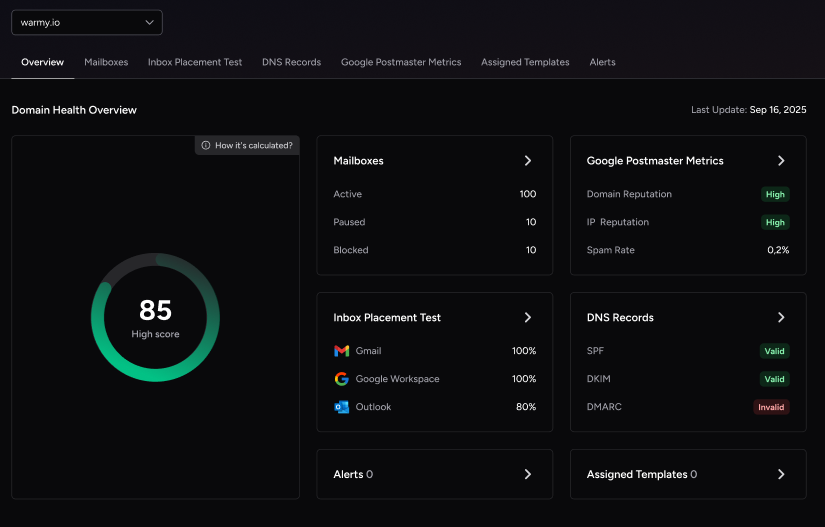
Warmy.io operates by gradually and intelligently increasing the volume of emails sent from your account. This methodical approach mimics authentic email activity, thereby signaling to Internet Service Providers (ISPs) and blacklist operators like Hostkarma that your email practices are legitimate and trustworthy.
Benefits of Using Warmy.io

Utilizing Warmy.io offers a host of advantages, key among them being improved email deliverability and effective reputation management.
Enhanced Deliverability. By carefully warming up your email account, Warmy.io helps ensure that your emails are more likely to land in the recipient’s inbox rather than being flagged as spam. This is critical for businesses whose operations heavily rely on email communications.
Reputation Management. Warmy.io aids in building and maintaining a positive sender reputation. A good reputation reduces the likelihood of being blacklisted and helps in maintaining consistent email deliverability.
Features Enhancing Email Security:
- Gradual Increase in Email Volume. Warmy.io intelligently increases your email volume, closely monitoring responses and engagement to avoid triggering spam filters.
- Realistic Email Interactions. The service simulates real email interactions, ensuring that the warm-up process appears natural to ISPs.
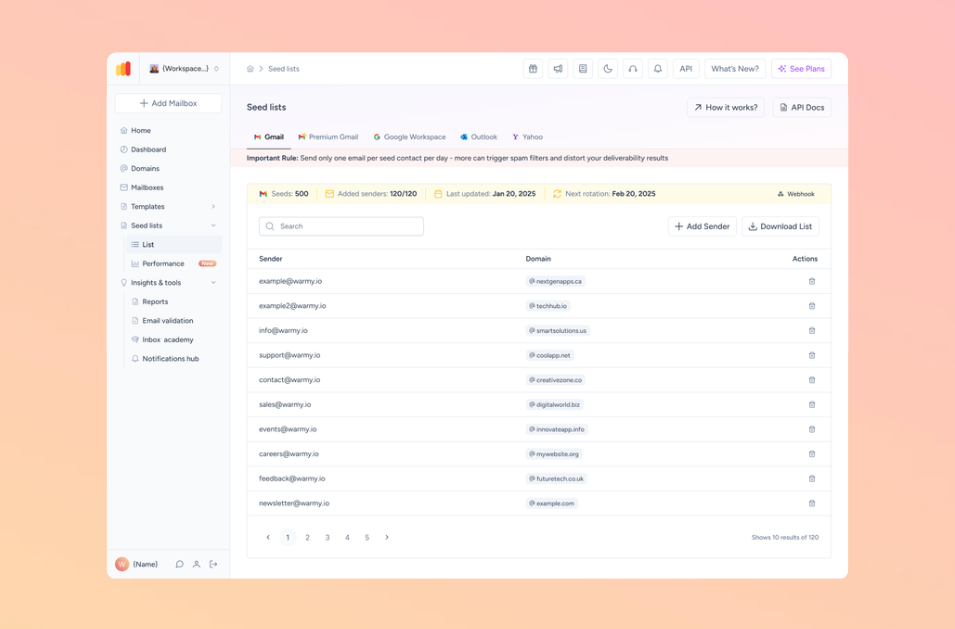
- Analytics and Reporting. Warmy.io provides detailed analytics, giving you insights into your email performance and areas for improvement.
Conclusion
As we conclude our exploration into the realms of digital blacklisting and email management, it becomes evident that understanding and managing your digital presence is not just a technical necessity but a cornerstone of successful online communication. The journey through the intricacies of Hostkarma and the strategies for delisting underscores the importance of vigilance and proactive measures in maintaining a healthy digital footprint.
In summary, the key to thriving in the digital landscape lies in embracing a proactive approach towards email management and utilizing innovative tools like Warmy.io. By doing so, you ensure that your digital communications are not only effective but also secure, laying a strong foundation for sustained success in all your online endeavors.
Ready to stop firefighting blacklist issues one at a time? Book a free demo with Warmy’s deliverability team and see how automated warm-up keeps your IPs and domains off lists like Hostkarma in the first place.