

A CNAME (canonical name) record is a DNS record that makes one domain name an alias of another. When someone looks up the alias, DNS follows the CNAME to the target name and returns that name’s records. Email services use CNAMEs to host your DKIM keys and tracking links on their servers.
If an ESP just sent you a list of records to add, “what is a CNAME record” is usually the first question. The second is why the list has so many of them, and we cover that after the basics.
What Is a CNAME Record?
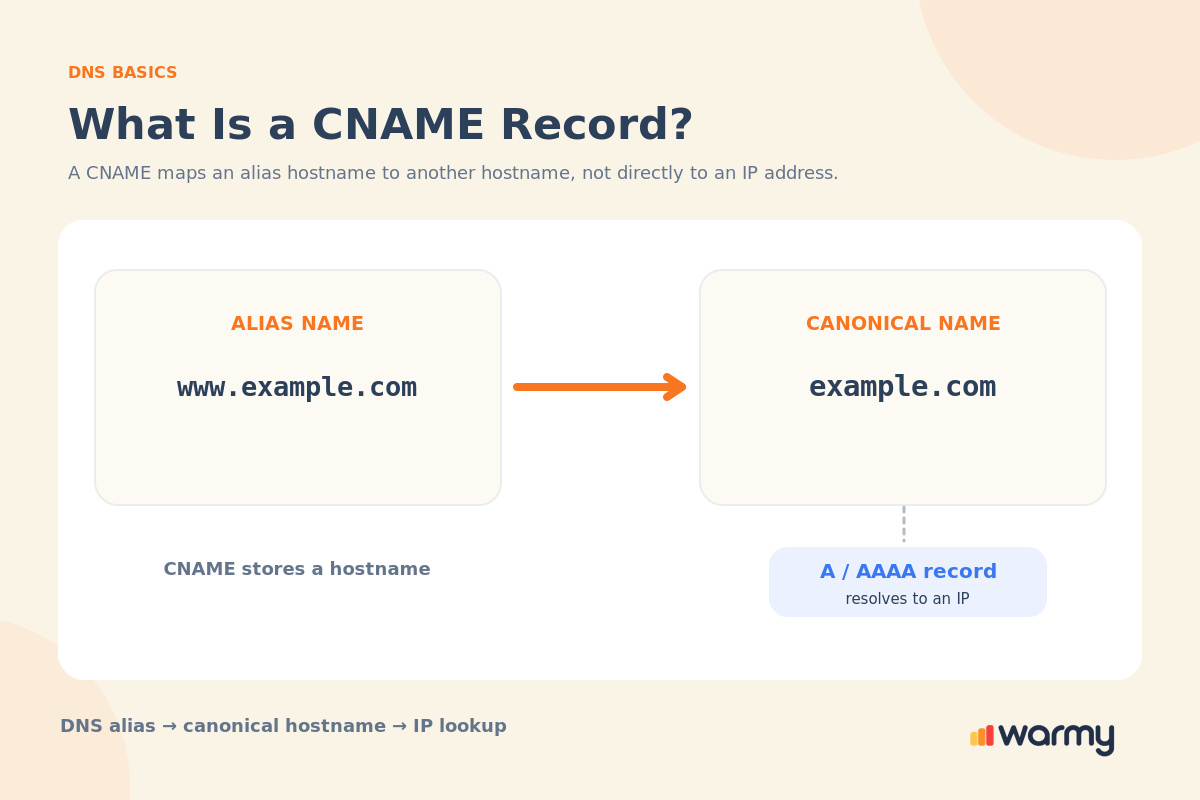
CNAME stands for canonical name. A canonical name record says that one name (the alias) is another name for a second one (the canonical, or real, name). The record is defined in RFC 1034, and RFC 1035 lists it as record type 5.
A CNAME holds a name and nothing else. It can’t store an IP address or text. All it tells a resolver is “for this name, go and ask about that other name.”
A CNAME isn’t a redirect in the web sense, either. An HTTP redirect sends a browser to a different URL, and the address bar changes. A CNAME does its work during the DNS lookup, before any connection is made. The browser or mail server keeps using the alias, and DNS fetches the answers from the target.
Every CNAME has the same four fields, although DNS panels label them a little differently:
| CNAME record field | Also called | What it holds | Example |
|---|---|---|---|
| Name | Host, Hostname | The alias you are creating | www |
| Type | Record type | Always CNAME | CNAME |
| Value | Target, Points to | The canonical name the alias points to | example.com |
| TTL | Time to live | How long resolvers may cache the answer, in seconds | 3600 |
Here is a CNAME record example in zone file format, the way a DNS server stores it:
www.example.com. 3600 IN CNAME example.com.The dot at the end marks a fully qualified domain name (FQDN). Most DNS panels add it for you.
How a CNAME Lookup Works
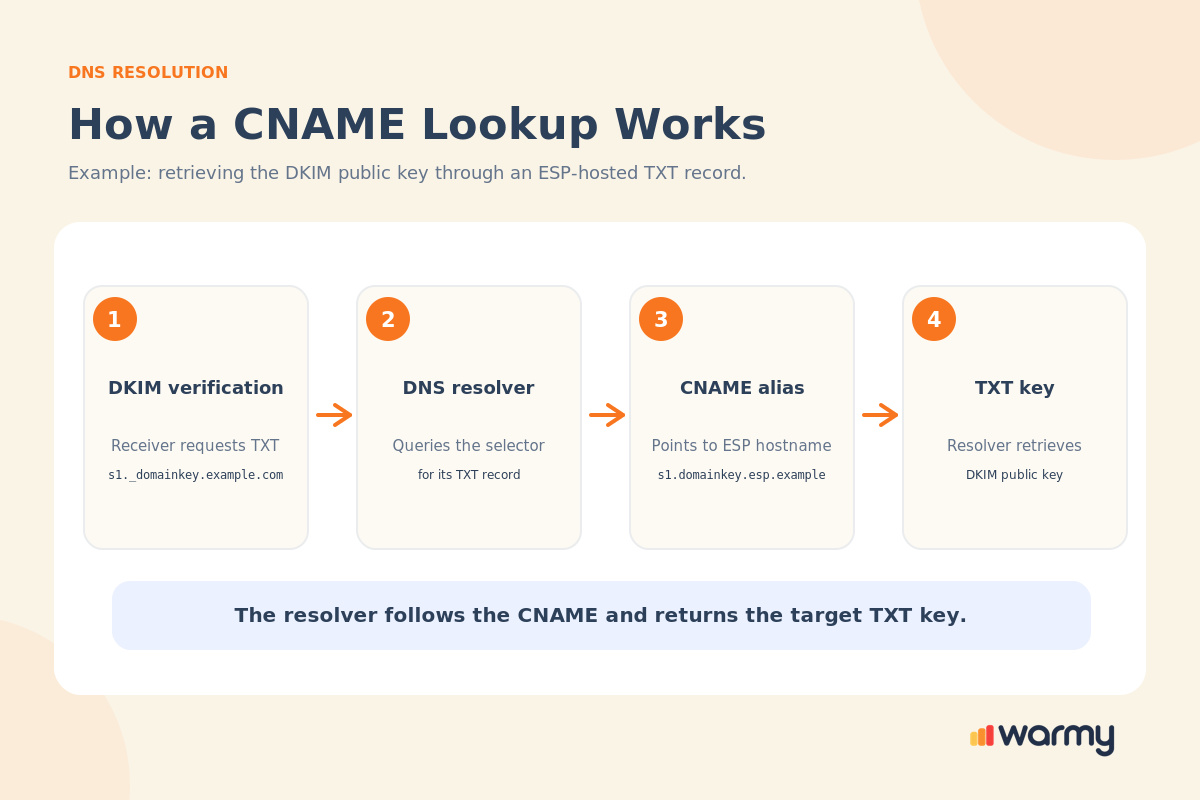
A DNS CNAME record changes the path of a lookup. Say a receiving mail server wants to verify a DKIM signature from SendGrid. It asks for the TXT record at s1._domainkey.example.com. The resolver finds a CNAME at that name, so it repeats the question for the target, s1.domainkey.u1234567.wl001.sendgrid.net, and returns the TXT record it finds there. The receiver gets SendGrid’s public key while asking only about your domain.
You can watch this happen with dig. The output below is anonymized:
$ dig TXT s1._domainkey.example.com
;; ANSWER SECTION:
s1._domainkey.example.com.  3600  IN  CNAME  s1.domainkey.u1234567.wl001.sendgrid.net.
s1.domainkey.u1234567.wl001.sendgrid.net.  3600  IN  TXT  "k=rsa; t=s; p=MIGfMA0GCSqGSIb3..."
Every extra hop costs another query. A CNAME that points to another CNAME still resolves, but long chains are slower, and removing one link breaks the whole chain. Keep your side to one hop and leave the rest to your provider.
CNAME vs A Record (and ALIAS/ANAME)
An A record maps a name to an IPv4 address (AAAA does the same for IPv6). A CNAME maps a name to another name. If you run the server and know its IP, use an A record. If someone else runs the service, use a CNAME, because they can change their IPs at any time and your record will still follow the name.
The root domain (the zone apex, such as example.com without www) is where this gets awkward. CNAMEs aren’t allowed there, which is a problem when a CDN or host gives you only a hostname. DNS providers work around it with non-standard ALIAS or ANAME records, and Cloudflare does it with CNAME flattening. In each case the provider looks up the target itself and answers with plain A or AAAA records, so the other records on the root keep working. That is the practical CNAME vs ALIAS difference: with ALIAS, the lookup happens at your DNS provider, and resolvers only ever see IP addresses.
| CNAME vs A record | A record | CNAME | ALIAS / ANAME |
|---|---|---|---|
| What it stores | An IPv4 address | Another domain name | Another domain name |
| What resolvers receive | The IP address | The target name, then its records | A or AAAA records (the provider resolves the target) |
| Allowed on the root domain | Yes | No | Yes |
| Other records on the same name | Allowed | Not allowed | Allowed |
| Standard | Yes (RFC 1035) | Yes (RFC 1034) | No, provider-specific |
| When to use | Your own server with a known IP | Subdomains for third-party services: DKIM, tracking, verification | Pointing the root domain at a CDN or host |
How A, MX and rDNS records work together on a mail server is covered in our guide to DNS MX record, A record and rDNS.
CNAME Record Rules That Break DNS
Five rules cover most CNAME problems, and the first one matters most for email.
You can’t put a CNAME on the root domain. The root holds the SOA and NS records that make your zone work, and a CNAME can’t share a name with any other record. On a sending domain the cost is high. A CNAME on example.com would leave no room for your MX record or your SPF TXT record, so inbound mail and SPF checks for the whole domain would fail.
That same limit applies on every other name. RFC 1912 states that a CNAME is not allowed to coexist with any other data, so you can’t have a CNAME and a TXT at s1._domainkey.example.com, or a CNAME and an MX at mail.example.com. Name servers such as BIND refuse to load a zone with this conflict.
It also works in the other direction. RFC 2181 says the name in an MX or NS record must not be an alias, so point your MX at a hostname that has its own A record. Our free MX record lookup shows where your MX points right now.
The value of a CNAME is always a hostname, never an IP address. If an IP is all you have, you need an A record.
Finally, avoid chains and loops. One hop is fine. Several add lookups, and a loop (A points to B, B points back to A) leaves the name with no answer at all.
Before you add a record your ESP sends, check what’s already on that name. A CNAME has to be alone, so an old TXT key or a doubled domain in the host field is enough to break DKIM, and the verify screen often won’t say why.
Daniel Shnaider, CEO
How Email Senders Use CNAME Records
When you connect an ESP, receivers have to see your domain in the authentication results, and the ESP wants its keys and servers on its own side so it can change them without asking you. A CNAME handles both, because the record name sits on your domain while the data it points to stays with the ESP. Gmail and Yahoo also expect authenticated mail from bulk senders, and our Google and Yahoo sender requirements checklist covers what they check.
DKIM key delegation
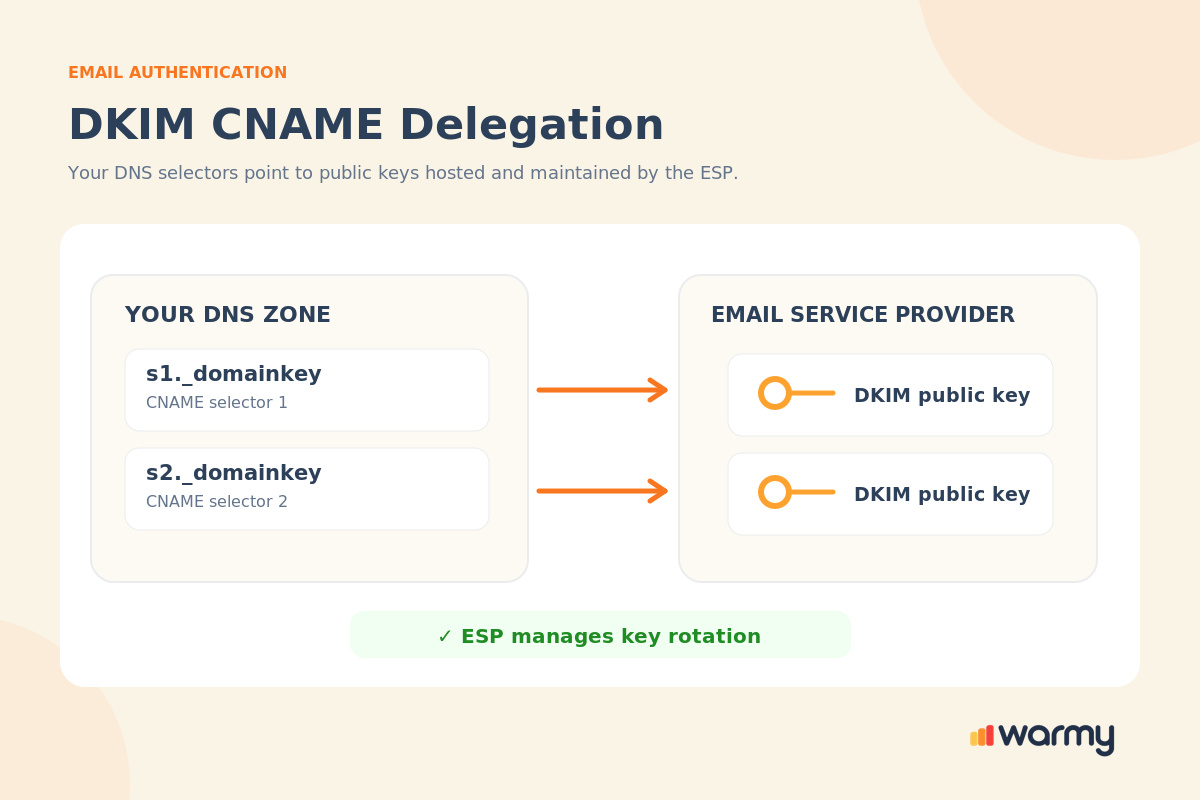
A DKIM public key sits at a selector name: selector._domainkey.yourdomain.com. You can publish the key there as a TXT record, or publish a DKIM CNAME that points the selector at a key your ESP hosts. The ESP can then replace the key with no DNS edits on your side. Most ESPs give you two selectors, so one key signs while the other rotates.
Selector names differ by provider. SendGrid uses s1 and s2 when automated security is on. Mailchimp usually gives k2 and k3 (older accounts may differ). Amazon SES Easy DKIM generates three CNAMEs with random tokens as selectors, which we cover in our Amazon SES SPF and DKIM guide. Microsoft 365 uses selector1 and selector2, with targets under dkim.mail.microsoft for custom domains added since May 2025. Our guide to DKIM in Microsoft 365 covers the full setup. Always copy the exact names from your ESP’s dashboard.
For the signing side, start with what is DKIM. Our DKIM selector guide shows how to find the selector in a message header.
Return-path and bounce domains
The return-path (bounce domain) is where bounces go, and it is the domain SPF checks. If it belongs to your ESP, SPF passes for the ESP’s domain and does nothing for your DMARC. SendGrid fixes this with a CNAME such as em1234.yourdomain.com pointing to its servers. Our SendGrid SPF, DKIM and DMARC guide lists the full record set. Your return-path then sits under your domain, and SPF aligns with a From address on that same domain under DMARC’s default relaxed alignment. Amazon SES gets the same result with a custom MAIL FROM domain built on MX and TXT records. More on alignment in what is DMARC and in our guide to SPF alignment issues.
Branded tracking domains
Click tracking routes links through a tracking host the ESP shares with other customers. A branded tracking domain is a CNAME such as links.yourdomain.com pointing to that host, so your links show your own domain. Shared tracking hosts can also hurt inbox placement, as we explain in how tracking links affect deliverability. We cover the setup in our guide to custom tracking domains.
Other email records you can delegate
Some services verify domain ownership with a CNAME instead of a TXT. Hosted MTA-STS services ask you to point mta-sts.yourdomain.com at them, and some DMARC monitoring services host your DMARC record through a CNAME at _dmarc.yourdomain.com. Once DMARC reports start arriving, you can read them in Warmy DMARC monitoring. The table sums up what common ESPs ask for. For the full Klaviyo setup, see our Klaviyo SPF, DKIM and DMARC guide.
| ESP | CNAMEs you add | Why |
|---|---|---|
| SendGrid | em1234 (return-path), s1._domainkey, s2._domainkey; optional link branding | SPF on a return-path under your domain, DKIM keys SendGrid rotates, branded links |
| Mailchimp | k2._domainkey, k3._domainkey | DKIM keys hosted by Mailchimp |
| Amazon SES | Three <token>._domainkey records | Easy DKIM keys SES hosts and rotates |
| Microsoft 365 | selector1._domainkey, selector2._domainkey | DKIM keys Microsoft hosts and rotates |
| Klaviyo (static routing) | Sending subdomain such as send, plus a DKIM pair such as km1._domainkey and km2._domainkey | Branded sending domain with DKIM. Dynamic routing uses NS records instead |
How to Add a CNAME Record (and Mistakes to Avoid)
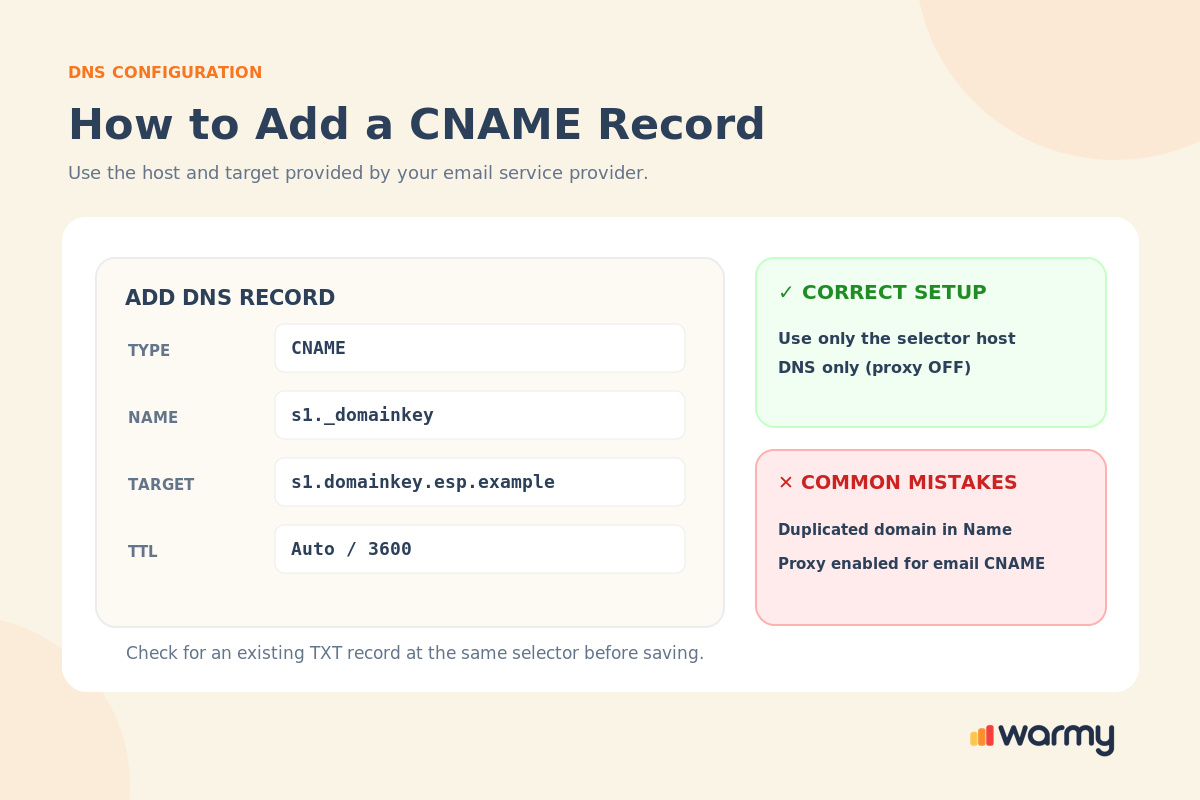
Open your domain’s DNS settings, add a new record and set the type to CNAME. Paste the host from your ESP into Name and the target into Value. Leave TTL at the default unless your ESP asks otherwise, save, then click verify in the ESP.
When verification fails, it’s usually one of four mistakes.
Many panels add your domain to the Name field on their own, so pasting s1._domainkey.example.com creates s1._domainkey.example.com.example.com. Enter only s1._domainkey.
If your DNS runs on Cloudflare, check the proxy status. A proxied CNAME answers with Cloudflare’s IP addresses instead of your ESP’s target. Cloudflare’s documentation says email and domain verification records should be DNS only, so set every ESP CNAME to DNS only (gray cloud).
Stray characters break records too. A space copied from the dashboard is enough, and so is an extra dot in a panel that adds its own.
And if an old TXT DKIM key sits at the selector name, delete it before you add the CNAME. The two can’t coexist. If that selector still signs live mail, swap the records in one sitting and send a test message right away, so DKIM is never left without a key.
After you save, resolvers that cached an older answer keep it until its TTL runs out. Our guide to DNS propagation explains the delays.
How to Check a CNAME Record
You can run this check from any terminal. On macOS or Linux, run dig with the record type and the full name:
dig CNAME s1._domainkey.example.com +shortA correct record returns the target name. An empty answer means the record is missing, saved under a slightly different name or not visible yet. nslookup does the same job and also works on Windows:
nslookup -type=CNAME s1._domainkey.example.comTo make sure the key itself is valid, run your selector through our DKIM checker. For MX and the other records your mail depends on, see MX and DNS record lookup. Our DNS record checker tests SPF, DKIM, DMARC and MX in one pass. Once everything resolves, run a free email deliverability test to see how your authentication looks from the receiving side.
FAQ
What is a CNAME record in simple terms?
A CNAME is a nickname in DNS. It makes one domain name an alias of another, so anyone who looks up the alias gets the target’s records. A simple CNAME record example is www.example.com pointing to example.com, so both names lead to the same server.
What is the difference between a CNAME and an A record?
An A record points a name to an IPv4 address. A CNAME points a name to another name, and DNS then looks up that name’s records. So the CNAME vs A record choice depends on what you have. Use an A record for a known IP and a CNAME for a hostname someone else manages.
Can I use a CNAME record on my root domain?
No. The root domain must hold SOA and NS records, and a CNAME can’t share a name with other records. On a mail domain it would also block MX and SPF. To point the root at a hostname, use an ALIAS or ANAME record from your DNS provider.
Can a CNAME record point to an IP address?
No. A CNAME always points to another domain name. If you enter an IP address as the value, the panel will reject it or treat it as a hostname. To point a name at an IP, create an A record (AAAA for IPv6).
Why does my email provider ask me to add CNAME records?
CNAMEs let your provider keep DKIM keys, bounce handling and tracking hosts on its own servers while receivers see your domain. The provider can rotate keys or move servers with no new DNS edits from you, so authentication keeps working as its setup changes.
Can DKIM use a CNAME record instead of a TXT record?
Yes. The key itself is still a TXT record, but it lives on your ESP’s domain. A DKIM CNAME at selector._domainkey.yourdomain.com points to it, and receivers follow the CNAME to read the key. SendGrid, Mailchimp, Amazon SES and Microsoft 365 all work this way.
Why is my CNAME record not working?
The usual causes are a doubled domain in the host field, a Cloudflare proxy left on, a typo in the target, or another record on the same name. Check it with dig or nslookup. An empty answer for a correct record usually means it is still propagating.
How long does a CNAME record take to work?
A new CNAME is often visible within minutes, but resolvers that cached an older answer keep it until its TTL expires. If your ESP checked before the record existed, the empty answer is cached too, for the negative-caching time set in your zone’s SOA record. Your ESP may also recheck DNS on its own schedule, so verification can lag behind the change. If it still fails after a few hours, check the record again.