TL;DR: Keep your email template size at 600px wide, front-load your message in the first 300-500px since height has no fixed rule, and keep your total HTML under 80-102KB or Gmail will clip your footer, unsubscribe link, and closing CTA. Attachment limits differ by provider and account type, so don’t assume 25MB is safe everywhere. Getting these numbers right still doesn’t guarantee inbox placement, so check your template for spam triggers before you send.
Warmy is an AI-driven email deliverability platform that helps you confirm your templates are not just sized correctly but are actually reaching the inbox.
What is the best email template width and height?
- The ideal email template width is 600 pixels. This has been the industry standard for over a decade and it holds for good reason. A 600px email marketing template renders cleanly in Gmail, Outlook, Yahoo, Apple Mail, and on mobile devices without horizontal scrolling.
- Some designers work with 650px or 700px for a slightly more spacious layout. These widths are also generally safe on modern clients. However, going beyond 700px increases the risk of horizontal scrolling in older Outlook versions and on smaller mobile screens.
- There is no fixed “correct” height for an email template. Height is simply determined by how much content you include. That said, shorter emails consistently outperform longer ones in engagement. As a practical guideline: put your most critical content — your offer, key message, or primary CTA within the first 300–500 pixels of vertical space, where it’s visible before the recipient has to scroll.
At a glance: recommended email template dimensions:
| Element | Recommended Width | Height | Notes |
|---|---|---|---|
| Email template (desktop) | 600–700px | Content-driven | 600px is the safest universal standard |
| Email template (mobile) | 320–480px | Content-driven | Achieved through responsive design |
| Email header image | 600px | 150–200px | Under 200KB; use alt text |
| Email banner | 600px | 150–200px | Up to 300px for promotional banners |
| Body images | Up to 600px | Proportional | Under 200KB per image |
| Subject line | — | — | 40–60 characters (~5–9 words) |
| Preheader text | — | — | 40–130 characters (device-dependent) |
| Email signature | — | Max 6 lines | 65–70 characters per line |
Email template size in pixels, inches & centimeters
One of the most commonly asked questions in email design is: what are email template dimensions in inches?
The answer depends on screen resolution (PPI or pixels per inch). Email and web design defaults to 72 PPI on Mac and most professional design tools, while Windows defaults to 96 PPI. Here’s how the most commonly used email dimensions convert across both standards.
Email template width conversions
| Width (Pixels) | Inches at 72 PPI | Inches at 96 PPI | Centimeters at 72 PPI |
|---|---|---|---|
| 600px | 8.33″ | 6.25″ | 21.17 cm |
| 650px | 9.03″ | 6.77″ | 22.94 cm |
| 700px | 9.72″ | 7.29″ | 24.69 cm |
| 800px | 11.11″ | 8.33″ | 28.22 cm |
Email header image dimension conversions
| Dimensions (Pixels) | Inches at 72 PPI | Centimeters at 72 PPI |
|---|---|---|
| 600 × 150px | 8.33″ × 2.08″ | 21.17 × 5.29 cm |
| 600 × 200px | 8.33″ × 2.78″ | 21.17 × 7.06 cm |
| 600 × 250px | 8.33″ × 3.47″ | 21.17 × 8.82 cm |
| 600 × 300px | 8.33″ × 4.17″ | 21.17 × 10.58 cm |
Email banner dimension conversions
| Dimensions (Pixels) | Inches at 72 PPI | Centimeters at 72 PPI |
|---|---|---|
| 600 × 150px | 8.33″ × 2.08″ | 21.17 × 5.29 cm |
| 600 × 200px | 8.33″ × 2.78″ | 21.17 × 7.06 cm |
| 600 × 300px | 8.33″ × 4.17″ | 21.17 × 10.58 cm |
Email header image size and dimensions
Your email header is the first visual element a recipient sees. Get the dimensions right, and it sets a professional, brand-consistent tone for everything that follows. Get it wrong, and it loads slowly, renders oddly on mobile, or gets blocked by image-suppressing email clients.
Recommended email header image dimensions:
- Width: 600px (matching your template width exactly).
- Height: 150–200px for most email types; up to 250px for brand-led or visual campaigns.
- File size: Under 200KB, ideally under 100KB.
- File format: JPEG for photographic headers; PNG for headers with logos, text overlays, or transparent elements.
Email header size in inches (at 72 PPI):
- 600 × 150px → 8.33″ × 2.08″.
- 600 × 200px → 8.33″ × 2.78″.
- 600 × 250px → 8.33″ × 3.47″.
Email header size in inches (at 96 PPI):
- 600 × 150px → 6.25″ × 1.56″.
- 600 × 200px → 6.25″ × 2.08″.
- 600 × 250px → 6.25″ × 2.60″.
Always include descriptive alt text for your header image. Many email clients, including Outlook, block images by default. Alt text ensures your header’s message communicates even when the image doesn’t load, and it also signals to spam filters that your email is legitimate and properly built.
Not sure if your current template is already too heavy? Run it through Warmy’s free Template Checker before you build out the rest of your design.
Email banner size: Best practices
Email banners appear within the body of your email to draw attention to a promotion, event, product launch, or key offer. They’re one of the highest-impact design elements in your template, so sizing and design quality both matter.
Recommended email banner dimensions:
- Width: 600px.
- Height: 150–200px for standard inline banners; up to 300px for full-width promotional banners.
- File size: Under 200KB.
- Format: JPEG for photo-based banners; PNG for text-heavy or graphic banners.
Email banner size in inches (at 72 PPI):
- 600 × 150px → 8.33″ × 2.08″.
- 600 × 200px → 8.33″ × 2.78″.
- 600 × 300px → 8.33″ × 4.17″.
Additional tips:
- Design your banners to be readable even at reduced sizes, since mobile clients often scale images down.
- Avoid placing critical information like promo codes or offer deadlines inside the image file itself.
- Use HTML text wherever possible so the information is searchable, copy-pasteable, and visible even when images are blocked.
Email body image size
Not only should your emails be well-written and highly targeted, but they also need to look good. Therefore, crafting a responsive email template ensures your emails look perfect on both desktop and mobile, making them more engaging and professional. Additionally, images embedded throughout the body of your email need to balance visual quality with file efficiency.
Recommended email body image specifications:
- Width: Up to 600px for full-width images; proportionally smaller for inline or side-by-side images.
- Resolution: 72–96 PPI for screen rendering; 300 PPI is for print only and creates unnecessarily large files.
- File size: Under 200KB per image; under 1MB total across all images in the email.
- Format: JPEG for photographs, PNG for graphics with transparency or text, GIF converter for simple animations.
Host images externally when possible. Rather than embedding images as attachments, upload them to your web server or a CDN and reference them via a URL in your HTML. This keeps your email’s code size down, improves load speed, and prevents your email from being clipped by Gmail’s 102KB threshold.
It’s also worth mentioning that responsive design is now a necessity for email templates. Using a responsive HTML builder can make this process much easier, allowing the email to adapt to the screen size of the recipient’s device and providing an optimal viewing experience on desktop and mobile devices alike.
Dark mode and image sizing
Most major email clients now default to dark mode for a large share of users, which changes how your images actually render, not just how they’re sized. A few things to check before you finalize dimensions:
- Transparent PNG logos can disappear or look wrong against a dark background. Build a dark-mode-safe version with a subtle outline or a solid background, at the same 600px width as your primary logo.
- Background colors set behind images should be tested in both light and dark mode. What looks like white space in light mode can become a jarring dark block, or vice versa, if the client applies automatic color inversion.
- Keep file sizes the same across light and dark mode versions of an image. Serving two versions doubles your total image weight, which pushes you closer to Gmail’s 102KB limit from block 4.
Email subject line length
Your subject line is what gets your email opened or ignored. Thus, length plays a direct role in how much of it recipients actually see.
Recommended subject line length:
- Optimal: 40–60 characters (~5–9 words).
- Mobile preview: Most mobile apps show 30–40 characters before truncating.
- Desktop preview: Gmail and Outlook typically show 60–70 characters.
Additional tips:
- Keep subject lines specific and action-oriented.
- Avoid ALL CAPS, excessive punctuation, and overused spam trigger words like “Free,” “Guaranteed,” or “Act now”
- Steer clear of words that trigger spam filters. These actively hurt your deliverability, not just your click rate. These words are commonly used by spammers, so ESPs and mailbox providers now treat these as suspicious. Using any of them in any capacity, even though your content is legitimate, can lead to being sent to the spam folder.
Email preheader size
The preheader is the short preview text that appears beside or below your subject line in the inbox. This is your second opportunity to encourage the recipient to open before they’ve even read your email.
Recommended preheader length:
- Desktop: 90–130 characters.
- Mobile: 40–70 characters (less screen space available).
- Universal sweet spot: 85–100 characters.
Additional tips:
- The preheader should complement your subject line, not repeat it.
- Use it to answer the question your subject line raises. For example, add a specific detail, create urgency, or answer “what’s in it for me?”
- Avoid leaving the preheader empty as many email clients will automatically pull the first line of your email body as a fallback, which is often “View this email in your browser”
Is your template designed within these specs? Confirm it’s also deliverability-ready with Warmy’s Email Template Checker. It scans for spam triggers, HTML issues, and image-to-text ratio problems before you send to a single real address.
Email signature size
A professional email signature reinforces your brand identity without overwhelming the recipient or triggering spam filters.
Recommended email signature specifications:
- Length: No more than 4–6 lines.
- Characters per line: 65–70 maximum.
- Logo/image (if used): 200–300px wide, under 50KB, with alt text.
- Font size: 11–12pt minimum for readability across devices.
Include your full name, job title, company name (linked to your website), and a primary contact method. A single CTA link (e.g., a meeting scheduling link or a relevant resource) is acceptable, but more than 3 links in a signature can trigger spam filters. Keep it simple and scannable.
Pro Tip: Use Warmy’s free Signature Builder for an easy way of generating an email signature that looks good and is compliant.
Email size limits by provider: Gmail, Outlook & Yahoo Compared
Different inbox providers impose different limits on total email size and individual attachments. Understanding these limits is the difference between emails that deliver and emails that bounce, clip, or fail entirely.
| Provider | Max Attachment Size | What Happens If Exceeded |
|---|---|---|
| Gmail | 25MB per attachment | Email is clipped; recipient must click “View entire message” |
| Outlook (personal account) | 25MB per message, this includes the body text and all attachments combined | Email may be rejected or bounced |
| Microsoft 365 / Exchange Online (business accounts) | 35MB by default, but admins can configure it anywhere from 10MB up to a 150MB hard cap, so the real limit depends on the recipient’s organization. | The sender gets a Non-Delivery Report (NDR) back with SMTP error 552 5.2.3: “message size exceeds fixed maximum message size.” Nothing reaches the recipient’s inbox at all. |
| Yahoo Mail | 25MB total per email | Email may be rejected |
| Apple Mail | 20MB (Mail Drop for larger) | Mail Drop link offered for large files |
The Gmail 102KB threshold is one of the most overlooked deliverability issues in email marketing. If your email’s HTML code exceeds 102KB, Gmail clips the email body. Recipients see a “Message clipped” notice and must click to view the rest. This means your footer links, unsubscribe button, and bottom CTA may never be seen.
This is not a rare edge case. An analysis of over 6,000 sent emails found that 5.5% exceeded the 102KB threshold without the sender realizing it. Because Gmail’s exact clipping point isn’t perfectly consistent, and because your email service provider often adds tracking code that increases file size after you hit send, a safer target is to keep your HTML under 80KB rather than cutting it close at 102KB.
How to stay under Gmail’s 102KB limit:
-
- Avoid unnecessarily long HTML strings or overly complex template structures.
-
- Minimize inline CSS. Use a stylesheet reference or class-based CSS where possible.
-
- Remove unnecessary whitespace and comments from your HTML code.
-
- Host all images externally rather than embedding them.
-
- Avoid unnecessarily long HTML strings or overly complex template structures.
Email attachment size: What you need to know
The attachment size limit determines the maximum file size you can include directly in an email. Here’s a quick reference:
- Gmail: 25MB per attachment. Files over this limit prompt Google to automatically offer a Google Drive link instead.
- Outlook: 25MB per attachment. Exchange server admins can configure this limit differently.
- Yahoo Mail: 25MB per email, covering the message plus all attachments combined.
- Apple Mail: 20MB per attachment via standard delivery; larger files can be sent using Apple Mail Drop.
To avoid delivery issues, compress attachments before sending and consider linking to files hosted in cloud storage (Google Drive, Dropbox, OneDrive) rather than attaching them directly.
Additional tips:
- For those sending automated reporting or customized PDFs, a PDF generation SDK can generate server-side PDFs with leaner images and fonts to keep attachments within those limits.
- Many senders also compress PDF files before attaching them so the total message size stays within email provider limits.
Get your email template right, then make sure it delivers
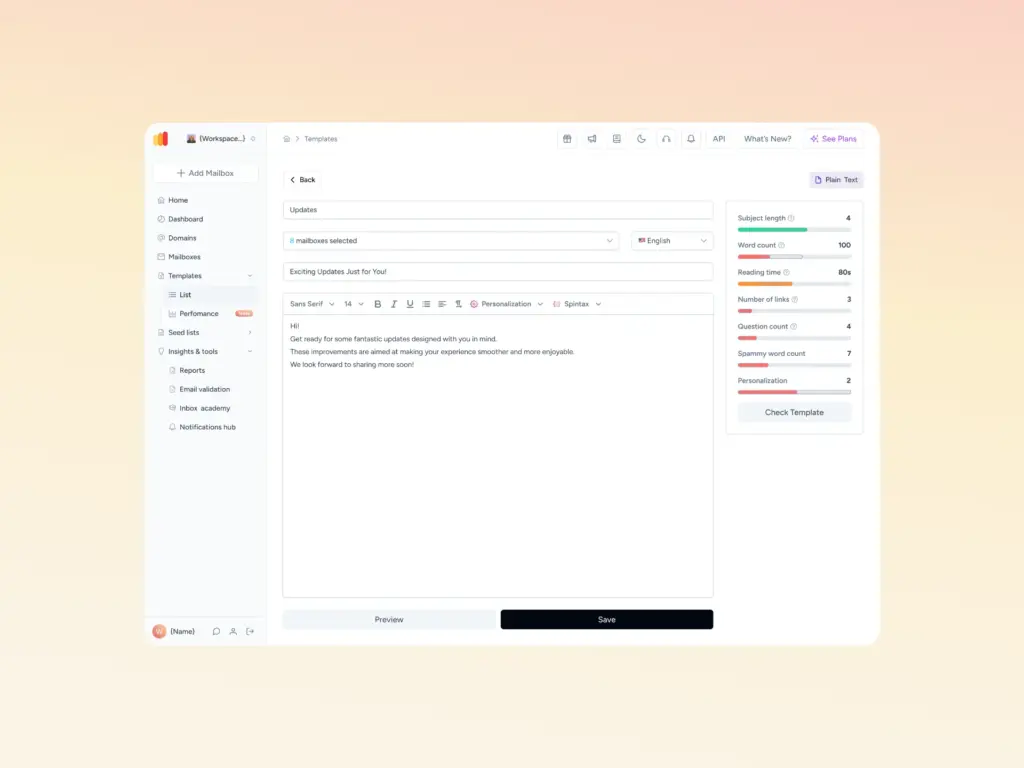
Getting the dimensions right is only half the job. A perfectly sized email that carries spammy language, broken HTML, or a poor image-to-text ratio will still miss the inbox.
Every send deserves both: a template built to spec and one that’s been checked for deliverability before it reaches a single real address.
Warmy.io gives you the tools to do both for free:
- Use the Template Checker to validate your email design against spam triggers, HTML issues, and formatting red flags before you send.
- Then run the free email deliverability test to see exactly where your emails land (inbox, promotions, or spam) across Gmail, Outlook, Yahoo, and other major providers.
Want a second set of eyes on your full deliverability setup, not just your template? Book a free Warmy demo and walk through it with the team.