SMTP Error 500 5.0.0 means the receiving mail server rejected your message outright because it could not process the command your server sent. It is a permanent failure, not a temporary glitch, so resending the identical email will not fix it. The fix depends on the underlying cause: malformed SMTP commands, broken email headers, or misconfigured authentication (SPF, DKIM, DMARC).
Below, we break down exactly why this error happens, walk through a six-step process to diagnose and resolve it, and cover how to prevent it from recurring.
What does SMTP Error 500 5.0.0 mean and why should you be concerned?
SMTP Error 500 represents a permanent failure, while the enhanced status code 5.0.0 specifies the type of error that you are receiving. The “5.0.0” designation marks it as a hard bounce, meaning the receiving mail server has completely rejected your email and won’t accept it without changes.
Per IETF RFC 3463, the enhanced status code standard, “X.0.0” is officially defined as “Other undefined status” — used when a server can only report the general class of error, not a specific cause. That is exactly why the accompanying text message matters as much as the numeric code.
These codes together would not be enough, however. You also need to take note of the next messages to further isolate what you should do next. Here are some of the typical messages that come with it.
- “Unknown or unimplemented command”
- “Syntax error, command unrecognized”
- “Command parameter not implemented”
Basically, if you translate this into human language, the server is telling you “I don’t understand what you’re asking me to do, and I can’t process this email.”
Related Reading: The Ultimate Guide to SMTP Error Codes, What They Mean, and How to Fix Them
SMTP Error codes that contain 4XX pertains to errors that can be resolved with a simple retry or patience or even just waiting it out. But the 500-series errors are more alarming since they are permanent.
No matter how many times you resend it, your emails will not push through or be delivered unless you understand the cause of the problem and fix the underlying issue.
More importantly, repeated SMTP 500 errors can damage your sender reputation, leading to:
- Lower inbox placement rates
- Increased spam filtering
- Domain and IP blacklisting
- Reduced email engagement overall
Common causes of SMTP Error 500 5.0.0
Finding out what the potential triggers of this error are can help you move forward on the type of resolution you should do next. Remember that the SMTP 500-series errors signal that something is fundamentally wrong—either with:
- The sending mail client or server
- The structure of the email being sent
- The authentication or DNS configuration
- The receiving server’s rules or security filters
Until the root cause is fixed, further attempts will fail in the same way. Here are some of the most common causes to watch for:
1. Malformed SMTP commands
Your email client or server may be sending improperly formatted SMTP commands that violate protocol standards. This includes invalid syntax in the email transaction process or other commands the receiving server doesn’t recognize.
Typical issues include:
- Invalid characters in the header or body
- Missing From/To fields
- Incorrect line breaks or MIME formatting
- Unsupported SMTP verbs (such as outdated AUTH commands)
This occurs often with custom integrations, older CRMs, or misconfigured email clients. If your bounce message specifically flags a syntax problem rather than an unrecognized command, our SMTP Error 500 5.5.1 guide covers that closely related variant in more detail.
2. Invalid email headers or formatting
Email headers must follow strict RFC standards. Common header issues include:
- Incorrectly formatted From or To addresses
- Missing or malformed Subject lines
- Invalid MIME types or content encoding
- Improper line breaks or special characters
Related Reading: Everything You Need To Know About Email Headers
3. Misconfigured DNS or authentication
It is important to configure your authentication and DNS settings. A minute issue in DNS configuration can cause a major and permanent rejection of your emails. This is why it is important to configure your authentication protocols and DNS.
Key triggers include:
- SPF records not authorizing your sending server: The receiving server checks SPF and rejects mail from unauthorized IPs
- DKIM signatures missing or corrupted: Invalid or absent DKIM signatures fail validation
- DMARC alignment failures: When SPF or DKIM don’t align with your From domain
- Pointing MX records to the wrong mail system: Misdirected mail routing causes rejection
These authentication triggers overlap with several other permanent-failure codes. If your bounce message points specifically to a policy or reputation rejection rather than a syntax problem, see our SMTP Error 550 5.7.1 guide, which covers policy-based rejections in detail.
4. Server-side misconfigurations
Problems on either the sending or receiving server can trigger this error:
- DNS issues: Incorrect MX records or missing PTR records
- Expired or invalid SSL/TLS certificates: Causing authentication failures
- Unsupported authentication methods: The server doesn’t support your AUTH mechanism
- Outdated server software: Running incompatible SMTP versions
How to fix SMTP Error 500 5.0.0
Once you’ve uncovered the cause of the error, you can go ahead and try to resolve it. Follow these systematic steps to diagnose and resolve the error:
Step 1: Inspect your SMTP logs
The message after the SMTP error and enhanced status code will lead you to the correct path. Look for the exact command that failed: Is it an “unknown” or “unimplemented” command? Or a Syntax error. You can move one from there.
If it is an unknown or unimplemented command, you can either
- Switch to standard SMTP
- Shorten your command lines
- Update client software to match server capabilities
While syntax errors means that you need to validate your email headers or ensure proper line endings.
Note: Client tools, ESP dashboards, and cPanel log viewers typically provide access to this detail.
💡 Pro tip: Search your logs directly for “500 5.0.0” instead of scanning line by line. Most mail servers log the enhanced status code and the failed command on the same line, so a keyword search jumps straight to the failed transaction instead of making you read the whole session.
Step 2: Validate email headers and formatting
Make sure that your emails comply with RFC (Request For Comments) standards:
- Check that From, To, and Reply-To fields use proper email address format
- Verify subject lines don’t contain illegal characters
- Confirm proper MIME encoding for attachments
- Test with plain text emails first to eliminate formatting variables
Step 3: Verify authentication settings
One of the potential reasons why your recipient server is unable to recognize your message is due to possible misconfiguration of your authentication settings. Remember to check the following:
- SPF records: Sender Policy Framework helps specify which mail servers are authorized to send emails for a domain. A correctly published SPF record tells the receiving server your sending IP is authorized, which lowers the chance of an unexplained 500 5.0.0 rejection during the SMTP handshake.
- DKIM Signatures: DomainKeys Identified Mail are cryptographic signatures your server adds to outgoing email headers, which the receiving server verifies against your published public DNS key. If a signature is missing, invalid, or altered in transit, strict DKIM enforcement on the recipient’s side can trigger SMTP error 500 5.0.0. Confirm your DKIM key is published correctly and that your sending platform signs every outgoing message.
- DMARC Policy: Domain-based Message Authentication, Reporting, and Conformance is an email authentication protocol that builds on SPF and DKIM to protect domains from spoofing by specifying policies for handling failed authentications.A DMARC policy set to “quarantine” or “reject” can cause SMTP 500 5.0.0 rejections whenever a message fails SPF/DKIM alignment, so check your policy setting before assuming the problem lies elsewhere.
💡 Pro tip: Gmail and other major providers now publish minimum authentication requirements for any domain sending them mail — see Google’s email sender guidelines — so check your setup against the current requirements before assuming a one-off configuration mistake is to blame.
Step 4: Check DNS configuration
DNS issues often masquerade as SMTP errors:
- Verify MX records point to the correct mail servers
- Confirm PTR (reverse DNS) records exist for your sending IP
- Check for DNS propagation delays if you recently made changes
- Use DNS lookup tools to validate all records
Step 5: Test with simplified messages
Strip down your email to basics:
- Send a plain text message with minimal content
- Remove all attachments temporarily
- Use a simple, standard-compliant format
- If this succeeds, gradually add complexity back to isolate the problem
💡 Pro tip: Send your simplified test message to a free Gmail or Outlook address you control, rather than through a shared testing inbox. You will see the raw bounce message immediately, without a third-party spam filter softening or hiding the real error text.
Not sure which of these is causing your rejections? Run Warmy’s free Email Deliverability Test to check your SPF, DKIM, and DMARC records, scan for blacklisting, and see exactly where your emails are landing before you keep troubleshooting manually.
Step 6: Contact the recipient’s administrator
If you’ve exhausted all options on your end, the issue may lie with the receiving server:
- Provide them with complete error logs showing the 500 5.0.0 rejection
- Ask about their SMTP server configuration and any recent changes
- Inquire whether your domain or IP is blocked
- Request they check their server logs for additional error details
How Warmy paves the path to avoiding permanent errors
Warmy.io offers a set of features and tools that will stop you from being hit by a brick wall which is the error SMTP 500 5.0.0 and its other potential varieties. With a strong focus on ensuring email deliverability and reputation building, Warmy has a way to address other factors that may affect your ability to attain the best and ideal email health.
Email warmup strengthens domain identity

A large portion of 500-series errors can be traced back to misaligned or missing authentication. Warmy’s AI-powered email warmup solution gradually establishes your domain as trustworthy, not by brute force, but by pacing introductions — mailbox to mailbox, domain to domain — in a way that ESPs interpret as legitimate activity.
When providers recognize your domain as authentic, they’re far less likely to reject a command outright.
Related Reading: Warm Up vs Warm Up With Clicks: What 2025 Data Reveals About Real Inbox Gains
Domain Health Hub keeps authentication mistakes from slipping through
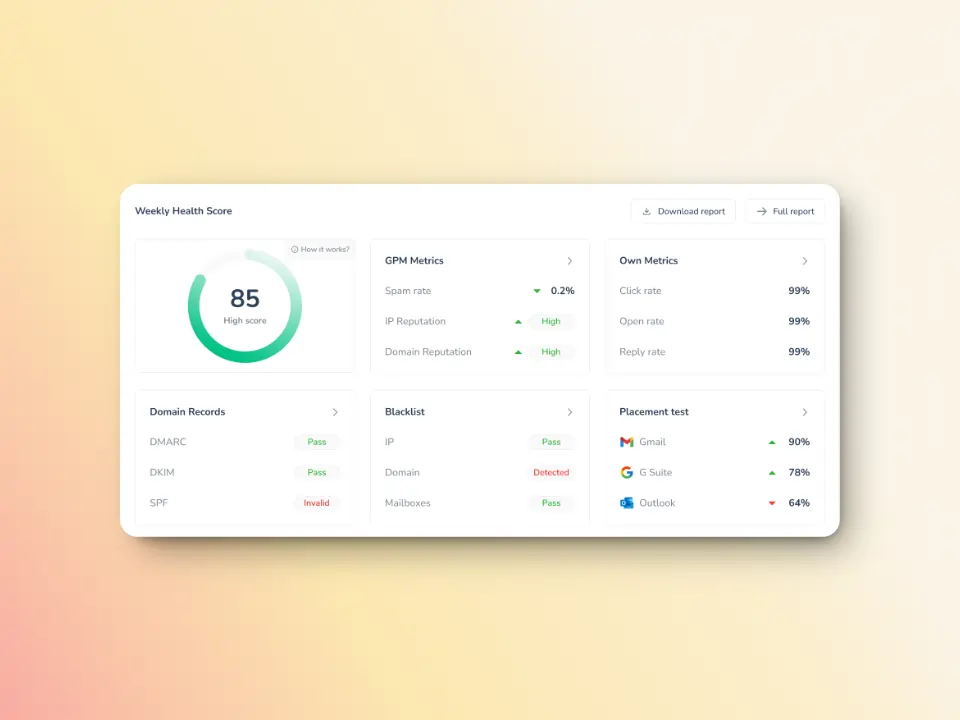
SMTP 500 errors love showing up when SPF, DKIM, or DMARC are out of tune. A single malformed signing key or missing authorization can trigger permanent rejection.
Warmy keeps an eye on your domain health by checking DNS records, tracking blacklists, and monitoring deliverability trends. It ensures your domain stays in good standing, preventing emails from getting lost in spam folders.
Inbox Placement Test keeps an eye on your deliverability
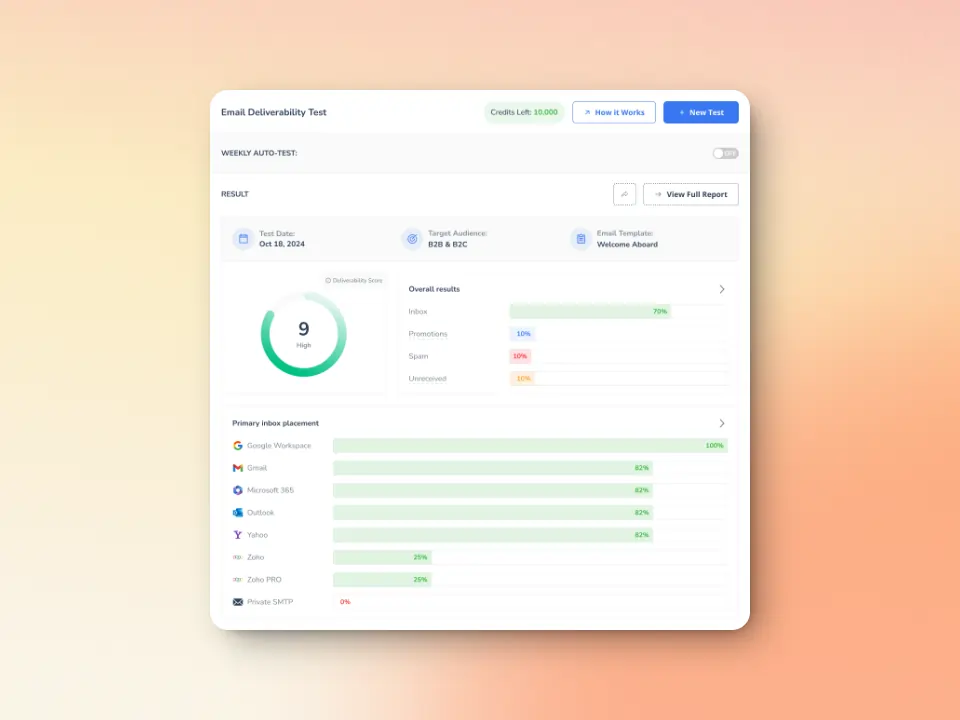
Malformed headers, broken message structures, or DNS routing gaps look amateurish to a receiving mail server. Warmy’s free inbox placement test and deliverability diagnostics grant real feedback loops — where your email lands, and how servers process it on the way.
- Evaluate sender reputation, domain health, bounce rates, and spam risks, which impact whether emails reach recipients.
- Measure inbox placement across providers like Gmail, Outlook, Yahoo, and more
- Detects technical issues with email authentication like SPF, DKIM, and DMARC, which are critical for ensuring messages are recognized as legitimate.
- Identify other potential issues affecting your email deliverability
Say goodbye to the weight and consequences of SMTP Error 500 5.0.0
SMTP Error 500 5.0.0 is a serious but solvable delivery problem. By systematically checking your SMTP commands, email formatting, authentication settings, and server configuration, you can identify and fix the root cause. Remember that prevention through proper setup, authentication, and gradual sending practices like those offered by Warmy will help you avoid these errors entirely.
Don’t let permanent delivery failures damage your sender reputation. Address SMTP 500 errors promptly, implement best practices, and maintain a healthy email infrastructure to ensure your messages reach their destination every time.
Try Warmy for Free and boost your email performance!