TL;DR: Real video playback only works in Apple Mail, which leaves two techniques that hold up everywhere: a clickable thumbnail linking to a hosted video, or a short GIF loop that fakes the playback. Both keep the file outside the message, and that’s what protects deliverability. Attaching a video is the one move that reliably gets a campaign filtered. Host on YouTube, Vimeo, or your own CDN, keep the HTML under 102KB so Gmail doesn’t clip it, and warm the domain before you send anything image-heavy.
Two details decide whether any of this survives contact with a real inbox. The play button has to be baked into the image file, because absolutely positioned CSS collapses in Outlook and leaves you with a bare thumbnail. And if you go the GIF route, frame one has to be a finished composition, since Outlook on Windows renders that single frame and discards the rest of the loop.
At the same time, you need to keep in mind that an attached video file increases the actual message payload, which is what security gateways weigh. Gmail’s 102KB clipping threshold counts only your HTML, so hosted images and video files sit outside it entirely. And a domain with no sending history carries an image-heavy campaign worse than a warmed one, however light the file is.
The open and click lift recorded for video campaigns was measured on emails that link out to a hosted video. Emails with playback inside were never part of that sample, which means the gain lies in the promise you make in the subject line and the creative.
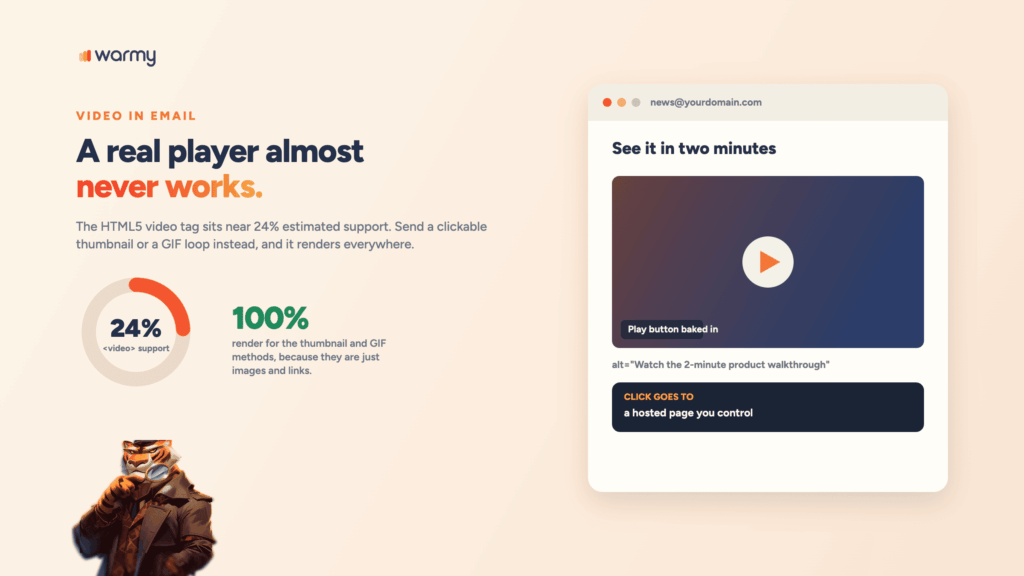
Here’s the part most guides bury: a real video player almost never works in email. The HTML5 <video> tag sits at roughly 24% estimated support across tracked clients, and Apple Mail’s the only mainstream client where it reliably plays. Gmail rips the tags out. Outlook shows the element and refuses to play it.
That doesn’t mean you skip video. How to send a video via email has a different answer than most people expect. You embed video in email as a clickable thumbnail pointing to a hosted file, or you fake the playback with a GIF. Both render everywhere, and neither puts a heavy file in the message.
Why real video barely works in email
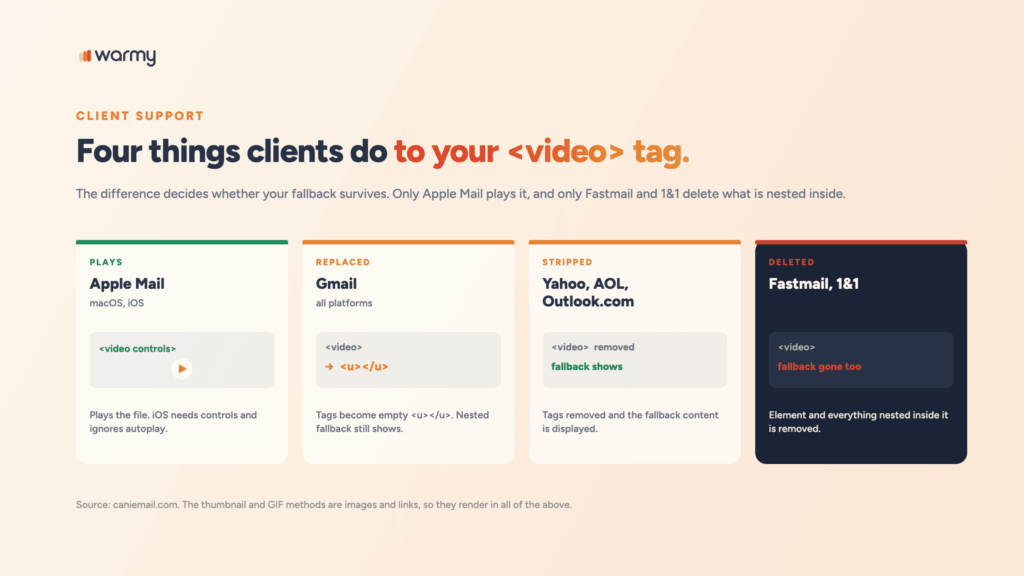
Email clients don’t behave like browsers. Most strip anything that executes or streams on its own, which rules out video players and any embed code from YouTube or Vimeo. The <video> element then gets handled in four different ways, explained below:
- Gmail replaces
<video>,<source>, and<track>with empty<u></u>tags. Anything you nest inside survives and displays. - Yahoo Mail, AOL, and Outlook.com strip the tags and show the fallback content instead.
- Fastmail and 1&1 delete the element along with everything inside it. Your fallback disappears with it.
- Apple Mail plays it, though iOS needs the
controlsattribute and ignoresautoplayentirely.
The thumbnail method: The safest way to embed video in email
This is how to embed a video in an email in a way that survives everywhere. Place a static image that looks like a player, wrap it in a link, send the click to a hosted page.
<a href="https://youtu.be/YOUR_VIDEO_ID?utm_source=newsletter" target="_blank">
  <img src="https://cdn.example.com/walkthrough-thumb.jpg"
       width="600" alt="Watch the 2-minute product walkthrough"
       style="display:block;width:100%;max-width:600px;border:0;">
</a>
The detail people get wrong is the play button. Overlaying a triangle with absolute CSS positioning breaks in Outlook, which uses Word’s rendering engine. Bake the button into the image file before you upload it. It’s one less thing to debug.
Also, don’t forget to write alt text that names the video, since a recipient with images off sees only that text. And add a tracking parameter, since the click is your only real metric.
Pro Tip: Send the click to a landing page you control rather than straight to YouTube. You keep the recipient in your funnel, you avoid the related-video sidebar pulling them toward a competitor, and you get the analytics.
The faux video method (GIF-based)
Faux video is the same structure with motion. Swap the static thumbnail for a short GIF loop, and the preview animates right there in the inbox while the click still goes to the full video.
<!--[if !mso]><!-->
<a href="https://youtu.be/YOUR_VIDEO_ID?utm_source=newsletter" target="_blank">
  <img src="https://cdn.example.com/preview-loop.gif"
       width="600" alt="Watch: product walkthrough preview"
       style="display:block;width:100%;max-width:600px;border:0;">
</a>
<!--<![endif]-->

<!--[if mso]>
<a href="https://youtu.be/YOUR_VIDEO_ID?utm_source=newsletter">
  <img src="https://cdn.example.com/preview-frame-one.jpg"
       width="600" alt="Watch: product walkthrough preview"
       style="display:block;border:0;">
</a>
<![endif]-->
Outlook on Windows displays only the first frame of a GIF, and that conditional block hands it a proper static image instead. Frame one of your GIF should be a finished composition with the play button already visible.
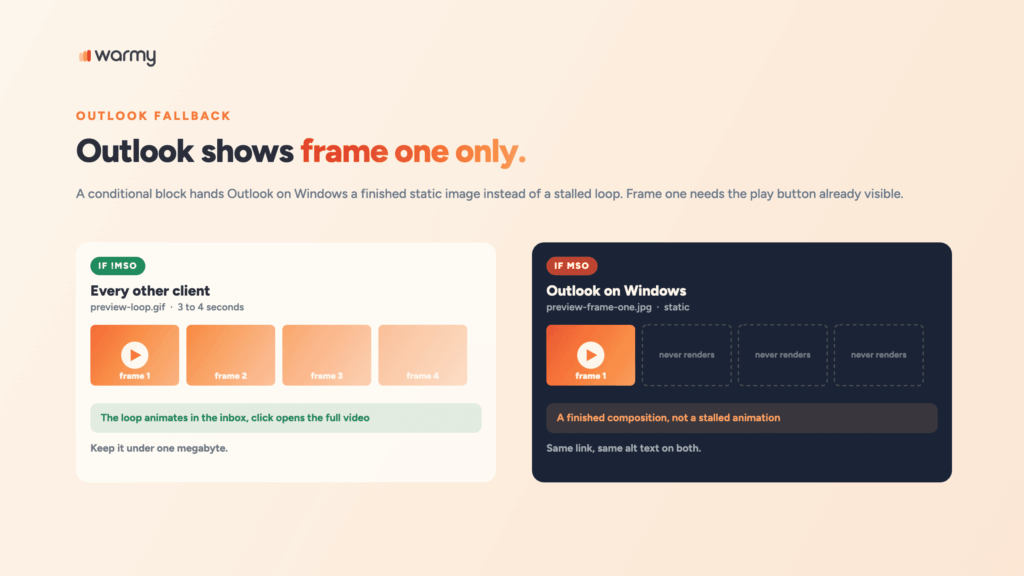
Keep the loop to three or four seconds and compress hard. A GIF past a megabyte slows the render and adds weight you don’t need.
The HTML5 video tag (Apple Mail only)
If your list skews heavily toward Apple Mail, real playback is available. Build it with a fallback nested inside.
<video width="600" controls playsinline
       poster="https://cdn.example.com/poster.jpg" style="max-width:100%;">
  <source src="https://cdn.example.com/demo.mp4" type="video/mp4">
  <a href="https://youtu.be/YOUR_VIDEO_ID">
    <img src="https://cdn.example.com/walkthrough-thumb.jpg"
         width="600" alt="Watch the product walkthrough" style="border:0;">
  </a>
</video>
The nested link covers Gmail, Yahoo, AOL, and Outlook, all of which either replace the tags or strip them while keeping the inner content. Fastmail and 1&1 delete the whole block, so a few recipients see a gap. Add a plain text link below it if that matters.
Skip autoplay. Apple Mail on iOS ignores it anyway, and a video that starts playing with sound in a business inbox reads as aggressive advertising rather than a demo.
How video affects email deliverability
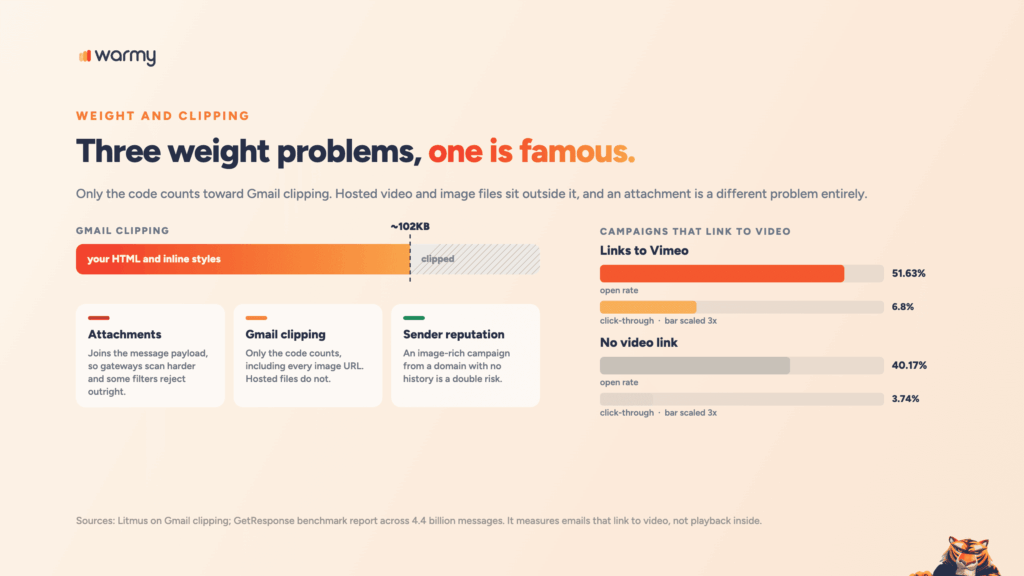
Email marketing with video runs into three separate weight problems, and only one of them is the one people worry about.
- Attachments. How to attach a video in an email is the wrong question for marketing mail. An attached file joins the message payload, pushing size into territory where security gateways scan harder and some corporate filters reject outright.
- Gmail clipping. Gmail truncates messages whose HTML passes roughly 102KB, according to Litmus, and hides the rest behind a “view entire message” link. Hosted image files don’t count toward it; only the code does, including every image URL. A template heavy with inline styles can clip before the video section renders.
- Sender reputation. An image-rich campaign asks more of your domain than a plain text follow-up does, and from a domain with no sending history that combination is a double risk. Before a video email blast goes out, make sure your domain can handle a heavier campaign.
Content matters as much as weight. Video-adjacent copy leans on urgency and superlatives, which is what filters score against. Our breakdown of which words and elements trigger spam filters covers the phrases to cut.
Hosting your video the right way
Whichever method you use to send a video to email recipients, the file lives somewhere else. Three options, in order of how much control you’re getting.
- YouTube. Free and familiar to recipients. The tradeoff is the surrounding interface pulling attention elsewhere.
- Vimeo. Cleaner player, no recommendation sidebar, better for a considered B2B audience.
- Your own CDN. Full control over the player, the page, and the data. Pick this if you want the
<video>tag to work in Apple Mail, since<source>needs a direct file URL rather than a platform page.
GetResponse’s benchmark report, drawn from 4.4 billion messages, found campaigns linking to Vimeo averaged a 51.63% open rate and 6.8% click-through rate, against 40.17% and 3.74% for campaigns with no video link. YouTube landed between them.
That means it measures emails that link to video, not emails with playback inside.
Email client support for video in email
| Client | HTML5 <video> | What happens |
|---|---|---|
| Apple Mail (macOS, iOS) | Plays | iOS needs controls; autoplay is ignored |
| Gmail (all platforms) | No | Tags become empty <u></u>; nested fallback shows |
| Outlook (Windows, Outlook.com) | No | Element renders but a strict CSP blocks playback |
| Yahoo Mail and AOL | No | Tags stripped, fallback content displayed |
| Fastmail, 1&1 | No | Element and all nested content removed |
The thumbnail and faux-video methods are images and links, which is why they’ll render in all of the above without exception.
Common mistakes that hurt deliverability
- Attaching the file. It inflates the message and trips filters.
- Pasting embed code. How to insert a video into an email using an iframe or a script doesn’t work anywhere. Both get stripped.
- CSS-positioned play buttons. They collapse in Outlook and leave a naked thumbnail.
- Uncompressed GIFs. A multi-megabyte loop slows rendering and pushes a template toward clipping.
- Autoplay with sound. Apple Mail ignores it on iOS, and nobody has ever thanked a brand for it.
- No alt text. With images blocked, the recipient sees an empty box and nothing to click.
- Skipping the first-frame check. Outlook shows frame one, and a blank stage is an embarrassing thing to ship.
- Sending from a cold domain. Heavy campaigns need a reputation behind them.
Pre-send testing checklist
- Render across clients. Check Apple Mail, Gmail, Outlook Windows, and one mobile client at minimum. That’s the floor.
- Check frame one. Open the message in Outlook and confirm the static frame looks finished.
- Click every link. Confirm the tracking parameter carries through to the destination.
- Measure the HTML size. Keep it under 102KB. If you’re anywhere near the line, check the file-size limits for your whole template.
- Scan the content. Test your video-embedded email before you hit send, particularly checking link density and formatting problems that a visual pass misses.
- Send to a seed list. Image-heavy campaigns don’t always land where your usual sends do.
Conclusion
Email marketing videos work once you stop trying to play them in the inbox. A linked thumbnail with a baked-in play button covers every client. A GIF loop adds motion, and Outlook quietly falls back to a still frame. The <video> tag is worth it only for an Apple-heavy list, and only with a nested fallback.
The deliverability side comes down to weight and reputation. Host the file, keep the HTML lean, and give the domain enough sending history before you send anything image-heavy to a real list.
Book a demo and see how Warmy protects inbox placement for campaigns that carry more than plain text.