



TL;DR: SMTP Error 450 4.2.1 is a temporary “mailbox unavailable” deferral, usually caused by the recipient receiving mail faster than their server or provider allows. Your message is queued for automatic retry over the next few hours up to five days, so no action is required beyond confirming the address is correct and, if the issue persists, reaching the recipient through another channel.
SMTP Error 450 4.2.1 means the receiving mail server has temporarily deferred your message because the recipient’s mailbox cannot accept more mail right now, most often because it is receiving messages faster than the provider allows. The error is temporary, not a bounce: your message stays queued, and delivery typically completes once the mailbox catches up or the block clears.
What is SMTP 450 4.2.1?
SMTP Error code 450 is a temporary error in the email delivery process, which means that the problem isn’t permanent. It belongs to a much larger set of three-digit SMTP replies, each with its own cause and fix, covered in full in Warmy’s SMTP error codes and messages guide. When SMTP Error 450 comes with the extension “4.2.1,” it usually comes with any of these error messages:
- 450, “4.2.1” The user you are trying to contact is receiving mail too quickly. Please resend your message at a later time. If the user is able to receive mail at that time, your message will be delivered.
- 450, “4.2.1”, The user you are trying to contact is receiving mail at a rate that prevents additional messages from being delivered. Please resend your message at a later time. If the user is able to receive mail at that time, your message will be delivered.
- 450, “4.2.1”, Peak SMTP relay limit exceeded for customers. This is a temporary error.
This combination tells you something important: the problem isn’t with your sending infrastructure or message content. Instead, the recipient’s mailbox cannot receive incoming messages at this time. It is currently receiving too many emails at a rate that is preventing it from receiving any more.
Pro Tip: The leading “4” is what matters most here. Per RFC 5321, any SMTP reply starting with 4 is a temporary deferral, never a permanent bounce, so don’t remove the contact from your list over a single 450. If you’re troubleshooting a related code, Warmy’s guide to SMTP Error 450 4.3.2 covers the broader system-level version of this same temporary-failure family.
Tips to resolve SMTP 450 4.2.1
Since we’ve established that this error is a temporary one, many would think waiting would be the logical next step. Although this is often the case, it would be more ideal for you to perform some extra troubleshooting steps just to ensure that your deliverability is safe, your reputation is secured, and your email health ideal.
Simply try again after a while
This is perhaps the most ideal resolution since it falls under the SMTP Error Code 450. The issue is temporary and sometimes patience is the perfect troubleshooting step. Most email systems will automatically retry sending your message multiple times over a period ranging from several hours. Or in some extreme cases up to three to five days. These automatic retry attempts happen in the background without any action required from you.
Contact the recipient via alternative methods
A direct reach-out through a different communication channel can also do the trick.
Try contacting the recipient via phone, social media, messaging apps, or an alternative email address if available. This is particularly important for this error because the recipient needs to take action to reactivate their mailbox.
Sometimes, the recipient may not be aware that their mailbox is undergoing some issues, and it will also be great for them to be notified so they can contact their email provider or IT department to resolve the issue. This can also be a perfect opportunity to update your contact record with any new information, as to your recipient’s contact details.
Verify the email address is updated
- Double-check that you’re using the recipient’s current and active email address. If the person has recently changed organizations or email providers, they may have a new address you should be using instead.
- Check if the recipient has provided an alternative email address for communications, especially if this is a business contact.
For business contacts, reach out to their organization
If you’re trying to reach someone at a company and encounter this error, consider contacting their organization’s main reception or support desk. They can direct you to the right person or provide an alternative contact method.
The account may be disabled temporarily due to the employee being on leave, and the organization may have established alternative points of contact.
Review your email infrastructure
If you’re sending multiple emails or conducting email campaigns, ensure that your sending patterns aren’t contributing to deliverability issues. Although this may be less likely with mailbox-specific errors, it would not hurt to confirm.
Make sure that you are using the proper tools and infrastructure designed, especially if you are sending bulk emails. If your domain is new, then consider warming it up to send signals to email service providers that your domain is reputable and not spam.
Pro Tip: If you’re sending high volumes to Gmail addresses, check Google’s email sender guidelines. Bulk senders are expected to keep reported spam rates under 0.3% and keep SPF and DKIM correctly aligned, and falling outside those limits is one of the most common reasons legitimate senders start seeing 450-class deferrals like this one.
Maintain proper email authentication
- Verify that your domain has correct DNS settings, including valid MX records, SPF, DKIM, and DMARC authentication. Poor sender reputation or authentication failures can sometimes contribute to receiving servers being more strict in their acceptance policies.
- Check that your sending IP address isn’t listed on any major spam blacklists.
Review your contact list’s hygiene
If you regularly encounter disabled mailbox errors across multiple recipients, it may be time to implement better list hygiene practices. Regularly clean your contact lists to remove inactive or disabled accounts, which will improve your overall deliverability rates.
Pro Tip: If you’re seeing this pattern across many recipients rather than just one, the root cause usually sits with your own sender reputation rather than each individual mailbox. Warmy’s guide to email sender reputation score walks through the specific factors mailbox providers weigh, and if a mailbox stays unavailable long enough, some servers stop deferring altogether and return a permanent SMTP Error 550 5.1.0 rejection instead.
That’s the gap Warmy closes: instead of finding out about a reputation problem after the bounces start, Warmy continuously monitors your sending reputation and warms up new domains before they ever trigger rate-limiting deferrals like this one. Book a demo to see how Warmy keeps your sender reputation healthy at scale.
How Warmy can prevent SMTP Error 450 4.2.1
While SMTP Error 450 4.2.1 primarily stems from conditions on the recipient’s side, having an all-in-one email deliverability tool such as Warmy can definitely give your email delivery success rate a boost and minimize errors that are extremely harmful for your email reputation.
Automated email warmup
Warmy’s automated email warmup builds trusted engagement through Adeline AI, which generates human-like actions across a real mailbox network, including opens, clicks, scrolls, and spam-folder rescues. This helps you improve how mailbox providers view your domain, which can also support recovery even after DNS-related disruptions or other sender related SMTP errors. For a side-by-side look at how different warmup tools build that reputation, Warmy’s best email warmup tools roundup breaks down what to look for.
Inbox placement testing
Warmy’s inbox placement tests show exactly where your emails land (Inbox, Spam, or Promotions) before you scale campaigns, reducing the risk of compounded delivery issues. You can try the free email deliverability test to get data about your inbox placement.
Domain authentication and technical configuration
Warmy offers free SPF record generator and DMARC Record Generator to improve domain security and safeguard them against spoofing and phishing.
Domain Health Hub
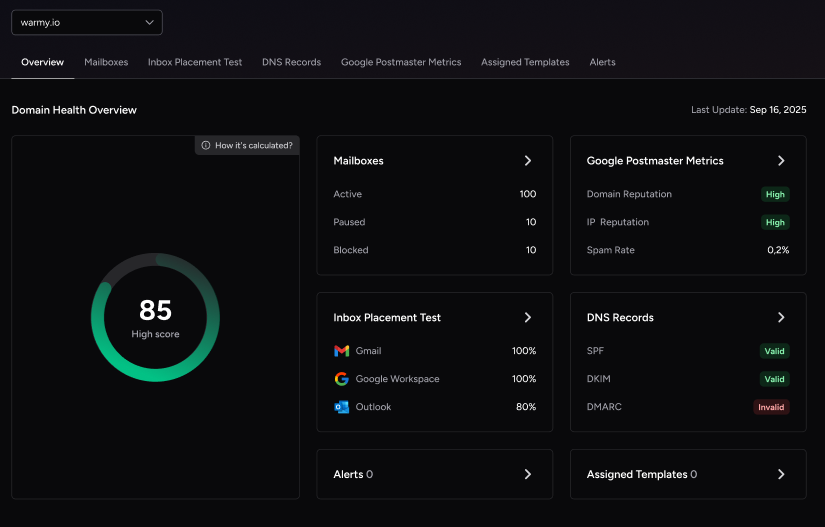
Warmy.io supplies a domain-level health dashboard, instead of just monitoring your individual email addresses. Some of its features include:
- A domain health score based on various factors like authentication, blacklist status, and inbox placement tests.
- Spam rate trends and overall deliverability performance with weekly or monthly tracking options.
- DNS status checks to help you validate SPF, DKIM, DMARC, rDNS, MX and A records easily enabling stronger authentication and security systems.
- Optimized multi-domain monitoring giving users the ability to manage all their domains from a singular dashboard. It can also identify which ones will require immediate attention
- Access to a detailed breakdown of health metrics, performance reports and deliverability trends per domain.
With Warmy.io you can minimize any major SMTP errors, and ensure that even if you receive temporary SMTP errors your inbox and deliverability are within the ideal health and hygiene. Sign up for your free trial today.!











