



There are many SMTP-related errors that email senders encounter daily. Some stem from IP reputation concerns, while others are temporary, retryable failures that resolve on their own.
SMTP error 421 4.3.2 (Service Shutting Down) is a 4xx-class soft bounce — meaning it is temporary and your mail server should retry delivery automatically. The receiving server is saying it cannot accept the connection right now, but may accept it shortly. Understanding this distinction matters: according to email deliverability benchmarks, inbox placement rates dropped significantly across major providers in 2025, making proactive deliverability hygiene more critical than ever — even for errors that appear temporary.
This issue can stem from server overload or scheduled maintenance. However, there are some instances in which this error occurs due to a misconfigured setting that prevents emails from being processed.
In this guide, you will find a clear explanation of what SMTP error 421 4.3.2 is, what causes it, how to fix it step by step, and the best practices to prevent it from recurring.
What causes SMTP error 421 4.3.2?
SMTP error 421 4.3.2 – Service Shutting Down typically indicates a temporary failure on the mail server. This means that the error is a result of uncontrollable factors such as mail server overloads, or scheduled maintenance.
You can still receive this error message if there are some sending limitations implemented in your account or if your email is blacklisted. Here are the detailed explanations of this issue.
Mail server overload
- The mail server is processing too many connections at the same time.
- High email traffic exceeds server capacity.
- Insufficient server resources (CPU, memory, bandwidth).
Scheduled maintenance or downtime
- The mail server is undergoing scheduled updates or maintenance.
- The email service was restarted manually or automatically.
Misconfigured server settings
- SMTP configuration errors (incorrect throttling limits, misconfigured queue settings).
- Poorly set connection limits for incoming and outgoing emails.
- Incompatibilities with email security protocols.
Network or ISP restrictions
- Firewall rules or security software blocking email communication.
- ISP restrictions on email sending limits.
- DNS or MX record misconfigurations.
Blacklisted IP or domain
- If the sending IP address is blacklisted, the receiving server may temporarily refuse connections.
- Reputation issues due to high spam rates.
Email queue congestion
- A large backlog of undelivered emails clogging the mail queue.
- Slow message processing due to poor performance tuning.
Note: Some providers use variant codes within the 421 family. Gmail’s 421 4.7.x is a reputation-based rate-limiting signal, not a pure infrastructure error — if you see this code repeatedly from Gmail, it indicates your sending velocity or domain reputation needs attention, not just a server-side wait.
Pro Tip: If you see 421 errors clustering on a specific step in your outreach sequence — especially one that opens a new email thread rather than replying to an existing one — that step may be triggering stricter filtering. Switch that step to a reply format to reduce the friction the receiving server sees.
How to fix SMTP Error 421 4.3.2?
It is more likely that this error can be resolved by simply waiting for a few moments. However, it is still wise to implement some corrective and preventive actions to guarantee that the error is at least not coming from your end.
For email senders:
- Retry sending emails at a later time
- Since this is often a temporary error, wait a few minutes before resending emails.
- Check if the receiving mail server is down
- Contact the recipient’s IT team or use online SMTP testing tools.
- Ensure your IP isn’t blacklisted
- Use tools like MXToolbox or Spamhaus to check your email reputation.
For system admins & IT professionals:
Step 1: Check server load and performance
- Run system diagnostics to monitor CPU, RAM, and disk usage.
- Identify resource bottlenecks and optimize server performance.
Step 2: Inspect email logs
- Analyze SMTP logs for detailed error messages.
- Use commands like:
- tail -f /var/log/maillog # For Linux-based mail servers
- Get-MessageTrackingLog -ResultSize Unlimited # For Exchange servers
Step 3: Adjust SMTP configuration
- Modify server settings so it can handle higher email loads:
- Increase mail queue limits.
- Adjust connection timeouts.
- Optimize rate limits.
Step 4: Review firewall & security rules
- Ensure that SMTP ports (25, 587, 465) are open.
- Check that antivirus software is not blocking email traffic.
Step 5: Clear mail queues
- On Postfix:
- postqueue -p # View the mail queue
- postsuper -d ALL # Clear the queue if necessary
- On Exim:
- exim -bp # View queue
- exim -Mrm <message-id> # Remove stuck messages
Step 6: Restart mail services
- Restart the SMTP service to refresh configurations:
- systemctl restart postfix # Postfix
- systemctl restart exim # Exim
Pro Tip: When you see a wave of 421 4.3.2 errors from a specific receiving domain, check that domain’s MX records and public status pages before spending time on server-side changes. Often, the issue is entirely on the recipient’s end — their server is down or throttling — and retrying after 30–60 minutes is all that is needed.
Why 421 errors matter for your overall deliverability
Even though SMTP error 421 4.3.2 is technically temporary, repeated occurrences can signal deeper deliverability problems worth addressing. Research from GlockApps shows that average inbox placement rates dropped sharply across major providers in 2025 — with Office 365 inbox rates falling by over 22 percentage points for high-volume senders. In that environment, any pattern of 4xx errors deserves investigation.
Proper email authentication is the most direct lever you have. According to Validity’s 2025 Email Deliverability Benchmark, domains with full SPF, DKIM, and DMARC configuration are significantly more likely to reach the inbox than unauthenticated domains — and the gap widens as provider filtering tightens. A correctly configured domain reduces both the frequency of 421-class deferrals and the longer-term reputation damage that can follow them.
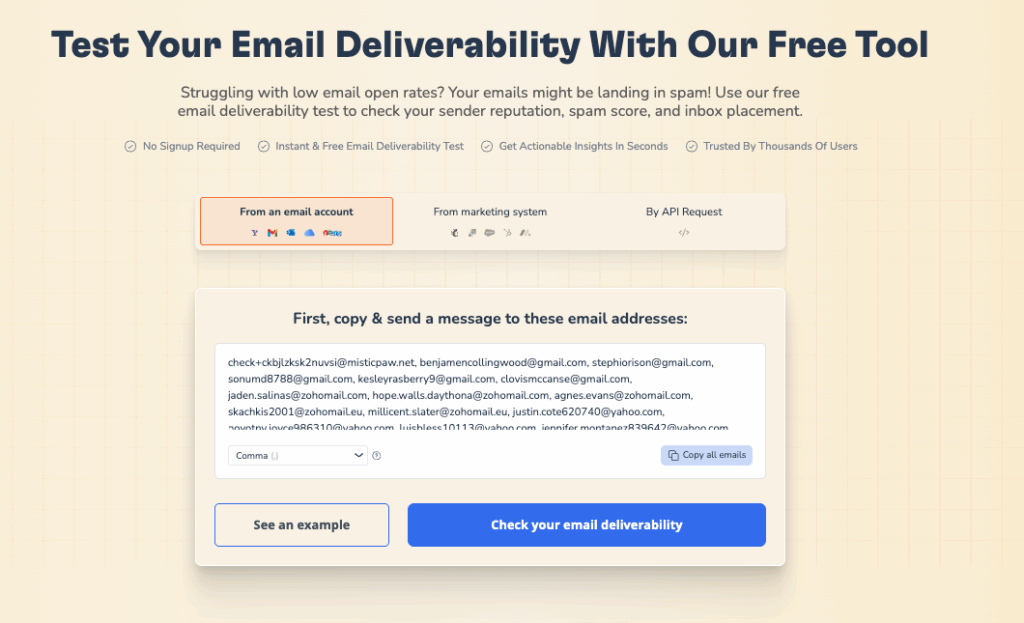
Not sure whether your domain authentication is set up correctly? Warmy’s free Email Deliverability Test checks your SPF, DKIM, and DMARC records, scans your domain and IP against major blacklists, and shows exactly where your emails land — inbox, spam, or missing — across Gmail, Outlook, and Yahoo. Run it free, no account required.
How to implement preventive action with Warmy
Although SMTP Error 421 4.3.2 is a temporary issue — with issues that are most likely caused by issues with the server — employing preventive measures can at least minimize its impact.
Warmy is an AI-driven email warmup and deliverability platform that helps 35,000+ businesses build sender reputation, improve inbox placement, and keep emails out of spam — no technical expertise required. Here is how Warmy’s tools address the root causes behind 421-class errors and broader deliverability risk.
Warmy offers the most versatile email deliverability system with tons of solutions that can help you minimize the impact of various SMTP related issues. Here is how.
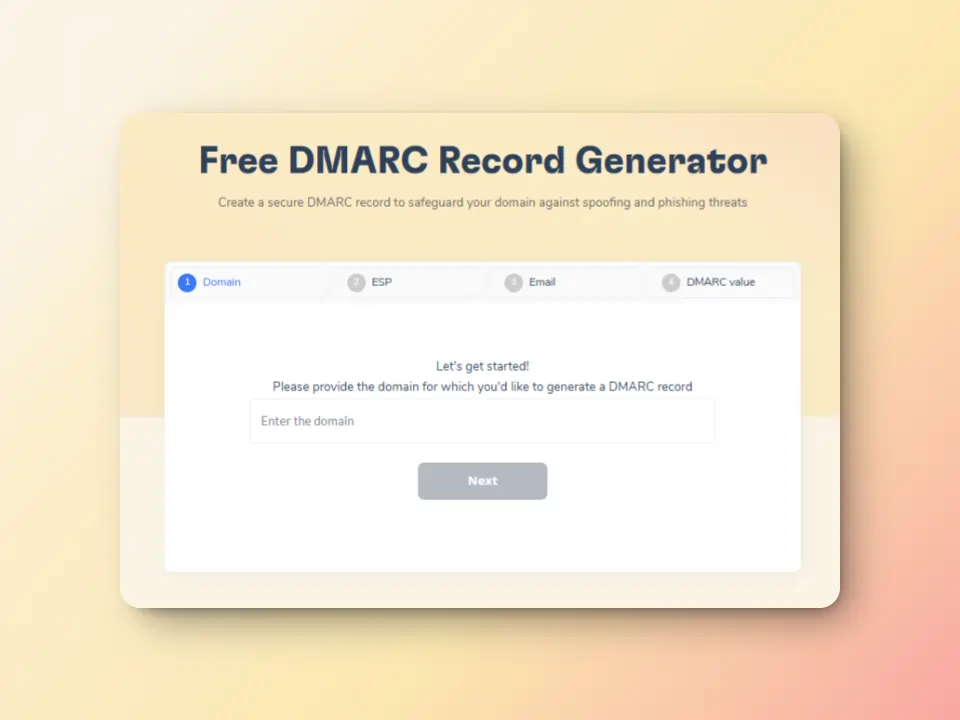
Improve email authentication with free SPF and DMARC Record Generators
Correctly configured SPF, DKIM and DMARC records are crucial for email authentication.
Warmy offers free SPF and DMARC record generators. With these tools, senders can be sure their domain is properly authenticated. This, in turn. will help reduce the numbers of SMTP errors you encounter.
Monitor email health with Domain Health Hub
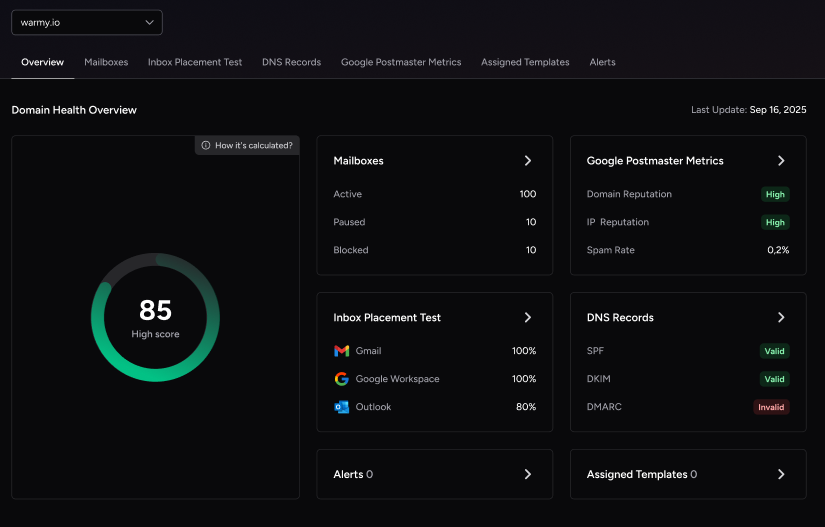
Warmy’s domain health hub offers a complete monitoring of their deliverability at the domain level instead of their individual inboxes. It offers a multitude of advantages that ensures that your emails are set up for success.
Instant domain health score: Check your deliverability status with metrics such as Inbox Placement, DNS Authentication, and Google Postmaster Data.
Clear warmup insights: Gives you the ability to track spam rates, inbox placement, and deliverability trends weekly and monthly.
Comprehensive DNS status checks: Validate and troubleshoot SPF, DKIM, DMARC, rDNS, MX, and A records for seamless email authentication and security.
Optimized multi-domain monitoring: Manage all your domains from one sleek dashboard, making it easier to identify which ones need immediate action.
Employ reliable email warmup
Warmy.io helps establish credibility with email providers by gradually increasing the email volumes your email is sending; “warming it up” to avoid your emails being flagged as spam or rejected. This helps you establish a positive sender reputation and credibility with email providers.
Powered by Adeline AI — Warmy’s proprietary AI engine that makes 20 million decisions per day across a network of 1M+ real mailboxes — the warmup process simulates genuine human engagement:
Warmy’s automated warmup includes:
- Email opens – Your email is not just marked as read but actually opened and scrolled through to simulate real engagement.
- Link clicks – If your email contains links, our system will click them naturally, improving sender trust.
- Spam recovery – If an email lands in spam, it is manually removed and marked as important to teach ISPs that your emails are legitimate.
- Dynamic email interaction – Instead of a static process, the system engages with your email content, ensuring interactions appear genuine and human-like.
Email deliverability test
Warmy.io offers free email deliverability tests to help you evaluate the chances of your emails landing in inboxes, instead of the spam folders.
The inbox placement analysis lets you see the percentages of emails landing across different providers (Gmail, Outlook, Yahoo, etc.). Regular scans also ensure that your sending IP and domain remain free from spam blacklists that could cause SMTP 421-related errors. And if somehow, your domain gets blacklisted, you will have the opportunity to know and can proceed with the delisting process.
Pro Tip: Run Warmy’s free Email Deliverability Test before and after making any changes to your SPF, DKIM, or DMARC records. The before/after comparison gives you a concrete data point showing whether the fix worked — and catches any authentication misalignment that could continue triggering 421-class deferrals.
Take actions and ensure email deliverability success in the face of SMTP errors
Some SMTP errors are inevitable, but it doesn’t mean that it should stop you from implementing proper email hygiene and configuration.
Being proactive doesn’t hurt. In fact, it can help.
Setting up email warmup, authentication, and DNS health monitoring puts you in a position where 421-class errors are caught early, resolved quickly, and don’t compound into longer-term reputation damage. The senders who reach the inbox consistently are not the ones who never encounter errors — they are the ones who have the right systems in place to detect and address them fast.
Instituting email deliverability measures like email warmups, email authentication, and DNS status check helps you be one step ahead of these errors.
Don’t let SMTP errors disrupt your email communication. Explore what Warmy.io can do for you and your business.
Sign up for a free trial (no credit card required) or schedule a free consultation with a deliverability expert.











