TL;DR: SURBL is a real-time blocklist that tracks the reputation of links inside your emails, not your sending IP, so a clean IP and good sender reputation don’t protect you from it. Legitimate senders get listed through causes like a hacked website, a contaminated affiliate link, an exposed ESP API key, or even a handful of cold-outreach recipients reporting your message as unsolicited, and the fix depends entirely on which SURBL sub-list you land on.
Removal requires identifying the exact sub-list at surbl.org/lookup, fixing the root cause, and only then submitting a documented removal request, since SURBL is a volunteer-run community with no support desk and little patience for vague appeals. The best defense is prevention: audit every link in your templates, keep DMARC enforced at p=reject, avoid linking to brand-new domains, and never try to dodge a listing by switching domains instead of fixing the one you have.
What is SURBL?
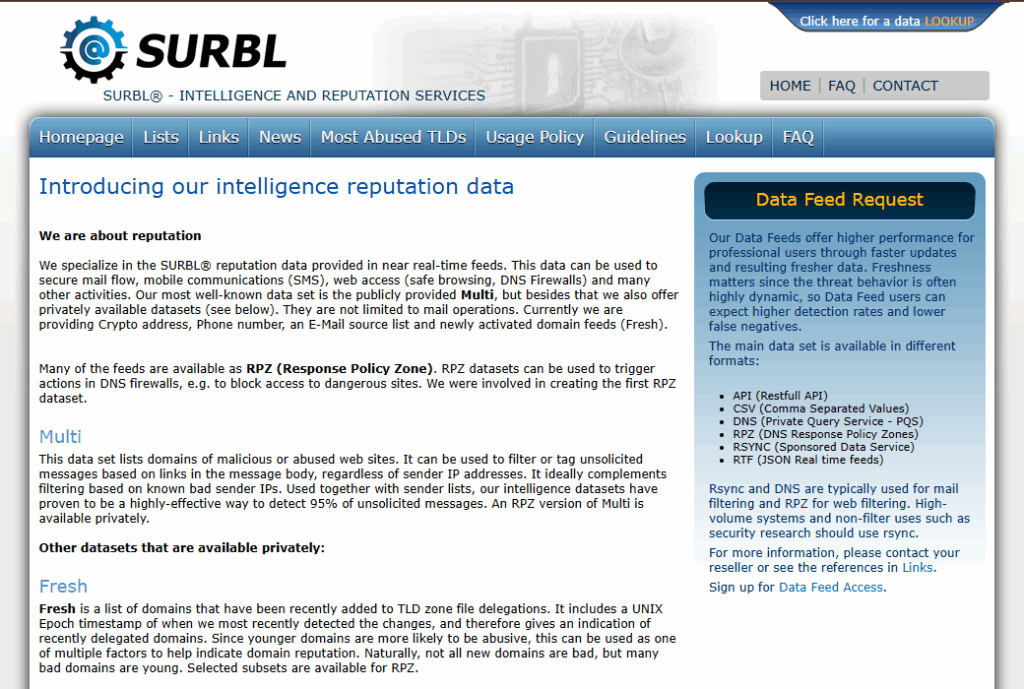
SURBL also known as the Spam URI Realtime Blocklist is a real-time database that tracks the reputation of domains and links found inside email bodies.
Compared to other blacklists, SURBL is not a sending blocklist. This means it doesn’t care about your IP. Instead, it cares about what your emails link to.
- Traditional blocklists like Barracuda or Spamhaus evaluate who is sending.
- SURBL evaluates what’s in the message.
This distinction changes everything for legitimate senders who think a clean IP and positive sender reputation score provides sufficient protection against blacklists.
What are the five lists that make up the SURBL system?
SURBL isn’t a single database. It’s a collection of specialized lists, each targeting a different threat and each requiring a different fix if you land on one.
- PH (Phishing): Uniform Resource Identifiers (URIs) used in credential harvesting or identity theft operations.
- MW (Malware): Sites hosting or distributing spyware, viruses, or ransomware.
- CR (Cracked Sites): Legitimate websites that have been compromised, hacked, or repurposed by spammers without the owner’s consent or knowledge.
- AB (AbuseButler): General domains flagged through high-volume sending and automated spam analysis.
- Multi: A combined “super-list” that allows mail servers to query all sub-lists in a single DNS lookup.
Beyond these five, SURBL also maintains a couple of smaller sub-lists worth knowing about: CT (click-trackers flagged for missing opt-in confirmation) and DM (disposable mail domains). They come up less often for legitimate B2B senders, but they’re why a domain can occasionally get flagged for something — like a third-party click-tracking service — that isn’t one of the five categories above.
Important note: The CR (Cracked Sites) list is the one that keeps legitimate business owners up at night. You can appear on it while your website looks completely normal, all because attackers installed hidden redirect scripts without disturbing the front end. Your site works.
Why legitimate senders can still get listed
The uncomfortable reality is this: you don’t have to do anything wrong to end up on SURBL. That’s why even senders with a positive domain reputation can get listed. Here are the most common reasons legitimate domains get flagged.
- Hacked web infrastructure. A WordPress or CMS compromise can install hidden redirect scripts that are invisible to site owners but obvious to SURBL scanners.
- Affiliate link contamination. Affiliate links carry the reputation history of every sender who has ever used them. For example, if someone spammed your affiliate URL at scale before you did, the damage is already done.
- Snowshoe link tactics. Using multiple subdomains pointing to the same landing page mirrors a known spammer technique. SURBL treats that behavioral pattern as a red flag, regardless of intent.
- Insecure contact forms. A publicly accessible “Tell a Friend” or contact form on your site can be exploited by spammers to send their own links through your domain’s infrastructure.
- New domain velocity. Linking to a domain registered in the last 24–72 hours is one of SURBL’s strongest triggers. New domains have no history, hence they have no reputation.
- Exposed or leaked ESP API keys. If a SendGrid, Mailgun, or similar sending key ends up in a public GitHub repo, a leaked config file, or a compromised employee laptop, attackers can send phishing or malware mail that’s fully authenticated against your real domain. Because it passes SPF, DKIM, and DMARC using your real credentials, nothing looks wrong on the sending side — the first sign is usually the URLs inside those messages showing up as listed.
- Cold outreach reported as unsolicited. Genuine, human-written B2B outreach can still get listed if enough recipients forward it to SURBL’s abuse reporting address and flag it as mail they never opted into. The volume doesn’t have to be high, and the message doesn’t have to look spammy, for a handful of reports to be enough.
Download the full report here: SURBL Blacklist: What Is It, Why You Get Listed, and How to Fix It
Not sure if any of this is already affecting you? Run Warmy’s free email deliverability test to check your sender authentication, spam score, and inbox placement before you spend time chasing the wrong cause.
The warning signs to watch out for
SURBL listings often produce what our research calls “silent” delivery failures or standard metrics don’t surface the problem immediately. Watch for these specific signals:
- SMTP Error 554 – Message content rejected: Receiving bounce codes when your sending IP is clean is an early warning sign. If you get this error, it’s almost always a URI block.
- Drop in click-through rates. Gmail and Outlook use SURBL data to disable links inside delivered messages so they arrive in the inbox, but they are unclickable. If you notice a significant drop in CTR, this may be the reason.
- “Too many hops” notification: Receiving alerts for errors like 554 5.4.6 signifies that a receiving server attempted to scan your links and exceeded the limit.
- Negative feedback loops: Complaint spikes tied to a specific URL instead of a sending domain may most likely be a URI-specific signal worth isolating.
- Cross-listing on other URI blocklists. A SURBL flag rarely shows up alone — the same domain often turns up on Spamhaus DBL or Swinog URIBL at the same time. Security gateways like Mimecast and Proofpoint weigh all of these together in one risk score, so a single listing can tip you past a filtering threshold you’d never hit from SURBL alone.
How to remove yourself from SURBL
Removal is not a one-stop shop or a form you simply fill out. SURBL will not remove a domain if the root cause has not yet been resolved. The sequence matters almost as much as the fix. Thus, it’s crucial to identify the issue first, resolve it, then apply for removal.
One thing worth knowing before you start: SURBL is run by a small volunteer community, not a commercial vendor with a support desk, so replies to inquiries tend to be brief and generic rather than detailed. Put the effort into the fix, not into arguing the listing.
-
- Submit the formal request. File the removal form on the SURBL site with a technical explanation of what caused the listing and what specific steps were taken. Vague submissions are rarely acted on. Have your organization’s name, a work email on your own domain (Gmail/Yahoo/Hotmail addresses are typically not accepted), street address, phone number, and the affected domain or IP ready before you start the form.
-
- Run the lookup. Go to surbl.org/lookup and identify which specific sub-list you’re on. The sub-list determines everything about your remediation path so this step is not optional.
-
- Fix the root cause. CR listing? Scanning and cleaning your site with tools like Sucuri or Cloudflare’s WAF can help. AB listing? Stop the high-volume sending behavior that triggered spam trap hits. Document everything you find and remove.
-
- Submit the formal request. File the removal form on the SURBL site with a technical explanation of what caused the listing and what specific steps were taken. Vague submissions are rarely acted on. Have your organization’s name, a work email on your own domain (Gmail/Yahoo/Hotmail addresses are typically not accepted), street address, phone number, and the affected domain or IP ready before you start the form.
Check back, and be ready to appeal. Allow at least 24–48 hours after submitting for the lookup to reflect a delisting. If the request is denied, address the specific reason given rather than resubmitting the same request as-is — appeals are accepted, but only once the underlying concern is actually resolved.
In short, SURBL blacklist removal only works once the underlying cause is gone — treat the request itself as the last step, not the first.
Be one step ahead: Prevention is cheaper than remediation
A few practices dramatically reduce SURBL exposure before it becomes a crisis:
- Audit every link in your email templates including social icons and tracking pixels. Any link is a potential scan target.
- Use a WAF like Cloudflare or Sucuri to prevent your site from being compromised and repurposed as a spammer’s redirector.
- Use a dedicated sending domain (e.g., getcompany.com) so a listing never touches your primary brand domain.
- Lastly, avoid linking to domains under 72 hours old. No exceptions.
- Move your DMARC policy to enforcement. A domain sitting at p=none or p=quarantine is easy to spoof, and spoofed mail can hit spam traps or trigger fresh abuse reports that put you right back on SURBL after a clean delisting. Moving to p=reject, and periodically auditing which third-party apps have send access to your Google Workspace or Microsoft 365 tenant, closes that door.
- Don’t try to outrun a listing with a new domain. Registering a fresh domain to dodge a SURBL listing usually backfires: new domains get heavy scrutiny from Gmail and Outlook regardless of intent, and if the new domain is used for the same kind of sending that got the old one flagged, it tends to get flagged again — just slower. Fix the domain you have.
On the monitoring side, Warmy provides continuous deliverability monitoring that detects blacklist issues early even before they escalate into a full listing event. For domains that are new or recovering from a previous listing, Warmy’s AI-powered email warmup solution builds sender reputation gradually and sustainably, reducing the behavioral signals that trigger AB-type listings in the first place
Go deeper on URI reputation and overall email deliverability
This article covers the fundamentals. The full Warmy Research Insights report goes even deeper with complete sub-list analysis, detection methodology breakdowns, and a step-by-step remediation framework built for technical teams.
Download the full report here.
Want this handled for you instead of chasing it manually? See how Warmy’s deliverability monitoring and AI-powered warmup keep domains off blacklists like this one.