TL;DR: Phishing links use deceptive URLs and lookalike domains to steal credentials, though you can spot them by checking the real address from right to left. Beyond inbound threats, a compromised inbox or stale API key can turn your own domain into a malicious sender, destroying your reputation on blocklists. If you click a bad link, you must immediately close the tab, revoke active sessions, and check for hidden email forwarding rules. Preventing this damage requires both employee vigilance and continuous monitoring of your domain reputation.
An invoice arrives from a vendor you actually use. The logo is right, the reply-to looks familiar, and the link claims to open your billing portal. Nothing in it asks you to slow down.
Plenty of guides explain how to detect phishing email traps, and this one does too. What almost nobody covers is the reverse situation. One hijacked mailbox or one stale ESP key can turn your own domain into the source of phishing links, and blocklists react within hours.
Warmy is an AI-driven email deliverability platform that monitors domain reputation, blacklist status, and inbox placement, which is where that damage surfaces first. You can scan your outbound email for risky links and content with the Free Template Checker.
What is a phishing link?
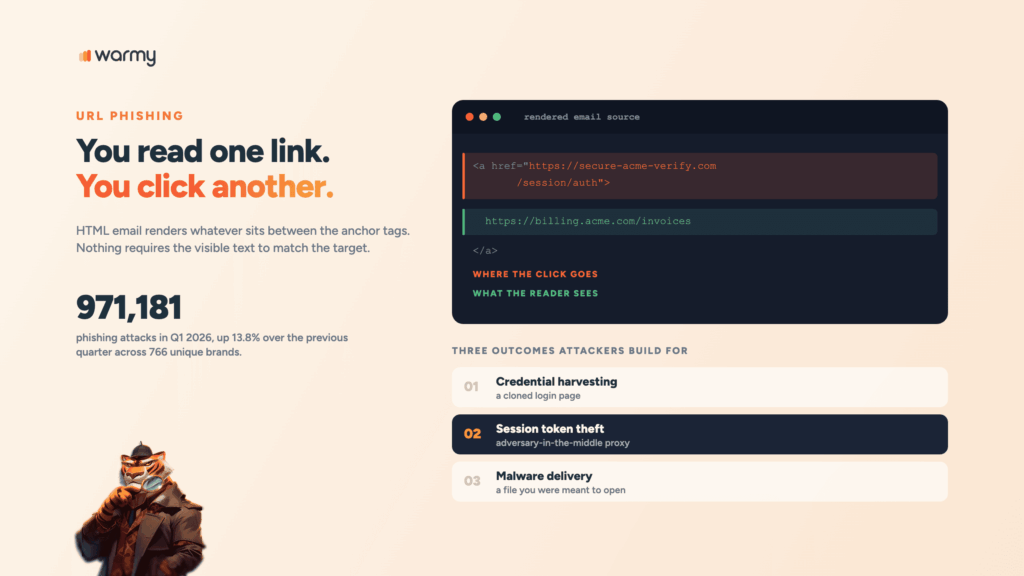
A phishing link is a URL that shows you one destination and sends you to another. HTML email renders whatever sits between the anchor tags, and nothing requires that visible text to match the target:
<!-- The recipient reads the second line.
     The click goes to the first. -->
<a href="https://secure-acme-verify.com/session/auth">
  https://billing.acme.com/invoices
</a>
Attackers build these for three outcomes: credential harvesting on a cloned login page, session token theft through an adversary-in-the-middle proxy, and malware delivery. The middle one dominates targeted campaigns now, because a stolen token walks straight past standard multi-factor prompts.
APWG recorded 971,181 phishing attacks in the first quarter of 2026, a 13.8% rise over the previous quarter, with 766 unique brands appearing across those reports.
How to spot a phishing link before you click
Hover before you click
Hover on the desktop and your client prints the real target in the status bar. On mobile, press and hold until the preview appears. That habit alone catches most ordinary attempts, because the whole trick depends on you reading the label and stopping there.
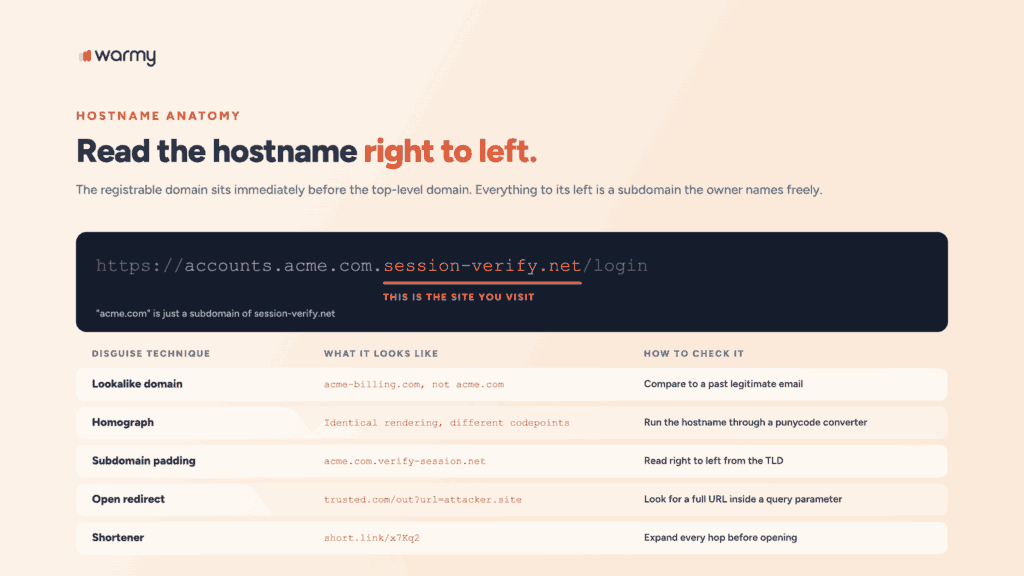
Then read the hostname right to left. The registrable domain sits immediately before the top-level domain, and everything to its left is a subdomain the owner can name freely:
https://accounts.acme.com.session-verify.net/login
                          ^^^^^^^^^^^^^^^^^
                          this is the site you are visiting
The string “acme.com” sits right there in the URL, working as a subdomain of session-verify.net.
Lookalike domains and homograph attacks
Lookalike domains are built to survive a glance. Some swap in a similar-looking character, some append a plausible word, some just change the TLD. Homograph attacks go further, using non-Latin characters that render identically:
Rendered in your browser:  https://аcme-billing.com/invoice
Actual ASCII hostname:     https://xn--cme-billing-xij.com/invoice
The first character there is Cyrillic “а”, not Latin “a”. Browsers show punycode for mixed-script domains in the address bar, though the email client that rendered the link gives you the pretty version first.
| Disguise technique | What it looks like | How to check it |
|---|---|---|
| Lookalike domain | acme-billing.com, not acme.com | Compare to a past legitimate email |
| Homograph | Identical rendering, different codepoints | Run the hostname through a punycode converter |
| Subdomain padding | acme.com.verify-session.net | Read right to left from the TLD |
| Open redirect | trusted.com/out?url=attacker.site | Look for a full URL inside a query parameter |
| Shortener | short.link/x7Kq2 | Expand every hop before opening |
Shortened links and redirect chains
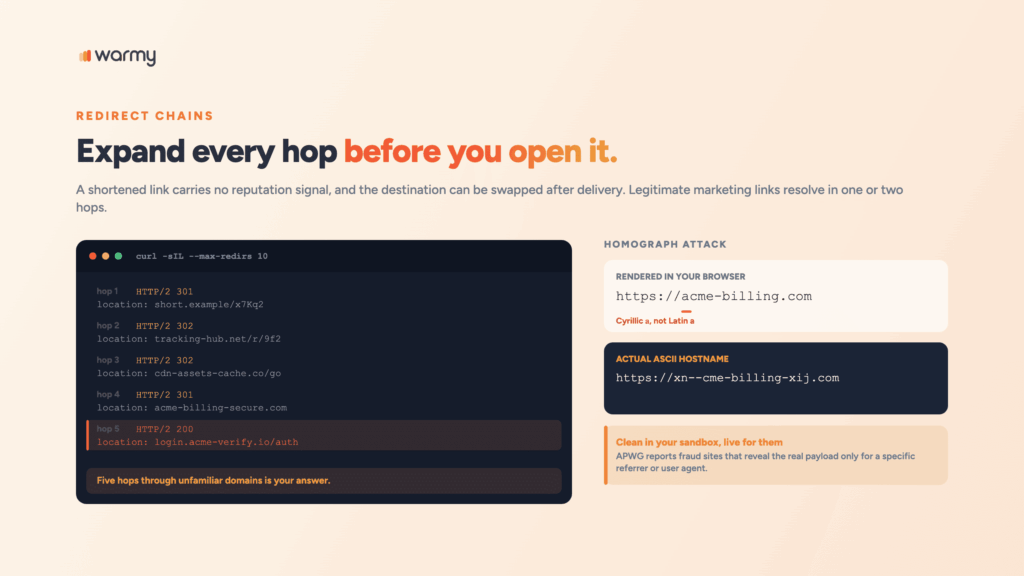
Shorteners help phishing websites survive filtering, because the shortened form carries no reputation signal and the destination can be swapped after delivery. Expand before you open:
curl -sIL --max-redirs 10 "https://short.example/x7Kq2" \
  | grep -iE '^(HTTP/|location:)'
Each location: header is one hop. Legitimate marketing links resolve in one or two. Five hops through unfamiliar domains is your answer.
Pro tip: Attackers increasingly serve harmless content unless the visitor arrives with the right referrer or user agent. APWG’s Q1 2026 report describes fraud sites that reveal their real payload only when the visitor came from a specific search engine or social platform. A URL that looks clean in your sandbox can still be live for the person you’re protecting.
Should you use a phishing link checker?
Most people who check email for phishing reach for a link checker at some point. These tools query reputation databases, resolve redirects, and sometimes detonate the page in a sandbox. On known-bad infrastructure they work well.
Two limits matter before you lean on them.
- Timing. Attackers register a domain, run a campaign for a few hours, and abandon it. A checker built on reputation data has nothing to report about a domain nobody has seen yet.
- Scope. Every checker on the market answers one question: is this inbound link dangerous to me? Run outbound campaigns and you’ll need the mirror image answered too, which no link checker does.
| Method | Question it answers | Where it falls short |
|---|---|---|
| Manual inspection | Does this hostname match the claimed sender? | Slow, and homographs defeat a casual read |
| Link checker | Is this URL already known to be malicious? | Blind to freshly registered infrastructure |
| Outbound scan | Do my own links trip filters before I send? | Every template, every time |
Warmy’s free Template Checker covers that third row, scanning your message for spam triggers, link count, and formatting problems before it reaches anyone. A Chrome extension handles it inside your existing workflow.
Is your own domain sending phishing links?
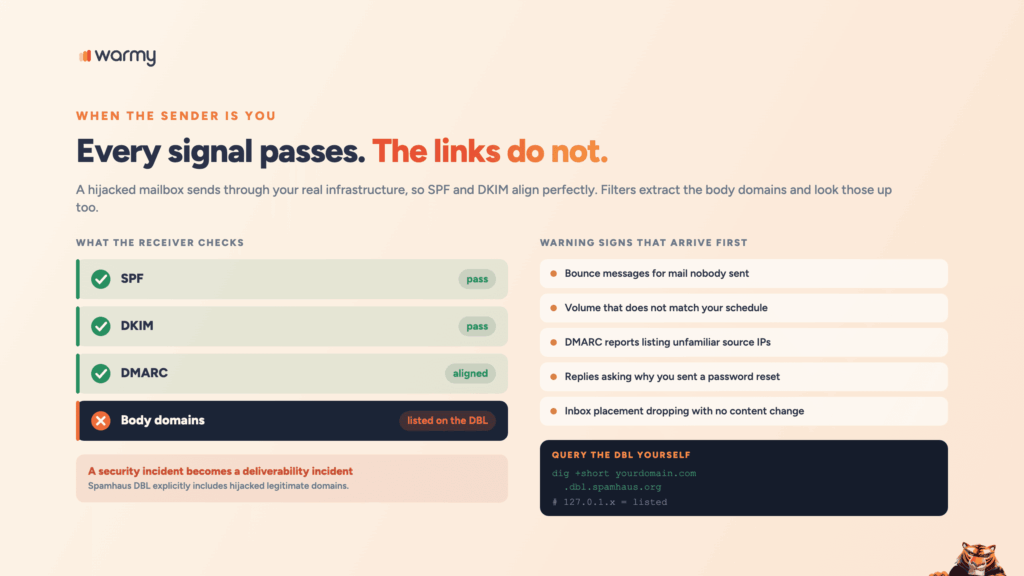
Someone on your team reuses a password. An attacker gets into that mailbox, or into your ESP account through a stale API key, and starts sending. Those messages authenticate correctly, because they’re leaving through your real infrastructure with your real SPF and DKIM alignment.
Every technical signal reads legitimate. The links inside point at a credential harvesting page.
Warning signs usually arrive before anyone tells you:
- Bounce messages for mail nobody on the team sent.
- Sending volume that doesn’t match your scheduled campaigns.
- DMARC aggregate reports listing source IPs you don’t recognize.
- Replies asking why you sent someone a password reset.
- Inbox placement dropping with no change to your content.
DMARC reporting is what makes the third one visible, and plenty of teams publish a policy without ever turning reports on:
v=DMARC1; p=reject; rua=mailto:dmarc-agg@yourdomain.com;
ruf=mailto:dmarc-forensic@yourdomain.com; pct=100; adkim=s; aspf=s
rua sends daily aggregate XML listing every IP that sent mail claiming to be you. p=reject tells receivers to drop whatever fails alignment. Strict alignment on both (adkim=s, aspf=s) closes the gap where a subdomain passes for its parent.
Audit one more thing on your own site. An endpoint like this hands out your domain’s reputation:
https://yourdomain.com/redirect?url=https://attacker.example/loginAn open redirect lets anyone wrap a malicious destination in your trusted hostname. Filters see your domain, the victim sees your domain, and traffic goes wherever the parameter says. Allowlist destinations or remove the endpoint.
How malicious links affect your sender reputation
Filters evaluate more than the sending IP and the envelope sender. They extract the domains from your message body and look those up too, which is how a security incident becomes a deliverability incident. The Spamhaus Domain Blocklist covers domains used in phishing, fraud, and malware distribution, and it explicitly includes legitimate domains that were hijacked for malicious content.
Once your domain lands on a list like that, every message containing it gets scored down or rejected, including mail your colleagues send about entirely unrelated things.
You can query the DBL directly:
dig +short yourdomain.com.dbl.spamhaus.org
# 127.0.1.x in the answer means listed
# empty output means no current listing
Delisting works and it’s slow. Reputation rebuilds on a timeline the receivers set, and any campaign you ran during the listing has already trained filters against you.
Monitoring closes that window. Warmy’s Deliverability Insights lets you check your domain’s blacklist and reputation status alongside inbox placement across Gmail, Outlook, and Yahoo, with automatic weekly tests at the domain level. A listing that appears on Tuesday gets caught on Tuesday.
What to do if you clicked a phishing link
- Close the tab without entering anything. If a file is downloaded, leave it alone.
- Change the password from a different device if you submitted credentials. Assume the original device is compromised.
- Revoke active sessions and OAuth tokens. Password rotation alone leaves a stolen session token valid, which is the entire point of adversary-in-the-middle kits.
- Check for mailbox rules the attacker created. Auto-forward and auto-delete rules are how they stay hidden while your domain sends for them:
Get-InboxRule -Mailbox user@yourdomain.com |
Select-Object Name, Enabled, ForwardTo, RedirectTo, DeleteMessage- Report it internally with full headers, not a screenshot. Your security team needs the
Authentication-Resultsheader and the original URLs. - Run a malware scan if anything is executed.
- Watch your domain’s blacklist status for a week afterward, especially if that account sends campaigns.
People skip steps 4 and 7. They’re what keeps a security incident from quietly becoming a deliverability incident.
Phishing prevention checklist for teams
- Move DMARC to
p=quarantine, thenp=reject, with aggregate reporting on from day one. - Require phishing-resistant MFA (passkeys or hardware keys) on every sending mailbox.
- Rotate ESP API keys on a schedule and delete the ones nobody can account for.
- Audit your site for open redirects and allowlist permitted destinations.
- Restrict which third-party OAuth apps can connect to your workspace.
- Scan outbound templates for link and content issues before each campaign.
- Monitor domain blacklist status weekly rather than after a placement drop.
- Give the team a one-click report button and measure how fast it gets used.
- For deeper coverage of inbound hygiene, read our full guide to protecting your email from spam.
Conclusion
Knowing how to detect phishing email traps protects you as a recipient, and the habits are cheap. Hover before you click. Read hostnames right to left, expand shortened links, and treat urgency as a reason to slow down.
The sender-side risk needs different tooling, because you can’t spot a compromised mailbox by rereading your own campaigns. By the time placement drops, the blocklist entry has been live for days. Continuous monitoring of reputation and blacklist status shortens that gap to hours.
Book a demo and see how Warmy protects your domain reputation before a compromised link costs you the inbox.