
One-on-one deliverability consultationBook
Warmy logovsMXToolbox logoSide-by-side comparison

Warmy vs MXToolbox: Email Deliverability Tools Compared (2026)

By the Warmy deliverability team Updated 7 min read

MXToolbox facts checked against its own website, November 2026

No Credit Card Required | Cancel Anytime

real warmup mailboxes
1M+
real warmup mailboxes
US seed accounts
500K+
US seed accounts
per month, billed monthly
$49
per month, billed monthly
human support
24/7
human support

MXToolbox is best known for its free SuperTool lookups (MX, DNS, blacklist, SPF, DKIM, DMARC) and its paid Delivery Center, which monitors blacklists, DMARC and mail flow and includes 30 to 100 inbox placement analyses a month, from $129 a month.

Warmy is a deliverability platform from $49 a month that pairs automated warmup on a 1M+ mailbox network with a 500,000+ US seed list, placement tests, DMARC monitoring and a dedicated deliverability expert in every plan.

Quick verdict: choose MXToolbox for blacklist and mail-flow monitoring across your infrastructure. Choose Warmy when the problem is sender reputation and you need placement to improve.

KEY TAKEAWAYS

MXToolbox vs Warmy at a Glance

Main job

Warmy: Build and test sender reputation: warmup, seed engagement, placement tests, monitoring

MXToolbox: Diagnose and monitor email infrastructure: DNS, blacklists, DMARC, mail flow

Starting price

Warmy: $49 a month, billed monthly

MXToolbox: Free plan; Delivery Center from $129 a month

Email warmup

Warmy: Included in every plan

MXToolbox: Not part of its plans

Inbox placement tests

Warmy: 5–50 a month by plan

MXToolbox: 30 a month (Delivery Center) or 100 (Plus)

Expert help

Warmy: Dedicated deliverability expert and 24/7 support in every plan

MXToolbox: Support team on paid plans; dedicated expert on Plus ($399)

SIDE BY SIDE

Warmy vs MXToolbox: Feature Comparison

Both tools help you find deliverability problems. MXToolbox goes deep on infrastructure and blacklists and Warmy adds the daily work of building reputation.

Feature comparison of Warmy and MXToolbox
CriterionWarmyMXToolbox
PositioningAll-in-one, self-serve email deliverability platformFree DNS and email diagnostics, plus paid Delivery Center monitoring
Email warmupKey difference1M+ real mailboxes; choose a B2B (Google Workspace, Microsoft 365) or B2C (Gmail, Yahoo, Outlook) networkNot part of its plans
Seed list engagementKey difference500,000+ real US seed accounts across Gmail, Outlook, Yahoo, corporate and regional providers, incl. mobile seeds; they open, rescue from spam, scroll and click your real campaignsTest messages measure placement; no seed engagement
Inbox placement testing5–50 tests a month by plan, results by provider, scheduled auto-tests30 analyses a month (Delivery Center) or 100 (Plus) at Gmail / Google Workspace, Microsoft 365 / Outlook and Yahoo
DMARC and authenticationDMARC monitoring with SPF, DKIM and DMARC checksSPF/DKIM/DMARC configuration analysis, recommendations and management tools; DMARC reporting
Blacklist monitoringBlacklist alerts as part of domain and IP reputation tracking64 (hourly) or 256 (real-time) monitors across 100+ blacklists; free plan: 1 weekly monitor, top 30 lists
Mail flow and threats—Inbound + outbound mail-flow monitoring, DMARC fraud/phishing and domain impersonation protection
Google PostmasterBuilt inNot listed in its plans
Email verificationKey differenceBuilt inNot part of its plans
AIAdeline AI co-pilot and Templates AI optimizerNot listed in its plans
Agencies and domainsUp to 50 client workspaces5 Delivery Center domains on each paid plan
APIFull API on every plan, plus n8n, Zapier and MakeREST API and bulk lookups on paid plans
Expert helpKey differenceDedicated deliverability expert and 24/7 human support on every planSupport team on paid plans; Dedicated Expert Support on Plus; Managed Services by quote
PricingFrom $49 a month, billed monthlyFree; $129 or $399 a month
Risk-free start7-day free trial, no credit card30-day satisfaction guarantee on Delivery Center

MXToolbox details come from its public website and knowledge base and were checked November 2026 (see sources). MXToolbox is a trademark of its respective owner.

No Credit Card Required | Cancel Anytime

PRICING

MXToolbox vs Warmy Pricing

Warmy has five plans. MXToolbox has a free plan and two paid Delivery Center plans.

Warmy and MXToolbox pricing compared
Pricing detailWarmyMXToolbox
Starting price$49 / month$129 / month
BillingMonthlyMonthly
Plans
  • Starter100 warmup emails/day · 5 tests/mo$49
  • Business300 warmup emails/day · 10 tests/mo$129
  • Premium1,000 warmup emails/day · 25 tests/mo$189
  • Expert2,000 warmup emails/day · 50 tests/mo$279
  • Platinum5,000 warmup emails/day · 50 tests/mo$429
  • Free1 blacklist monitor, weekly$0
  • Delivery Center64 monitors · 30 placement analyses/mo · 5 domains · 500K messages$129
  • Delivery Center Plus256 monitors · 100 placement analyses/mo · 5 domains · 5M messages$399
Placement testsIncluded in every planIncluded in Delivery Center plans
Also includedGoogle Postmaster integration, API access, custom warmup settings, agency dashboard, Deliverability Academy, private community. 7-day free trial, no credit card.Blacklist and mail-flow monitoring, DMARC reporting, REST API; Managed Services by quote

Prices in USD are from each vendor's public pricing page and were checked November 2026. Prices can change so confirm on the vendor's site before buying.

THE VERDICT

When to Choose Warmy vs MXToolbox

If your problem is sender reputation Warmy gives you the tools to work on it every day. If you need to watch blacklists and DNS and mail flow across your infrastructure MXToolbox is built for that.

If you want…
Choose
Automated warmup for new or struggling mailboxes
Warmy
A seed list that engages with your real campaigns
Warmy
Placement tests and warmup together, from $49 a month
Warmy
A dedicated deliverability expert on every plan
Warmy
Hourly or real-time blacklist monitoring across 100+ lists
MXToolbox
Inbound and outbound mail-flow monitoring, or free one-off DNS lookups
MXToolbox

Where MXToolbox Has the Edge

MXToolbox's free SuperTool is the go-to place for quick DNS and blacklist lookups and its free plan has a weekly blacklist monitor. On paid plans it watches up to 256 IPs and domains across 100+ blacklists in real time and tracks mail flow in both directions and flags phishing and domain impersonation. If your team runs its own mail servers and needs that level of infrastructure monitoring it does the job well.

Pros and Cons

Warmy

Pros

  • Warmup, seed engagement and placement tests in one plan
  • Choice of a B2B or B2C warmup network
  • Dedicated expert and 24/7 support included
  • Lower entry price for paid features

Cons

  • No mail-flow monitoring
  • No forever-free plan (7-day free trial instead)

MXToolbox

Pros

  • Large set of free lookups
  • Real-time blacklist monitoring across 100+ lists
  • Mail-flow and impersonation monitoring
  • Managed Services available

Cons

  • No email warmup
  • Placement tests at three providers, capped at 30 or 100 a month
  • Dedicated expert only on the $399 plan
  • 5 domains per paid plan

Run a free deliverability test now and then start a 7-day free trial to work on what it finds.

SOCIAL PROOF

What Senders Are Saying about Warmy

Rated 4.9/5 on G2 and trusted by 35,000+ happy businesses like marketers and entrepreneurs and affiliates.

“If you do cold email, Warmy will increase your efficiency, improve your deliverability, and cut your costs.”
Thomas TzouridisCEO, ActiScale
“Warmy has been a game changer for us. The platform pays for itself many times over.”
Darren PrineCo-founder and CRO, Cloud Tech Gurus
“I’ve purchased many marketing tools before. Often, once you buy, you’re on your own. With Warmy, they care about you.”
Gábor MajerFounder, Nord Sales Company

MXToolbox and Warmy in Brief

MXToolbox logo

What Is MXToolbox and How Does It Help With Email Deliverability?

MXToolbox is an email and DNS diagnostics service best known for the free MXToolbox SuperTool which is one search box for MX and DNS and blacklist and SPF and DKIM and DMARC and SMTP and header lookups. Its free mxtoolbox email deliverability test works by sending an email to a test address and opening the report it sends back and the Domain Health check gives a quick view of mxtoolbox email health for a domain.

For ongoing mxtoolbox deliverability work there's the paid MXToolbox Delivery Center with blacklist monitoring and SPF and DKIM and DMARC configuration analysis with recommendations and DMARC reporting and inbound and outbound mail-flow monitoring and inbox placement analysis at Gmail, Microsoft 365 / Outlook and Yahoo. MXToolbox also offers Managed Services where its team handles reputation work for you.
Warmy logo

What Is Warmy?

Warmy is an email deliverability platform that combines testing with the work of improving placement. You choose a B2B or B2C focus and your mailboxes warm up inside a network of 1M+ business or consumer mailboxes on a schedule that sends during working hours in the recipient's time zone.

Every plan adds a 500,000+ US seed list that engages with your real campaigns and inbox placement tests by provider and DMARC monitoring and domain and IP reputation tracking and Google Postmaster Tools data and email verification and a full API. Adeline is Warmy's AI co-pilot and she reads your tests and DNS and warmup data and suggests what to fix next. A dedicated deliverability expert backed by 24/7 human support is included too.

FREE TOOLS

Free Email Diagnostics: MXToolbox and Warmy Tools

Both companies offer free checks you can run without a paid plan. Here's how the most common MXToolbox SuperTool lookups line up with Warmy's free tools.

Free email diagnostics from MXToolbox and Warmy
CheckMXToolboxWarmyNote
BlacklistBlacklist CheckBlacklist CheckerSame task
DNS recordsDNS LookupDNS Record CheckerSame task
MX recordsMX LookupMX Record LookupSame task
SPFSPF Record LookupSPF Checker & FlattenerWarmy also flattens SPF
DKIM checkDKIM LookupDKIM Generator & CheckerCompare the checker; Warmy can also generate keys
DMARCDMARC LookupDMARC CheckerSame task
Email headersHeader AnalyzerEmail Header AnalyzerSame task
Deliverability testEmail Deliverability (test address)Email Deliverability TestReports differ: check what each one covers

Want to check your setup before choosing a platform?

Use Warmy’s free tools to check authentication, blacklists, headers and placement.

Email Warmup Process

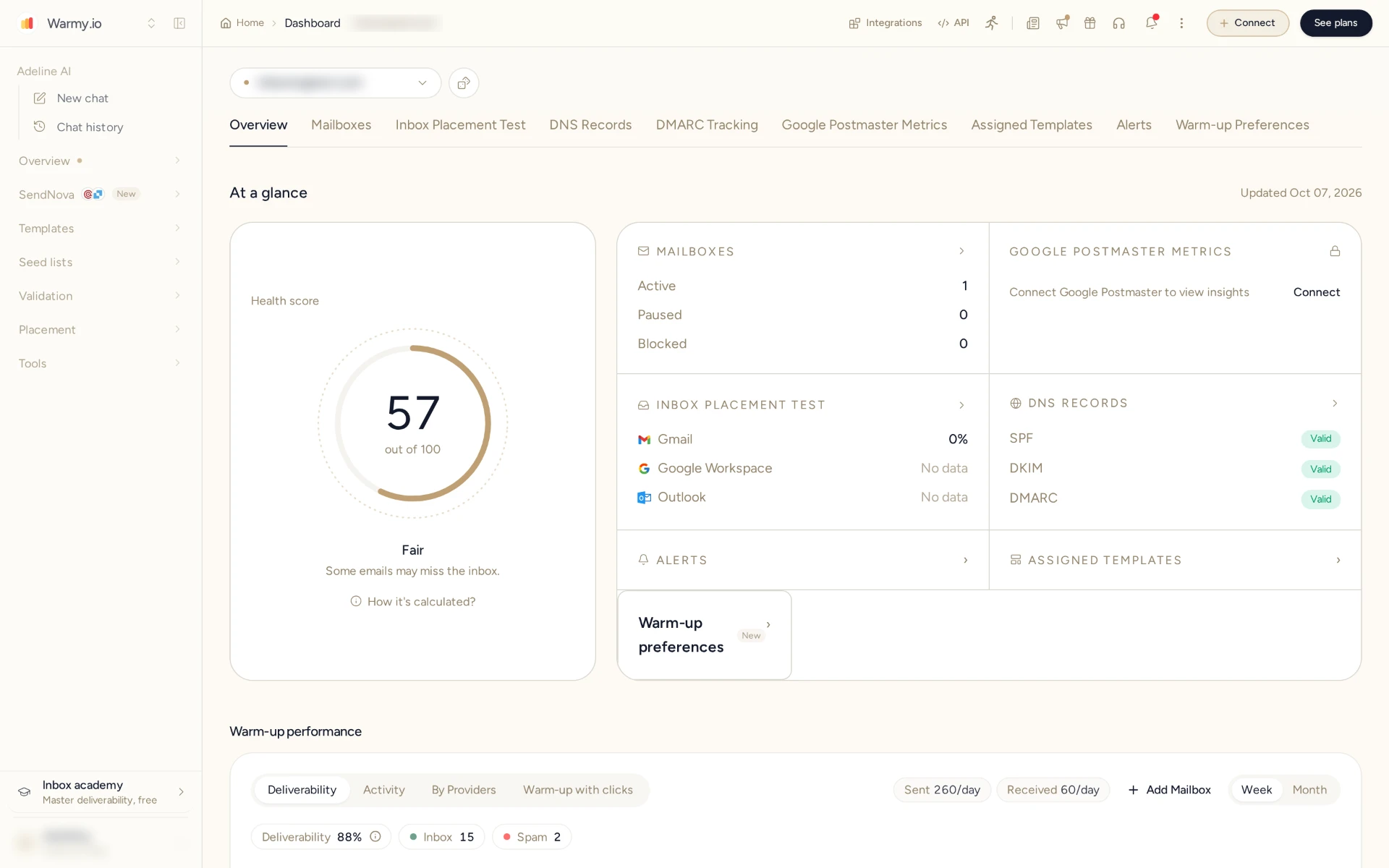
Warmy email warmup runs through your existing provider on a protected network of over a million real Google Workspace and Microsoft 365 and consumer inboxes. It sends during working hours in the recipient's time zone and ramps up gradually and slows down at night and on weekends. Warmup emails are opened and replied to and marked as important and rescued from spam and auto-archive keeps them out of your inbox.

Warmy warm-up dashboard

How MXToolbox does it

warmup isn't part of its plans. It monitors and reports and its Managed Services team can take on reputation work for you.

Why it matters: a clean DNS report doesn't give a new domain a sending history. Gradual volume and positive engagement do.

Using Seed Lists

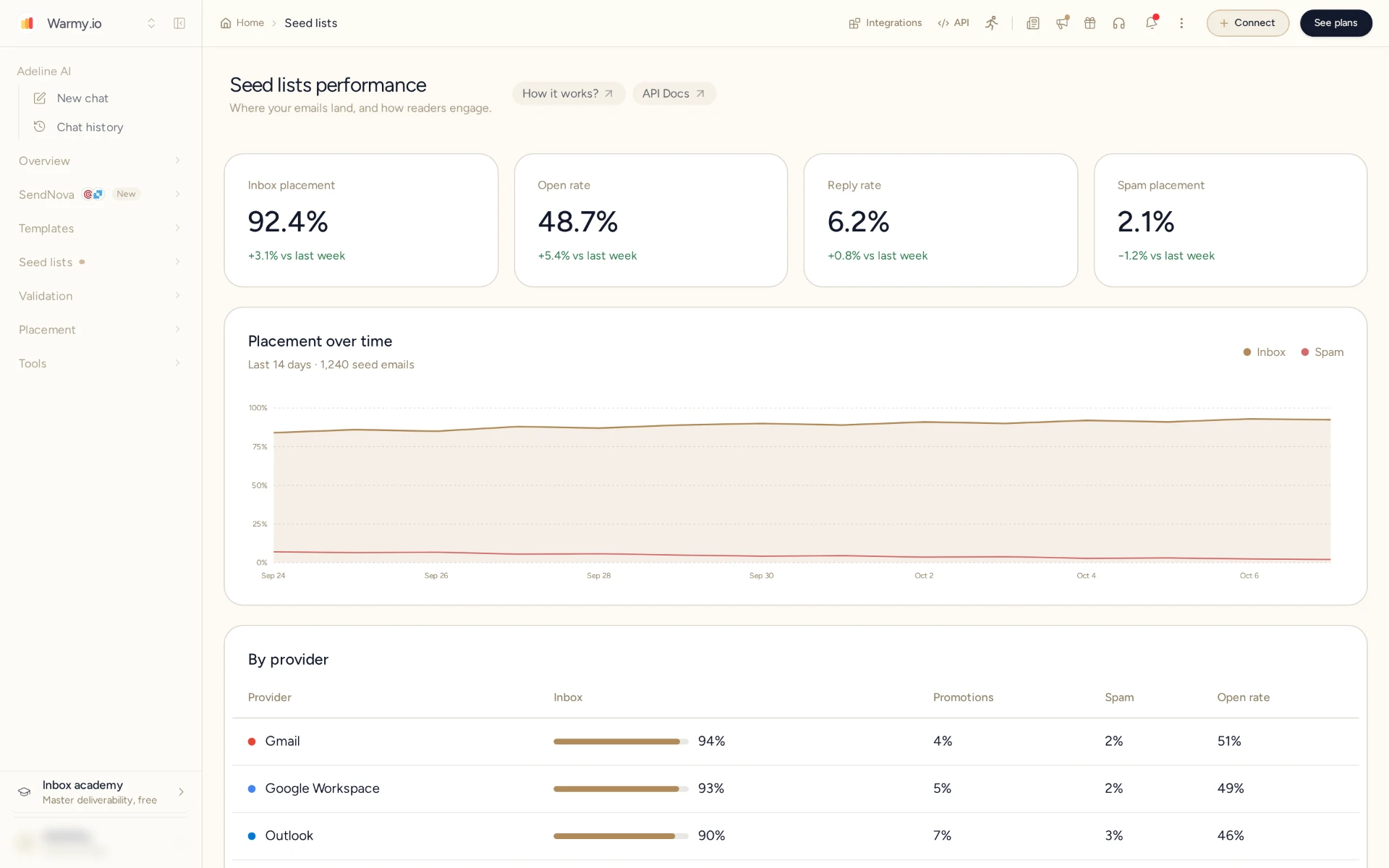
Warmy adds a 500,000+ US seed list across Gmail and Outlook and Yahoo and corporate and regional providers including mobile seeds on real US devices. Send your campaigns to the list and the seed accounts open your emails and move them out of spam and scroll and click links. The list rotates every month.

Warmy seed list

How MXToolbox does it

its inbox placement analysis sends test messages to check where they land. The test accounts don't engage with your campaigns.

Why it matters: measuring placement tells you where you stand. Engagement from real accounts is what moves it.

Authentication and Monitoring

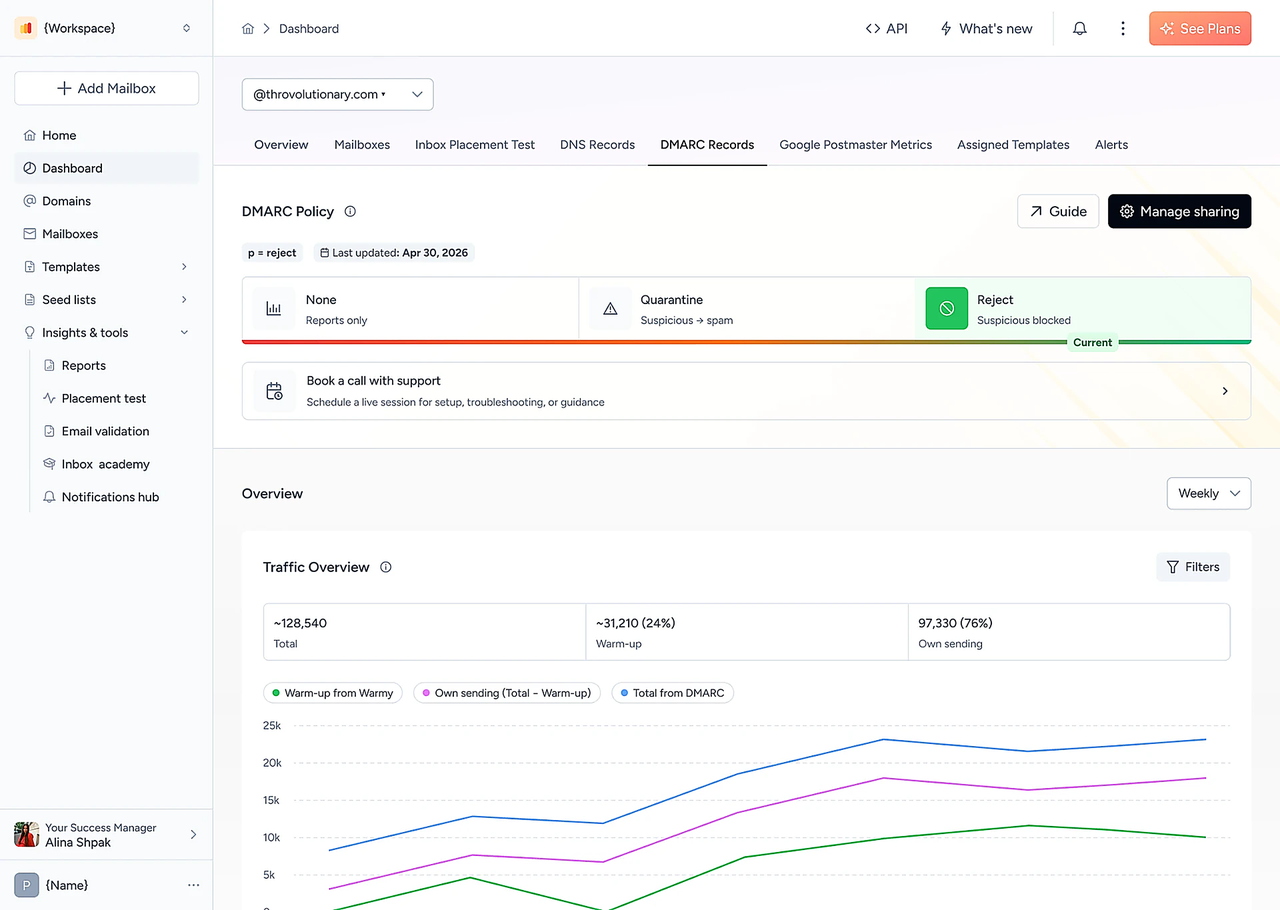
Start with authentication. SPF and DKIM and DMARC are the core protocols in Google's sender requirements. Warmy's DMARC monitoring shows who is sending as your domain and what fails and the exact record to change and domain and IP reputation is tracked all the time with alerts when a signal drops.

Warmy DMARC monitoring

How MXToolbox does it

Delivery Center analyzes SPF and DKIM and DMARC configuration with recommendations and management tools and reports on DMARC and monitors blacklists hourly (Delivery Center) or in real time (Plus) along with inbound and outbound mail flow.

Why it matters: for mxtoolbox monitoring of large mail infrastructure MXToolbox goes deeper. If you need monitoring plus the warmup that fixes reputation issues Warmy covers both in one plan.

Measuring Results

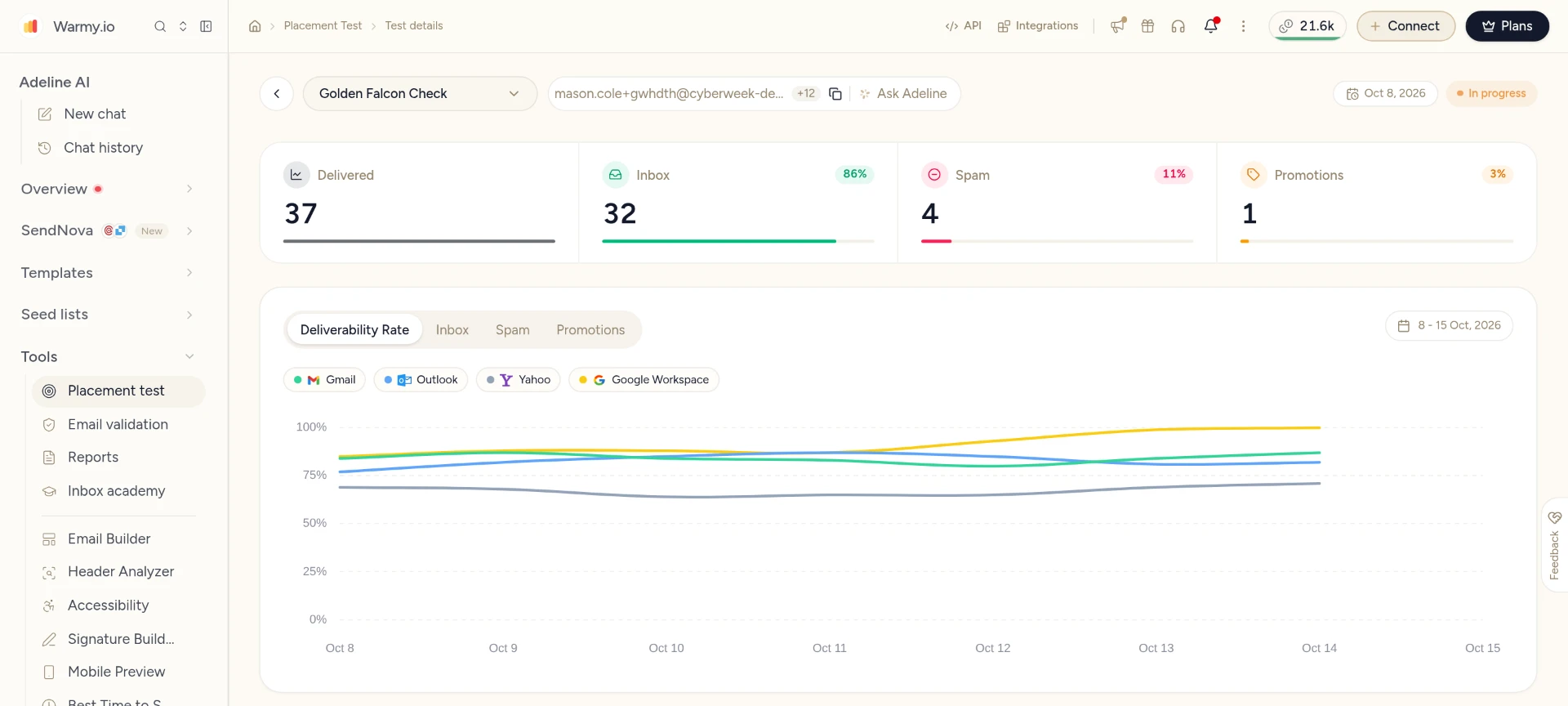
Warmy's placement tests run outside the warmup network and break results down by provider and show Inbox and Promotions and Spam so you get a practical email deliverability score for the campaign you're about to send. Scheduled auto-tests keep a fresh baseline. Keep the template and provider mix the same between tests.

Warmy inbox placement test by provider

How MXToolbox does it

inbox placement analysis at Gmail / Google Workspace and Microsoft 365 / Outlook and Yahoo with 30 a month on Delivery Center or 100 on Plus and content and configuration checks.

Why it matters: if your list includes corporate or regional mailboxes check which providers your tests actually cover before you trust the score.

TROUBLESHOOTING

When Your DNS Checks Pass but Emails Still Land in Spam

It's a common situation. SPF and DKIM and DMARC pass and the domain health check is green and no blacklist shows up and still campaigns go to spam. Infrastructure checks confirm your setup is valid. They don't tell you if mailbox providers trust your sending reputation and that's built from volume history and how recipients engage. Here's how to work through it.

  1. Confirm where it lands. Run a placement test and look at Inbox and Promotions and Spam by provider.

  2. Rule out the basics. Check DMARC reports and Google Postmaster data for authentication failures or a reputation drop.

  3. Fix the cause. If a blacklist listing shows up find out why it happened and fix it and request delisting from that list. Warmy doesn't remove listings for you.

  4. Rebuild reputation if needed. Start warmup on the B2B or B2C network and send campaigns to the seed list so positive engagement starts building.

  5. Test again. Scheduled placement tests show if things are improving and your deliverability expert reviews them with you.

FAQ

Warmy vs MXToolbox FAQ

No. MXToolbox diagnoses and monitors deliverability and offers Managed Services but automated email warmup isn't part of its plans. Warmy warms up mailboxes on a network of 1M+ business or consumer inboxes.
SOURCES & METHODOLOGY

How We Checked This Comparison

Every MXToolbox detail on this page comes from MXToolbox's own website which means its plan matrix and Delivery Center pages and knowledge base and was checked November 2026. Where its pages disagree we use the numbers on the pricing table. Warmy details come from Warmy's pricing and product pages. We haven't tested MXToolbox hands-on so this comparison doesn't claim one tool gets better placement results than the other.

Evidence labels:

Verified from official pricing (prices, monitors, domains, placement analyses)Vendor-reported (network and seed list sizes)Not independently tested (placement results)

Disclosure: this comparison is published by Warmy and that's one of the two products compared. We've tried to keep it fair including where MXToolbox is the better choice. Spot something out of date? Tell us and we'll correct it.

Sources

Update history

October 28, 2026: comparison published; prices and features checked for both tools.

See Warmy's warmup and monitoring and deliverability tools in action.

Book a free demo or get a free 7-day trial (no credit card required) and see how Warmy can improve your email deliverability.