



TL;DR: This error means your sending domain’s DNS records could not be resolved, not that your email content was flagged. The fix is to confirm your MX, A, and AAAA records are published and fully propagated, since SPF and DKIM alone can’t resolve a domain that doesn’t exist in DNS.
While this error is a temporary failure, it can still cause inconveniences, delays, and frustrations. Thus, it’s essential to address this error as soon as possible.
Understanding and resolving this error is crucial to ensuring that your emails are properly authenticated, and your domain remains in good standing with email providers.
What is SMTP Error 450 4.1.8?
SMTP error 450 4.1.8 is a temporary failure that indicates your email was rejected by the recipient’s mail server. Yes, it’s a temporary error – but it can often point to a fundamental issue. The 4.1.8 code is one of many enhanced SMTP status codes defined in the IETF’s enhanced status code registry, which standardizes how mail servers report specific delivery problems beyond the basic 450 response.
Basically, what happened is the recipient’s email server could not find the domain of the sender’s email address in the DNS (Domain Name System). When this happens, your emails can be classified as spam, blocked entirely, or temporarily rejected with this 450 4.1.8 error. This is just one of many SMTP response codes you might encounter; Warmy’s guide to SMTP error codes and messages covers the full list and what each one means.
What causes SMTP Error 450 4.1.8?
To illustrate, here’s what occurs behind the scenes:
- DNS Lookup Initiated: When a recipient’s mail server receives an incoming email, one of its first tasks is to verify the legitimacy of the sender’s domain.
- Failure to locate domain: The server attempts to perform a DNS lookup on the domain in the MAIL FROM address or, in some cases, the From header domain.
- Missing DNS Records: If the server cannot find corresponding DNS records for the sending domain, it triggers the ‘domain not found’ error. This is often because of missing or misconfigured DNS records.
Understanding the crucial role of DNS records in mitigating SMTP Error 450 4.1.8
As mentioned above, SMTP error 450 4.1.8 is often caused by issues with domain authentication and DNS records. Here, we discuss how various DNS records impact deliverability.
The role of domain authentication in email delivery
Domain authentication is the process of verifying whether an email is truly coming from the domain it claims to be from. It helps mail servers identify legitimate senders and prevent malicious or spammy emails from reaching inboxes.
When you authenticate your domain, you provide proof that you own the domain and have the right to send emails from it. This also helps avoid spoofing incidents.
While the SMTP error 450 4.1.8 isn’t really about authentication protocols like SPF, DKIM, and DMARC, these records still contribute when it comes to confirming a domain’s existence.
So if domain authentication records are missing, misconfigured, or expired, the recipient’s email server may find it difficult to verify the domain. This can then lead to errors like 450 4.1.8. This is particularly problematic because an unverified domain may be flagged as suspicious or potentially dangerous.
What are the essential DNS records for email sending domains?
Mail servers look for specific record types to confirm a domain’s existence and its ability to handle email:
- MX (Mail Exchanger) records: This tells other mail servers where to route emails for your domain. Even if you’re sending an email and not receiving it, many recipient mail servers still conduct this check to determine if the sending domain is legitimate.
- A (Address) and AAAA (IPv6 Address) records: The A record maps a domain map to an IPv4 address, and an AAAA record to an IPv6 address. It’s an additional anti-spam measure that recipient mail servers do to protect their users by confirming that the domain actually exists. Microsoft’s documentation on required DNS records for email delivery walks through how MX, A, and supporting records work together for a sending domain.
- Sender Policy Framework (SPF) and DomainKeys Identified Mail (DKIM): These are both crucial records for email authentication. They don’t directly cause the SMTP Error 450 4.1.8 “domain not found” issue, but they still play a crucial role in verifying your legitimacy and trustworthiness.
How to resolve the 450 4.1.8 Error
To fix this issue, you’ll need to verify that your sending domain is properly configured and publicly resolvable. The steps below walk you through how to diagnose, correct, and prevent this issue.
Perform a DNS lookup for your sending domain
The first and most important step you need to take is to confirm that your sending domain has valid, publicly visible DNS records. Check the MX, A, and AAAA records not only for your primary sending domain (e.g., ml.example.com) but also for related hostnames (e.g., mtaX.ml.example.com).
Recommended tools:
- dig
- Nslookup
Example commands:
- dig A yourdomain.com
- dig AAAA yourdomain.com
- dig MX yourdomain.com
Pro Tip: Check DNS from more than one resolver, for example Google’s public resolver at 8.8.8.8, alongside your local ISP’s DNS. A record can look fine from one resolver while still returning stale or missing data from another during propagation.
Verify DNS propagation
DNS changes can take time to propagate globally. The timeframe can be anywhere from a few hours to 24–48 hours. So if records were recently added or modified, recipient servers may still be seeing outdated DNS data.
What you should do: If everything appears configured correctly, propagation delay may be the temporary cause. You can wait it out for a set amount of time before troubleshooting again if the error persists.
Pro Tip: If you know a DNS change is coming, lower the TTL (time-to-live) on the affected records a day or two beforehand. Shorter TTLs make resolvers refresh their cache faster, which shrinks the propagation window the next time you update records.
Check essential DNS records
At minimum, check if your MX records exist and if they point to your mail server. Also take a look at your A/AAAA records, and review if your SPF, DKIM, and DMARC protocols are valid and published. Don’t forget to verify DNS records for all domains or subdomains involved in your sending pipeline.
Quick note: Even if SPF/DKIM pass, missing MX or A/AAAA records can still trigger a 450 4.1.8. Domain resolvability must be correct first.
Confirm proper configuration on authoritative DNS nameservers
Make sure your authoritative DNS servers are serving the correct data. If they are misconfigured, inconsistent, or out of sync, some receiving servers may fail DNS lookups.
Consider temporary network or recipient-side issues
Because 450 is a temporary error, other causes include recipient DNS glitches, momentary network failures, and receiver server overload. If your DNS is correct, simply waiting and retrying may resolve it.
Fixing the DNS records behind a 450 4.1.8 error resolves the immediate deferral, but repeated deferrals can still leave a dent in your sender reputation. Book a free demo with Warmy to see how continuous domain monitoring flags DNS problems before they turn into bounces.
How Warmy can help prevent future SMTP 450 4.1.8 errors
The SMTP error 450 4.1.8 – Sender address rejected: Domain not found doesn’t just block an email. It signals a foundational DNS problem that can hurt your overall email deliverability.
When receiving servers cannot find your sending domain, they may treat this as a red flag. That can lead to increased bounces, more messages going to spam, blacklisting, and long-term reputation damage.
DNS configuration, authentication, and domain reputation are all interrelated, meaning this error has a role to play when it comes to maintaining inbox placement.
Warmy.io provides a comprehensive set of tools and automated processes designed to keep your sending infrastructure healthy and help ensure your domain is always properly authenticated.
Domain Health Hub
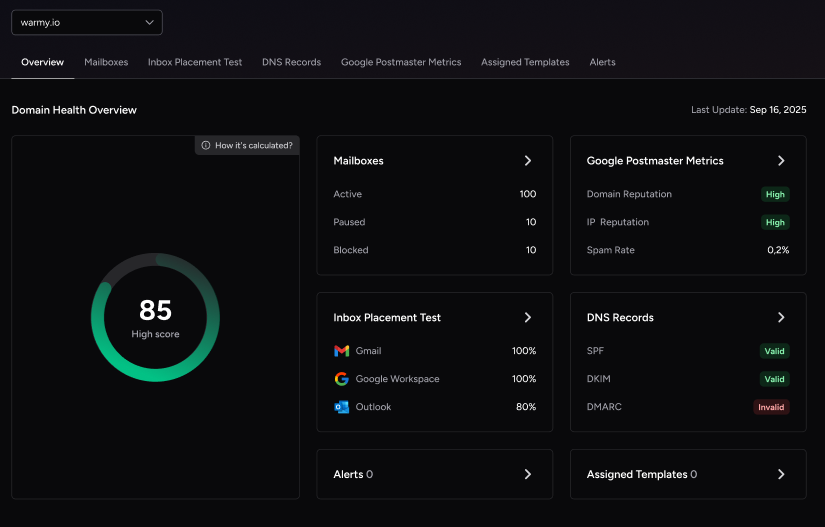
Instead of monitoring individual email addresses, Warmy.io provides a domain-level health dashboard. The Domain Health Hub shows the following features:
- A domain health score based on various factors like authentication, blacklist status, and inbox placement tests.
- Spam rate trends and overall deliverability performance with weekly or monthly tracking options.
- Comprehensive DNS status checks to easily validate SPF, DKIM, DMARC, rDNS, MX, and A records for stronger authentication & security.
- Optimized multi-domain monitoring so users can manage all their domains from one dashboard and identify which ones need immediate attention.
- Quick access to a detailed breakdown of health metrics, performance reports, and deliverability trends per domain.
By monitoring your setup, Warmy helps prevent the configuration drift that leads to DNS-related failures.
Pro Tip: Don’t wait for a bounce notification to check your DNS health. Set up recurring domain monitoring so a missing MX or A record gets caught before it triggers a 450 4.1.8 deferral or damages your sender reputation.
SPF and DMARC Record Generators
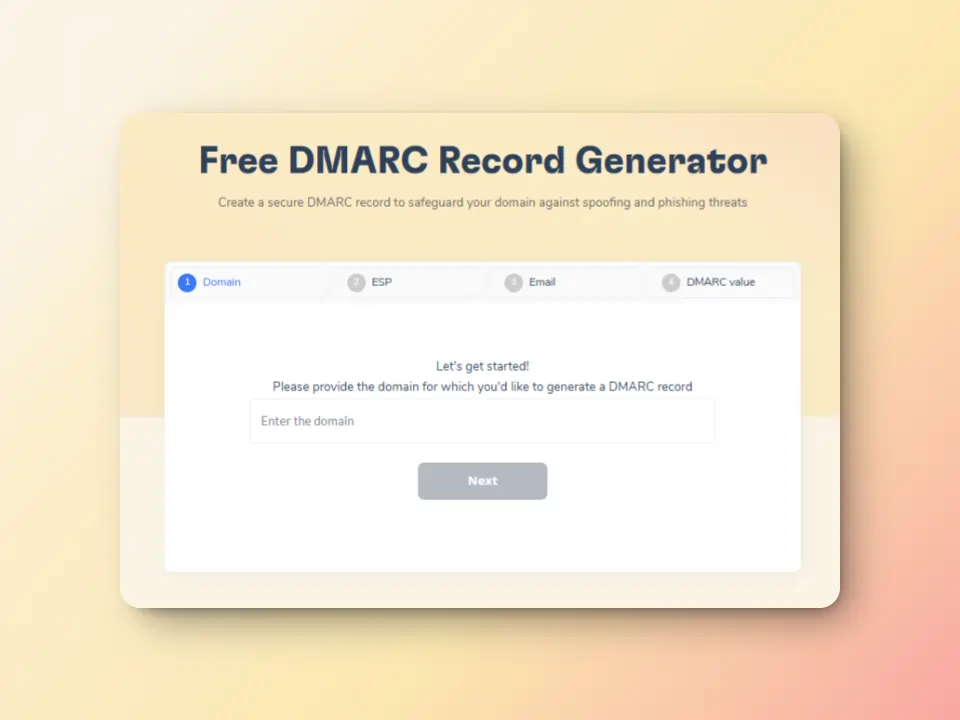
One of the strongest defenses against deliverability issues is proper authentication. Warmy’s free SPF Record Generator ensures SPF is valid and includes the correct authorized senders. On the other hand, the free DMARC Record Generator ensures DMARC policies are correctly set and aligned
Continuous inbox warmup & reputation building

If DNS or authentication issues have damaged your sender reputation, Warmy’s automated email warmup helps repair it by generating trusted, positive engagement (opens, replies, and importance marks). This helps improve how mailbox providers perceive your domain and supports recovery after DNS-related disruptions or SMTP errors.
Email deliverability test
Warmy.io’s Email Deliverability Test gives a comprehensive report of the percentage of your emails landing in the inbox, promotions, spam, and even the unreceived ones. It also reveals if your domain or IP is included in any blacklists which can happen if your email content is continuously rejected by recipients’ servers.
The test also checks your email authentication settings (SPF, DKIM, and DMARC) if they are properly authenticated.
Avoid SMTP error 450 4.1.8 and take a proactive approach to email deliverability
SMTP error 450 4.1.8 – Sender address rejected: Domain not found can be a major roadblock to successful email campaigns, but it’s entirely preventable with the right approach and strategies discussed above.
Taking a proactive approach to email health not only prevents SMTP errors but also ensures that your emails reach your recipients’ inboxes consistently. Warmy’s tools help automate and streamline the process of maintaining domain health, verifying authentication, and continuously monitoring your deliverability, so you can focus on engaging with your audience without worrying about email errors.
Ready to take control of your email deliverability? Start your free trial with Warmy today.











