TL;DR: If your open rates just dropped, you need to run an email health check across four specific layers in a strict priority order. Always start with authentication (SPF, DKIM, DMARC) because it is a binary test, and a failure here makes everything else irrelevant. Check your reputation and blacklists second, list quality third, and content last. This exact sequence moves from the fastest technical signals to the slowest subjective ones, helping you pinpoint the root cause of your deliverability issue in under fifteen minutes. To skip the manual troubleshooting, Warmy automatically monitors and optimizes those first two technical layers for you.
A proper email health check is effective because it moves strictly from absolute facts to subjective judgment. Authentication either passes or fails, and you can verify that layer in about thirty seconds from a terminal. Content quality, on the other hand, requires nuance and takes at least an hour to properly evaluate.
Our team at Warmy built an AI-driven email warm-up and deliverability platform to solve this exact problem. We run this specific diagnostic sequence whenever a domain starts underperforming because it eliminates the guesswork.
The fast diagnostic order: What to check first
Most articles about email deliverability problems hand you 20 factors with no indication of which to look at first. An inventory like that leaves you exactly where you started.
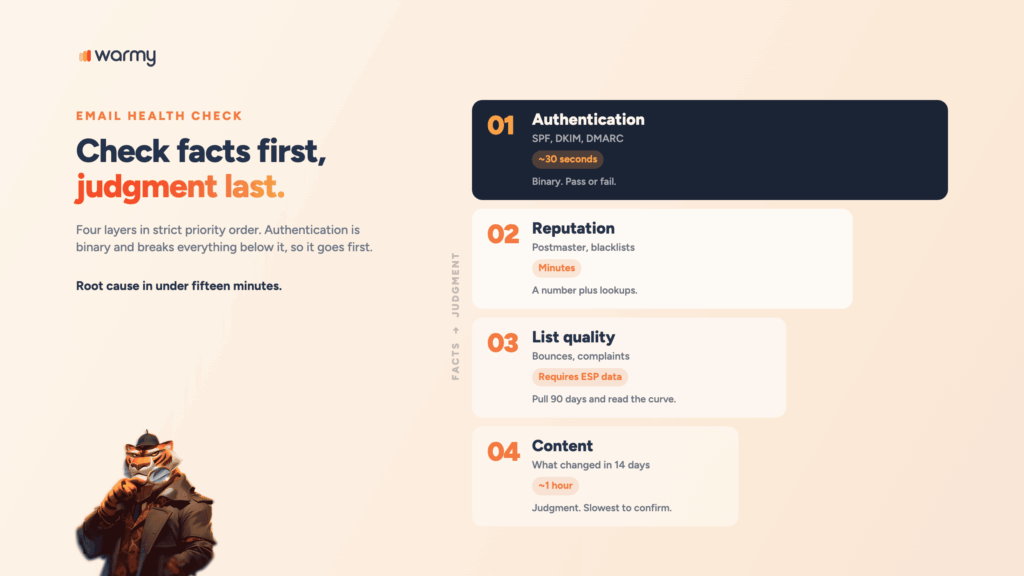
Here’s the order, and the reasoning behind it:
- Authentication. Binary, checkable in seconds, and it breaks everything below it.
- Reputation and blacklists. A number you can read plus a handful of lookups.
- List quality and engagement. Requires pulling data from your ESP.
- Content and recent changes. Requires judgment, and it’s slowest to confirm.
Step 1: Check authentication (SPF, DKIM, DMARC)
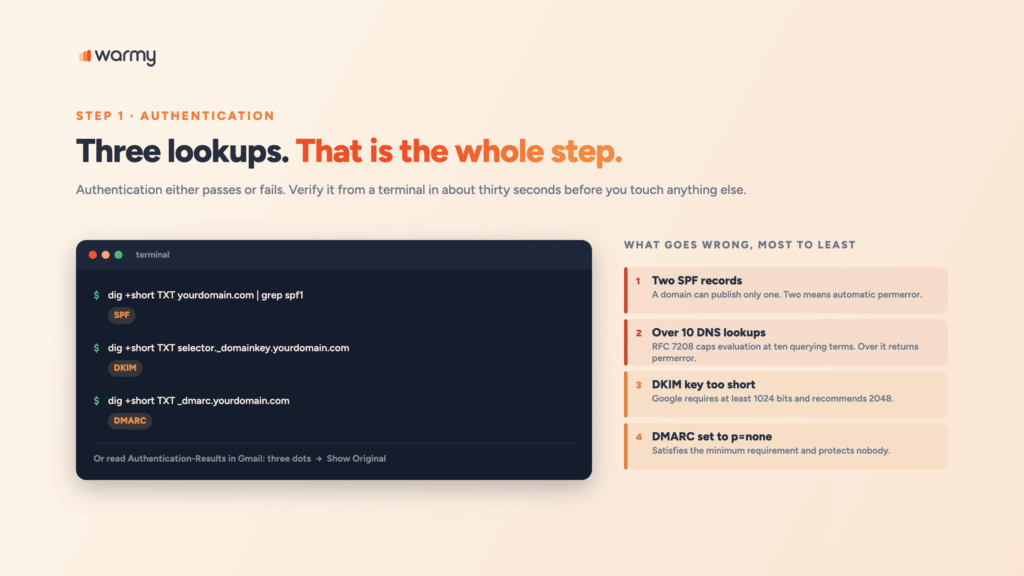
Three DNS lookups. That’s the whole first step.
dig +short TXT yourdomain.com | grep spf1          # SPF
dig +short TXT selector._domainkey.yourdomain.com  # DKIM
dig +short TXT _dmarc.yourdomain.com               # DMARC
What goes wrong, in rough order of frequency:
- More than one SPF record. A domain can publish only one. Two means an automatic permerror, and every message fails SPF. This happens constantly when someone adds a sending tool and pastes in a second TXT record instead of merging.
- Too many DNS lookups in SPF. RFC 7208 caps evaluation at ten DNS-querying terms, and going over returns permerror. Every include, a, mx, and redirect counts, including nested ones inside your providers’ records. Google Workspace alone can eat three or four, so adding a CRM and a help desk pushes you over without touching your own record.
- A DKIM key that’s too short or missing. Google requires at least 1024 bits for personal Gmail and recommends 2048. Selectors also drift after an ESP migration.
- A DMARC record that does nothing. p=none satisfies the minimum requirement and protects nobody.
Faster confirmation lives in the message itself. Open a recent email in Gmail, click the three dots, choose Show Original, and read the header block:
Authentication-Results: mx.google.com;
       dkim=pass header.i=@yourdomain.com;
       spf=pass (google.com: domain of you@yourdomain.com
             designates 203.0.113.10 as permitted sender);
       dmarc=pass (p=REJECT sp=REJECT dis=NONE) header.from=yourdomain.com
Step 2: Check your sender reputation and blacklists
Authentication clean? Now check whether providers trust you.
Google Postmaster Tools is the most useful free source, because it shows Gmail’s own view of your domain. Watch the user-reported spam rate. Google’s guidance is to stay under 0.1% and never reach 0.3%, and it’s calculated daily rather than averaged over a campaign.
Blacklists come next. A listing on a major DNSBL changes placement within hours.
# Reverse the IP octets, then query the blocklist.
# For 203.0.113.10 on Spamhaus ZEN:
dig +short 10.113.0.203.zen.spamhaus.org
# An answer in the 127.0.0.x range means listed. No answer means clear.
Two things people get wrong here. An obscure list rarely moves the needle on its own, while Spamhaus does. And on a shared IP pool, domain listings matter more, because the IP reputation belongs partly to your neighbors while the domain is entirely yours.
If reputation is where the problem lives, ongoing visibility beats one-off lookups. You can see the full picture with Deliverability Insights instead of checking each provider manually.
Step 3: Check list quality and engagement
Authentication passes, reputation looks fine, and your emails are still not being delivered the way they used to.
Pull three numbers from your ESP for the last 90 days, and read the shape of the curve rather than the absolute value:
- Hard bounce rate. A spike starting on a specific date almost always traces back to a list import or a form that stopped validating addresses.
- Spam complaint rate. Compare against the 0.1% line, then segment by campaign to find which send caused it.
- Engagement by contact age. If it’s falling only among contacts older than twelve months, that’s list hygiene rather than deliverability.
Why are my emails not being delivered to people who used to open them? Usually because you kept mailing the ones who stopped. Providers weigh recent engagement heavily, and a growing block of inactive addresses drags placement down for everyone else on the list.
Recycled spam traps are the invisible version of the same problem: real addresses that were abandoned, then reactivated by the provider to catch senders who never clean their lists. You can’t see them in any report. Suppressing dormant contacts is the only defense.
Step 4: Check content and recent changes
Ask a narrower question than “is my content spammy?” Ask what changed in the last 14 days. New template, new ESP, new sending domain, a volume jump, a link shortener someone added. Deliverability rarely degrades without a trigger.
Then look at the message itself:
- Link density, and whether any linked domain is itself listed.
- Image-to-text ratio, especially image-only emails with almost no live text.
- Subject line and body language. Our breakdown of which words trigger spam filters in your content lists the phrases worth cutting.
- Volume pattern. A domain that normally sends 2,000 a day and suddenly sends 20,000 looks compromised.
Email deliverability issues by symptom
Working backward from the symptom beats working forward through a checklist. Find yours, then check the right-hand column first.
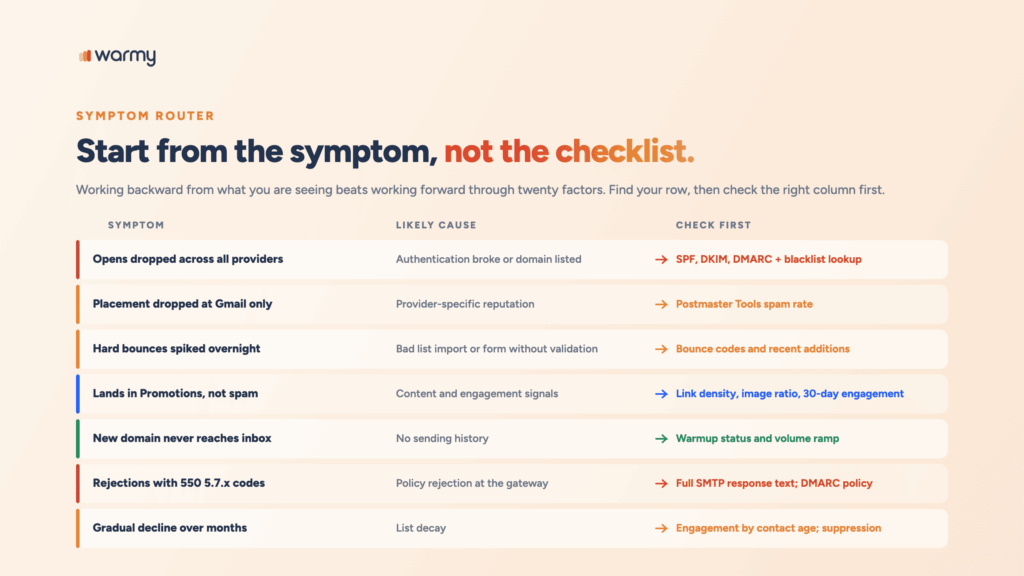
| Symptom | Likely cause | Check first |
|---|---|---|
| Opens dropped sharply across all providers | Authentication broke or the domain got listed | SPF, DKIM, DMARC records; blacklist lookup |
| Placement dropped at Gmail only | Provider-specific reputation | Postmaster Tools spam rate |
| Hard bounces spiked overnight | Bad list import or a form without validation | Bounce codes in your ESP; recent list additions |
| Mail lands in Promotions rather than spam | Content and engagement signals | Link density, image ratio, 30-day engagement |
| A new domain never reaches the inbox | No sending history | Warmup status and volume ramp |
| Rejections with 550 5.7.x codes | Policy rejection at the gateway | The full SMTP response text; DMARC policy |
| Gradual decline over several months | List decay | Engagement by contact age; suppression rules |
When to run a full health check vs. a quick check
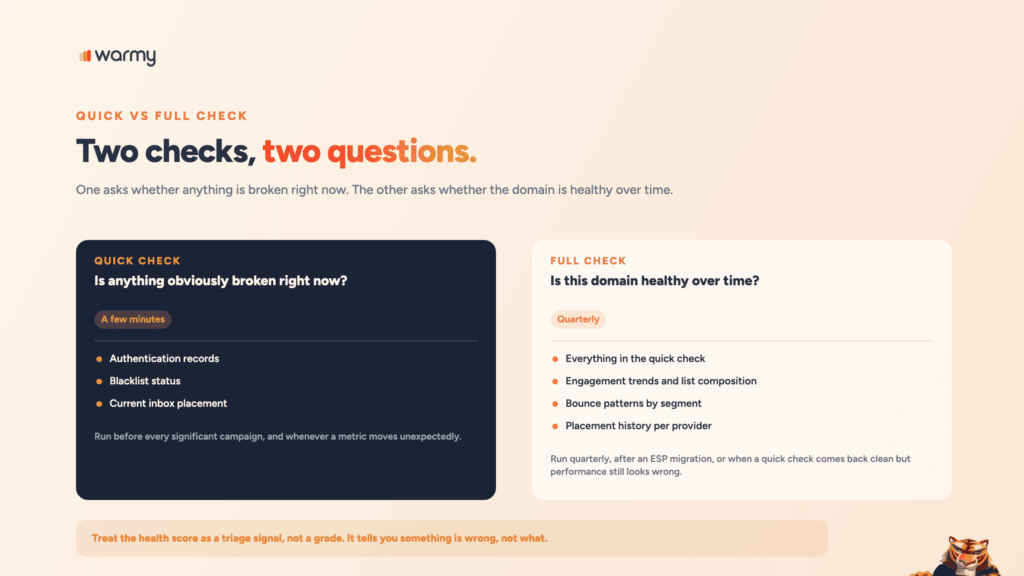
A quick check answers “is anything obviously broken right now?” Authentication, blacklist status, current placement. A few minutes. Run it before every significant campaign and whenever a metric moves unexpectedly, which is what an email health checker is built for.
A full check answers “is this domain healthy over time?” Everything above plus engagement trends, list composition, bounce patterns by segment, and placement history per provider. Run it quarterly, after an ESP migration, or when a quick check comes back clean but performance still looks wrong.
Treat the email health score most tools give you as a triage signal rather than a grade. It compresses authentication, blacklist presence, placement, and DNS config into one number, which is useful for spotting that something’s wrong and useless for telling you what.
How to fix what you find
How to fix email deliverability depends entirely on which layer failed.
- Authentication. Merge duplicate SPF records into one. Get under ten lookups by removing includes for services you dropped, replacing them with ip4: entries where IPs are static, or delegating senders to subdomains. Regenerate DKIM at 2048 bits. Move DMARC from p=none to p=quarantine once reports are clean.
- Reputation. Delisting is usually self-service and takes hours to days. The listing is a symptom, though, and a domain listed once will be listed again unless the sending behavior changes. If reputation is genuinely damaged, start rebuilding your domain’s reputation with a controlled volume ramp rather than pausing and hoping.
- List quality. Suppress anyone dormant for six months, verify anything imported, turn on double opt-in.
- Content. Cut link count, add live text to image-heavy templates, revert whatever changed right before the drop.
Run the check automatically
Everything in Steps 1 and 2 can be automated, which is the point of a free email health checker rather than a terminal window.
Warmy’s free Email Deliverability Test covers those two layers in one pass: inbox placement across Gmail, Outlook, and Yahoo, a blacklist scan of your domain and IP, and verification that SPF, DKIM, and DMARC are configured and aligned. You get a score plus the breakdown behind it, which is where the diagnosis lives.
Run this check automatically with our free Email Deliverability Test, or read the full breakdown of deliverability testing methods and tools for the wider set of approaches and when each applies.
Wrapping up
An email health check is a sequence rather than a single tool or number, and the sequence matters more than any individual test in it. Authentication, then reputation, then list, then content, stopping at the first layer that comes back broken.
Most email deliverability problems announce themselves in the first two layers, and both are free to check. The teams that recover fastest already know what their baseline looks like, because they measured it before anything went wrong.
Run a free Email Deliverability Test on your sending domain and see where you stand today.