You can check if an email is valid without sending a message by testing its format, domain mail setup, and the receiving server’s SMTP response. These checks show whether an address is structurally possible and whether the mail infrastructure recognizes it.
An email checker automates the process and can return Accept-All or Unknown when the evidence is not strong enough for a definite result. Below, we explain how each method works and when one-address checking should turn into list-wide verification.
What Email Verification Actually Checks
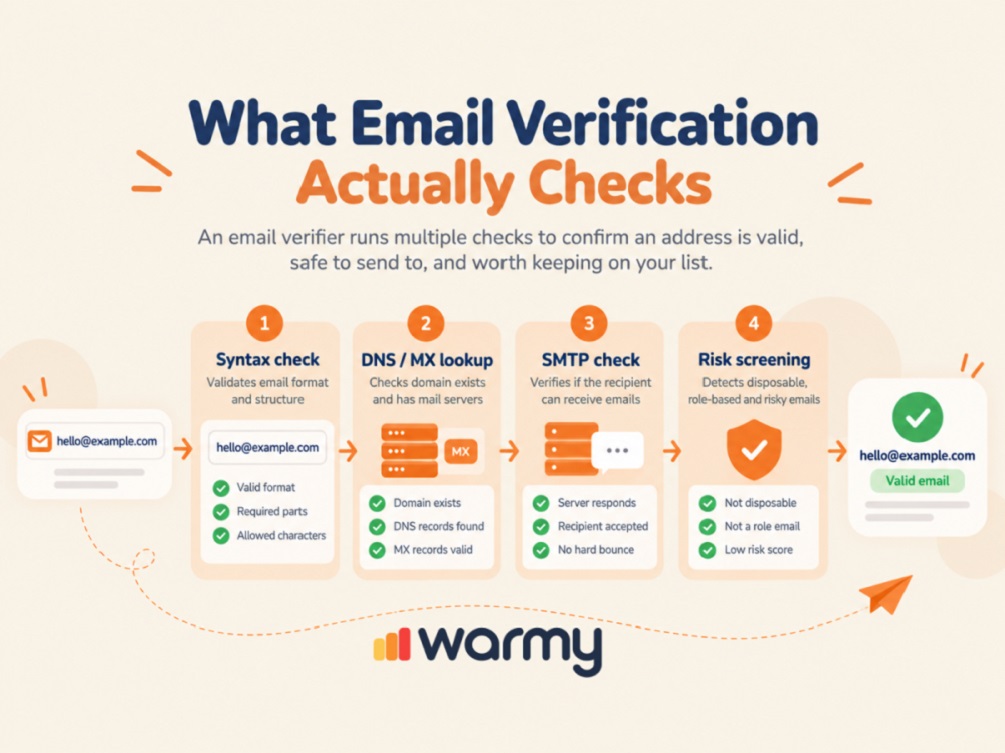
Email verification checks the address format, domain mail configuration, and receiving server response, then adds risk signals where needed.
An email validator first performs a syntax check to catch malformed input. A missing @ or incomplete domain can be rejected before any domain or mailbox checks begin. Passing this stage confirms the syntax only; mailbox existence requires further checks.
An MX record check looks for the servers responsible for receiving email. Beyond the MX lookup, the verifier checks the domain’s broader DNS setup to confirm usable mail routing.
Next, the verifier performs an SMTP check by querying the intended recipient and stopping before message content is sent. Some servers block verification or accept recipients too broadly, so a positive response is strong evidence rather than absolute proof.
Risk screening can identify disposable and role-based addresses. It also flags patterns linked to temporary or abusive use. Spam trap detection belongs here: tools can flag known or suspicious signals, but true trap identities remain private, so no external verifier can reliably identify every trap.
Manual Ways to Check Email (and Their Limits)
You can manually see if an email is valid by searching for the address on Google. Other options include sending a test message or querying the receiving mail server directly. Each method answers a different question.
Finding an address on a current company website confirms that it has been published, but the mailbox may already be inactive.
Sending a message is the simplest test for valid email delivery, but every failure becomes a real delivery attempt. A valid mailbox can still reject a message for reasons unrelated to whether the address exists.
With a manual SMTP check, you query the recipient without sending the message body. Some servers block this type of probing. Catch-all domains create a different limitation because they may accept addresses that do not exist as individual mailboxes.
Using Email Checker Tool
An email checker tool automates syntax, domain, and SMTP checks and combines them into statuses such as Valid, Invalid, Accept-All, Disposable, and Unknown.
- Valid means the address passed the service’s checks at that moment.
- Invalid means it failed verification.
- Disposable identifies an address from a temporary email service.
Accept-All means the domain accepts recipients broadly, so the specific mailbox cannot be confirmed normally. Unknown means the email verify tool could not collect enough evidence, often because the server blocked verification or returned no usable response.
A reliable email verifier website distinguishes Accept-All and Unknown from confirmed Valid and Invalid addresses. That distinction helps decide which contacts to keep, suppress, or review.
The Catch-All Problem Nobody Talks About
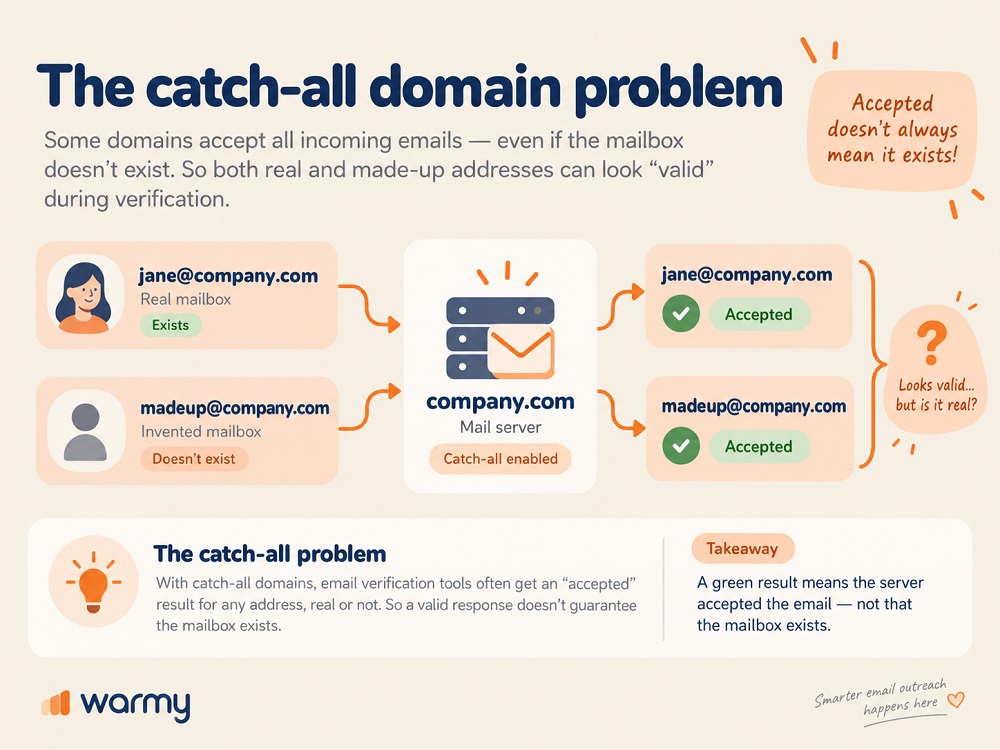
A catch-all domain accepts email for addresses that may not have individual mailboxes. This behavior makes a standard SMTP result insufficient for confirming a specific recipient.
Suppose john@company.com is real and madeupname@company.com is invented. A catch-all server may accept both, and the invented address will look deliverable during verification.
Keep catch-all results in an uncertain category. Advanced services can improve the classification for some addresses by using additional provider-specific signals. The source and value of the contact can then guide your decision about whether to keep it. Even then, the result remains less certain than for a confirmed mailbox.
ZeroBounce’s 2026 Email List Decay Report says more than 9% of all addresses it checked in 2025 were catch-all emails.
Bulk Verification: When You Actually Need It
A single-address checker is enough for a handful of contacts. Once the list grows into hundreds or thousands, bulk email verification becomes more efficient: it checks every address in a CRM export and assigns statuses such as Valid, Invalid, Accept-All, or Unknown.
When checking if an email address is valid at signup or lead capture, real-time verification can stop malformed and disposable data before it enters the database. Older records still need another pass later, because an address that was valid at collection can become inactive over time.
Once verification becomes a database workflow, compare dedicated list-scrubbing tools if you’re managing a large list. You can also see the full process for validating your entire email database.
How List Quality Affects Email Deliverability
A clean list reduces invalid recipients and avoidable bounces. Inbox placement also depends on authentication, sender reputation, complaint rates, and sending behavior.
ZeroBounce’s Email List Decay Report published on February 13, 2025 found that at least 28% of email data became invalid or risky over the year. The study covered more than 10 billion addresses. Its next report, released on February 26, 2026 and based on more than 11 billion addresses processed during 2025, put annual list decay at 23%.
The annual rate varies, so a list that passed verification months ago should not be treated as permanently clean. Jobs change, mailboxes are retired, accounts are abandoned, and databases accumulate stale records. Regular list hygiene catches those changes before a major send raises the bounce rate.
Gmail requires proper sender authentication, valid DNS configuration, and TLS for message transport. Google recommends keeping user-reported spam below 0.1% and avoiding rates of 0.3% or higher. Senders delivering more than 5,000 messages per day to Gmail need SPF and DKIM, DMARC, and one-click unsubscribe for marketing mail.
Verification improves recipient-data quality. You can monitor list-related signals alongside domain reputation to separate database problems from reputation or inbox-placement issues.
Common Email Verification Mistakes
- Treating a syntax check as complete verification. Correct formatting does not confirm the mailbox.
- Assuming Valid means guaranteed delivery. Mailbox state and sender-side conditions can change the result.
- Treating Unknown as Invalid. Unknown means the service could not reach a reliable conclusion.
- Automatically removing every catch-all address. Catch-all means uncertain, not nonexistent.
- Trusting one old verification indefinitely. Email data changes, so verification needs a date.
- Expecting an email checker tool to identify every spam trap. Verification can identify risk signals, while true trap lists remain private.
- Assuming a clean list fixes deliverability by itself. Authentication, reputation, complaints, and sending behavior still affect placement.
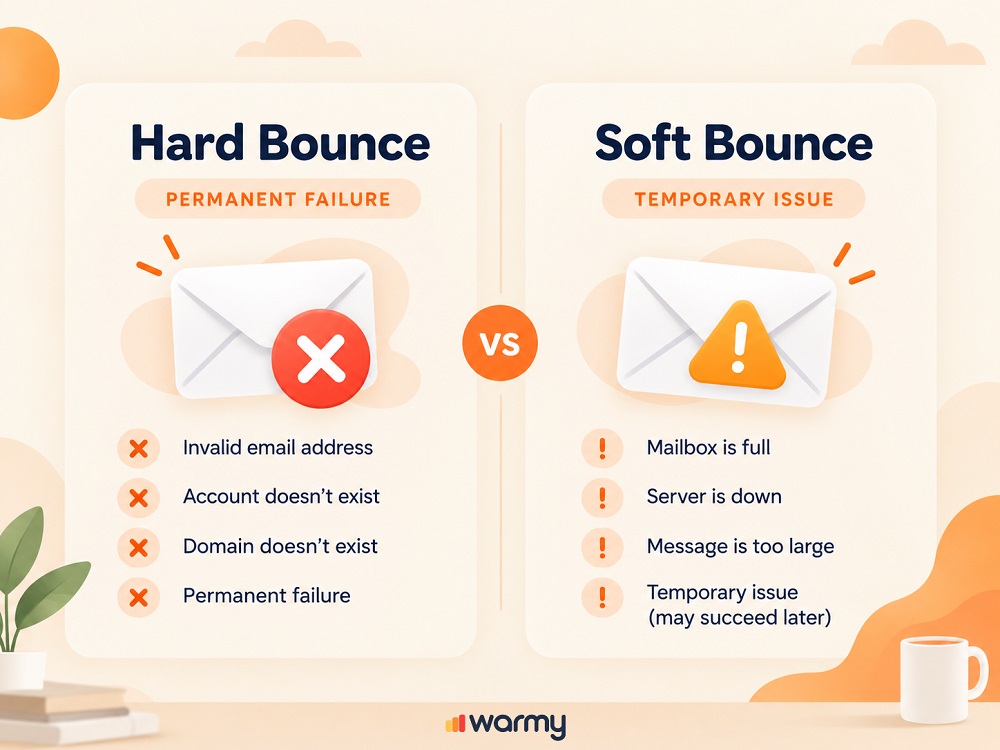
- Treating every bounce as proof that the address is invalid. A hard bounce is a permanent delivery failure, while a soft bounce is temporary and can result from a full mailbox or an unavailable receiving system.
Pre-Send Checklist
Before a campaign:
- Verify an active list at least every 90 days; check fast-growing databases monthly.
- Suppress addresses classified as invalid or known hard bounces.
- Review Accept-All and Unknown contacts as uncertain results that require a separate decision.
- Confirm SPF, DKIM, and DMARC where they apply to your setup.
- Check domain reputation and current inbox placement.
- Reverify an older list before a major campaign, even if it was clean when collected.
Wrapping Up
An email checker removes malformed and invalid recipients before they turn into real bounces. Accept-All and Unknown should remain separate from confirmed Valid and Invalid addresses because the available evidence is different.
Before the next campaign, check your domain’s overall deliverability health with Warmy’s Email Deliverability Test to separate list problems from sender-side issues.
For larger sending programs, recipient quality and sender health need to be monitored together. Warmy’s Deliverability Insights shows how your domain performs across providers and where messages land.
Key Takeaways
- Email verification can test an address without sending a message by checking its structure, domain mail setup, and receiving server.
- A reliable email verifier website should show uncertain results such as Accept-All or Unknown; an effective service does not force every address into a Valid or Invalid status.
- A positive SMTP response is strong evidence, but catch-all domains can also accept addresses without individual mailboxes.
- Use a single checker for a few contacts and bulk verification for hundreds or thousands of records.
- We recommend verifying an active email list at least every 90 days. Check fast-growing databases more often and recheck older lists before a major campaign.