TL;DR: Roughly half the inboxes you send to can actually submit an HTML form. Apple Mail, Gmail on the web and Android, and Yahoo Mail handle them. Outlook renders the markup and then throws the data away, and ProtonMail on Android deletes the form element along with everything nested inside it. That last detail decides your architecture, because a fallback link placed inside the form disappears along with the thing it was supposed to rescue. If you want the version that works everywhere, one-click links with query parameters beat forms outright, since there is no form element for a client to strip. AMP for Email gives you the richest experience, though only in Gmail, Yahoo Mail, and Mail.ru, and Google has to approve your sending address before any of it renders.
Interactive email forms are HTML or AMP forms placed inside the body of an email, letting recipients submit data without opening a browser. To add one without deliverability damage: authenticate your domain with SPF, DKIM, and DMARC, keep the form to a single field, point the action at an HTTPS endpoint on your own domain, and add a fallback link for clients that strip form markup.
Send a survey link and the drop-off happens in stages. Some never open. Some open and don’t click. Some click, hit a slow page, and close the tab. Put the first question inside the email and you skip most of that, which is why email forms keep coming back into fashion, and also why they keep causing a problem nobody warns you about.
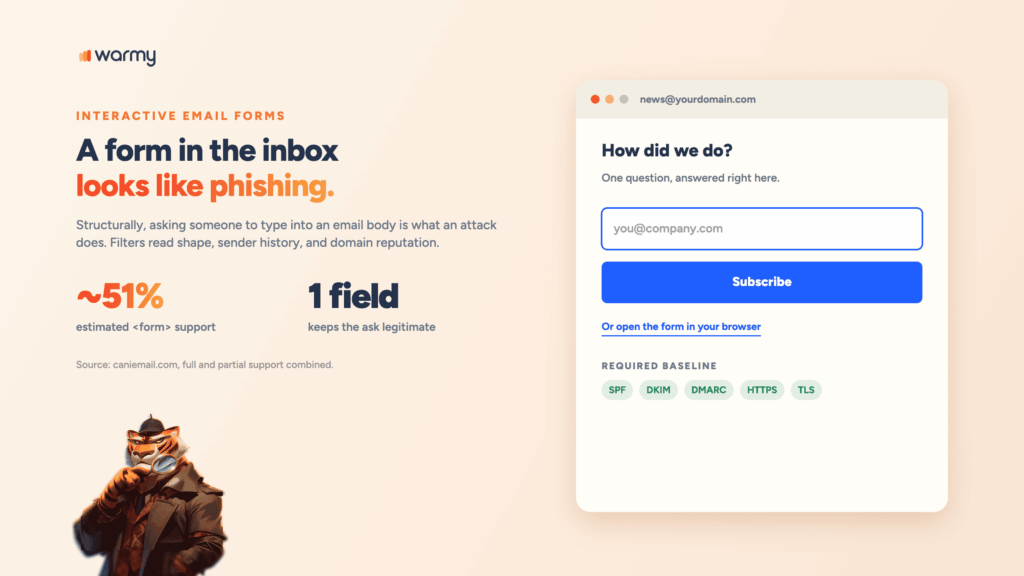
Asking someone to type personal information into an email body is, structurally, what a phishing message does. Filters are tuned to that shape. Warmy is an AI-driven email warmup and deliverability platform that builds the sender reputation these messages depend on.
If you’ve searched for how to embed a form in an email and found markup with no deliverability context, this fills in the other half. Start with a free email deliverability test on your domain.
What are interactive email forms (and why use them)
An interactive email form is a form element rendered inside the message body. The recipient types, hits submit, and the data posts to your endpoint. There’s no browser tab and no landing page, which means nothing gets lost in between.
There are two technologies doing this. Plain HTML forms use the same <form>, <input>, and <button> markup you’d write for a web page. AMP for Email uses a separate MIME part with stricter rules.
An email web form earns its place when the ask is small:
- Feedback after a support ticket. One rating, submitted while the interaction is fresh.
- Signup inside a forwarded email. The person reading isn’t your subscriber yet.
- Preference updates. Frequency and topics changed without a login.
- Quick polls and NPS. A one-tap question beats a linked survey most of the time.
What is not so good is the long-form email asking for name, company, role, phone, and budget. Anything resembling a lead-gen page belongs on one.
Why forms inside email can trigger spam filters
A classic phishing email looks like it came from a bank or an IT helpdesk, and it asks the recipient to enter credentials. Interactive forms have the same structure.
The visual pattern matches, the request matches, and either way the data ends up flowing to an external endpoint. Anti-phishing systems read structure, sender history, and domain reputation.
Google’s own documentation makes the logic visible. Dynamic AMP emails face extra security requirements: the message must pass DKIM, the signing domain must align with the From domain, SPF must pass, and the message must be TLS encrypted in transit.
Google recommends DMARC at quarantine or reject and notes this may be enforced later. Fail any of it and Gmail quietly drops back to the HTML version.
That’s a mailbox provider stating in writing that interactive content needs a higher standard of proof than a static newsletter. A form email is only as trustworthy as the domain behind it, which means a first-week domain is asking for scrutiny it hasn’t earned.
Pro Tip: Never request a password, a payment detail, or a government ID in an email form. Those three fields are the signature of a credential-harvesting attack, and asking for any of them invites exactly the treatment you’re trying to avoid.
Email client support for interactive forms
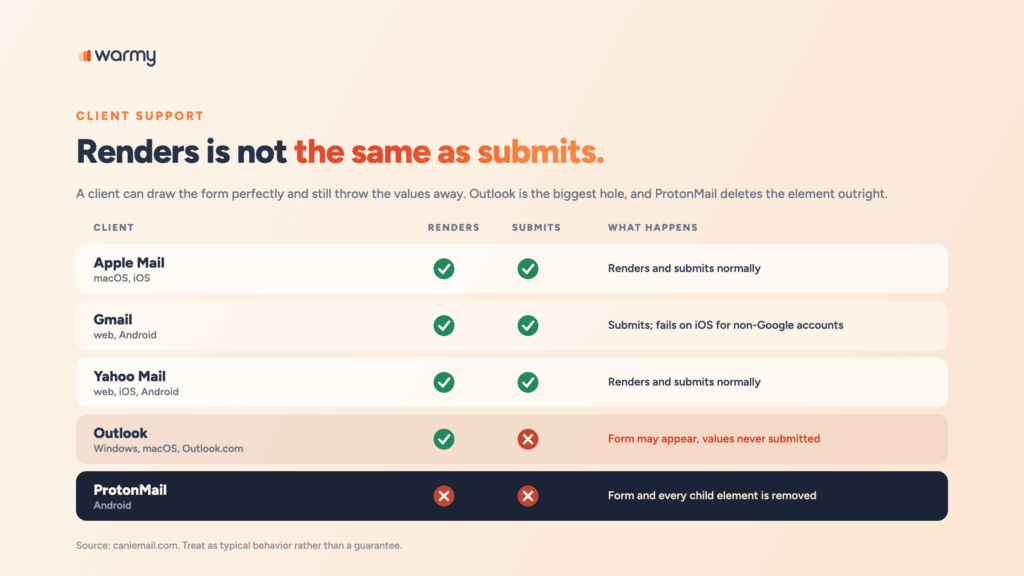
A client can render a form perfectly and still refuse to submit it, which is what most support grids fail to say. According to caniemail.com, the <form> element sits at roughly 51% estimated support once full and partial support are counted together.
| Client | Form support | What happens in practice |
|---|---|---|
| Apple Mail (macOS, iOS) | Yes | Renders and submits normally |
| Gmail (web, Android) | Yes | Submits; on iOS it fails for non-Google accounts |
| Yahoo Mail (web, iOS, Android) | Yes | Renders and submits normally |
| Outlook (Windows, macOS, Outlook.com) | No | The form may appear, but values are never submitted |
| ProtonMail (Android) | No | The form and everything inside it is removed |
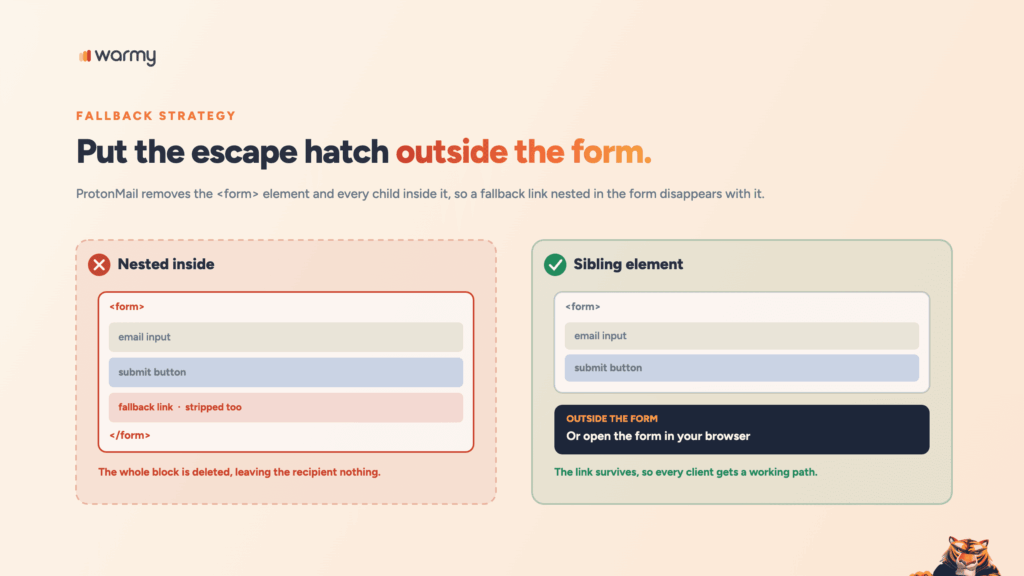
The ProtonMail row catches people out. The entire <form> element goes, along with every child inside it, so any fallback you tucked in there disappears too.
How to build a basic email signup form
Once you decide to embed forms in email HTML rather than link out, an email signup form needs four things: an action URL, a method, an input, and a submit control.
<form action="https://example.com/subscribe" method="post" target="_blank">
  <input type="hidden" name="campaign" value="aug-newsletter">
  <label for="sub-email">Your email</label>
  <input type="email" id="sub-email" name="email" placeholder="you@company.com">
  <button type="submit">Subscribe</button>
</form>
The action must be an absolute HTTPS URL, because a relative path has nothing to resolve against inside an email client. POST keeps values out of URLs and server logs. Without target="_blank", some clients try to render the response in place and fail. And skip client-side validation, because required is ignored almost everywhere.
GET or POST for email sign ups
One-click actions are the exception. A rating, an unsubscribe, an RSVP: none carry sensitive data, and all work as a link with query parameters.
<a href="https://example.com/feedback?ticket=88213&rating=positive">Helpful</a>No form element means nothing for a client to strip, which makes one-click patterns the most reliable interactive element in email.
Add a honeypot field
Bots harvest form markup out of emails the same way they harvest it off web pages. A hidden field they fill and humans never see is a cheap filter on your email sign ups.
<div style="display:none;max-height:0;overflow:hidden;" aria-hidden="true">
  <input type="text" name="company_site" tabindex="-1" autocomplete="off">
</div>
Discard any submission where company_site came back with a value.
AMP for email: The modern alternative
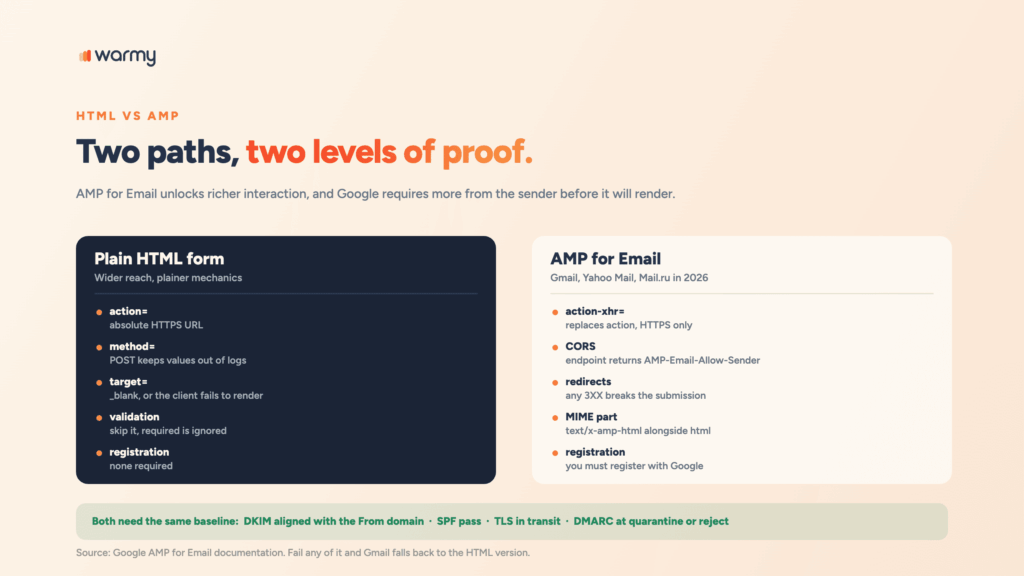
AMP email is Google’s answer to the limits of HTML forms. You send a third MIME part alongside text/plain and text/html, using the type text/x-amp-html. Supporting clients render the interactive version and everything else falls back to your HTML. Support in 2026 covers Gmail, Yahoo Mail, and Mail.ru.
<form method="post" action-xhr="https://example.com/subscribe-amp" target="_top">
  <input type="email" name="email" required>
  <input type="submit" value="Subscribe">
  <div submit-success>
    <template type="amp-mustache">Thanks. You're on the list.</template>
  </div>
</form>
The differences are real engineering work. action-xhr replaces action and must be HTTPS. Your endpoint has to implement CORS for AMP email and return the AMP-Email-Allow-Sender header. Redirects fail, because any 3XX response breaks the submission. And you must register with Google first.
Fallback strategy for unsupported clients
Most guides on how to embed form in email stop at the markup and never mention Outlook. Given the table above, roughly half your recipients see whatever you put in place of the form.
Two things to keep in mind. First, the fallback link lives outside the <form> element, because ProtonMail on Android deletes the form and everything nested inside it. Second, hide the form from Outlook deliberately, since Outlook renders form markup and then silently fails to submit it.
<!--[if !mso]><!-->
<form action="https://example.com/subscribe" method="post" target="_blank">
  <input type="email" name="email" placeholder="you@company.com">
  <button type="submit">Subscribe</button>
</form>
<!--<![endif]-->

<!--[if mso]>
<a href="https://example.com/subscribe?src=fallback">Subscribe on our site</a>
<![endif]-->

<p style="font:13px Arial,sans-serif;color:#666;">
  Form not loading?
  <a href="https://example.com/subscribe?src=fallback">Sign up here instead</a>.
</p>
That last paragraph is the safety net. It renders everywhere and survives form stripping. Tag it with a source parameter and you’ll learn how many recipients took the fallback path.
Real examples of interactive forms in email
- One-question feedback after a support ticket. Three rating links, each a GET request carrying the ticket ID. There’s no form element for a client to strip.
- Survey or NPS score. Ten numbered links, or a form with one radio group. The follow-up “why?” lives on the landing page after the click.
- Preference center update. Topic checkboxes and a frequency selector, posting to an endpoint that already knows the subscriber through a signed token. Forms genuinely beat a landing page here, because there’s no login step to lose people at.
- Signup in a forwarded email. The reader isn’t on your list yet. One field converts a forward into a subscriber.
Reducing spam-filter risk when you use email forms
Whether the message arrives depends on a different set of decisions.
- Authenticate first. SPF, DKIM with an aligned signing domain, and DMARC at quarantine or reject. If your records are incomplete, our guide on why you need to configure SPF, DKIM, and DMARC covers the setup.
- Send from a domain with history. A form is a request for trust and a new domain has none to offer. Before you put interactive content in front of a live list, make sure your domain’s reputation can support this.
- Match the action domain to the sending domain. A message from
you@company.composting toforms-provider-cdn.netlooks like the redirect chain in a phishing kit. - Keep the branding recognizable and the ask small. Use the logo and from-name people already associate with you, on a palette that matches the rest of your mail. Every extra field raises abandonment and suspicion at once.
- Watch the copy. Urgency language next to an input field is the phishing formula in miniature. Our breakdown of words that trigger spam filters lists the phrases to cut.
Pre-send testing checklist
Rendering and submitting fail independently of each other. Test both.
- Render check. Confirm the form appears where it should and the fallback appears everywhere else.
- Submit from every supported client. Click the button and check the payload arrives with the field names you expect.
- Verify authentication. Open the message in Gmail, use Show Original, confirm SPF, DKIM, and DMARC pass.
- Scan the content. Test how your form-embedded email renders and scores with Warmy’s free Template Checker before it goes near a live list. It flags spam trigger words, link density, and formatting problems a visual pass will miss.
- Send to a seed list. Placement on a form-bearing email can differ from your usual campaigns.
- Check the fallback. Open the message in Outlook and click the fallback link.
Skip this and you’ll find out from a customer that the subscribe button hasn’t worked since Tuesday.
Wrapping up
Interactive email forms work. The markup is stable, the use cases are real, and the response-rate gain over a linked landing page is worth it for the right kind of ask.
What the tutorials leave out is that a form changes how filters read your message. You’re sending something that shares its structure with the most common attack in email, and the only thing distinguishing you is the strength of your sender signals. Get that layer right and the form is just a form.
Book a demo and see how Warmy builds and protects the sender reputation your interactive campaigns run on.