TL;DR
An SPF record is a single TXT record in your domain’s DNS that lists which servers are allowed to send email using your domain. To create one, publish a TXT record at your root domain that starts with v=spf1, add an include or IP for each sending service, and end with -all. To check it, run your domain through an SPF checker and confirm you have exactly one record, clean syntax, and fewer than 10 DNS lookups. You can generate an SPF record with Warmy’s free SPF generator.
What an SPF record is
Sender Policy Framework (SPF) is an email authentication standard defined in RFC 7208. An SPF record is a DNS TXT record that names the mail servers and services allowed to send email on behalf of your domain. When a message arrives, the receiving server looks up your SPF record and checks whether the sending server’s IP address is on your authorized list. If it is, the message passes SPF. If it is not, the result depends on how strict your record is.
SPF matters because mailbox providers use it to decide whether a message is legitimate. Since February 2024, Google and Yahoo have required bulk senders to authenticate with SPF or DKIM, along with DMARC and one-click unsubscribe. Without valid authentication, messages get throttled, filtered to spam, or rejected.
One detail trips up many senders: SPF checks the Return-Path address, also called the envelope sender, not the visible From address. That is why SPF can pass while DMARC still fails, and why SPF works best alongside DKIM and DMARC rather than on its own.
How to create an SPF record
Creating an SPF record comes down to publishing one TXT record with the right contents. Here is the process.
- Audit your sending sources. List every service that sends email using your domain, including your mailbox provider, marketing platform, transactional email service, CRM, and support desk. Each one needs to be authorized.
- Open your DNS host. Log in wherever your DNS is managed, which is your registrar or DNS provider such as Cloudflare or GoDaddy. This is often not the same company that provides your email, and it is not inside your email admin console.
- Create a TXT record at the root domain. Set the host or name field to @ (or your domain) and the type to TXT.
- Write the record. Start with the version tag, add a mechanism for each sender, and finish with an all mechanism.
The building blocks are mechanisms and qualifiers. The common mechanisms are:
- include: authorizes another service’s SPF record, used for most email service providers.
- ip4: and ip6: authorize specific IP addresses or ranges directly.
- a and mx authorize the IPs behind your domain’s A or MX records.
The all mechanism at the end sets the default for anything that did not match, and its qualifier decides how strict you are:
- -all (hardfail) tells receivers to reject unauthorized senders. Use this for production.
- ~all (softfail) marks unauthorized mail as suspicious but usually still delivers it. Google suggests starting here while you confirm every sender, then tightening to -all.
- ?all (neutral) makes no assertion, which offers little protection.
- +all authorizes the entire internet to send as you. Never use it.
A few real examples. Google Workspace only:
v=spf1 include:_spf.google.com -all
Google Workspace plus SendGrid and Microsoft 365:
v=spf1 include:_spf.google.com include:sendgrid.net include:spf.protection.outlook.com -all
Your own static mail servers by IP:
v=spf1 ip4:203.0.117.4 ip4:198.59.105.0/24 -all
Publish only one SPF record per domain. If you add a new sender later, merge it into the existing record rather than creating a second one.
Common mistakes and the 10-lookup limit
The single most common SPF failure is the 10-lookup limit. RFC 7208 caps SPF evaluation at 10 DNS-querying mechanisms per check. Every include, a, mx, ptr, and exists counts toward that total, and the includes inside a provider’s record count too. The ip4, ip6, and all mechanisms do not count, since they need no DNS query.
When a receiver hits the eleventh lookup, SPF returns a PermError, which is a permanent failure. Receivers treat it as an SPF fail, and DMARC treats it the same way, so legitimate mail can be quarantined or rejected. Microsoft environments enforce this strictly, so senders to Microsoft 365 feel it fast.
What makes this dangerous is that your record can break without you touching it. Each include pulls in whatever the provider lists, and providers change their records without notice. A record that used nine lookups yesterday can exceed the limit today.
To stay under the limit:
- Remove services you no longer use. Old includes are common dead weight.
- Replace include with ip4 or ip6 for senders that give you stable, dedicated IPs.
- Avoid the a and mx mechanisms when you do not need them, and never use the deprecated ptr mechanism.
- Split marketing and transactional sending onto separate subdomains, since each subdomain gets its own 10-lookup budget.
Other mistakes to avoid: publishing two SPF records on one domain, which also causes a PermError; leaving a space inside a mechanism such as include: domain.com; and adding vendor includes that never get checked because the vendor uses its own Return-Path. Check the Return-Path in a real message before adding any include.
How to check and verify your SPF record
After you publish, verify the record before you trust it. A good SPF checker performs a live DNS lookup, confirms you have exactly one record, validates the syntax against RFC 7208, counts your DNS lookups, and flags errors.
Confirm three things every time:
- Syntax is clean, the record starts with v=spf1, and it ends with an all mechanism.
- Every mechanism resolves, with no typos in include domains.
- The total lookup count is under 10, ideally with room to spare.
DNS changes can take up to 48 hours to propagate, though most resolvers pick them up within about 15 to 30 minutes. Recheck after any change to a sending service, since a provider-side update can quietly push you over the limit. Pairing SPF with a DMARC record set to p=none also gives you aggregate reports that reveal senders you forgot and alert you when something breaks.
Free SPF generator and checker from Warmy
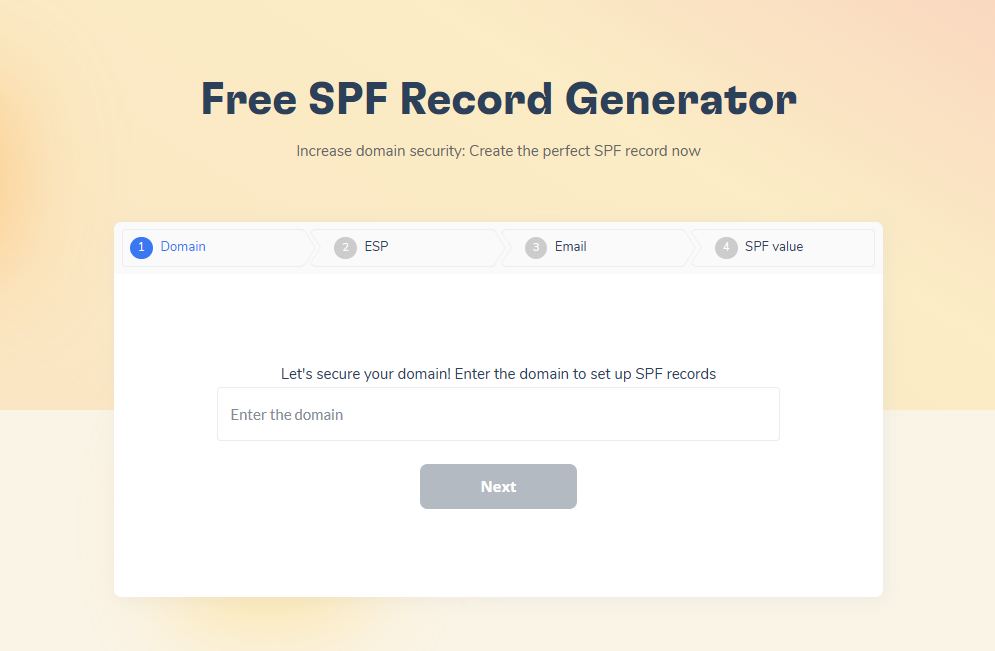
Warmy’s free SPF generator builds a valid record in four steps: enter your domain, choose your email service provider, add your email address, and generate the record. You copy the result into a TXT record at your DNS host, and the tool handles the syntax so you avoid the small errors that break authentication.
For verification, Warmy users who connect a mailbox can run a built-in DNS test inside the platform that checks SPF, DKIM, and DMARC together, with no third-party tools required. The number of tests depends on your plan.
Because SPF only covers part of the picture, it works best next to DKIM, DMARC, and a warmed sending domain. A valid SPF record helps a message qualify for the inbox. Reputation and engagement still decide whether it lands there.