



SMTP Error 421 4.7.0 means the receiving mail server has temporarily refused your message under its own sending policy — most often because of rate limits, a reputation issue, or an authentication problem, not because anything is permanently wrong with the recipient address. It’s a soft bounce: the message stays queued and your server will retry automatically, usually succeeding within a few hours once the underlying issue clears.
Quick answer: to resolve SMTP Error 421 4.7.0, verify that your SPF, DKIM, and DMARC records are correctly published and aligned, confirm you haven’t exceeded your provider’s sending limits, check that your IP or domain isn’t listed on a blacklist, and clean your list to lower bounce rates. If the rejections keep recurring after those checks, the root cause is usually sender reputation — which is where an email warmup tool like Warmy.io becomes useful for rebuilding trust with ISPs. For a broader reference on SMTP error codes, Warmy’s SMTP error codes and messages guide covers the full range of delivery failures and how to fix each one.
The sections below break down exactly what triggers this rejection and how to fix each cause, so you can stop it from escalating into a permanent block.
What is SMTP Error 421 4.7.0?
SMTP Error 421 4.7.0 is a temporary rejection error. Unlike a hard bounce, where an email cannot be delivered permanently (for instance, because the address doesn’t exist), this error means the recipient’s mail server has temporarily blocked delivery of the message but may let it through on a later attempt. This differs from routing failures like SMTP Error 554 5.4.0, where the receiving server permanently rejects the message because of a DNS or network misconfiguration rather than a temporary policy hold.
How SMTP Error 421 4.7.0 affects email deliverability
SMTP Error 421 4.7.0 is a temporary rejection that can have a long-term impact on your email deliverability and sender reputation. Let’s explore how this error affects your email performance — and what it means for your overall deliverability strategy.
Temporary rejections can lead to permanent blocks
If an email gets rejected because of SMTP 421 4.7.0, it means that the recipient’s server is telling you, “Not right now, but maybe later.” Most mail servers will make multiple attempts to resend the email after some time.
However, if the issue causing the rejection is not resolved, the temporary block may escalate into a permanent one.
Repeated policy violations, stricter ISP filtering, getting blacklisted, and SMTP 421 errors from your domain all contribute to turning temporary rejections into permanent blocks.
Basically, if temporary errors are not addressed, ISPs will stop retrying delivery and may permanently block your emails from reaching recipients.
Decreased sender reputation
ISPs use reputation scores to determine whether to accept, reject, or filter incoming emails. SMTP Error 421 4.7.0 directly affects sender reputation, making it harder for your emails to land in the inbox.
Multiple occurrences of this error means higher bounce rates, which negatively impacts sender trust. Also, a domain experiencing frequent rejections (albeit temporary), will be seen as less trustworthy. When this happens, more emails will go to spam or promotions.
In essence, a history of email rejections, low engagement, and spam complaints lowers your score, making it harder for future emails to bypass filters. If sender reputation declines, inbox placement drops. What does this mean? Even your legitimate emails could start landing in spam, reducing overall email performance.
Slower email campaign performance
If your email marketing and sales strategies depend on timely communication, SMTP Error 421 4.7.0 can significantly slow down your outreach efforts. Even though this error is temporary, it causes delays in email delivery. And delayed email delivery affects engagement, lead nurturing, and sales efforts—making it harder to maintain consistent communication with prospects and customers.
Common causes of SMTP Error 421 4.7.0
Sending domain or IP address is flagged for suspicious activity
Email servers closely monitor the reputation of sending domains and IP addresses. If your domain or IP has been associated with spam-like behavior, mail servers may temporarily reject your emails. This is different from server-side issues like SMTP Error 451 4.3.5, where the rejection stems from a misconfiguration on the recipient’s mail server rather than your own sending reputation.
Factors that contribute to this issue:
- Sending too many emails in a short time – ISPs flag sudden spikes in email volume as potential spam.
- History of low engagement or bounces
- High spam complaint rates
Failing authentication checks (SPF, DKIM, DMARC Issues)
Email authentication protocols help validate that an email has been sent from an authorized server. If these records are missing or misconfigured, ISPs might refuse emails for security reasons. Authentication gaps can also trigger other codes, such as SMTP Error 530 (Authentication Required), so it’s worth confirming your SMTP credentials alongside your DNS records.
- SPF (Sender Policy Framework) tells the email server which mail servers are authorized to send emails for your domain
- DKIM (DomainKeys Identified Mail) adds a digital signature to your emails, confirming that they have not been tampered with while in transit.
- DMARC (Domain-based Message Authentication, Reporting, and Conformance) authenticates email against spoofing and tells mail servers how to handle emails that cannot be authenticated.
Exceeding email sending limits or rate restrictions
Most ISPs and email providers impose sending limits to prevent spam. These limits vary based on sender reputation, domain age, and email engagement.
Common rate limits by ISPs:
- Gmail free accounts: up to 500 emails per day.
- Google Workspace (Business Accounts): Up to 2,000 emails per day. Both figures match Google’s official Workspace sending-limits documentation.
- Outlook / Microsoft 365: Up to 10,000 recipients per day on Microsoft 365 / Exchange Online business plans (500 recipients per message), per Microsoft’s official Exchange Online limits documentation.
Poor list hygiene & high bounce rates
High bounce rates signal poor email-sending practices, triggering temporary rejections that can escalate into long-term deliverability issues. So what factors contribute to high bounce rates?
- Sending to invalid or expired email addresses: If too many emails are sent to non-existent addresses, ISPs may reject future messages.
- High number of hard bounces: Hard bounces indicate permanent failures and negatively affect your domain reputation.
- Spam traps: Sending to purchased, scraped, or outdated lists increases the risk of hitting spam traps, leading to immediate blocking.
Blacklisted IP or Domain
If your sending IP address or domain is listed on a blacklist, ISPs and mail servers may automatically reject emails as a precaution. A blacklisted domain or IP severely impacts deliverability, leading to mass email rejections until the issue is resolved. If the block escalates further, it can turn into a hard bounce like SMTP Error 550 5.1.0, which requires rebuilding your sender reputation from scratch.
Spammy email content & poor engagement rates
Content-based filtering is a major factor in email rejections. If ISPs detect spammy content or low engagement, they may temporarily reject or filter your messages into spam. Here are some examples:
- Overuse of spam words like “free,” “guarantee,” “urgent,” or “limited-time offer” may trigger filters.
- Excessive links or attachments
- Poor email formatting like lack of a text-to-image ratio, missing personalization, or no unsubscribe link
- If recipients ignore or delete emails without opening, future messages may be flagged.
📌 Not sure which of these causes is behind your rejections? Book a free 1-on-1 deliverability consultation with Warmy’s team and get a clear diagnosis before you change a single setting.
How to fix SMTP Error 421 4.7.0
1. Improve email authentication (SPF, DKIM, DMARC Setup)
Many ISPs reject emails that fail authentication checks, as these emails appear suspicious or unauthenticated.
- Verify SPF, DKIM, and DMARC Records. Use Warmy.io’s Email Deliverability Test to confirm that your records are set up correctly.
- Ensure alignment between sending domains and authentication policies. Make sure your SPF, DKIM, and DMARC settings match the domain used to send emails.
- Use a subdomain for email outreach. If your main domain is used for transactional emails, create a subdomain (e.g., outreach.yourdomain.com) for cold emails and marketing campaigns. This protects your primary domain from deliverability issues.
2. Monitor sending limits & warm up new email accounts
- Start with low email volume. If you’re using a new mailbox, limit sending to 50-100 emails per day and gradually increase over a few weeks.
- Use email warmup tools like Warmy.io. Automated email warmup mimics natural interactions, improving domain reputation and preventing temporary blocks.
- Check Google Postmaster Tools to monitor spam rates, domain reputation, and email performance.
🎯 Pro tip: Warm up in the background, not in a rush. Sending 50-100 emails a day feels slow, but jumping to full volume even a week early is the single most common reason a fresh mailbox trips 421 4.7.0 again after it just recovered. Let the ramp-up finish before you launch a real campaign from that address.
🔖 Related Reading: The Science and Process of Warming Up Newly Created Email Domains
3. Maintain a clean email list
- Regularly clean your email list to prevent high bounce rates by removing inactive, bounced, or spam traps.
- Before sending a campaign, verify email addresses with a reputable email validation service.
🔖 Related Reading: 6 Must-Have Email List Scrubbing Tools for Spotless List Hygiene
4. Check if your IP or domain is blacklisted & delist it
If your IP address or domain is blacklisted, many email providers will automatically reject or temporarily block emails. Regularly checking your blacklist status ensures you can take action before SMTP 421 errors escalate.
- Run a blacklist check. Use MXToolbox, Spamhaus, or Warmy.io’s email deliverability test to check if your domain or IP is blacklisted.
- If your domain is blacklisted, contact the blacklist provider to request removal.
- Improve sending practices. If you were blacklisted due to spam complaints, rate limits, or low engagement, improve list hygiene, warmup practices, and authentication settings before reattempting email delivery.
🎯 Pro tip: Check more than one blacklist before you declare victory. A domain can be delisted from Spamhaus but still sit on a smaller ISP-specific list that keeps triggering 421 4.7.0 with that one provider. Run your domain and IP through at least two independent checkers before you resume full-volume sending.
🔖 Related Reading: Email Domain & IP Blacklist Removal: 5 Steps to Delist
5. Avoid spammy email content & optimize engagement
Spammy email content can lead to automatic rejections, even if your domain reputation is strong. Email providers use content filtering to detect and block suspicious or spam-like messages.
How to fix email content issues:
- Write personalized & non-spammy subject lines. Avoid using ALL CAPS, excessive exclamation marks, or misleading clickbait.
- Remove excessive links & attachments because too many links or large attachments increase spam scores, triggering policy restrictions
🎯 Pro tip: Run your draft through a spam-word and formatting checker before you hit send, not after a rejection. Catching a flagged phrase or a missing unsubscribe link at the drafting stage is faster than untangling a 421 4.7.0 pattern across a whole campaign later.
How Warmy.io helps prevent SMTP 421 4.7.0
Dealing with SMTP Error 421 4.7.0 can be frustrating, but Warmy.io provides a complete solution for email deliverability. With AI-driven technology and advanced deliverability tools, Warmy.io ensures your emails reach the inbox instead of getting blocked by ISPs. Here’s how Warmy.io helps you avoid temporary rejections and improve your email performance:
SPF, DKIM, and DMARC testing
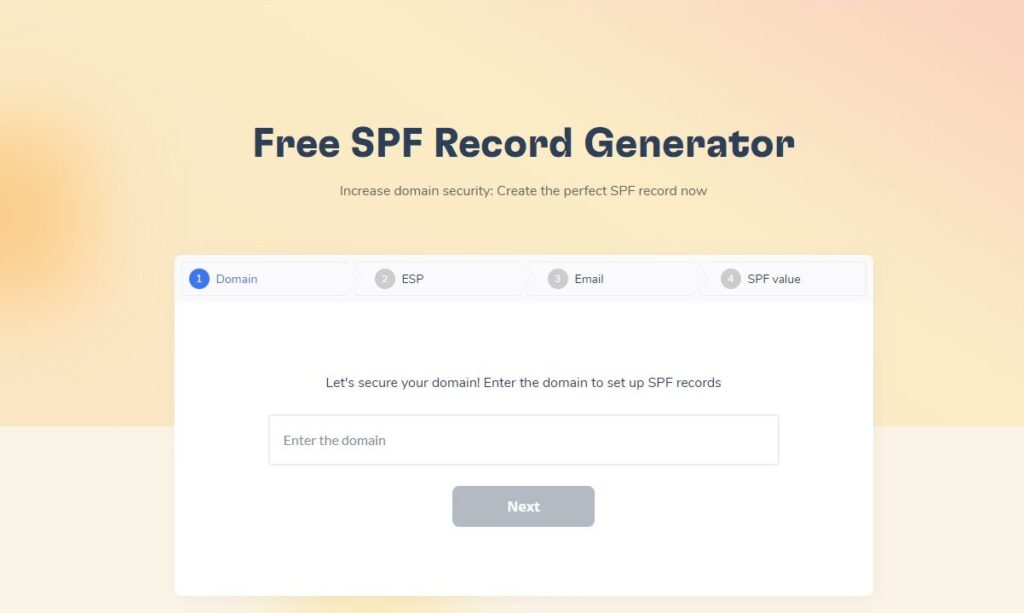
Failing email authentication checks (SPF, DKIM, DMARC) is one of the top reasons why emails get temporarily rejected with SMTP 421 errors. Warmy.io includes a built-in authentication checker to ensure your email authentication settings are correct.
Additionally, Warmy has a Free SPF Record Generator and a Free DMARC Record Generator.
Warmy.io’s AI-powered email warmup
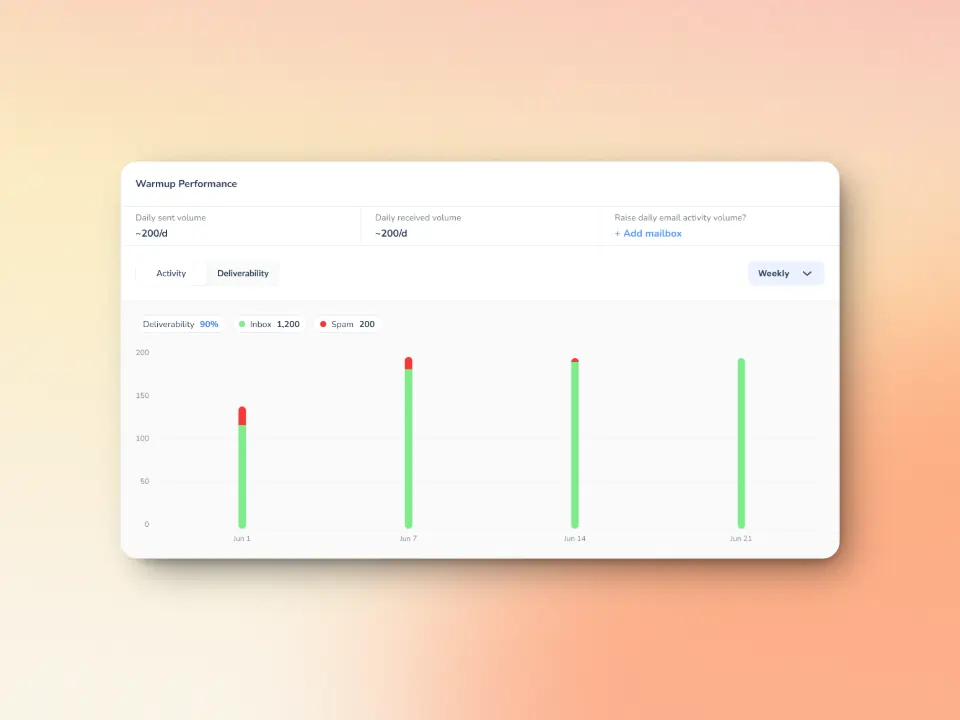
Warmy.io’s email warmup feature gradually builds trust with ISPs, ensuring that your emails are recognized as legitimate. It does this by mimicking natural email interactions to show ISPs that your emails are trusted and valuable. By warming up your domain before sending at scale, you minimize the chance of SMTP 421 rejections.
The platform scales to millions of emails per day across its network rather than a fixed daily cap, so warmup volume grows with your sending needs instead of hitting an artificial ceiling. Additionally, it supports custom templates and 30+ languages to personalize the experience for recipients.
The platform is capable of handling up to 5,000 emails per day, making it a robust solution. Additionally, it supports custom templates and multiple languages to personalize the experience for recipients.
Domain health at a glance
If your domain or IP reputation drops, ISPs may start temporarily rejecting emails (SMTP 421 errors). Warmy.io monitors your email performance and alerts you to potential issues before they become critical. For example:
- Check what percentage of your emails are reaching the primary inbox, spam folder, or promotions tab.
- Clear warmup performance insights such as spam rates, inbox placement, and deliverability trends on a weekly & monthly basis
- Warmy.io automatically scans your domain/IP against major email blacklists (Spamhaus, MXToolbox, etc.).
- Monitor deliverability at the domain level from one dashboard to easily identify which needs attention
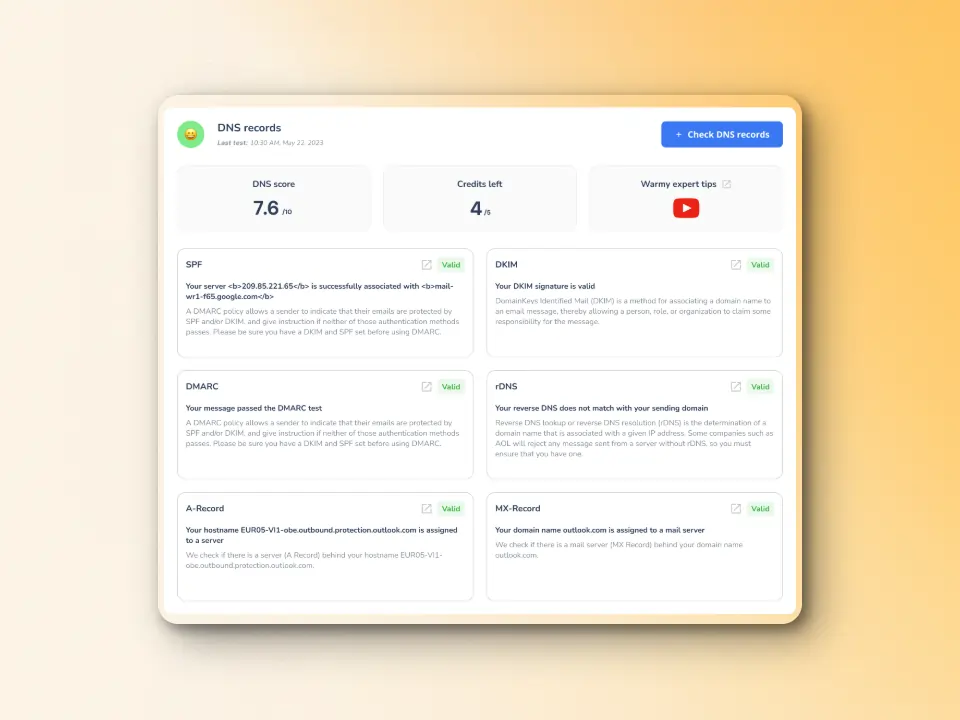
- Comprehensive DNS status checks to easily validate SPF, DKIM, DMARC, rDNS, MX, and A records for stronger authentication & security
Advanced seed lists for various ISPs
ISPs don’t treat all senders the same way. What works for Gmail might not work for Outlook or Yahoo. This means that some ISPs may apply stricter filtering, leading to SMTP 421 temporary rejections. Warmy.io’s seed lists lets you test inbox placement across different providers and optimize your email strategy accordingly while building your sender reputation at the same time. Using these advanced seed lists will help users identify deliverability issues before scaling their campaigns—setting them up for success.
Ensure deliverability beyond SMTP error prevention with Warmy
SMTP Error 421 4.7.0 is just one of many challenges that email senders face when trying to reach inboxes and maintain a strong sender reputation. But email deliverability is more than just fixing errors—it’s about ensuring long-term success, higher engagement, and uninterrupted communication with your audience.
With Warmy.io, you don’t just fix SMTP rejections. You prevent them before they happen. Take control of your email success today. Try Warmy.io now!











