SMTP Error 554 5.4.0 means your email was rejected due to a DNS routing failure — the receiving mail server could not resolve the path needed to deliver your message. In plain terms: your email never reached the recipient’s inbox because something broke at the routing level before it even arrived.
The three most common causes are: (1) misconfigured or missing MX/DNS records on your domain, (2) incorrect SMTP relay settings on your sending server, and (3) a low sender reputation that causes receiving servers to drop the connection before delivery completes. Each of these has a specific fix — and this guide walks through all of them.
Quick answer: to resolve SMTP Error 554 5.4.0, verify your MX records point to the correct mail server, confirm your SPF/DKIM/DMARC records are published and valid, check that your SMTP relay is properly authorized, and make sure your sending domain or IP is not listed on a blacklist. If the error persists after those checks, your sender reputation may need rebuilding — which is where email warmup tools like Warmy.io become essential. For a broader reference on SMTP error codes and what they mean, Warmy’s guide covers the full range of delivery failures and how to fix each one.
While a free deliverability test may reveal some issues in your current deliverability status, we still created this comprehensive guide to explore everything you need to know about SMTP Error 554 5.4.0, what causes it, and how to fix it.
Decoding SMTP Error 554 5.4.0
SMTP Error 554 5.4.0 is a permanent delivery failure code. The “554” indicates a hard rejection by the receiving server, while “5.4.0” specifically points to a DNS routing failure — meaning the sending server could not correctly resolve the next-hop destination for your message.
Unlike soft bounce errors (4.x.x) that may resolve on retry, a 554 code tells you the server made a deliberate, final decision to reject the message. You need to fix the underlying issue before resending.
The 5.4.0 sub-code specifically relates to routing: the sending MTA (Mail Transfer Agent) attempted to look up the destination server’s address in DNS and either received no valid response, got conflicting records, or the lookup timed out entirely.
This differs from a 554 5.7.1 error (policy-based rejection) or 554 5.1.1 (bad recipient address) — for 5.4.0, the problem is almost always infrastructure-level: DNS records, server configuration, or network routing between mail servers.
Root causes behind SMTP Error 554 5.4.0
Network and routing disruptions
Your email’s journey can be disrupted by network issues similar to roadblocks on a highway. Misdirected routes or incorrect firewall settings can prevent emails from reaching the recipient. Ensuring clear and correct routing instructions is essential for a smooth delivery.
DNS configuration errors
Errors in DNS settings are like having a wrong listing in a digital phonebook. If your domain’s DNS records are inaccurate, email servers can’t route your messages correctly, leading to bounces. Regularly verify your DNS records for accuracy to keep the email path clear.
Q: What are DNS settings and how do they affect deliverability?
A: DNS settings are configurations within the Domain Name System that define how a domain’s traffic (which includes emails) is routed and authenticated. Key DNS settings for email deliverability include SPF, DKIM, and DMARC, which help verify that emails are coming from authorized senders. Properly configured DNS settings ensure that emails are trusted by receiving servers. This prevents them from being marked as spam or from being rejected. Meanwhile, incorrect or misconfigured DNS settings can hurt your sender reputation and hinder successful email delivery.
🔖 Related Reading: What are DNS MX record, DNS A-record, rDNS and how does it work?
Server configuration oversights
An incorrectly configured email server is like a broken post office. An improperly set SMTP relay, failed back and forth authentication, and other similar actions lead to SMTP Error 554 5.4.0.
Make sure the server is properly configured to comply with the standards of email transmission. By correcting such errors at the beginning, your chances for improved email deliverability increase. No bumps in the network, successful DNS changes and configurations all contribute in making sure your emails go where they’re supposed to go, consistently.
Pro Tip #1: Run a full DNS check before touching your SMTP settings
Before adjusting any server configuration, use a free tool like MXToolbox (mxtoolbox.com) to perform a full DNS lookup on your domain. Check that your MX records point to the correct mail server, that your SPF record exists and covers your sending IP, and that rDNS (reverse DNS) resolves correctly for your server’s IP address. Fixing DNS issues first eliminates the most common cause of 554 5.4.0 — and often resolves the error entirely without any other changes.
Solving SMTP Error 554 5.4.0
Guidance for Gmail users
Getting around SMTP Error 554 5.4.0 requires a few strategic moves, especially for Gmail users. Here’s how you can ensure your emails are set up for success:
Check for blacklists
Start by checking if you’re on a blacklist. One of the most common reasons emails go to spam is that the sender is blacklisted.
Blacklists are one of the most common ways Gmail tries to decrease spam. So one of the fastest, easiest ways to check not only if you are on a blacklist but to gauge your email deliverability in general is Warmy’s Free Email Deliverability Tool.
Verify your settings
Ensure your email is correctly configured to communicate with Gmail’s servers. Your SMTP settings should be:
- SMTP server:
smtp.gmail.com - Port: 587
- Encryption: TLS
Authenticate your emails
Gmail places high importance on email authentication to prevent spam and phishing. Setting up SPF, DKIM, and DMARC records for your domain significantly boosts your email’s credibility.
Warmy offers free SPF and DMARC Record Generators, making this crucial step hassle-free. By authenticating your emails, you’re telling Gmail (and your recipients) that your messages are safe and legitimate.
Pro Tip #2: Use Warmy’s free SPF and DMARC generators — no technical expertise needed
Setting up authentication records manually can be error-prone. Warmy offers a free SPF Record Generator and a free DMARC Record Generator built directly into its platform — you answer a few questions and get a ready-to-publish DNS record. This removes a major source of configuration errors that lead to 554 5.4.0 rejections, especially for Gmail and Outlook users.
🔖 Related Reading: SPF, DKIM, and DMARC: Boosting Email Security and Deliverability
Tips for Outlook enthusiasts
SMTP configuration
Ensure your SMTP settings align with Outlook’s requirements: server (`smtp.office365.com`), port 587, and TLS encryption.
Monitor your sending reputation
Outlook users can benefit from Microsoft’s Smart Network Data Services (SNDS) to get insights into their email performance and identify potential issues.
Clean your email list
Regularly prune your email list to remove non-responsive or invalid addresses, improving your overall deliverability.
Q: What does it mean to “prune” an email list?
A: To “prune” an email list means to remove inactive, invalid, or unengaged email addresses. The purpose of this is to improve the quality of the list. As a result, regular pruning reduces bounce rates, increases open rates, and prevents spam complaints.
🔖 Related Reading: 6 Must-Have Email List Scrubbing Tools for Spotless List Hygiene in 2025
Strategies for Yahoo users
Review email sending practices
Stay within Yahoo’s email sending limits and avoid sending content that might be flagged as spam.
Authentication is Key
Implement SPF and DKIM records for your domain. Yahoo, like other providers, uses these to verify your emails’ legitimacy.
Use Yahoo Postmaster Tools
Access Yahoo’s Postmaster Tools to gain insights into your sending reputation and identify any deliverability issues you need to address.
Pro Tip #3: When fixing configuration isn’t enough — rebuild your sender reputation
Sometimes DNS and SMTP settings are perfectly correct, yet 554 5.4.0 errors keep occurring. This usually means receiving mail servers are routing your messages differently because your domain or IP has a poor sender reputation. In these cases, configuration fixes alone won’t help — you need to actively rebuild your reputation through consistent, authentic email engagement. Warmy.io’s Adeline AI automates this: it gradually scales your sending volume, generates real opens, replies, and clicks across 1M+ active mailboxes, and monitors your reputation in real time so you can track improvement.
Still getting 554 5.4.0 after fixing your DNS and SMTP settings?
Your sender reputation may be the issue. Warmy.io’s free 7-day trial lets you start rebuilding your domain reputation immediately — with AI-driven warmup powered by Adeline AI, real engagement from 1M+ active mailboxes, and a built-in email deliverability test to track your progress. No credit card required.
Book a Demo to fix your deliverability today!
Understanding variants of SMTP Error 554
554 5.7.1 – Blocked. Your email violates the recipient server’s policies, getting it blocked.
554 5.0.0 – General Failure. A vague network or server issue has prevented delivery.
554 5.2.2 – Mailbox Full. The recipient’s inbox is overflowing, leaving no room for your message.
554 4.4.7 – Timeout. Delivery attempts dragged on too long without success.
554 5.1.1 – Wrong Address. The email address you’re sending to doesn’t exist.
Want to know more? Read also – SMTP Email Error 554 – How to Resolve [SOLVED]
Boosting your email’s health with Warmy.io
Bypass SMTP 554 5.4.0 error and boost your email health using Warmy.io, a pivotal email warm-up service that ensures your emails hit the mark.
Why Warmy.io? With Warmy.io, you’re not just avoiding errors; you’re securing a direct line to your audience’s inbox, ensuring your messages are welcomed, not warned. Let’s dive into a few key features that will change your email marketing game.
Automated warmup process
Many SMTP errors occur when email providers temporarily reject emails from new, inactive, or low-reputation domains. Warmy.io’s AI-powered email warmup combats this by:
- Gradually increasing email volume to prevent sudden spikes that could trigger mail server rejections.
- Simulating human-like interactions to ensures emails are opened, replied to, and marked as important.
- Monitoring email reputation to identify potential issues before they impact campaigns.
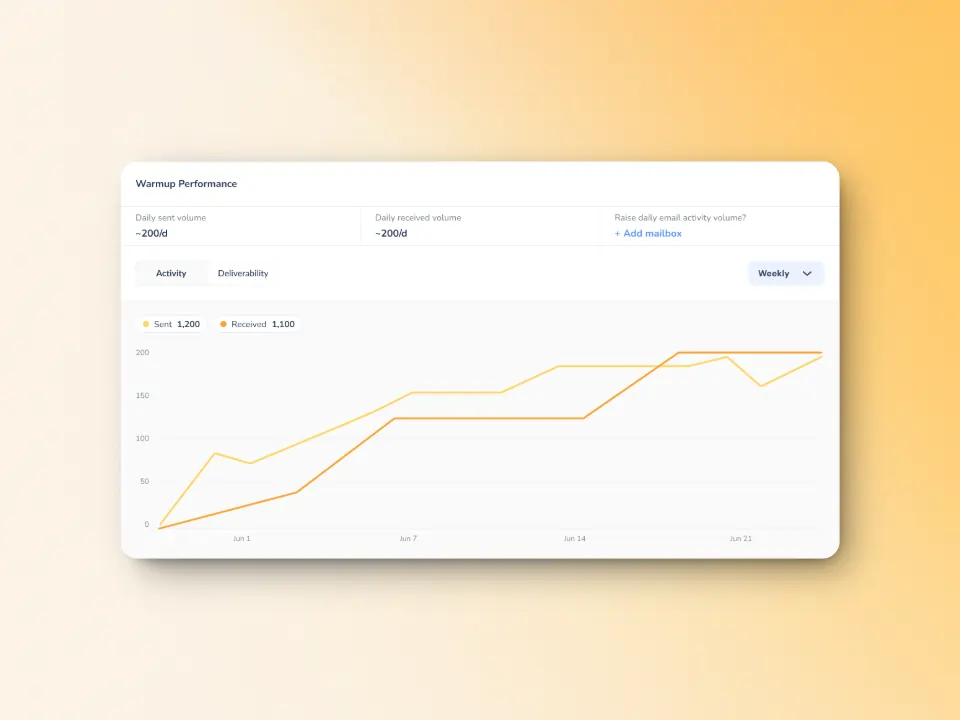
Enhanced warmup process tailored to your business and audience
The Warmup Preferences feature helps senders customize and fully control the warmup process from both sender and user levels.
Essentially, senders will be able to customize the warmup’s distribution across different email service providers. They can also choose if they want to use B2B or B2C customers for engagement patterns to tailor the behavior and insights to their business type.
Here’s another plus point: All of these settings can be changed right within the Warmy system for hassle-free customer experience.
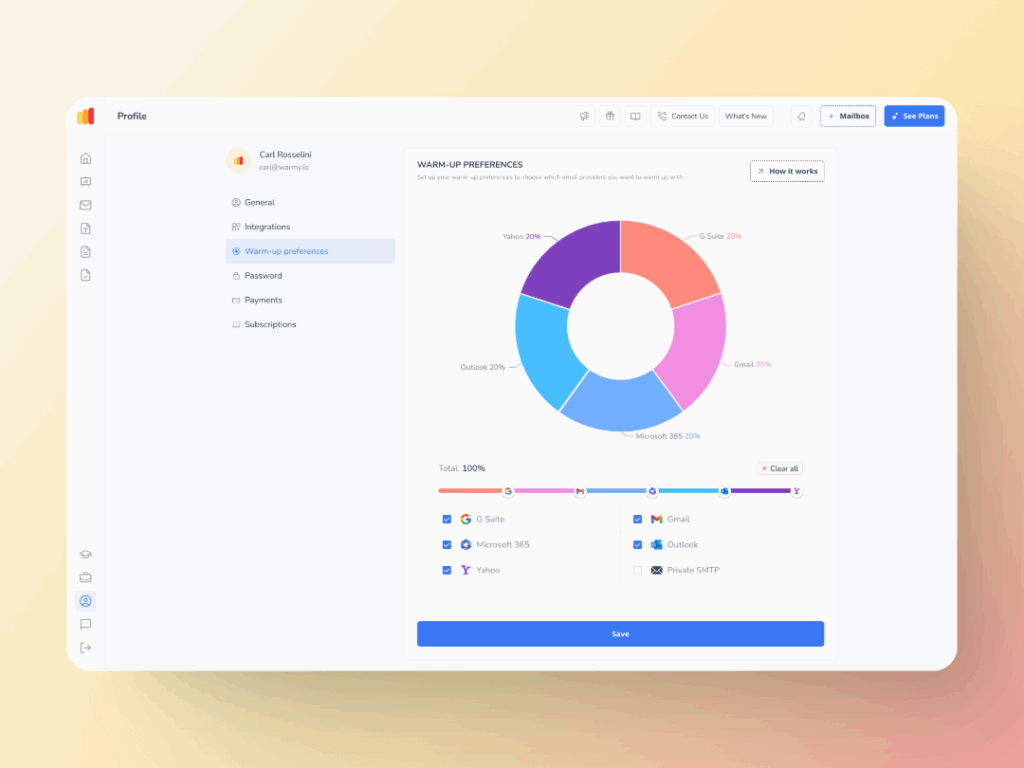
Comprehensive insights you won’t get anywhere else
Warmy’s free email deliverability test provides a detailed deliverability score.
For email senders, you’ll find this is critical for evaluating your email reputation. The test can quickly check if your emails are landing on its intended recipient and shows the percentage of emails that ends in spam, promotions, inbox, and unreceived across major email providers.
Plus, it is capable of revealing if your domain or IP is listed anywhere on any blacklists.
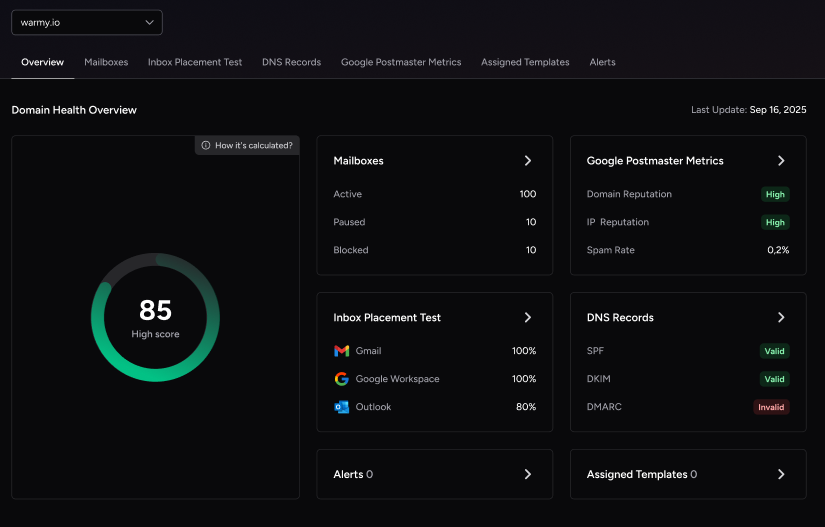
Additionally, Warmy’s Domain Health Hub provides a domain-level health dashboard which includes the following features:
- A domain health score based on authentication, blacklist status, and inbox placement tests.
- Spam rate trends and overall deliverability performance (weekly or monthly tracking options)
- Comprehensive DNS status checks to easily validate SPF, DKIM, DMARC, rDNS, MX, and A records for stronger authentication & security.
Genuine engagement and real results with advanced seed lists
While traditional warmup lists can only open emails, Warmy’s advanced seed lists take it up a notch.
Our seed lists offer actual engagement—your emails are opened, scrolled through, clicked on, and replied to. If there are emails that land in spam, these are removed and marked as important to let the ESPs know you are credible.
Warmy will equip you with tools—you just need to take the first step
Key takeaways:
- Tackle the triggers. Identify and address the specific causes behind SMTP 554 5.4.0, whether they’re related to server configurations, DNS settings, or email practices.
- Platform-specific fixes. Apply the guidance tailored to your email service provider, ensuring your settings are optimized for smooth delivery.
- Leverage Warmy.io. Embrace the power of email warmup services like Warmy.io to enhance your sender reputation, dodge deliverability pitfalls, and keep your emails away from spam folders.
You can warm up your email for free with Warmy’s free trial for seven days and experience the difference yourself.