Getting an email delivered is only part of the challenge. Getting it into the inbox is another problem entirely.
According to the State of Email Deliverability 2025, approximately 16 to 17 percent of emails sent globally never reach the inbox. They land in spam or disappear entirely. The global average inbox placement rate sits at 83.5 percent, and spam placement nearly doubled in 2024. Around 70 percent of emails now show at least one spam-related issue.
DNS email authentication protocols — SPF, DKIM, and DMARC — have a direct bearing on whether your emails are trusted by receiving servers.
But how much does configuration quality actually matter? And does the type of email template you use (plain text vs. HTML) affect where it lands?
Warmy’s research team ran a controlled experiment to answer both questions using real domains and real inbox providers. This post presents those findings, updated with 2025 industry data and the new requirements that Gmail, Yahoo, and Microsoft have introduced for bulk senders.
Understanding SPF, DKIM, and DMARC
DNS (Domain Name System) records allow mail servers to verify whether an email originated from an authorized sender. A correctly configured set of SPF, DKIM, and DMARC records reduces the risk of spoofing, phishing, and spam classification. Misconfigured or missing records cause legitimate emails to be filtered even when their content is completely clean.
SPF (Sender Policy Framework)
- SPF is a DNS record that specifies which mail servers are authorized to send email on behalf of a domain.
- Receiving servers check the SPF record to verify that the sending IP is on the approved list.
- Without SPF, unauthorized parties can send fraudulent email appearing to come from your domain, and your legitimate emails are more likely to be rejected or flagged as spam.
- Use Warmy’s free SPF Generator to build a correctly structured record.
DKIM (DomainKeys Identified Mail)
- DKIM adds a cryptographic signature to outgoing email.
- When an email is sent, it is signed with a private key. The recipient’s server checks that signature against the public DKIM key stored in the sender’s DNS records.
- A match confirms the email is authentic and has not been modified in transit. Gmail and Microsoft both weigh DKIM heavily in filtering decisions.
DMARC (Domain-based Message Authentication, Reporting, and Conformance)
- DMARC builds on SPF and DKIM by specifying how email providers should handle messages that fail authentication.
- A DMARC policy tells receiving servers whether to monitor (p=none), quarantine (p=quarantine), or reject (p=reject) failing emails.
- Without an enforced DMARC policy, cybercriminals can spoof your domain and send phishing emails on your behalf.
DMARC also requires alignment: the domain in the visible From header must match the domain authenticated by either SPF or DKIM. Alignment failure causes DMARC to fail even when both SPF and DKIM individually pass. Use Warmy’s free DMARC Generator to create a correctly structured record with the right policy and reporting tags.
What bulk sender rules now require
Gmail and Yahoo now require the following from bulk senders, defined as senders dispatching 5,000 or more emails per day:
- Spam complaint rates must stay below 0.3 percent. The recommended target is below 0.1 percent.
- DMARC is required on the sending domain. p=none is accepted as a starting point, but providers expect progression toward enforcement.
- One-click unsubscribe must be supported in marketing email.
Microsoft has added its own requirements:
- No-reply sending addresses are flagged under new rules discouraging noreply@ addresses.
- Inactive mailboxes are removed faster, reducing deliverability for lists with aged or unverified contacts.
The practical implication: A DMARC record that simply exists at p=none with no reporting address and no advancement plan now creates more exposure than it did previously. Providers treat a permanent p=none as a signal that the sender is not actively managing their authentication policy.
The experiment: How DNS configuration was tested
To quantify the impact of DNS configuration on inbox placement, Warmy’s research team used a controlled Google Workspace (GSuite) account as the sender and delivered test emails to multiple recipient domains under consistent sending conditions.
The experiment tested four domain categories:
- New domains with correctly configured SPF, DKIM, and DMARC
- New domains with partial or incorrect DNS configurations
- Older domains with properly configured records
- Older domains with misconfigured SPF, DKIM, or DMARC
The emails were sent to a range of email providers, each with different spam filtering policies and authentication requirements:
- Gmail (including Gsuite)
- Microsoft 365 (MS365)
- Outlook
- Yahoo
- Zoho and ZohoPro
- SMTP-based services
Testing structure
- Each domain type was tested under controlled email dispatch conditions to ensure fair and unbiased comparisons.
- We sent a series of emails (ranging from five to 15 per test batch) from each domain category to the different providers.
- These emails were a mixture of HTML and text-based. Specifically, we created two templates that we internally labeled as “Inbox” and “Spam” so we could gauge filter sensitivity. “Inbox” templates were those that were not deliberately selling something. They don’t contain words related to purchasing anything. Meanwhile, the “Spam” templates were templates that were heavenly customized for marketing.
The metrics we tracked were:
- DNS validation: Status of SPF, DKIM, and DMARC records for each domain and if they matched expected configurations
- Deliverability outcomes: We tracked whether emails landed in the inbox or spam folders.
- Template effectiveness: Inbox placement rates for non-HTML (plain text) vs. HTML emails
- Provider-specific performance: How each email provider responded to various domain types and authentication settings.
Testing note: Unreliable DKIM verification in some provider environments (particularly MS365) affected the precision of results for those tests. Any conclusions drawn from affected tests should be read with that limitation in mind.
Results and key findings
After analyzing email deliverability across different domain types, DNS configurations, and email content formats, the results revealed clear patterns in how different factors influence inbox vs. spam placement.
Finding 1: Correct DNS configuration leads to significantly higher inbox rates
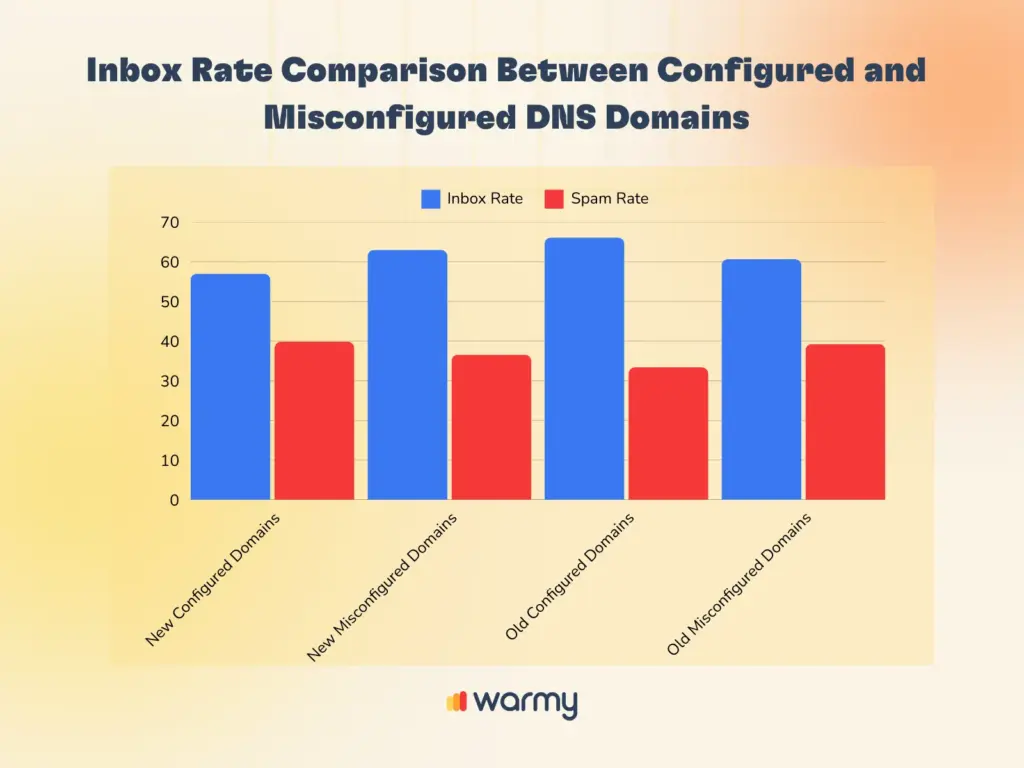
- Domains with correctly configured SPF, DKIM, and DMARC consistently achieved inbox rates above 70%.
- Misconfigured domains saw spam rates above 50% in most provider tests. DMARC misalignment produced the steepest drops in inbox placement, larger than the impact of missing SPF or DKIM alone.
- New domains with correct DNS configuration still showed lower inbox placement than older configured domains. This confirms that DNS correctness and domain reputation are separate factors. Correct authentication gets your email considered, but sender reputation determines where it lands.
Finding 2: Email template affects inbox placement
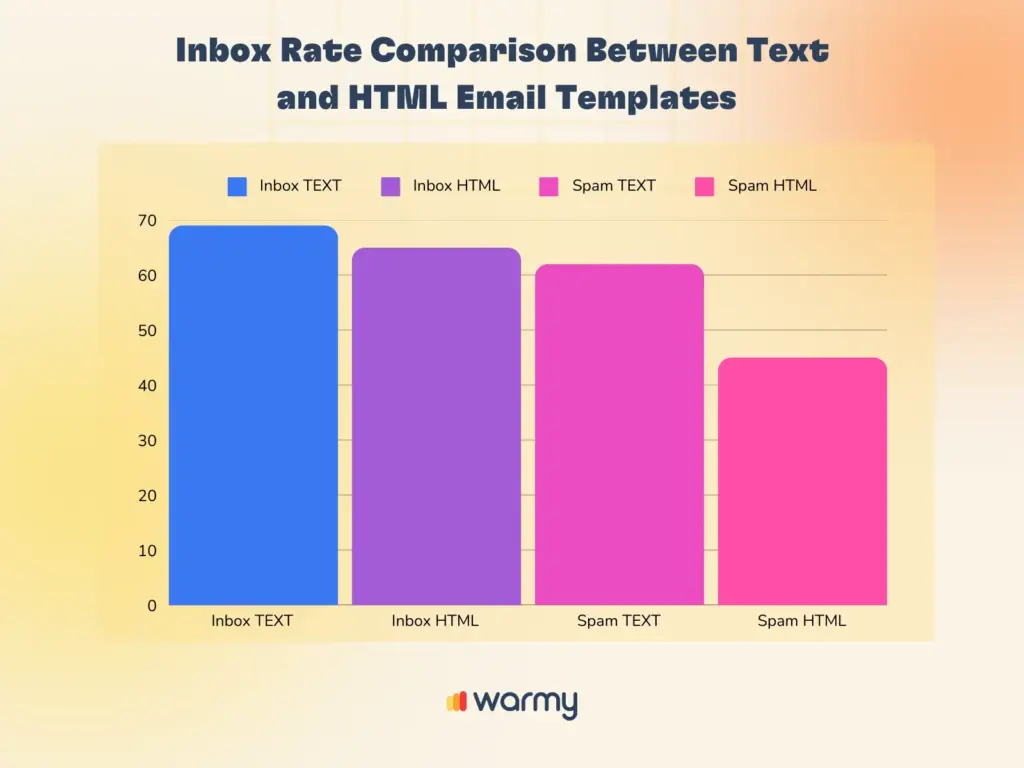
In the experiment, we had both text-based emails and HTML emails that followed both the “Inbox” template and the “Spam” template.
- Text-based emails achieved higher inbox placement rates than HTML emails across most providers tested. MS365 and Outlook applied particularly strict filtering to HTML-heavy content.
- HTML emails were more likely to be filtered as spam. Especially when sent from new or misconfigured domains.
- Findings show that while proper DNS configurations improve inbox placement, email content type is still very much a critical factor. The takeaway is that template format is not a substitute for correct authentication, and correct authentication is not a substitute for clean template format. Both matter independently.
Finding 3: Provider-Specific Filtering Behavior Varies
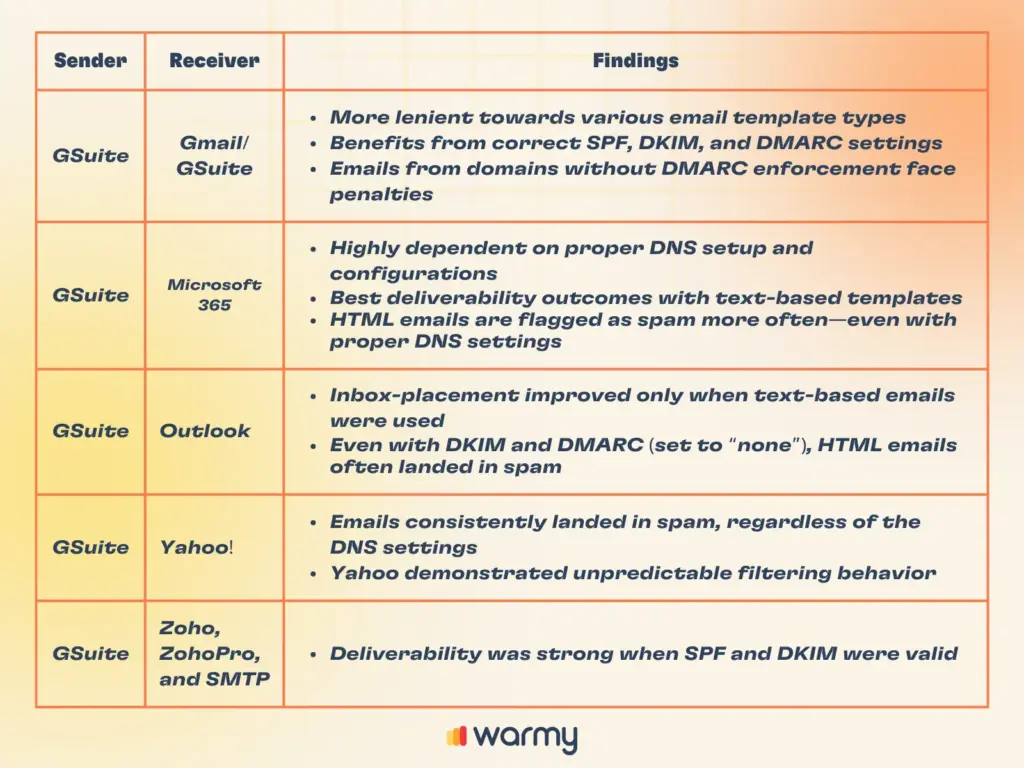
Different inbox providers apply different filtering logic. The variation between providers means that deliverability cannot be optimized for one inbox environment and assumed to transfer to others. Placement tests across multiple providers are necessary to get an accurate picture.
- In general, Gsuite/Gmail was more lenient when it came to various template types, but DMARC absence was still penalized.
- On the other hand, M365 prefers text-based emails and DNS misconfigurations rendered substantial spam rates.
- Outlook, on the other hand, flags HTML content as spam unless DNS is fully aligned.
- Yahoo showed the highest spam filtering rates, regardless of configuration.
The table below summarizes how each provider responded to the various domain and template combinations tested:
What do these results mean for your email deliverability?
When Warmy’s experiment was originally conducted, some of these authentication requirements were industry recommendations. They are now enforced by Gmail, Yahoo, and Microsoft. The findings have become more consequential, not less.
SPF and DKIM are baseline requirements; DMARC policy advancement is now expected. SPF and DKIM are no doubt essential for proving email authenticity, reducing spam classification, and ensuring email security. However, DMARC configuration is the game-changer as a non-enforcing DMARC policy can undermine benefits provided by SPF and DKIM. Setting a p=none record and leaving it is not sufficient for bulk senders under current Gmail and Yahoo rules. The record needs to exist, include a reporting address (rua=), and progress toward a quarantine or reject policy once legitimate sending sources are confirmed.
New domains require deliberate reputation-building. The experiment showed that new domains — even with perfect DNS records — had the worst deliverability, further emphasizing the fact that new domains are subject to increased scrutiny from ESPs.
Plain text continues to outperform HTML in filtered environments. MS365 and Outlook filtering behavior has not softened on HTML-heavy email. If your outreach is targeting those environments, template format is a practical variable worth controlling.
Sender reputation operates alongside authentication, not as a replacement. Inbox provider judgment criteria goes beyond DNS. There are multiple layers like spam complaint rates, bounce rates, engagement history, and spam trap hits all feed into reputation scoring. A domain with clean authentication and a 0.5 percent complaint rate will still be filtered. Authentication establishes legitimacy. Reputation determines trust.
What to do when authentication is correct but emails still land in spam
Authentication records fix the credentials problem but they do not fix the reputation problem. If your SPF, DKIM, and DMARC records are correctly configured, but emails are still reaching spam, the issue is likely sender reputation or sending history.
- Warmy addresses this through automated email warmup: gradually increasing the number of emails sent over time while simulating natural email interactions including opens, clicks, and replies. This builds the sending history that inbox providers use to assess trust. Warmy’s AI-powered warmup adjusts pace based on your domain’s actual behavior rather than applying a fixed schedule.
- Warmy’s Seed List allows warmup emails to be directed to specific inbox providers (Gmail, Outlook, Yahoo) so reputation is built exactly where your target audience is.
- Warmup with Clicks simulates real link engagement behavior, reinforcing positive signals to inbox providers and accelerating trust-building with filtered environments like Outlook and MS365.
- Warmy also runs inbox placement tests across Gmail, Outlook, Yahoo, and other providers. This shows whether emails are reaching the inbox under live conditions and not just whether DNS records pass a static check. There is a meaningful difference between an authentication pass and an inbox placement pass, and both need to be verified separately.
- The Template Performance Dashboard lets you track which email warmup templates are performing in the inbox vs. landing in spam, allowing you to get actual data on which emails work.
Run a free Email Deliverability Test on your domain to know where you stand today.
Warmy.io: going above and beyond DNS records
Warmy’s experiment confirmed three things:
- DNS configuration quality directly affects inbox placement
- Template format is an independent variable that matters especially with MS365 and Outlook
- Domain age creates a reputation gap that correct authentication alone cannot close.
Get a more detailed breakdown of this report by downloading your own copy here.