If you’ve just hit SMTP Error 550 5.1.0, you’re not alone — it’s one of the most common email delivery failures. The error means the receiving server has permanently rejected your message. The good news: it’s fixable. In most cases the culprit is either a bad or nonexistent recipient address, a misconfigured DNS record, or a blacklisted sending IP.
This guide walks you through every cause and every fix — in the order most likely to solve your problem fastest. While some underlying causes can be spotted immediately with a free email deliverability test, understanding each factor’s role in triggering Error 550 5.1.0 helps you prevent it permanently.
Let’s figure out together what this error is and how to solve it.
Understanding SMTP Error 550 5.1.0
The Simple Mail Transfer Protocol (SMTP) is the standard trusted courier of emails, enabling delivery to their target mailboxes. Your messages are like unstamped letters that would otherwise be sitting pathless if it were not for SMTP.
Then comes SMTP 550 Email Error 5.1.0. Think of it like you sent a letter, but instead to reach the destination was returned with a note saying “Address Unknown.” The error may look different, and each of the variations has a specific meaning regarding email delivery:
- 550 5.1.0 sender rejected: The server of the person you are trying to send this email to rejects your sending out mail handle rights. Of course, this rejection happens most commonly when the sender IP or domain has a low reputation OR is blacklisted to prevent and not fulfilling spam policy of recipient server.
- 550 5.1.0 address rejected: This means that the email you sent was not accepted by the recipient. There may be a typo in email address. Domain of recipient may not exist or is inactive. This is an example where sender is fine but there is a problem probably with the receiving address.
To resolve these errors:
- For sender rejected errors, check your domain’s reputation and make sure it isn’t blacklisted. Improving your sender reputation or contacting the recipient’s server administrator may also help.
- For address rejected errors, verify the recipient’s email for any typos or confirm the address is active.
SMTP error codes follow the same logic regardless of your mail platform. Whether you’re using Gmail, Outlook, Yahoo, or a private SMTP server — and whether you’re sending from the US, Europe, or Asia — a 550 5.1.0 response means the destination server has issued a permanent rejection. The fix steps below apply universally across all providers and regions.
Common causes of SMTP error 550 5.1.0
Invalid recipient email address
Think of this like a wrong number. If you’re sending to a wrong email address or an email address that does not exist—like a unicorn—what you’re getting in response is your email sent right back to you.
DNS issues
DNS, or Domain Name System, is like the internet’s phonebook. If there’s a mix-up here, your email can’t find the way because the address doesn’t match any real location. Think of it as having the right street name—but the wrong zip code.
According to Microsoft’s email authentication guidelines, SPF, DKIM, and DMARC are interdependent building blocks — all three must be correctly configured together to provide reliable sender authentication and prevent rejections.
IP address is blacklisted
This is the email world telling you, “I’m not taking this call.”
If your IP address gets tagged as spam or malicious, email servers will slam their doors. It’s like being on the no-entry list at the coolest club in town.
Interested in details? Check out our article: Email Domain & IP Blacklist Removal: 5 Steps to Delist
Email server configuration
Sometimes, the problem is in your own backyard and your email server is set up with the wrong configurations. You need to make sure everything is in order for your emails to fly straight.
Step-by-step solutions to resolve SMTP Error 550 5.1.0
Verify the recipient’s email address
Start simple. Verify the recipient’s email address by double-checking that email address and ensuring there are no mistakes. This could be one letter missing or two letters mixed up, so take a good long look at this.
💡 Pro Tip #1: Before launching any email campaign, run your list through an email verification tool to remove invalid addresses. Sending to bad addresses not only triggers 550 errors — it damages your sender reputation, which can lead to even more rejections down the line.
Check DNS settings
Now is the opportunity to verify your DNS records. You want to see what has been verified and ensure it’s all in order. It’s like ensuring the postal equivalent of your address matches your name.
Q: What are DNS records and how do they affect deliverability?
A: DNS records provide crucial information about a domain, such as its IP address, mail servers, and other settings. Properly configured DNS records, such as SPF, DKIM, and DMARC, are essential for email deliverability as they authenticate the sender’s identity and verify that the email is legitimate. Incorrect or missing DNS records can lead to emails being flagged as spam or rejected by email service providers, negatively impacting deliverability.
🔖 Related Reading:
Inspect for IP blacklisting
Now picture your IP address with a “Do Not Trust Me” sign pasted to its forehead. This is the reality of receiving such messages as 550 5.1.0 sender rejected because your IP address isn’t trusted. You can check online to see if you’ve been added to any blacklists. It’s not a big deal if you have; you can clear your name and set the record straight using these delisting steps.
The best way to check if your IP is blacklisted is to check using Warmy’s Free Email Deliverability Test.
💡 Pro Tip #2: Don’t wait for a 550 error to check your blacklist status. Set a calendar reminder to run Warmy’s free Email Deliverability Test at least once per month — catching a blacklisting early, before a major campaign send, can save your deliverability entirely.
Review email server configuration
Dive into your email server settings. It’s a bit like making sure your car’s engine is set up right before a long trip. You want to ensure everything is tuned according to the manual, so your messages zoom off without a hitch.
550 5.1.0 is one of many SMTP rejection codes you may encounter. For a full reference of what each code means, see Warmy’s complete guide to SMTP error codes and messages.
🎯 Hitting SMTP Error 550 5.1.0 repeatedly? A damaged sender reputation is usually the root cause. Warmy’s AI-powered email warmup rebuilds it automatically — gradually increasing your sending volume, simulating real engagement, and keeping your domain trusted by Gmail, Outlook, and Yahoo. Start warming up today and stop fighting rejections.
If you’re troubleshooting similar bounce codes, our guides on SMTP Error 550 5.7.1 (policy and authentication rejections) and SMTP Error 550 5.1.1 (user unknown errors) walk through each specific cause step by step.
How Warmy helps resolve SMTP Error 550 5.1.0
As discussed above, there are many factors that may trigger SMTP Error 550 5.1.0. For senders to avoid this error, they must keep an eye on all those factors to ensure everything is working correctly on their end.
Warmy.io helps with this process, as it offers various tools that contribute to improving your overall email deliverability.
AI-driven email warmup prevents server rejections and spam flags
Many SMTP errors occur when email providers temporarily reject emails from new, inactive, or low-reputation domains. Warmy.io’s AI-powered email warm-up helps mitigate this issue by:
- Gradually increasing email volume to prevent sudden spikes that could trigger mail server rejections.
- Simulating human-like interactions to ensures emails are opened, replied to, and marked as important.
- Monitoring email reputation to identify potential issues before they impact campaigns.

Email deliverability test detects issues before they cause SMTP errors
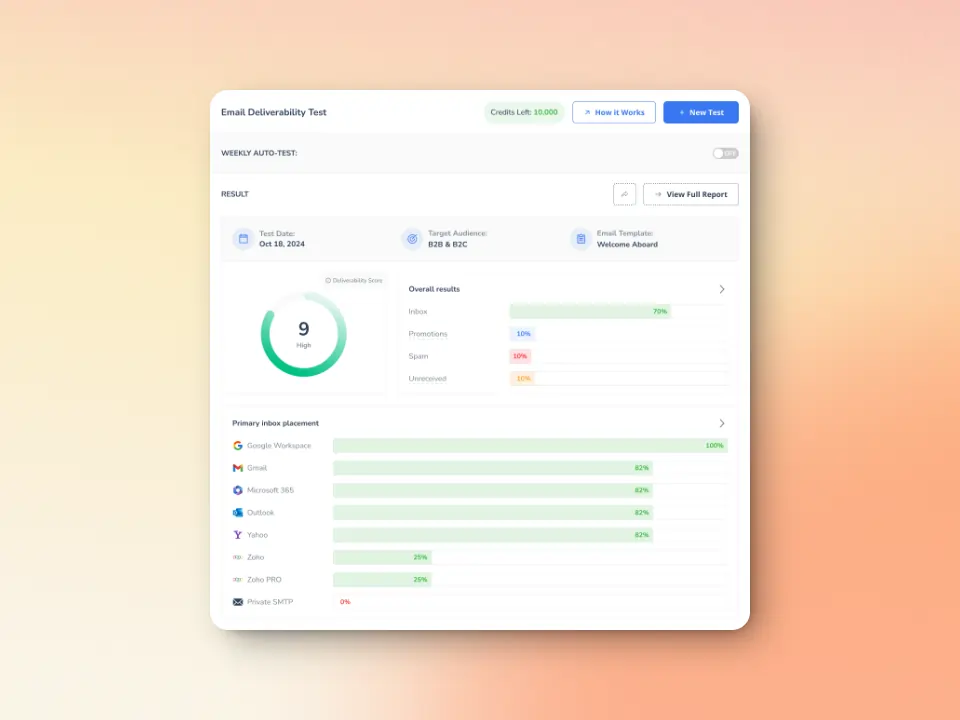
Warmy.io offers a free email deliverability test that helps identify potential problems before your emails get rejected. The test provides data on:
- whether your emails are landing in Inbox, Spam, or Promotions tabs.
- monitoring detects if your domain or IP is on a spam blacklist, a common reason for SMTP 451 errors.
- SPF, DKIM, and DMARC verification to ensure authentication records are configured correctly to reduce deferrals.
💡 Pro Tip #3: After fixing your DNS records or getting delisted from a blacklist, wait 24–48 hours for propagation and then re-run Warmy’s Email Deliverability Test to confirm the issue is fully resolved before sending to your full list.
Additional warmup preferences to maximize inbox placement
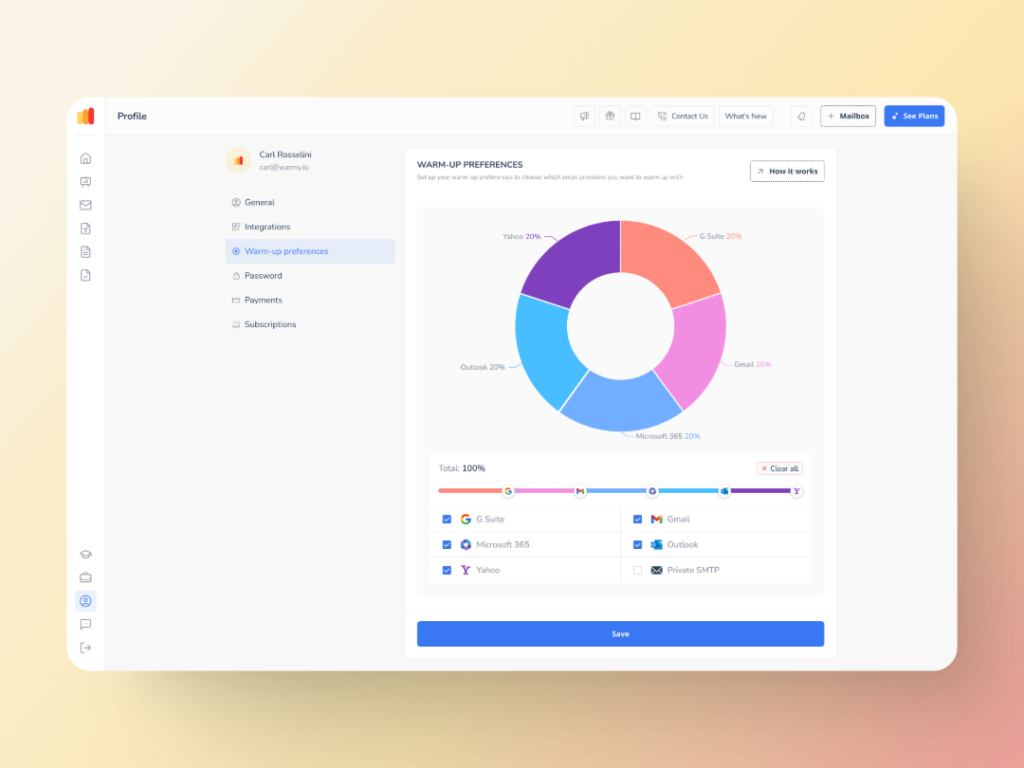
This feature is designed to make your email warmup process even smarter by allowing senders to tailor certain preferences, such as:
- Warmup distribution across GSuite, Gmail, M365, Outlook, Yahoo, and even Private SMTP.
- Engagement patterns. Choose between B2B or B2C customers.
- Define percentage of emails that will be sent to each provider
- Set warmup preferences per mailbox or across all mailboxes at once — all from inside the Warmy dashboard, no support ticket required.
Advanced seed lists for genuine engagements
Warmy.io’s seed list feature helps businesses test and optimize email campaigns before sending emails to real recipients.
This ensures high deliverability and low bounce rates. Compared to traditional warming methods which lack engagement tracking, Warmy’s seed list uses real email addresses that actively interact with your emails. By “interacting:”
- Your email is not just marked as read but actually opened and scrolled through
- If your email has any links, our system will click them naturally to improve sender trust.
- If an email finds its way in spam, it is manually removed and marked as important to let ISPs know your emails are legitimate.
It can also be integrated into any email client to improve your email performance testing. Warmy will supply genuine email addresses from Google, Outlook, and Yahoo that will act as seeds for testing your email deliverability.
Routing issues in your DNS or server configuration can also surface as SMTP Error 550 5.4.1 — a rejection that specifically involves DNS lookup failures or unreachable mail servers. If your 550 5.1.0 errors persist after fixing sender-side issues, that guide covers the recipient-routing angle.

Plus, with the API Endpoint for Established Seed List is a new way to access, manage, and configure your seed list splits directly from your system. No more manual updates, and no more time wasted with the following capabilities:
- Seamless integration with real-time seed list data that goes straight into your system with API access.
- Efficiency boost via automated split management which reduces errors, and saves valuable time.
- Better inbox placement due to properly configured splits mean fewer bounces and stronger sender reputation.
Achieve deliverability beyond SMTP Error 550 5.1. 0
Fixing SMTP Error 550 5.1.0 comes down to four actions: verify the recipient address, correct your DNS records (SPF, DKIM, DMARC), remove your IP from any blacklists, and review your mail server configuration. Address each one in order and you will eliminate the vast majority of 550 5.1.0 rejections.
For long-term protection, email warmup is your best tool. Warmy.io automates the entire process — building sender reputation gradually, simulating genuine engagement, and alerting you to deliverability issues before they become SMTP errors. The result: fewer bounces, better inbox placement, and more reliable delivery, regardless of the platform or region you’re sending from.
Sender reputation is the single biggest determinant of whether your email reaches the inbox.
And keep in mind that if you use an email warmup service, like Warmy.io, this will make for even easier delivery. The warmup should lessen any potential of 550 5.1.0 sender rejected as it establishes a better sending reputation. So take a breath, do your best, and this error will be gone before you know it—and so will all the rest! You got this!