Most senders don’t think twice about the unsubscribe link. It’s in the footer, it’s required, done. Move on.
That’s the problem.
The Warmy Research Team analyzed data across millions of daily emails to find out how much the setup of your unsubscribe link actually matters to spam filters. Turns out, it matters a lot. Inbox providers aren’t just checking whether an opt-out link exists. They’re also checking how it’s built, whether it works, and whether the destination domain matches your sending domain.
This post breaks down what we found. For the full dataset, methodology, and technical setup guide, download the complete Warmy Research Report on Unsubscribe Links’ Impact on Inbox Placement.
To know where your emails are landing, test your current inbox placement for free with Warmy’s Email Deliverability Test.
Why the unsubscribe link is a deliverability factor, not just a compliance checkbox
Most people treat the unsubscribe link as a legal requirement and leave it at that. GDPR, CAN-SPAM, and opt-out rules are real, but they’re not the whole picture.
Gmail, Outlook, and Yahoo also check your unsubscribe link when deciding where your email goes. The specifics of how it’s set up, whether it works, and whether it’s domain-aligned all play into that decision.
The Warmy team tested five different unsubscribe link setups across millions of daily emails to see exactly how each one affects inbox placement. The five unsubscribe link configurations were:
- Non-existent link: The email has no unsubscribe link and provides no way for the recipient to opt out
- Dynamic links: A personalized “smart” link that connects directly to your custom domain.
- Standard links: A conventional “Unsubscribe” button in the footer.
- Broken link: A link containing syntax errors or leading to 404 pages.
- Hidden link: An unsubscribe link hidden using invisible text or very small font sizes.
Everything was measured against one baseline: emails with no unsubscribe link at all. Here’s what we found.
For the full methodology and dataset, download the complete report.
Summary of findings: The 5 types of unsubscribe links and how each one impacts deliverability
Dynamic links result in highest inbox placement
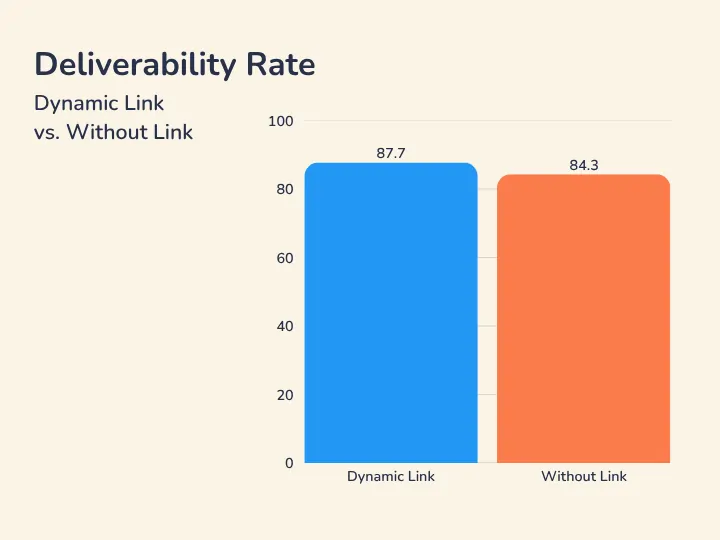
What it is: A dynamic unsubscribe link is a personalized opt-out URL tied directly to your sending domain. Instead of routing through a third-party redirect or a generic landing page, it connects to your own infrastructure. Spam filters pick up on that domain alignment and treat it as a trust signal.
Impact on inbox placement:
- In our research, dynamic links got an inbox placement rate of 87.70%, which is a +3.40% improvement over sending with no link at all.
- At scale that’s not trivial. For every 100,000 emails, that’s 3,400 more messages landing in the inbox instead of spam.
If you’re running high-volume cold email or outbound campaigns, this is the setup to use.
Standard visible links are safe and stable
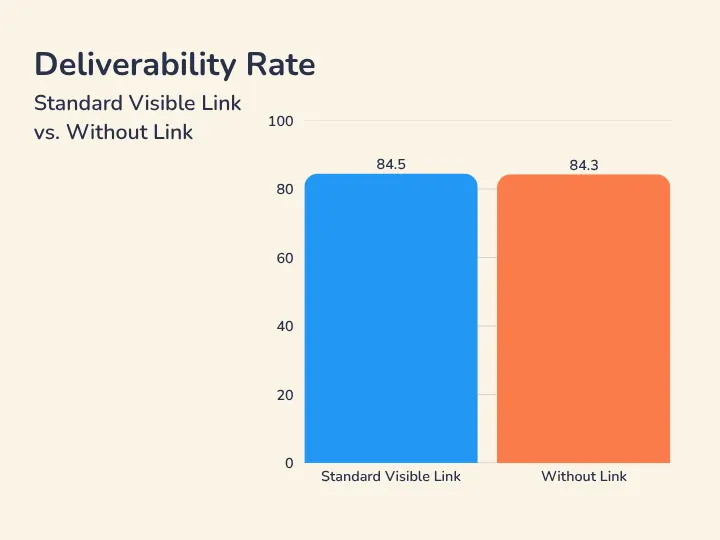
What it is: The standard “Unsubscribe” link in your footer is what most senders use. It’s familiar, compliant, and inbox providers treat it as normal marketing behavior.
Impact on inbox placement:
- Our data shows standard visible links give a +0.20% improvement over the no-link baseline. Not dramatic, but stable.
- More importantly, they cut down on manual spam complaints because recipients who want out can actually get out without marking you as spam.
For most senders this is the minimum you should have. It won’t transform your deliverability but it keeps your complaint rate under control.
Broken links are worse than no unsubscribe link
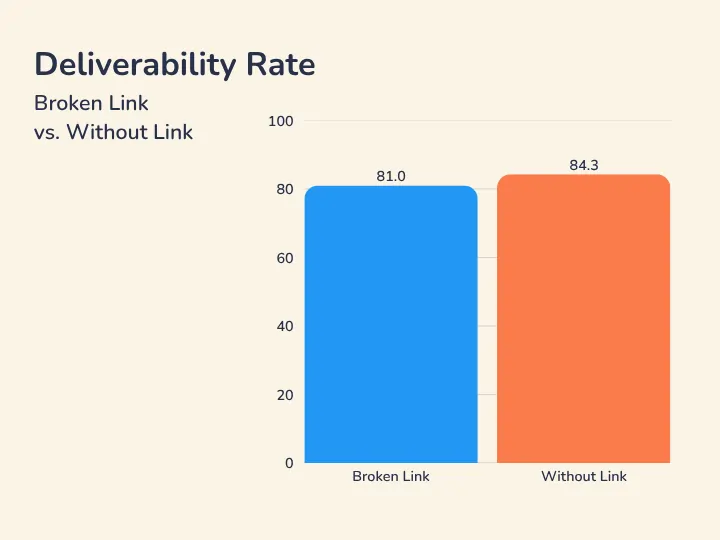
What it is: A broken unsubscribe link, whether it’s a syntax error or a URL that leads to a 404, actually performs worse than having no link at all. Modern spam filters verify URLs before delivery. A non-working opt-out link reads like low-quality content or a phishing attempt.
Impact on inbox placement:
- Our data shows that broken links get an inbox placement rate of 81.00%, a -3.30% drop from the no-link baseline.
The irony is that you went to the trouble of adding a link and it’s hurting you more than if you’d left it out. Catch broken links before you send, not after.
Hidden links are the worst thing you can do
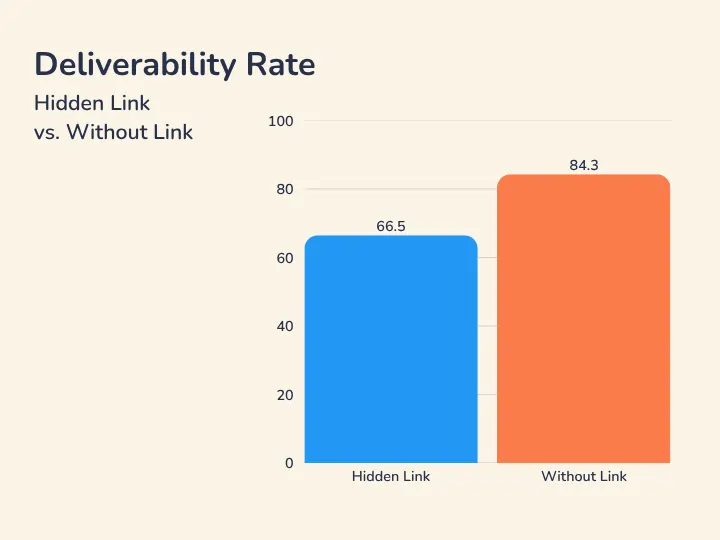
What it is: Hiding your unsubscribe link, whether through invisible text, white-on-white fonts, microscopic text size, or burying it in unreachable code, is the fastest way to destroy your inbox placement. Spam filters are specifically trained to detect this. It doesn’t read as a minor oversight. It reads as deliberate manipulation.
Impact on inbox placement:
- Our research shows hidden links get an inbox placement rate of just 66.50%, a -17.80% drop from the no-link baseline.
- At that level of inbox placement loss, campaigns fail entirely.
The reputation damage doesn’t stop when the campaign ends. Repeated use of hidden links can get your domain permanently blacklisted, which takes months to recover from if recovery is even possible. No short-term retention benefit is worth that.
Summary table of key findings
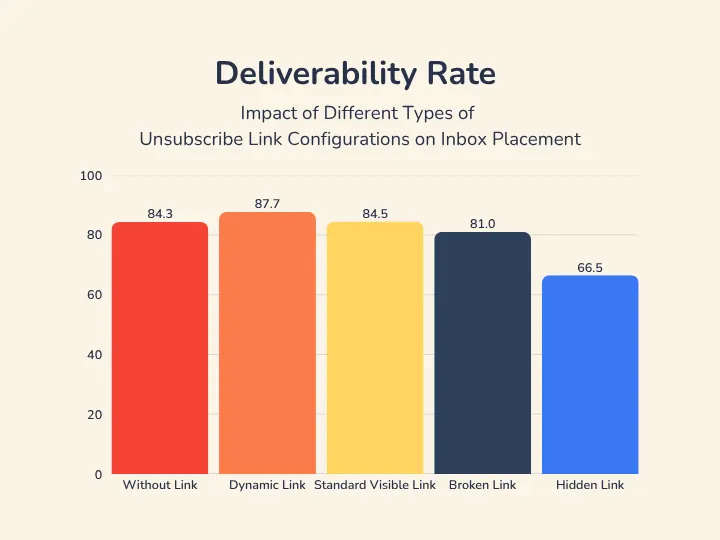
| Unsubscribe Link Type | Inbox Placement Rate | vs. No Link |
|---|---|---|
| Dynamic link | 87.70% | +3.40% |
| Standard visible link | 84.50% | +0.20% |
| Without link (baseline) | 84.30% | — |
| Broken link | 81.00% | -3.30% |
| Hidden link | 66.50% | -17.80% |
The gap between best and worst is 21.20 percentage points. That’s not from your subject line or your copy. That’s from how you set up one link in your footer.
What that looks like at real sending volume
Let’s say you’re sending 100,000 emails per month. If you’re using a hidden link instead of a dynamic one, you’re losing 17,800 inbox placements per month. Those are emails that could have reached a prospect and got sent to spam instead. Multiply that by your average reply rate and deal value and you get a clearer picture of what taking your Unsubscribe link for granted actually costs.
This compounds, too. Because lower inbox placement hurts your sender reputation. Worsending reputation means lower placement next month. The cycle runs in both directions, and breaking out of it can take a long time.
Pro tip: Audit your unsubscribe link before your next campaign send. Check that the URL works, that the destination domain matches your sending domain, and that the link is actually visible to recipients.
Get the complete research report on “How Unsubscribe Configurations Impact Inbox Placement”
The takeaway from the data is pretty simple:
- Use a dynamic link if you can set one up.
- Use a standard visible link if you can’t.
- Never use a broken one or a hidden one.
- And if you’re currently sending without any opt-out link, add one before your next send.
Bottom line: your unsubscribe link is part of your email infrastructure, so treat it accordingly.
This post covers the main findings. The full report has the complete dataset across all five link types, the full methodology, setup guidance for each configuration, and analysis of how opt-out setup interacts with other sender reputation factors.
Download the full research report to see exactly where your current setup stands.