TL;DR: Choosing an ecommerce email marketing tool means weighing pricing structure, ease of use, customer support, and integration depth alongside deliverability, since a platform that nails automation and segmentation can still cost you revenue if inbox placement isn’t protected.
This guide walks through what to compare on price and usability, then adds the five deliverability questions most buyer’s guides skip entirely: shared versus dedicated sending pools, built-in authentication support, real inbox-placement reporting, warm-up support for a new sending domain, and content-level spam scoring. Run every finalist through the full list before you sign, and pair whichever ecommerce email marketing software you pick with Warmy’s AI-driven warm-up and monitoring layer to keep that decision protected long after the contract is signed.
An ecommerce email marketing tool is software that sends and automates order confirmations, abandoned-cart flows, and promotional campaigns for an online store, and choosing between finalists means weighing more than automation and templates: pricing structure, ease of use, support quality, and integration depth all shape whether a platform is worth the switch. The criterion most comparisons still shortchange, deliverability posture, is the one this guide adds to that list.
You’ve Already Narrowed the Field. Now Ask the Question Comparison Pages Skip
You’ve read the category guides and you’ve got two or three names on a shortlist. What none of those guides tell you is what happens to your inbox placement six weeks after you migrate: whether cart-abandonment emails keep landing in Primary, or start sliding into Promotions the week your list crosses a volume threshold nobody warned you about.
That’s the gap this checklist fills. If you’re still choosing a platform category or working out a budget, Warmy’s guide to email deliverability for e-commerce covers that broader strategy. This article assumes you’ve done that work already, and is built for the moment you’re staring at two or three named finalists and need a concrete way to tell which one will protect your sender reputation once you sign.
Warmy is an AI-driven email deliverability platform that pairs with whichever ecommerce email marketing tool you land on, so this checklist isn’t building toward “switch platforms.” It’s building toward “ask these five questions before you commit to the one you’re already leaning toward.”
What to Weigh Before You Compare Finalists
Core features: automation, segmentation, ecommerce integrations
Every legitimate ecommerce email marketing software candidate needs the same three things at a baseline:
- Native storefront integration with Shopify, WooCommerce, or BigCommerce so customer and order data sync automatically.
- Behavior-based segmentation by purchase history and lifecycle stage, not just open history.
- Pre-built automation for cart abandonment, post-purchase follow-up, and win-back flows.
HubSpot’s own buyer research on email marketing platform features points to the same short list: integration depth, automation flexibility, and revenue attribution reporting rather than opens alone. None of that is unique to this article. These are table-stakes features, not differentiators, and two tools that both check every box here can still perform very differently the first time you send to your full list.
Pricing and plan structure
Ecommerce email marketing tools price in a few different ways: by number of contacts, by monthly send volume, or by a flat platform fee with usage caps. None of these is inherently better, but each rewards a different kind of store. A contact-based model penalizes list growth even if your emails per contact stay low; a send-based model penalizes high-frequency senders even with a small list. Before comparing sticker prices, map each finalist’s pricing model against how your store actually operates: list-size trajectory, campaign frequency, and whether automated flows count against your monthly send cap.
- Ask whether automation-triggered sends (abandoned cart, post-purchase) count toward your plan’s send or contact limit.
- Ask what happens the moment you cross a plan’s list-size or volume threshold: automatic upgrade, overage billing, or throttled sending.
- Ask whether dedicated IP access, advanced segmentation, or multi-user seats are gated behind a higher tier than the one in the sales demo.
Pro Tip: Price out your finalists at your list size six months from now, not today. A plan that looks cheapest at your current contact count can flip to the most expensive option once you cross the next pricing tier, especially around a seasonal growth spike.
Ease of use and onboarding
A platform with every feature on paper still costs you time if your team can’t actually use it without developer help. Ask each finalist how long a typical store takes to go from signup to a first live automation, whether templates are genuinely drag-and-drop, and whether historical campaign and list data migrates over automatically or has to be rebuilt by hand.
Customer support and account management
Support quality tends to track plan tier more than platform quality. Entry plans usually get email or chat support with a published response-time target, while higher tiers add a dedicated account manager who understands your specific setup. Ask directly what support channel and response time apply at the plan you’re actually going to buy, not the one shown in the sales demo, and whether migration assistance is included or billed separately.
The deliverability features most buyer’s guides skip
Most comparison content stops at pricing tiers, template quality, and integrations. It rarely asks whether the platform gives you visibility into where your emails actually land, or whether its infrastructure is built to protect a growing list rather than just send to one. The next section fills that gap: a five-point deliverability rubric most buyer’s guides skip entirely.
The 5-Point Deliverability Checklist Most Buyers Skip
The five deliverability questions to ask any ecommerce email marketing tool finalist are: does it use a shared or dedicated sending pool, does it support SPF, DKIM, and DMARC natively, does its reporting show real inbox placement rather than just opens, does it offer warm-up support for a new sending domain, and does it score your content for spam risk before you send. Ask all five before you sign, not after your first campaign underperforms.
- Sending pool: shared infrastructure or dedicated, and at what volume that changes.
- Authentication: native SPF, DKIM, and DMARC setup and ongoing monitoring.
- Reporting: real inbox placement by provider, not just opens and clicks.
- Domain warm-up: built-in ramp-up guidance for a new sending domain.
- Content scoring: spam-risk checks before you send, not after a campaign underperforms.
1. Shared vs. dedicated sending pools
Most entry and mid-tier ecommerce plans send through a shared IP or shared domain pool, which means your inbox placement is partly determined by every other store sending through that same infrastructure. If another sender on your pool triggers a wave of spam complaints, your own clean sending history doesn’t fully insulate you from the fallout. Validity’s comparison of dedicated and shared IP setups notes that dedicated infrastructure gives senders sole ownership of their reputation, at a cost and setup overhead that only makes sense once volume justifies it.
Ask each finalist directly: is my account on a shared or dedicated pool by default, and at what volume does dedicated become an option? If a sales rep can’t answer that specifically, treat it as a red flag. For stores scaling volume ahead of a seasonal push, Warmy’s guide to warm-up for high-volume senders walks through the technical prerequisites that matter most once you cross that threshold.
Pro Tip: Ask for the exact volume threshold in writing, not a verbal estimate. Some ESPs move accounts to dedicated infrastructure automatically at a set send volume; others require you to request it and pay extra. Knowing which one you’re dealing with now avoids a surprise mid-migration.
2. Built-in authentication (SPF/DKIM/DMARC) support
A platform that doesn’t walk you through SPF, DKIM, and DMARC setup during onboarding is handing you a deliverability problem on day one. These three records tell Gmail, Yahoo, and Outlook that your messages genuinely come from your domain and weren’t altered in transit, and Google Workspace’s own sender setup documentation is explicit that bulk senders need all three properly configured, not just one.
Ask whether the platform generates these records for you, validates them automatically, and alerts you if one breaks after a DNS change on your end. Treating authentication as a one-time setup step rather than something to keep monitoring is a gap that tends to surface at the worst possible moment, right before a sale.
3. Reporting: opens, clicks, and actual inbox placement
Open rate and click rate tell you what happened to emails that were delivered. Neither tells you what share of your sends never reached the inbox at all, landing instead in spam or a promotions tab where a customer is unlikely to see them. That gap is exactly what a dedicated inbox placement test measures, and it’s a reporting capability most ecommerce ESPs don’t build natively.
Ask each finalist whether their dashboard shows inbox placement by provider, not just aggregate delivery. If it doesn’t, you’ll need to run that test separately. Warmy’s guide to email deliverability testing methods breaks down how to read placement results provider by provider.
Two More Checklist Items Before You Sign
The last two checklist items cover what happens after you sign: whether the platform helps you warm up your new sending domain safely, and whether it flags spam-risk content before a send goes out rather than after it lands in a filter. Skipping either one is how a technically sound migration still ends in a deliverability dip nobody saw coming.
- Warm-up support: built-in ramp-up guidance for a brand-new sending domain.
- Content scoring: spam-trigger and formatting checks before you send, not just after.
If you’re migrating off Klaviyo or Mailer Lite specifically, both platforms have known, well-documented deliverability quirks worth understanding before you commit to (or away from) them. Warmy’s guides to Klaviyo deliverability issues and MailerLite deliverability fixes cover the specific failure patterns each one is prone to.
4. Warm-up support for new sending domains
Migrating to a new ecommerce email marketing tool often means sending from a new subdomain, and a brand-new domain has zero sending history with Gmail, Yahoo, or Outlook. Send your full list on day one and you’re the exact pattern spam filters are built to catch: a cold domain suddenly pushing high volume. Ask whether your finalist offers built-in ramp-up guidance, or whether warming the domain is entirely on you.
5. Content and spam-risk scoring
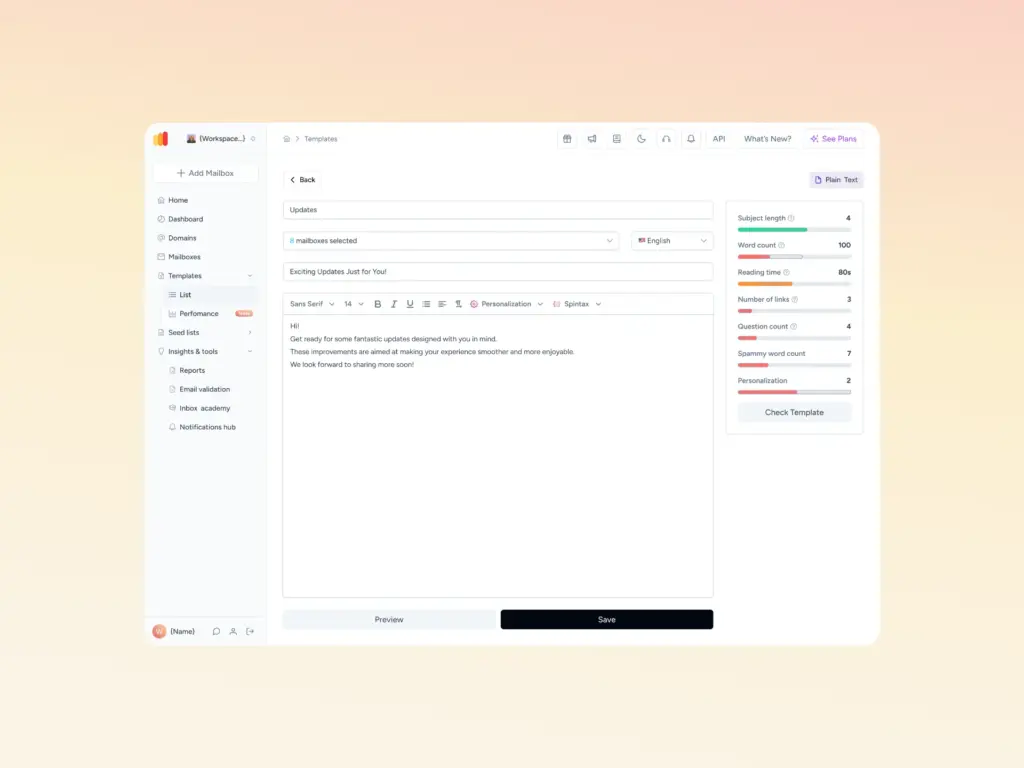
Even a perfectly authenticated, properly warmed domain can get filtered if the email itself trips a spam filter, subject lines with certain trigger phrases, an image-to-text ratio that reads as promotional, or broken HTML. Ask whether your finalist scores content before you send, or only reports problems after the fact. Warmy’s free Template Checker scans a template for exactly these issues ahead of a send, which is worth running against your first few campaigns on any new platform regardless of which ESP you land on.
Run the Checklist Against Your Shortlist
| Checklist item | Ask this | Red flag answer |
|---|---|---|
| Sending pool | Shared or dedicated by default, and at what volume does that change? | Rep can’t specify a threshold |
| Authentication | Do you generate and monitor SPF, DKIM, and DMARC? | “You’ll need to set that up yourself” |
| Reporting | Does the dashboard show inbox placement by provider? | Only shows opens and clicks |
| Domain warm-up | Is there guidance for ramping a new sending domain? | No mention of warm-up at all |
| Content scoring | Is content scored for spam risk before sending? | Only flags issues after a campaign underperforms |
Already narrowed it down to your top pick? Run a free Email Deliverability Test before your first real campaign goes out, so you know your starting inbox placement across Gmail, Outlook, and Yahoo instead of finding out from a quarter of missing revenue.
Tools / Warmy Features
Pairing any ESP with Warmy’s warm-up and monitoring layer
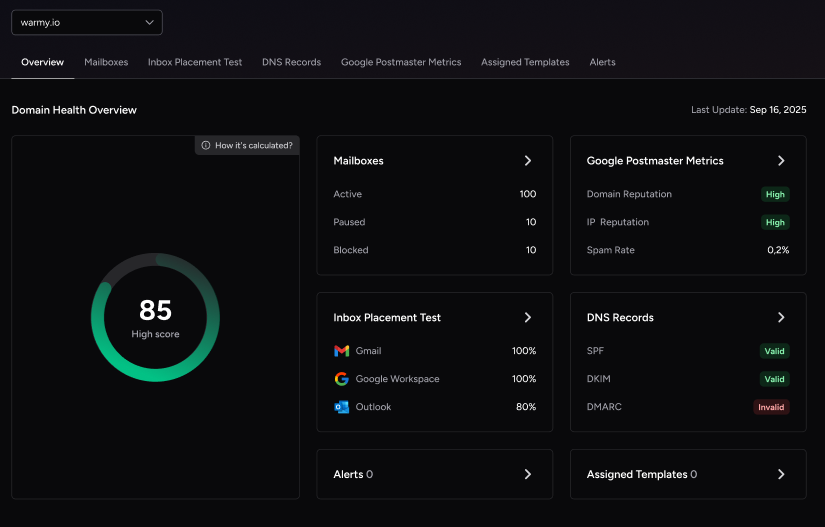
Whichever ecommerce email marketing tool wins your comparison, Warmy runs alongside it rather than replacing it. Warmy’s deliverability monitoring pulls inbox placement, blacklist status, and authentication health into a single dashboard, so you’re not toggling between your ESP’s native reporting and a separate provider tool every time you want a straight answer on where your campaigns are landing.
A few Warmy features are worth knowing about specifically because they layer directly onto whichever ESP you land on, rather than requiring a migration:
- Seed List: Warmy’s Seed List gives you a regularly refreshed set of real Gmail, Outlook, Yahoo, Google Workspace, and Microsoft 365 addresses that engage with your test sends the way real customers would, opening, scrolling, clicking, and rescuing anything that lands in spam, so you can see how a new ESP is placing mail before you send to your full list. Blocked or inactive addresses are automatically replaced, keeping the signal consistent send after send.
- Warmup Preferences: lets you control the split of warmup activity across Gmail, Google Workspace, Outlook, Microsoft 365, and private SMTP, and choose between B2B and B2C engagement patterns to match how your store’s actual customers are distributed.
- Domain Health Hub: a domain-level dashboard that scores authentication status, blacklist presence, and inbox placement trends, so you can track every sending domain from one place instead of checking each mailbox separately.
- Warmup With Clicks: layers real link clicks and automatic Promotions-tab removal on top of standard warmup activity, which pushes Gmail toward treating a new sending domain as a trusted, Primary-tab sender.
- Smart Weekly Auto-Run: schedules recurring inbox placement tests automatically at the domain level, so a newly migrated domain keeps getting tested without you having to trigger each check manually.
How to Vet a Tool’s Deliverability Track Record Before You Sign
Before you sign, ask for references from other ecommerce stores on the same plan tier, and request a trial long enough to run your own placement test. If your migration means standing up a new sending domain, warm up that new ESP’s sending domain gradually rather than pointing your full list at it the day the contract starts. Warmy’s AI engine adjusts that ramp in real time based on how each domain performs, which matters most in the exact window a migration is most exposed.
Conclusion
The best email marketing tool for ecommerce is the one that fits how you actually operate: pricing that matches your real send volume, onboarding your team can handle without a developer, support that answers when something breaks, and integrations that keep your storefront data in sync. It also protects deliverability before you sign, not after a campaign underperforms.
Run the five-point checklist against whichever names are left on your list: sending pool, authentication, reporting, warm-up support, and content scoring. Whichever platform you land on, pairing it with a dedicated deliverability layer closes the one gap the platform itself was never designed to cover.
Pair Any ESP With Warmy
Already narrowed it down? See how Warmy pairs with any ecommerce ESP to protect deliverability from the first campaign onward. Book a Demo and get a clear read on where your finalist’s infrastructure needs backup.