TL; DR:
- Warming up an email domain for cybersecurity companies typically takes 2 to 6 weeks, and up to 45 days for brand-new or previously inactive domains.
- The exact timeline depends on domain age, sending history, technical setup (SPF, DKIM, DMARC), and whether the domain has a blacklisting history.
- Start with 10–20 emails/day, increase volume by 20–30% weekly, and monitor engagement throughout.
If you work in cybersecurity, you already know trust is everything. The same principle applies to your email domain. Before you can send campaigns at scale, you need to build that trust with inbox providers—and that process is called email domain warmup.
This guide breaks down exactly how long it takes, what affects the timeline, and the best practices cybersecurity companies should follow to hit the inbox every time.
Not sure where your emails are landing? Run a Free Email Deliverability Test.
Why does email domain warmup for cybersecurity matter more?
Warming up your email domain is all about building credibility and trust with both the inbox providers and your recipients. For cybersecurity companies, sender reputation holds more weight, as every message can be examined for security.
Your recipients are more suspicious by default
73% of all reported cyber-incidents in 2024 were business email compromise (BEC) attacks. That statistic has put your audience on high alert as security-conscious recipients are more likely to mark unexpected emails as phishing or spam. Especially if it’s coming from an unfamiliar domain.
A proper warmup builds the consistent sending behavior that makes your emails feel expected and legitimate.
Spam and phishing filters are stricter in this space
- Phishing attacks use fake emails to steal credentials. Spoofing forges your sending address to impersonate you.
- Email providers have become extremely aggressive with their filtering and cybersecurity-adjacent domains are scrutinized even more heavily, since attackers routinely impersonate security vendors to gain victim trust. In fact, Google blocks around 100 million phishing emails every single day.
A poor sender reputation can permanently damage your brand
Getting blacklisted doesn’t just block one major email campaign. It can delay or block all future emails, including transactional messages and security alerts that existing clients depend on. Gradual, responsible email domain warmup for cybersecurity companies protects the credibility your firm has worked hard to build.
The timeline for email domain warmup for cybersecurity: How long does it actually take?
Here’s a straightforward breakdown of what to expect depending on your domain’s situation:
|
Domain Type |
Warmup Duration |
Starting Volume |
Key Risk |
|
New domain |
4–6 weeks |
10–20 emails/day |
No prior reputation |
|
Dormant domain |
3–5 weeks |
20–30 emails/day |
Stale reputation |
|
Previously blacklisted |
6+ weeks |
5–10 emails/day |
Active blacklist entry |
Standard timeline: 2 to 6 weeks
- Most new or recently inactive cybersecurity domains require 14 to 21 days of warmup before they can send at meaningful volume.
- This window allows inbox providers to observe consistent, low-risk sending behavior and assign a positive reputation score.
Extended timeline: Up to 45 days
- Brand new domains with zero sending history, or previously inactive domains that have been dormant for months, may require a more conservative schedule that stretches to 45 days.
- Rushing this process increases the risk of triggering spam filters before reputation is established.
Curious to see how the warmup process can be automated? Check out this overview of Warmy.io:
5 key factors that affect your warmup speed
No two domains warm up at exactly the same pace. Here are the variables that matter most for cybersecurity senders:
1. Domain age and sending history
Older domains with a documented history of legitimate sending tend to warm up faster because inbox providers have baseline data to work from. Meanwhile, new or dormant domains start from scratch and need more conservative pacing to avoid triggering automated risk systems.
The Warmy Research Team released a report on the different email platforms and diverse domain configurations and how they affect warmup. Access the complete report here: The Science and Process of Warming Up Newly Created Email Domains.
2. Email volume and sending frequency
Start with 10–20 emails per day and increase by no more than 20–30% per week. Sudden spikes in volume (even from a well-intentioned campaign launch) are one of the most common reasons cybersecurity domains get flagged. Consistency builds trust and unpredictability destroys it.
3. Content quality and engagement signals
Inbox providers measure how recipients interact with your emails. High open rates, replies, and click-throughs signal that your emails are wanted. Irrelevant or poorly written emails that get ignored (or worse, reported) can slow your warmup significantly and can reverse progress you’ve already made.
4. Technical authentication: SPF, DKIM, and DMARC
SPF, DKIM, and DMARC are email authentication protocols that verify your domain is a legitimate sender. Without proper configuration, even a perfect warmup strategy will underperform. Plus, you’ll be at higher risk of being impersonated in phishing attacks.
Pro Tip: A warmedup domain with strong authentication (SPF, DKIM, DMARC) is your first line of defense against spoofing and phishing. Use Warmy’s free SPF Record Generator and DMARC Record Generator to ensure your records are valid and set up correctly.
5. Blacklisting or prior spam complaints
If your domain or sending IP has previously been blacklisted, you’ll need to resolve those issues before beginning warm-up. Existing blacklist entries significantly extend the timeline and require additional remediation steps before standard warm-up practices can take effect.
Best practices for warming up a cybersecurity email domain
Step 1: Start with low volume sending
Begin with 10–20 emails per day, targeting recipients who are most likely to engage. These can be existing contacts, colleagues, or people already familiar with your brand. Every positive interaction (open, reply, click) strengthens your sender reputation.
- Avoid large batches early on
- Target most engaged recipients first
- Monitor open rates, clicks, and replies daily
- Send at consistent times to establish predictable patterns
Step 2: Increase volume gradually
Once early engagement signals are strong and consistent, you can begin scaling up. The 20–30% weekly increase rule exists for a reason: it mirrors natural business growth patterns and avoids triggering algorithmic risk flags.
- Increase sending volume by 20–30% each week
- Only scale when engagement metrics remain positive
- Avoid sharp spikes because consistency matters more than speed
- Track bounce rates and spam complaint rates alongside volume
Step 3: Encourage real interactions
Inbox providers pay attention to two-way engagement, not just sends. Emails that receive replies, scrolls, and clicks are treated as high-trust signals. That’s why it’s recommended to send to recipients who are most likely to interact with your emails.
Tools like Warmy.io simulate these genuine interactions through real mailbox networks (not bots) to accelerate reputation building safely during the email domain warmup for cybersecurity.
Step 4: Use an AI-powered warmup platform
Manual warmup is possible, tested, and proven. However, it’s time-intensive and easy to get wrong.
Warmy.io’s AI engine analyzes your domain’s history and sending patterns in real time, automatically calibrating volume increases to protect your reputation while maximizing inbox placement. For cybersecurity teams that can’t afford a misstep, automation removes human error from the equation.
How does email domain warmup for cybersecurity protect against phishing impersonation?
One of the most underappreciated benefits of email warmup in the cybersecurity sector is what it does for phishing resistance. A well-warmed domain with strong authentication doesn’t just deliver better. It’s also significantly harder to impersonate.
Reinforces sender authentication protocols
A consistent sending history over weeks gives inbox providers the behavioral data they need to trust your domain. Combined with properly configured SPF, DKIM, and DMARC records, this makes it extremely difficult for attackers to spoof your identity successfully.
Mastering Email Deliverability: The Modern Guide to Authentication and Inbox Warm-Up is a comprehensive report from the Warmy Research Team which gives a clear picture on how email warmup and authentication work together.
Builds recipient recognition and confidence
When your recipients receive consistent, expected emails from your domain, they build familiarity with your sending patterns. This recognition acts as a natural human filter. Recipients are more likely to trust your emails and more likely to notice when something looks off.
Reduces false positives in spam filtering
Overeager spam filters sometimes catch legitimate emails, especially from domains that haven’t established a reputation yet. A proper warmup reduces these misclassifications by building the track record that tells filters: this domain is safe, consistent, and trusted.
Here’s how Warmy.io supports cybersecurity domain warmup
Warmy is an AI-driven email warmup platform built for senders who can’t afford deliverability failures, making it the right fit for cybersecurity companies. Here’s what makes it particularly well-suited for cybersecurity companies:
AI-driven warmup with real-time adjustment
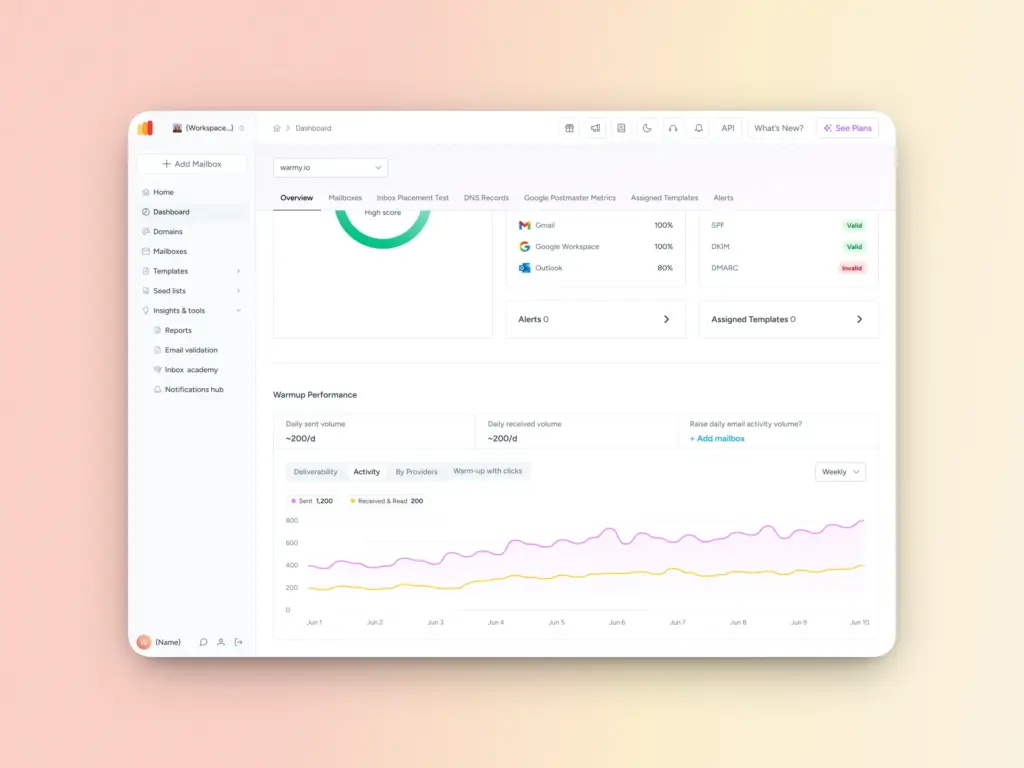
Warmy analyzes your domain history, mailbox provider preferences, and engagement data to create a custom warmup plan—and adjusts it automatically as conditions change. The Warmup Preferences feature lets you control how warm-up volume is distributed across Gmail, Outlook, and Yahoo, and choose between B2B or B2C engagement patterns to match your audience.
Real mailbox interactions and Warmup with Clicks
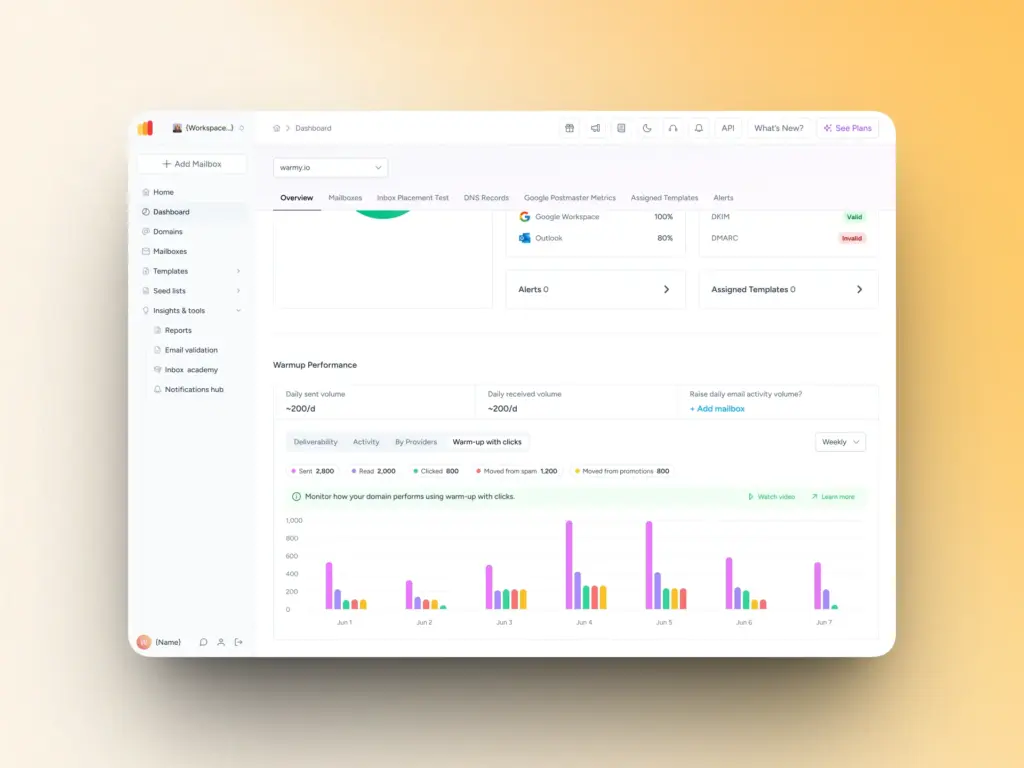
Warmy’s Seed Lists and Warmup With Clicks feature use real mailboxes that generate authentic opens, replies, scrolls, and clicks. Clicks, especially, send valuable signals to mailbox providers that you are trustworthy, legitimate, and sending relevant content.
Emails that land in spam are flagged as important and rescued, signaling legitimate intent to mailbox providers. This is fundamentally different from bot-based warmup services from other email warmup tools that can trigger algorithmic penalties.
Domain Health Hub and deliverability monitoring
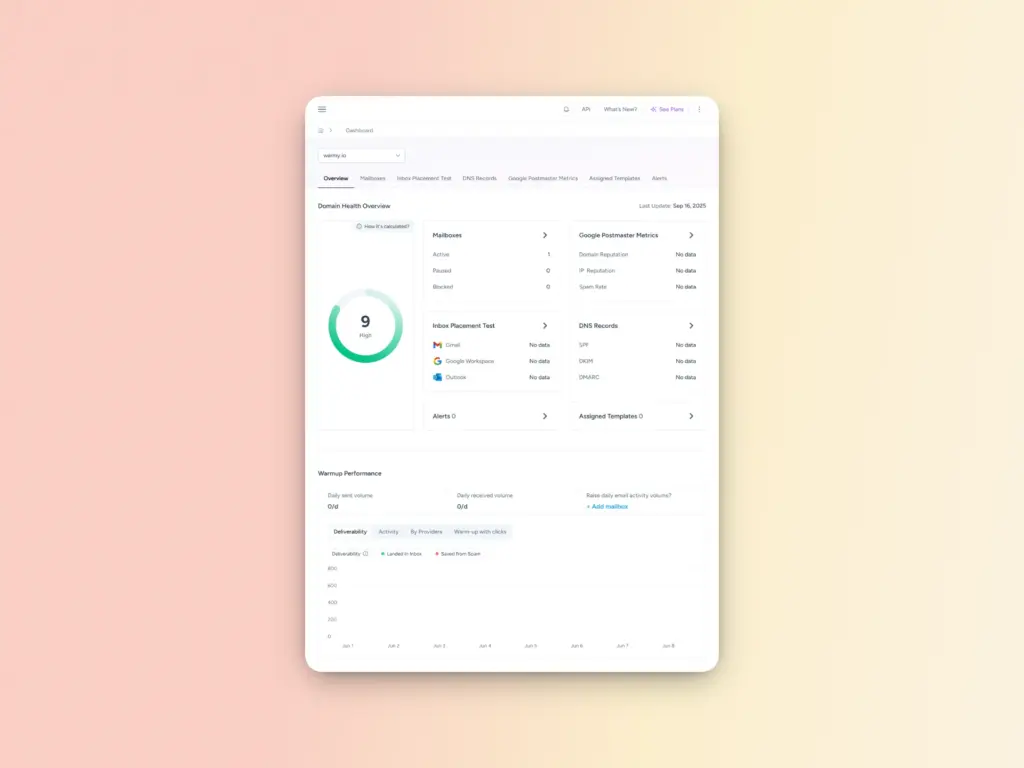
Warmy’s Domain Health Hub gives you a real-time view of your sending health, including:
- Domain health score based on authentication status and inbox placement
- Spam rate trend monitoring (weekly or monthly)
- Full DNS validation for SPF, DKIM, DMARC, rDNS, MX, and A records
- Multi-domain dashboard to manage and prioritize across all your sending domains
Compliance and security-first features
Warmy’s platform is built with GDPR and CAN-SPAM compliance in mind which are critical for cybersecurity firms that are frequently targeted by attackers using their brand as a cover. Free tools include an SPF Record Generator and DMARC Record Generator to help you establish authentication before warmup begins.
Your cybersecurity emails deserve to be trusted. Start warming up the right way.
In cybersecurity, your emails are a direct reflection of your organization’s credibility. A domain that hasn’t been properly warmed up risks being mistaken for the exact kind of threat your company exists to prevent.
A structured warmup process, the right technical foundation, and consistent sending behavior are all it takes to build a sender reputation that inbox providers and your recipients can trust.
Cybersecurity companies that leverage Warmy.io’s features can be sure that emails reach the inbox and are recognized as legitimate by recipients and inbox providers.
Warmy.io was built for exactly this kind of high-stakes sending environment. Its AI-driven warmup engine and comprehensive suite of deliverability features provide teams the tools to protect their sender reputation from day one.
Ready to protect your sender reputation? Book a personalized demo with the Warmy team.
FAQ
How long does email domain warmup take for a cybersecurity company?
Most cybersecurity domains require 2 to 6 weeks of warmup. Brand-new or previously inactive domains may need up to 45 days to establish a reliable sender reputation without triggering spam filters.
What is the best starting volume for a cybersecurity email warmup?
Start with 10–20 emails per day and increase by 20–30% each week. Begin with highly engaged recipients—existing contacts or known prospects—to generate positive early engagement signals.
Do I need SPF, DKIM, and DMARC before starting my warmup?
Yes. SPF, DKIM, and DMARC should be correctly configured before you send a single warmup email. Misconfigurations reduce deliverability and can cause your emails to be flagged as phishing attempts, which is especially damaging for cybersecurity brands.
Can I warm up a domain that was previously blacklisted?
Yes, but you must resolve the blacklisting first. The warmup timeline for previously blacklisted domains is typically 6 or more weeks, and the process requires more conservative volume ramp-up than a clean new domain.
How does Warmy.io help cybersecurity companies warm up faster?
Warmy.io uses AI to create a customized warmup strategy based on your domain’s specific history and provider preferences. Its real-mailbox seed network generates authentic engagement signals, and the Domain Health Hub monitors deliverability in real time so you can address issues before they impact campaigns.