SMTP error 503 5.5.1 means your email client tried to send a command before properly identifying itself to the server with an EHLO or HELO greeting — and the server rejected it. In plain terms: your email client skipped the required “handshake” step, so the server refuses to process anything further. The fix is almost always a misconfigured SMTP client, wrong authentication order, or a faulty script. This guide explains every known cause and walks you through the exact steps to resolve it across Gmail, Outlook, Yahoo, and custom SMTP setups.
The SMTP 503 5.5.1 error is part of a broader family of 503 errors that all indicate the server received a command out of sequence. What makes 5.5.1 specific is the “EHLO/HELO required” message — it tells you the session was never properly initialized. Unlike authentication errors caused solely by wrong passwords, this error is also frequently triggered by poorly written email scripts, email clients that fall back to legacy protocols, or server-side policy changes that now require EHLO (the extended version of HELO). Left unresolved, it blocks all outbound email from that session entirely.
Below you’ll find every documented cause of this error and step-by-step resolution instructions for the most common email clients and SMTP configurations.
Understanding SMTP Error 550 5.1.1
This error is the digital equivalent of a “Return to Sender” notification. Basically, an email failed after it was sent over SMTP (Simple Mail Transfer Protocol—the Internet standard communication protocol used in sending messages) and the receiving server did not accept it.
A returned email or SMTP Error 550 5.1.1 is an indication that the address does not exist on the server of our recipients.
The most frequent causes are a misspelled address, a deleted or renamed account, an expired domain, or a misconfigured recipient mail server that refuses to accept the message.
The error message may look something like this:
550 5.1.1 <recipient@example.com>... User unknown
Other variations may include “Recipient address rejected” or “Mailbox unavailable.”
🔖 Related Reading: SMTP Email Error 550 5.4.1 – How to Resolve [SOLVED]
Common causes of SMTP Error 550 5.1.1
SMTP Error 550 5.1.1 can occur due to various reasons—each of which indicates a fundamental problem in the way the email was addressed or routed.
Invalid recipient email address
This is one of the most common reasons. When you make a mistake typing in the email address and that email address doesn’t exist, the email will not be sent and you will receive the error message.
Problems with the domain name
If the domain portion of the email address (the section after the @ symbol) is incorrect or no longer exists, emails will not be delivered. This can happen when a recipient’s domain name changes or expires. For example, if you’re sending to someone using a business email and their company had just rebranded or changed names, it’s likely that the email addresses of the employees have also changed.
Problems with server configuration
On the recipient’s side, the mail server may be configured in such a way that it does not recognize or accept emails to a valid address.
This may be due to strict filtering rules or a misconfigured server that effectively blocks incoming messages. A common related issue is missing SMTP authentication—see how to fix “550 Please Turn On SMTP Authentication” if your server logs show that specific variant.
Outdated DNS records
As DNS converts domain names to IP addresses. And if the DNS records of the email recipient’s domain are outdated or incorrectly configured, the email servers cannot find the right direction to deliver the email, and delivery fails.
Q: What are DNS records?
A: DNS records are entries in the Domain Name System that give information about a domain (like its IP address or mail servers). These records help route internet traffic to the right destination by translating domain names into IP addresses.
🔖 Related Reading: What are DNS MX record, DNS A-record, rDNS and how does it work?
Step-by-step solutions to resolve SMTP Error 550 5.1.1
Regardless of which email provider you use—be it Gmail, Outlook, Yahoo or another digital email service—let’s look at the general steps:
1. Check your email address carefully
Make sure there are no typos or errors. It’s easy to misspell a name or misspell a domain, so take another look.
2. Check your email settings
Double-check your account settings to see if there are any filters or rules that may be redirecting your emails or blocking them entirely.
3. Check your server settings
If you are using an email client (such as Outlook or an email application), make sure your SMTP server settings are correct.
Here are the SMTP server settings for Gmail, Outlook, and Yahoo, which you might need for configuring email clients or troubleshooting email issues:
Gmail SMTP settings
- Server address: smtp.gmail.com
- Port: 587 (for TLS/STARTTLS) or 465 (for SSL)
- Authentication required?: Yes
- Username: Your full Gmail email address (including @gmail.com)
- Password: Your Gmail password (or an App password if two-factor authentication is enabled)
Outlook SMTP settings
- Server address: smtp-mail.outlook.com
- Port: 587
- Encryption method: STARTTLS
- Authentication required?: Yes
- Username: Your full Outlook email address (including @outlook.com, @live.com, etc.)
- Password: Your Outlook password
Yahoo SMTP settings
- Server address: smtp.mail.yahoo.com
- Port: 587
- Encryption method: STARTTLS
- Authentication required?: Yes
- Username: Your full Yahoo email address (including @yahoo.com)
- Password: Your Yahoo password
4. Check your spam filters
Sometimes outgoing emails may be incorrectly flagged by your account’s spam filters. Make sure your email doesn’t fall into these filters by adjusting them if necessary. If you’re seeing a spam-related 550 variant specifically, read our guide on Email Error 550: High Probability of Spam for a targeted fix.
🔖 Related Reading: Why are My Emails Going to Spam or Junk? [Solved]
5. Be aware of restrictions
Please be aware of the sending limits set by your email provider. If you send too many emails you can quickly reach your limit.
Here’s a brief overview of the sending limits for Gmail, Outlook, and Yahoo:
Gmail
- Daily limit: Gmail allows you to send up to 500 emails per day for personal accounts. For G Suite (now Google Workspace) users, this limit increases to 2,000 emails per day.
- Recipients limit: Each email can be sent to a maximum of 500 recipients in total for personal accounts and 2,000 for Google Workspace accounts.
Outlook (Microsoft 365/Office 365)
- Daily limit: Outlook.com (for personal use) has a daily limit of 300 emails. For Microsoft 365 or Office 365 business accounts, the limit is much higher, allowing users to send up to 10,000 emails per day.
- Recipients limit: The maximum number of recipients per message is 500 for Outlook.com. For Microsoft 365 or Office 365, the limit is 500 recipients for a single email and up to 5,000 recipients per day.
Yahoo Mail
- Daily limit: Yahoo Mail limits users to sending 500 emails per day.
- Recipients limit: Each email can have a maximum of 100 recipients.
6. Contact customer service
If you have fixed everything, but still receive an error, write to technical support.
Gmail (Google Workspace)
- Support center: Google Workspace users can access support through their admin console, which provides options to contact Google support directly, including phone and email options.
- Help center: For free Gmail accounts, Google offers a comprehensive Help Center where you can find answers to common issues and guidance on how to use Gmail features.
Outlook (Microsoft 365/Office 365)
- Support center: Microsoft 365 or Office 365 subscribers can access support directly through their admin portal, where they can find options for email and phone support.
- Help center: For free Outlook.com accounts, Microsoft provides a Help Center with troubleshooting guides and FAQs. You can also use the Microsoft Community forums for additional assistance.
Yahoo Mail
- Help center: Yahoo Mail offers a Help Center where you can find answers to common questions and troubleshooting steps for various issues.
- Customer care: Direct contact options, including email customer support, can be limited for free accounts. However, Yahoo does provide a paid subscription service called Yahoo Mail Plus, which offers more direct support options.
💡 Pro Tip #1: Validate your list before every send
Use Warmy’s built-in email validation tool to verify addresses before you send. It removes invalid addresses from your list so you stop burning sender reputation on bounces. Unlike many competitors that offer validation only as a paid add-on, Warmy includes this inside the platform at no extra cost.
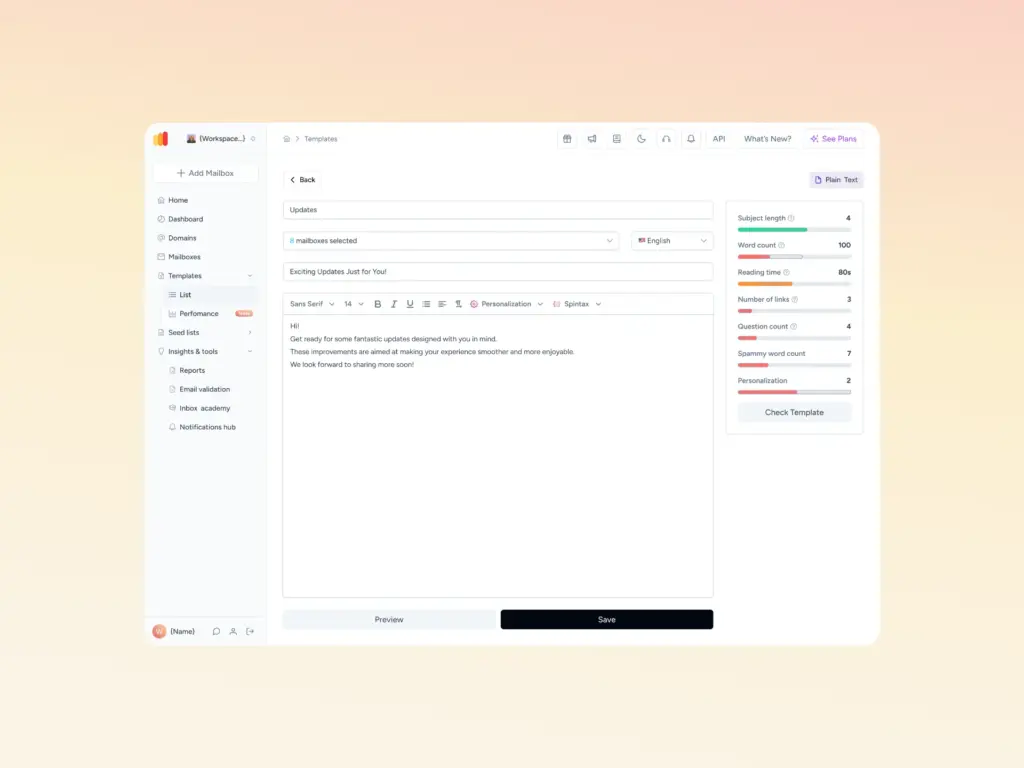
💡 Pro Tip #2: Check your email template before hitting send
A poorly structured email template can trigger spam filters and cause your messages to be blocked before they ever reach a recipient—making it look like a 550 error even when the address is valid. Use Warmy’s free Email Template Checker to scan your template for spam triggers, broken links, and authentication gaps before you send. It’s available as a free web tool—no login required.
💡 Pro Tip #3: Warm up new mailboxes before sending in volume
When a new mailbox suddenly sends a large volume of emails, receiving servers treat it as suspicious—which can amplify 550 rejections even for legitimate addresses. A proper email warmup using Warmy gradually builds your sender reputation with real engagement signals across Gmail, Outlook, Yahoo, and custom SMTP providers. Warmy’s network of over 1 million active mailboxes ensures the warmup process is recognized by major ISPs as genuine activity, not artificial inflation.

Still getting 550 5.1.1 errors after checking the basics? Your sender reputation or authentication setup may be the real issue. Book a demo and see how Warmy fixes your deliverability automatically.
List of common SMTP Error 550 5.1.1 messages
Here is a list of all the errors you may receive:
550 5.1.1 – Recipient rejected
- The recipient’s email server has rejected the message, possibly due to a policy setting or a blacklist.
550 5.1.1 – Recipient address rejected
- Similar to the above, this message indicates that the recipient’s address is invalid or not recognized by their email server.
550 5.1.1 – Recipient address rejected: User unknown in virtual alias table
- This error occurs when the recipient’s email server cannot find the email address in its virtual alias table, suggesting the address does not exist.
550 5.1.1 – User unknown
- A straightforward message indicating that the recipient’s email address is unknown or incorrect.
550 5.1.1 – Mailbox not found
- The specified mailbox for the recipient does not exist, which could be due to deletion or a typo in the email address.
550 5.1.1 – Invalid mailbox
- This message suggests that the mailbox format is incorrect or violates the server’s naming conventions.
550 5.1.1 – Mailbox unavailable
- The recipient’s mailbox is currently unavailable, which could be due to various reasons, including server maintenance or temporary issues.
550 5.1.1 – Unrouteable address
- The email address cannot be routed correctly, possibly due to an issue with the domain name or DNS settings.
550 5.1.1 – Mailbox temporarily disabled
- The recipient’s mailbox is temporarily disabled, potentially due to inactivity or account issues.
550 5.1.1 – No such user here
- This error indicates that the recipient’s email server does not have an account matching the email address provided.
How Warmy.io can help you with deliverability even beyond SMTP Error 550 5.1.1
SMTP Error 550 5.1.1 bounces don’t only come from bad addresses. When a mailbox is new or has been inactive, ISPs are quick to flag sudden spikes in sending volume as suspicious behavior—blocking messages even to valid recipients. Poor sender reputation, missing authentication records, or a blacklisted IP can all produce this error long after you’ve verified the address is correct.
Warmy.io tackles deliverability at every layer—from fixing DNS authentication records and removing blacklist issues to gradually building a sending reputation that ISPs trust. Whether the root cause of your 550 error is a technical misconfiguration or a low sender score, Warmy’s AI, Adeline, diagnoses the issue and runs automated warmup to resolve it. Warmy supports Gmail, Google Workspace, Microsoft 365, Outlook, Yahoo, Sendgrid, Mailgun, Brevo, Zoho, Amazon SES, and custom SMTP—covering virtually any setup your team uses.
Warmy’s free email deliverability test lets you know where you stand
We invite you to take a free email deliverability test and you will immediately see the status of your mailbox and all possible problems.
The email deliverability test includes the following:
- Inbox placement analysis: Know whether your emails land in the inbox, spam, promotions, or go unreceived—and what percentage.
- Blacklist status: See if your domain or IP is listed on major spam blacklists so you can take action
- SPF, DKIM, and DMARC validation: Ensure and verify if your authentication records are correctly set up.
Domain Health Hub gives comprehensive deliverability insights
Warmy.io provides a domain-level health dashboard so businesses can take a more strategic approach to email deliverability. The Domain Health Hub includes the following features:
- A domain health score based on a combination of various factors like authentication, blacklist status, and inbox placement tests. You’ll also be able to monitor your spam rate trends and overall deliverability performance with weekly or monthly tracking options.
- Comprehensive DNS status checks to easily validate SPF, DKIM, DMARC, rDNS, MX, and A records for stronger authentication & security.
- Optimized multi-domain monitoring so users can manage all their domains from one dashboard and identify which ones need immediate attention.
- Quick access to a detailed breakdown of health metrics, performance reports, and deliverability trends per domain.

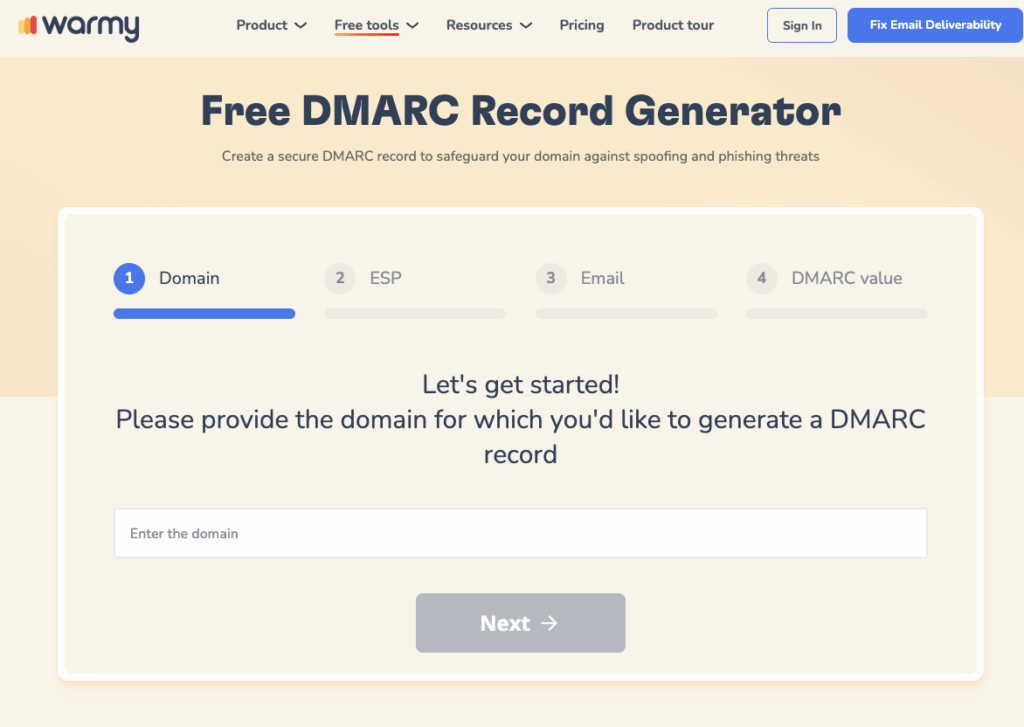
Free SPF & DMARC Record Generators help tackle DNS and authentication issues
Many SMTP errors occur due to incorrect DNS settings, especially related to SPF, DKIM, and DMARC records. Warmy.io provides free tools to generate and verify these records:
- Free SPF Record Generator: helps create a valid SPF record to prevent unauthorized email sending.
- Free DMARC Record Generator: strengthens email security by preventing phishing and spoofing attacks.
Warmup Preferences feature maximizes inbox placement
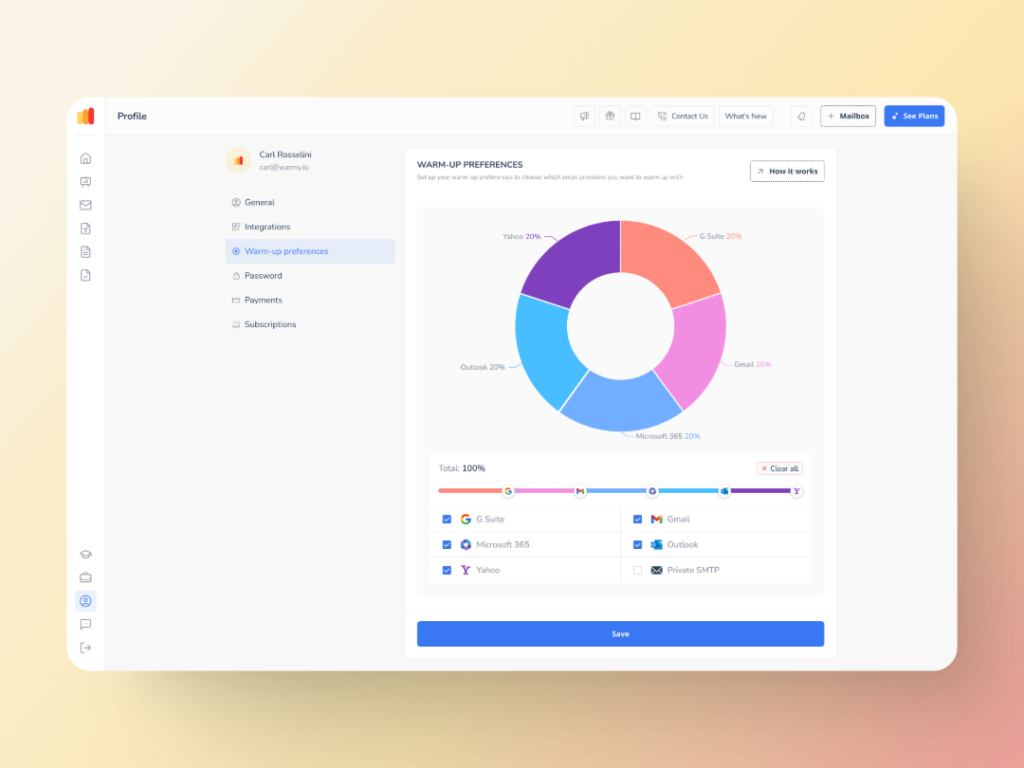
This feature is designed to make your email warmup process uniquely yours by allowing you to:
- Customize the warmup distribution across providers like GSuite, Gmail, M365, Outlook, Yahoo, and even Private SMTP.
- Tailor engagement patterns by choosing between B2B or B2C customers
- Set warmup settings for all your mailboxes at once—or even one by one
Advanced seed lists provide real mailboxes and real engagement
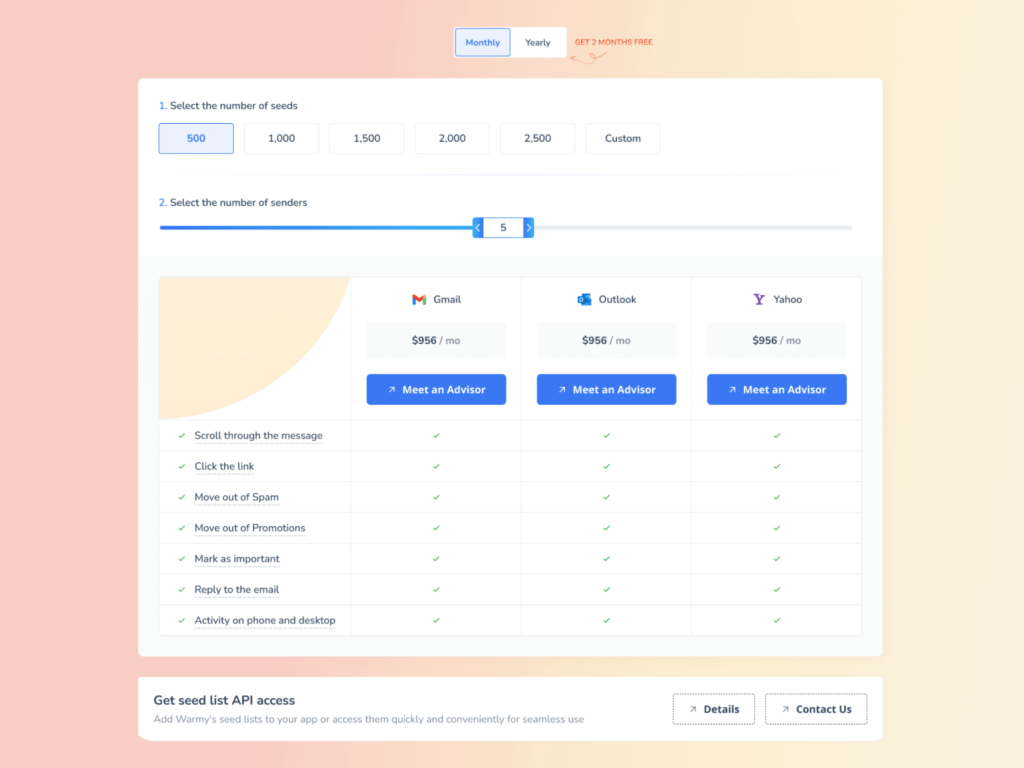
Some warmup tools use fake email addresses, which do nothing for your reputation. Warmy.io’s advanced seed lists contain only genuine email addresses. Other details about Warmy’s seed lists:
- Authentic email interactions (opens, scrolls, clicks, replies, archives)
- If an email lands in spam, it is removed and marked as important
- Better recognition by ISPs like Google, Microsoft, and Yahoo
- Improved sender score and reputation
- Currently Warmy has seed lists for Gmail, Outlook, and Yahoo.
- Ability to warm up using any provider that previously cannot be warmed up—Mailchimp, Shopify, Omnisend, and Klaviyo, etc.
Learn more about Warmy’s seed lists here. Or, you may want to get a more in-depth look at how Warmy’s seed lists work and what they can do for your email deliverability:
- Email Warmup Alternatives: When Traditional Warmup Isn’t Enough
- Email Engagement How Seed List Helps Improve Open & Click Rates
Warmy has also introduced the API Endpoint for Established Seed List. This feature allows seamless integration with real-time seed list data that goes straight into your system with API access—providing an efficiency boost via automated split management which reduces errors, and saves valuable time.
Fix SMTP errors and employ Warmy.io to make the most of your email strategy
In wrapping up, tackling the SMTP 550 5.1.1 isn’t as daunting as it seems. By carefully checking email addresses for typos, ensuring your email settings are spot on, and gradually building your sender’s reputation with services like Warmy.io, you can significantly reduce the chances of hitting this error.
Whether you’re sending transactional emails, cold outreach, or marketing campaigns—the principle is the same: clean lists, proper authentication, and a warmed-up mailbox are the foundation of consistent inbox delivery. According to email industry research from Validity’s Email Deliverability Guide, sender reputation is the single biggest factor in whether email reaches the inbox. Warmy’s automated warmup, combined with Adeline AI, is built specifically to improve that score across all major providers. The SMTP protocol itself—as defined in RFC 5321—was designed to relay status information back to senders so they can take action. Error 550 5.1.1 is the server telling you exactly what went wrong; now you know what to do about it.
Try Warmy.io for free for the next seven days!