A Microsoft 365 seed list is a curated set of genuine Microsoft 365 mailboxes that receive your campaign emails before they go live — generating real engagement signals that train inbox providers to trust your domain and improve your Outlook email deliverability where it matters most: inside business inboxes.
Microsoft 365 is the dominant email infrastructure for enterprise and mid-market businesses worldwide. And now Warmy’s Seed List covers it directly. Microsoft 365 joins Gmail and Outlook as a fully supported provider — complete with its own split options, download flow, performance statistics, and pricing. If your audience lives in corporate Microsoft inboxes, this update is built for you.
Why Outlook Email Deliverability Is the Hardest Problem in Email Marketing
Microsoft is the toughest inbox to crack. Unlike other providers, Microsoft’s filtering system assigns every incoming email a Spam Confidence Level and evaluates it against sender reputation, authentication status, and user engagement signals — not just content. Fail any of those checks and your email never reaches the inbox. No warning, no second chance. The culprit isn’t your copy — it’s your sender reputation.
The reason is structural. In 2025, Microsoft started rejecting emails that did not meet its new bulk sender requirements for Outlook.com, Hotmail.com, and Live.com — non-compliant messages receive a 550 5.7.15 error and are not delivered at all.
As Microsoft’s own email authentication documentation explains, Microsoft 365 applies composite authentication — going beyond standard SPF, DKIM, and DMARC to weigh sender reputation and prior recipient engagement. Clean content isn’t enough. If your domain hasn’t earned trust inside the Microsoft 365 ecosystem, your campaigns get silently buried — and you won’t know until the revenue numbers tell you.
This is precisely why seed lists are a proven deliverability lever: they generate the authentic engagement signals Microsoft’s filters are looking for before your real campaign ever sends.
💡 Pro Tip: Before targeting any Microsoft 365 audience, run a free email deliverability test to see exactly where you stand right now. You can’t fix what you haven’t measured.
What’s New: Microsoft 365 Seed List Support in Warmy
Warmy is an AI-driven email warmup platform that helps senders reach the inbox across every major provider. With this release, the Seed List feature gains full Microsoft 365 support — giving you real Microsoft 365 mailboxes that actively open, click, and engage with your campaigns before they go live. Here’s exactly what’s available now:
- Two split sizes: 500 or 1,000 Microsoft 365 mailboxes — choose the scale that matches your sending volume.
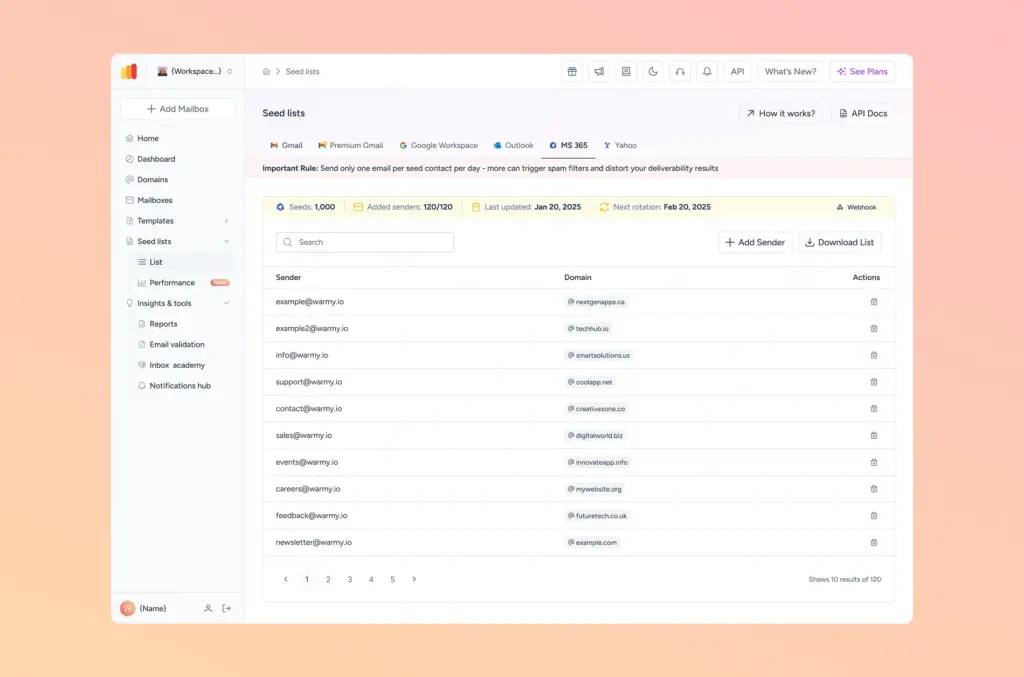
- Download directly from the Seedlist page: Access your MS365 split just like Gmail or Outlook — same familiar workflow.
- Add your senders: Register your sending addresses against the MS365 split so engagement signals are tied to your specific domain.
- Full performance statistics: The Seedlist Performance page now shows Microsoft 365 metrics — reads, clicks, spam recoveries, and promotions movements — on par with the Gmail and Outlook views.
- Self-service pricing card: A dedicated Microsoft 365 card on the Upgrade page lets you purchase directly, without contacting support.
Who This Is For
B2B email marketers and sales teams whose prospect lists are dominated by corporate Microsoft 365 domains. If you’re sending outreach to mid-market and enterprise companies, the majority of your recipients are on Microsoft 365. Poor inbox placement there doesn’t just hurt open rates — it kills pipeline.
Agency operators and deliverability consultants managing email programs for multiple clients across sectors. When a client’s domain is new or recovering from a reputation hit, the Microsoft 365 seed list gives you a direct, measurable path to rebuilding trust with Microsoft’s filters before a live send.
Real-World Scenarios
Scenario 1 — The B2B Sales Manager Pre-Launch
Marcus runs outbound email for a SaaS company. His prospect list is 80% enterprise — nearly all Microsoft 365 accounts. Before a high-stakes product announcement campaign, he downloads the 1,000-mailbox Microsoft 365 split, registers his sending domain, and runs his campaign template through the seed list for five days.
The Performance tab shows strong read and click rates inside Microsoft 365 mailboxes. When the real campaign fires, inbox placement holds above 85% — a 12-point improvement over his last unseeded send to the same segment.
Scenario 2 — The Agency Recovering a Client Domain
Sofia manages deliverability for a portfolio of clients at a digital marketing agency. One client’s domain took a spam reputation hit after a high-complaint campaign. She uses Warmy’s AI email warmup alongside the new Microsoft 365 seed list — pairing automated reputation rebuilding with active Microsoft 365 engagement signals.
The combined approach accelerates recovery. Within three weeks, her client’s Microsoft 365 placement is back above threshold and the next campaign goes out on schedule.
Key Benefits at a Glance
| Without Microsoft 365 Seed List | With Microsoft 365 Seed List |
|---|---|
| Blind to how MS365 filters see your domain | Real pre-send visibility into MS365 placement |
| Silent filtering with no warning | Spam recovery signals fix issues before live send |
| Separate Gmail/Outlook stats, no MS365 view | Unified performance dashboard across all three providers |
| No MS365-specific warmup path | 500 or 1,000 active MS365 mailboxes engaging your content |
| Manual outreach required to purchase | Self-service pricing card — upgrade in minutes |
The bottom line: seed lists directly improve open and click rates by priming provider-level trust before your real audience receives a single message. Microsoft 365 support means that benefit now extends to the provider where deliverability is hardest to achieve.
How It Works: Step by Step
- Go to the Seedlist page inside your Warmy dashboard. You’ll see the new Microsoft 365 provider tab alongside Gmail and Outlook.
- Choose your split size — 500 or 1,000 Microsoft 365 mailboxes — based on your sending volume and campaign needs.
- Add your sender addresses to the Microsoft 365 split. This ties engagement signals to your specific sending domain.
- Download your Microsoft 365 split and upload it to your ESP (Mailchimp, SendGrid, Klaviyo, or any platform you use).
- Send your campaign to the seed list once per day. Mirror your real campaign template as closely as possible for accurate results.
- Track performance on the Seedlist Performance page — filter by MS365 provider and watch reads, clicks, and spam recoveries trend over time.
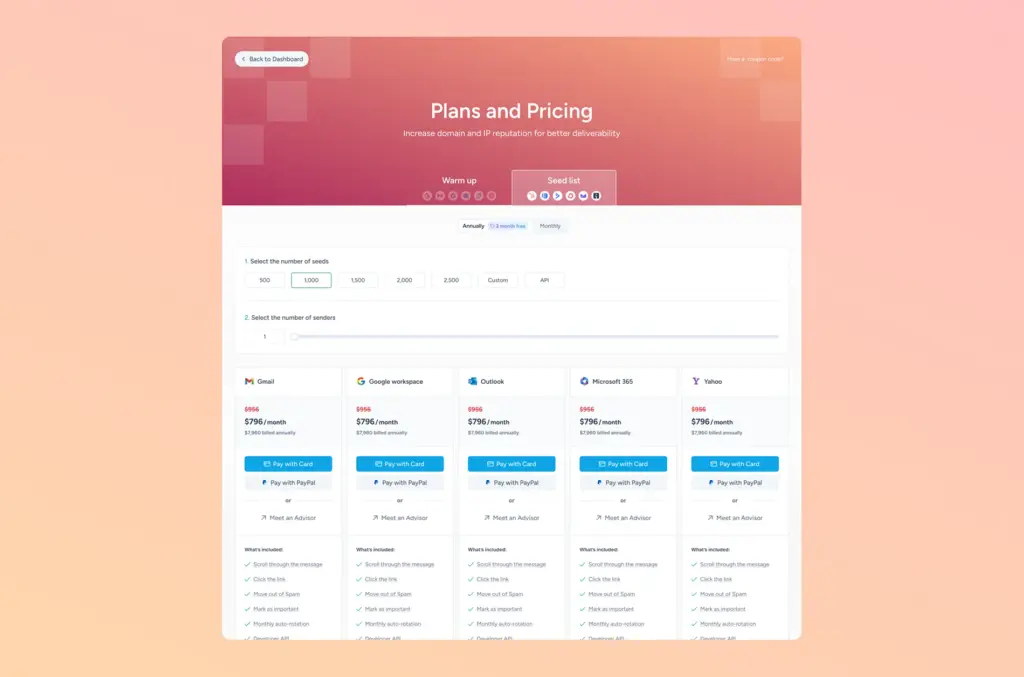
The Upgrade page now includes a dedicated Microsoft 365 pricing card, so you can add it to your plan without any back-and-forth with support. Pick your split size, complete checkout, and your Microsoft 365 mailboxes are ready immediately.
Get Started Today
If you’re already a Warmy user, the Microsoft 365 seed list is available right now in your dashboard. Head to the Seedlist page, select Microsoft 365, and choose your split. If you’re new to Warmy’s email deliverability monitoring tools, two easy paths in:
- Start for free — create your account and explore the Seed List feature with no commitment.
- Book a demo — see the Microsoft 365 seed list in action and get a tailored walkthrough for your sending setup.
Not sure where your Microsoft 365 deliverability stands right now? Run a free email deliverability test first — it takes under a minute and shows you exactly how major providers, including Microsoft, are currently seeing your domain.