Email marketing outperforms most digital channels for SaaS retention, with automated lifecycle campaigns generating 320% more revenue than one-time sends. However, success depends entirely on deliverability: approximately 16-17% of emails never reach the inbox globally, directly limiting trial-to-paid conversions and MRR growth. The best SaaS email marketing strategies combine behavioral segmentation, lifecycle automation, and strong deliverability to engage users at every stage — from onboarding to renewal and win-back.
In the SaaS landscape, success lies in nurturing leads and retaining customers. After all, the subscription business model follows the recurring revenue model — with MRR (monthly recurring revenue) as the primary indicator of growth.
But in a crowded field of SaaS companies, standing out requires more than generic marketing. It requires strategic, data-driven campaigns built on a deep understanding of your audience’s needs. Email marketing fills that gap and is one of the most effective ways to influence those variables.
Why email marketing is not optional for SaaS companies
Unlike many other digital channels, an email campaign offers a direct, personal line of communication with users throughout their entire customer journey. It’s can be used to reach your users at every touchpoint—both for new users you are attracting, existing subscribers, and returning users who need more value from your product.
An effective email marketing strategy will increase your trial-to-paid conversions, lower your churn, and increase lifetime value per customer. It boasts one of the most favorable ROIs of digital channels, so it’s essential in any SaaS marketer’s arsenal. Ignoring or downplaying email marketing means you might be missing out on vital chances to engage, educate, and influence your audience.
Other benefits of email marketing for SaaS include:
- Provides an efficient lead nurture process: Emails allow SaaS businesses to deliver relevant messages that move prospects closer to a purchase decision. Automated campaigns keep leads engaged without extra manual effort.
- Boosts trial-to-paid conversions: Targeted onboarding emails can be used to increase the chance that free users will upgrade from free trials to paid plans.
- Increases customer retention: Regular email communication keeps existing subscribers interested, informed, engaged, and satisfied. Retaining existing customers consistently delivers stronger returns than acquiring new ones — loyal buyers spend more per order, convert at higher rates, and cost significantly less to reach. Every percentage point of retention you improve compounds directly into profit.
- Drives upsell and cross-sell opportunities: Segmented campaigns from an email list can promote relevant upgrades, add-ons, or complementary services to maximize revenue from your existing subscriber base.
- Generates measurable results: It’s easy to attribute revenue to email marketing efforts. Email marketing platforms provide detailed analytics, letting you track open rates, clicks, conversions, and revenue.
7 best email marketing strategies for SaaS companies
Implementing the right SaaS email marketing strategies can transform how you engage prospects and customers. Below are seven tactics proven to deliver results in the SaaS space.
1. Personalize and segment your users
For SaaS companies, users are at different stages in their customer journey — so delivering the right email at the right time is critical. Personalization and segmentation together ensure every message you send is relevant to the recipient, which directly drives opens, clicks, and revenue.
SaaS businesses can personalize content based on where users currently are in their journey:
- New users: Receive onboarding tips and guides on how to use your product.
- Active users: Receive regular feature updates and advanced tutorials.
- Inactive users: Receive check-ins, re-engagement offers, or surveys.
- Subscribers nearing renewal: Receive discounted upgrade offers and reminders.
🔖 Related Reading: How to Better Use Your Email Lists
2. Design effective drip campaigns to generate more leads
A drip campaign is an email automation sequence that moves prospects and users through specific customer touchpoints. Email drip campaigns can: over time, generate the desired, intended engagement, qualified actions that lead to conversion.
Here are some of the must-have drip campaigns for SaaS companies:
New free trial user flow
This sequence is for customers who have recently activated a free trial. The main goal is to provide an effective onboarding experience and eliminate any form of ambiguity. A long-term goal is to eventually convert them to a paying customer.
Example: Send a series of emails over the first days or weeks of the trial that introduce core features, share tutorials, and highlight benefits. This keeps users engaged and helps prevent trial abandonment.
This new free trial users flow may include any of these types of emails:
- Welcome email thanking users for signing up
- Quick-start guide or video tutorial
- Tips on how to use key features
- Invitation to join webinars or live demos
- Reminder before the trial ends with upgrade options
Free trial user nurture flow
After the onboarding, it is vital to continue engaging with your trial users. You can achieve this by following up at the right time to encourage further exploration of your product or book demos.
Explore setting up periodic emails that also allow you to check in on user status, extend a helping hand, or ask the user to take the next step by scheduling a demo or contacting your support team.
Examples of messaging angles:
- “How’s your trial going?” check-in
- Case studies or success stories
- Demo booking invitations
- Personalized advice based on usage data
- Incentives like discounts for early upgrades
Educational drip campaigns to drive activation
Successful SaaS email marketing always leaves room to focus on delivering value through content that helps users understand how to get the most from the SaaS product. Sharing best practices, tutorials, FAQs, etc., empowers your users to activate the core features that will increase retention and satisfaction.
Examples include:
- Weekly emails with in-depth feature guides
- Video tutorials or product walkthroughs
- FAQ or troubleshooting tips
- Invitations to knowledge base resources or forums
- Highlight new feature releases
3. Implement email marketing automation to cover the entire lifecycle
SaaS email automation empowers your team to send personalized messages at scale throughout the entire customer lifecycle, ensuring every user receives relevant content that encourages progression from prospect to loyal customer — with minimal manual effort.
Not sure which scenarios call for automated outreach vs. broadcast campaigns? This breakdown of where email marketing applies covers the key use cases.
The basic automation flows that SaaS companies must have include the following:
New subscriber and onboarding flow
This is an automated sequence that welcomes new subscribers or sign-ups and guides them through initial product setup and usage. The goal is to introduce your SaaS product, educates users on key features, and encourage activation. You will probably never have a second chance to make a first impression, so utilize all of the steps in this flow to the maximum.
Best practices include:
- Send a warm welcome email immediately
- Provide step-by-step onboarding instructions
- Include links to tutorials or support
- Space out emails to avoid overwhelm
Example: A SaaS tool sends a welcome email on day one, a “getting started” guide on day three, followed by feature highlights and info bites on days seven and fourteen.
Upsell and cross-sell flows
These are automated emails targeting existing customers to promote higher-tier plans or complementary products. It basically encourages them to spend more and increase their customer lifetime value.
These automated emails target existing customers to promote higher-tier plans or complementary products, encouraging them to increase their spend and lifetime value.
Apply segmentation based on subscribers’ current plans and usage, combined with personalized offers and highlighted benefits, to drive additional revenue.
Example: Customers using a basic plan receive emails showcasing premium features with exclusive upgrade discounts after 30 days of active use.
Retention flows
With the recurring revenue model, SaaS businesses are able to offset such costs by retaining subscribers. After all, current customers spend 67% more on average compared to new customers.
Using retention flows is part of an email strategy designed to keep current customers engaged and satisfied, reducing churn. Email content usually centers around product updates, and engagement prompts to maintain ongoing interest.
Example: Monthly emails sharing new feature releases, best practices, and invitations to user community events.
Customer winback flows
Yes, businesses can also use email marketing to win back subscribers—as they should. Customer winback flows are emails specifically for inactive or churned customers to encourage re-engagement. The goal is to renew interest and bring users back into active use.
Best practices:
- Identify inactivity based on usage or login data
- Offer incentives or highlight new features
- Keep messaging empathetic and helpful (
Example: A series of emails sent to users inactive for 60+ days, starting with a “We miss you” or “It’s been a while” message followed by a special offer.
Dunning sequences
Now sometimes, customer churn can be involuntary. This can happen when there are failed payments due to any of the following reasons:
- Credit card on file has expired
- Credit card on file is at its maximum limit already
- Payment information is outdated
- Technical bugs
About 20–40% of churn is involuntary — caused by payment failures rather than customer dissatisfaction, which means it can be avoided.
A meaningful portion of SaaS churn is involuntary, which means a well-executed dunning sequence can recover subscribers who never intended to cancel.
Best practices for dunning:
- Start with polite reminders soon after payment failure
- Increase urgency gradually without sounding aggressive
- Include clear instructions to resolve the issue and even a direct payment link
- Make it easy for them to reactivate payment and their account
Example: Three-step sequence: day 1 friendly reminder, day 5 warning of service suspension, day 10 final notice before cancellation.
Not sure if your emails are landing in the inbox or getting filtered to spam? Run a free email deliverability test to see exactly where your campaigns are landing before your next send.
4. Reduce churn with re-engagement strategies
Retaining customers is crucial for SaaS companies, and well-planned re-engagement campaigns can help bring back inactive users before they churn. These are the key strategies to identifying disengaged customers and reengaging them through personalized outreach:
- Identify inactive users early on. Set clear criteria to define this. For example, no log-ins in the past 30 days.
- Monitor email engagement metrics like open rates and click-through rates to get an idea if there is an impending issue
- Collect feedback through surveys or feedback requests
Example: A SaaS platform flags users who haven’t logged in for 45 days or haven’t opened any emails in 60 days for re-engagement outreach.
Re-engagement emails only work if they actually reach the inbox. See how warming up your email directly increases sales by ensuring re-engagement and win-back messages land where they need to.
5. Conduct A/B testing on subject lines and content
A/B testing is the process of testing two versions of an email to see which gets a better result from subscribers. This process helps identify the most compelling subject lines, copy, images, and layouts.
Best practices:
- Test one variable at a time for clear results
- Use statistically significant sample sizes
- Apply winning variants to full audience
Example: A/B test email subject lines and track open rates to determine which works best for your subscribers.
6. Meet 2026 deliverability and compliance requirements
Deliverability is no longer a best-practice checklist — it is a hard enforcement regime. Gmail, Yahoo, and Microsoft Outlook now reject non-compliant bulk email outright. For SaaS companies scaling onboarding flows and lifecycle campaigns, this section is the most operationally critical in the guide.
Authentication in 2026: all three protocols are mandatory
SPF, DKIM, and DMARC are no longer optional or interchangeable. In 2026, all three must be configured, passing, and DMARC-aligned for bulk senders across Gmail, Yahoo, and Outlook.
What each protocol does:
- SPF (Sender Policy Framework): A DNS record that lists every IP address and service authorized to send email on your domain’s behalf. Critical 2026 pitfall: SPF records can only trigger 10 DNS lookups. SaaS stacks using multiple tools — transactional email, support, CRM, marketing — frequently exceed this limit, causing a permanent SPF failure (PermError). Audit your SPF record and flatten it if needed.
- DKIM (DomainKeys Identified Mail): Cryptographically signs every outbound message so receiving servers can verify you sent it. A minimum 1024-bit key is required; 2048-bit is the 2026 best practice. Both SPF and DKIM must be configured for bulk senders — having only one is no longer sufficient.
- DMARC (Domain-based Message Authentication, Reporting & Conformance): Ties SPF and DKIM together and tells receiving servers what to do when messages fail authentication. 2026 baseline: p=none is technically accepted by Google but is a negative trust signal. Aim for p=quarantine as your operational standard — it actively protects your domain from spoofing while preserving deliverability.
💡 Pro Tip — DMARC alignment is the step most SaaS teams miss. SPF and DKIM can both pass individually, but if the domain in your From: header doesn’t match the domain validated by SPF or DKIM, DMARC still fails. Verify alignment — not just authentication status — before scaling any campaign.
Understanding exactly where the line sits between legitimate email and spam is essential for every SaaS sender. Read about the differences between email marketing and spam to make sure your practices keep you on the right side of inbox providers.
Microsoft Outlook enforcement — now fully active
The guide previously focused on Gmail. As of 2026 this is no longer sufficient. Microsoft began enforcing bulk sender requirements for Outlook.com, Hotmail.com, and Live.com in May 2025, with full rejection of non-compliant senders active from November 2025. Non-compliant emails receive a hard rejection: 550; 5.7.515 Access denied, sending domain does not meet the required authentication level. The requirements mirror Gmail’s: SPF, DKIM, DMARC with alignment, and a visible unsubscribe link in every bulk send.
Bulk sender classification — a one-way door
If your SaaS company sends 5,000 or more emails in a single day to Gmail or Outlook addresses, you are permanently classified as a bulk sender. That classification does not expire even if volume drops afterward. Plan your sending infrastructure and authentication setup for bulk-sender compliance before you need it, not after.
One-click unsubscribe and spam rate thresholds
- One-click unsubscribe (required): All marketing and promotional emails must include List-Unsubscribe and List-Unsubscribe-Post headers. Gmail surfaces this as the Unsubscribe button next to your sender name. Unsubscribe requests must be processed within 48 hours.
- Spam complaint rate (enforced): Keep your rate below 0.10% as a working target. Crossing 0.30% results in hard deliverability consequences and loss of mitigation support from Gmail. Monitor this in Gmail Postmaster Tools v2 — Google retired the legacy dashboard in October 2025 and the old High/Medium/Low reputation scores no longer exist.
Comply with GDPR, CAN-SPAM, and other regulations
Legal guidelines like GDPR and CAN-SPAM protect users and carry financial penalties for non-compliance. Damaged legal reputation flows directly into damaged sender reputation — and damaged sender reputation means emails land in spam, not inboxes.
7. Use Warmy.io for a solid deliverability foundation
Inbox placement is non-negotiable in 2026. With Gmail, Outlook, and Yahoo enforcing hard rejections for non-compliant bulk senders, SaaS companies that wait until they hit 5,000 daily sends to implement authentication and warm-up strategies are starting from a disadvantage.
Warmy combines three essential capabilities SaaS companies need:
- Automated Smart Warm-up: Unlike manual warm-up sequences that require ongoing management or static warm-up tools with fixed paces, Warmy uses AI to adjust warm-up speed based on your domain’s actual response from Gmail, Outlook, and Yahoo. This reduces warm-up duration from 4-8 weeks to 2-4 weeks while minimizing spam folder risk.
- Real-Time Domain Health Monitoring: Since Google Postmaster Tools v2 retired legacy reputation scores, SaaS teams lack visibility into sender reputation across providers. Warmy’s Domain Health Hub consolidates SPF, DKIM, DMARC alignment, blacklist status, bounce rates, and complaint frequency in a single dashboard, flagging compliance issues before they trigger hard rejections.
- Inbox Placement Testing Across Providers: Before scaling onboarding or lifecycle campaigns, test whether emails land in Gmail, Outlook, Yahoo, and other major providers. Warmy’s placement tests use real inboxes to show exactly where your templates land, allowing you to fix deliverability issues before 5,000 recipient campaigns fail silently.
The warm-up process is what transforms a new domain from an unknown sender into a trusted one. Learn exactly how email warm-ups transform outreach results — and why SaaS companies need this foundation before scaling any campaign.
Automated warmup process with customizable preferences
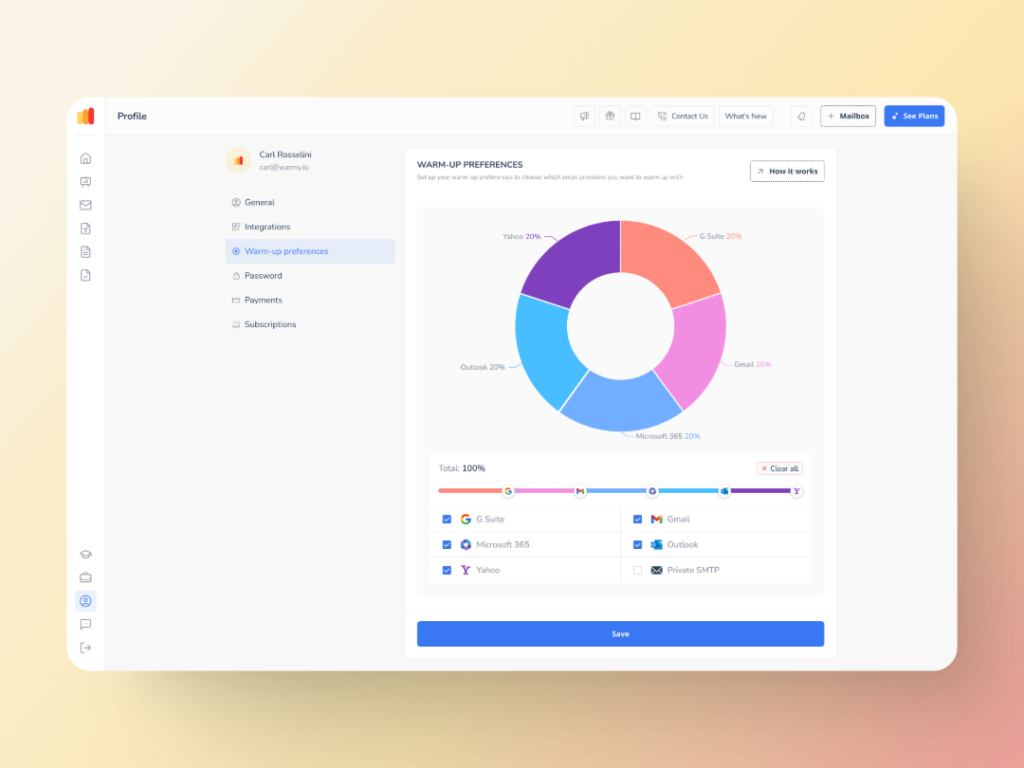
Warmy.io uses AI-driven algorithms to customize the warm-up strategy based on your domain’s age, sending history, and goals. This establishes a strong domain and IP reputation with email service providers, reducing the risk of spam placement.
The Warmup Preferences feature lets SaaS businesses customize warmup distribution across different providers and choose between B2B or B2C engagement patterns to tailor behavior to their business type.

This process helps to establish a good domain and IP reputation with email service providers, which reduces the risk of your emails landing in spam. By using authentic interactions, Warmy helps you build a strong foundation for successful email marketing campaigns.
Don’t forget the new Warmup Preferences feature—which optimizes your email warmup strategy all the more. SaaS businesses can customize the warmup distribution across different providers and choose if they want to use B2B or B2C customers for engagement patterns to tailor the behavior and insights to their business type.
Advanced seed lists
Warmy.io’s advanced seed lists are composed of real email addresses that simulate genuine engagement — emails are opened, read, and clicked. If an email lands in spam, it is manually rescued and marked as important to improve future deliverability.
Complementing this, Adeline AI — Warmy’s built-in deliverability assistant — continuously analyzes your account’s sending activity, domain health, and reputation signals to surface actionable recommendations in plain language. Rather than leaving you to interpret raw metrics, Adeline tells you exactly what to fix and why, so you can act on deliverability issues before they affect your campaigns.
Template Checker
Before sending your email campaigns, use Warmy.io’s Template Checker to analyze your email content for spam triggers and deliverability risks. This tool helps optimize subject lines, HTML structure, and wording to avoid common pitfalls that cause emails to get filtered.
This template checker now has a Chrome Extension version too—for even more accessibility.
Domain Health Hub
Monitor your domain’s health with Warmy.io’s centralized dashboard. It tracks authentication status (SPF, DKIM, DMARC), blacklist monitoring, and sender reputation metrics, providing actionable insights to keep your deliverability on track.
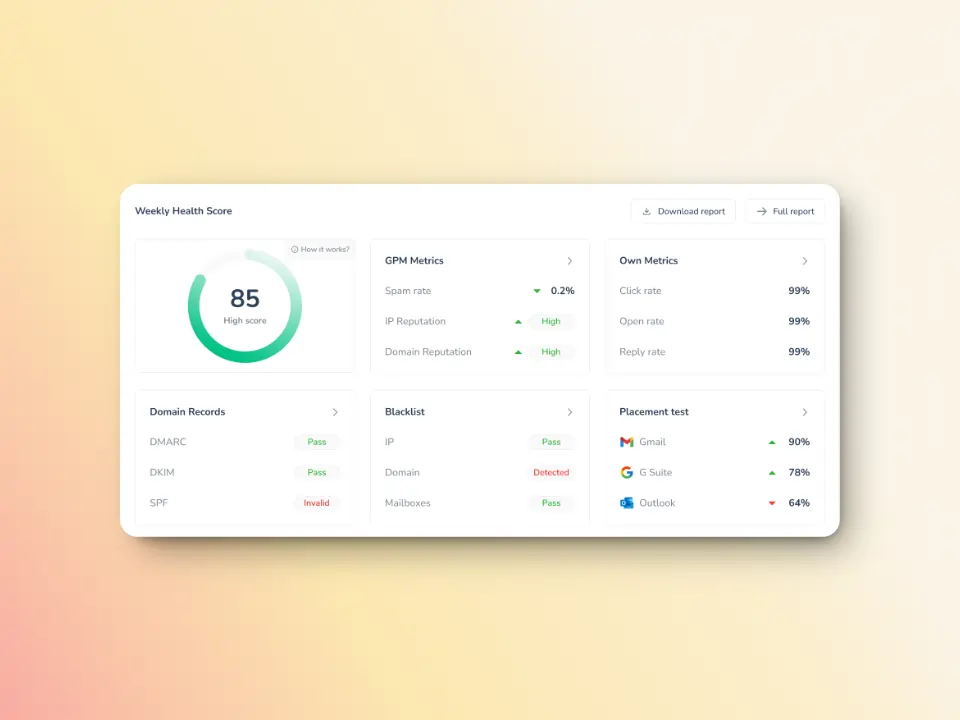
This monitoring tool helps you maintain a strong sender reputation throughout. Plus, armed with valuable data, you can quickly address any issues that could affect your deliverability.
SaaS email marketing strategies: quick comparison
Use this table to prioritize which best email marketing for SaaS tactics to implement first based on effort and business impact.
| Strategy | Effort | Revenue Impact | Primary Goal |
|---|---|---|---|
| Segmentation & personalization | Medium | High | Relevance & conversions |
| Drip campaigns | Medium | High | Trial activation |
| SaaS email automation | Medium-High | Very High | Full lifecycle coverage |
| Re-engagement / churn reduction | Low-Medium | High | Reduce churn |
| A/B testing | Low | Medium (cumulative) | Optimize performance |
| 2026 deliverability & compliance | Medium | Critical (hard rejections if missed) | Inbox placement across Gmail, Outlook, Yahoo |
| Warmy warm-up | Low (automated) | Very High | Sender reputation |
Ready to transform your SaaS email marketing?
The SaaS market is competitive, but with the right email marketing approach, you can build lasting relationships that fuel sustainable success. Don’t miss out on the full potential of your email campaigns. Start applying these expert strategies today to increase engagement, boost trial-to-paid conversions, and grow your recurring revenue.
Test your email deliverability for free and start fixing inbox placement today. Book a free demo and let Warmy’s AI build your sender reputation automatically.