SMTP Error 554 5.4.6 – also seen as “Hop count exceeded, possible mail loop” – means the receiving mail server permanently rejected your message because it counted too many “hops” (server-to-server relays) in the delivery path and concluded the message was stuck in a routing loop. This maps to enhanced status code X.4.6, “Routing loop detected,” defined in RFC 3463. The fix is always the same: find and break the loop – not raise the hop limit.
This is a permanent (5xx) failure, not a temporary deferral, so your server will not automatically retry. Left unresolved, repeated 554 5.4.6 bounces stall time-sensitive communications and can quietly erode your sender reputation if outbound systems keep retrying into the same loop. If you’re troubleshooting a different bounce, see Warmy’s full breakdown of SMTP error codes and messages for context on how this one fits in.
Below, you’ll find exactly what triggers the “Too Many Hops” error, how to trace the loop causing it, and the steps to fix it for good.
What is SMTP Error 554 5.4.6?
SMTP error 554 5.4.6 indicates an email has taken too many hops and traveled off course with a distance greater than needed.
SMTP means Simple Mail Transfer Protocol, and it is a messaging protocol responsible for sending emails. The “Too Many Hops” error comes from the protocol, which limits how many hops or relays an email can take. This isn’t an arbitrary number the protocol invents on the spot: RFC 5321 §6.3 describes loop detection by counting Received header fields, and each mail system (Exchange, Gmail, Postfix, etc.) enforces its own hop ceiling on top of that.
So, when an email crosses this threshold, it sets off a “Too Many Hops” error, meaning the message has been routed through too many servers and probably isn’t going to make it to its destination.
Q: What are “hops” in email routing?
A: In email delivery, a “hop” refers to the journey from mail server to mail server. Each event and each server the email goes through is one hop. This is similar to how when you email someone from your mailbox, it moves through your outgoing mail server and then possibly through intermediary servers before landing on the recipient’s mailbox. Most email messages typically make only a few hops, but too many hops can hinder delivery and could even mean the email goes over a limit set by the email service provider.
💡 Pro Tip: the hop ceiling is set by the receiving mail system, not by a universal standard. Microsoft Exchange Online, for example, documents specific hop thresholds for hybrid and cloud-only routing – so the same message can bounce on one provider and sail through on another.
Why do multiple hops lead to delivery issues?
Another important thing to mention: Multiple hops are in fact an expected part of how emails are routed. Messages often have to bounce between servers – but too many hops can set off alarms on the receiving mail servers.
- The more hops an email takes, the more opportunities for errors, delays or misrouting.
- The more servers in the email’s path, the greater the chance that one of them misidentifies that email as spam, or rejects it outright, based on the perceived complication of its routing.
- If any hop is misconfigured, such as forwarding rules that are incorrect, mail relays that are not reliable, or DNS records that are not configured correctly, then the message may be stuck in an email loop.
In the end, these problems could end up blocking the email from getting to where it needs to go.
Common reasons behind SMTP Error 554 5.4.6
SMTP Error 554 5.4.6 (the “Too Many Hops” error) can arise from many errors in the email infrastructure or routing practices. Below are the most frequent reasons behind this issue:
1. Misconfigured email routing
When emails are routed through too many servers before reaching their destination, they can exceed the hop limit set by mail servers. Misconfigured routing may occur if intermediate relays are set up incorrectly or if emails are unnecessarily relayed through multiple servers that could otherwise be avoided.
Example: For instance, an email may first get sent to your outgoing SMTP server, and from there get relayed to a backup server, then to an external relay service, and ultimately get delivered to the recipient’s server. This chain of relays can quickly accumulate additional yet unnecessary hops.
2. Forwarding loops
Email forwarding loops occur when forwarding rules are misconfigured. This occurs most often with an email sent to one mailbox, forwarded to another, then forwarded again – either back to the originating server or to a secondary server that forwards it again. This loop of forwarding over and over creates excessive hops in the email, hence the “Too Many Hops” error is thrown.
Example: A user sends an email from a personal email account to a corporate inbox, then forwards email to their personal email account, which forwards them back to the corporate inbox. The message is caught in an infinite loop between the two addresses.
3. Excessive email forwarding rules
Let’s get one thing straight. Forwarding rules can be useful, but if it is too complex, or just simply too much, it can harm us. Here’s what we mean by this:
- When a user sets up forwarding from one address to another, emails are routed through several mail servers before reaching their final destination.
- If the user sets forwarding at multiple places across multiple servers, this only increases the number of hops an email has to take.
- When misconfigured (forwarding to a wrong address, creating circular forwarding where emails get forwarded back to the sender’s server, or loop between two servers), forwarding rules can also lead to many hops.
Example: Forwarding rules that are too complex, such as forwarding based on email content or recipient group, may result in a single email message going through multiple mail servers. Each forwarded message adds another hop to the path. Google Workspace documents this exact tradeoff in its own email routing and delivery options guidance for admins setting up conditional or multi-stage routing.
4. Misconfigured DNS settings
Routing issues from DNS misconfigurations, like incorrect MX (Mail Exchange) records or missing SPF or DKIM records, can result in excessive hops as well. DNS records define which mail servers are responsible for receiving and processing email messages for a given domain. These records, when misconfigured, can channel the emails through wrong servers – increasing the number of hops and slowing down delivery. A correctly configured MX record is what tells other mail servers where to deliver your mail in the first place, so an incorrect one is often the earliest domino in a routing-loop chain.
Example: If your DNS records don’t point to the right mail servers or your SPF/DKIM settings are wrong, the receiving server may have difficulty validating your email. Said email could then be traversed through more servers than needed, shielding itself in the process that would contribute to a higher hop count.
It’s a given fact that DNS records play crucial roles in email deliverability. However, some email senders ask:
Q: What are SPF, DKIM, DMARC?
A: SPF (Sender Policy Framework), DKIM (DomainKeys Identified Mail), and DMARC (Domain-based Message Authentication, Reporting & Conformance) are email authentication protocols that help to ensure that other mail servers know who has the authority to send email on behalf of your domain. These protocols effectively prevent email spoofing.
- SPF verifies if the sender’s IP address matches the authorized IPs defined in the domain’s DNS records.
- DKIM uses the cryptographic signatures to verify that the contents of the email were not changed or tampered during the journey.
- DMARC builds on SPF and DKIM, providing a policy framework that establishes a policy for the domain owner dictating how email servers should process failing SPF and/or DKIM checks, improving both security and deliverability.
💡 Pro Tip: check for multiple SPF records before you troubleshoot anything else. A domain can only have one SPF TXT record – a leftover second record from an old provider migration is one of the most common, and most overlooked, causes of authentication-related routing failures.
Read more here: SPF, DKIM, and DMARC: Boosting Email Security and Deliverability
🔖 Related Reading: Warmy’s Research Team conducted an in-depth study on how DNS configuration and email templates affect email deliverability. You can read the report in detail here.
5. Unnecessary use of relays
A mail relay is an intermediary server that passes emails between the sender‘s mail server and recipient‘s mail server. A relay is what makes sure emails get to their destination across multiple networks and/or domains. These relays help route the email to its final destination, but if a relay server is misconfigured, this could also lead to delays, errors, or the infamous SMTP Error 554 5.4.6.
Mail relays help to filter out unwanted mail, scan content, or perform DNS lookups to ensure that an incoming mail message originated from the legitimate domain owner. On the other hand, if there are too many relays, it may increase the hop count and delivery may get affected.
Example: For instance, if an email must traverse multiple redundant mail relays prior to reaching the server of the recipient, it can cause delays to the point that it exceeds the hop count, resulting in the “Too Many Hops” error.
👉 Not sure if your own routing setup is contributing to deliverability problems beyond this one error? Book a free Warmy demo and see exactly what’s happening to your sender reputation before it costs you inbox placement.
Troubleshooting SMTP Error 554 5.4.6
When faced with SMTP Error 554 5.4.6, it is essential to conduct troubleshooting to identify and rectify the root cause of this error. This section covers critical steps to identify the underlying problems that could be causing excessive hops and delivery failures.
Identify misconfigured email routing
- Review email server logs. Access the logs on your sending and receiving email servers to trace the path the email takes. Logs will show the IP addresses of the servers involved, any delays, or errors that occurred.
- Analyze email headers. Use email header analysis tools to examine the routing information embedded in the email itself. Look for any unusual or unexpected server hops that could indicate misrouting.
- Use Traceroute tools. Run a traceroute on your email’s journey to visualize its path. This can help identify where the email is being delayed or rerouted unnecessarily.
- Check routing configurations. Verify your email system’s routing rules and settings to ensure they are configured to route emails efficiently. Avoid routing emails through multiple servers if not necessary.
💡 Pro Tip: if the Reporting-MTA in your bounce message is your own server, the loop is on your side and you can fix it directly. If it names an external server, the loop is happening on the recipient’s infrastructure, and only their mail admin can resolve it.
Investigate forwarding rules and loops
- Check the forwarding rules configured in your email system. Make sure you have valid destination addresses, and make sure you do not forward an email back to the originating server (circular forwarding).
- If using third-party email forwarding services, use the most up-to-date configuration to not inadvertently cause a loop.
- Use diagnostic tools to trace the history of forwarded emails and check if they are being redirected back to the sender or another forwarding address.
- If a loop is detected, remove or correct the faulty forwarding rules to prevent the cycle from continuing. Ensure each forwarded email has a clear final destination.
🔖 Microsoft has a comprehensive guide on loop prevention in Exchange Online. You can check it out here.
Verify DNS and SPF/DKIM settings
- Check MX Records: Ensure your Domain Name System (DNS) has the correct MX records set up to point to the appropriate mail servers.
- Validate SPF records. Use SPF checker tool to check if you have implemented the SPF records properly that help mail servers identify whether the emails are from your domain or a malicious entity.
- Review DKIM signatures: Ensure that your DKIM records are set up correctly.
- Test DNS propagation: After making changes to your DNS settings, use DNS testing tools to check if the updated records have propagated correctly across the internet.
Solutions to prevent email looping and excessive hops
Optimize email routing
- Use direct routes. Set up email routing so that emails are sent directly to the recipient’s mail server or to the most efficient intermediary server. Avoid routing emails through multiple unnecessary servers.
- Avoid redundant relays. Ensure your routing configuration does not include redundant or unnecessary relay servers. Each relay adds a hop and could increase the risk of errors.
- Implement load balancing. Sometimes, it happens that the person needs to use multiple mail servers. In that case, load balancing must be set up to distribute the email traffic across servers to reduce congestion and routing errors
Configure forwarding rules correctly
- Set clear destination addresses. Ensure that each forwarding rule points to a valid and final email address.
- Limit the number of forwarded servers. Avoid forwarding emails through multiple intermediate servers. Set up the forwarding rules to route emails to the final destination directly.
- Use conditional forwarding. If your email system allows it, configure conditional forwarding that activates only under particular conditions, such as email subject or sender domain. This can reduce the risk of unintentional forwarding loops.
- Verify third-party forwarding services. If you use external forwarding services, make sure they are configured correctly and do not contribute to email loops or excessive hops.
- Regularly audit forwarding rules. Periodically review all forwarding rules in your system to check for potential loops or misconfigurations.
Conduct regular mail server maintenance
- Regularly check server logs. Regularly examine email server logs for activities such as misrouted emails, excessive relaying or any forwarding problems. This will enable you to identify potential problems before they turn into costly outages.
- Remove unused or redundant rules. Periodically clean up any outdated or unused forwarding rules, mail relays, and server configurations to streamline your email routing process.
- Test and update routing configurations: Periodically test your email routing configurations to ensure they remain optimized and that no unnecessary hops are added to the email delivery path.
Warmy – the best support system for optimizing your email deliverability
While SMTP Error 554 5.4.6 arises due to misconfigurations in email routing, forwarding rules, or DNS settings, Warmy’s features can ensure smoother overall email delivery by enhancing your sender reputation and reducing the likelihood of SMTP errors. For the bigger picture on how these pieces fit together, see Warmy’s guide to global email deliverability.
AI-powered email warmup and advanced seed lists for establishing a solid sender reputation
Warming up your email domains and mailboxes helps build a positive sender reputation, which reduces the chances of your emails being flagged or rejected by receiving servers. By gradually increasing the volume of emails sent, Warmy prevents your email address from being marked as suspicious or spammy. This gradual increase in sending activity ensures your domain is properly recognized by other mail servers.
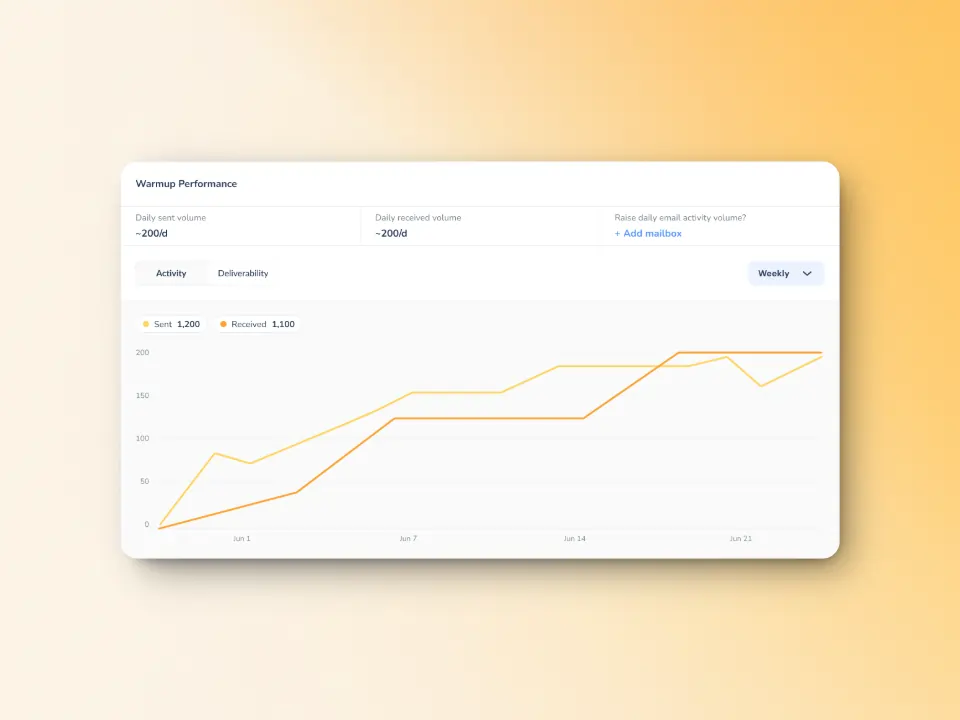
Additionally, Warmy also offers the most advanced email seed lists which offer actual engagement – your emails are opened, scrolled through, clicked on, and replied to. If there are emails that land in spam, these are removed and marked as important to let the ESPs know you are credible. Senders can also maximize these seed lists for testing and optimizing inbox placement across different providers.
If you want to get a more in-depth look at how Warmy’s seed lists work and what they can do for your email deliverability, check out these articles:
- Email Warmup Alternatives: When Traditional Warmup Isn’t Enough
- Email Engagement How Seed List Helps Improve Open & Click Rates
Comprehensive domain health monitoring
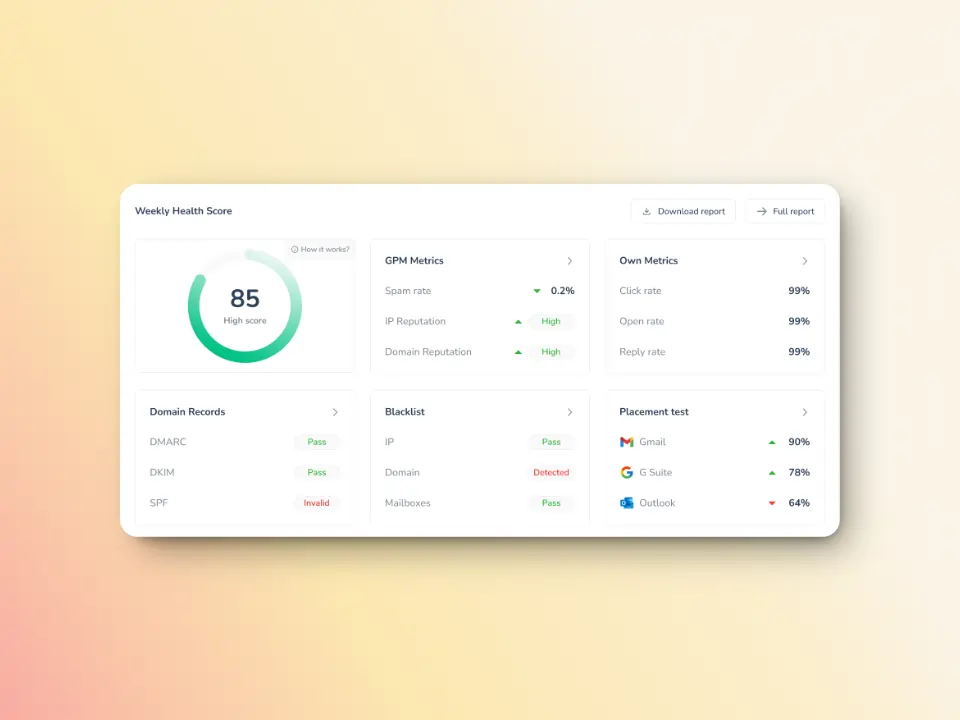
Warmy’s Domain Health Hub provides a domain-level dashboard to help senders take a more strategic approach to email deliverability. The hub includes:
- A domain health score based on factors like authentication, blacklist status, and inbox placement.
- Spam rate trends and overall deliverability performance (weekly and monthly)
- Reports and a detailed breakdown of health metrics, performance reports, and deliverability trends per domain.
Email deliverability tests combined with DMARC and SPF Record Generators
Warmy’s free email deliverability test can help identify issues preventing your emails from reaching inboxes. The deliverability test includes the following:
- Information on whether your emails land in the inbox, spam, promotions, or go unreceived – and what percentage.
- Data on whether your domain or IP is listed on major spam blacklists so you can take action right away
- SPF, DKIM, and DMARC validation to ensure and verify if your authentication records are correctly set up, which is essential for preventing excessive hops
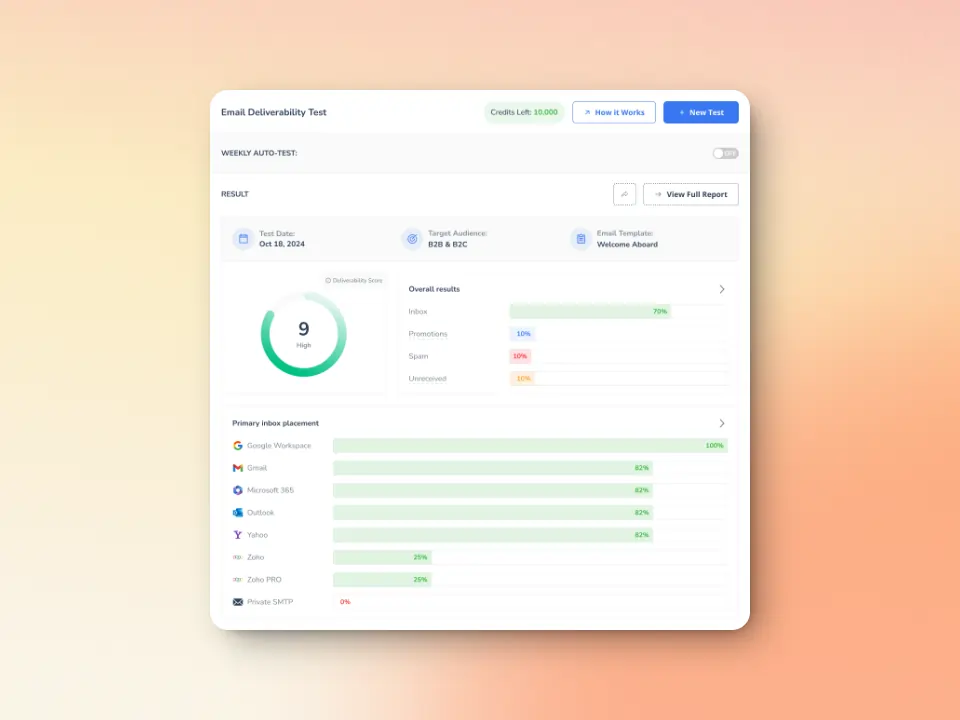
Additionally, Warmy has a free SPF Record Generator and DMARC Record Generator to help users generate and validate their records with ease.
Warmup Preferences to fine-tune your email warmup the way you like it
Warmy’s new Warmup Preferences feature allows users to customize and fully control the warmup process from both sender and user levels to optimize deliverability further.
By providing both sender-level and user-level customization, this feature ensures that emails are gradually warmed up and sent to the right recipients, optimizing the chances of successful delivery without triggering excessive hops. Users can also target specific email providers, such as Gmail, Microsoft 365, or Outlook, and set the percentage of emails sent to each provider, ensuring that their warmup strategy is aligned with their domain’s needs. Additionally, the option to choose B2B or B2C engagement patterns allows users to further refine their approach.
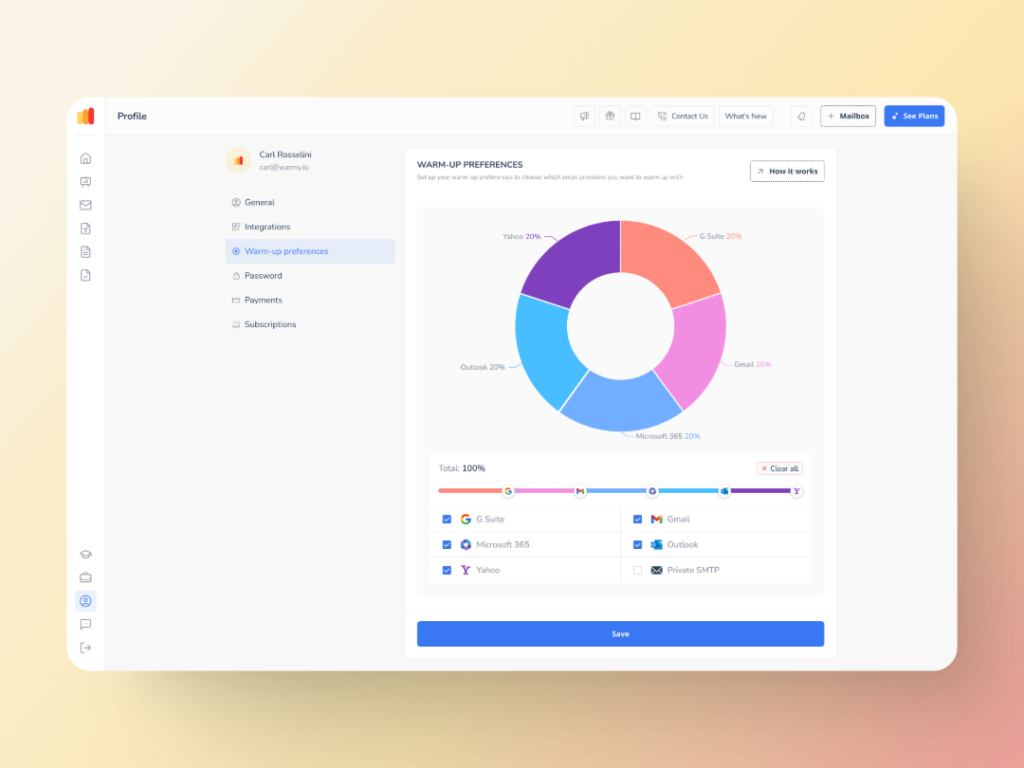
By offering complete visibility and control over mailbox balancing and warmup settings, Warmy helps users manage their email deliverability effectively, preventing routing issues that lead to the 554 5.4.6 error.
Streamline email delivery by starting your Warmy journey today
SMTP Error 554 5.4.6 can cause significant disruptions in your email campaigns, but with the right tools and strategies, you can prevent these issues and ensure your emails reach their intended recipients. Start improving your email deliverability by signing up with Warmy today. It’s free for seven days – and you get to experience what difference it makes.