Imagine this; you have already put in hours working on the perfect email campaign, you personalized every message, you took the time to double-check everything, there are no typos and you hit “send” only to find out your emails are getting blocked. No warning, no real explanation—just an obscure bounce message: “SMTP Error 451 4.7.24 – DMARC Policy Failure.”
If this is starting to sound familiar, you’re not alone. A lot of businesses and email marketers struggle with this annoying error without being able to fully comprehend why their emails are not accepted. In this article, we’ll explain what SMTP 451 4.7.24 means, why DMARC failures cause email rejection, as well as how to resolve them so your emails find their way into inboxes instead of spam folders.
What is SMTP Error 451?
SMTP (Simple Mail Transfer Protocol) is a set of rules that servers follow to send and receive messages. But when things go wrong—especially with security authentication—your email server may respond with an SMTP 451 error indicating a temporary rejection. The 4.7.24 error code is a special case that indicates a DMARC (Domain-based Message Authentication, Reporting, and Conformance) policy failure, which means your email failed an authentication check.
What is DMARC and why is it important?
Now more than ever, email security is vital. Cybercriminals leverage email vulnerabilities to impersonate businesses, send phishing emails and commit fraud daily. This is where DMARC steps in.
It isn’t just another email security protocol. It’s a policy layer that ensures only legitimate emails sent from your domain reach inboxes. attackers can send emails that appear to be coming from your address (spoofing it) when they’re really phishing attempts to steal sensitive information from your customers or employees.
For companies that leverage email for marketing, sales, and customer communication, improperly configured DMARC policies can lead to rejection of their email and erode inbox placement rates, resulting in poor deliverability and lost revenue.
How DMARC works
DMARC works by telling receiving mail servers how to handle emails that fail authentication. This is done through SPF and DKIM alignment checks in order to deliver, quarantine, or reject an email.
In order to understand DMARC’s effectiveness, we first need to cover the two main email authentication technologies DMARC builds upon: SPF (Sender Policy Framework) and DKIM (DomainKeys Identified Mail).
Overview of SPF (Sender Policy Framework)
SPF is like a guest list for your email domain. It tells receiving mail servers which email servers are authorized to send emails on behalf of your domain.
- SPF records are kept in DNS TXT records that specify the IP addresses or mail servers permitted to send emails on behalf of your domain.
- Whenever an email is received, the mail server queries SPF records of the domain from which email was sent. If the sending IP address is not on the approved list, the email fails SPF authentication and this increases the likelihood of the email being marked as spam or rejected.
- SPF alone isn’t enough because email forwarding can break SPF checks—this is where DKIM comes in.
🔖 Related Reading: The Definitive Guide to SPF in Email
Overview of DKIM (DomainKeys Identified Mail)
DKIM is your email’s digital signature that verifies the email message was not changed while it travelled.
- DKIM attaches a cryptographic signature to the email header.
- When a receiving server gets an email, it checks the DKIM signature against the public key stored in the sending domain’s DNS records.
- If the signature matches and the message hasn’t been modified, DKIM authentication passes.
- DKIM ensures email integrity but doesn’t verify whether the sender is actually authorized to send emails for the domain—that’s where DMARC comes in.
🔖 Related Reading: Everything You Need to Know About DKIM Selector: What Is It and How to Find It?
How DMARC ties SPF and DKIM together
Although SPF and DKIM are powerful authentication tools, they work separately—an email can pass one and fail the other. DMARC enforces consistency by requiring alignment between SPF and DKIM.
- DMARC alignment means the “From” domain in the email be the same domain as the domain used on the SPF or DKIM.
- If neither SPF nor DKIM align with DMARC, DMARC considers the email not authorized and provides a response based on the policy set forth in the domain’s DMARC record.
- One more advantage of DMARC is it provides domain owners with periodic reports on failed email authentications that can be quite useful for diagnosing and troubleshooting potential security problems.
DMARC policy modes
DMARC policies determine how receiving mail servers handle emails that fail authentication. There are three DMARC policy modes.
Root causes of SMTP 451 4.7.24: Why do DMARC failures lead to email rejections?
DMARC failures, resulting in MTP Error 451 4.7.24, usually happen because of misconfigurations in email authentication records, conflicts with third-party services, or DNS-related issues. As DMARC depends on SPF and DKIM alignment, any disruption to these protocols can cause an email to fail DMARC checks, resulting in rejection or spam filtering. Below, we’ll explore the most common reasons why DMARC failures occur and how they impact email deliverability.
Misconfigured DMARC policy
A misconfigured DMARC record can lead to email rejections and deliverability issues. Common mistakes include:
- Syntax errors: A missing semicolon (;), incorrect format, or misplaced tags can break the DMARC policy.
- Missing or incorrect email addresses for reports: If the “rua” (aggregate reports) and “ruf” (forensic reports) tags contain an invalid email address, mail servers might ignore reporting functions.
- No DMARC record at all: If a receiving mail server requires DMARC compliance but your domain lacks a DMARC record, emails may be rejected by default.
SPF and DKIM misalignment
SPF and DKIM authentication failures can lead to DMARC failures, causing emails to be rejected or flagged as spam. SPF ensures that only authorized servers send emails for your domain. Common SPF misconfigurations include:
- Missing IPs: Sending emails from servers not listed in your SPF record.
- Exceeding lookup limit: SPF fails if more than 10 DNS lookups are required.
- Multiple SPF records: A domain should have only one SPF record to avoid conflicts.
Meanwhile, DKIM verifies email authenticity with a cryptographic signature. If DKIM is misconfigured, emails fail authentication. Common issues include:
- Missing DKIM key: The public key isn’t published in DNS.
- Improper key rotation: Changing email providers without updating DKIM records.
- Domain mismatch: The d= value in the DKIM signature must match the sender’s domain.
Forwarding and mailing list issues
When an email is forwarded, here’s what happens:
- The new mail server re-sends the email using its own infrastructure.
- SPF fails because the forwarding server is not in the original sender’s SPF record.
- DKIM may still pass, but only if the original signature remains intact.
Since DMARC requires either SPF or DKIM to align, if SPF fails and the forwarding service alters the email (breaking DKIM), DMARC fails, leading to rejections. Meanwhile, mailing lists (e.g., Google Groups, Mailchimp, HubSpot) modify email headers before distributing emails to list members. This can break DKIM signatures, causing DMARC to fail. Additionally, the sender’s domain policy (p=reject) might block emails that fail DMARC.
ESP and hosting provider conflicts
Using third-party Email Service Providers (ESPs) like Gmail, Outlook, SendGrid, or AWS SES can lead to DMARC failures if authentication isn’t properly set up. Common ESP-related DMARC issues include:
- Not adding the ESP’s SPF entry to your domain’s SPF record.
- Some ESPs disable DKIM signing by default, leading to failures.
- The “From” domain and DKIM signing domain don’t align, causing authentication issues.
Plus, organizations using multiple email services (e.g., Microsoft 365 for internal emails and AWS SES for marketing) often configure SPF/DKIM for only one service. This causes DMARC failures for unconfigured services and email rejections or spam filtering due to missing authentication.
DNS issues affecting authentication
When SPF, DKIM, or DMARC records are updated, changes may not take effect immediately due to DNS propagation delays. This can cause mail servers to use outdated records, leading to authentication failures. DMARC failures can also occur when mail servers cannot find DNS records due to:
- Misconfigurations (incorrect or missing SPF/DKIM/DMARC entries).
- DNS provider outages or slow lookups.
- Expired domain registrations, causing authentication records to disappear.
How to troubleshoot and fix SMTP 451 4.7.24
Step 1: Check your DMARC policy
Since SMTP 451 4.7.24 is triggered by DMARC policy failures, the first step is to verify your DMARC record settings and make sure your policy isn’t unintentionally blocking legitimate emails.
- Use DNS lookup tools to verify your DMARC record (ex. MXToolbox DMARC Lookup or Warmy’s free deliverability test)
- Run a DMARC check to confirm that your DMARC record exists in your domain’s DNS, the record syntax is correct (no typos or misconfigurations), and the policy (p=none, p=quarantine, p=reject) matches your email security goals.
- Ensure policy settings match your email security needs. If your DMARC policy is too strict (p=reject), and legitimate emails are failing, temporarily switch to p=none for monitoring. This allows you to collect DMARC failure reports before making adjustments.
Step 2: Verify SPF configuration
It’s important to ensure that all authorized sending IPs are included in your SPF record. Here’s how:
- Check if all sending IP addresses are included in your SPF record.
- Run an SPF record check using tools like MXToolbox SPF Lookup or Warmy’s free deliverability test
- Make sure your SPF record exists and is correctly formatted.
- Check to see if the SPF record includes all mail servers and third-party ESPs that send emails on your behalf.
- Review if the SPF record does not exceed 10 DNS lookups (exceeding this limit causes SPF to fail)
Step 3: Confirm DKIM signature
Test DKIM signature alignment using email headers:
- For Gmail Users: Open the email, click “More” (⋮), and select “Show original”.
- For Outlook Users: Open the email, click “File” > “Properties” > “Internet headers”.
Look for Authentication-Results: in the headers. If DKIM is set up correctly, you should see:
dkim=pass header.i=@yourdomain.com
If DKIM fails, it may show:
dkim=fail reason=signature verification failed
Ensure your email service provider correctly signs outgoing emails:
- If DKIM is missing, verify that your ESP (e.g., Google Workspace, Microsoft 365, SendGrid) has DKIM enabled.
- If DKIM fails, check your domain’s DNS TXT record for DKIM keys and ensure they match what your email provider requires.
Example of a DKIM record in DNS TXT:
default._domainkey.yourdomain.com TXT “v=DKIM1; k=rsa; p=MIGfM….”
If DKIM isn’t configured, contact your ESP or hosting provider to enable it.
Step 4: Address forwarding and mailing list issues
Email forwarding often breaks SPF authentication because the forwarder’s IP isn’t in the original SPF record. ARC (Authenticated Received Chain) helps preserve authentication results across forwarding. If you use Google Workspace, Microsoft 365, or another email provider, enable ARC headers.
Check if mailing list modifications are breaking authentication. Mailing lists (Google Groups, Mailchimp, HubSpot) often rewrite email headers, breaking DKIM. If possible, configure mailing lists to preserve DKIM headers or use ESP-approved solutions for DMARC compliance.
Step 5: Adjust DMARC policy if necessary
Once SPF and DKIM are properly configured, adjust your DMARC policy gradually to avoid email rejections:
- Start with p=none for monitoring before enforcing stricter policies. Use this initially to collect DMARC reports without affecting email delivery.
- Gradually move to p=quarantine or p=reject once authentication is fully aligned
- p=quarantine: Moves failed emails to spam instead of blocking them.
- p=reject: Strictly blocks unauthorized emails (recommended after proper testing).
Example of a DMARC policy transition strategy:
- Week 1-2: p=none → Monitor reports.
- Week 3-4: p=quarantine (with 10-50% enforcement).
- Week 5+: p=reject (only if authentication is working perfectly).
Step 6: Work with your ESP or IT team
If you’ve followed all troubleshooting steps but emails are still being rejected, it’s time to escalate the issue. Some email providers have strict DMARC enforcement policies. So do check your ESP’s documentation to ensure it supports SPF, DKIM, and DMARC alignment.
If email bounces persist, contact your DNS hosting provider or ESP support to verify your settings. Provide DMARC reports and SMTP error logs to help diagnose the problem.
Warmy.io—the all-in-one tool for fighting DMARC policy failure
SMTP Error 451 4.7.24 might sound like a frustrating roadblock, but the truth is—it’s completely preventable with the right tools and strategies. The key to avoiding DMARC policy failures and ensuring seamless email deliverability isn’t just about fixing issues after they occur, but about proactively optimizing your sender reputation, domain health, and authentication records.
That’s exactly where Warmy.io comes in, and it’s not just another email authentication checker. It’s a complete email deliverability solution, leveraging AI-driven insights, automated email warmup, and real-time monitoring to keep your emails out of spam and ensure they reach the inbox. Whether you’re dealing with DMARC failures, authentication errors, or general deliverability challenges, Warmy.io provides everything you need to send emails with confidence.
SPF & DMARC Record Generators—authenticate your emails the right way
A misconfigured SPF or DMARC record is a common cause of email failures, and setting them up manually can be complex. Warmy.io automates and simplifies the process, ensuring that your email authentication settings are rock-solid.
- Free SPF Record Generator to help you generate SPF records to authenticate your email servers
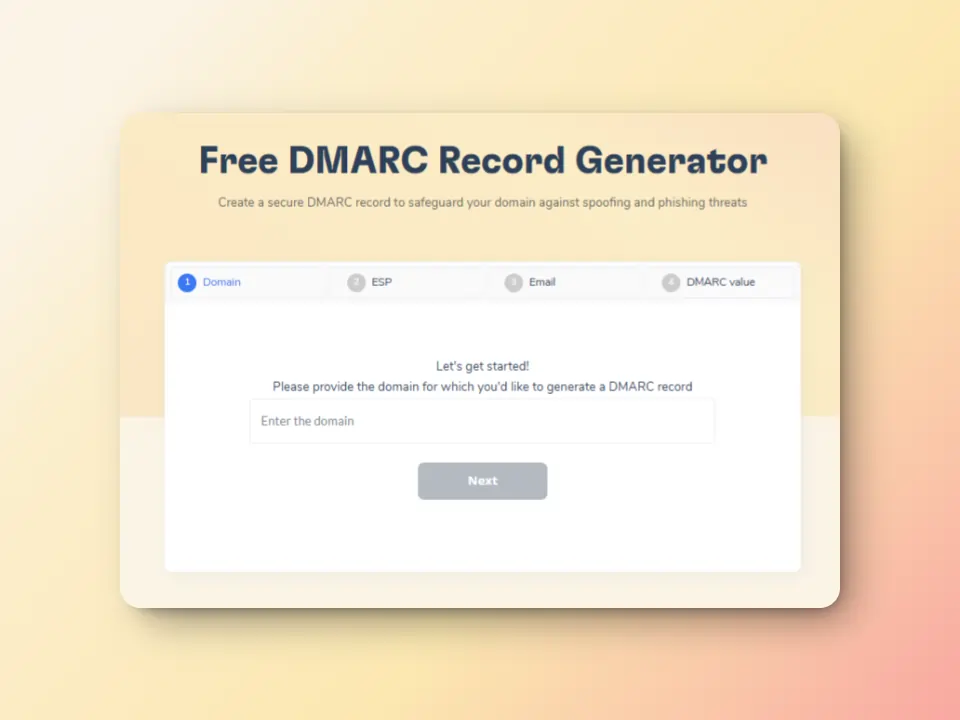
Free DMARC Record Generator to create DMARC policies for domain protection against spoofing and cyberattacks.
Free email deliverability test to know where you stand
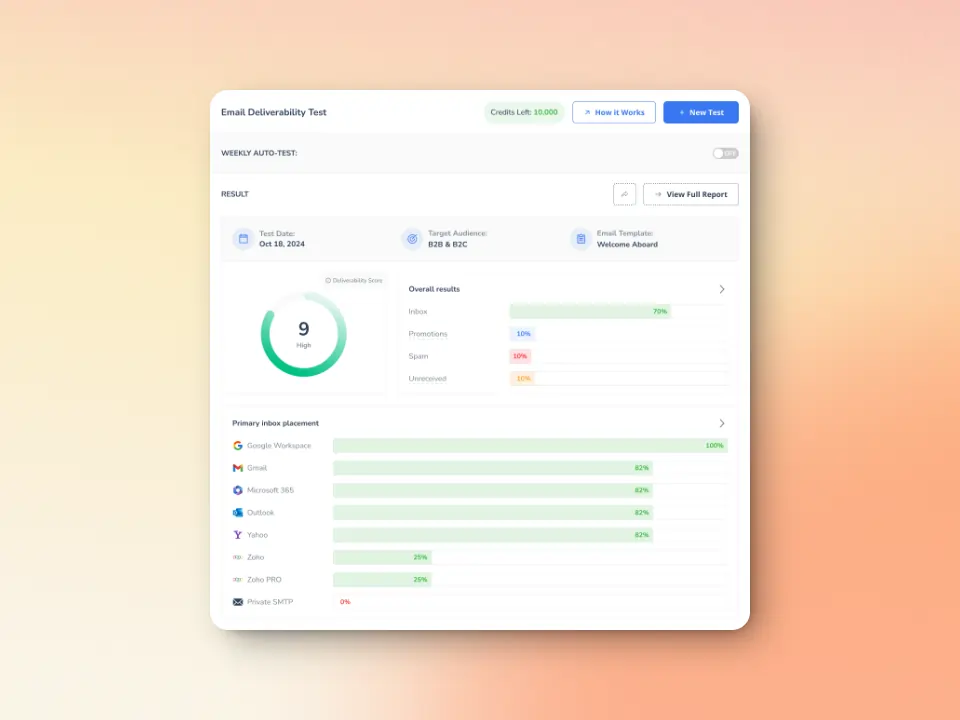
Warmy.io provides a powerful free email deliverability test that pinpoints issues preventing your emails from reaching inboxes. The deliverability test includes the following:
- Inbox placement analysis: Know whether your emails land in the inbox, spam, promotions, or go unreceived—and what percentage.
- Blacklist status: See if your domain or IP is listed on major spam blacklists so you can take action
SPF, DKIM, and DMARC validation: Ensure and verify if your authentication records are correctly set up.
AI-powered email warmup and advanced seed lists for building a strong sender reputation
One of the biggest reasons for DMARC-related email rejections is a poor sender reputation. Even if your SPF, DKIM, and DMARC records are properly configured, mailbox providers still evaluate whether they “trust” your emails. Additionally, a sudden increase in email volume from a new or dormant email domain can trigger red flags for email providers, resulting in bounces, spam placement, or outright blocks.
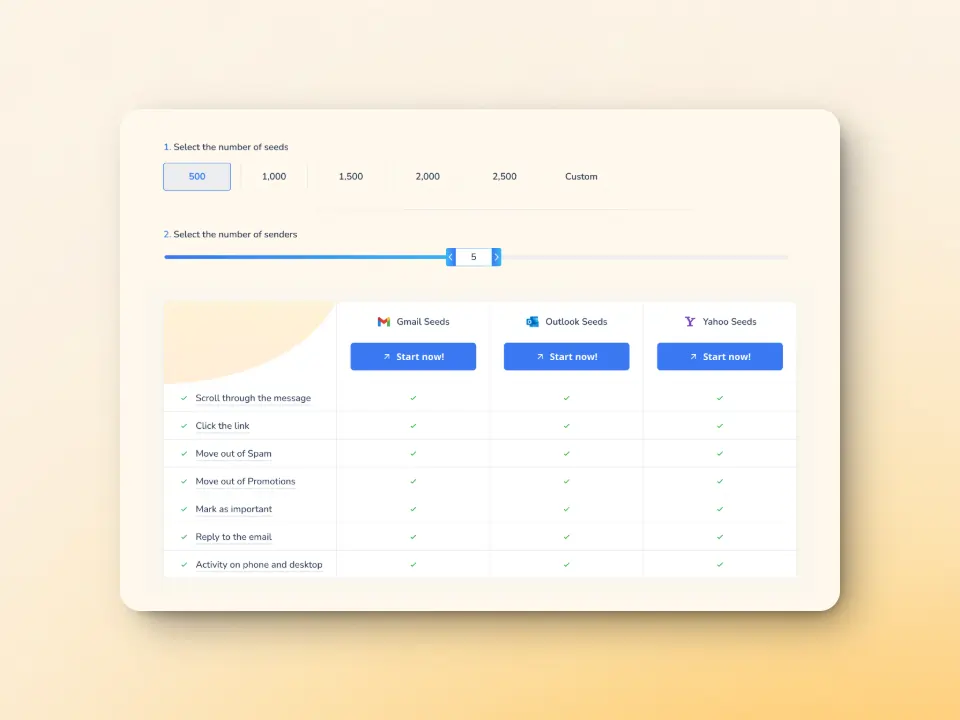
Warmy.io gradually scales up email activity, making sure your domain is trusted and has a positive reputation with mailbox providers before sending large campaigns.
Additionally, Warmy does this by using advanced seed lists that contains genuine email addresses that act as seeds to mimic actual human engagement and behavior. This means emails are opened, scrolled through, and links are clicked. And if emails still somehow land in spam, these are manually removed and then marked as important to improve future deliverability.
Domain Health Hub—a next-level view of your email performance
Instead of monitoring individual email addresses, Warmy.io provides a domain-level health dashboard, helping businesses take a strategic approach to email deliverability.
The newly updated Domain Health Hub gives you a domain health score based on a combination of various factors like authentication, blacklist status, and inbox placement tests. You’ll also be able to monitor your spam rate trends and overall deliverability performance with weekly or monthly tracking options.
Why does this matter? If your domain’s reputation declines, it affects all emails sent from it, not just one mailbox. The Domain Health Hub ensures that you’re always ahead of potential issues. You’ll be able to zoom in right away on what needs attention.
Experience deliverability success beyond preventing SMTP Error 4.7.24 with Warmy.io
Preventing SMTP Error 451 4.7.24 is just the beginning. True email deliverability success comes from building a strong sender reputation, maintaining domain health, and ensuring every email reaches the inbox. Warmy.io doesn’t just help fix DMARC errors or prevent SMTP Error 4.7.24—it prevents them from happening in the first place.
Don’t let poor email authentication or deliverability issues hold your emails back. Sign up for your FREE 7-day trial of Warmy.io today and start sending with confidence!