A comprehensive email deliverability test gives senders a complete picture of inbox placement and deliverability status. It includes the following steps:
- Gathering information on sending domain, IP addresses, ESP, and current authentication records, as well as choosing an email that is a good representation of actual campaigns.
- Taking the inbox placement test itself. Warmy’s free email deliverability test is a comprehensive inbox placement test that shows overall placement score, a breakdown by provider (inbox, promotions, spam, unreceived), and a summary of authentication results.
- Review and verify authentication and DNS records.
- Run your sending domain and IP through Google Postmaster Tools and Microsoft SNDS to review provider-side reputation data including complaint rates, spam rates, and infrastructure reputation.
- Run a blacklist check across major lists including Spamhaus (SBL, XBL, PBL, DBL), SORBS, Barracuda, and SpamCop. If a listing is found, note the blacklist name, listing date, and reason before beginning remediation.
For businesses that rely on email marketing as a primary source of revenue, pipeline, and customer retention, it’s crucial to know if your emails are actually landing in the inbox or landing in spam.
Conducting email deliverability testing can help you understand key deliverability metrics, such as:
- Whether your emails land in the inbox, spam, or promotions tab
- How your emails are landing in inbox or spam depending on provider
- Whether authentication issues are suppressing placement
- Whether blacklist listings or reputation signals are affecting performance
- Whether your domain is safe to scale
This guide outlines a structured testing methodology:what to test, how to test it, and how to interpret the results so you can take corrective action with confidence.
Why is email deliverability testing important?
Many senders assume that deliverability means an email was “sent successfully” or did not bounce. A fair assumption, but one that is dangerously inaccurate.
- An email can be delivered to a recipient’s server and still be filtered into spam, quarantined, or routed to the promotions tab.
- True email deliverability goes beyond transmission as it measures inbox placement and sender reputation.
Three of the major email service providers updated sender requirements (Gmail, Outlook, and Yahoo). Bulk senders are now required to:
- Authenticate their domains by configuring SPF, DKIM, and DMARC
- Maintain spam complaint rates below 0.3% as reported in Postmaster Tools
- Offer one-click unsubscribe as per RFC 8058, an internet standard first introduced in 2017 as a method to support Signaling One-Click Functionality for List-Unsubscribe Email Header Fields.
However, what works for one mailbox provider may not work for another. As such, visibility into deliverability performance is not standardized across providers. For example:
- Gmail offers domain-level reputation and spam rate insights through Postmaster Tools.
- In contrast, Microsoft provides data through Smart Network Data Services (SNDS), which focuses primarily on IP reputation, spam trap hits, and traffic metrics rather than domain-based inbox placement reporting.
This difference emphasizes how each major mailbox provider evaluates and reports sender performance differently. You need to know exactly where you’re landing across each major mailbox provider.
What does email deliverability testing actually measure?
Email deliverability measures where the email actually landed: Inbox, spam folder, promotions tab, and even unreceived. These are the highlights of deliverability testing which a simple delivery confirmation will not tell you.
The other components of a deliverability testing ecosystem includes:
- Inbox placement testing
- Authentication records validation
- Sender reputation checks
- Blacklist scans
- Content analysis
The 5 core components of comprehensive deliverability testing
1. Inbox placement testing across multiple providers
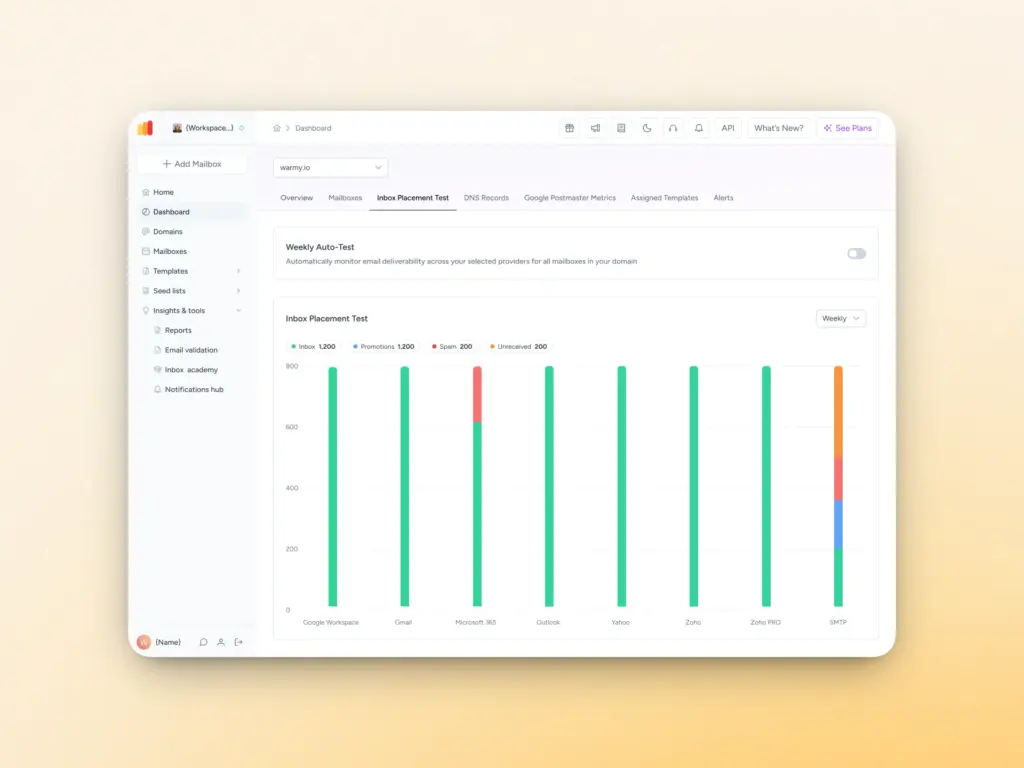
Inbox placement testing tells you if your email is accepted by the receiving servers. Does it land in the primary inbox? The promotions tab? The spam folder? How about on Yahoo, Outlook, or Gmail? Does it land in spam in Gmail but inbox in Yahoo?
Tests usually use sets of real email addresses across Gmail, Outlook, Yahoo, Apple Mail, and other providers that you send to as part of your test. After sending, check how each address received the message and calculate your placement rate by provider and category.
Additionally, when interpreting results, look at placement percentages by provider. A 90% inbox rate overall might hide a 60% spam rate at Outlook. Provider-specific breakdowns are where the actionable insights live.
2. Email authentication record validation
Authentication is the technical foundation of deliverability. Without it, providers have no way to verify you are who you say you are, and they’ll treat your domain with suspicion.
The email authentication fundamentals are:
- SPF (Sender Policy Framework): A DNS record that specifies which IP addresses are authorized to send email on behalf of your domain. Misconfigured SPF records — too many DNS lookups, missing sending sources, or overly permissive syntax — are among the most common deliverability issues.
Check out Warmy’s Free SPF Generator today.
- DKIM (DomainKeys Identified Mail): A cryptographic signature attached to outgoing emails that allows receiving servers to verify the message hasn’t been tampered with in transit. A DKIM failure is a serious red flag for spam filters.
- DMARC (Domain-based Message Authentication, Reporting & Conformance): A policy layer that tells receiving servers what to do when SPF or DKIM fails — quarantine the message, reject it, or take no action. DMARC also provides reporting, giving you visibility into who’s sending email using your domain.
Having issues with your DMARC policy? Use Warmy’s Free DMARC Generator.
Beyond these three, BIMI (Brand Indicators for Message Identification) is an emerging standard that displays your brand logo in supported inboxes when you have a DMARC policy of quarantine or reject. Testing BIMI implementation requires verifying your Verified Mark Certificate (VMC) and DNS record configuration.
3. Sender reputation assessment
Your sender reputation is a score assigned by mailbox providers based on your historical sending behavior. It’s a composite of the following:
- Domain reputation
- IP reputation
- Engagement metrics
- Spam complaint rates
Domain reputation has become increasingly important as providers like Google move away from purely IP-based filtering. Even if you’re on a pristine IP, a domain with a history of spam complaints or low engagement will struggle to reach the inbox.
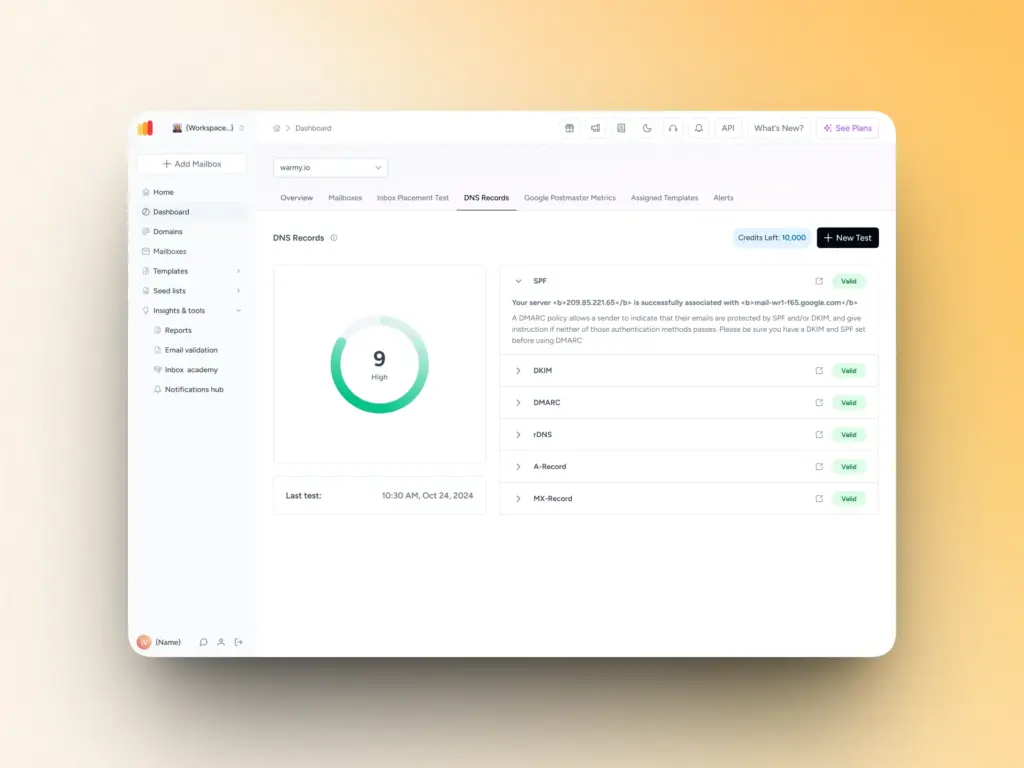
Key tools for reputation monitoring include Google Postmaster Tools (for domain and IP reputation at Gmail) and Microsoft SNDS (Smart Network Data Services, for IP-level data at Outlook). Warmy’s Domain Health Hub also consolidates all critical deliverability metrics into a single dashboard, providing:
- A numeric health score based on inbox placement tests, DNS authentication status, and Google Postmaster data.
- Real-time monitoring of spam rate trends, inbox placement percentages, and overall deliverability performance with weekly or monthly tracking.
- Comprehensive DNS health checks that validate SPF, DKIM, DMARC, rDNS, MX, and A records, alerting you to authentication issues before they impact deliverability.
- Provider-specific insights showing your reputation and inbox placement rates across Gmail, Microsoft, Yahoo, and other major providers.
4. Blacklist monitoring and detection
Getting blacklisted is one of the fastest ways to destroy deliverability. Blacklists are maintained by organizations that track IP addresses and domains associated with spam, and mailbox providers reference them when making filtering decisions.
There are two types:
- IP-based blacklists (targeting the server sending your email)
- Domain-based blacklists (targeting your sending domain or links within your email)
Tip: The most critical blacklists to monitor include Spamhaus (SBL, XBL, PBL, DBL), SORBS, Barracuda, and SpamCop.
Automated blacklist monitoring is essential as checking manually across hundreds of lists is impractical and time-consuming. Most comprehensive deliverability tools include automated blacklist scanning with alerts when a new listing is detected.
Warmy.io’s inbox placement test also includes checking for presence on blacklists. That way, senders can begin the delisting process right away before it causes long-term deliverability damage.
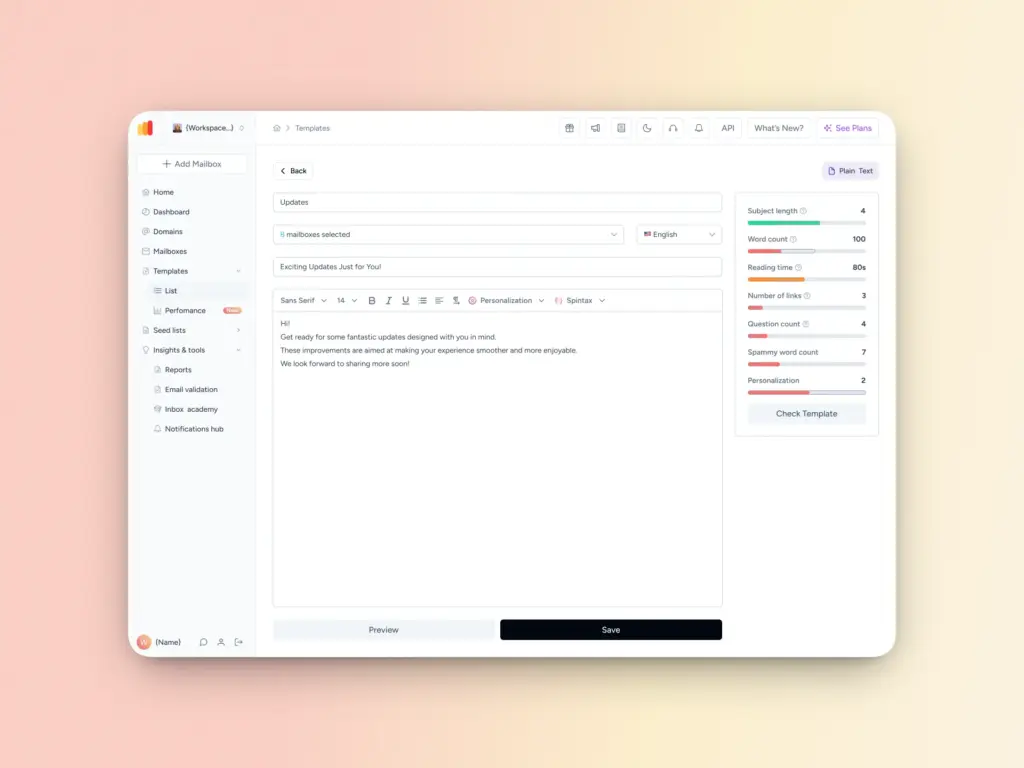
5. Content and template analysis
Your email’s content plays a significant role in how spam filters evaluate it. Even if your technical setup and authentication records are all sparkly clean, presence of spammy content can derail your deliverability.
Spam trigger words in subject lines or body copy, excessive use of images relative to text, broken HTML, suspicious links, and certain attachment types can all contribute to filtering.
Content analysis involves running your email through spam filter simulators that score it against common trigger patterns. It also includes rendering tests across email clients because an email that looks perfect in Gmail might break completely in Outlook 2016. Subject line analysis helps identify phrasing that might flag filters, while link scanning verifies that none of your URLs appear on blacklists.
Curious to see if your email template is causing your campaigns to land in spam? Try Warmy’s Template Checker now.
How to run a complete email deliverability test: step-by-step
The following is a step-by-step process on how to prepare, how to run an inbox placement test, conduct authentication checks, and how to perform reputation and blacklist scans.
Step 1: Pre-test preparation
Before running any test, gather the information you’ll need
- Your sending domain
- The IP address(es) you send from
- Your ESP or sending infrastructure details
- Your current SPF, DKIM, and DMARC records
Choose email content that’s representative of your actual campaigns because testing with a stripped-down message won’t give you accurate results.
Set baseline metrics so you can measure improvement over time. Document your current inbox placement rate, sender score, authentication pass/fail status, and any blacklist listings before you make any changes.
Step 2: Run the inbox placement test

Warmy’s free email deliverability test provides a straightforward way to run a placement test without technical setup.
- Step 1: Access the test at Warmy.io and select the list of email addresses provided. These addresses span Gmail, Outlook, Yahoo, and other major providers.
- Step 2: Send your test email to all the provided addresses exactly as you would send a real campaign. It should be from your actual sending domain and infrastructure, with your normal headers and content.
- Step 3: Wait for results. Warmy’s test typically returns placement data within 3–5 minutes.
- Step 4: Access your deliverability report. You’ll see an overall placement score, a breakdown by provider (inbox, promotions, spam, unreceived), and a summary of authentication results.
Step 3: Conduct authentication and DNS checks
After running the placement test, verify your authentication setup directly:
- For SPF, validate that all your sending sources are included and your record is under the 10 DNS lookup limit.
- For DKIM, send a test email and use a DKIM validator to verify the signature is passing. Check that the selector, domain, and key match what’s published in your DNS.
- For DMARC, review your policy configuration — p=none, p=quarantine, or p=reject — and verify DMARC alignment (whether your From domain aligns with your SPF and DKIM domains). If you’re not yet receiving DMARC reports, configure an RUA address so you can start monitoring authentication activity across all senders using your domain.
Step 4: Review the reputation and blacklist scan results
Warmy’s inbox placement test scans blacklist presence. If you find a listing, note which blacklist, when the listing occurred, and any details about the reason for listing. You’ll need this information for remediation.
How to interpret your deliverability test results
You got your test results, but somehow the data is still foreign to you. But don’t worry, the following is a comprehensive and general interpretation of the result. It presents how you can read the deliverability score, understand placement breakdowns, and identify if there are some form of reputation problems you should be wary of.
Reading the deliverability score
An overall deliverability score is an aggregate measure of where your email landed across all tested providers. Aim for 90% or higher as much as possible to ensure that you have a healthy email sending reputation.
Some warning signs to watch for:
- Overall inbox placement below 80%
- Spam placement at any major provider above 10%
- Any “unreceived” category results (email that wasn’t delivered at all)
- Significant variance between providers (e.g., 95% at Gmail but 55% at Outlook)
Understanding placement breakdowns
Provider-level placement data is where you’ll find your most actionable insights.
- Gmail distinguishes between the primary inbox, promotions tab, social tab, and spam.
- Outlook’s filtering is binary: inbox or junk.
- Yahoo and Apple Mail have their own categorization systems.
Landing in the promotions tab of Gmail is not a deliverability failure, but a categorical decision. The email you send is still considered as delivered and accessible. Users who check that tab will still see it. However, it does affect open rates as the Promotions tab is not the default inbox.
Spam folder placement is a genuine problem. Unreceived results indicate your email was rejected or silently discarded.
Diagnosing authentication issues
Authentication failures appear in your test results as SPF fail, DKIM fail, or DMARC fail. Each tells a different story:
- An SPF failure means the IP you sent from wasn’t authorized in your SPF record. This happens when you add a new ESP or send service without updating DNS.
- A DKIM failure usually means the signature doesn’t match the public key in DNS, which can happen after a key rotation where the DNS wasn’t updated, or if your email was modified in transit.
- A DMARC failure means either SPF or DKIM failed and your policy instructs providers to act on that failure.
Identifying reputation problems
A low sender score combined with high complaint rates is a serious signal.
Remember that Gmail requires complaint rates stay below 0.3% so the best practice is keeping them below 0.1%. Exceeding these thresholds triggers algorithmic filtering that can suppress your entire sending domain.
Blacklist presence should also be treated urgently, especially listings on Spamhaus. A Spamhaus SBL listing will block delivery to a significant portion of global email traffic.
Should you conduct regular email deliverability testing?
Short answer: Yes.
Should you test daily, weekly, or monthly? It depends on your goals, but here are our general recommendations on what to test during specific periods.
- Daily testing requirements: Daily monitoring should focus on quick health indicators: spam complaint rate trends from your ESP, any new blacklist alerts, and bounce rate spikes. These are signals that something may have changed and warrants deeper investigation. Automated alerts from your monitoring tools should surface critical issues without requiring manual checking every morning.
- Weekly testing protocol: Each week, run a fresh inbox placement test, review your sender score trends, perform a full blacklist scan, and compare performance across providers week-over-week. Weekly testing gives you the frequency to catch problems before they become crises while being granular enough to identify what changed.
- Monthly deliverability audits: Monthly audits go deeper. Review your authentication records to ensure nothing has drifted (DNS changes, new sending tools), analyze placement performance by provider, and compare your results against industry benchmarks. Monthly audits are also a good time to prune your seed lists, clean your sending list, and evaluate whether your testing tools are still meeting your needs.
- Quarterly strategic reviews: Quarterly reviews zoom out to long-term trends. Are your inbox placement rates improving or declining over time? Is your reputation score trending in the right direction? Are your infrastructure choices (ESP, dedicated vs. shared IP, domain structure) still serving your sending volume and program complexity? Use quarterly reviews to make strategic adjustments, not just tactical fixes.
Specific scenarios and use cases for email deliverability testing
Testing before major campaign launches
- Any campaign to a significantly larger list than your typical campaign lists, a new segment you haven’t emailed before, or a new template or content type warrants a pre-launch test.
- Send a test email through the same infrastructure you’ll use for the actual campaign, check placement results across all major providers, and verify authentication is passing cleanly.
Testing new domains and IP addresses
- When warming up a new domain or IP, run placement tests at each stage of your warmup schedule.
- Document the baseline at day one (this is often poor and that’s expected) and track improvements weekly.
- Look for movement from spam to inbox and for engagement signals that indicate providers are starting to trust your sending identity.
- New domains typically take 4–8 weeks of consistent, escalating sends to build meaningful reputation.
Testing after deliverability issues
- After a deliverability problem such as being blacklisted, a complaint spike, or inbox placement drop, don’t assume you’ve recovered just because you’ve made the fixes.
- Run a full test to confirm. Monitor closely for 2–4 weeks post-incident, as some filtering decisions are slow to reverse even after the underlying issue is resolved.
What are some common testing mistakes to avoid?
Testing too infrequently
Running a deliverability test once a quarter and assuming everything is fine in between is a recipe for surprises. Deliverability can deteriorate quickly: a bad send, a new spam trap hit, or a sudden complaint spike can damage your reputation in days. Build testing into your routine, not just your troubleshooting workflow.
Ignoring provider-specific variations
A global inbox placement score is a useful summary, but it can mask severe problems at individual providers. If your average is 85% but Outlook is delivering you to junk 60% of the time, that 85% figure is misleading. Always review provider-level breakdowns, not just aggregate scores.
Testing without taking action
The most common and costly mistake is running tests, seeing problems, and failing to act on the results. Testing has no value if it doesn’t drive remediation. Build a process where test results map directly to action items, owners, and timelines. Track whether the fixes you implement actually move the needle on your next test.
Arm yourself with data with a solid email deliverability test
Email deliverability testing is one of the highest-leverage activities a sender can invest in. After all, businesses lose millions in potential revenue from failed communications
The good news is that most deliverability issues are diagnosable and fixable. Authentication failures have straightforward solutions. Blacklist listings can be remediated. Reputation problems can be reversed with consistent good sending hygiene over time.
But none of this is possible if you don’t know there’s a problem in the first place, and that’s exactly what testing gives you.
Start with a baseline: run Warmy’s free email deliverability test to see where you stand today.
Access advanced deliverability testing, automated warm-up, and domain health monitoring with Warmy’s complete platform. Start your free 7-day trial today!
FAQ
What is the difference between email delivery and email deliverability?
Email delivery only confirms that an email was accepted by the recipient’s mail server. Email deliverability measures where the email actually landed, whether in the inbox, spam folder, promotions tab, or whether it was silently dropped. True deliverability focuses on inbox placement and sender reputation, not just successful transmission.
How often should I run email deliverability tests?
The ideal frequency depends on your sending volume, risk level, and goals. High-volume senders should monitor daily health indicators, run inbox placement tests weekly, perform monthly deliverability audits, and conduct quarterly strategic reviews to identify long-term trends and infrastructure issues.
What metrics does an email deliverability test measure?
A comprehensive deliverability test measures inbox placement by provider, spam and promotions placement, authentication pass/fail status (SPF, DKIM, DMARC), sender reputation signals, and blacklist presence. These metrics help determine whether a domain is safe to scale.
Can authentication issues affect inbox placement even if emails are delivered?
Yes. Emails can be delivered to the server but filtered into spam or junk if SPF, DKIM, or DMARC are misconfigured or failing. Authentication issues signal low trust to mailbox providers and often suppress inbox placement even without visible bounce errors.
What should I do if a deliverability test shows spam placement or blacklist listings?
If spam placement or blacklist listings are detected, immediately review authentication records, sending patterns, complaint rates, and list hygiene. Identify the root cause, remediate it, and retest. Ongoing monitoring and controlled warm-up are essential to confirm recovery and prevent recurrence.