Email subject lines determine whether your message gets opened or ignored. 47% of recipients decide to open an email based on the subject line alone, and 69% mark emails as spam for exactly the same reason. A single line of text carries the full weight of your campaign’s success, which means getting it right is not optional.
This guide covers the proven best practices for writing email subject lines that get opened, plus 70 ready-to-use examples across every major email type — from welcome sequences and B2B cold outreach to follow-ups and thank-you emails.
Pro Tip: Even the most expertly crafted subject line fails if your domain is not trusted by Gmail, Outlook, or Yahoo. Warmy is an AI-driven email warmup and deliverability platform that automatically builds your sender reputation so your emails land in the inbox — not the spam folder. Before you optimize your subject lines, make sure your sending infrastructure gives them a fair shot.
Why Email Subject Lines Matter for Deliverability
Most marketers treat subject line optimization as a copywriting problem. It is — but it is also a deliverability problem.
Spam filters read your subject line as a signal: certain words, excessive punctuation, and all-caps formatting raise your spam score before the email body is ever evaluated. A subject line that trips a filter means your message never reaches the inbox, regardless of how good the content is. For a full breakdown of what causes emails to land in spam, see Why Are My Emails Going to Spam.
This is where sender reputation becomes the foundation everything else rests on. Email providers like Gmail and Outlook evaluate your domain’s sending history, authentication records, and engagement signals before deciding where to route your email.
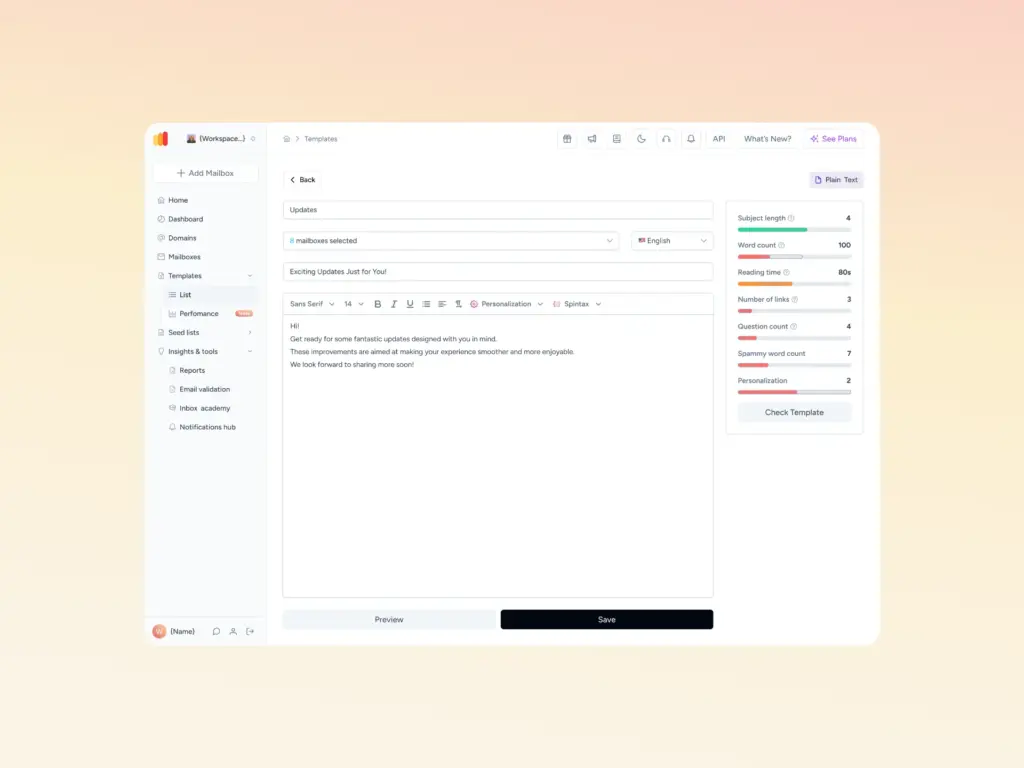
Not sure if your subject line contains hidden spam triggers? Warmy’s Template Checker scans your subject line and email body for spam trigger words, formatting issues, and structural problems — and returns a spam score with specific fixes. The Chrome Extension version runs the same check directly inside your Gmail compose window.
Email Subject Line Best Practices: The Complete Checklist
These practices apply to every email type, whether you are sending a cold outreach sequence, a newsletter, or a transactional notification.
Define your audience first
Know who you are writing for before you write a single word. A subject line for a B2B procurement manager lands differently than one for a consumer loyalty program subscriber. Tailor your tone, vocabulary, and urgency level to the specific person receiving the message. This audience-first approach is equally valuable when you need to reply to an email professionally, as it helps you choose the right tone and level of formality for the recipient.
Write a subject line that earns the open
Your subject line has one job: make the reader want to open the email. It should create curiosity, signal value, or promise a specific outcome. Vague lines like ‘Checking in’ or ‘Quick question’ may work for cold outreach but will underperform for newsletters and promotional sends.
Keep it focused on one topic
Do not try to communicate two ideas in the subject line. A single, clear promise performs better than a subject line that hedges its bets with multiple angles.
Use a recognizable sender name alongside a strong subject line
The ‘From’ name and the subject line are evaluated together. A strong subject line from an unrecognized sender still gets deleted. Warm up your domain and build recognition before scaling email volume.
Optimize for mobile
Over 43% of email opens occur on mobile devices, and most mobile clients display only 30 to 41 characters of a subject line before truncating. Front-load your most important words. A subject line that gets cut off mid-promise loses its impact entirely. For a broader look at how mobile affects deliverability, see Warmy’s email deliverability best practices guide.
Include a clear, funnel-matched CTA
Your subject line sets the expectation; your email body must deliver it. Match the promise of your subject line to a clear call to action inside the email.
Test and optimize systematically
A/B test one element at a time — subject line length, personalization, tone, or emoji use. Build a performance history for your specific audience rather than relying on industry benchmarks alone. Warmy’s guide on how to test cold email subject lines covers a structured methodology for running statistically meaningful experiments.
Segment your list for higher relevance
A subject line that speaks directly to a recipient’s situation outperforms a generic one every time. Segment by behavior, industry, or lifecycle stage, and write subject lines that match each segment’s context.
Send consistently
Irregular sending patterns damage your sender reputation. Recipients who forget they subscribed are more likely to mark your email as spam, which feeds back into lower inbox placement rates for future sends.
How to Write Email Subject Lines That Get Opened
No universal formula exists for the perfect subject line, but these principles apply consistently across email types and audiences. For a full breakdown of how subject lines fit into a high-converting cold email, see Warmy’s guide on the anatomy of a high-performing cold email.
- Be concise. Keep your subject line to 30 to 50 characters for reliable display across desktop and mobile. Subject lines between 41 and 50 characters achieve the highest click-through rates, while lines under 70 characters consistently earn the strongest open rates.
- Be specific. Use clear, accurate language that reflects exactly what is inside the email. Misleading subject lines generate opens but destroy trust and drive unsubscribes.
- Use action-oriented language. Give the reader a reason to act now: ‘Get your free report,’ ‘Fix your inbox placement today,’ or ‘See your domain score.’
- Personalize it. Including the recipient’s name or a reference to their company, industry, or recent interaction increases open rates by 26% according to MailerLite’s email marketing data. Personalization beyond just a first name — using company names, recent interactions, or specific pain points — drives even stronger results.
- Create genuine urgency. Urgency works when it is real. ‘Last chance: offer ends tonight’ outperforms manufactured urgency that recipients learn to ignore. Overuse of urgency language also triggers spam filters.
- Use numbers. Numbered subject lines like ‘5 ways to fix your open rate’ set a clear expectation and consistently outperform vague equivalents.
- Avoid spam trigger words. Words like ‘Free!!!’, ‘URGENT’, and ‘Act NOW’ trip spam filters and damage deliverability. Modern spam filters are machine-learning based and evaluate the full context of your email — but high-risk words still raise your spam score.
- A/B test everything. No best practice replaces data from your own audience. Run controlled tests, measure results, and build a subject line playbook specific to your list.
| Subject Line Approach | What It Does | Best Used For |
|---|---|---|
| Personalized (name/company) | +26% open rate lift | Cold outreach, B2B campaigns |
| Numbered lists (“7 ways to…”) | Sets expectation, drives curiosity | Newsletters, educational emails |
| Question format | 46% open rate in cold email research | Cold outreach, re-engagement |
| Urgency (“Last chance, ends tonight”) | Drives immediate action | Promotional, cart abandonment |
| Emoji in subject line | Up to 56% open rate increase (audience-dependent) | Consumer brands, newsletters |
| Under 30 characters | Above-average open rates | Mobile-first audiences |
Ready to make sure your emails actually reach the inbox? Warmy’s free Email Deliverability Test shows you exactly where your emails are landing — inbox, promotions, spam, or unreceived — across Gmail, Outlook, and Yahoo. Run it before your next campaign to confirm your domain is ready to deliver.
10 Welcome Email Subject Lines
Welcome emails have the highest open rates of any email type because recipients expect them. Use that attention to set the tone for your relationship.
- Welcome to [Company Name]: Here’s What You Need to Know
- Thanks for Joining [Company Name] — Let’s Get Started!
- Your [Company Name] Membership is Confirmed
- Welcome to the [Company Name] Community
- Get Ready to Unlock Exclusive [Company Name] Benefits
- You’re in! Welcome to the [Company Name] Family
- Welcome Aboard! Here’s What’s Next
- [Company Name] Welcomes You: Here’s What to Expect
- Thanks for Signing Up! Here’s a Special Offer Just for You
- [Company Name] Welcomes You to Our Newsletter — Let’s Stay Connected
Make your welcome email personalized, friendly, and informative. Tell subscribers what to expect, what benefits they unlock, and how to reach you if they need help.
10 B2B and Cold Email Subject Lines for Sales
B2B subject lines need to earn attention in a crowded inbox. Keep them specific, direct, and relevant to the recipient’s role or pain point.
- [Name], are you struggling with [pain point]?
- [Name], how [Company Name] helps [specific goal]
- How [Industry] leaders are solving [problem]
- [Company Name] Presents: [Event or Webinar Title]
- [Name], cut your [cost/time metric] on [product/service]?
- [Name], let’s talk [solution or benefit]
- [Company Name] Exclusive: [Specific Offer]
- [Name], the [specific trend] every [industry role] needs to know
- [Name], discover the 2026 approach to [challenge]
- [Name], one question about [specific company challenge]
Keep B2B subject lines specific, relevant, and free of spam trigger words. Focus on the recipient’s goals, not your product’s features.
10 Reconnecting Email Subject Lines
Reconnecting emails restart relationships that have gone quiet. A subject line that acknowledges the gap without being awkward about it gets far better results than a generic ‘checking in’ opener.
- It’s been a while — let’s catch up
- [Name], long time no talk
- Let’s reconnect about [topic of interest]
- A blast from the past: [Name], how are you doing?
- [Name], it’s been too long — can we schedule a call?
- Reconnecting after [time frame]: how have you been?
- [Name], wanted to say hi and share something relevant
- We should catch up about [shared interest or experience]
- [Name], I came across something you’d find useful
- Reconnecting — and I have news to share
10 Thank-You Email Subject Lines After an Interview
A strong post-interview subject line keeps you top of mind and demonstrates professionalism. Send your thank-you email within 24 hours.
- Thank you for the opportunity to interview with [Company Name]
- [Name], great meeting you — thank you!
- Following up on our interview — thank you for your time
- Appreciating the time and the opportunity to interview
- Thank you for taking the time to meet with me
- Grateful for the interview and the chance to learn more about [Company Name]
- Thank you for considering me for the [Job Title] position
- Thank you for the insightful conversation about [Company Name]
- Appreciating the opportunity to learn about [Company Name] and the [Job Title] role
- Thank you for the interview — looking forward to hearing back
Personalize your subject line by referencing something specific from the conversation. It signals attentiveness and distinguishes your follow-up from generic thank-you emails.
10 Resignation Email Subject Lines
A clear, professional resignation subject line sets the right tone and ensures your message is processed promptly.
- Resignation Notice: [Your Name]
- Formal Resignation: [Your Name]
- My Resignation: [Your Name]
- Moving On: [Your Name]’s Resignation
- Notice of Resignation: [Your Name]
- Resignation Effective [Date]: [Your Name]
- Departing [Company Name]: [Your Name]’s Resignation
- Thank You and Farewell: [Your Name]’s Resignation
- Resignation Announcement: [Your Name]
- Transitioning Out: [Your Name]’s Resignation Notice
Keep the subject line professional and to the point. Your resignation email body should specify your last day, express gratitude for the experience, and offer to assist with the transition.
10 General Thank-You Email Subject Lines
Use these across professional and personal contexts where you want to acknowledge someone’s support, time, or generosity.
- Thank you for your time and consideration
- Grateful for your support and guidance
- Thank you for the opportunity to [event or experience]
- Appreciating your generosity
- Thanks for being an inspiration
- Thank you for the difference you made
- Showing appreciation for your hard work
- Thank you for your collaboration and teamwork
- Grateful for your help and guidance
- Thank you for being part of this journey
10 Follow-Up Email Subject Lines
Follow-up subject lines should be specific enough that the recipient immediately knows what you are referencing, without being pushy.
- Checking in: [Your Name]
- Follow-up on [Meeting/Event/Conversation]: [Your Name]
- [Recipient Name], quick question: [Your Name]
- Recap of [Meeting/Event/Conversation]: [Your Name]
- Touching base: [Your Name]
- [Recipient Name], can we connect this week?
- Following up on [action item or request]: [Your Name]
- Reminder: [Deadline/Meeting/Event]: [Your Name]
- [Recipient Name], did you get a chance to review?
- Next steps: [Your Name]’s follow-up
Reference the prior exchange specifically — a recipient who sees ‘Follow-up on our October 3rd call about pipeline automation’ opens the email far more readily than one who sees ‘Touching base.’
Conclusion
Your subject line is the first and most important decision point in your entire email campaign. Get it right, and you unlock opens, clicks, and conversions. Get it wrong, and even the best email content never gets read.
The practices in this guide give you the framework: know your audience, keep it concise and specific, personalize where you can, test everything, and avoid spam trigger words that send your messages to junk before a human ever sees them. The 70 examples across every email type give you a running start.
One thing the subject line alone cannot fix is a damaged sender reputation. If your domain is flagged, your emails land in spam regardless of how well-crafted the subject line is. If you are evaluating your deliverability stack, Warmy’s comparison of the best email warmup and deliverability tools is a good place to start.
When you are ready to protect your inbox placement at scale, book a demo to see Warmy in action.