What is an email blacklist?
An email blacklist is a real-time database that identifies IP addresses or domains associated with spam or suspicious sending behavior. Some mail servers, ISPs, and spam filters query these databases during the delivery process. So if your sending IP or domain appears, your message gets rejected, deferred, or routed to spam—often without any notification to you.
Two types of email blacklists:
- Real-time Blackhole Lists (RBLs): DNS-based lists queried at the server level. A match typically results in immediate rejection. The sender receives a bounce and the recipient receives nothing.
- DNS-based Blacklists (DNSBLs): A broader category covering both IP-based and domain-based listings. Major operators include Spamhaus, Barracuda, and Microsoft’s SNDS. Each maintains its own listing criteria and its own delisting process.
What does being blacklisted mean?
- A blacklist entry creates a full stop on your deliverability without any warning. It gives receiving servers a reason to be suspicious of your email and stop accepting them. This can also lead to the collapse of your open rates, the increase of bounces, and the drying of pipelines.
- Spamhaus listings, for example, affect inbox placement with Gmail, Outlook, Yahoo, and most corporate mail environments simultaneously. The damage compounds the longer it goes undetected.
3 immediate signs your domain is blacklisted
One of the scariest aspects of being blacklisted is that you won’t receive any alerts or early warning signals. It often only becomes visible through campaign metrics. At that point, the damage has already been done.
1. High percentage of bounce rates
- You will notice an unexplained rise in hard bounce rate even if your list quality has not changed. This is a strong indicator that your domain or IP may be blocked or blacklisted. When receiving servers reject mails due to a listing, those rejections are logged as delivery failures or hard bounces.
- Many ESPs and ISPs treat bounce rates about 2%-4% as a red flag, but a bounce rate above 5% is considered a serious reputation problem that will lead to filtering or blacklisting.
2. Open rates drop with specific providers
- If you notice your open rates are falling sharply for Gmail or Outlook recipients, but other providers display relative stability, this suggests that those providers are querying or enforcing a blocklist you are on.
- Across‑the‑board drops in open rates typically indicate a broader issue, such as a widely‑used blacklist entry or a more general sender reputation problem.
3. An increase in spam complaint notifications
- Major providers route complaint feedback loop (FBL) notifications back to senders when recipients mark email as spam.
- A spike in FBL complaints (particularly when combined with elevated bounces) means that your domain or IP is under scrutiny, may already be listed, or your current sending behavior is on the verge of triggering a blacklist.
How to check if your email is blacklisted
Manual Checks
- Tools like MXToolbox let you run a one-time lookup of your domain or IP against dozens of blacklists simultaneously. It’s free and useful for diagnosing a known deliverability problem.
- Since it’s manual, the process is entirely reactive. You will only find out if your domain is blacklisted after your campaigns have already been affected.
Automated Monitoring
- Automated monitoring offers a more proactive approach, tools like Warmy.io can provide tracking systems such as Domain Health Hub to help you understand your weekly and monthly spam rate trends and overall deliverability performance.
- Incorporating this gives you an early warning detective signals and DNS status checks for important authentication protocols such as SPF, DKIM, DMARC, rDNS, MX, and A records
Pro Tip: Run your free Warmy deliverability test and find out where your emails are landing.
Why did I get blacklisted? Common triggers and reasons
Spam traps and dirty lists
Spam traps are email addresses that exist specifically to identify senders with poor list hygiene. These are created and maintained by an email provider or anti-spam organization to identify spammers who send unsolicited emails.
It is categorized by two types:
- Pristine Traps: Email address created by email providers or anti-spam organizations
- Recycled Spam Traps: Email address once used by real people but have been abandoned and was taken over by email providers or anti-spam organizations.
Either type sends signals to blacklist operators that your list sourcing or maintenance practices are problematic. Purchased lists, scraped contacts, and lists that haven’t been cleaned in over six months are the most common sources of trap hits
Warmy’s email validation tool flags addresses that are likely to be inactive, or associated with known spam trap patterns, which can reduce bounce rates and spam complaints.
Missing authentication: SPF, DKIM, and DMARC
Authentication records are no longer optional:
- Gmail and Yahoo formalized their enforcement in 2024, requiring all bulk senders to maintain spam complaint rates below 0.3% and implement DMARC as a mandatory baseline.
- Microsoft followed in May 2025, extending hard authentication requirements to any sender exceeding 5,000 emails per day to Outlook.com. Sending without properly configured SPF, DKIM, and DMARC today doesn’t just hurt deliverability. It puts your domain on a direct path to blacklisting..
If you’re not certain your records are correctly configured, Warmy’s SPF Generator and DMARC Generator walk through setup and validation without requiring a paid account.
Volume spikes from unwarmed domains
- Suddenly sending 20,000 emails in one go from a domain that normally sends 500 emails a week triggers automated spam filters.
- Inbox providers treat sudden volume increases from low-history domains as a strong spam signal, regardless of content quality or list legitimacy.
- This is why email warmup exists: to build the sending history that makes volume increases look organic rather than suspicious.
Step-by-step: How to get removed from an email blacklist
Delisting is not automatic, and submitting a removal request without fixing the underlying problem typically results in re-listing within days. Work through these steps in order.
Step 1: Identify every email blacklist you’re on
Run a full check across major databases. A single campaign can trigger listings on multiple operators simultaneously. Know the full scope before taking action
Step 2: Fix the root cause before requesting removal
Clean your list, configure authentication records, and reduce sending volume from affected domains. Email blacklist operators review removal requests — submitting one without evidence of remediation reduces your chances of a fast delist and flags your domain for closer scrutiny on future listings.
Step 3: Submit delisting requests through each operator’s portal
Spamhaus, Barracuda, and Microsoft’s SNDS each have self-service delisting forms. Here are some of them:
- Spamhaus Lookup / Delisting page
- Barracuda Central Removal
- Office 365 / Microsoft anti‑spam IP delist portal
Upon filling this out, be factual about what happened and specific about what you’ve changed. Vague requests take longer to process.
Step 4: Monitor for removal and re-listing
Don’t assume delisting is permanent. Check that you’ve been removed, then continue monitoring. A domain that was blacklisted once is more likely to be listed again if the underlying habits haven’t changed.
Step 5: Rebuild sending volume gradually
After delisting, your sender reputation needs time to stabilize. Restart sending at lower volume, and lead with your most engaged contacts. It is recommended to use a warmup tool such as Warmy to re-establish standing with ISPs before returning to full campaign volume.
Why manual recovery isn’t enough: The case for continuous monitoring
The manual approach to email blacklist management follows a predictable and costly pattern: deliverability drops, someone investigates, a blacklist entry is found, a removal request is submitted, and days or weeks later, the domain is back to normal.
However, by that point, revenue has been lost, pipeline has stalled, and sender reputation has taken damage that takes longer than the blacklist entry itself to fully recover from.
This is the core problem with reactive deliverability management: the visible symptom always lags behind the actual problem. By the time bounce rates or open rate drops surface in your campaign dashboard, your domain has already been flagged, ISP filters have already adjusted, and your sender score has already taken a hit.
Continuous monitoring breaks that cycle. When health checks run automatically against major email blacklists, you get an alert before the next campaign goes out, before open rates drop, before the bounce rate climbs.
How Warmy can help
Warmy combines that monitoring layer with ongoing AI-driven warmup, which means most users don’t just catch email blacklist issues early. They avoid them.
Email deliverability monitoring
Warmy’s dashboard continuously monitors your sender reputation and deliverability health. If your metrics start trending in the wrong direction, like your spam placement rate creeps up, you’ll know it early on.
The timing is critical, because one of the quieter signs that spam traps are on your list is a gradual erosion of deliverability that most senders don’t notice until it’s severe.
Seed Lists
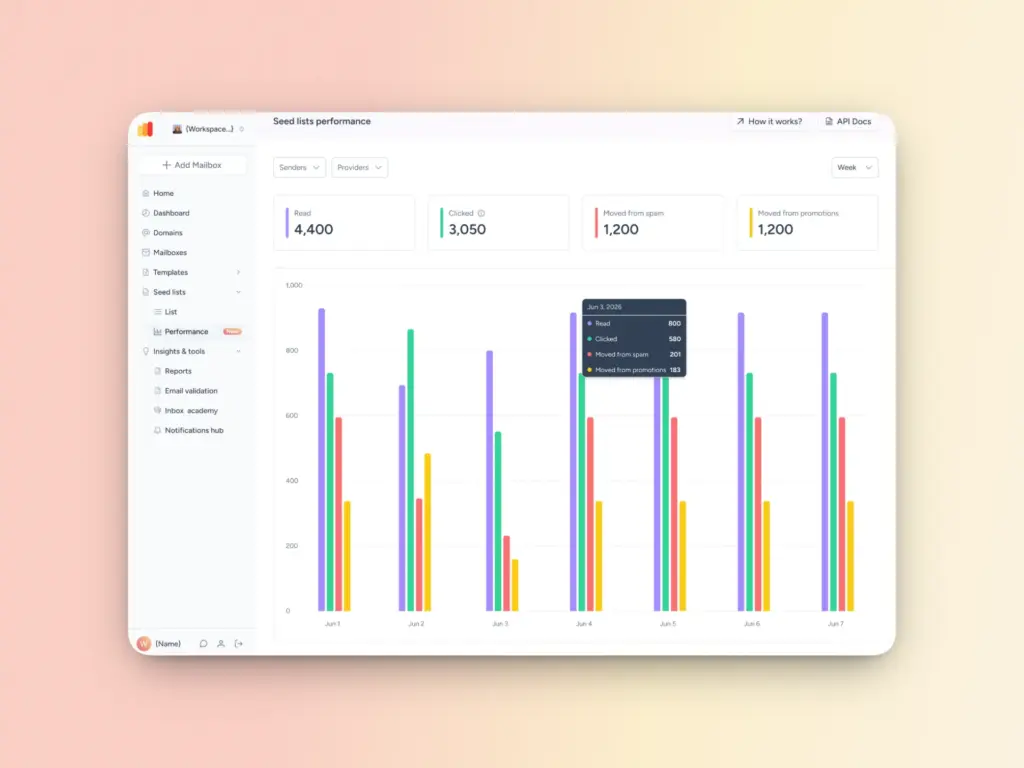
Warmy also offers seed lists which are a curated set of email addresses across major providers like Gmail, Outlook, and Yahoo. You can use these seed lists for specific warming up of certain providers before you send a large-scale campaign. Additionally, these high-quality seed lists provide interactions that ESPs value—opening emails, reading emails, replying, recovering from spam, and clicking on links.
Free Template Checker
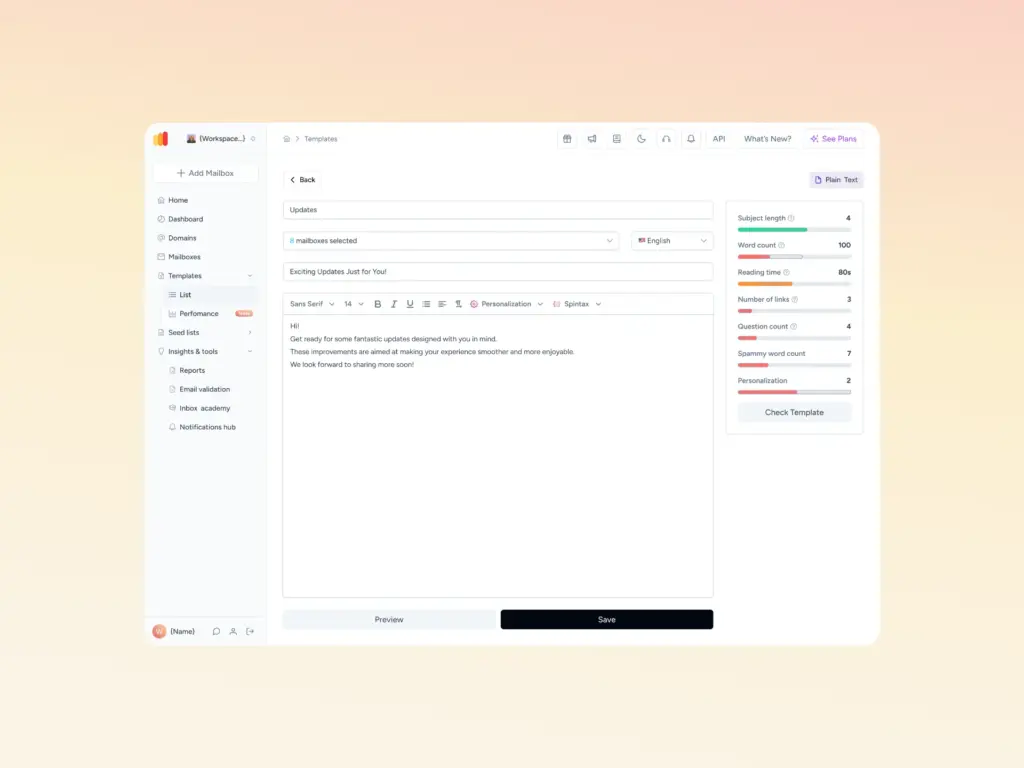
Our free Template Checker checks your email content against potential spam triggers and formatting inconsistencies. With the new Chrome Extension, you can easily test your email templates before you hit send on large scale email campaigns to improve your deliverability. Think of it as a last checkpoint. If you pass the template checker’s criteria, your chances of landing in your recipients’ inboxes are greater.
Protect your revenue with proactive email health
A blacklisted domain doesn’t just underperform. It effectively removes email as a revenue channel until the issue is resolved and reputation is rebuilt. That’s the real cost of reactive deliverability management.
The senders who avoid email blacklisting consistently aren’t doing anything unusual. But they’re implementing best practices continuously: They’re maintaining clean lists, running proper authentication, warming up before scaling, and monitoring continuously rather than checking in only when something goes wrong.
The technical foundation is straightforward. The habits are repeatable. The tools to support it exist. If you haven’t checked your domain’s current health, that’s the right place to start. Run your free deliverability test today to see where you stand.
FAQ
How long does it take to get off an email blacklist?
It depends on the operator. Minor email blacklists often process self-service requests within a few hours. Major operators like Spamhaus typically take 24 to 72 hours; complex cases or repeat listings can extend to several weeks. How thoroughly you’ve addressed the root cause has a direct impact on processing time as operators can see whether the underlying issue has been resolved.
Can I be blacklisted even if I don’t send spam?
Yes. Spam trap hits from an outdated or purchased list, a sudden volume spike from an unwarmed domain, missing authentication records, or a compromised account sending without your knowledge can all result in a blacklist entry. Intent is not a factor in how listings are determined.
What is the difference between a blocklist and a blacklist?
The terms are interchangeable. “Blocklist” is the more current preferred usage; “blacklist” remains the more widely recognized term in practice. Both refer to databases that flag IP addresses or domains associated with spam or suspicious sending behavior. You’ll encounter both depending on the tool or provider you’re working with.
Does Warmy.io help with email blacklist removal?
Yes, but with an important caveat: Warmy.io does not automatically “remove” your IP or domain from blacklists, there is no button that you can click to remove your email from being blacklisted. Instead, it helps you detect, diagnose, and prepare for removal, while reducing the risk that you get listed again.