Most Microsoft 365 deliverability advice focuses solely on authentication. Teams publish SPF, DKIM and DMARC records, confirm they are valid, and then assume their emails will reach the inbox. However, a proportion of their emails still end up in the spam or promotions folder, or are lost entirely, and the reason for this is difficult to identify.
Microsoft gives senders little direct insight into how it scores them. There is no reputation dashboard like Gmail’s Postmaster Tools, and Microsoft’s own IP reporting tool, Smart Network Data Services (SNDS), covers only consumer Outlook.com and Hotmail mail, not Microsoft 365 business tenants. For MS365, that leaves you inferring trust mostly from outcomes such as inbox placement and engagement.
To find out whether two proactive tools actually change that outcome, the Warmy Research Team measured inbox placement across active Microsoft 365 mailboxes. We compared deliverability before and after senders used an email seed list with placement checkers, and before and after structured warm-up.
The question was direct: does enrolling in an Outlook seed list and running warm-up genuinely move mail into the MS365 inbox, and which senders benefit most?
We grouped senders into three baseline tiers by deliverability rate: below 40%, between 40% and 70%, and above 70%. Reading the results by tier matters because the same intervention behaves very differently for a broken domain and for a healthy one.
What is a seed list and how does it differ from an email warm-up?
Before the findings, here are the terms used throughout this report, defined the way Warmy measures them.
- Deliverability rate: The percentage of sent emails that reach the inbox, rather than landing in spam, in a separate tab, or going missing.
- Email seed list: A set of mailboxes used to simulate genuine recipient engagement, including opens, clicks, and inbox interactions, to build or restore sender reputation. A seed list also reveals where your mail currently lands across real inboxes.
- Placement checker: A tool that tests where your emails land across real mailboxes: inbox, spam, or promotions, before or during a live campaign.
- Email warm-up: The process of gradually increasing sending volume over time to build sender reputation with mailbox providers.
- Baseline: The sender deliverability state before any intervention, with no seed list activation and no warm-up. It is the reference point for measuring real impact.
In short, a seed list shows you where you stand and supplies engagement signals, while warm-up steadily raises the volume your reputation can support. They solve related problems, which is why this study measured both.
Pro tip: Capture your baseline before you touch anything. Run one placement test with no seed list and no warm-up active, and write the number down. Without that clean reference point you cannot tell a real lift from normal day-to-day variation.
How we ran this research
By tracking placement data across thousands of MS365 mailboxes, the Warmy Research Team monitors how messages reach the inbox, get filtered to spam, or fail to deliver. For this report, we looked at two proactive levers, the email seed list with placement checkers and structured warm-up, and measured their effect on real Microsoft 365 sending.
Results are broken down across the three sender health tiers, from completely broken at below 40% deliverability to near perfect above 70%. That structure gives a clear view of which senders benefit most, how large the gains are, and where diminishing returns begin.
Deliverability rate by sender tier
Across all senders, deliverability rose from 84% to 86%. That headline number hides the real story, which only appears once you separate senders by where they started.
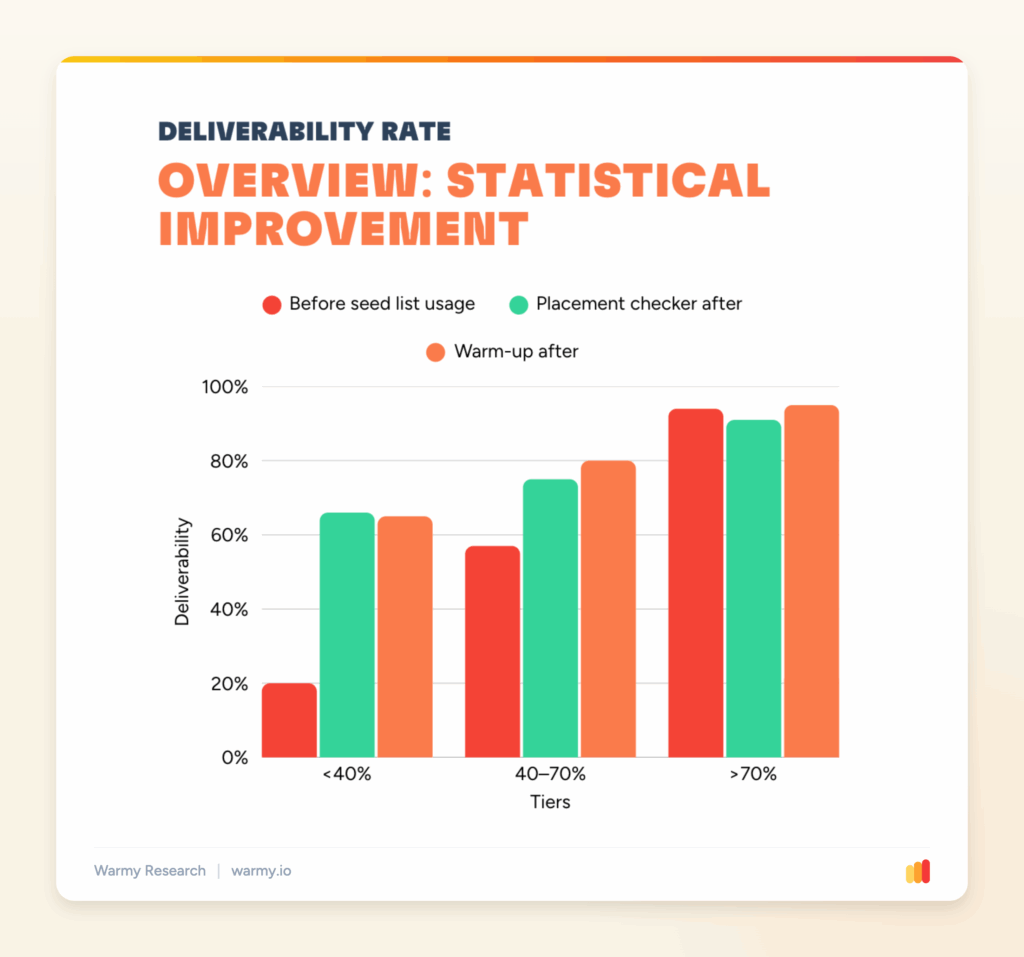
Deliverability rate by tier, before any intervention versus after placement checkers and after warm-up. Source: Warmy Research, June 2026.
The numbers at a glance:
| Sender tier | Before seed list usage | Placement checker after | Warm-up after |
|---|---|---|---|
| Below 40% | 20% | 66% (+46%) | 65% (+45%) |
| 40 to 70% | 57% | 75% (+18%) | 80% (+23%) |
| Above 70% | 94% | 91% (-3%) | 95% (+1%) |
- Below 40%: The biggest jump in the report. From a 20% baseline, both tools roughly tripled deliverability to 66% with placement checkers and 65% with warm-up.
- 40% to 70%: Steady gains from a solid start. Warm-up edged ahead at 80% against 75% for placement checkers.
- Above 70%: Already strong at 94%. Warm-up nudged it to 95% while placement checkers dipped to 91%, so there was little left to win.
How placement checkers moved inbox placement over 30 days
Snapshots tell you the outcome. The 30-day view shows how senders got there once seed list activation began on day 0.
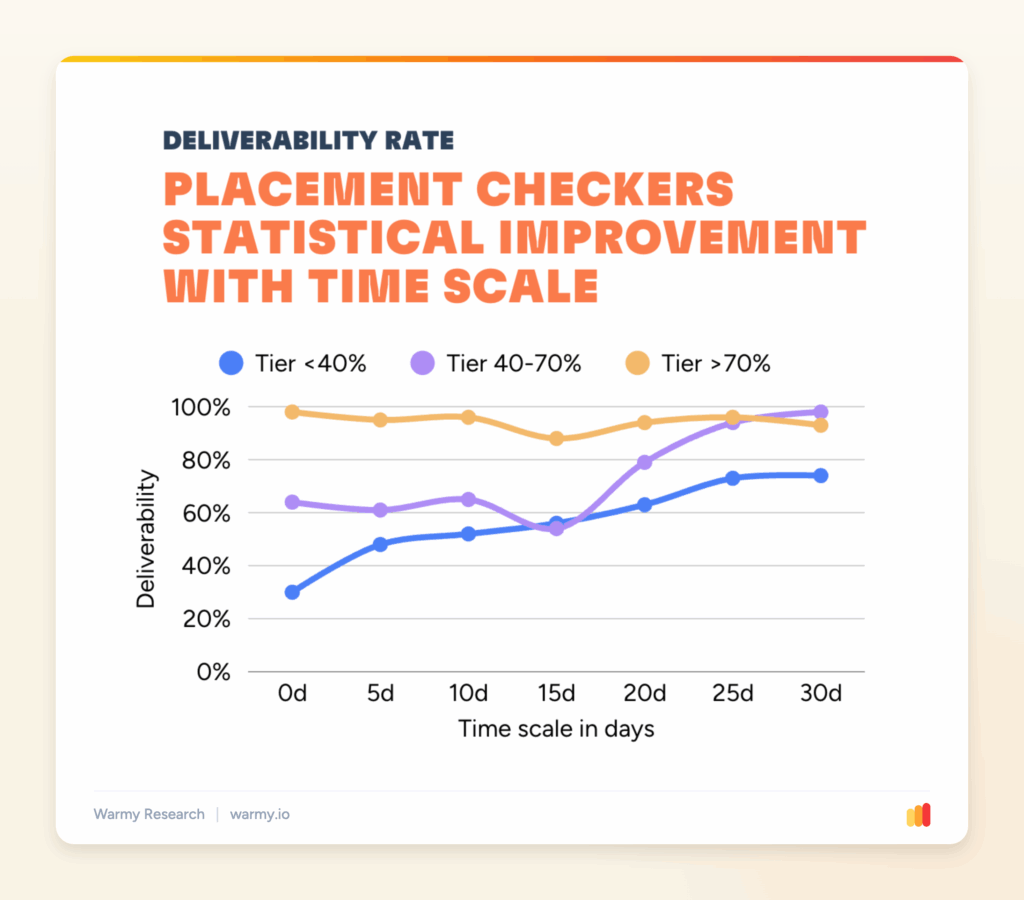
Placement checker trajectory across 30 days, by tier. Source: Warmy Research, June 2026.
- Tier below 40%: Started at 30% and climbed steadily to 74% by day 30, a gain of 44 points.
- Tier 40% to 70%: Started at 64% and reached 98% by day 30, a gain of 34 points.
- Tier above 70%: Started at 98% and settled at 93% by day 30, a 5-point decline that reflects normal variation at the top.
Measured this way, overall placement checker deliverability moved from 82% to 84%.
How email warm-up moved inbox placement over 30 days
Warm-up produced the steepest recovery curve of the study, especially for the senders who needed it most.
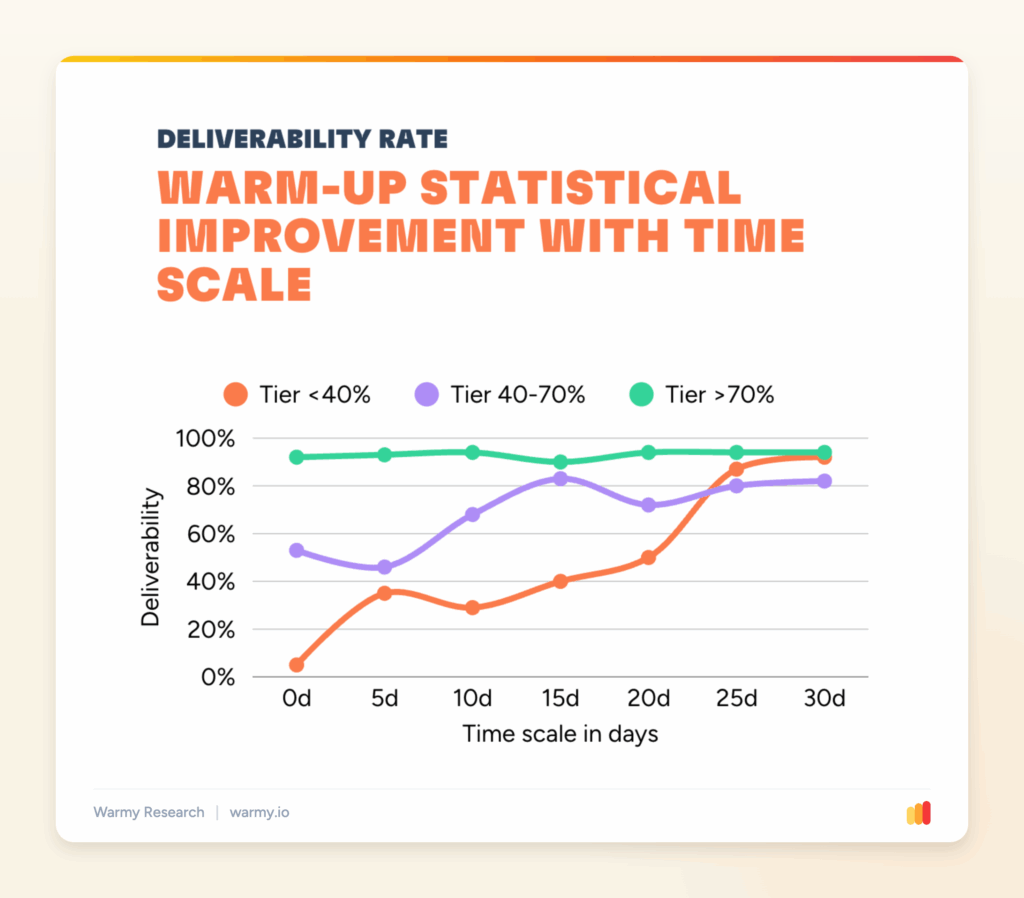
Warm-up trajectory across 30 days, by tier. Source: Warmy Research, June 2026.
- Tier below 40%: Started at 5% and climbed to 92% by day 30, a gain of 87 points.
- Tier 40% to 70%: Started at 53% and reached 82% by day 30, a gain of 29 points.
- Tier above 70%: Started at 92% and finished at 94%, a 2-point gain that confirms how little headroom strong senders have.
Measured this way, overall warm-up deliverability moved from 86% to 88%.
Seed list vs email warm-up, side by side
Both tools improve inbox placement, but they do different work and suit different moments. This comparison maps when each one earns its place.
| What to compare | Seed list | Email warm-up |
|---|---|---|
| Main job | Measures where mail lands and generates real engagement to build or restore reputation | Gradually raises sending volume so providers learn to trust the sender |
| Best starting point | Weak and mid-tier senders who need a placement baseline and a reputation lift | Weak and mid-tier senders rebuilding from low or damaged reputation |
| Strongest result in study | Below 40% tier: 20% to 66% | Below 40% tier: 5% to 92% over 30 days |
| Value for strong senders | Limited. Above 70% senders dipped to 91% | Marginal. Above 70% senders held at 95% |
| How they work together | Tells you the current placement and feeds engagement signals | Uses those trusted signals to safely scale real volume |
What the data actually tells us
- Your starting point predicts your gain. Weak senders below 40% had the most to recover and recovered the most. Strong senders above 70% had almost nothing to add.
- Warm-up is the stronger rescue tool for broken domains. The below 40% tier climbed from 5% to 92% over 30 days of warm-up, the single largest move in the study.
- Placement checkers and the seed list shine for weak and mid-tier senders. They supply the engagement signals and visibility that struggling domains lack, which is where most of their lift comes from.
- High-reputation senders should protect, not chase. Above 70%, the marginal gain is small and can even read as a slight dip, so the priority is consistent volume, engagement, and monitoring to catch a drop early.
Why Microsoft 365 senders see these patterns
These results line up with how Microsoft filters mail. Outlook and Microsoft 365 run messages through SmartScreen and Exchange Online Protection, which weigh sender reputation, authentication, engagement, and content together. Authentication alone does not guarantee the inbox.
Microsoft also keeps its sender scoring mostly private. Unlike Gmail, which exposes reputation in Postmaster Tools, Outlook reputation can only be inferred from outcomes such as inbox placement, engagement rates, and complaints. That is why senders so often see mail reach Gmail while the same message lands in Outlook Junk or the Other tab, and why steady positive engagement and consistent sending matter so much.
This is also why broken domains gain the most. A seed list feeds the genuine opens, clicks, and replies that Microsoft reads as trust, and warm-up raises volume slowly enough that the filters do not flag a sudden spike. A healthy domain already sends those signals, so it has far less to gain.
How to apply this to your own sending
Match the tool to your tier.
- If you are below 40%: Start warm-up immediately and run a seed list with placement checks alongside it. This is the combination that delivered the largest recovery in the study.
- If you are between 40% and 70%: Lean on warm-up to push toward the 80% range, and keep placement checks running so you can see exactly where mail is landing.
- If you are above 70%: Hold your gains. Keep volume and engagement consistent, and monitor placement so any decline shows up early, before it costs you the inbox.
Pro tip: For strong senders, the win is early warning, not extra lift. Set up placement monitoring with alerts so a dip surfaces within days, while consistent volume can still pull you back, rather than after a campaign has already landed in junk.
Whatever tier you are in, treat warm-up as ongoing rather than a one-time setup. Outlook reputation decays during idle periods, so stopping warm-up can slow a recovery or trigger new filtering.
If you want the full dataset, every chart, and the methodology behind these findings, download the complete Warmy Research Report and see exactly how each sender tier responds to an Outlook seed list and warm-up.