If your HubSpot emails are going to spam or getting blocked, the root cause almost always comes down to one of five issues: missing or broken authentication (SPF, DKIM, DMARC), a damaged sender reputation, a dirty contact list, poorly formatted content, or a cold domain that hasn’t been properly warmed up. Here’s what you need to do:
- Configure SPF, DKIM, and DMARC authentication.
- Check your IP type and sender reputation. If you’re on a shared IP and experiencing unexplained drops, consider upgrading to a dedicated IP.
- Run a free deliverability test to assess your current sender reputation score.
- Clean and segment your contact list. Remove all hard bounces, suppress contacts with no engagement in 90+ days, and enable HubSpot’s graymail suppression. Verify your list with an email validation tool before any large send. Never use purchased lists.
- Test and optimize your email content. Use Warmy’s Email Template Checker to score your email before sending. Avoid all-caps subject lines, excessive links, high image-to-text ratios, and missing unsubscribe links. Ensure your From address matches your authenticated domain.
- Warm up your sending domain. If you’re on a new or cold domain, use Warmy’s AI-driven warm-up tool to gradually build your sender reputation with ISPs. Start with low volumes and increase steadily over 30–60 days. Monitor inbox placement with Warmy’s free deliverability test throughout.
- Monitor your HubSpot Email Health score. Track bounce rates, spam complaint rates, and open trends month over month. Use Warmy’s free deliverability test alongside HubSpot’s native analytics for a complete picture.
What is HubSpot email deliverability and why does it keep breaking?
HubSpot email deliverability is one of the most common pain points for marketers using the platform. News flash—the problem rarely lies with HubSpot itself. It lies in how the account is configured and how the domain is being used.
Warmy is an AI-driven email warmup platform that helps businesses using HubSpot (and other ESPs) systematically rebuild their sender reputation and protect inbox placement. In this guide, we’re sharing everything you need to know to diagnose your deliverability issues and fix them for good.
For HubSpot users, there are three core factors that drive where your emails end up:
- Sender reputation. Think of this as your credit score with internet service providers (ISPs). Every bounce, spam complaint, and unsubscribe chips away at it. Every open and click builds it back up. Your reputation is domain-specific as it follows you even if you switch ESPs.
- Technical authentication. Without properly configured SPF, DKIM, and DMARC records, mailbox providers treat your emails as potential threats. Even a single misconfiguration can send your campaigns straight to the spam folder.
- Content & engagement. ISPs track how recipients interact with your emails over time. Low open rates signal that your emails are unwanted. Triggered spam complaints can permanently damage your sending reputation.
Not sure about your deliverability status? Take a free email deliverability test now.
The 5 most common HubSpot deliverability problems (and how to fix them)
1. Broken or missing email authentication
Authentication is one of the most commonly misconfigured factors in HubSpot deliverability. Technically, SPF, DKIM, and DMARC are not strictly required to send emails via HubSpot. However, you will not be able to send emails with your domain in the From address until you connect your domain to HubSpot via DKIM setup.
Without properly verified SPF, DKIM, and DMARC records, every email you send looks like a potential threat to mailbox providers. It doesn’t matter how clean your list is or how good your content is. If your authentication is broken, your emails won’t make it to the inbox.
There are three protocols working together here, and you need all three:
- DKIM (DomainKeys Identified Mail): adds a cryptographic signature to your emails so receiving servers can verify the message really came from your domain. HubSpot sets this up via two CNAME records in your DNS. Without DKIM, you can’t even use your own domain in the From address. Instead, HubSpot will replace it with a system-managed domain like user=yourcompany.com@hs-domain.com, which kills trust and engagement immediately.
- SPF (Sender Policy Framework): tells receiving servers which IP addresses are authorized to send email on behalf of your domain. HubSpot provides a dynamic include statement that automatically updates as their sending IPs change, so you never have to manually maintain it.
- DMARC (Domain-based Message Authentication, Reporting and Conformance): sits on top of SPF and DKIM and tells mailbox providers what to do with emails that fail those checks: deliver them anyway (none), send them to spam (quarantine), or reject them outright (reject). It also gives you aggregate reporting on how your domain is being used across the internet.
How to set these up in HubSpot:
- Go to Settings > Domains & URLs > Email Sending Domains
- Click Connect a domain and follow the in-app authentication wizard
- HubSpot will generate the DKIM and SPF records you need. Copy these exactly and add them to your DNS provider (GoDaddy, Cloudflare, Route 53, etc.)
- Add a DMARC TXT record separately. The bare minimum that satisfies Gmail and Yahoo’s requirements is: v=DMARC1; p=none;
- Wait for DNS propagation (can take up to 48 hours), then return to HubSpot to verify
Common authentication mistakes to avoid:
- Multiple SPF records. You can only have one SPF TXT record per domain. If you already have one for another provider (e.g. Google Workspace), don’t create a second record. Instead, add HubSpot’s include statement to the existing one, separated by a space: v=spf1 include:anotherprovider.com include:123456.spf03.hubspotemail.net -all
- Hard-coded IP addresses in SPF. HubSpot’s include statement dynamically pulls the correct IPs automatically. Adding hard-coded IPs alongside it can cause SPF failures and is not considered best practice.
- Multiple DMARC records. Just like SPF, you can only have one. If a receiving server finds more than one DMARC record on your domain, it immediately stops processing and your policy won’t be applied at all.
- Invalid DMARC values. The policy values are case-sensitive and must be lowercase. p=Quarantine will throw an error; p=quarantine is correct. The valid options are none, quarantine, and reject.
- Incorrectly formatted reporting addresses. If you include rua or ruf tags for DMARC reporting, the address must be in URI mailto format: rua=mailto:reporting@yourdomain.com, not just rua=reporting@yourdomain.com.
Pro Tip: Gmail and Yahoo now require DMARC, DKIM, and SPF to all be fully configured for any domain sending bulk emails. If you’re sending more than 5,000 emails per day to Gmail addresses and your DMARC record is missing or misconfigured, those emails will be bounced and categorized specifically as a “DMARC or Policy bounce” in HubSpot. Start with p=none to monitor without blocking anything, then graduate to p=quarantine once you’ve confirmed legitimate emails are passing authentication.
Generate valid records with Warmy’s free SPF Record Generator and free DMARC Record Generator.
2. Shared IP reputation damage
By default, most HubSpot accounts send from shared IP addresses. This means your deliverability is partly dependent on the sending behavior of thousands of other businesses on the same IP. So if another sender on your shared IP gets flagged for spam, you can feel the impact even if you’ve done nothing wrong.
| Factor | Shared IP | Dedicated IP |
|---|---|---|
| Who controls the reputation? | All senders on the IP | You alone |
| Best for | Lower-volume senders | High-volume senders (10K+ emails/month) |
| Risk | Other senders can damage your rates | Full responsibility on you |
| Warm-up required? | No (managed by HubSpot) | Yes — 40-day automated process |
| Cost | Included | Add-on purchase required |
If you’re experiencing unexplained deliverability drops and your own practices are solid, a shared IP issue may be the culprit. HubSpot does offer a dedicated IP add-on, which includes a 40-day automated warmup period to build your sender reputation from scratch.
3. A dirty or unengaged contact list
Your list quality directly determines your sender reputation. If you’re emailing contacts who haven’t engaged in 6–12 months, haven’t opted in properly, or have invalid addresses, you’re training ISPs to treat your domain as a spam source.
Signs your list needs cleaning:
- Hard bounce rate above 2%
- Spam complaint rate above 0.1%
- Open rates declining month over month
- HubSpot placing your account in a suspension state
What to do:
- Remove hard bounces immediately. HubSpot auto-suppresses these, but you should still audit them regularly.
- Segment unengaged contacts. Use HubSpot’s Sends since the last engagement property to identify contacts who haven’t opened anything in 90+ days.
- Enable graymail suppression. This HubSpot feature automatically excludes contacts who habitually ignore your emails which protects your reputation on autopilot.
- Never use purchased lists. HubSpot prohibits them outright, and they’re one of the fastest ways to destroy a domain’s reputation.
- Enable double opt-in for new subscribers to ensure every contact on your list actually wants to hear from you.
Pro Tip: Before any large send to a re-engaged or migrated list, run it through an email verification tool. Even a list that was clean 6 months ago can have 5–10% invalid addresses by now due to employee churn and domain changes.
Not sure how your current list is affecting your domain? Every Warmy plan comes with 10,000 free credits for the Email Validation Tool. Sign up today.
4. Email content that triggers spam filters
Even a perfectly configured domain with a pristine list can land in spam if the email content itself has words that trigger spam filters. ISP filtering algorithms have become sophisticated enough to flag patterns that go beyond obvious spam keywords.
Content issues that damage deliverability:
- Subject lines with excessive capitalization, exclamation marks, or overtly promotional language (“ACT NOW!!!”, “FREE OFFER INSIDE!”)
- Heavy HTML with complex nested tables or excessive CSS
- A high image-to-text ratio (emails that are mostly images with little text)
- Too many hyperlinks, especially to domains with poor reputations
- Missing or broken unsubscribe links
What good email content looks like:
- Clean, mobile-responsive design with balanced text and imagery
- A clear sender name and “From” address that matches your authenticated domain
- Personalization tokens that make each email feel 1:1
- A single clear call-to-action
Before any major send, check your template against spam filters. Use Warmy’s free Email Template Checker to score your email before you send.
5. Sending from a cold or damaged domain
If you’ve recently migrated to HubSpot from another ESP, launched a new sending domain, or haven’t sent emails in a while, your domain is essentially invisible to mailbox providers. Sending high volumes from a cold domain without warming it up first is a surefire way to destroy your deliverability before you even get started.
HubSpot recommends gradually increasing volume over 30–60 days when switching to a new domain. For dedicated IP users, they provide an automated 40-day warm-up program. But for most accounts on shared IPs or anyone who needs to repair a damaged reputation, you need a more active approach which is what Warmy.io offers.
How to use Warmy.io to fix HubSpot deliverability
Warmy is an AI-driven email warmup platform purpose-built to solve exactly this problem. It systematically improves your sender reputation by sending real emails from your account to its network of addresses, generating positive engagement signals that ISPs trust.
Here’s how it works:
- Connect your HubSpot sending domain to Warmy
- Warmy’s AI gradually increases sending volume, mimicking natural human behavior
- Emails exchanged through the network receive opens, replies, and positive signals
- Over time, ISPs recognize your domain as a trusted, engaged sender
- Your inbox placement rates improve consistently and sustainably
Warmy also offers a 7-day free trial, so you can test the impact on your deliverability metrics before committing. Beyond warmup, Warmy’s comprehensive suite of features make it easy to diagnose and fix the technical foundations of your deliverability:
Inbox placement test
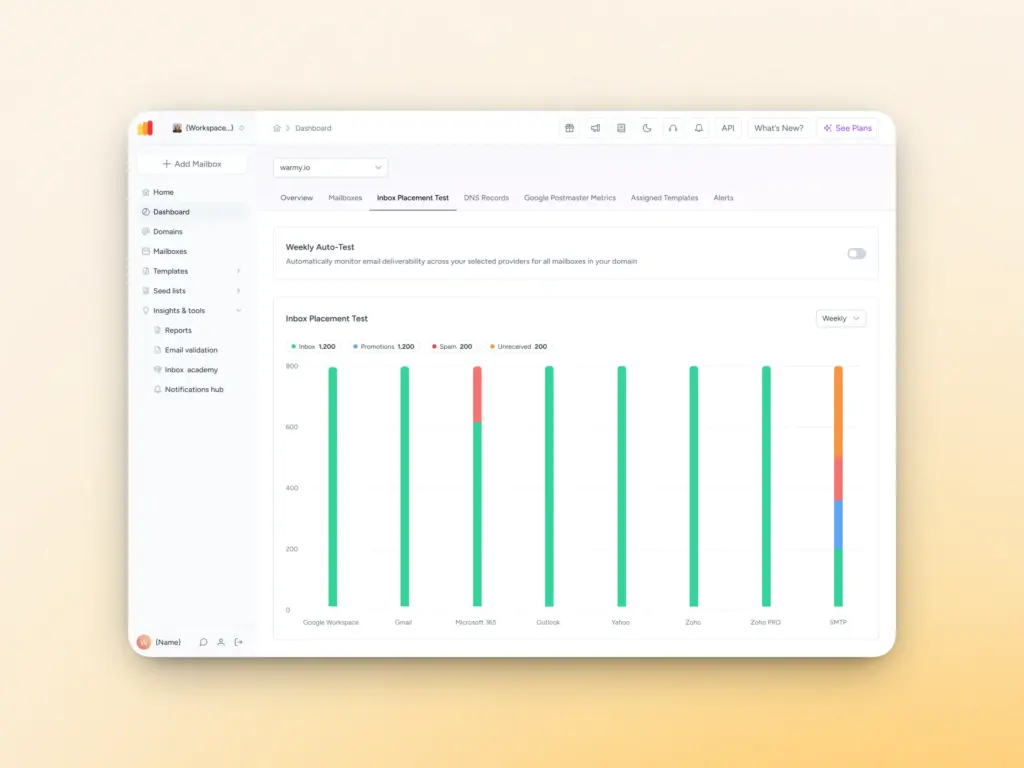
Before you can fix your deliverability, you need to know what to fix. Warmy’s free email deliverability test gives you an instant, detailed picture of your inbox placement across major providers like Gmail, Outlook, and Yahoo. The test results show you the exact percentage of your emails landing in the inbox, spam folder, promotions tab, or going unreceived entirely.
It also checks whether your domain or IP is listed on any blacklists, which is one of the most common and most damaging causes of sudden deliverability drops in HubSpot. It also verifies your SPF, DKIM, and DMARC authentication settings in one go, so you don’t have to cross-reference multiple tools to diagnose an authentication failure.
Run your free email deliverability test with Warmy today.
Domain Health Hub
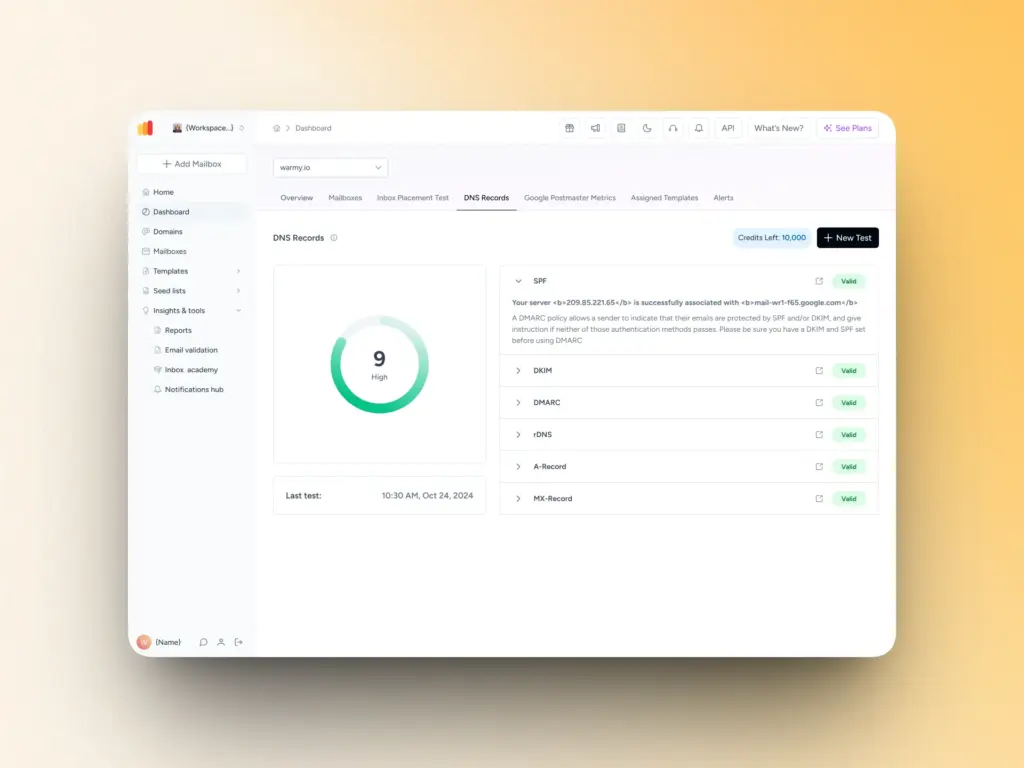
Warmy’s Domain Health Hub takes monitoring a level further. Rather than tracking individual email addresses, it gives you a strategic, domain-level view of your deliverability health across all your sending domains, from a single dashboard.
Here’s what it covers:
- Domain health score: A composite score built from your authentication status, blacklist presence, and inbox placement results, with weekly or monthly trend tracking so you can see whether things are improving or declining over time.
- Spam rate monitoring: Track spam complaint trends before they escalate into reputation damage.
- Full DNS validation: Instantly verify SPF, DKIM, DMARC, rDNS, MX, and A records in one place, so authentication gaps don’t slip through unnoticed.
- Multi-domain management: Monitor all your sending domains from one view and identify which ones need immediate attention.
- Per-domain reporting: Drill down into detailed health metrics, performance reports, and deliverability trends for any domain in your account.
For HubSpot users managing multiple brands, business units, or client accounts, this kind of domain-level visibility is difficult to get from HubSpot’s native dashboard alone.
AI-powered email warmup
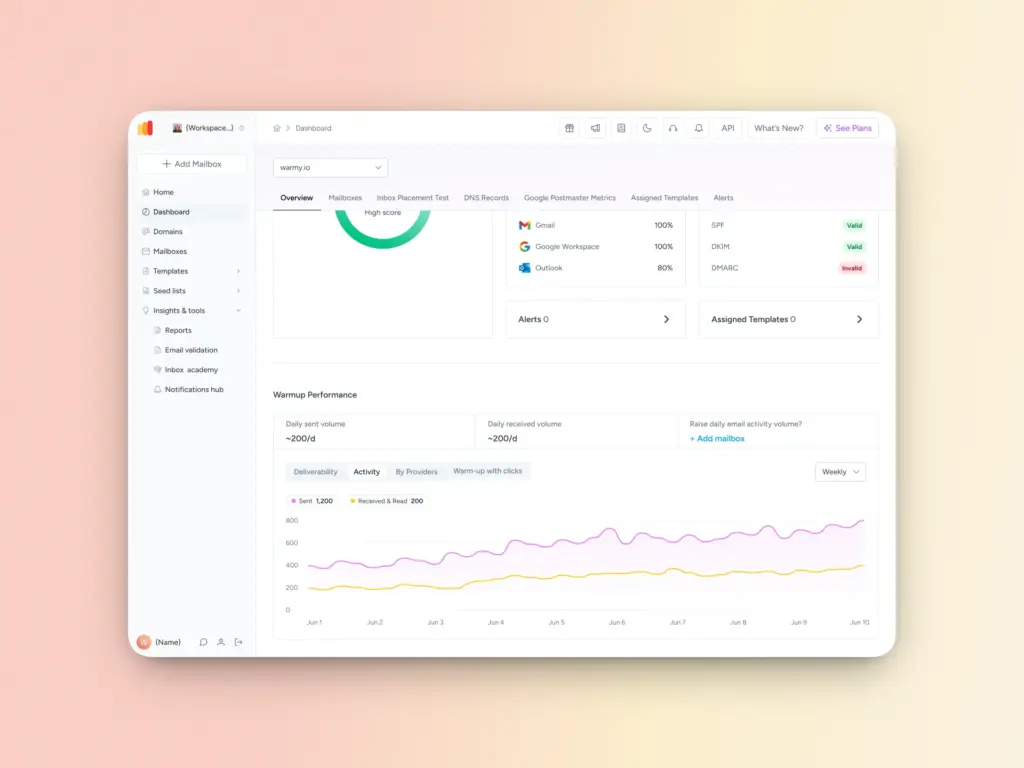
Even with perfect authentication and a clean list, a cold or damaged sender reputation will still send your emails to spam. This is where most HubSpot deliverability problems become a vicious cycle. Low engagement leads to worse placement, which leads to even lower engagement.
Warmy’s email warmup solution breaks that cycle. Here’s how it works:
- Connect your HubSpot sending domain to Warmy
- Warmy’s AI gradually increases your sending volume, mimicking natural human behavior to avoid triggering spam filters
- Emails exchanged through Warmy’s network are opened, scrolled through, replied to, and marked as important. If one lands in spam, it’s retrieved and marked as important to actively train ISPs to trust your domain
- Over time, mailbox providers recognize your domain as a legitimate, engaged sender
- Your inbox placement rates improve consistently and sustainably
Unlike traditional warmup tools that rely on fake or bot-generated interactions, Warmy uses real and trusted mailboxes that engage with your emails the way actual recipients would. The warmup also works across 30+ languages, so interactions look natural and relevant regardless of where your audience is based.
HubSpot’s built-in deliverability tools (and their limits)
HubSpot has invested heavily in deliverability infrastructure. Their platform offers an Email Health Tool with a health score out of 10, automatic bounce and spam complaint suppression.
These are genuinely useful tools but they have limits worth understanding:
| HubSpot Feature | What It Does Well | Where It Falls Short |
|---|---|---|
| Email Health Dashboard | Monitors your last 30 days of sending performance | Doesn’t explain why emails land in spam |
| Automatic Suppression | Automatically removes any contact that has already hard bounced, unsubscribed, or marked an email as spam. | Doesn’t verify emails before sending |
| Graymail Suppression | Automatically excludes any contacts who have not been engaging with your marketing emails | Doesn’t proactively rebuild sender reputation |
| Analytics | Clear, exportable reporting | Open rates may be inflated by email preview loading |
The gap these tools leave (particularly around domain warmup, proactive reputation building, and pre-send content testing) is where Warmy adds the most value.
HubSpot deliverability checklist: Fix it in order
Work through this checklist before your next send:
- Authenticate your domain: Make sure SPF, DKIM, and DMARC all configured and verified
- Connect your sending domain in HubSpot. Do this by going to Settings > Domains & URLs > Email Sending Domains
- Check your Email Health score. Aim for 7/10 or above
- Enable graymail suppression in your HubSpot email settings
- Clean your list. Remove hard bounces, unengaged contacts, and invalid addresses
- Test your email template. Check for spam triggers before sending
- Warm up your domain especially if you’re new to HubSpot or relaunching after inactivity.
- Monitor regularly using HubSpot’s health dashboard, Warmy’s free deliverability test, and Warmy’s Domain Health Hub.
Maximize HubSpot by making sure your domain is set up for deliverability success
Deliverability isn’t a one-time fix. It’s an ongoing discipline that sits underneath everything else you do in HubSpot. Your segmentation, your copy, your automation, workflows… none of it matters if your emails never make it to the inbox.
The good news is that most deliverability problems have clear, fixable causes. Tighten your authentication, keep your list clean, respect your recipients’ engagement signals, and give your domain the warmup runway it needs. Do those things consistently, and your sender reputation will reflect it.
Now, if you’re dealing with deliverability issues right now such as emails going to spam, open rates in freefall, bounce rates climbing, don’t wait and hope it corrects itself. Reputation damage compounds quickly and takes far longer to repair than it does to prevent.
Warmy gives you the tools to take control of your inbox placement and not just hope for it. Start your free 7-day trial today. No credit card required.
FAQ
Why are my HubSpot emails going to spam even though everything looks fine?
The most common cause is missing or misconfigured authentication, specifically DMARC. Even if SPF and DKIM are set up, Gmail and other major providers have become stricter about DMARC compliance. Check your DNS records and run a free deliverability test to identify the specific issue.
Does HubSpot warm up your domain automatically?
Only for dedicated IP users. HubSpot provides a 40-day automated warm-up for dedicated IP add-on purchases. If you’re on shared IPs (the default for most accounts), HubSpot manages the IP reputation but doesn’t warm up your specific domain. You need a tool like Warmy for that.
What is a good email deliverability rate in HubSpot?
The platform average is around 83.4% inbox placement. A healthy rate for most businesses is 90%+. If you’re consistently below 80%, you likely have a sender reputation or authentication problem worth investigating immediately.
How long does it take to fix a damaged sender reputation in HubSpot?
It depends on the severity of the damage. Minor issues (a recent bounce spike) may recover in 2–4 weeks with clean sending practices. More serious damage from high spam complaints or being blacklisted can take 60–90 days of careful, low-volume sending to repair. A domain warm-up tool like Warmy can accelerate this process significantly.
Can switching ESPs fix my deliverability problems?
No, and this is one of the most common misconceptions. Your sender reputation is tied to your domain, not your ESP. Moving from HubSpot to another platform without fixing the underlying domain reputation issues will result in the same problems following you over.