


SMTP Error 502 5.5.2 is a permanent delivery failure that occurs when the receiving mail server cannot recognize a command from the sending client. To prevent this issue from happening again, senders must:
- Update email client to the latest version and review SMTP command syntax
- Go over SMTP logs and confirm which specific command is being rejected
- Use tools specifically built for SMTP testing or tools that can handle line endings properly
- For server managers, review configuration and security policies to ensure necessary commands are enabled.
- Contact recipients’ server admin to confirm which commands are supported.
- Check the provider’s required port and match your client’s encryption settings.
Experiencing SMTP Error 502 5.5.2 consistently (whether on Outlook, Gmail, Yahoo or other providers) may lead to long term damage to sender reputation. This article will discuss why this error happens in the first place and how to prevent it from happening again.
What does it mean when I get an SMTP Error 502 5.5.2?
SMTP Error 502 5.5.2 – “Command not recognized” is a permanent delivery failure. It means the recipient’s mail server has captured a command from your email client that it does not recognize.
Imagine you’re in a foreign country and you speak to a local using your own language, then they respond in a different language of their own. You can’t communicate if you both speak different languages.
It’s the same with mail servers:
- Both your server and your recipient’s mail server should speak the same Simple Mail Transfer Protocol (SMTP). The protocol has rules about which commands exist, and it has a strict format that they should follow.
- Not following these rules leads to a server not receiving a match that it expects. Thus, there is a large chance that the sender will get the SMTP Error 502 5.5.2 on Gmail, Outlook, Yahoo, or other providers.
Since this error is permanent, you can’t just “wait it out.” You need to do something on your end before you attempt to resend the email or campaign.
SMTP Error 502 5.5.2 vs SMTP Error 5.5.1: what’s the difference?
- SMTP Error 502 5.5.1 occurs when the server lacks support for a valid command (an example is unsupported AUTH method or STARTTLS on minimal relays). This is about capability gaps, not malformed input.
- SMTP Error 502 5.5.2 occurs when the server cannot recognize the command due to syntax errors, invalid arguments, or protocol mismatches (e.g., malformed EHLO or blank lines). Often logs as “command not recognized.”
In simple terms:
- 502 5.5.1 says “I know what you’re asking for, but I don’t do that”
- 502 5.5.2 says “I don’t understand what you just said.”
How to fix SMTP Error 502 5.5.2
Find yourself asking “How do I fix SMTP Error 502 5.5.2?” Since this is a permanent error, resolving this is more urgent compared to temporary SMTP errors. Here are the common reasons why SMTP Error 502 5.5.2 occurs and how to solve them.
Cause | Solution |
Syntax errors in SMTP commands |
|
Incorrect command sequence |
|
Carriage return and line feed issues |
|
Outdated email software |
|
Server configuration restrictions |
|
Port and authentication mismatches |
|
Solution #1: Correct any syntax errors in SMTP commands
Email communication follows strict formatting protocols, and even the slightest deviations can cause the server to reject commands it doesn’t recognize. Examples of syntax problems include:
- Incorrect spelling of commands
- Missing or extra spaces
- Wrong parameters
- Improper formatting of email addresses and headers
Email clients like Outlook or Thunderbird handle command formatting automatically. However, bugs in the software, corruption in configuration files, or compatibility issues between client and server can cause malformed commands to be sent.
How to fix this:
- Update your email client to the latest or most updated version. Some software updates often include fixes for bugs that cause improper command formatting.
- If you’re using custom scripts or third-party applications to send email, review your SMTP command syntax carefully. Pay close attention to proper spelling and spacing as well as correct parameters for each command.
- Commands should be in uppercase (HELO, EHLO, MAIL FROM, RCPT TO, DATA) and follow the exact sequence and formatting specified in RFC 5321.
Solution #2: Implement correct command sequence
During the email handshake, the SMTP requires commands to be sent in a specific order.
- HELO or EHLO – Initiate the connection with the mail server.
- Authentication – If the server requires it, provide login credentials at this stage.
- MAIL FROM – Specify the sender’s email address.
- RCPT TO – Specify the recipient(s) of the email.
- DATA – Transmit the message content, including headers and body.
- QUIT – Close the connection once the message has been sent.
If commands are sent out of this order, the server may return a 502 5.5.2 error. For example, sending MAIL FROM before HELO/EHLO, or attempting DATA before specifying any recipients, will trigger a rejection because the server cannot interpret the commands in the wrong context.
How to fix this:
- Review the full error message and check your SMTP logs to confirm which specific command is being rejected.
- Remember to look for patterns when the error occurs during the email sending process.
- If you are developing custom email functionality, make sure your code follows the proper SMTP command sequence.
- Utilize established email libraries and avoid writing raw SMTP commands manually, since these libraries handle sequencing correctly.
Solution #3: Correct any issues with carriage return and line feed issues
This is a subtle but surprisingly common cause of 502 5.5.2 errors:
- SMTP requires that each command end with a “carriage return” followed by a “line feed” (CRLF, represented as \r\n).
- Different operating systems handle line endings differently: Unix/Linux systems use just line feed (\n), while Windows uses carriage return and line feed (\r\n), and older Mac systems used just carriage return (\r).
When your email client or script sends commands with incorrect line endings, the server may not recognize where one command ends and the next begins.
How to fix this:
- If you’re testing SMTP connections manually with third party tools, your terminal might not send the correct CRLF sequences when you hit Enter. Perfectly valid commands can suddenly look like errors.
- Use tools built for SMTP testing or email client debugging tools that can handle line endings properly.
- If you are scripting your own tests, do not simply rely on your language’s default newline character, instead end every SMTP command with CRLF (\r\n) explicitly.
Solution #4: Make sure your email software is updated
When email client software is outdated:
- It may have bugs causing it to generate malformed SMTP commands.
- It might not be able to properly implement SMTP standards.
- It could also have programming errors in their command generation logic.
- It might be incompatible with modern mail servers that have stricter validation rules.
Similarly, outdated mail server software on the receiving end might not recognize valid commands from modern clients, particularly if extended SMTP (ESMTP) features are being used.
How to fix this
- Update both your email client and server to the latest versions. Apply patches and check compatibility with your provider.
- If the software is unsupported, migrate to a modern alternative.
Solution #5: Check for any server configuration restrictions
Your mail server may have configuration settings that disable or restrict certain SMTP commands, even valid ones. Administrators sometimes disable specific commands for security reasons or due to resource constraints.
When your client attempts to use these disabled commands, the server responds with 502 5.5.2. This can happen with commands like VRFY (verify user exists), EXPN (expand mailing list), or even certain authentication methods that the server administrator has chosen not to support.
How to fix this
- If you manage the server: Review configuration and security policies to ensure needed commands are enabled.
- If you’re sending to another domain: Contact their admin to confirm which SMTP commands are supported.
Solution #6: Fix all port and authentication mismatches
Using the wrong port for the type of connection you’re attempting can cause command recognition issues.
- Port 25 is for standard SMTP relay
- Port 587 is for mail submission with STARTTLS encryption
- Port 465 is for SMTP over SSL/TLS.
Each port has different expectations about which commands will be sent and in what order. If you’re connecting to port 587 but your client isn’t sending STARTTLS to upgrade to an encrypted connection when the server requires it, the commands may be rejected.
How to fix this
- Check your provider’s required port.
- Match your client’s encryption settings:
- TLS/STARTTLS for 587
- SSL for 465
- Ensure your client sends the proper commands for that connection type.
Prevent SMTP errors from happening with the help of Warmy, the all-in-one email deliverability solution. Sign up for a free 7-day trial here.
SMTP Error 502 5.5.2 – How does it affect your email deliverability?
SMTP Error 502 5.5.2 is a permanent failure and experiencing this often can damage your sender reputation. Mailbox providers may end up sending you to spam or worse—blacklisted.
Consistent hard bounces are not a good sign for your email reputation. (According to HubSpot, top-performing campaigns have 2% bounce rates. So if your bounce rates are higher than this, it’s already a cause for alarm.)
ISPs and ESPs view persistent SMTP errors as a sign of poor technical management, outdated infrastructure, or potentially malicious activity.
Now here’s the clincher: A damaged sender reputation doesn’t have an easy fix. Even if you resolve this error, the damage will still linger. Just because you’ve fixed this error, it doesn’t mean your emails will suddenly be successfully delivered.
How to secure your email deliverability and sender reputation with Warmy.io
There are many tools like Mailivery or Warmup Inbox who promise automatic email warmup to improve deliverability. However, the damage of Error 502 5.5.2 can be much deeper and implementing just warmup won’t cut it.

Warmy.io is the only email deliverability solution that uses Adeline, a proprietary AI, to analyze sender data real-time, conduct AI-powered email warmup, and monitor other contributors to domain health. Using Warmy, senders can protect themselves from the damage that Error 502 5.5.2 can inflict.
Here are just some of the specific features of Warmy that protect overall domain health:
AI-powered email warmup builds and establishes strong sender reputation

When you have a strong, established reputation, occasional technical errors like 502 5.5.2 won’t immediately destroy your deliverability. Servers are more forgiving of temporary or one-off technical problems when they trust your domain.
Warmy’s progressive email warmup system gradually establishes your sending domain as legitimate and trustworthy through carefully orchestrated engagement patterns unique to your domain and recipients’ sending behavior.
This builds credit with email service providers, creating a “buffer” that protects your overall deliverability even when isolated technical problems occur. A well-warmed domain with proven legitimacy receives more tolerance from mail servers when configuration issues or compatibility problems arise.
Curious to know where you stand right now and how various providers see you? Try Warmy’s free email deliverability test.
Real-time data monitoring of domain health and inbox placement
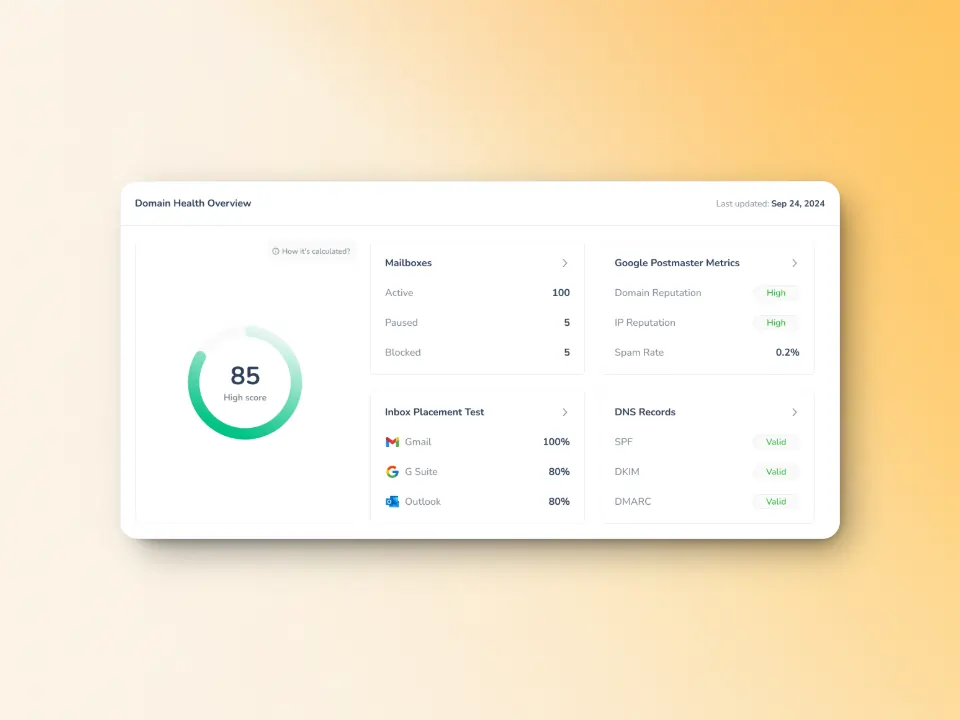
One of the biggest challenges with SMTP errors is resolving them before they cause serious damage. If you’re sending hundreds or thousands of emails, a handful of 502 5.5.2 errors might slip through unnoticed, slowly degrading your sender score without obvious symptoms.
Aside from Warmy’s email deliverability test, the Domain Health Hub also provides a domain-level dashboard to assess your current sending reputation and identify potential vulnerabilities in your email infrastructure. Together, senders can have access to:
- Inbox placement analysis: the percentage of your emails that end up in the spam folder, promotions tab, inbox, and even the unreceived ones. This data spans multiple providers too. So if you notice that a large percentage of your spam placements are coming from Gmail, you may want to conduct a targeted warmup for Gmail recipients.
- Domain health score: A score based on factors like authentication, blacklist status, and inbox placement.
- Spam rate trends: Data on spam rate trends and overall deliverability performance (weekly and monthly)
- Blacklist status: Learn if your domain or IP is listed on any blacklists so you can proceed with the delisting process right away.
- Authentication verification: Assess your email reputation and verifies your email authentication settings such as SPF, DKIM, and DMARC.
When something changes that could lead to SMTP errors or deliverability problems, you see it immediately. This proactive monitoring means you can address issues before they affect your email campaigns or business communications.
Email authentication that prevents configuration errors
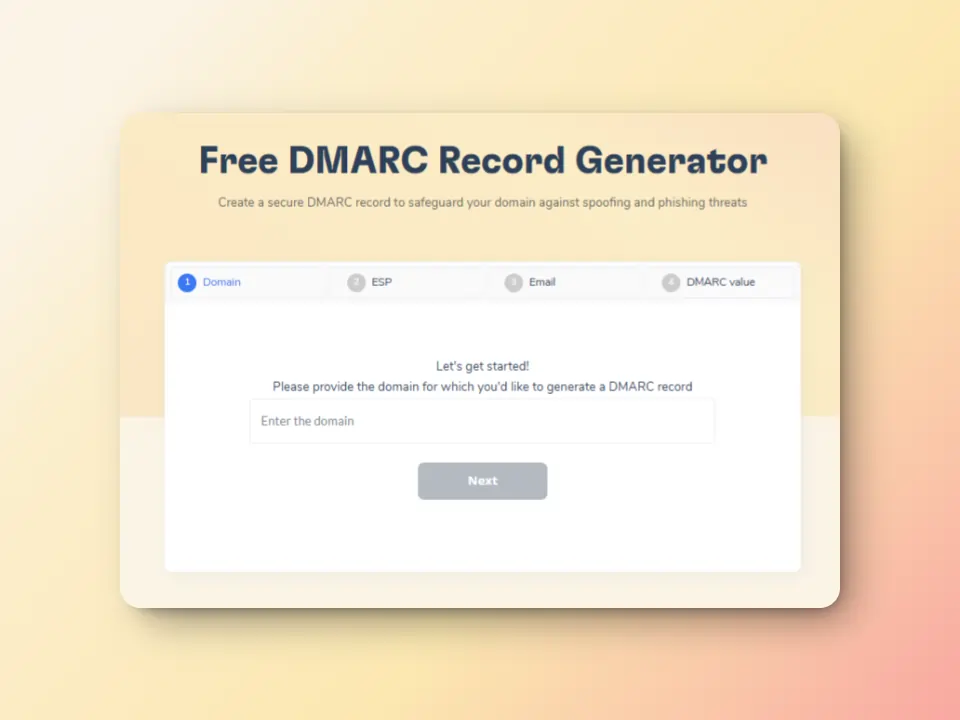
Many SMTP errors, including 502 5.5.2, can be traced back to authentication and DNS configuration problems. Incorrect SPF records, missing DKIM signatures, or improperly configured DMARC policies can cause mail servers to behave unpredictably, sometimes rejecting commands or flagging messages as suspicious.
Aside from checking authentication protocols, Warmy also provides free SPF Record Generator and free DMARC Record Generator tools that ensure your authentication protocols are configured correctly. These tools help you avoid the configuration mistakes that can trigger SMTP errors and deliverability problems.
Keep your domain health in tiptop shape for the long-term with Warmy.io
When it comes down to it, the best way to avoid and prevent SMTP errors like 502 5.5.2 and even 535, 550, or even 421 from occurring is to maintain a positive sender reputation and domain health.
Not only does Warmy help avoid these errors, it is also the most advanced email deliverability solution. It is created intentionally to help senders make the most of their email efforts and maximize inbox placement. With a comprehensive suite of AI-driven features, Warmy is an all-in-one email deliverability solution that gives your domains, IPs, and emails the best chance for success.
Explore more on how Warmy.io can help you build a sender reputation that gets your emails into the inbox, right where they belong. Try Warmy for free today.
FAQ
What is SMTP Error 502 5.5.2?
SMTP Error 502 5.5.2 is a permanent delivery failure that happens when the receiving mail server doesn’t recognize a command from the sending client.
What causes SMTP Error 502 5.5.2?
SMTP Error 502 5.5.2 is caused by syntax errors in SMTP commands, incorrect command sequence, carriage return and line feed issues, outdated email software, server configuration restrictions, and port-authentication mismatch,
Is SMTP Error 502 5.5.2 a temporary or permanent error?
Yes, SMTP Error 502 5.5.2 is a permanent error. This means the email will not be delivered unless the issue is fixed on the sender’s side. The underlying command, syntax, or configuration issue must be corrected before successful delivery can occur.
What is the difference between SMTP Error 502 5.5.2 and 502 5.5.1?
Error 502 5.5.1 means the server recognizes the command but does not support it, often due to missing capabilities or disabled features. Error 502 5.5.2 means the server cannot recognize or parse the command at all, usually because of syntax errors, incorrect command order, or protocol mismatches.
Can repeated 502 5.5.2 errors affect my email deliverability?
Yes. Repeated 502 5.5.2 errors can damage your sender reputation over time. Mailbox providers interpret consistent permanent failures as signs of poor configuration or unreliable sending practices. This can lead to increased spam filtering, reduced inbox placement, or outright blocking even for legitimate emails. Monitoring domain health and fixing issues early is critical to protecting long-term deliverability.


![Text on a white background reads SMTP Error 510: How to Fix smtp error 510 [SOLVED] in bold black and red font.](https://warmy-blog-wordpress-bucket.s3.amazonaws.com/wp-content/uploads/2026/01/30053325/SMTP-510.webp)
![Text graphic displays "SMTP Error 500 5.5.1 How to Fix It [SOLVED]" on a white background, accented by a soft orange blur on the right, highlighting common solutions for SMTP Error 500 5.5.1 issues.](https://warmy-blog-wordpress-bucket.s3.amazonaws.com/wp-content/uploads/2026/01/27070922/SMTP-500-5.5.1.webp)
![Text graphic with the message: SMTP Error 500 5.3.3 How to Fix It [SOLVED] in bold and colored fonts on a white background with a soft gradient in the lower right corner.](https://warmy-blog-wordpress-bucket.s3.amazonaws.com/wp-content/uploads/2026/01/26104416/SMTP-500-5.3.3.webp)



