One error code that senders wish they never receive is SMTP Error Code 500 5.0.0, an error message that requires immediate attention.
So what does this entail? And how can you go ahead in resolving it? We will explore the causes of SMTP Error 500 5.0.0, how to resolve it, and what you can do to avoid it.
What does SMTP Error 500 5.0.0 mean and why should you be concerned?
SMTP Error 500 represents a permanent failure, while the enhanced status code 5.0.0 specifies the type of error that you are receiving. The “5.0.0” designation marks it as a hard bounce, meaning the receiving mail server has completely rejected your email and won’t accept it without changes.
These codes together would not be enough, however. You also need to take note of the next messages to further isolate what you should do next. Here are some of the typical messages that come with it.
- “Unknown or unimplemented command”
- “Syntax error, command unrecognized”
- “Command parameter not implemented”
Basically, if you translate this into human language, the server is telling you “I don’t understand what you’re asking me to do, and I can’t process this email.”
Related Reading: The Ultimate Guide to SMTP Error Codes, What They Mean, and How to Fix Them
SMTP Error codes that contain 4XX pertains to errors that can be resolved with a simple retry or patience or even just waiting it out. But the 500-series errors are more alarming since they are permanent.
No matter how many times you resend it, your emails will not push through or be delivered unless you understand the cause of the problem and fix the underlying issue.
More importantly, repeated SMTP 500 errors can damage your sender reputation, leading to:
- Lower inbox placement rates
- Increased spam filtering
- Domain and IP blacklisting
- Reduced email engagement overall
Common causes of SMTP Error 500 5.0.0
Finding out what the potential triggers of this error are can help you move forward on the type of resolution you should do next. Remember that the SMTP 500-series errors signal that something is fundamentally wrong—either with:
- The sending mail client or server
- The structure of the email being sent
- The authentication or DNS configuration
- The receiving server’s rules or security filters
Until the root cause is fixed, further attempts will fail in the same way. Here are some of the common causes you
1. Malformed SMTP commands
Your email client or server may be sending improperly formatted SMTP commands that violate protocol standards. This includes invalid syntax in the email transaction process or other commands the receiving server doesn’t recognize.
Typical issues include:
- Invalid characters in the header or body
- Missing From/To fields
- Incorrect line breaks or MIME formatting
- Unsupported SMTP verbs (such as outdated AUTH commands)
This occurs often with custom integrations, older CRMs, or misconfigured email clients.
2. Invalid email headers or formatting
Email headers must follow strict RFC standards. Common header issues include:
- Incorrectly formatted From or To addresses
- Missing or malformed Subject lines
- Invalid MIME types or content encoding
- Improper line breaks or special characters
Related Reading: Everything You Need To Know About Email Headers
3. Misconfigured DNS or authentication
It is important to configure your authentication and DNS settings. A minute issue in DNS configuration can cause a major and permanent rejection of your emails. This is why it is important to configure your authentication protocols and DNS.
Key triggers include:
- SPF records not authorizing your sending server: The receiving server checks SPF and rejects mail from unauthorized IPs
- DKIM signatures missing or corrupted: Invalid or absent DKIM signatures fail validation
- DMARC alignment failures: When SPF or DKIM don’t align with your From domain
- Pointing MX records to the wrong mail system: Misdirected mail routing causes rejection
4. Server-side misconfigurations
Problems on either the sending or receiving server can trigger this error:
- DNS issues: Incorrect MX records or missing PTR records
- Expired or invalid SSL/TLS certificates: Causing authentication failures
- Unsupported authentication methods: The server doesn’t support your AUTH mechanism
- Outdated server software: Running incompatible SMTP versions
5. Anti-spam blocks and rate limits
High-volume sending can trigger protective measures:
- Rate limits exceeded, causing the server to reject commands as spam
- IP address blacklisting
- Reputation-based filtering that blocks suspicious patterns
- Anti-abuse mechanisms mistaking legitimate traffic for attacks
How to fix SMTP Error 500 5.0.0
Once you’ve uncovered the cause of the error, you can go ahead and try to resolve it. Follow these systematic steps to diagnose and resolve the error:
Step 1: Inspect your SMTP logs
The message after the SMTP error and enhanced status code will lead you to the correct path. Look for the exact command that failed: Is it an “unknown” or “unimplemented” command? Or a Syntax error. You can move one from there.
If it is an unknown or unimplemented command, you can either
- Switch to standard SMTP
- Shorten your command lines
- Update client software to match server capabilities
While syntax errors means that you need to validate your email headers or ensure proper line endings.
Note: Client tools, ESP dashboards, and cPanel log viewers typically provide access to this detail.
Step 2: Validate email headers and formatting
Make sure that your emails comply with RFC (Request For Comments) standards:
- Check that From, To, and Reply-To fields use proper email address format
- Verify subject lines don’t contain illegal characters
- Confirm proper MIME encoding for attachments
- Test with plain text emails first to eliminate formatting variables
Step 3: Verify authentication settings
One of the potential reasons why your recipient server is unable to recognize your message is due to possible misconfiguration of your authentication settings. Remember to check the following:
- SPF records: Sender Policy Framework helps specify which mail servers are authorized to send emails for a domain. Ensuring a configured SPF record gives your email the authorization to other servers that you can send emails.
- DKIM Signatures: DomainKeys Identified Mail are seals added to email headers by your server and can be verified by recipients via a public key. Many email users — especially business emails — enforce a strict authentication requirement in their DKIM, which can lead to SMTP error 500 5.0.0. This is an opportunity for you to ensure that this is properly verified.
- DMARC Policy: Domain-based Message Authentication, Reporting, and Conformance is an email authentication protocol that builds on SPF and DKIM to protect domains from spoofing by specifying policies for handling failed authentications.Strict DMARC policies cause 500 5.0.0 rejects for non-compliant mail
Step 4: Check DNS configuration
DNS issues often masquerade as SMTP errors:
- Verify MX records point to the correct mail servers
- Confirm PTR (reverse DNS) records exist for your sending IP
- Check for DNS propagation delays if you recently made changes
- Use DNS lookup tools to validate all records
Step 5: Test with simplified messages
Strip down your email to basics:
- Send a plain text message with minimal content
- Remove all attachments temporarily
- Use a simple, standard-compliant format
- If this succeeds, gradually add complexity back to isolate the problem
Step 6: Contact the recipient’s administrator
If you’ve exhausted all options on your end, the issue may lie with the receiving server:
- Provide them with complete error logs showing the 500 5.0.0 rejection
- Ask about their SMTP server configuration and any recent changes
- Inquire whether your domain or IP is blocked
- Request they check their server logs for additional error details
How Warmy paves the path to avoiding permanent errors
Warmy.io offers a set of features and tools that will stop you from being hit by a brick wall which is the error SMTP 500 5.0.0 and its other potential varieties. With a strong focus on ensuring email deliverability and reputation building, Warmy has a way to address other factors that may affect your ability to attain the best and ideal email health.
Email warmup strengthens domain identity

A large portion of 500-series errors can be traced back to misaligned or missing authentication. Warmy’s AI-powered email warmup solution gradually establishes your domain as trustworthy, not by brute force, but by pacing introductions — mailbox to mailbox, domain to domain — in a way that ESPs interpret as legitimate activity.
When providers recognize your domain as authentic, they’re far less likely to reject a command outright.
Related Reading: Warm Up vs Warm Up With Clicks: What 2025 Data Reveals About Real Inbox Gains
Domain Health Hub keeps authentication mistakes from slipping through

SMTP 500 errors love showing up when SPF, DKIM, or DMARC are out of tune. A single malformed signing key or missing authorization can trigger permanent rejection.
Warmy keeps an eye on your domain health by checking DNS records, tracking blacklists, and monitoring deliverability trends. It ensures your domain stays in good standing, preventing emails from getting lost in spam folders.
Inbox Placement Test keeps an eye on your deliverability
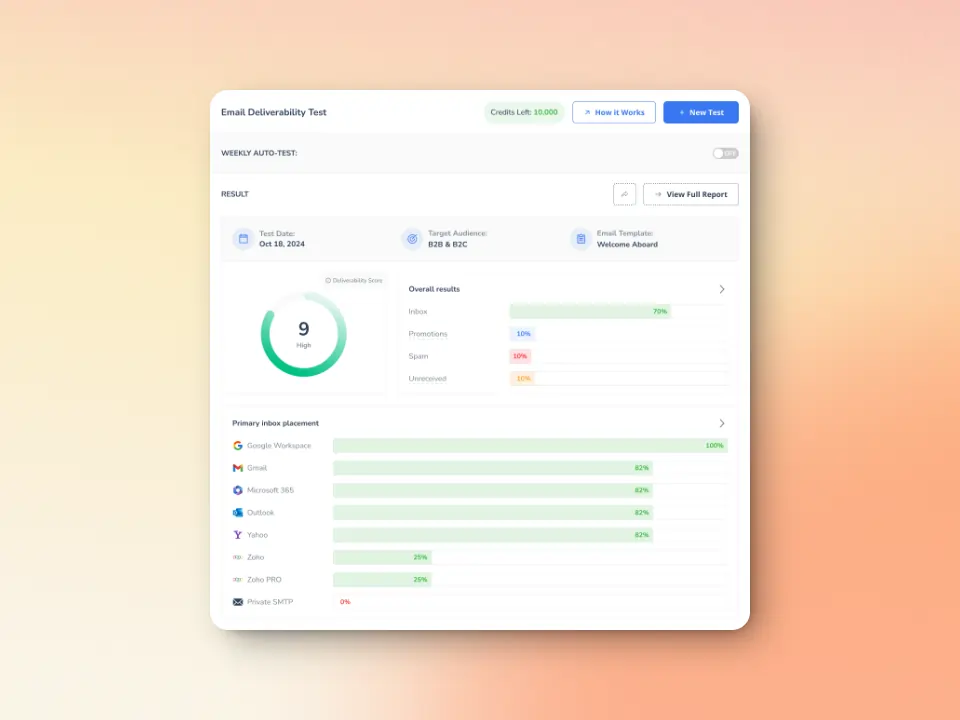
Malformed headers, broken message structures, or DNS routing gaps look amateurish to a receiving mail server. Warmy’s free inbox placement test and deliverability diagnostics grant real feedback loops — where your email lands, and how servers process it on the way.
- Evaluate sender reputation, domain health, bounce rates, and spam risks, which impact whether emails reach recipients.
- Measure inbox placement across providers like Gmail, Outlook, Yahoo, and more
- Detects technical issues with email authentication like SPF, DKIM, and DMARC, which are critical for ensuring messages are recognized as legitimate.
- Identify other potential issues affecting your email deliverability
Say goodbye to the weight and consequences of SMTP Error 500 5.0.0
SMTP Error 500 5.0.0 is a serious but solvable delivery problem. By systematically checking your SMTP commands, email formatting, authentication settings, and server configuration, you can identify and fix the root cause. Remember that prevention through proper setup, authentication, and gradual sending practices like those offered by Warmy will help you avoid these errors entirely.
Don’t let permanent delivery failures damage your sender reputation. Address SMTP 500 errors promptly, implement best practices, and maintain a healthy email infrastructure to ensure your messages reach their destination every time.
Try Warmy for Free and boost your email performance!
FAQ
What is SMTP Error 500 5.0.0, and why does it occur?
SMTP Error 500 5.0.0 indicates a permanent failure in email delivery. The “5.0.0” designation refers to a hard bounce, where the receiving server has completely rejected your email. It typically arises from issues like malformed SMTP commands, improper email headers, DNS or authentication misconfigurations, or server-side errors.
How can I resolve SMTP Error 500 5.0.0?
To resolve SMTP Error 500 5.0.0, you should:
Inspect your SMTP logs for errors.
Validate email headers and ensure they comply with RFC standards.
Check your SPF, DKIM, and DMARC authentication settings.
Verify your DNS configuration, ensuring correct MX and PTR records.
Test with simplified messages to isolate the issue.
Contact the recipient’s server administrator if the issue persists.
Can repeated SMTP 500 errors affect my email reputation?
Yes, repeated SMTP Error 500 5.0.0 can harm your sender reputation, which can result in lower inbox placement rates, increased spam filtering, blacklisting of your domain or IP, and reduced email engagement overall.
How does Warmy help prevent SMTP Error 500 5.0.0?
Warmy’s AI-powered email warm-up gradually builds your domain’s reputation, ensuring authentic activity is recognized by ESPs, reducing the likelihood of errors like SMTP 500. It also monitors your domain’s health, checks DNS records, and ensures proper email authentication (SPF, DKIM, DMARC), helping prevent SMTP errors before they occur.