



Email is the most widely used business communication channel, and that makes it a prime target for cyberattacks including phishing, data interception, and spoofing. In 2024, more than 94% of malware was delivered via email, making secure transmission a baseline requirement rather than an optional upgrade.
SMTP connection encryption protects your emails from interception, tampering, and spoofing during transit. TLS 1.2 and TLS 1.3 are the current standards, implemented via STARTTLS on port 587 or SMTPS on port 465. Encryption alone does not guarantee inbox placement: SPF, DKIM, DMARC authentication, and a strong sender reputation are also required. This guide explains how each layer works and what you need to configure.
Without encryption, emails travel as plaintext across the internet, where anyone with network access can read, alter, or steal them. SMTP (Simple Mail Transfer Protocol) is the standard protocol for sending emails, but it was designed in an era before email security was a concern. Encryption is the first layer of protection you must add on top of it.
What is SMTP and why it needs encryption
SMTP is the protocol that does the heavy lifting when it comes to routing an email from the sender’s email server to the intended recipient’s inbox. But SMTP only makes sure that emails get delivered, it does not offer security by default.
- SMTP is based on the client-server model, where the sending mail server is the client, and the receiving mail server is the server.
- It uses commands and responses, like HELO, MAIL FROM, and RCPT TO.
There is no default encryption built into Simple Mail Transfer Protocol (SMTP), meaning that attackers are able to intercept, alter and spoof SMTP messages.
To secure this process, encryption mechanisms are being used such as TLS (Transport Layer Security) and SSL (Secure Sockets Layer). SMTP sends emails in plaintext by default, which is its biggest disadvantage, as it is prone to many security threats, such as:
- Man-in-the-Middle (MITM) Attacks: Cybercriminals can intercept your emails while in transit, modifying or stealing sensitive data
- Eavesdropping: Unencrypted emails are susceptible to reading by unauthorized entities. These are done through intercepting and not using strong encryption such as SSL/TLS to secure the communication between the server and the client.
- Spoofing and phishing: The adversaries use an authentic sender, deceiving the user into exposing sensitive information.
- Compliance risks: Email communications involving personal or financial data are subject to encryption as per regulations such as GDPR, HIPAA, and PCI-DSS.
How SMTP encryption works
Overview of TLS and SSL
SSL (Deprecated) was initially used for securing email and web traffic, SSL has been replaced by TLS for email due to security vulnerabilities. TLS (Current Standard) encrypts email connections and ensures data integrity. It is used in modern email security settings. Both are cryptographic protocols that encrypt email transmissions, preventing unauthorized access.
The SMTP encryption process follows these steps:
- A mail server attempts to establish a connection with another mail server.
- The sending server confirms that the recipient’s server supports STARTTLS (a command that allows encryption to take place)
- In case STARTTLS is supported, communication is encrypted through TLS.
- TLS secures the connection, making it impossible to intercept the email content during transmission.
The role of STARTTLS
STARTTLS is an SMTP extension to upgrade a plain text connection to an encrypted connection using TLS. Most modern email providers support it, like Google, Microsoft or Yahoo!
Without STARTTLS, emails travel as plain text and anyone with access to the network path can read them. With STARTTLS enabled, emails are encrypted in transit. One important limitation: STARTTLS is opportunistic by default, meaning a connection will proceed without encryption if the receiving server does not support it. That is why MTA-STS (covered below) exists to enforce encryption rather than merely request it.
Pro Tip: Use port 587 with STARTTLS for outbound email submission and port 465 for SMTPS (SMTP over SSL). Avoid port 25 for client-to-server connections as it is reserved for server-to-server relay and is blocked by most ISPs for outbound mail to prevent spam.
SMTP encryption protocols and best practices
Choose the right encryption protocol
- SSL 3.0 and TLS 1.0/1.1 are deprecated and have known weaknesses
- TLS 1.2 is widely used and offers robust encryption..
- The latest release, TLS 1.3, brings improvements in security and performance.
Recommendation: Use TLS 1.3 when possible, but TLS 1.2 is still secure for most email providers.
Here is a quick comparison of the main encryption options:
| Protocol | Status | Use case | Port |
|---|---|---|---|
| TLS 1.3 | Current best | All modern servers | 587 / 465 |
| TLS 1.2 | Widely supported | Fallback for older servers | 587 / 465 |
| TLS 1.0 / 1.1 | Deprecated | Do not use | N/A |
| SSL 3.0 | Deprecated | Do not use | N/A |
Configure SMTP with encryption
EIf you enable TLS encryption, email sent through Yahoo!, Gmail, and Microsoft are safe during transmission. Each provider has step-by-step configurations that we will cover below.
1. Enabling TLS encryption on Gmail
Gmail automatically enforces TLS encryption whenever possible, but you can ensure your outgoing and incoming emails are protected by checking your settings.
For sending emails using Gmail’s SMTP server with TLS:
- SMTP Server: smtp.gmail.com
- SMTP Port: 587 (TLS)
- Authentication: Required
- Username: Your Gmail address
- Password: Your Google account password or App Password (if 2FA is enabled)
To check if TLS is working in Gmail:
- Open Gmail and click on Compose.
- In the recipient field, enter an email address.
- Click the lock icon next to the recipient’s email (if enabled).
- If it’s green, the email is encrypted with TLS.If it’s red, the email is not encrypted.
2. Enabling TLS encryption on Yahoo! mail
Yahoo! Mail also supports TLS encryption by default, but you can configure it manually when using an external email client. For transmission of emails via Yahoo! SMTP with TLS:
- SMTP Server: smtp.mail.yahoo.com
- Port: 465 or 587 (TLS)
- Authentication: Required
- Username: Your Yahoo email address
- Password: Your Yahoo password or App Password (if 2FA is enabled)
To verify if TLS is active in Yahoo Mail:
- Log into your Yahoo Mail account.
- Go to Settings → More Settings → Security and Privacy.
- Ensure Secure Mail Transfer is enabled.
3. Enabling TLS encryption on Outlook (Microsoft 365)
Outlook (Microsoft 365) requires senders to use TLS encryption for sending emails securely.
For sending emails via Outlook SMTP with TLS:
- SMTP Server: smtp.office365.com
- Port: 587 (TLS)
- Authentication: Required
- Username: Your Outlook email address
- Password: Your Outlook password or App Password (if 2FA is enabled)
To ensure TLS is enabled in Outlook:
- Open Outlook and go to File → Account Settings.
- Select your email account and click Change.
- Click More Settings → Advanced Tab.
- Set Outgoing Server (SMTP) to Port 587.
- Choose STARTTLS as the encryption type.
- Save and restart Outlook.
If you encounter errors during configuration, Warmy’s SMTP error code guide covers the most common failure codes and step-by-step fixes so you can resolve connection issues quickly.
Not sure if your email is being encrypted and delivered to the inbox? Run Warmy’s free Email Deliverability Test to check your inbox placement, authentication records, and blacklist status in one pass.
Email compliance and security standards
Data regulation with strengthened security applies to businesses that handle sensitive information to reduce the risk of data breaches, phishing, and identity theft. Just like how the email authentication protocols help to ensure the integrity of email and protect organizations against email spoofing and other cyber attacks.
Security regulations
Many international regulations also mandate the encryption of email communications, email authentication, and protection of personal and financial data. Noncompliance can lead to exorbitant fines, reputation damage, and legal implications. The major ones are:
- General Data Protection Regulation (GDPR) any organization that deals with the personal data of European Union (EU) citizens, no matter where the business is located. All emails that contain personal data should be encrypted, to mitigate the risk of unauthorized access. Also, the GDPR talks about only gathering and storing the data that’s necessary, and reporting of data breaches immediately.
- Health Insurance Portability and Accountability Act (HIPAA) for health providers, insurance companies, and any organization dealing with medical records.
- Payment Card Industry Data Security Standard (PCI-DSS) This standard applies to companies handling credit card transactions and financial information. Examples of provisions include no storage of credit card details in emails and TLS encryption must be enabled for any email with financial details.
If your business handles EU customer data, the intersection of GDPR and email authentication is worth understanding in depth. Warmy’s GDPR and email deliverability guide explains how authentication, list hygiene, and warmup all contribute to compliance.
Email authentication protocols
However, even with encryption, organizations need email authentication to protect themselves from spoofing and phishing with impersonation. Authentication ensures that emails come from legitimate sources and are not altered during transmission.
- Sender Policy Framework (SPF) mechanism that checks if the sender of an email is authorized to send emails from the domain. Essentially, the SPF record (TXT record) is added to the domain’s DNS, listing all authorized email servers. This in turn prevents email spoofing, as unauthorized senders will be blocked from sending mail using your domain.
- DomainKeys Identified Mail (DKIM) uses cryptographic signatures to check that an email message was not changed in transit. A DKIM signature is added in the email header by the sending email server, which is then verified in the recipient’s server against a public DKIM key of the domain. DKIM prevents email tampering, phishing, and email fraud.
- Domain-based Message Authentication, Reporting & Conformance (DMARC) protocol that works on top of SPF & DKIM and provides an enforcement policy for email authentication.
Pro Tip: Authentication is the floor, not the ceiling. You can have perfect SPF, DKIM, and DMARC records and still land in spam if your sender reputation is weak. Combine authentication with consistent engagement signals – AI-driven warmup builds the inbox trust that authentication alone cannot provide.
For a complete walkthrough of authentication setup, see Warmy’s modern guide to authentication and inbox warmup, which covers SPF, DKIM, and DMARC alignment as well as the warmup strategies that build lasting inbox trust.
The future of secure email transmission: our bold predictions
Cyber threats are becoming more sophisticated each year. Traditional security measures have helped mitigate risks, but phishing, data spoofing, and breaches continue to evolve. SMTP AUTH mechanism selection and OAuth2 adoption are already reshaping how senders prove identity at the protocol level. Below are the trends shaping the next generation of email security.
End-to-end email encryption rising
The SMTP encryption goes from the sender to the mailbox, where it is encrypted in motion but mail content is not encrypted at rest. This means that email providers can still view and read emails saved in their systems. End-to-end encryption (E2EE) means that only the person sending an email and the person receiving it can read it, so nobody, not even their email providers and hackers, can intercept their messages.
Adoption of MTA-STS and DANE for stronger encryption
While TLS encryption via STARTTLS is widely used, it still has vulnerabilities – Downgrade Attacks can force emails to be sent without encryption. To counteract this, two new SMTP security standards are gaining traction:
- MTA-STS (Mail Transfer Agent Strict Transport Security) provides a platform where email providers can enforce TLS to exchange emails. If they don’t support TLS, then they are rejected. This makes it difficult for an attacker to utilize insecure SMTP connections during a man-in-the-middle (MITM) attack.
- DANE (DNS-Based Authentication of Named Entities) uses DNSSEC (Domain Name System Security Extensions) to authenticate TLS certificates, preventing certificate forgery and achieving a more robust encryption validation than what TLS offers by default.
For senders moving high-volume email over IPv6, encryption requirements are evolving further. Warmy’s guide to SMTP over IPv6 explains the security and deliverability implications of the IPv4-to-IPv6 transition.
Evolution of DMARC, SPF, and DKIM Authentication
Future improvements to email authentication include:
- DMARC Alignment Enforcement: More stringent policies that will outright reject unauthorized email rather than sending it to the spam folder.
- BIMI (Brand Indicators for Message Identification): Enables authenticated senders to display their registered brand logos in emails for enhanced trust and engagement.
Pro Tip: Check whether your domain is listed on any spam blacklists as part of your regular maintenance. A single blacklist entry can override all your encryption and authentication work, causing deliverability to drop overnight. Warmy’s free Email Deliverability Test scans your domain against major blacklists and flags issues before they affect your campaigns.
How Warmy.io helps you cover all bases
While SMTP (SMTP with TLS encryption) is essential for securing email transmission, it is not a complete solution for email security and deliverability. Even with encryption, emails can still be compromised by:
- Phishing attacks using lookalike domains that trick recipients into sharing credentials.
- Malicious attachments containing viruses or ransomware.
- Fraudulent links that redirect to phishing websites.
- Social engineering tactics used to manipulate users.
- Spoofed emails sent from unauthorized servers impersonating legitimate businesses.
Why email security requires more than just encryption
SMTP encryption ensures that emails are protected in transit, but it does not prevent attackers from sending fraudulent emails that bypass security filters. Without proper authentication, attackers can still send emails from a company’s domain, damaging brand reputation and increasing spam complaints. Poor sender reputation, lack of email warming, and missing deliverability configurations can cause legitimate emails to land in spam – even if they are encrypted.
That is the gap Warmy closes. Warmy is an AI-driven email warmup and deliverability platform that automatically builds your sender reputation, improves inbox placement, and keeps your emails out of spam, no technical expertise required. Even after all your security configuration is correct, a new or cold domain needs a warmup period before inbox providers will trust it at scale.
Understanding how your SMTP stack interacts with deliverability is critical for high-volume senders. Warmy’s guide to SMTP STARTTLS errors covers the most common TLS-related configuration failures and how to fix them without disrupting your sending.
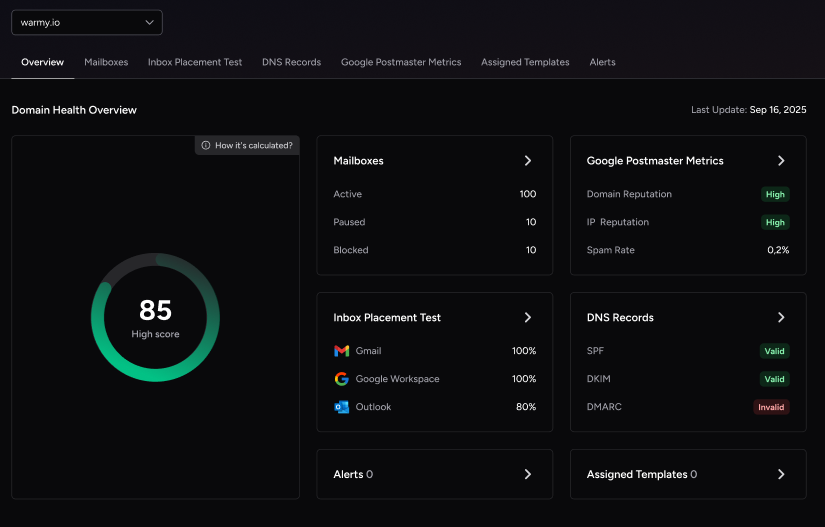
Ensuring emails reach the inbox, not spam
Even if an email is securely transmitted, it can still be flagged as spam by email providers due to other factors. Warmy.io optimizes inbox placement by:
- Automating the process of warming up email domains: Based on mailbox health, Warmy increases email volume gradually to build trust with email providers.
- Mimicking human-like interactions: Sending auto-generated personalized warmup emails that simulate real conversations. Emails sent through Warmy receive automated replies, are marked as important, and stay out of spam folders. Here’s a really cool feature – even if an email ends up in Spam, these are manually removed and then marked as important to improve future deliverability.
- Automating domain warmup: Adeline AI, Warmy’s proprietary AI engine, builds a personalized warmup schedule for each mailbox, gradually increasing send volume while simulating real human engagement across a network of 1M+ real mailboxes.
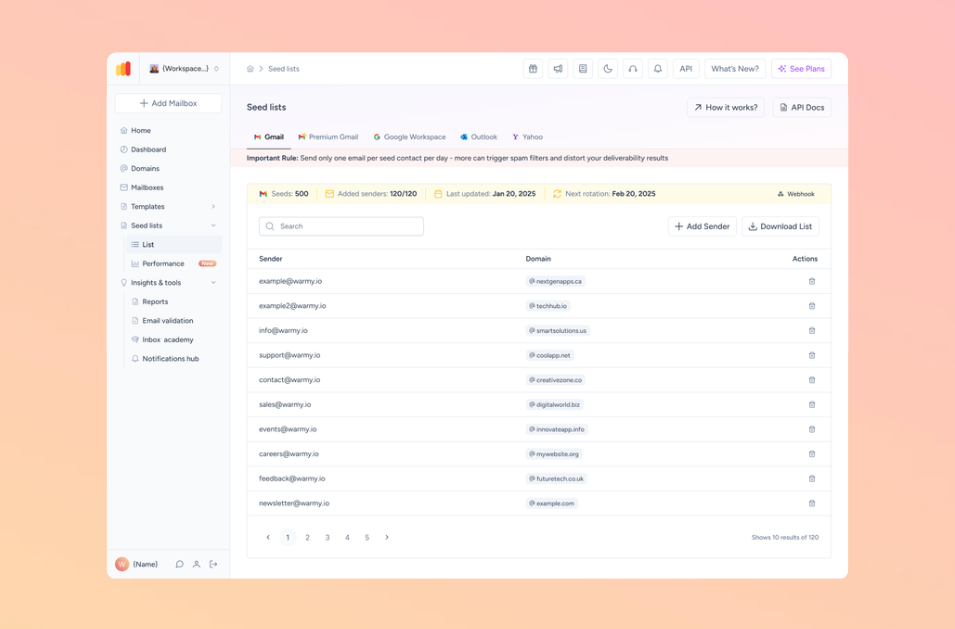
Leveraging an advanced seed list: Warmy’s seed list consists of actual email addresses. These enable real behavior to ensure emails are opened, scrolled, and clicked. This helps build a positive sender reputation and foundation for future campaigns.
Providing free tools to help with authentication
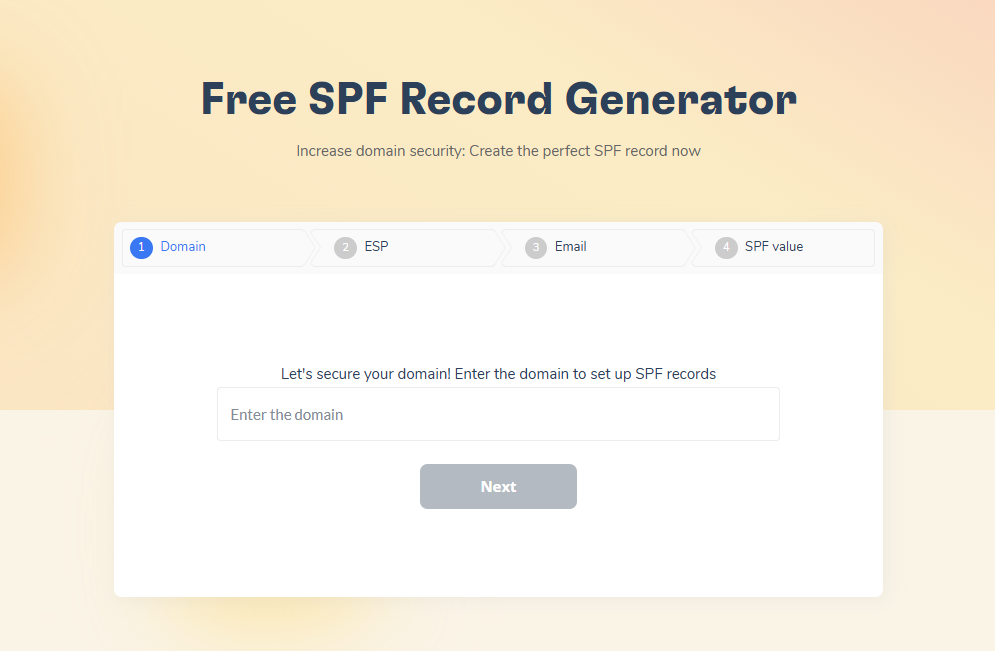
- The Free SPF Record Generator helps users create robust SPF records to prevent email spoofing and enhancing deliverability.
- The Free DMARC Record Generator helps users create a DMARC record to reduce the probability of phishing attacks. It does this by preventing unauthorized use of the domain in phishing attempts.
- Warmy also offers a free Email Template Checker that scans your email content for spam trigger words, formatting issues, and structural problems before you send. It is also available as a Chrome Extension so you can check templates directly inside Gmail before launching a campaign.
Comprehensive email deliverability testing
Most businesses don’t realize they have email deliverability issues until emails start landing in spam and they’re left wondering why. Warmy.io conducts email deliverability tests (for free) to identify and fix potential issues before they impact email performance.
How Warmy’s email deliverability test works:
- Analyzes inbox placement: Determines the percentage of your emails that land in Inbox, Promotions, or Spam.
- Provides actionable insights: Identifies blacklists, authentication issues, and domain reputation problems.
Blacklist monitoring: Informs users if their domain is on certain blacklists, so the delisting process can commence ASAP
Final thoughts: Why Warmy.io is the ultimate solution
Ensuring email encryption is just one part of a strong email deliverability strategy. Warmy.io goes beyond encryption by improving email reputation, optimizing inbox placement, and ensuring long-term deliverability success.
With AI-driven warmup, deliverability testing, and advanced domain health monitoring, Warmy ensures that your emails are not only secure but also reach the inbox – where they truly belong.
Want to protect your email reputation and maximize email deliverability? Start using Warmy.io today!











