Most senders find out they have an email deliverability issue the hard way: a campaign they spent weeks building lands in spam on day one. Open rates tank, replies dry up, and no meetings get booked. By the time that happens, the decision was already made long before the first send.
Inbox providers don’t wait for your first cold email to form an opinion. They’ve been evaluating your domain since it was registered: how old it is, whether authentication records are in place, whether anyone has ever engaged with this address before. A domain with no sending history doesn’t get the benefit of the doubt. It gets filtered.
Email warmup is how you build that history before it costs you. This guide covers everything you need to know: what warmup actually is, why skipping it is one of the most costly mistakes in cold outreach, and how to do it correctly.
What is email warmup?
Email warmup is the process of gradually building a positive sender reputation for a new or inactive email account before you start sending at volume. You’re slowly introducing your domain to inbox providers like Gmail, Outlook, and Yahoo, and giving them enough engagement history to trust that your emails belong in the inbox, not the spam folder.
This matters most for cold email, outreach, and marketing. Any scenario where you’re sending to people who haven’t already opted into a relationship with your domain.
Inbox providers don’t make inbox placement decisions in a vacuum. They evaluate a pattern of signals over time:
- Sending volume and patterns: how many emails, how often, and how consistently
- Engagement rates: opens, replies, and clicks from real recipients
- Domain age: how long the domain has been active and sending
- Spam complaint rates: how often recipients flag your mail as unwanted
- Bounce rates: how many addresses on your list are invalid
- Authentication record health: whether SPF, DKIM, and DMARC are correctly configured
A new domain has none of this history. Sending hundreds of emails from a brand-new account looks exactly like how spam operations behave, and the inbox placement damage that follows can take months to reverse. Warmup is the process that earns the sending history providers need before they’ll classify your domain as legitimate.
Not sure where your emails are currently landing in the first place? Run a free inbox placement test with Warmy to see your split across primary inbox, Promotions, and spam across Gmail, Outlook, and Yahoo before you start any campaign. Run the test now.
What happens if you skip warmup?
If you skip warmup, there’s a bigger chance of your campaigns landing in the spam folder.
The more you send without warmup, the lower your inbox placement rate becomes as each unengaged and unread message compounds the negative signal. By the time you notice the problem, the damage is layered: mailbox provider algorithms have already formed a low-trust assessment of your domain that a single good campaign cannot undo.
Rebuilding a burned domain can be slower and more difficult than simply starting fresh with a new one. This means every campaign, every contact list, and every piece of copy you built around that domain has to be reconsidered.
This is not a worst-case scenario. It is what consistently happens to senders who skip the warmup process, regardless of how clean their content or how well-configured their authentication records are.
How to warm up your email and domain
A proper warmup runs 4–8 weeks for a new domain, assuming you do not skip any step. Every phase — authentication setup, gradual volume scaling, engagement monitoring — contributes to the reputation your domain carries into campaigns.
There are two approaches: manual and automated.
1. Manual email warmup
Done manually, the process starts small and builds up gradually. Here’s an example:
- On day one, you send a handful of emails (maybe 10 or 20) to people you know will actually engage: colleagues, contacts, anyone likely to open, reply, and occasionally click a link.
- The next day you send a few more. The day after, a few more than that. You keep a spreadsheet. You track who opened, who replied, whether anything bounced. You log in to Postmaster Tools to monitor your domain reputation.
- You check with your colleagues whether any of your test sends ended up in spam. If they did, they can manually retrieve them and mark them as important, because that rescue signal matters.
This process goes on for weeks. How long does it take to warm up a new domain? Four weeks minimum for a new domain. Sometimes eight.
Every day requires active attention. This involves adjusting volume based on what the metrics are telling you, rotating through different engaged contacts so the engagement pattern looks varied, and avoiding any spike that might look like a sudden blast. The gradual ramp is the whole point and it’s what makes the growth look organic.
The engagement signals accumulate, inbox providers begin recognizing your domain, and when you send campaigns at real volume, your reputation is solid.
Manual warmup works for very low volumes and early reputation testing. But it is genuinely time-consuming. For a single domain managed carefully, manual warmup demands daily attention across the full 4–8 week period. For anyone managing multiple domains or running warmup alongside live campaign work, it scales into a significant operational burden fast. Miss a day, rush the ramp, or skip the spam rescues, and you risk undoing weeks of work.
That’s why most teams at any serious sending volume don’t do this by hand.
2. Automated warmup
For any real campaign setup, automated email warmup is the practical choice. Email warmup tools can run consistently in the background without requiring daily manual sends, scales beyond what your personal network can support, and generates engagement signals at a volume that actually moves the reputation needle.
It basically automates the process of building sender reputation. Inbox providers keep close track of sending volumes from new addresses. Any sudden increase in sending volume from a domain with no prior history is treated as suspicious behavior so warmup tools address this by starting slowly and scaling volume gradually. That way, the growth curve looks like organic engagement rather than a blast campaign.
Warmy’s internal research found that standard warmup alone produces a 4.56% increase in inbox placement rate. But when warmup interactions include real link clicks (not just opens and replies), that figure rises to 37.30%. This is why engagement depth matters, not just volume.
The core mechanisms warmup tools use:
- Reputation building: Connect your inbox to a trusted network of addresses that exchange emails generating positive signals like opens, replies, saves, spam rescues. ESPs interpret consistent positive engagement as evidence that the sender is legitimate and wanted.
- Volume ramp-up: Start at 10–50 emails per day and scale by 20–50% daily over 2–8 weeks, mirroring organic growth rather than a mass campaign pattern.
- Engagement simulation: Automate the interactions like replies, prioritizations, spam rescues that train ISP algorithms to treat your domain favorably.
- Spam rescue: When a warmup email lands in spam, it is manually retrieved and marked as important, a direct credibility signal to ESPs that the sender is not a spammer.
Manual vs. automated warmup: How they compare
| Aspect | Manual Warmup | Automated Warmup (e.g., Warmy.io) |
|---|---|---|
| Daily Effort | High; requires active sending and monitoring every day | Low; runs in background after initial setup |
| Consistency | Variable and depends on your execution | Algorithmic and continuous |
| Scale | Limited by personal contacts (~50–200/day) | Network-backed, scales to thousands per day safely. Warmy is even capable of sending millions of warmup emails per day. |
| Spam Rescue | Manual cleanup; easy to miss signals | Automated detection and retrieval on every cycle |
| Feedback Loops | Requires separate ISP enrollment (Postmaster, etc.) | Built into dashboard with real-time monitoring |
| Best For | Very low volume or early reputation testing | Production domains and real cold email campaigns |
Pro Tip: One of the most common warmup mistakes is treating it as a setup step you complete once and then turn off once your reputation is solid. The moment campaigns start running, sender reputation becomes a moving target. Spam complaint rates change, engagement patterns shift, ISP algorithms update. Keeping warmup running alongside live campaigns is what sustains inbox placement over time, not just during the initial ramp. Most deliverability problems that appear weeks into a campaign are traceable to warm-up that stopped too early.
What other factors aside from email warmup affect email deliverability?
Warmup is the foundation, but it doesn’t work in isolation. Even a well-warmed domain will underperform if the infrastructure underneath it is misconfigured and inbox providers check both layers independently.
The authentication foundation: SPF, DKIM, and DMARC
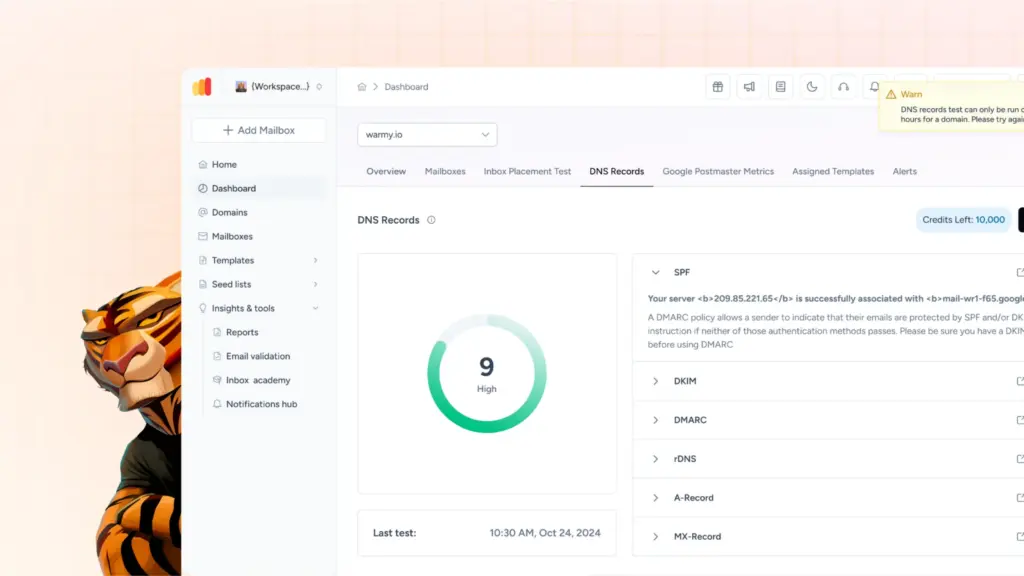
Getting your authentication right isn’t an optional extra step. It’s the prerequisite that makes everything else worth doing.
Gmail’s Sender Guidelines require spam complaint rates below 0.3% (with best practice at 0.1%), and Yahoo enforces the same thresholds. These requirements apply alongside, not instead of, proper SPF, DKIM, and DMARC configuration. Meeting the engagement side while failing the authentication side still results in filtering.
Get the infrastructure right before any warmup begins. Here’s what you should know:
- DKIM (DomainKeys Identified Mail) attaches a cryptographic signature to outgoing emails that lets the receiving server verify the message was genuinely sent by your domain and hasn’t been altered in transit. A valid DKIM record protects message integrity and builds provider-level trust over time.
- SPF (Sender Policy Framework) specifies exactly which mail servers are authorized to send email on behalf of your domain. When an email arrives claiming to be from you, the receiving server checks your SPF record against the actual sending IP. If they don’t match, the email fails authentication — regardless of how well-warmed the domain is. Use Warmy’s free SPF Generator to create or verify your SPF record before starting warm-up.
- DMARC (Domain-based Message Authentication, Reporting & Conformance) ties SPF and DKIM together by telling inbox providers what to do when either check fails — reject the message, quarantine it, or let it through. It also gives you visibility into how your domain is being used across the email ecosystem through automated reporting. A policy of p=none is the minimum starting point. p=quarantine or p=reject gives your domain significantly stronger protection against spoofing and unauthorized sending. Use Warmy’s free DMARC Record Generator to configure your record correctly.
Presence on email blacklists
An email blacklist entry is one of the quietest ways to lose inbox placement. Your domain passes authentication, warmup appears to be running normally, and emails are still disappearing because a provider is using an email blacklist’s judgment as reference.
Email blacklists are real-time databases maintained by third-party organizations that flag senders associated with spam behavior. Getting listed doesn’t always come with an alert. The damage happens in the background until you notice that placement rates have deteriorated and start investigating why.
Monitor your blacklist status regularly, and if you find a listing, act on it immediately. Warmy’s Domain Health Hub checks blacklist status continuously as part of its real-time monitoring so you’re not waiting until a campaign underperforms to find out something went wrong.
How Warmy.io builds sender reputation through AI-powered email warmup
Most warmup tools address one layer of the reputation problem, usually engagement volume, and leave the rest to you. This means they have automation set up to gradually increase your sending volume in the background.
However, inbox providers do not evaluate reputation on a single dimension.
Gmail, Outlook, and Yahoo each assess authentication records, sending patterns, engagement quality, domain age, content signals, and domain health, often independently from each other. A domain performing well with Gmail is not automatically performing well with Outlook.
So a domain with strong engagement but broken SPF will still get filtered. Each variable matters, and they interact in ways that a fixed-schedule warmup tool cannot adapt to in real time.
Warmy is built around that complexity, and it is designed to be the all-in-one solution for email deliverability.
Adeline AI for real-time adaptive warmup
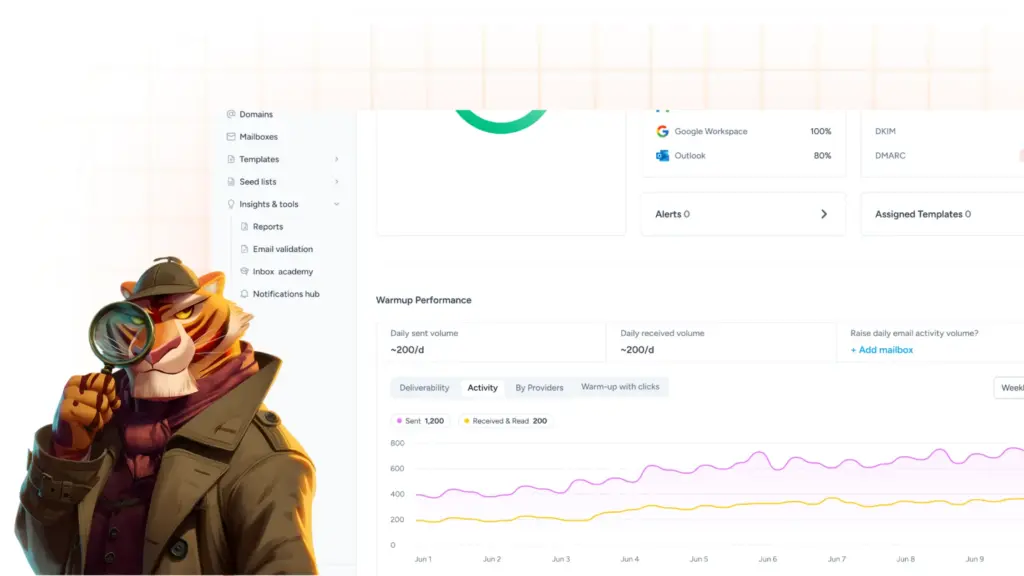
Adeline AI is Warmy’s proprietary AI engine which processes over 20 million daily decisions to adjust warmup strategy per domain in real time. Strategy is based on current reputation status, sending patterns, and business type. When ISP behavior shifts or your domain’s reputation signals change, Adeline adjusts warmup volume, frequency, timing, and engagement models to respond. You do not need to monitor and manually tune the strategy because Adeline does it for you continuously.
Provider-specific warmup composition
Warmy’s Warmup Preferences feature lets senders configure the composition of the warmup network to mirror your actual campaign list. So if 50% of your real recipients are on Gmail, you can direct 50% of warmup traffic toward Gmail inboxes. This means you build reputation specifically where your campaigns actually matter, not against a generic provider spread. You can also configure warmup across 30+ languages and industry-specific topics, making the signals more contextually relevant for your audience.
Email templates so users can warm up with own content
With Warmy’s Email Templates feature, senders can add their own copy, subject lines, and links to the warmup process and test their own content. Mailbox providers learn to recognize and trust your specific content patterns before the campaign launches so you are not just warming up a domain, you are also warming up the actual emails your recipients will receive.
Seed Lists for targeted warmup and platform-specific use cases
Warmy’s Seed Lists consist of genuine, active email addresses from Gmail, Outlook, and Yahoo that generate real multi-action engagement: opens, scrolls, clicks, replies, and spam rescues. Seed list warmup also extends capability to platforms that do not support traditional mailbox-based warmup methods: Mailchimp, Shopify, Klaviyo, and Omnisend. For senders on these platforms, seed list warmup is often the only viable path to building sender reputation before high-volume campaigns begin.
Warmup With Clicks gives the engagement depth that moves the needle
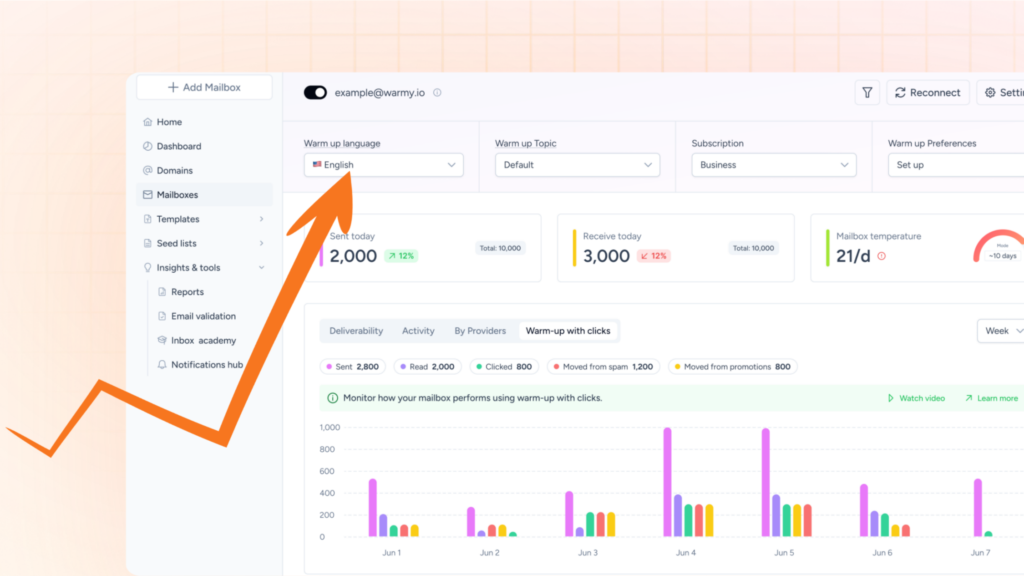
Warmup With Clicks is a fully automated process that runs on top of standard warmup activity, generating the deeper engagement signals that carry more weight with Gmail’s and Outlook’s filtering algorithms.
Domain Health Hub for continuous real-time monitoring
SPF, DKIM, DMARC, and MX record status, blacklist checks, DNS health, inbox placement data, and Google Postmaster signals are all surfaced in one dashboard that is updated continuously, 24/7. Reputation is affected by multiple variables simultaneously. Having all of them visible in one place is what makes proactive management possible, rather than reactive troubleshooting after campaigns have already been damaged.
Warm up first, then land every time
By the time an email lands in spam, the reputation decision has already been made based on signals your domain either produced or failed to produce.
Email warmup is the work that happens before the campaign:
- Get the authentication right first, then build the sending history deliberately, with real engagement depth.
- Monitor the variables that inbox providers actually weigh. Not just whether emails are being sent, but where they are actually landing.
- Do all of that, and your domain arrives at the first campaign send with something most senders do not have: a track record that earns the inbox rather than begging for it.