Key takeaways:
|
You spent time writing the perfect email and it never arrived. No error, no reply, just silence. Sound familiar?
Gmail’s filters are now smarter than ever, and even legitimate senders can get caught in the crossfire. The good news? Most blocks have a clear cause and a clear fix.
In this guide, you’ll find the 10 most common reasons Gmail is blocking your emails, plus actionable steps to resolve each one.
If you want to get ahead of deliverability issues before they hurt your business, Warmy’s free email deliverability test can show you exactly where you stand right now.
1. Your email contains spam signals
Gmail’s algorithms scan every message for patterns associated with spam. Things like excessive capitalization, using a lot of exclamation marks, suspicious links, or certain trigger words can flag your email before it even reaches a human.
Examples of some common spam triggers to avoid:
- Subject lines with words like “FREE,” “URGENT,” or “LIMITED TIME OFFER”
- All-caps text or excessive punctuation (!!!!!)
- Shortened or cloaked URLs
- No plain-text version of your email
How to fix it:
- Run your email through an AI detector or a spam checker tool before sending. Even minor tweaks, like replacing “FREE” with “complimentary” can meaningfully improve deliverability.
- Warmy’s free Template Checker is a great tool that shows you exactly which parts of your email content can trigger spam filters.
2. You have a high bounce rate
A bounce happens when your email can’t be delivered. In fact, you may receive different variations of SMTP errors which will usually tell you why the email failed to be delivered.
While one bounced email may not be a cause for concern, having a consistently high bounce rate (especially from hard bounces), is one of the fastest ways to damage your sender reputation with Gmail.
|
Factor |
Soft Bounce |
Hard Bounce |
|
Definition |
Temporary delivery failure; usually retries automatically |
Permanent delivery failure |
|
Example cause |
Recipient inbox full |
Invalid email address |
|
Gmail impact |
Monitored over time; frequent occurrences of soft bounces will pile up and damage deliverability |
Immediate reputation hit; may result in blacklisting right away |
|
Action needed |
Retry sending |
Remove from list immediately |
How to fix it:
- Clean your email list regularly and practice list hygiene.
- Remove invalid email addresses and use a list verification tool before major campaigns. Aim to keep your bounce rate below 2%.
- Warmy has an email validation tool that comes with 10,000 credits with every plan. Senders can use it before executing large-scale campaigns
3. You’re sending to inactive email accounts
Sending consistently to accounts that have been dormant for months signals to Gmail that your list isn’t well-maintained and updated. This behavior is common in spammers who scrape old email lists and Gmail treats it accordingly.
How to fix it:
- Segment your list by engagement level.
- Re-engagement campaigns can help, but if recipients haven’t opened your emails in 6+ months, it’s safer to remove them than to keep emailing them.
4. You’re sending too many emails too fast
Volume spikes are a major red flag. If your domain suddenly sends thousands of emails from a low-activity account, Gmail interprets it as suspicious. Even if you are a legitimate sender and even if every address on your list is valid and opted in.
How to fix it:
- Warm up any email account gradually before high-volume sends.
- This is exactly what Warmy’s email warmup solution is designed for. It builds your sending reputation gradually so Gmail recognizes your domain as trustworthy before you go big.
Pro tip: New domains and accounts should never jump straight to mass sending. A proper warmup period of 4–8 weeks significantly reduces the risk of Gmail flagging your emails as suspicious. For a more indepth analysis, you can check out Warmy’s research report, The Science and Process of Warming Up Newly Created Email Domains.
5. Your IP address has a poor reputation
Gmail evaluates the IP address your emails are sent from, not just your domain. So if you’re on a shared IP that other senders have used for spam, you inherit some of that damage.
Gmail’s filters are increasingly sensitive to the reputation of the underlying network. If you are using shared or low-quality IPs, you risk being ‘blacklisted’ by association. To mitigate this, professional outbound teams are moving toward Premium Proxies solutions like IPFoxy to provide ISP-level IPs that mimic authentic household connections, offering a much higher trust score than standard data center IPs, and effectively shielding your domain’s reputation from shared-IP volatility.
How to fix it:
- Check your IP reputation using tools like MXToolbox or Google Postmaster Tools.
- If you’re on a shared IP with a poor history, consider moving to a dedicated IP or a reputable email service provider.
6. Your domain authentication is failing
SPF, DKIM, and DMARC are the three pillars of email authentication. Gmail uses them to confirm you are who you say you are. If any of these checks fail, your email may be rejected or sent straight to spam.
What each one does:
- SPF (Sender Policy Framework): Lists which servers are authorized to send email on behalf of your domain
- DKIM (DomainKeys Identified Mail): Adds a cryptographic signature to verify the email hasn’t been tampered with
- DMARC: Ties SPF and DKIM together and tells Gmail what to do if either check fails
How to fix it:
- Use Google’s free Admin Toolbox to check your DNS records.
- If you’re not sure where to start, our email deliverability test will flag authentication gaps instantly.
7. Too many recipients are marking you as spam
Every time someone clicks “Report spam” on your email, it’s like a “No” vote against your sender reputation. Gmail tracks complaint rates, and a high rate can trigger automatic blocking even for emails that would otherwise pass every other check.
How to fix it:
- Only email people who have explicitly opted in.
- Make your unsubscribe link impossible to miss. A reader who opts out is far less damaging than one who marks you as spam.
8. Your content violates Gmail’s policies
Gmail explicitly prohibits certain types of content such as anything illegal, harmful, hateful, or sexually explicit. So if your email contains content that trips these filters, it will be blocked. No questions asked.
How to fix it:
- Review Gmail’s Bulk Sender Guidelines and ensure your content (including linked pages) doesn’t violate any policies.
9. Your email contains a virus or malware
Gmail automatically scans all attachments and links for malicious content. If something suspicious is detected (even if it’s a false positive from a misconfigured attachment) the email will be blocked to protect the recipient.
How to fix it:
- Always scan attachments with up-to-date antivirus software before sending.
- Avoid sending executable files (.exe, .bat) or compressed archives unless absolutely necessary. These are high-risk file types that Gmail scrutinizes heavily.
10. Your domain or IP has been blacklisted
Being blacklisted is the most severe form of sender reputation damage.
If your domain or IP appears on a major blocklist, Gmail may refuse delivery entirely. Regardless of what you send or how you send it. Warmy’s Research Report “Email Blacklist Impact on Deliverability: How Gmail, Outlook & Yahoo Really Filter Senders” details how mailbox providers use blacklists to determine whether an email should land in the inbox or spam.
How to fix it:
- Check your domain and IP against common blocklists using MXToolbox Blacklist Check.
- If you’re listed, follow the delisting process for each blocklist and identify the root cause so you don’t end up relisted.
How to know if Gmail Is Blocking Your Emails
Not all blocks come with a clear error message. Here are the signs to watch for:
- Your sent folder shows the email as delivered, but the recipient never receives it
- Bounce rates spike suddenly with no clear change in your list
- Recipients consistently find your emails in spam, including contacts who know you
- Open rates drop sharply across a campaign or time period
- Google Postmaster Tools shows a sudden dip in domain reputation score
Set up Google Postmaster Tools for your domain. It’s free and gives you direct visibility into how Gmail is evaluating your sending reputation. Warmy integrates with Postmaster, allowing users to view its data from the Warmy dashboard.
How to fix Gmail blocking: A quick-reference checklist
- Audit your email content for spam trigger words, suspicious links, and policy violations
- Make sure your SPF, DKIM, and DMARC records are correctly configured
- Clean your email list to remove hard bounces and inactive contacts
- Check your IP and domain reputation using MXToolbox or Google Postmaster Tools
- Warm up new accounts or domains before high-volume sends
- Keep complaint rates below 0.1% by only emailing opted-in recipients
- Monitor your sender reputation continuously with Warmy’s email deliverability tools
See exactly how Warmy rebuilds and protects your sender reputation. Book a personalized demo.
How Warmy keeps your emails out of Gmail’s blocklist before problems start
Most senders only think about deliverability when something goes wrong and when revenue has already taken a hit. Warmy is built for the opposite approach as it gives you the tools to prevent Gmail blocks from happening in the first place. This helps senders catch early warning signs before they escalate into a full inbox meltdown.
Here’s how it works in practice:
Automated email warmup
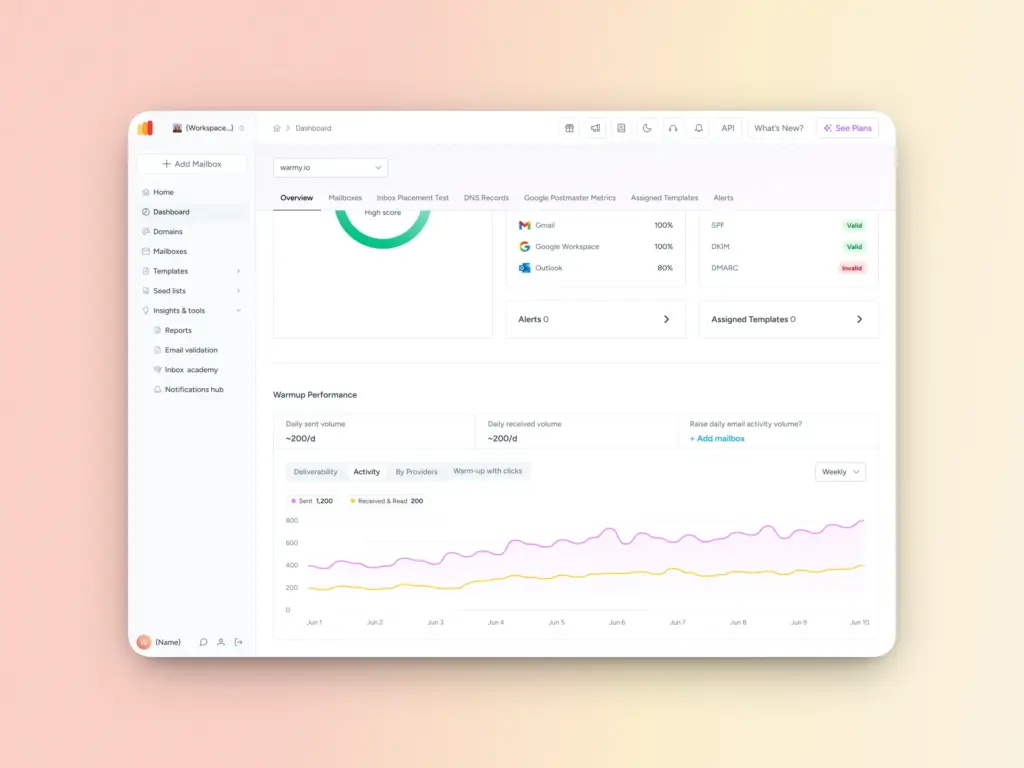
Warmy is an AI-driven email warmup platform that automatically sends, opens, and engages with emails on your behalf. This simulates the behavior of a healthy, active sender and trains Gmail to recognize your domain as trustworthy long before you hit send on a big campaign.
Rather than manually trickling out emails over weeks, Warmy handles the entire ramp-up process for you. It adjusts sending volume dynamically based on your domain’s current reputation, so you’re always growing at the right pace. Never too fast to trigger Gmail’s spam filters, never too slow to build momentum.
Best for: New domains, recently recovered accounts, or anyone scaling up sending volume.
Deliverability testing & inbox placement checker
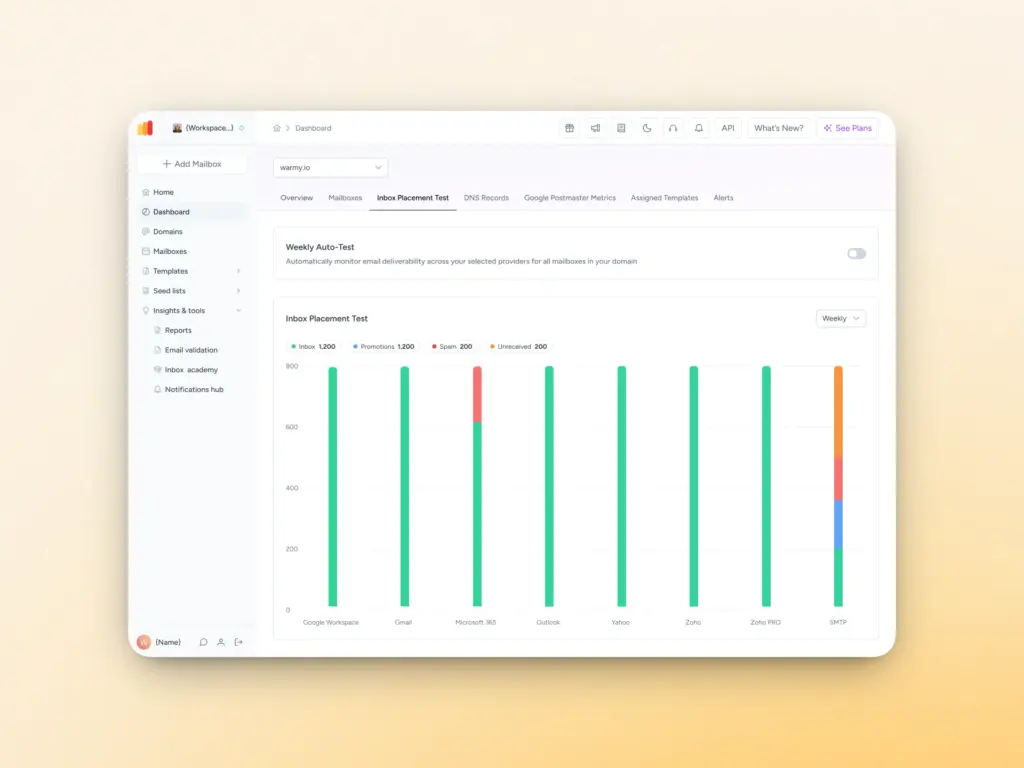
Wondering whether your emails are actually landing in the inbox or quietly disappearing into spam? Warmy’s deliverability test tests your emails across major providers, including Gmail, and gives you a clear pass/fail breakdown so you know exactly what recipients are seeing.
It checks for the most common delivery blockers: authentication failures, spam trigger words, blacklist appearances, and more. So instead of guessing why your open rates dropped, you get a concrete diagnosis with actionable fixes.
Best for: Anyone about to launch a campaign, or troubleshooting a sudden drop in engagement.
Sender reputation monitoring
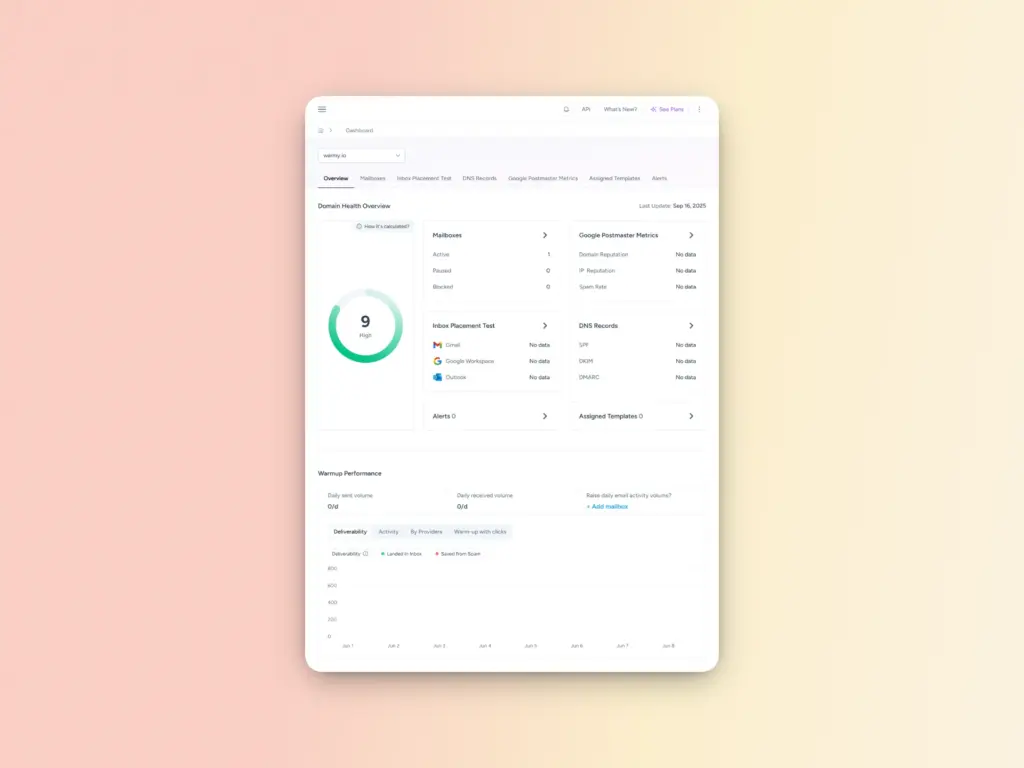
Your sender reputation with Gmail can shift without any obvious warning. A spike in complaints, a shared IP issue, or a sudden bounce rate increase can quietly drag your domain score down before you notice the impact in your metrics.
Warmy’s Domain Health Hub monitors your domain and IP reputation continuously, so you can act before Gmail does. Think of it as an early warning system that keeps you one step ahead of a block, rather than scrambling to fix one after the fact.
Best for: High-volume senders, agencies managing multiple domains, or any business where email is a critical revenue channel.
Warmup With Clicks
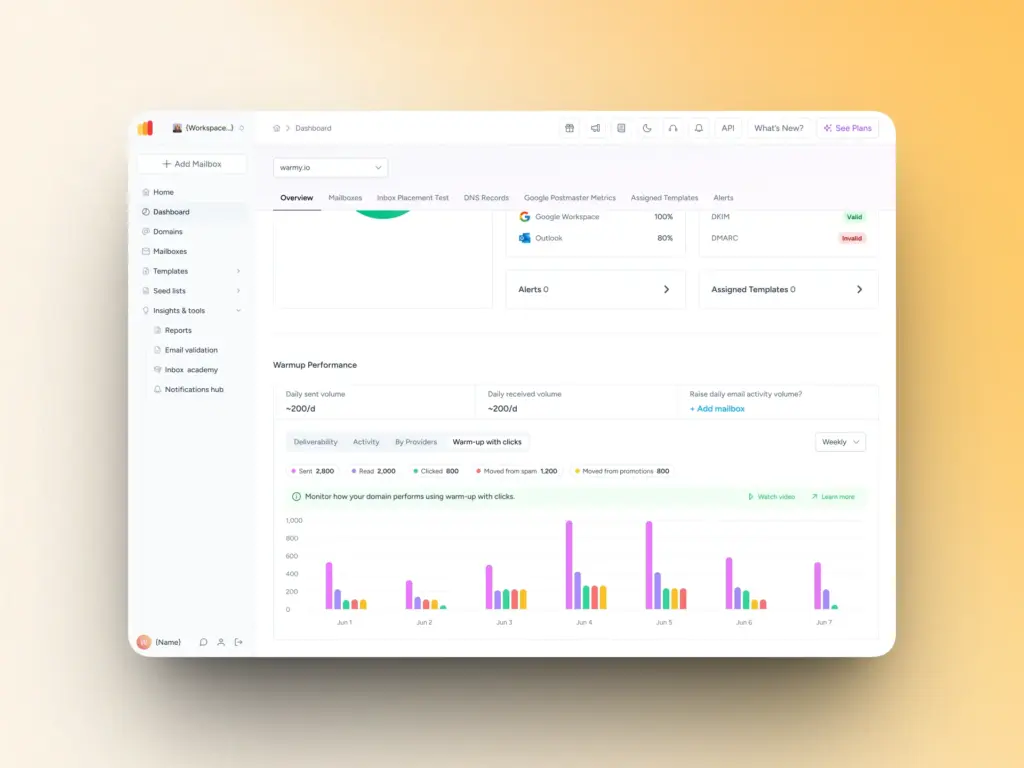
Standard warmup covers the fundamentals. However, Gmail increasingly weighs deeper engagement signals like link clicks and Promotions tab removal when evaluating sender trust. Warmy’s Warmup With Clicks feature layers these more sophisticated signals on top of your existing warmup activity, creating a holistic and sustainable deliverability strategy.
Warmup With Clicks adds progressive engagement analytics. It facilitates real link clicks from genuine email addresses and automatically removes emails that land in Gmail’s Promotions tab, pushing your domain toward primary inbox placement.
The result is a continuous warmup signal that mirrors how real, engaged recipients behave—exactly what Gmail’s algorithms are looking for. No manual seed list management, no tracking split updates by hand.
Best for: Senders who want to go beyond basic warmup and actively improve primary inbox placement with Gmail.
Free SPF and DMARC Record Generators
Since failing email authentication checks (SPF, DKIM, DMARC) is one of the top reasons why Gmail rejects emails, Warmy.io includes a built-in authentication checker to ensure your email authentication settings are correct. Additionally:
Warmy.io’s Free SPF Record Generator helps you:
- Generate a valid SPF record in seconds
- Automatically optimize your SPF record to avoid lookup limit failures.
- Validate your current SPF setup to identify errors and missing entries.
Warmy.io’s Free DMARC Record Generator helps you:
- Create a valid DMARC record based on your email security needs.
- Monitor authentication failures to detect unauthorized senders.
- Gradually enforce DMARC policies to prevent email rejections.
Template Checker
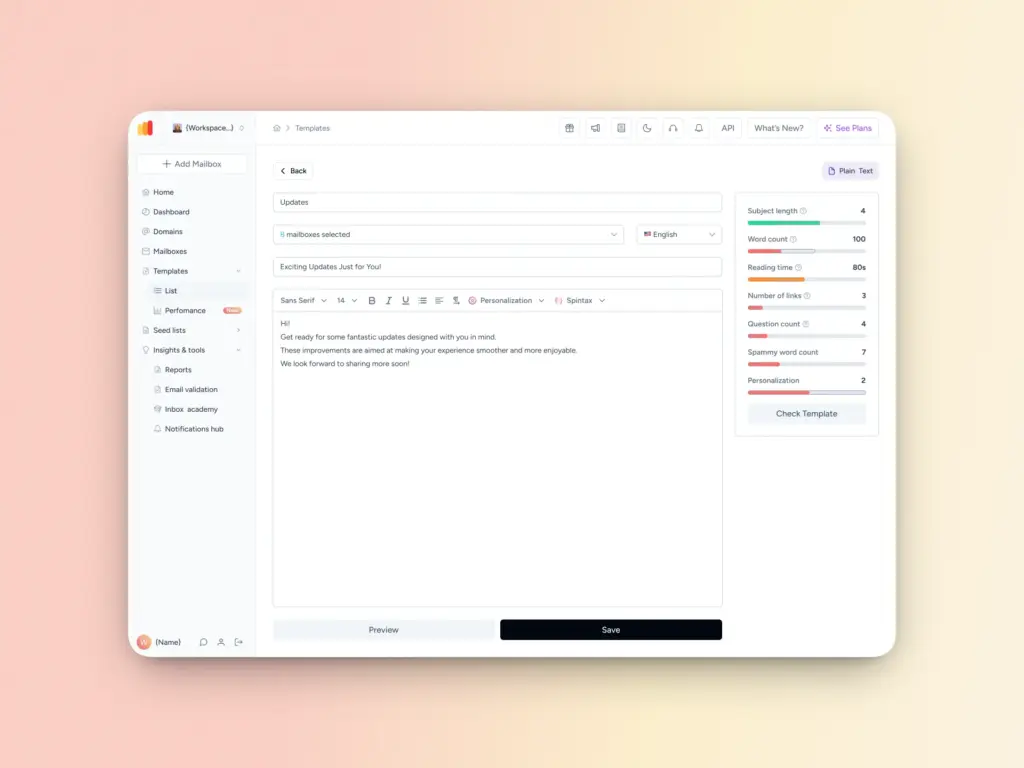
Warmy’s free Template Checker analyzes your email for spam trigger words, formatting issues, and anything else that could cause Gmail to route it away from the primary inbox.
What makes it especially practical is the Chrome Extension version. Rather than testing templates in a separate tool, you can assess your email directly before hitting send. This way, you can catch problems at the moment they’re easiest to fix. It tells you whether your email is likely to be flagged as spam and surfaces the specific tweaks needed to improve placement.
Best for: Anyone running outreach or campaigns where content quality directly impacts deliverability and anyone who wants a final check before sending.
Gmail’s inboxes are harder to get into, but Warmy gets your foot in the door
Gmail blocking your emails isn’t random. There’s always a reason, and there’s always a fix. It can be a misconfigured DNS record, a spike in complaints, or a volume issue with a new account, but the path forward is always the same: identify the cause, fix it at the source, and build the kind of sending reputation that keeps your emails landing in inboxes.
Warmy is an all-in-one AI-driven email deliverability solution that automates the process of building and maintaining your sender reputation. You can focus on sending great emails instead of troubleshooting deliverability whenever issues arise.
The senders who consistently land in Gmail inboxes aren’t just the most technically compliant. They are the ones who are actively managing their reputation, warming up the right way, and checking their content before it goes out. Exactly what Warmy is built to help you do.
From automating your warmup to flagging content issues before they become delivery failures, Warmy gives you full visibility and control over every factor that influences where your emails land.
Stop reacting to Gmail blocks. Start preventing them. Start your free 7-day trial with Warmy today.
FAQ
Why is Gmail blocking my emails even though they’re not spam?
Gmail uses dozens of signals beyond content. This includes bounce rate, IP reputation, authentication setup, and complaint history. Even a legitimate sender can be blocked if any of these signals look suspicious. Start by checking your SPF/DKIM records and your Google Postmaster Tools domain reputation.
How long does it take to fix a Gmail block?
It depends on the cause. Fixing an authentication issue (SPF/DKIM) can improve deliverability within 24–72 hours once DNS changes propagate. Recovering from a poor sender reputation or blacklisting takes longer — typically 2–6 weeks of consistent, low-complaint sending.
What is email warmup and why does it matter?
Email warmup is the process of gradually increasing your sending volume from a new domain or account so that Gmail recognizes you as a trustworthy sender. Skipping this step is one of the most common reasons bulk senders get blocked. Warmy automates this process so you can scale safely.
Can Warmy help if my emails are already being blocked by Gmail?
Yes. Warmy is designed to rebuild sender reputation through consistent, positive engagement signals. If your domain or account has been flagged, Warmy’s warmup process gradually restores trust with Gmail. Start with a free deliverability test to understand where you stand.