


SMTP Error 553 5.1.2 is a permanent delivery failure stemming from the rejection of an email due to issues with the recipient’s domain. To resolve this issue, senders can implement the following solutions:
- Verify the recipient’s email address
- Confirm domain existence
- Check MX records
- Contact the recipient through alternative channels.
- Review your email client settings
- Clean your email list
Receiving the error code 553 5.1.2 with the message “We weren’t able to find the recipient domain” can be alarming and confusing. Though the message is straightforward, it can be challenging to resolve this on a large-scale basis.
High-volume senders must ensure overall health of email infrastructure and contact lists to avoid permanent delivery errors like 553 5.1.2 which can dampen sender reputation. Sales Development Representatives (SDRs) for example, regularly send email campaigns. For them, experiencing 553 5.1.2 is not just a simple technical glitch. It’s a lost lead, missed opportunity, and a “burnt” domain.
SMTP Error 553 5.1.2 – What is it and why does it occur?
As per Gmail’s own directory of SMTP errors and codes, SMTP Error 533 5.1.2 means “We weren’t able to find the recipient domain. Please check for any spelling errors and make sure you didn’t enter any spaces, periods, or other punctuation after the recipient’s email address.”
For other providers, the 553 5.1.2 error comes with these variations:
- “553 5.1.2 We weren’t able to find the recipient domain.”
- “553 5.1.2 The recipient address is not a valid RFC-5321 address.”
- “553 5.1.2 Recipient domain unavailable”
This particular error stems from the overarching SMTP Error 553, which is a permanent rejection code from a receiving server. Specifically, 553 5.1.2 means there is an issue with the recipient’s email address or domain configurations. In short, the mail server cannot verify or cannot find the recipient’s domain.
Possible reasons why 553 5.1.2 error was triggered includes:
- DNS configuration issues
- Typos in the domain name
- Invalid characters
- Temporary domain issues
How to fix SMTP Error 553 5.1.2
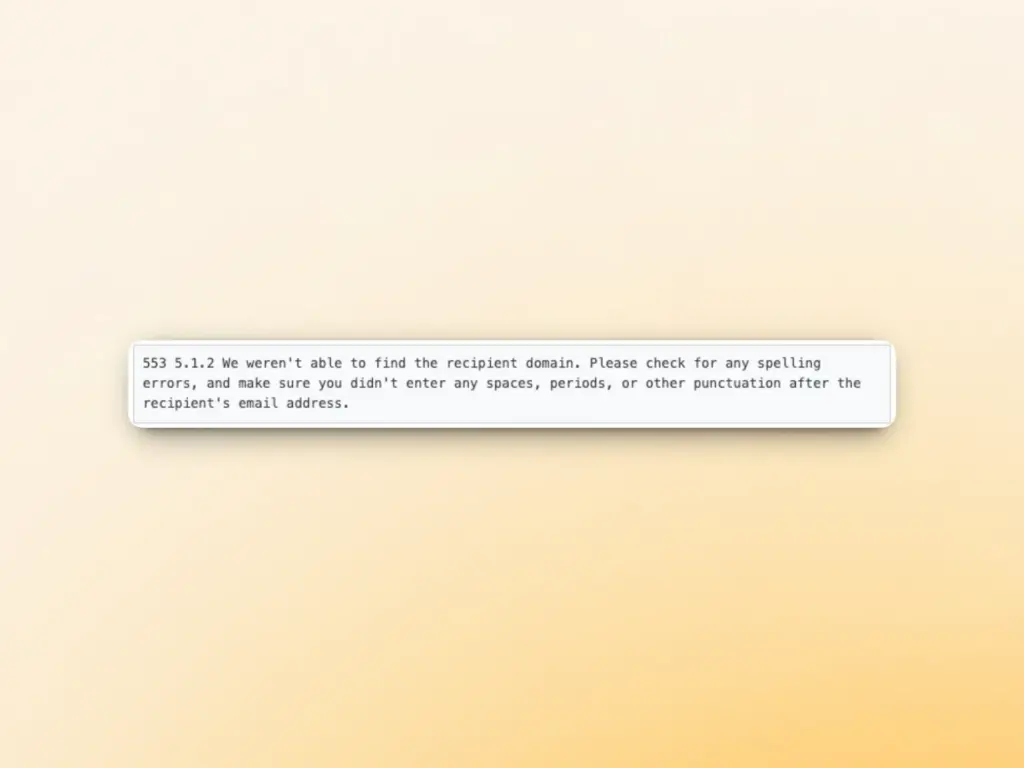
If you’re still asking the question “How do I fix error 553 5.1.2?” you’re in the right place. The following solutions are proven methods to troubleshoot and resolve this error.
Solution #1: Verify the recipient address for typo errors
Double-check that you have the correct email address and that it is correctly typed in the “To” field. Pay special attention to the domain and look for:
- Common typos (Example: .cmo instead of .com)
- Missing or extra characters
- Spacing errors
Solution 2: Confirm if the domain really exists
Use online tools or DNS lookup services to verify if the recipient’s domain exists and is active. You can use command-line tools like nslookup or dig to check if the domain has valid DNS records.
Solution 3: Check MX records
If you have access to the domain management, verify that the MX records are properly configured. MX records direct email traffic to the correct mail servers. Missing or incorrect MX records will prevent email delivery.
Solution 4: Contact the recipient through alternative channels
If possible, reach out to the recipient via phone, text, or social media to confirm their correct email address. They may have recently changed domains or might be unaware of issues with their email configuration.
Solution 5: Review your own email client settings
Ensure your email client isn’t adding unwanted characters or formatting email addresses. Sometimes autocorrect features can inadvertently modify addresses.
Solution 6: Clean your email list
If you’re sending to multiple recipients, use email validation services to validate addresses before sending. This helps identify and remove invalid domains from your list.
Similar to SMTP Error 510, manual entries of email addresses can sometimes result in these errors. When sending to only one or a few email addresses, it may only take a few seconds to check for errors. However, it can be very difficult for high-volume senders to run through each and every email address in your list.
That’s why it’s recommended to import the whole list from forms to Warmy’s Validation Tool which checks for any invalid email addresses.
Warmy users get free 10,000 credits which you can use right away before you launch your next large-scale campaign. Get started today.
How does SMTP Error 553 5.1.2 affect your email deliverability?
Experiencing 553 5.1.2 Error Code once may not do any significant damage to your email deliverability or sender reputation. However, triggering this error repeatedly can cause long-term damage.
The consequences of bulk email permanent failure 553 5.1.2 extend beyond individual failed deliveries. Consequences include:
Damaged sender reputation
Email Service Providers (ESPs) and Internet Service Providers (ISPs) monitor bounce rates and delivery failures as closely as possible. Consistently high bounce rates give off the impression that the sender does not practice good email practices.
When your emails consistently fail to reach recipients due to invalid domains, it raises a red flag and may give the impression that you are trying to send multiple invalid emails, which can translate to spam behavior. Even if you are unaware of this, it can still impact and damage your email health.
Increased spam filtering and potential blacklisting
A decline in sender reputation is more than enough reason for email providers to send you to spam. This can cause ESPs to mark your domain as suspicious and decide to send future emails to the spam folder. Or worse, ESPs may decide to blacklist you. If you get blacklisted, other major providers will again see this as another red flag—further damaging your sender score.
An article from Hubspot confirmed that top-performing campaigns have 2% bounce rates only. So if you have a higher percentage of bounce rates, you will need to act right away.
Lost business opportunities
Beyond technical impacts, failed deliveries also mean missed connections. You might lose potential customers, partnerships, or important communications simply because your emails aren’t reaching their destination.
Prevent SMTP errors with Warmy.io – Here’s how:
Warmy.io provides a full-on email deliverability solution that helps senders build, establish, and maintain long-term email health and sender reputation. Senders with a solid domain health are less prone to experiencing SMTP errors and the damage that comes with them.
While many alternatives offer basic email warmup to increase email deliverability, Warmy’s full suite of tools work hand in hand to optimize various aspects that affect sender reputation. This includes inbox placement, authentication protocols, sending behaviors, and even email content.
Warmy uses its proprietary AI, Adeline, to analyze and draw insights from each sender’s data to be able to implement the best deliverability strategy guaranteed to get consistent high inbox placement and less run-ins with SMTP errors.
Try validating your first few thousand emails for free when you sign up for a Warmy plan.
AI-powered email warmup provides real engagement
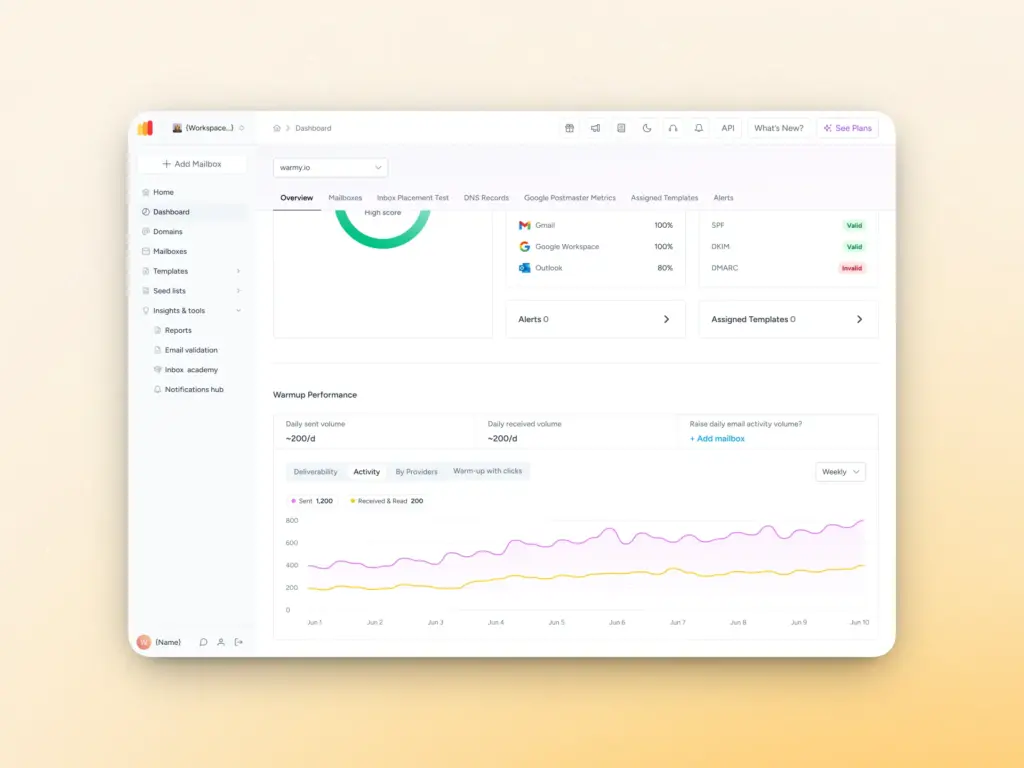
Warmy’s automated email warmup gradually increases sending volume using real inboxes that open, reply, and interact with your emails. Yes, this also includes manually retrieving emails if they land in spam and then marking them as important.
These interactions mirror human behavior and send signals to mailbox providers that the sender is trustworthy and legitimate. The gradual activity establishes trust, reducing the likelihood of permanent rejection errors caused by poor sender reputation or sudden sending spikes.
Email validation tool keeps lists in good hygiene
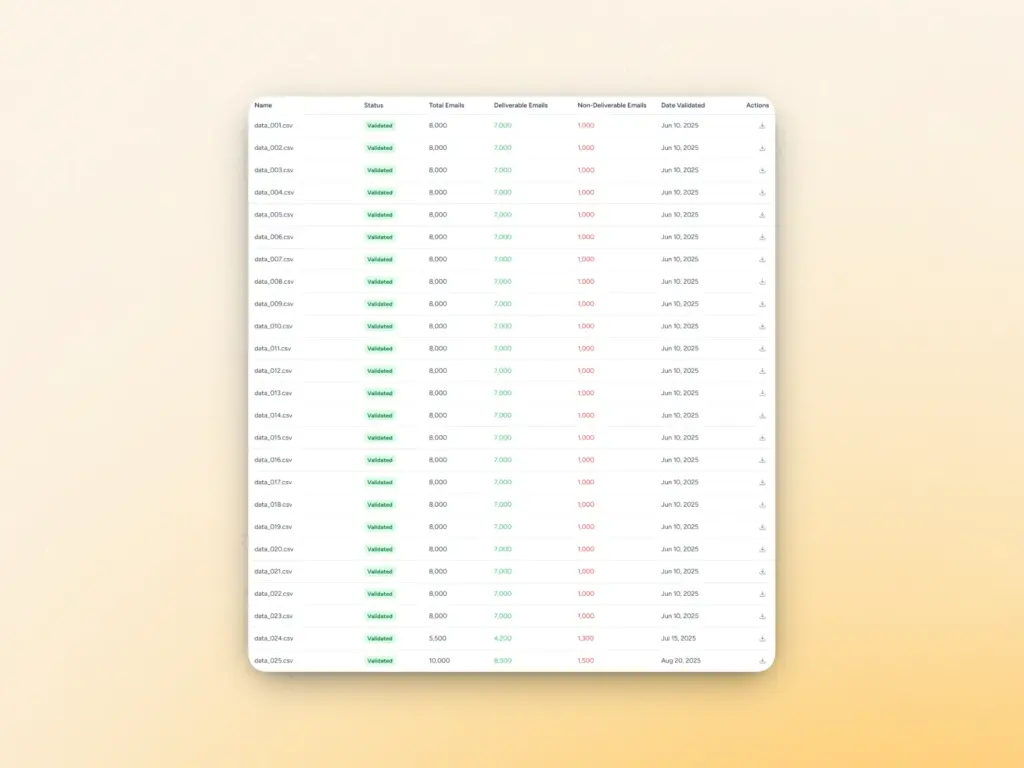
Warmy’s email validation tool keeps email lists in good health as it identifies invalid addresses. Running large lists through the validation tool ensures you’re only sending to valid email addresses. This removes the risk of experiencing SMTP errors like 553 5.1.2.
Warmy assigns each contact a score from 1 to 10, based on its deliverability status:
- Deliverable (score 6-10): These emails are safe to send.
- Non-deliverable (score 1-5): These emails may bounce or result in delivery issues.
Real-time access to data and insights
Warmy provides senders with all the data they need to know about their email deliverability. The user dashboard and domain health hub provide the following information at a glance:
- Health Score: A quick snapshot of the domain’s overall health, based on its reputation and performance.
- DNS Records: Details on SPF, DKIM, and DMARC settings for authentication.
- Deliverability: Breakdown of how well your emails are being delivered to recipients’ inboxes.
- Spam Rate: Insights into how often your emails are marked as spam by recipients.
- Sent and Received Today: Counts of how many emails were sent and received during the day.
- GPM Status: Gmail Postmaster (GPM) status, including your domain’s reputation and spam rate as reported by Gmail.
From the dashboard, senders can generate domain-level reports which eliminates the need to dig into individual user accounts. This is particularly helpful for larger teams and agencies managing multiple domains and mailboxes. The reports can even be customized by adding statistics like:
- Deliverability Checker Statistics (Inbox, Spam, Promotions, Unreceived): A breakdown by period (Today, Yesterday, Last 7 Days), showing how emails are classified across major providers (Gmail, Outlook, Yahoo, etc.).
- Warmup Statistics (Sent, Landed in Inbox, Saved from Spam): How well your emails performed in the warmup process, helping you track progress and optimize sending behavior.
This kind of visibility allows you to detect domain-level issues early, way before they contribute to hard bounces like the 553 5.1.2 SMTP error.
Inbox placement test
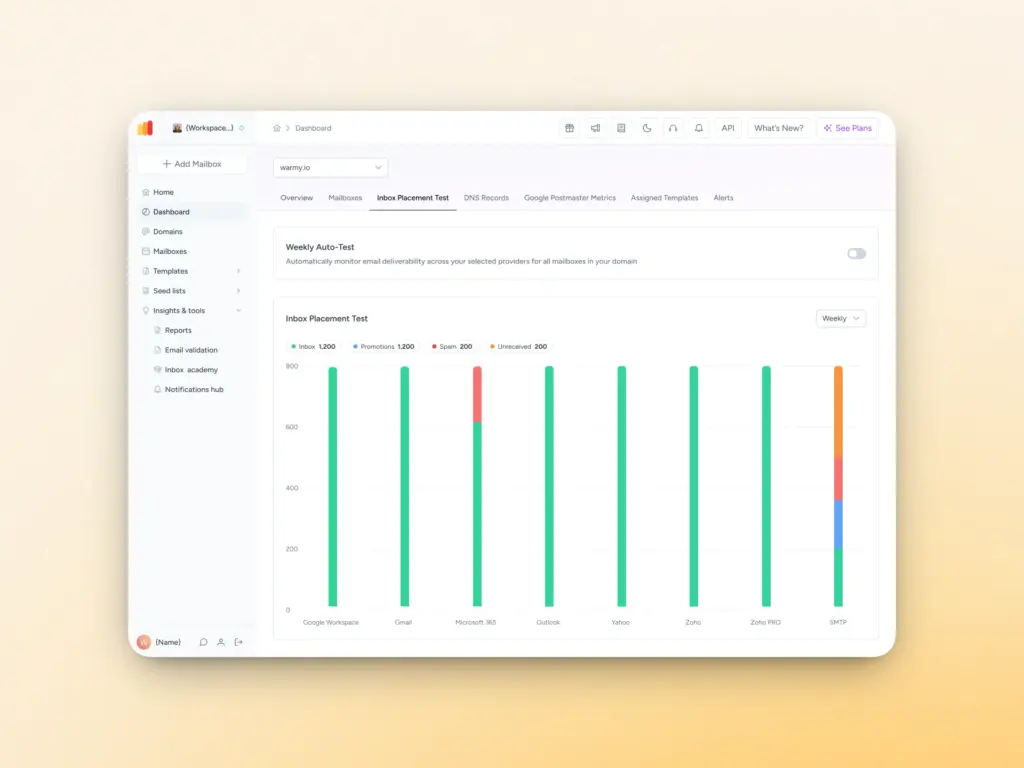
Warmy’s free inbox placement test and deliverability diagnostics provide much-needed information on where a sender currently stands. It shows the percentage of your emails that land in the inbox and spam folder across different mailbox providers. The test also gives an overview of email authentication issues and other potential issues that affect your deliverability.
For paid users, the email deliverability test can be set up to automatically run on a weekly schedule.
Free SPF and DMARC Record Generators
Warmy has a free SPF Record Generator and a free DMARC Record Generator to help you quickly set up and verify these essential records for your domain. They ensure your emails pass the necessary checks, preventing deliverability issues right from the start.
Warmy doesn’t simply resolve SMTP errors after the damage is done. Warmy actively prevents these errors by solidifying your domain reputation.
Warmy takes a holistic approach to email deliverability, addressing reputation, infrastructure, authentication, and monitoring in one unified platform so your emails consistently reach the inbox instead of bouncing at the server level.
Try Warmy for free, for seven days and witness the transformation of your email health.
FAQ
What is SMTP Error 553 5.1.2?
SMTP Error 553 5.1.2 is a permanent delivery error that happens when there are issues with a recipient’s domain.
What causes SMTP Error 553 5.1.2?
SMTP Error 553 5.12 can be triggered due to DNS configuration issues, typos in the domain name. invalid characters, and temporary domain issues
How to fix SMTP Error 553 5.1.2?
Since SMTP Error 553 5.1.2 is a permanent error, it will not be resolved by simply retrying. To prevent it from happening again, senders can verify the recipient’s email address, confirm domain existence, check MX records, contact the recipient through other channels, review your email client settings, and maintain proper list hygiene.



![Text graphic featuring "SMTP Error 502 5.5.2 How to Fix It [SOLVED]" with smtp error 502 5.5.2 highlighted on a white background and a subtle orange gradient fading in from the right side.](https://warmy-blog-wordpress-bucket.s3.amazonaws.com/wp-content/uploads/2026/01/30150409/SMTP-502-5.5.2.webp)
![Text on a white background reads SMTP Error 510: How to Fix smtp error 510 [SOLVED] in bold black and red font.](https://warmy-blog-wordpress-bucket.s3.amazonaws.com/wp-content/uploads/2026/01/30053325/SMTP-510.webp)
![Text graphic displays "SMTP Error 500 5.5.1 How to Fix It [SOLVED]" on a white background, accented by a soft orange blur on the right, highlighting common solutions for SMTP Error 500 5.5.1 issues.](https://warmy-blog-wordpress-bucket.s3.amazonaws.com/wp-content/uploads/2026/01/27070922/SMTP-500-5.5.1.webp)


