


SMTP Error 454 4.3.0 can be one of the biggest mysteries of SMTP errors. There’s no denying that it is a frustrating error, and the mystery of what it is not is not helping either.
This blog will prove that when it comes to receiving this type of error, there is really nothing that you should worry about.
What is SMTP Error 454 4.3.0?
SMTP Error 454 is a temporary failure code indicating that the receiving mail server cannot accept or receive your email at the moment.
Here’s some good news. If you ever receive an SMTP error with the “4.x.x” code, it means that it’s a temporary error and is highly solvable.
Related Reading: The Ultimate Guide to SMTP Error Codes, What They Mean, and How to Fix Them
Some common error message variations are as follows:
- “454 4.3.0 Try again later.”
- “454 4.3.0 Temporary authentication failure”
- “454 4.3.0 Unable to lookup DNS.”
- “454 4.3.0 Relay access denied.”
Let’s explore all of them:
“Try again later”
The receiving mail server might be experiencing high traffic or resource limitations, causing it to temporarily reject incoming connections.
On the other hand, it can also mean that there is an intermittent network problem between your mail server and the recipient’s, causing temporary failures and urging you to “try again later.”
“Temporary authentication failure” and “Relay access denied”
If you’re using SMTP authentication, temporary authentication issues can trigger this error:
- Expired authentication tokens
- Temporary synchronization issues with authentication servers
- Rate limiting on authentication attempts
Some email servers use greylisting as an anti-spam measure. They temporarily reject emails from unknown senders, expecting legitimate servers to retry.
Another reason is if you are sending a high volume of emails, this will often prompt the recipient’s server to temporarily block you to prevent spam.
“Unable to lookup DNS”
The most frequent cause of this error is DNS-related issues. Your email server may be unable to resolve the recipient’s domain name to find the correct mail server.
Common DNS issues include:
- Missing or incorrect MX (Mail Exchanger) records
- DNS propagation delays after recent changes
- DNS server timeouts or unavailability
- Misconfigured SPF, DKIM, or DMARC records
How to fix SMTP Error 454 4.3.0
Let’s walk through the solutions step by step, starting with the quickest fixes.
Solution 1: Wait and retry after a while
Since this is a temporary error, the simplest solution is often to wait 15-30 minutes and try sending your email again. Many temporary issues resolve on their own within this period.
Best practices for retrying:
- Wait at least 15 minutes before the first retry
- Use exponential backoff (wait longer between each subsequent retry)
- Limit retry attempts to avoid being flagged as spam
Solution 2: Verify DNS configuration
Check your domain’s DNS records to ensure everything is configured correctly.
Steps to verify:
- Check MX records: nslookup -type=mx yourdomain.com and ensure MX records point to valid mail servers with correct priority values.
- Verify SPF records: nslookup -type=txt yourdomain.com. Your SPF record should include all authorized sending servers.
- Test DNS propagation: Use online tools like whatsmydns.net to confirm your DNS changes have propagated globally.
- Check reverse DNS (PTR record): Ensure your mail server’s IP address has a valid PTR record pointing back to your domain.
Solution 3: Review SMTP authentication settings
If you’re using authenticated SMTP, verify your credentials and settings:
- Review if username and password are correct
- Check if authentication method matches server requirements (PLAIN, LOGIN, CRAM-MD5)
- Connection security (TLS/SSL) is properly configured
- Authentication port is correct (typically 587 for TLS or 465 for SSL)
Solution 4: Check server logs
Examine your mail server logs for more detailed information about the error. Logs often contain additional context that can pinpoint the exact issue.
What to look for in logs:
- Specific DNS lookup failures
- Connection timeout messages
- Authentication error details
- Recipient server response messages
Solution 5: Verify IP reputation
Your sending IP address might have reputation issues causing temporary blocks.
Steps to check:
- Use tools like MXToolbox or MultiRBL to check if your IP is blacklisted
- Review your IP reputation score
- Check for any spam complaints associated with your IP
- Consider using a dedicated IP address for important email campaigns
Solution 6: Contact your email service provider
If you’re using an email service provider or hosting company, reach out to their support team. They can:
- Check server-side issues you can’t access
- Review server logs for specific error details
- Verify DNS configuration from their end
- Identify any account-specific limitations or blocks
Solution 7: Implement proper email warmup
If you’re using a new domain or IP address for sending emails, you may need to warm up your sending reputation gradually.
Warmup best practices:
- Start with small sending volumes
- Gradually increase volume over 4-6 weeks
- Send to engaged recipients first
- Maintain consistent sending patterns
- Monitor bounce rates and engagement metrics
Preventing SMTP Error 454 4.3.0 in the future
There are multiple proactive measures that can help you minimize this type of error, and avoid other more severe errors.
Maintain healthy DNS records
This means regularly auditing your DNS configuration, keeping MX, SPF, DKIM, and DMARC records updated, using DNS monitoring tools to catch issues quickly, and setting appropriate TTL values to ensure faster propagation when changes are made.
Related Reading: Why Do You Need to Configure SPF, DKIM, DMARC and How To Set Them
Build and maintain sender reputation
You can do this by keeping bounce rates under 2%, monitoring spam complaints to stay below 0.1%, maintaining list hygiene to remove invalid addresses, and using double opt-in to ensure new subscribers genuinely want your emails.
Implement authentication protocols
Set up SPF to authorize sending servers, configure DKIM for message verification, implement DMARC for enforcement and reporting, and periodically rotate authentication keys to strengthen security.
Use reliable email infrastructure
Choose reputable email service providers, use dedicated IP addresses for critical sending, make sure your mail servers have adequate resources, and implement redundancy with backup systems to prevent downtime.
Monitor and respond quickly
Stay ahead of issues by setting up alerts for SMTP errors, reviewing server logs on a regular basis, tracking key deliverability metrics, and responding to problems immediately before they snowball.
How Warmy can help avoid SMTP Error 454 4.3.0

Warmy.io is an all-in-one email deliverability tool built to ensure ideal email health to avoid SMTP Error 454 4.3.0 and other errors. Here’s how:
Warmy helps senders maintain healthy DNS records
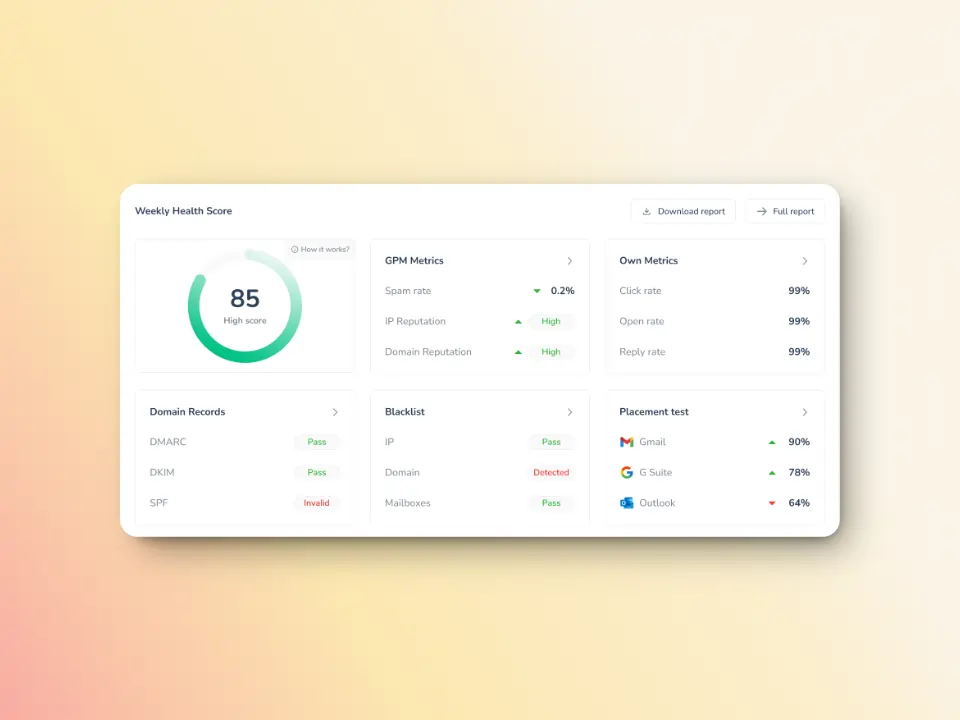
Regular auditing of your DNS configurations is one of the processes that you can perform to avoid SMTP Error 454 4.3.0. Warmy keeps an eye on your domain reputation through the Domain Health Hub, a domain-level dashboard with the following capabilities or features:
- A domain health score based on factors like authentication, blacklist status, and inbox placement.
- Data for monitoring spam rate trends and overall deliverability performance (weekly and monthly)
- DNS checks for validating SPF, DKIM, DMARC records for extra security
- Multi-domain monitoring for convenient tracking of all domains
- Reports on performance and other health metrics
Warmy also help businesses simplify their DNS authentication setup:
- The Free SPF Record Generator instantly generates the correct SPF record for your domain to help prevent configuration errors. This ensures proper sender authorization and reduces spam classifications.
- The Free DMARC Record Generator creates an optimized DMARC record for maximum email security, allowing you to enforce policies gradually.
Warmy helps senders build, establish, and maintain sender reputation
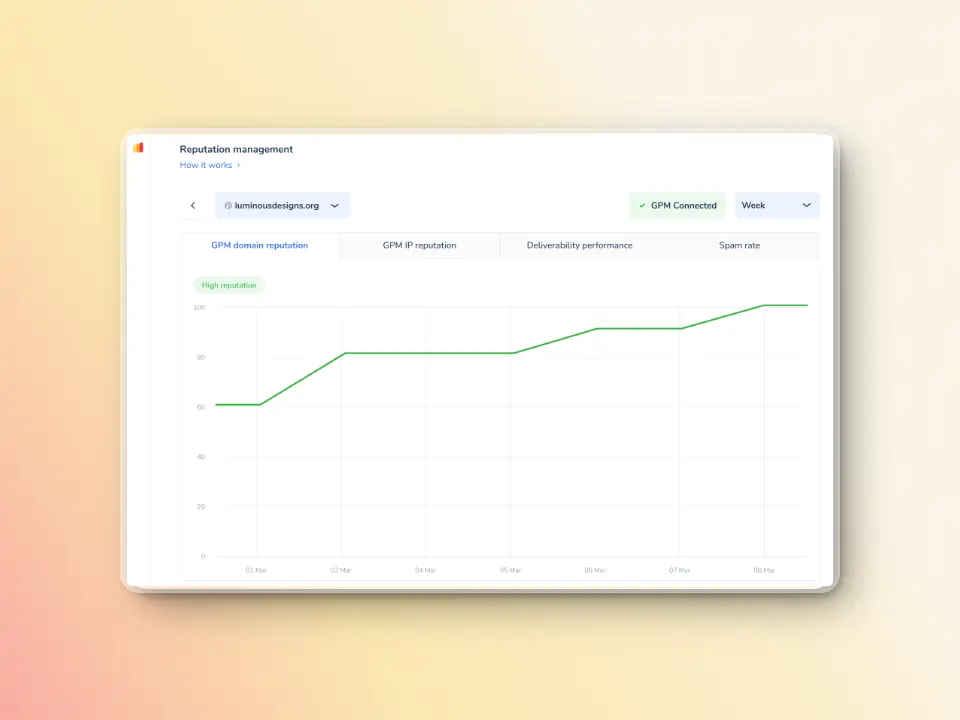
How to improve your email sender reputation score will depend on the email deliverability tools that you use.
Warmy checks your DNS records, and optimizes your entire email sending strategies to ensure optimal sender reputation and consistently ensure that your messages land in the inbox, and avoid SMTP errors.
Here’s an overview of how Warmy does this:
AI-powered email warmup

New domains often find themselves struggling with deliverability, thus affecting their sender reputation.
This happens even if they have perfect DNS settings. Warmy can help you overcome this challenge by gradually increasing your sender reputation via automated email warmup. This involves automatically sending and receiving warmup email to gradually build trust with ESPs (Email Service Providers).

Seed Lists are real email addresses that actively interact with your emails and send engagement signals to mailbox providers.
This results in a great impact on your reputation as the contacts in the seed lists promptly engage with you by opening emails, marking emails as read, and removing the emails that land in spam. These interactions let ESPs and ISPs know that you have legitimate and trustworthy emails.
Deliverability monitoring and inbox placement tests
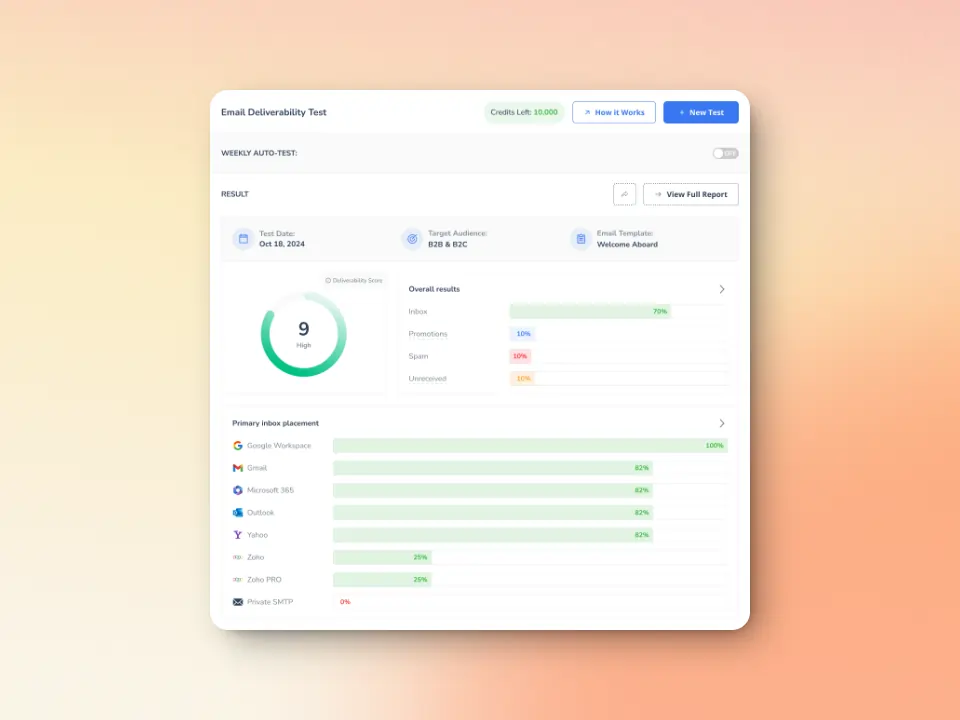
Setting up your DNS records and ensuring that everything is in order is necessary, but sometimes it is not enough. In some circumstances, senders will still encounter some SMTP errors since deliverability is multi-layered.
Warmy.io’s free deliverability test provides data on the percentage of emails that go to inbox, spam, or promotions. The test also alerts you if your domain or IP is flagged by major blacklists.
Avoiding the inconvenience of SMTP Error 454 4.3.0
SMTP Error 454 4.3.0 can be inconvenient, but it’s usually a temporary issue that can be resolved with patience and proper troubleshooting. By understanding the causes—primarily DNS problems, server issues, and authentication failures—you can quickly identify and implement the right solution.
Remember these key takeaways:
- Start with simple solutions like waiting and retrying
- Verify your DNS configuration thoroughly
- Maintain good sender reputation
- Use tools like Warmy to proactively manage deliverability
- Monitor your email infrastructure regularly
With proper prevention strategies and monitoring in place, you can minimize the occurrence of this error and ensure your emails reach their intended recipients reliably. And when issues do arise, you’ll have the knowledge and tools to resolve them quickly.
Ready to eliminate email deliverability headaches?
Give Warmy a try for free today! automated warm-up and monitoring tools to keep your emails flowing smoothly and maintain a stellar sender reputation.
FAQ
Is SMTP Error 454 4.3.0 a permanent failure?
No, SMTP Error 454 4.3.0 is a temporary (transient) error, indicated by the “4.x.x” code structure. This error means the receiving server is temporarily unable to process your email, but it should work if you retry later.
How long should I wait before retrying after receiving this error?
The recommended approach is to use exponential backoff when retrying. Wait at least 15-30 minutes for your first retry attempt. If the error persists, double the wait time for each subsequent attempt (30 minutes, then 1 hour, then 2 hours, etc.).
Can SMTP Error 454 4.3.0 affect my sender reputation?
While a few instances of this error won’t significantly harm your sender reputation, persistent occurrences can be problematic. If your mail server repeatedly attempts to send to servers that consistently return this error, it may be interpreted as poor list hygiene or aggressive sending behavior. This is why proper retry logic and monitoring are crucial. Using email deliverability tools like Warmy helps you maintain a healthy sender reputation by gradually building trust with receiving servers and identifying potential issues before they escalate into reputation damage.


![Text on a white background reads SMTP Error 510: How to Fix smtp error 510 [SOLVED] in bold black and red font.](https://warmy-blog-wordpress-bucket.s3.amazonaws.com/wp-content/uploads/2026/01/30053325/SMTP-510.webp)
![Text graphic displays "SMTP Error 500 5.5.1 How to Fix It [SOLVED]" on a white background, accented by a soft orange blur on the right, highlighting common solutions for SMTP Error 500 5.5.1 issues.](https://warmy-blog-wordpress-bucket.s3.amazonaws.com/wp-content/uploads/2026/01/27070922/SMTP-500-5.5.1.webp)
![Text graphic with the message: SMTP Error 500 5.3.3 How to Fix It [SOLVED] in bold and colored fonts on a white background with a soft gradient in the lower right corner.](https://warmy-blog-wordpress-bucket.s3.amazonaws.com/wp-content/uploads/2026/01/26104416/SMTP-500-5.3.3.webp)



