Manual email warmup was effective but couldn’t scale. Automated warmup tools solved the volume problem but introduced new blind spots such as AI-powered spam filters, shallow engagement simulation, and no visibility into actual inbox placement. Modern senders need more than warmup; they need a complete deliverability system which includes:
- Complete understanding of the factors that drive email deliverability
- Tools to flag issues before they cause long-term damage such as authentication failures, content-level spam triggers and blacklist issues
- Real-time inbox placement data to know exactly where your emails are landing across different providers
- Robust features on customizing the warmup process
Cold email outreach is a powerful weapon for businesses, but it only works if you can ensure email deliverability.
Email warmup is one of the most critical steps in achieving high email deliverability. It’s the practice of gradually increasing the volume of emails sent from your mail server so that email providers build a positive impression of you as a sender.
For companies and individuals who use cold outreach, newsletters, or transactional emails, proper warmup makes sure their messages land in recipients’ inboxes, instead of being marked as spam. Instantaneously sending a high volume from a different or less active email (without warmup) can send red flags to ISPs, marking you and your messages untrustworthy.
Over the years, the approach to email warmup has evolved significantly, from painstaking manual processes to automated tools to full-scale deliverability platforms. Understanding that evolution is the key to understanding why so many senders still struggle, and what it actually takes to get it right.
Stage 1: Traditional or manual email warmup
Traditional email warmup is the process of gradually increasing the volume of emails sent from a new or inactive email account to establish a positive sender reputation with email service providers (ESPs) like Gmail, Outlook, and Yahoo. This will help you prove that you are the real deal and your emails will not end up in spam
How does traditional warmup work?
Before any tools existed, warming up an email domain was entirely a human endeavor. Senders would personally send a handful of emails per day to known contacts (colleagues, friends, existing customers) and gradually increase volume over several weeks.
The goal was simple: show email service providers (ESPs) like Gmail, Outlook, and Yahoo that this was a real, active sender with real recipients who engaged with their mail.
The traditional email warmup process typically follows a gradual, staged approach over several weeks:
- It starts with low-volume sending, like 5-10 per day to a list of recipients.
- The number of emails sent each day slowly increases while monitoring engagement.
- The focus is on avoiding spam triggers and increasing metrics like open rates.
- After 2-4 weeks, the transition into regular campaigns can occur while maintaining a strong sender reputation.
When it comes to the recipients involved in the warmup process, businesses go about it differently. Some prefer to implement the warmup process with a list of their most engaged recipients. That way, there’s a higher likelihood of them opening emails and engaging with the emails.
Meanwhile, some take the time to create their own lists of recipients, and some buy pre-made lists from external parties.
Why traditional email warmup may not be enough
This is not to say traditional email warmup doesn’t work. It does. But depending on your goals, it may not be enough.
Manual warmup worked because the engagement was real. There were actual people opening, replying to, and interacting with emails. ESPs noticed, enabling sender reputation grew organically.
The problem? It was slow, labor-intensive, and didn’t scale. As email became a primary channel for growth, businesses needed to ramp up faster than any manual process could support.
Stage 2: Automated email warmup
Automated email warmup tools emerged to solve the scaling problem. Instead of relying on real contacts, these tools use networks of mailboxes that automatically simulate engagement on your behalf. The core mechanics or what virtually every automated warmup tool on the market offers generally include:
- Automated sends and opens: Emails are sent between mailboxes in the warmup network and automatically opened to simulate engagement.
- Read simulation: Emails are held in the inbox for a period of time to mimic a real person reading them.
- Spam recovery: If a warmup email lands in spam, it’s automatically retrieved, marked as not spam, and moved to the inbox. These signal to the ESP that your mail is wanted.
This approach gave senders the ability to warm up new domains and email accounts much faster, without needing a ready-made list of engaged contacts. For many use cases, it’s a strong starting point.
But automated warmup has real limitations that become apparent when you’re trying to scale cold outreach or run high-volume campaigns. Many businesses still struggle with emails landing in spam, inconsistent results across different providers, and reputation issues that persist despite following warmup best practices.
Limitations include:
Strict spam filters (even warmed up emails may land in spam)
- Email providers constantly update their spam filters to detect and block unwanted (or deemed suspicious) emails.
- Many email providers rely on advanced AI-based spam detection, which can identify automated interactions.
- Even if an email account has been warmed up, sudden spikes in sending volume or using the wrong content can still result in spam placement.
Low engagement or lack of genuine engagement
- ESPs evaluate engagement metrics, such as open rates, replies, and interactions to determine deliverability. Automated warmup services often rely on pre-set patterns rather than organic, real interactions.
- If engagement isn’t authentic, ESPs may ignore warmup interactions, making it harder to establish true credibility.
- Most automation actions only involve opening emails, and not really engaging with them.
Inconsistent inbox placement
- Not all email providers handle incoming emails the same way. What works for Gmail may not work for Outlook or Yahoo.
- Traditional warmup tools don’t always test across multiple ISPs, so it’s hard to understand inbox placement across different providers.
Stagnant IP & domain reputation
- Some warmup services rely on low-quality mailboxes for engagement, which may not influence major ISPs.
- If other factors like SPF, DKIM, DMARC, or previous domain history are not properly configured, warmup alone won’t fix reputation issues.
- Poor email content or aggressive sending behavior after warmup can still result in deliverability problems, even if the initial warmup was successful.
In short: automated warmup is a necessary foundation, but for serious senders, it’s not the whole picture.
Stage 3: Warmy’s advanced approach — warmup + complete deliverability
This is where Warmy.io goes further. Warmy doesn’t just warm up your domain. It gives you a complete deliverability toolkit so you can understand exactly where your emails are landing, why, and what to do about it.
AI-powered email warmup (done right)
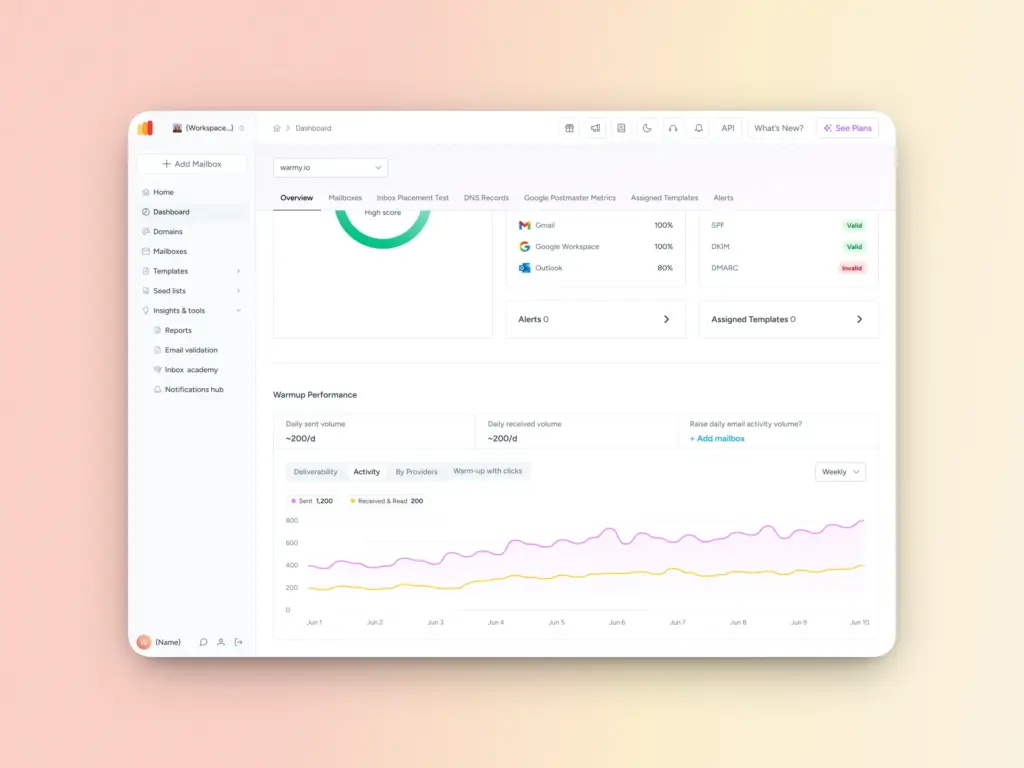
Warmy’s core email warmup engine handles everything you’d expect from an automated tool, but at a significantly higher scale—up to 5,000 warmup emails per day.
More importantly, Warmy simulates genuine human behavior: emails are opened, scrolled through, and replies are generated. If an email lands in spam, it’s recovered and marked as important. But the full engagement pattern around that email looks and behaves like a real person, not a bot.
Warmy also works across providers that other warmup tools don’t support, including Klaviyo, Omnisend, Mailchimp, and Shopify which is something that limits a lot of businesses trying to invest in warmup elsewhere.
Additionally, Warmy allows senders to customize the warmup topic, warmup language (over 30+ to choose from), warmup distribution per provider, and engagement pattern to simulate (B2B vs B2C).
Seed lists: real-world inbox placement, not just testing
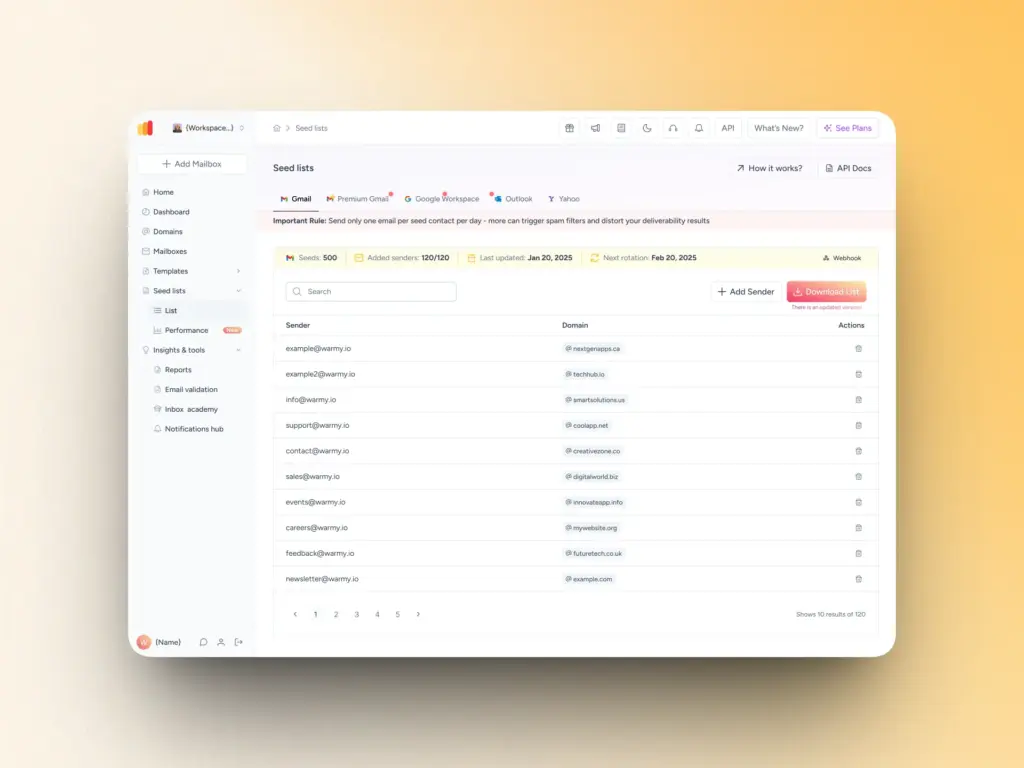
One of Warmy’s most powerful features is its seed list feature. A seed list is a curated collection of genuine email addresses spread across major ESPs (Gmail, Outlook, Yahoo).
Most seed lists are passive by design. They receive emails but don’t open them, click links, or signal to ESPs that your content is worth reading. That makes traditional seed lists useful for diagnosing where emails land, but useless for actually improving inbox placement. The engagement data simply isn’t there.
Warmy’s seed list is built differently:
- Instead of passively receiving test emails, Warmy’s seed addresses actively interact with them — opening emails, scrolling through content, clicking links, recovering emails from spam, and marking them as important.
- These are the exact engagement signals that ESPs like Gmail, Outlook, and Yahoo use to evaluate sender trustworthiness.
- By generating them through the seed list itself, Warmy turns what has traditionally been a measurement tool into an active part of your sender reputation strategy.
- Addresses are continuously updated and maintained so the engagement signals stay credible over time.
Beyond placement data, Warmy’s seed list helps you catch provider-specific filtering issues, detect blacklisting problems before they hit a live campaign, test how subject lines and content perform across different ESPs, and identify the send times and frequencies that work best without tripping spam filters.
Comprehensive deliverability insights
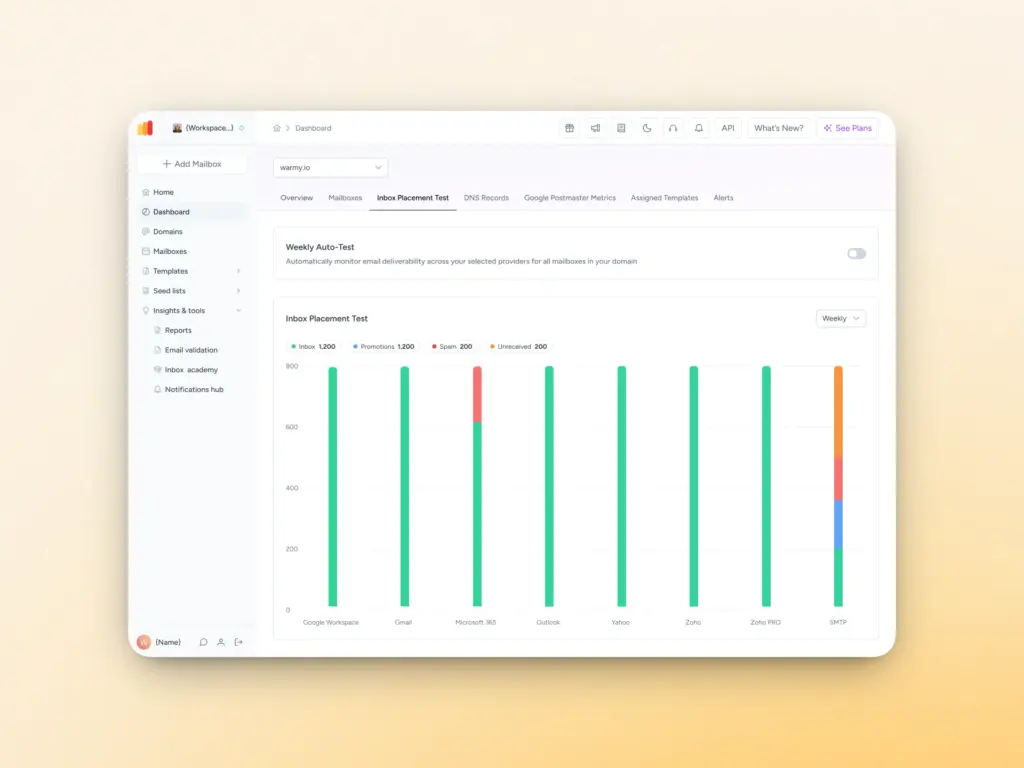
Warmy’s free email deliverability test gives you a full assessment of your email health in one place, including:
- Inbox placement analysis: See the exact breakdown of where your emails land: inbox, spam, promotions, or unreceived.
- Blacklist status: Find out immediately if your domain or IP is listed on any blacklists, so you can begin the delisting process.
- Authentication verification: Confirm that your SPF, DKIM, and DMARC records are properly configured and aligned.
Not sure where your emails are landing? Take the free deliverability test today.
Domain Health Hub
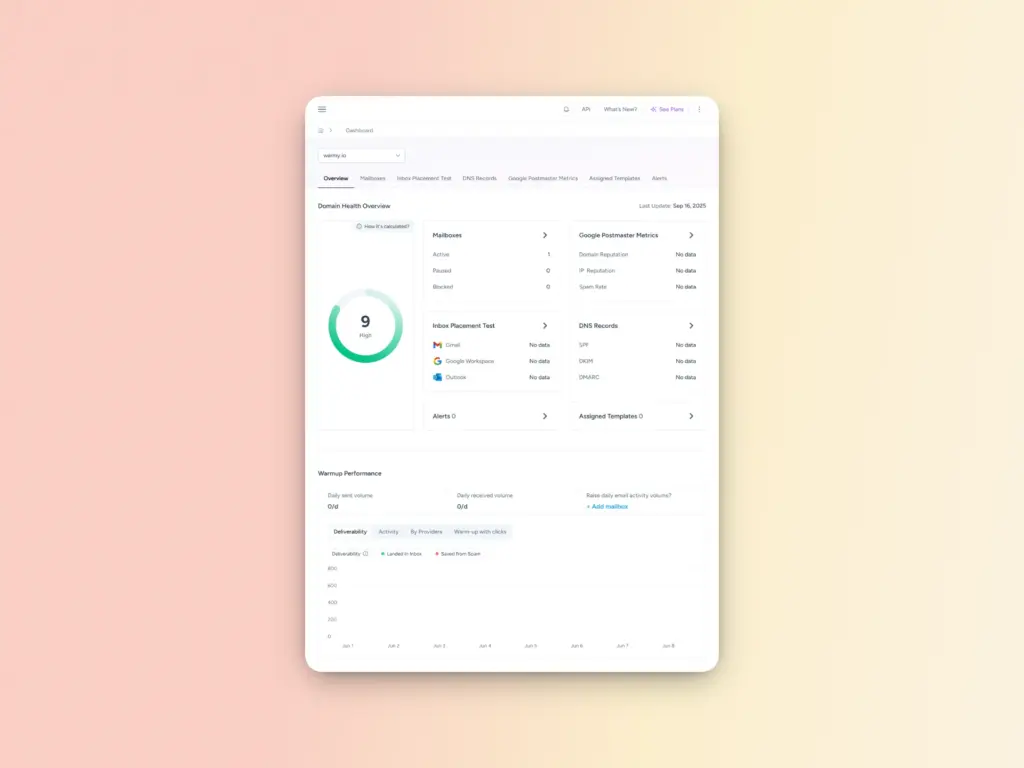
Rather than monitoring individual email addresses in isolation, Warmy’s Domain Health Hub gives you a strategic, domain-level view of your deliverability. From a single dashboard, the Domain Health Hub includes the following features:
- A domain health score based on a combination of various factors like authentication, blacklist status, and inbox placement tests. You’ll also be able to monitor your spam rate trends and overall deliverability performance with weekly or monthly tracking options.
- Comprehensive DNS status checks to easily validate SPF, DKIM, DMARC, rDNS, MX, and A records for stronger authentication & security.
- Optimized multi-domain monitoring so users can manage all their domains from one dashboard and identify which ones need immediate attention.
- Quick access to a detailed breakdown of health metrics, performance reports, and deliverability trends per domain.
Step-by-step guide: how to use a seed list for email warmup
Step 1: Select the right seed list provider
Choosing a reliable and diverse seed list provider is critical if you have long-term deliverability goals. A good and credible seed list provider must:
- have wide coverage across major ESPs
- have corporate and business email addresses
- provide real-time tracking and insights
Warmy.io’s seed lists cover Gmail, Outlook, and recently added Yahoo. Additionally, Warmy’s seed lists contain genuine email addresses which mimic real receiver behavior. Users can choose the corresponding seed list for their preferred ESP. Aside from this, users can also customize the number of seeds and the number of senders. In summary, Warmy’s advanced seed lists have multiple layers of customization.
Step 2: Set up your seed list in your email sending platform
- Upload the seed list contacts into your email-sending platform as a separate segment.
- Create a test email campaign specifically for the seed list, separate from live customer emails.
Step 3: Send test emails to your seed list
- Use the same email templates as your real campaigns. This helps identify content-related spam triggers.
- Test across different ESPs (Gmail, Outlook, Yahoo, etc.) to ensure consistent inbox placement.
- Send at different times of the day as some filters are more sensitive at peak hours.
- Include variations in subject lines and content to determine what elements affect spam placement.
Hot tip: Use Warmy’s Free Test Email Template Checker to create emails that will not trigger spam filters
Step 4: Adjust your email setup for better deliverability
Depending on the data your seed list warmup strategy generates, you may have to spend some time adjusting your email setup accordingly.
For example, if emails land in spam, you will need to adjust email copy, avoid spam trigger words, reduce links, and test different subject lines. If there are authentication failures, you will need to correct DNS records and ensure proper alignment between sender domain and authentication policies.
Step 5: Gradually increase sending volume while monitoring performance
- Don’t go from sending 10 emails per day to 1,000 overnight just because your spam rates have gone down.
- Continue testing with a seed list even as you scale.
- Encourage responses and interactions to signal positive sender behavior.
- Stay consistent. Irregular sending patterns can raise red flags with ISPs.
Move beyond traditional warmup with Warmy
Manual warmup worked, but it couldn’t scale. Automated warmup scaled, but it can’t give you the full picture. Warmy gives you both: a robust, AI-powered warmup engine that actually simulates human behavior, plus the deliverability intelligence to know exactly where you stand and what to fix before problems cost you campaigns.
Whether you’re launching a new domain, switching email providers, formalizing your company structure through resources like Zenbusiness, or trying to improve the performance of existing outreach, Warmy’s platform is built to support you at every stage of that journey.
Ready to stop guessing and start landing in inboxes? Get started with Warmy.io today.
FAQ
What is the difference between a seed list and email warmup?
They serve different purposes, but work best together. Email warmup is the process of gradually building sender reputation by increasing sending volume over time. A seed list is traditionally a testing tool: a way to check where your emails land before a live campaign. Warmy’s seed list bridges the gap: it actively engages with your emails during the warmup process rather than just passively receiving them, so you’re building reputation and measuring results at the same time.
Can I use a seed list on an already active domain?
Yes, seed lists aren’t only for new domains. If you’ve noticed a drop in inbox placement, inconsistent results across providers, or suspect your sender reputation has taken a hit, running a seed list campaign can help you pinpoint exactly what’s happening and where before it affects your real recipients.
How often should I update my seed list?
Seed lists lose effectiveness over time as addresses become inactive or outdated, which erodes the credibility of the engagement signals they produce. Warmy handles this automatically by continuously refreshing addresses, so you don’t have to manage it manually or worry about stale data skewing your results.
How is Warmy’s seed list different from a traditional one?
Traditional seed lists are passive, They receive emails but don’t interact with them, which means they can tell you where an email landed but do nothing to influence it. Warmy’s seed list actively opens emails, clicks links, recovers emails from spam, and marks them as important. That active engagement sends genuine trust signals to ESPs, making it a tool that improves sender reputation rather than just measuring it.
Do I need to use a seed list alongside Warmy’s other warmup tools?
You don’t have to, but the results are significantly better when you do. The seed list works as a standalone diagnostic and engagement tool, but paired with Warmy’s AI-powered warmup, Domain Health Hub, Template Checker, and deliverability test, you get full-stack visibility: from authentication and DNS health all the way through to per-provider inbox placement. Each layer covers a gap the others can’t on their own.