


Email deliverability conversations often focus on what you send: subject lines, copy, personalization, authentication. Far less attention is paid to how emails are sent: specifically, batch size and sending cadence.
Yet mailbox providers do not evaluate emails alone. They observe traffic patterns, timing, engagement levels, and behavioral consistency. So whether emails arrive as a steady stream or in sudden bursts can actually influence how spam filters act.
To understand whether email batch size truly affects deliverability at scale, the Warmy Research Team conducted a year-long analysis using real sending data across major mailbox providers to answer this question: Does sending emails in batches hurt deliverability, and if so, how much?
Why is email batch size related to deliverability?
Batch sending is a common operational choice. Many email systems, CRMs, and outreach tools send messages in parallel to optimize throughput and reduce processing time. From an infrastructure standpoint, batching makes sense.
From a mailbox provider’s perspective, however, batch sending creates high-density traffic patterns. Multiple emails arriving within the same second, from the same sender, with identical structure, can look very different from messages sent with pauses in between.
How this research was conducted: a year of sending data
This study analyzed email traffic collected over nearly the entire year of 2025, covering seasonal fluctuations, peak sending periods, and normal business cycles.
This was real production traffic, not test emails or lab simulations. All messages were sent to real inboxes across major mailbox providers and evaluated based on actual inbox placement outcomes.
The study focused on specific sending patterns:
- Batch sending of 10 emails at a time: Ten emails are sent in parallel within a short time window. Each recipient sees the other recipients in the “To” field. This represents a commonly used small-batch strategy designed to balance speed and risk.
- 1-by-1 sending of emails: Emails are sent sequentially with intervals between each message. Each recipient receives an email addressed only to them, with no visible parallel sending activity. This pattern produces low-density traffic that resembles manual sending behavior. Almost 1 million emails were analyzed.
Inbox placement results for batch sending strategy
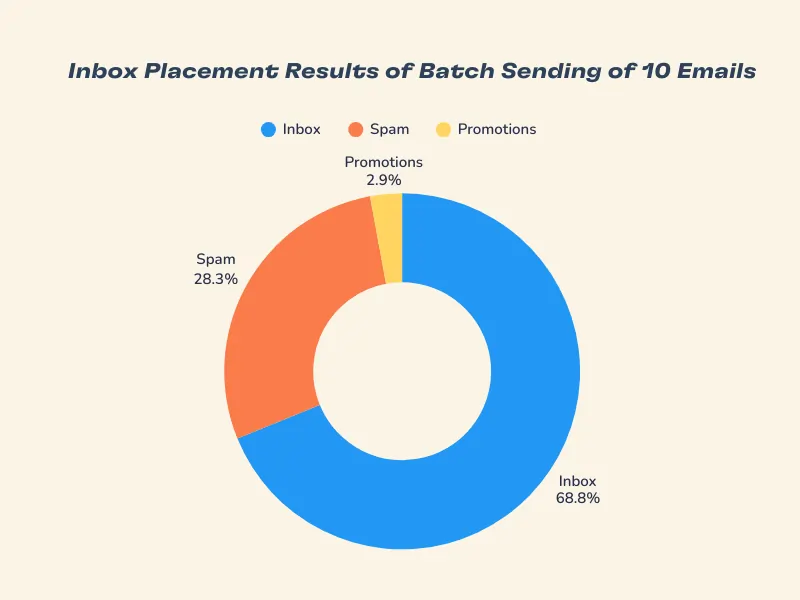
Across more than 20 million emails sent in batches of 10, inbox placement broke down as follows:
- Inbox: 68.9%
- Spam: 28.3%
- Promotions: 2.9%
In practical terms, about 7 out of 10 batch-sent emails reached the inbox. Nearly 3 out of 10 were filtered as spam, while only a small fraction landed in Promotions. This confirms that batch sending does not automatically destroy deliverability, but it does carry a meaningful spam component at scale.
Inbox placement results for 1-by-1 sending strategy
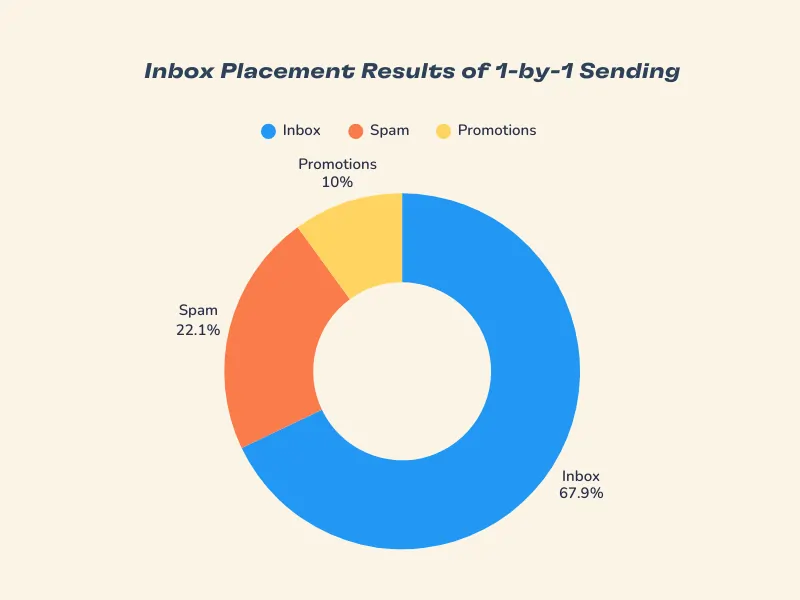
For emails sent sequentially, the dataset included nearly 1 million emails, with the following outcomes:
- Inbox: 67.9%
- Spam: 22.1%
- Promotions: 10.0%
Compared to the batch sending strategy, 1-by-1 sending has a similar inbox rate. However, the spam rate is noticeably lower, and Promotions placement is higher. This indicates that at least for this data set, 1-by-1 sending does not dramatically increase inbox placement.
Side by side comparison
This table shows a side-by-side comparison of how sending with different batch sizes impacts email deliverability. Aside from the batch sending by 10 emails and the 1-by-1 sending strategy, we also gathered the data from batch sending by 5 emails.
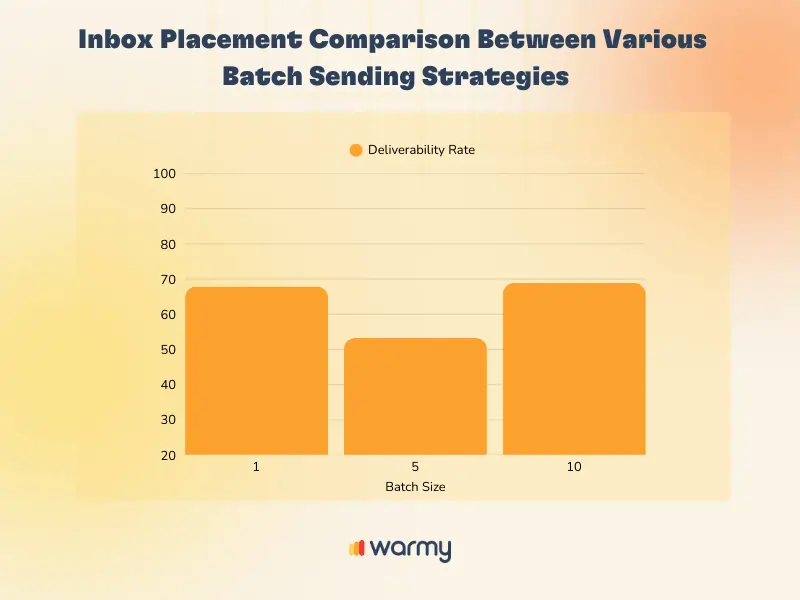
- 1-by-1 sending: about 67.9% deliverability
- Batch sending of 10 emails: about 68.9%
- Batch sending of 5 emails: about 53.2%
What the data actually tells us
- Inbox rate is surprisingly stable across different sending strategies. With a 68.9% deliverability for batch sending of 10 emails and 67.9% deliverability rate for 1-by-1 sending, there isn’t a significant difference.
- This challenges the assumption that slowing down sending unlocks better inbox performance. In reality, batch size alone does not appear to be a decisive factor for inbox placement when used responsibly.
- Where the difference emerges is classification, and not deliverability. Batch sending pushed more emails into Spam, and 1-by-1 sending shifts more into Promotions. For senders, this distinction matters. Spam placement often blocks visibility entirely. Promotions placement still allows messages to be seen, just outside the primary inbox.
- Mid-sized batch sending (by 5 emails) performed the worst in terms of deliverability. Many teams assume that smaller batches are inherently safer. The data shows that batch size 5 is actually less reliable than either 1-by-1 or 10-per-batch sending.
Related Reading: Cracking the Code: Why Emails Land in Gmail’s Promotions Tab
Key insights on batch sending:
- Batch size alone does not control inbox placement. Deliverability is not unlocked by adjusting batch size alone.
- Batch size can influence email classification, not trust. However, it is also not the only factor.
- Consistency and sender reputation still matter more than density. Mailbox providers reward predictable patterns. Inconsistent or irregular batching is riskier than either steady low-volume or structured batching.
Maximize inbox placement with Warmy.io
If your goal is simply to maximize inbox percentage, changing batch size alone will not move the needle.
However, if your goal is to reduce spam placement, sending patterns matter and here is where Warmy comes in with solutions designed for automated email warmup, reputation management, engagement quality, and volume control.
If you want to explore the full dataset, charts, and methodology behind this study, download the complete Warmy Research Report and see how sending behavior truly impacts deliverability at scale.




![Text on a white and orange gradient background reads: smtp error 450 4.1.1—How to Fix It [SOLVED] in bold black and red font.](https://warmy-blog-wordpress-bucket.s3.amazonaws.com/wp-content/uploads/2026/01/06135820/SMTP-450-4.1.1.webp)



