




Scaling email deliverability in 2026 is multi-layered. Success has multiple factors and depends on five critical pillars:
- Authentication first: SPF, DKIM, and DMARC are mandatory, not optional as Gmail and Yahoo now require them for bulk senders.
- Strategic email warmup: New domains need 45-90 days of gradual volume increases (starting at 20-50 emails/day, scaling to 5,000+) with AI-driven adjustment based on real-time engagement metrics.
- Multi-domain strategy: Never send everything from one domain. It is better to distribute risk across multiple mailboxes to prevent catastrophic reputation loss from a single blacklist hit.
- The 0.3% rule: Keep spam complaints below 0.3% (3 per 1,000 emails) or face automatic spam folder placement. For high-volume senders, this is a hard limit.
- Continuous monitoring: Track regularly and use real-time health checks to catch deliverability drops before they compound. A 2% problem today becomes 15% next week if ignored.
Email marketing remains one of the most effective revenue-driving channels, delivering an average return of $36 for every dollar spent. Yet in 2026, performance is increasingly defined by whether emails reach the inbox at all. Industry data consistently shows that roughly 16.9% of outbound emails never reach their intended inbox, meaning nearly one out of every six messages silently disappears.
That translates directly into lost leads, reduced conversions, and inaccurate campaign analytics.
These statistics also point out one crucial detail: successful email marketing in 2026 requires more than strong copy or large contact lists. It demands a strategic approach to sender reputation, authentication setup, audience targeting, and sending behavior.
Email deliverability isn’t just about avoiding spam filters, but it’s about systematically building trust with inbox providers through proper infrastructure, gradual scaling, and proactive monitoring.
Since your sender reputation functions exactly like a credit score, every email you send is a transaction that either builds trust or damages it. Gmail, Outlook, and other inbox providers maintain sophisticated reputation scores for every sending domain and IP address. These scores determine whether your emails land in the inbox, the promotions tab, or—worst case—the spam folder.
This “Email Credit Score” is influenced by multiple factors:
- Engagement rates: How many recipients open, click, and reply to your emails
- Spam complaint rates: The percentage of recipients marking your emails as spam (must stay below 0.3%)
- Bounce rates: Invalid email addresses damage your reputation quickly
- Domain age and history: Newer domains start with zero trust and must earn it
- Technical authentication: Proper SPF, DKIM, and DMARC implementation (non-negotiable in 2026)
Just like a financial credit score, your sender reputation may take months to build but can be destroyed in days through poor sending practices. This guide will show you how to systematically build and protect that reputation at scale.
The foundation: Technical authentication as a baseline

Proper authentication setup is the foundation of your email deliverability. To ensure that you have this solid foundation, one of the most important steps is to have your SPF, DKIM, and DMARC properly configured.
However, a lot of email users often commit the mistake of thinking that these authentication protocols are supplementary or advanced features. In reality, they are the minimum requirements for professional email sending.
Gmail and Yahoo now require proper authentication for bulk senders, and other providers are quickly following suit. Without these protocols configured correctly, your emails won’t even have a chance to prove their worth.
SPF (Sender Policy Framework)
SPF tells receiving servers which IP addresses are authorized to send email on behalf of your domain. Think of it as a guest list for your email domain.
Having trouble with ensuring your SPF Record is properly set up? Warmy offers a free SPF Generator to help you create the perfect SPF Record.
DKIM (DomainKeys Identified Mail)
DKIM adds a cryptographic signature to every email you send, proving it hasn’t been tampered with in transit. It’s like a tamper-evident seal on a package. Your email service provider typically handles DKIM signing automatically, but you must publish the public key in your DNS records.
DKIM ensures inbox providers can verify that the email claiming to be from your domain actually came from your authorized servers and wasn’t modified by a malicious third party.
DMARC (Domain-based Message Authentication, Reporting & Conformance)
DMARC is the enforcement layer that tells receiving servers what to do when SPF or DKIM checks fail. It also provides reporting so you can monitor who’s trying to send email using your domain.
For enterprise organizations for example, DMARC isn’t just about deliverability, it’s also about brand protection. A p=reject policy prevents phishing attacks that impersonate your domain, protecting both your customers and your reputation.
Enterprise email deliverability solutions require DMARC enforcement to ensure that only authorized emails reach customers’ inboxes. Without it, bad actors can send fraudulent emails that appear to come from your company, damaging trust and potentially creating legal liability.
Warmy’s Free DMARC Generator helps you protect your domain against spoofing and phishing threats.
Scaling methodology: The 3 warmup stages by volume
Internet Service Providers and Email Service Providers are always on the lookout for any emails that may have the potential of being spam, this is to ensure that the email space is a safe environment.
Attempting to send high volumes of email from a new domain or IP address is the fastest way to destroy your sender reputation. Since new domains and IP addresses have no established reputation yet, inbox providers will treat it as suspicious, especially if there is a sudden volume spike.
And to institute legitimacy over your domain and IP address, you need to build your sending volume gradually over time.
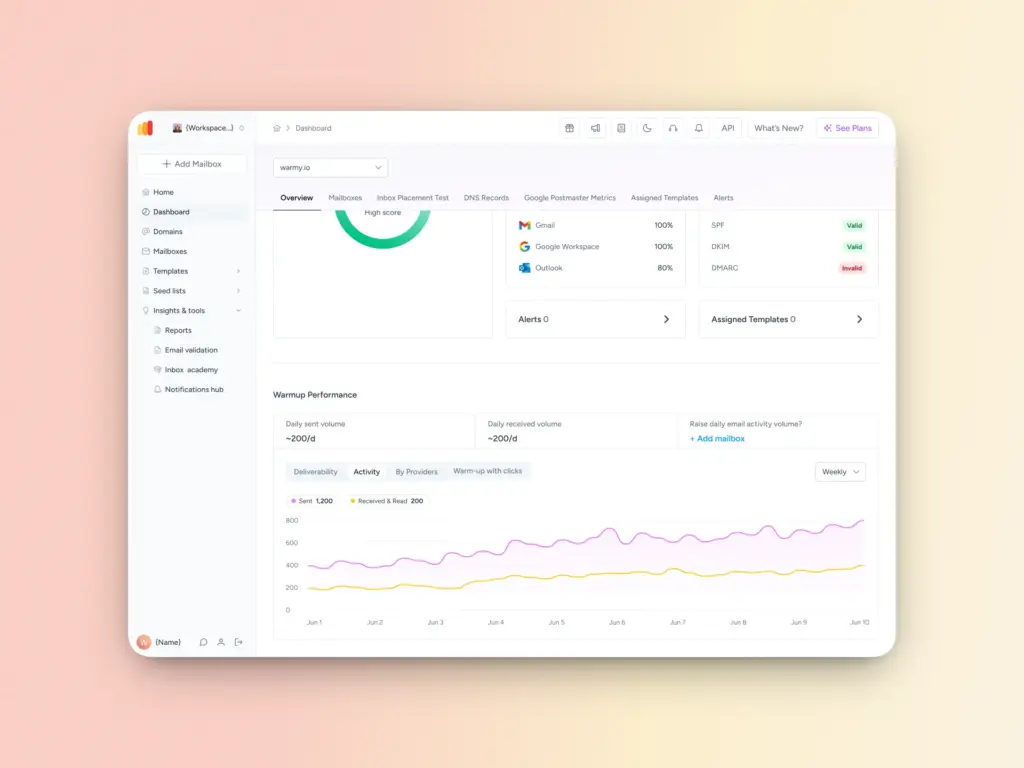
With its email warmup system, Warmy gradually increases sending volume by using real engagement behavior, such as opens, replies, and clicks. This establishes trust with mailbox providers and ISPs, which helps improve your sender reputation.
Note: Exact warmup timelines may vary depending on domain history, provider rules, and engagement performance, but the phased methodology remains consistent.
Stage 1: The ramp-up (Days 1-14)
The first two weeks are critical for establishing baseline trust. Start conservatively:
- Days 1-3: Send 20-50 emails per day to highly engaged contacts (colleagues, warm leads, existing customers)
- Days 4-7: Increase to 50-100 emails per day, maintaining high engagement rates
- Days 8-14: Gradually scale to 200-500 emails per day, monitoring deliverability metrics closely
The key during this phase is engagement quality over volume. Every email should target recipients likely to open and ideally reply. High engagement rates in the early days create a positive reputation foundation that supports higher volumes later.
Critical success factors for Stage 1:
- Maintain open rates above 25%
- Keep bounce rates below 2%
- Achieve spam complaint rates below 0.1% (ideally zero)
- Generate at least 5-10% reply rates through personalized outreach
If these metrics drop below acceptable thresholds, pause sending and diagnose the issue before continuing the warmup. It’s far better to spend an extra week in Stage 1 than to rush ahead and damage your reputation.
Stage 2: AI optimization (Days 15-45)
Once you’ve established a baseline reputation, it’s time to scale more aggressively but intelligently. This is where AI-powered warmup systems, such as Warmy, become essential.
Warmy uses AI to analyze your domain’s specific deliverability patterns and adjust the warmup pace dynamically. The system monitors:
- Real-time inbox placement rates across major providers (Gmail, Outlook, Yahoo)
- Engagement patterns specific to your domain and content
- Blacklist status changes and reputation fluctuations
- Email deliverability test with other providers
Based on this data, the AI adjusts your daily sending volume automatically. If engagement drops or spam folder placement increases, the system slows down. If metrics remain strong, it accelerates the ramp.
Typical Stage 2 progression:
- Days 15-21: Scale to 500-1,000 emails per day
- Days 22-30: Increase to 1,000-2,500 emails per day
- Days 31-45: Reach 2,500-5,000 emails per day depending on engagement
What makes AI optimization powerful is its ability to detect subtle reputation changes before they become critical problems. A manual warmup process might miss a drop, but an AI system will catch it immediately and adjust sending patterns to compensate.
Stage 3: Full capacity with automated engagement (Day 45+)
After about 45 days of systematic warmup, your domain should have established a sufficient reputation to handle huge production volumes. However, maintaining that reputation requires ongoing engagement signals.
This is where automated interaction networks become valuable. Platforms like Warmy maintain a network of thousands of real mailboxes that exchange emails with your domain, generating consistent engagement signals:
- Opens: Demonstrating that recipients view your emails
- Clicks: Showing that content is relevant and valuable
- Replies: The strongest engagement signal, indicating two-way communication
- Moving emails from spam to inbox: Training provider algorithms that your emails belong in the primary inbox
These automated interactions run continuously in the background, separate from your actual outbound campaigns. They create a steady baseline of positive engagement that buffers your reputation against occasional campaigns that might underperform.
For example, if you send a campaign with a 15% open rate (below your usual 25%), the automated engagement network ensures your overall engagement metrics don’t drop below critical thresholds. This gives you resilience to experiment with different messaging and targeting strategies without risking your sender reputation.
Stage | Daily Volume Example | Key Metrics |
1 (1-14 days) | 20-500 | Opens >25%, Bounces <2%, Replies 5-10% |
2 (15-45 days) | 500-5,000 | Inbox >90%, Monitor blacklists |
3 (45+ days) | Full production | Sustained engagement via networks |
Managing risks: The multi-domain & multi-mailbox strategy
The single biggest mistake high-volume senders make is concentrating all their email sending through one domain or mailbox. This “single point of failure” approach creates catastrophic risk: one blacklist hit, one spam complaint spike, or one reputation drop can shut down your entire outreach operation overnight.
The solution is strategic diversification across multiple domains and mailboxes.
Why does multi-domain architecture matter?
- Diversification reduces risk. If you’re sending 10,000 emails per day from a single domain and it gets blacklisted, your outreach goes to zero instantly.
- But if you’re sending 2,000 emails per day across five domains, a blacklist on one domain only impacts 20% of your volume.
Beyond risk mitigation, multi-domain strategies enable:
- Segmentation by campaign type: Use separate domains for cold outreach, warm follow-ups, and transactional emails
- Vertical specialization: Assign different domains to different product lines or customer segments
- A/B testing at scale: Test aggressive messaging on one domain while maintaining conservative approaches on others
- Geographical targeting: Use country-specific domains for better local deliverability
Why is managing multiple client mailboxes critical for agencies?
For marketing agencies managing email outreach across multiple clients, the complexity multiplies exponentially. Each client needs their own properly warmed infrastructure, but managing dozens or hundreds of mailboxes manually is impossible.
This is where email deliverability for agencies becomes a specialized discipline. Agencies face unique challenges:
- Varied sending volumes: Different clients have different campaign sizes requiring different warmup schedules
- Client reputation isolation: One client’s poor practices shouldn’t impact others
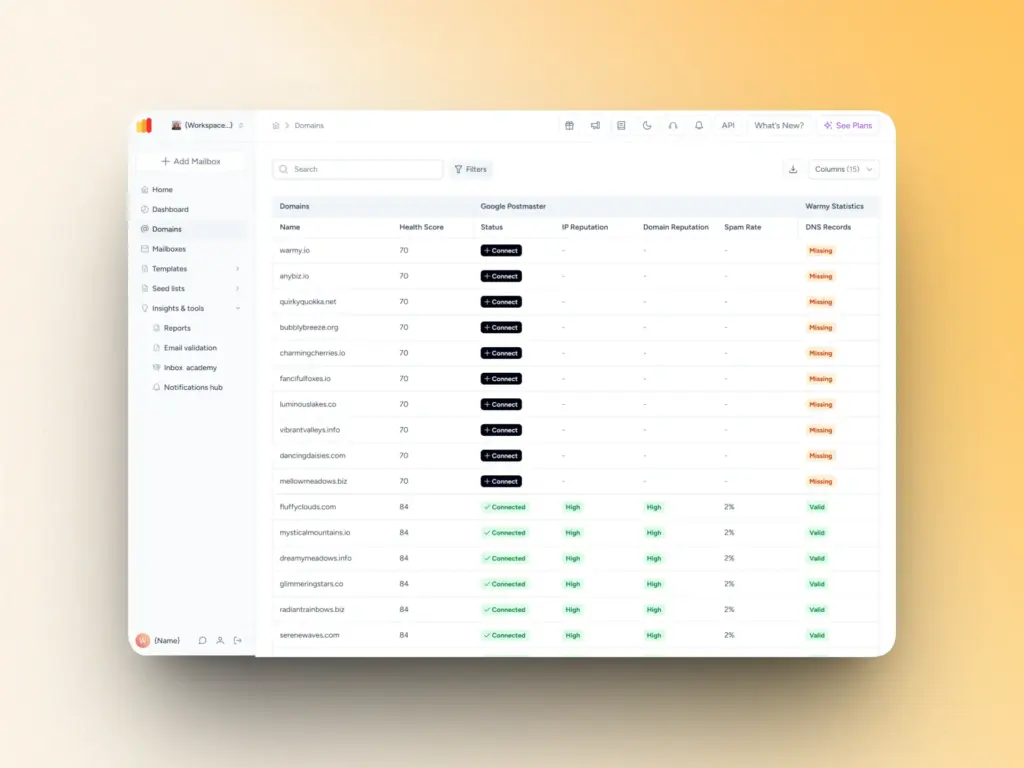
- Centralized monitoring: Agencies need a single dashboard to track deliverability across all client accounts
- Scalable onboarding: New clients need immediate warm-up infrastructure without manual configuration
Warmy’s Workspace Management and Warmy Agency: Enterprise-grade multi-account management
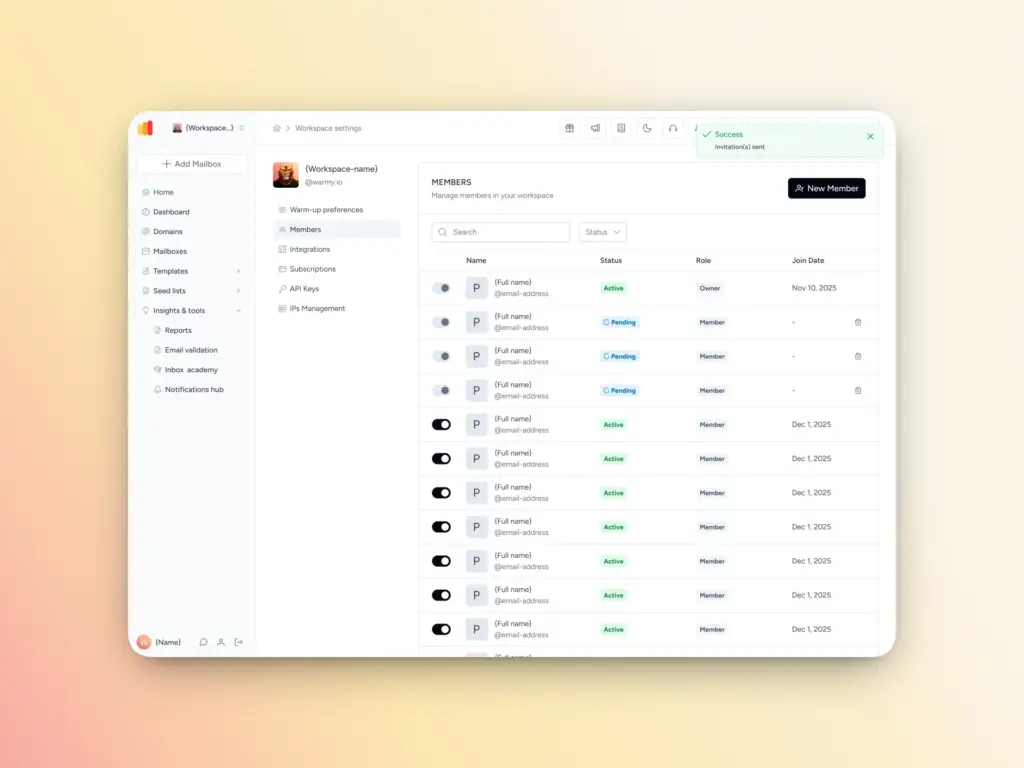
Warmy’s Workspace Management feature and Warmy Agency were both designed specifically to solve these challenges. You can manage everything in one place, access employee and client information, handle mailbox functionalities, and manage subscriptions.
Key features include:
- One-click client onboarding: Add new client mailboxes and start automated warmup immediately
- Per-client deliverability dashboards: Track inbox placement, spam rates, and engagement for each client separately
- Automated reputation monitoring: Real-time alerts if any client mailbox hits a blacklist or experiences deliverability issues
This infrastructure enables agencies to scale to hundreds of clients without proportionally increasing operational overhead.
For enterprise businesses with multiple brands and domains, the Workspace Management feature allows an easier way to manage deliverability across these multiple domains without needing to create a separate account.
Scalable sending limits: Avoiding the “spam blackhole”
Even with a perfect technical setup and thorough warmup, exceeding optimal sending limits will destroy your deliverability. The challenge is that “optimal” varies by provider, domain age, and current reputation score.
The 0.3% spam complaint threshold: your hard limit
Maintaining spam complaint rates below 0.3% (3 complaints per 1,000 emails) is critical for inbox placement. Once you cross this threshold, inbox providers start routing your emails to spam automatically.
This means if you’re sending 10,000 emails per day, you can tolerate a maximum of 30 spam complaints. Exceed that, and your deliverability collapses rapidly.
How to set sustainable sending limits:
- Start with provider limits as a ceiling: Gmail allows ~500 emails/day for free accounts, 2,000 for Google Workspace; Outlook allows ~300/day for personal, 10,000 for business
- Calculate your complaint rate: Track complaints weekly and adjust volume if you approach 0.2%
- Factor in engagement rates: Higher engagement = higher sustainable volume
- Scale gradually: Increase by no more than 20% week-over-week, even after warmup
Email deliverability for SDRs: Why 500 emails from one Gmail account is a risk
Sales Development Representatives (SDRs) often make a critical mistake: sending their entire daily quota from a single personal Gmail or Outlook account. This creates multiple problems:
- Volume concentration risk: Sending 500 emails from one account in a single day flags you as a bulk sender, even if you’re technically within Gmail’s limits. Inbox providers look at velocity, not just total volume.
- Reputation vulnerability: If that single account gets blacklisted or limited, the SDR’s entire outreach capability disappears. There’s no backup.
- Engagement dilution: Personal accounts aren’t designed for high-volume sending. Engagement rates typically drop as volume increases, creating a negative feedback loop.
- Best practice for SDRs: Use 3-5 mailboxes per SDR, each sending 100-150 emails per day. This distributes risk, maintains higher engagement per mailbox, and provides redundancy if one account experiences deliverability issues. Tools like Warmy can warm and maintain all these mailboxes simultaneously, making multi-mailbox management practical.
Vertical use cases: Tailoring the methodology
Different industries face unique deliverability challenges. Here’s how to adapt the scalable methodology for specific verticals:
SaaS companies & startups: Building reputation for new outbound domains
Challenge: New domains have zero reputation and must prove trustworthiness from scratch.
Solution:
- Extended warmup period: Plan 60-90 days instead of 45 for brand-new domains
- Subdomain strategy: Use subdomains (outreach.yourcompany.com) to protect your primary domain
- Engagement-first approach: Start with warm introductions and referrals to build initial positive signals
- Content testing: A/B test subject lines and messaging extensively during warmup to optimize engagement before scaling
Warmy application: Use AI-powered warmup to automatically adjust pace based on your specific domain’s reputation building progress. The system detects when your domain has built sufficient trust to accelerate.
Ecommerce & iGaming: Managing high-volume transactional and promotional engagement
Challenge: Mixing transactional emails (order confirmations, shipping updates) with promotional emails (sales, new products) on the same infrastructure.
Solution:
- Separate sending domains: Use different domains/subdomains for transactional vs. promotional email. Most transactional emails like order acknowledgement don’t usually receive replies, and ESPs might see this as lack of engagement.
- Transactional priority: Ensure transactional emails have pristine deliverability by never mixing with promotional content
- Segmentation by engagement: Send promotions only to engaged users; suppress unengaged segments
- Re-engagement campaigns: Periodically re-activate dormant subscribers before removing them
Warmy application: Maintain separate warmup schedules and engagement patterns for each sending domain. Transactional domains maintain steady, predictable volumes while promotional domains scale up for campaigns and scale down between them.
Consultants: Maintaining professional authority through high-quality inbox placement
Challenge: Personal reputation and brand authority depend on every email reaching the inbox. Even a few spam folder placements damage perceived credibility.
Solution:
- Quality over quantity: Send fewer, highly personalized emails rather than high-volume outreach
- Consistent sending patterns: Maintain regular sending schedules (same days/times each week)
- High-value content: Every email should provide genuine value to maintain high engagement
- Relationship building: Prioritize replies and conversations over one-way broadcasts
Warmy application: Use conservative warmup settings that prioritize inbox placement over volume. Monitor deliverability metrics closely and pause outreach immediately if inbox placement drops below 95%.
Monitoring: Maximize the “Seed List” and real-time health checks
Deliverability problems can compound exponentially. A simple 2% drop in inbox placement today, can become 5% next week, and 15% after that. This is possible if it is left unaddressed.
This means that early detection and alertness is everything.
Critical metrics to monitor daily:
- Inbox placement rate: Percentage of emails reaching the inbox vs. spam folder
- Blacklist status: Real-time checks across 100+ major blacklists
- Spam complaint rate: Must stay below 0.3% threshold
- Bounce rate: Hard bounces indicate list quality issues
- Engagement trends: Week-over-week changes in opens, clicks, and replies
Seed Lists: Your deliverability early warning system
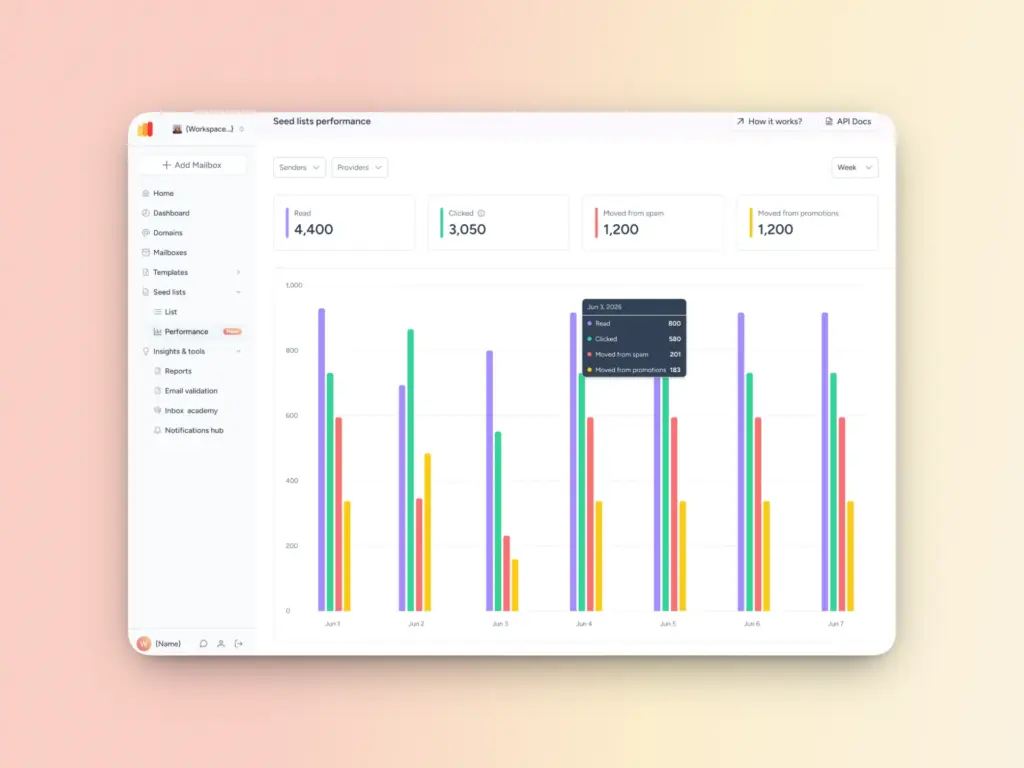
Warmy’s seed list is a collection of genuine email addresses across different providers (Gmail, Outlook, Yahoo).These “seed” addresses provide authentic engagement patterns like opening emails, reading them, recovering emails from spam, and marking them as important.
Implementing warmup to a high-quality seed list enables senders to accelerate their deliverability with specific providers. For example, if you want to improve your inbox placement for Yahoo contacts specifically, you can avail Warmy’s Yahoo Seed List.
Compared to many seed list providers, Warmy ensures contacts are updated and accurate. At the same time, Warmy also provides real-time data on how your seed lists are performing. You can check the latest feature updates here.
Real-time health checks and alert systems
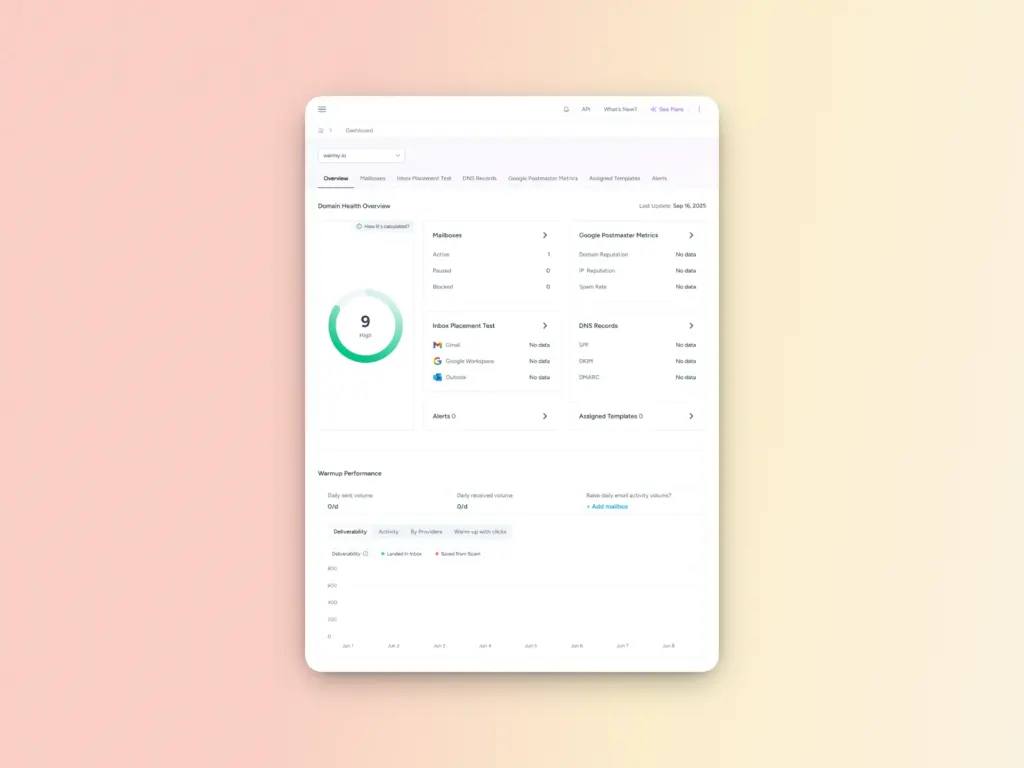
Deliverability isn’t something that can be easily fixed once it has already been damaged. Continuous monitoring is crucial to ensure you can tackle issues before they cause long-term impact. Maybe receiving one SMTP error may not cause a huge dent in your sender reputation, but when you start receiving them often, it can be hard to pinpoint specific underlying causes.
However, when you start scaling, it’s challenging to do manual monitoring. Automated monitoring systems should track:
- Blacklist hits: Immediate alerts if your domain or IP appears on any major blacklist
- Reputation score changes: Daily tracking of sender scores across monitoring services
- Authentication failures: Alerts if SPF, DKIM, or DMARC checks start failing
- Engagement anomalies: Automatic detection of unusual drops in open/click rates
- Spam trap hits: Identification of spam trap addresses on your list
Response protocols: Establish clear escalation procedures when monitoring detects issues:
- Minor issues (2-5% deliverability drop): Review recent campaign content and list quality
- Moderate issues (5-15% drop or single blacklist hit): Pause sending, investigate root cause, implement fixes
- Critical issues (15%+ drop or multiple blacklists): Complete sending halt, comprehensive audit, systematic remediation
The continuous improvement cycle
Deliverability isn’t a “set it and forget it” system. It requires ongoing optimization such as:
- Weekly reviews: Analyze performance trends and identify areas for improvement
- Monthly audits: Deep-dive into list quality, authentication status, and reputation scores
- Quarterly strategy updates: Adjust sending limits, warmup parameters, and domain strategies based on growth
- Annual infrastructure reviews: Evaluate whether your current setup scales to your projected volume
Moving beyond getting out of spam and towards building a sustainable email deliverability system
Scaling email outreach without hitting spam requires a systematic, multi-layered approach:
- Foundation: Implement SPF, DKIM, and DMARC authentication
- Warmup: Follow structured 45-day ramp with AI optimization
- Architecture: Diversify across multiple domains and mailboxes
- Limits: Respect the 0.3% complaint threshold and provider limits
- Monitoring: Maintain seed lists and real-time health checks
The difference between companies that successfully scale email outreach and those that end up in spam folders isn’t luck. It’s methodology.
Remember: your sender reputation is a strategic asset that takes months to build and minutes to destroy. Invest in the infrastructure, processes, and tools needed to protect it as you scale.
Ready to build enterprise-grade email deliverability? Warmy’s AI-powered warmup and monitoring platform handles the complexity automatically, letting you focus on crafting compelling outreach while ensuring it reaches the inbox. Start your automated warmup now for free!
FAQ
What is the safe sending limit for a new domain?
There’s no universal number, but the safest approach is to start with 20–50 emails per day in the first few days and scale up gradually over 45–90 days. Provider limits serve as your ceiling. Gmail Workspace allows up to 2,000/day and Outlook Business up to 10,000/day. Hitting those limits too soon on a new domain will trigger spam filters.
How does AI-driven warmup differ from manual sending?
Manual warmup relies on you to adjust volume, monitor metrics, and catch problems which means issues can go undetected for days. AI-driven warmup continuously monitors inbox placement rates, engagement patterns, and blacklist status across all major providers in real time, then automatically adjusts your daily sending volume to match. If your spam folder placement spikes or engagement drops, the system slows down before the damage compounds. It also detects subtle reputation shifts that a manual process would likely miss entirely.
Why do Gmail and Yahoo require DMARC in 2026?
Both providers updated their bulk sender requirements to combat phishing and domain spoofing at scale. DMARC tells receiving servers what to do when SPF or DKIM checks fail. Without it, bad actors can impersonate your domain and send fraudulent emails to your customers. From Gmail and Yahoo’s perspective, senders without DMARC enforcement represent a security risk they’re no longer willing to accommodate. Without a properly configured DMARC policy, your emails may be rejected or filtered regardless of how good your content or engagement metrics are.
What happens if my domain gets blacklisted?
A single blacklist hit doesn’t have to be catastrophic, but speed matters. First, identify which blacklist flagged you and why (common causes include spam trap hits, high complaint rates, or sudden volume spikes). Then pause sending from that domain, remediate the root cause, and submit a delisting request to the blacklist operator. This is exactly why a multi-domain architecture matters: if one domain goes down, your other domains keep your outreach running while you fix the problem. Ongoing real-time blacklist monitoring across 100+ lists is the best way to catch a hit early before it spreads.
Do I need a separate domain for cold outreach versus transactional emails?
Yes. Mixing them is one of the most common and damaging mistakes senders make. Transactional emails (receipts, password resets, shipping confirmations) have naturally high engagement and low complaint rates, which builds strong sender reputation. Cold outreach carries inherently more risk. If you send both from the same domain and a cold campaign generates complaints, it drags down the reputation of your transactional sending infrastructure too.