SMTP Error 500 5.5.1 is a permanent delivery failure caused by a syntax error where the receiving server does not recognize the sender’s command or parameters. To resolve this, senders should:
- Ensure you have the latest version of your email client.
- Review and confirm if SMTP settings and SMTP command sequence are properly set up.
- Check for syntax errors within your code if you are using automated scripts. Make sure all SMTP commands and email addresses adhere to strict formatting rules.
- Temporarily disable any antivirus or firewall software to confirm if it is intercepting SMTP commands.
There are many harmful SMTP errors, but SMTP Error 500 5.5.1 – Syntax error, Command Unrecognized can be more damaging than others if not acted upon right away.
This guide will walk you through everything you need to know about SMTP Error 500 5.5.1 and how to prevent it from disrupting your email campaigns and damaging your sender reputation.
SMTP Error 500 5.5.1 syntax error: What is it and what does it mean?
Every SMTP error that belongs in the 500 code family indicates a permanent syntax error and the enhanced status code 5.5.1 provides more details.
SMTP Error 500 5.5.1 means that the receiving server is rejecting an unrecognized command or malformed parameters. It is a permanent delivery failure, which means it cannot be resolved on its own. It doesn’t automatically retry, and manually resending the email won’t solve it either.
Error messages that accompany the error code can be any of the following:
- Syntax error, Command Unrecognized
- Authentication Needed
- Syntax error in parameters or arguments
This is a different story from other authentication errors wherein the server understands you but won’t let you through, or mailbox errors where the command is correct but the destination doesn’t exist.
With Error 500 5.5.1, the server is essentially saying, “I don’t know what you’re asking me to do.”
How to fix SMTP Error 500 5.5.1
Understanding why this error occurs helps you troubleshoot more effectively. Here are the most frequent culprits behind this error and the steps you can take to resolve them.
Cause | Solution |
Invalid SMTP commands | Make sure you have the latest email client version. Review SMTP command syntax for any typos, formatting errors, or unsupported extensions. |
Incorrect command sequence | Identify which specific command failed by reviewing the full error message. Ensure your code follows appropriate command sequences. |
Authentication issues | Confirm if SMTP settings and server address are correct. |
Malformed syntax in email headers | Check for syntax errors in code. Make sure all SMTP commands follow formatting rules. |
Antivirus and firewall interference | Temporary disable antivirus or firewall software to confirm if it is intercepting SMTP commands. |
1. Make sure all SMTP commands are valid
When your sending client or server issues commands the receiving server doesn’t recognize or support, it triggers SMTP Error 500 5.5.1.
Here’s what that looks like:
- SMTP relies on specific commands like HELO, EHLO, MAIL FROM, RCPT TO, AUTH, and STARTTLS.
- If any of these contain typos, incorrect spacing (e.g., missing CRLF), malformed arguments (e.g., unbracketed addresses), or unsupported extensions/protocol versions, the receiving server will reject them
How to fix this:
- Make sure that you have the latest email client version. If you don’t, then make sure you update them. Many developers employ regular patch bugs that cause malformed SMTP commands.
- Review your SMTP command syntax especially if you are using a custom email script or application.
2. Ensure command sequence is correct
Each command sequence must follow its specific order. Incorrect command sequence creates a miscommunication between two email servers, since the server expects a conversation to follow a particular flow. So when the sequence breaks, the server is left clueless, resulting in “command unrecognized.”
This issue commonly occurs with custom email scripts or when developers are building their own email sending functionality without fully understanding the SMTP protocol handshake.
How to fix this:
- Review the full error message that accompanies the 500 5.5.1 code. It often provides more detail on which command failed, such as “Command unrecognized,” “Authentication Required,” or “EHLO/HELO first.” This information points you directly to what went wrong in the sequence.
- Once you’ve figured it out, you need to make sure that your code follows the appropriate SMTP command sequence:
- Connection, greeting (EHLO/HELO)
- Authentication (if required)
- Sender specification (MAIL FROM)
- Recipient specification (RCPT TO)
- Data transmission
- Disconnection.
3. Fix authentication issues
This isn’t about a simple password or credential mismatch. Authentication issues in SMTP appear when there is an issue with the authentication command, such as:
- Your email client isn’t configured to authenticate
- It does not have the correct format and is then unrecognizable
- It is attempting to use an authentication method the server doesn’t support
How to fix this:
- Confirm if your SMTP settings and server address is correct. If you are using Gmail then make sure that it is set in: smtp.gmail.com. If you are using Outlook then then it should be smtp-mail.outlook.com
- Then use the recommended port number: port 587 with TLS/STARTTLS or port 465 with SSL.
- Ensure that “My outgoing server requires authentication” is enabled in your email client settings, and confirm your username and password are correct.
Ensuring your authentication protocols are properly configured, as this helps prevent permanent rejections like SMTP Error 5.3.3. You can check this through our free email deliverability test.
4. Identify and resolve malformed syntax in email headers
If you’ve already verified that you have the correct SMTP commands, you need to start checking the content those commands are trying to send.
Sometimes this error occurs due to improperly formatted email headers that causes the server to reject the entire command. For example, missing angle brackets around email addresses in MAIL FROM or RCPT TO commands, or improperly structured headers, can trigger this error.
How to fix this:
- If you’re a developer using automated scripts, check for syntax errors in your code.
- Make sure all of your SMTP commands and email address follow strict formatting rules. It is important to note that email addresses in SMTP commands should be enclosed in angle brackets.
5. Make sure there are no antivirus and firewall interference
Security software, firewalls, or proxy servers sitting between your email client and the destination server can modify or corrupt SMTP commands in transit.
Deep packet inspection, certain antivirus scanning features, or poorly configured proxy servers might alter command syntax just enough to make them unrecognizable to the receiving server.
How to fix this:
- Temporarily disable any antivirus or firewall software and confirm if it is intercepting or change SMTP commands.
- If disabling security software resolves the issue then that’s it.
- However, if that isn’t the case then you might need to work with your IT department (if you are using an email from a corporation) to guarantee that security protocols are not modifying the SMTP traffic in ways that break command syntax. Some modern antivirus programs have this option to disable email scanning, while it maintains other security measures, causing this error to occur.
6. When nothing works, contact your provider
Contact your email service provider’s support team for assistance. They have access to server-side logs that can reveal exactly which command is failing and why. They can provide specific guidance for their system and identify whether there are known issues or special configuration requirements you need to follow. Sometimes the issue involves server-side settings that only the provider can adjust.
Will your email deliverability be affected by SMTP Error 500 5.5.1?
Yes and no.
Here’s what we mean by this: In the short term, no. Experiencing it once will not automatically damage your deliverability. But if you experience it often, it may be the symptom of a bigger problem.
There is a long list of SMTP errors and codes that you may experience. And like other errors in the 5** variants, SMTP Error 500 5.5.1 represents a permanent failure, where simply waiting out and resending would not work.
For individual users sending occasional emails, this error is more of an inconvenience than a crisis. You’ll know immediately that something went wrong and can troubleshoot accordingly.
But how about businesses? If you are managing multiple domains and are experiencing this error repeatedly, then the error can be systemic and may suggest a problem at your email infrastructure.
Repeated permanent failures impact your sender reputation with email service providers. When your domain or IP address consistently generates hard bounces, ISPs and email platforms take notice. They may interpret this pattern as a sign of poor list hygiene, technical incompetence, or even potential malicious activity
Over time, this will degrade your sender score, which can result in legitimate emails being filtered to spam or blocked entirely, even after you’ve resolved the original 500 5.5.1 error.
How Warmy protects your email infrastructure from SMTP errors
While understanding and fixing SMTP Error 500 5.5.1 is important, preventing email deliverability problems before they occur is even better.
This is where Warmy.io becomes an invaluable part of your email infrastructure.
Warmy is an email warmup and deliverability platform designed to help businesses establish and maintain healthy sender reputations and maximize inbox placement rates. Rather than waiting for errors to appear and then scrambling to fix them when they do, Warmy helps users establish a high deliverability rate. This prevents many SMTP errors from occurring in the first place.
Warmy helps build sender reputation that withstands technical hiccups

Email service providers are strict when it comes to evaluating individual messages. They will most likely assess the following:
- Your sending history
- Engagement patterns
- Technical hygiene
This can be easy for those with a strong and established reputation, and experiencing occasional SMTP errors such as 500 5.5.1 won’t really do much to tank your deliverability.
However, this problem can be significant for those with a newly created domain, since email servers do not have a way to recognize if your email is reputable. After all, you have no sending history yet.
Warmy’s AI-powered email warmup solution gradually establishes your sending domain as legitimate and trustworthy through simulating engagement patterns. This builds credit with email service providers, creating a buffer that protects your overall deliverability even when isolated technical problems occur.
When servers encounter commands they don’t recognize from a domain with poor reputation, they’re more likely to reject aggressively. A well-warmed domain with proven legitimacy gets more tolerance.
Real-time visibility into factors that affect deliverability
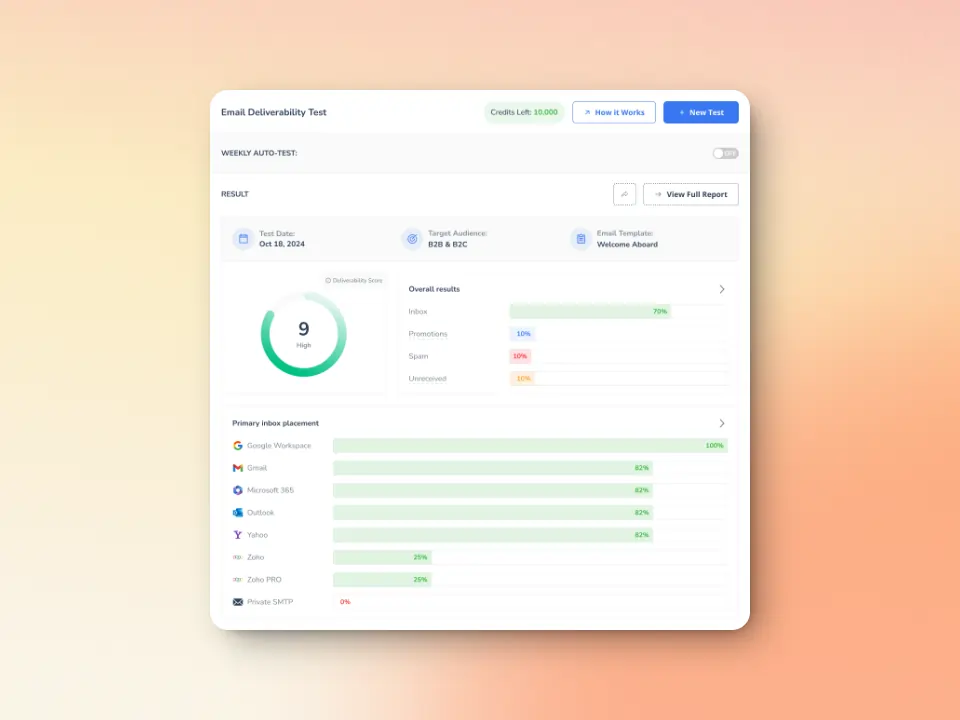
One of the biggest challenges with SMTP errors is that you often don’t know about them until it’s too late. If you’re sending hundreds or thousands of emails, a handful of 500 5.5.1 errors might slip through unnoticed, slowly degrading your sender score without obvious symptoms.
Warmy’s inbox placement test provides real-time visibility into where your messages actually land. You can see whether emails reach the inbox, get filtered to spam folders, or encounter delivery failures. This early warning system helps you identify problems while they’re still small and manageable, before they escalate into reputation damage that takes weeks to repair.
You can also use Warmy’s free email deliverability test to assess your current sending reputation and identify potential vulnerabilities in your email infrastructure.
Monitors authentication protocols to prevent configuration errors
Our experts found that many SMTP errors, including 500 5.5.1, stem from authentication and DNS configuration problems. Incorrect SPF records, missing DKIM signatures, or improperly configured DMARC policies can cause mail servers to reject your commands or flag your messages as suspicious.
Having correctly configured SPF and DMARC records can give you peace of mind. Use our free SPF Record Generator and a free DMARC Record Generator to ensure your authentication protocols are valid and to help you avoid configuration mistakes that can lead to SMTP errors.
Domain Health Hub that catches problems early
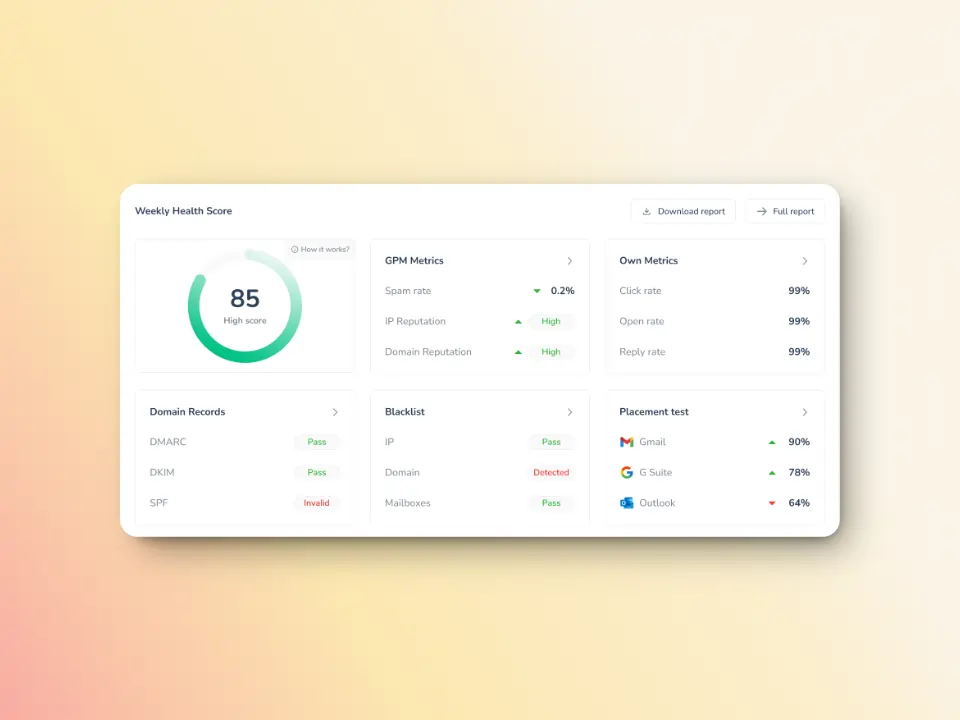
SMTP Error 500 5.5.1 is sometimes a symptom of deeper issues with your domain’s technical configuration or reputation. Misaligned DNS records, blacklist appearances, or gradual reputation decline can all contribute to increased error rates.
Warmy keeps an eye on your domain reputation through the Domain Health Hub, a domain-level dashboard with the following capabilities or features:
- A domain health score based on factors like authentication, blacklist status, and inbox placement.
- Data for monitoring spam rate trends and overall deliverability performance (weekly and monthly)
- DNS checks for validating SPF, DKIM, DMARC records for extra security
- Multi-domain monitoring for convenient tracking of all domains
- Reports on performance and other health metrics
Safeguard your deliverability from common SMTP errors
Yes, Warmy.io can definitely help minimize SMTP errors but preventing SMTP errors is just a plus point. Warmy is the most advanced email warmup and deliverability platform, designed intentionally to help you maximize inbox placement by building a positive sender reputation.
FAQ
What is SMTP Error 500 5.5.1?
SMTP Error 500 5.5.1 refers to an error code triggered by a syntax error and an unrecognized command. The receiving server does not understand what is being requested.
What really causes SMTP Error 500 5.5.1?
SMTP Error 500 5.5.1 is usually caused by invalid SMTP commands, incorrect command sequences, authentication issues, malformed syntax in email headers, or antivirus and firewall interference.
Can I resend my email after receiving SMTP Error 500 5.5.1?
Yes you can, but if you do so without making any changes or troubleshooting, it will just trigger the error again.
Should I keep retrying after receiving a 500 5.5.1 error?
Unlike temporary errors that resolve with time, 500 5.5.1 is a permanent failure that won’t fix itself through retries. Before attempting to resend, you need to identify and fix the underlying cause whether that’s updating your email client, correcting your SMTP configuration, or addressing compatibility issues with the receiving server.
How do I know if the error is caused by my system or the recipient’s server?
Testing with different recipients and email clients can help isolate the source. If you can successfully send to other email addresses using the same client and configuration, the problem likely lies with the specific recipient’s mail server. If the error occurs across all recipients regardless of domain, the issue is almost certainly with your email client, SMTP settings, or sending server configuration.
Is SMTP Error 500 5.5.1 related to spam filtering?
Not directly. This error occurs before spam filtering takes place — it happens at the SMTP protocol level when servers are negotiating the basic mechanics of email transfer. Spam filters evaluate message content after the SMTP transaction completes successfully.